Stale Warning of Searches Delayed and/or Searches Skipped in the Splunkd Health Report
Available Languages
Applicability
Splunk CloudDescription
On the Splunkd health report (accessible by clicking the icon on the left side of the user's login name), if you expand splunkd > Search Scheduler, you are seeing either: (1) Searches Delayed and/or (2)Searches Skipped in the last 24 hours are showing RED exclamation symbol.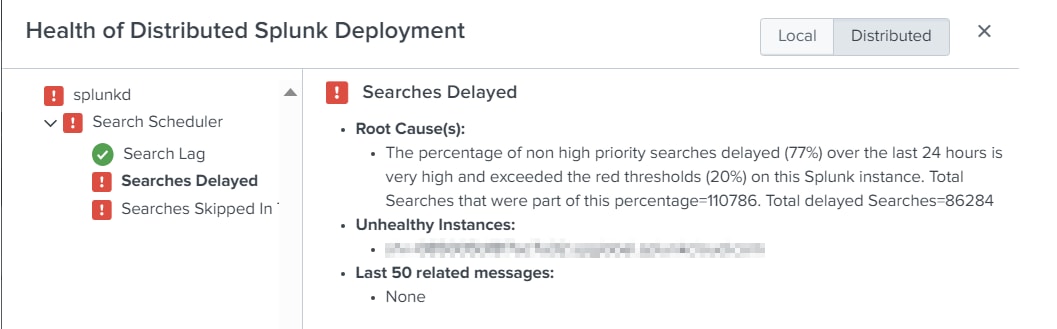
Investigation
1. Navigate to CMC > Skipped Scheduled Searches > Adjust the time picker to 24 hours and see:
(a) Total skipped searches shows "No result found".
(b) Scheduled search skip ratio shows 0%.
(c) Skipped searches by name and reason shows "No result found".
2. Navigate to CMC > Scheduler Activity > Scheduler executions detail panel and it shows no skipped or deferred.
3. Run the following SPL with time picker = 24 hours to make sure the CMC dashboard is not giving false information. SPL should return no result just like what the CMC dashboard shows.
index=_internal host=sh* sourcetype=scheduler savedsearch_name=* (status=skipped OR status=deferred OR status=continued)
4. Wait for 24 hours and the health messages do not clear by itself.
Resolution
If all of the 4 symptoms in the Investigation section apply, perform a Rolling Restart of the Search Head Cluster (SHC) or just the Search Head if there is no SHC to clear the red status.
Also try manually update the health indicator in Web UI and re-saved it.
If the issue persists, please contact Splunk Technical support.
Revision History
| Revision | Publish Date | Comments |
|---|---|---|
1.0 |
29-Sep-2026
|
Initial Release |
 Feedback
Contact Cisco
- Open a Support Case

- (Requires a Cisco Service Contract)
This Document Applies to These Products
Related Articles
- Health Report shows stale warning for "Searches Delayed": The percentage of non high priority searches delayed (A%) over the last 24 hours is very high
- ERROR: "The percentage of non high priority searches skipped (X%) over the last 24 hours is very high"
- Health Report Showing Red and/or Yellow for Forwarder Ingestion Latency
- Alert for delayed scheduled searches