Alert for delayed scheduled searches
Available Languages
Applicability
Splunk Enterprise Splunk CloudDescription
There is a red "!" sign in the Health Status of Splunkd banner indicating the presence of searches being delayed as follows: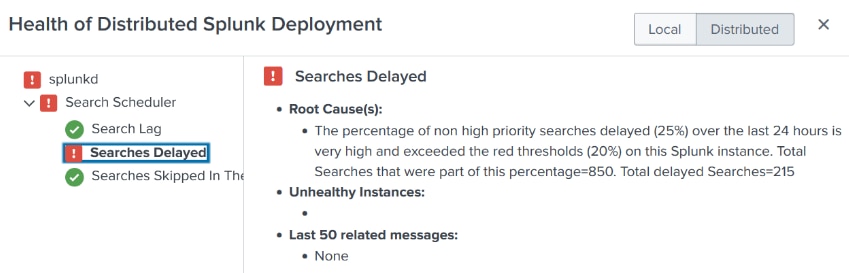
This indicator checks whether there is any extremely lagged searches in the last hour. These are scheduled searches that have been unable to run within their configured interval. By default, this indicator is never yellow and is in red if there is at least 1 extremely lagged scheduled search.
Investigation
In the dropdown menu messages appear the following: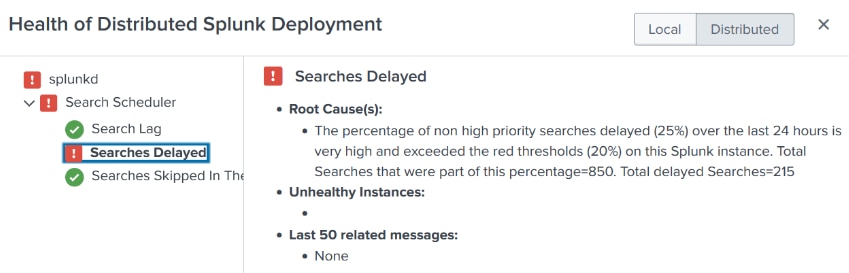
For example, if this is happening to a job consistently at night, but not when re-run during the day. Try moving the job forward or backward to avoid any possible lag when there could be other jobs scheduled at the same time or close to each other. Or, perhaps it is exactly what it says it might be, and the indexer restarted during the time that the search was running.
Another reason could be when running the search repeatedly and getting this issue, an error in the connection path may appear. For example, on a multi-site clustered system (only if applicable), then perhaps the VPN link to the other site is wobbly, or some firewall in between is messing up with the connection.
In any case, this is not generally going to be a problem with the SPL (search), instead, it is some kind of problem with the architecture of the cluster, but if they're healthy this can be disregarded, or the timing of the job can be moved to avoid the latency.
Resolution
Work on fine-tuning the cron scheduled for it. This error is generated when a saved search is scheduled to run repeatedly and Splunk tries to start the search on schedule but discovers that a previous instance of this search is still running.
For example: A query that takes an hour to complete and is scheduled it to run every ten minutes. Splunk would start the first iteration and then try to start another iteration ten minutes later, but the first iteration is still running - this would generate the error message and would not start the second iteration. It will generate one of these messages every time it tries to start the saved search and discovers that a previous instance is still running.
With this being said, it is a matter of setting that search accordingly and based on the amount of data it handles, so it will work flawlessly and as desired, otherwise the issue/warning will continue to appear.
Revision History
| Revision | Publish Date | Comments |
|---|---|---|
1.0 |
29-Sep-2026
|
Initial Release |
 Feedback
Contact Cisco
- Open a Support Case

- (Requires a Cisco Service Contract)