[Splunk Add-on for Amazon Web Services] - Getting "[HTTP 403] Client is not authorized to perform requested action" error after upgrading the Splunk Add-on for AWS to version 7.8
Available Languages
Applicability
Splunk Enterprise Splunk Cloud Splunk Add-on for Amazon Web Services (AWS) version 7.8Description
After upgrading the Splunk Add-on for Amazon Web Services (AWS) from version 7.6 to 7.8, an issue occurred on the add-on's input and configuration pages, resulting in an HTTP 403 error.
Investigation
Run the following SPL to find the error in the splunkd.log.
index=_internal source="*splunkd.log" log_level=ERRORThe below is the error log from splunkd.log.
12-09-2024 09:25:47.651 +0000 ERROR AdminManagerExternal [1188 TcpChannelThread] - Unexpected error "<class 'splunk.AuthorizationFailed'>" from python handler: "[HTTP 403] Client is not authorized to perform requested action; https://127.0.0.1:8089/servicesNS/nobody/Splunk_TA_aws/configs/conf-server/sslConfig". See splunkd.log/python.log for more details.Resolution
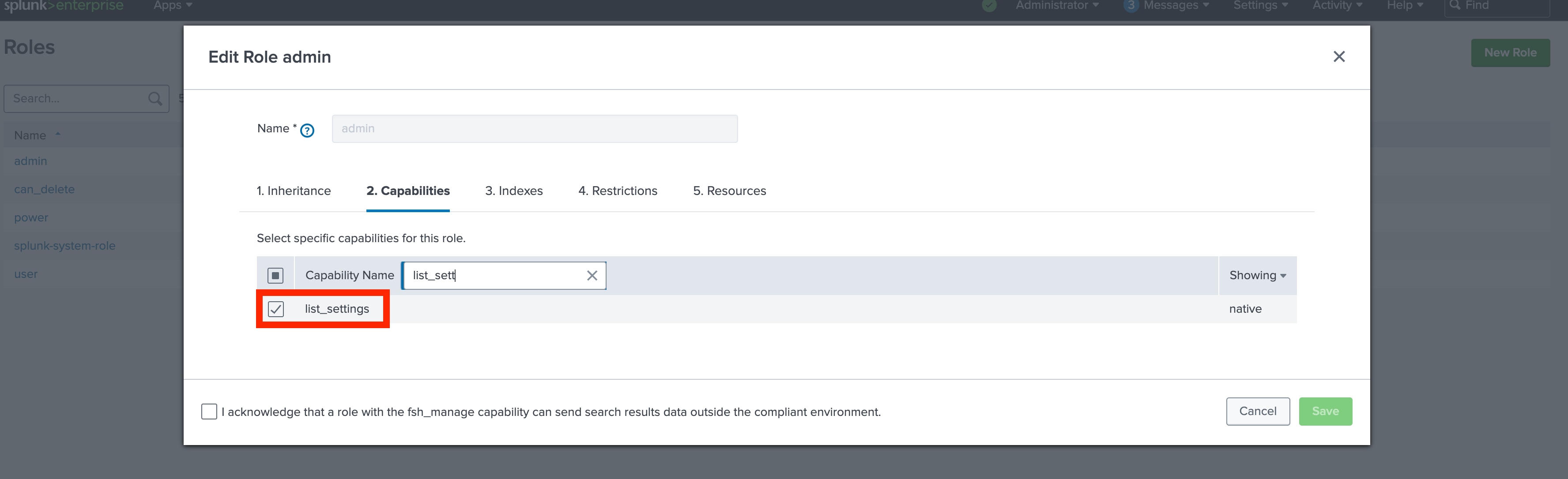
The Splunk User had a missing list_settings capability in the admin role and the following error was observed.
To fix the UI issue on the Splunk Add-on for Amazon Web Services 7.8 version, Go to settings > Roles > admin > Capabilities > and select list_settings for the Splunk user and save it.
Revision History
| Revision | Publish Date | Comments |
|---|---|---|
1.0 |
29-Sep-2026
|
Initial Release |
 Feedback
Contact Cisco
- Open a Support Case

- (Requires a Cisco Service Contract)
This Document Applies to These Products
Related Articles
- Splunk Add-on for AWS: Getting "[HTTP 403] The client is not authorized to perform this action" while accessing Inputs and configuration page.
- Adaptive Response action returns "[HTTP 403] Client is not authorized to perform requested action"
- Splunk Add-on for Amazon Web Services (AWS) Not Populating AWS Secret Regions (IL6 Region)