Encountering the "Unable to get local issuer certificate" error when testing connectivity from the SOAR export app to SOAR.
Available Languages
Applicability
Splunk Cloud Splunk SOAR Cloud Splunk SOAR Splunk Enterprise SecurityDescription
While testing connectivity to the SOAR server configured in the SOAR export app, an SSL-related error is encountered.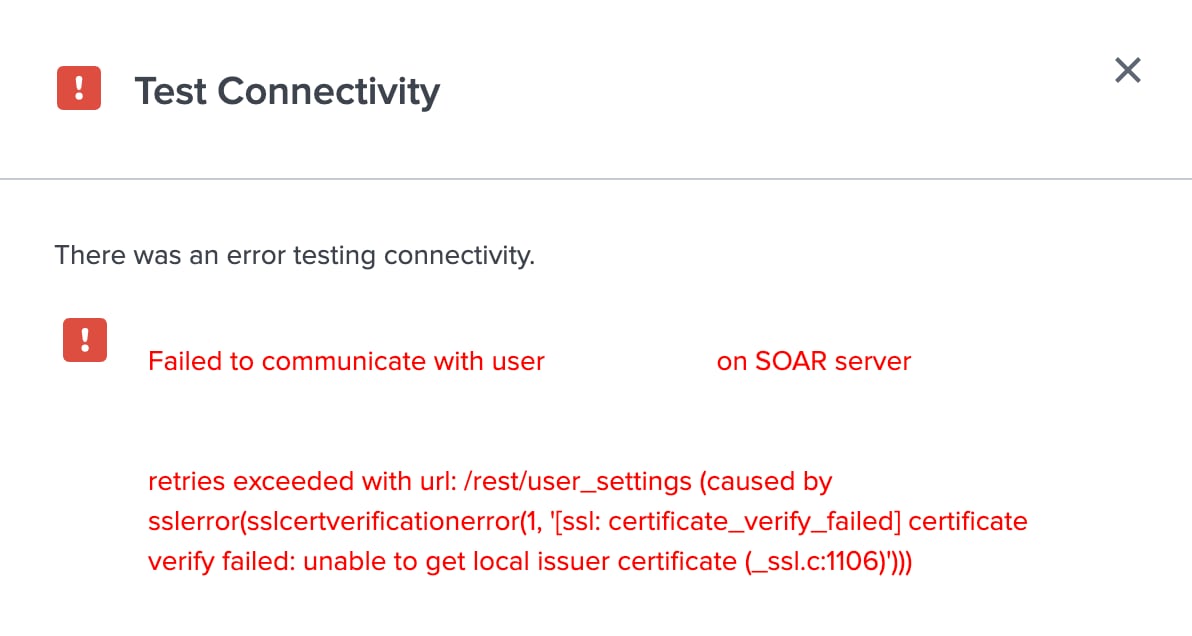
Investigation
By default, the connection between Splunk SOAR (Cloud) and Splunk SOAR (On-Premises) and Splunk Enterprise or Splunk Cloud Platform requires a valid SSL certificate. The existing SSL certificate can be found at $SPLUNK_HOME/etc/apps/phantom/local/cert_bundle.pem.
The below command is commonly used for troubleshooting SSL/TLS connectivity or verifying the authenticity of a server's SSL certificate.
echo "" | openssl s_client -connect <serverURL>:443 -CAfile $SPLUNK_HOME/etc/apps/phantom/local/cert_bundle.pem
Here is the output of the above command when an SSL error is encountered.
CONNECTED(00000003)
verify error:num=20:unable to get local issuer certificate
verify return:1
verify error:num=21:unable to verify the first certificate
verify return:1
---
Certificate chain
---
Server certificate
-----BEGIN CERTIFICATE-----
<certificate>
-----END CERTIFICATE-----
---
No client certificate CA names sent
Peer signing digest:
Peer signature type:
Server Temp Key:
---
Verification error: unable to verify the first certificate
---
Secure Renegotiation IS NOT supported
Compression: NONE
Expansion: NONE
No ALPN negotiated
Early data was not sent
Verify return code: 21 (unable to verify the first certificate)
Resolution
Based on the error message in the investigation section, Splunk is unable to verify the first certificate. Please ensure that the certificate used in SOAR matches the one on the Splunk side and follows the suggested format outlined below.
Certificate format: ( cert_bundle.pem )
-----BEGIN CERTIFICATE-----
<Client Cert Contents>
-----END CERTIFICATE-----
-----BEGIN CERTIFICATE-----
<intermediary Cert Contents>
-----END CERTIFICATE-----
-----BEGIN CERTIFICATE-----
<Root Cert Contents>
-----END CERTIFICATE-----
Revision History
| Revision | Publish Date | Comments |
|---|---|---|
1.0 |
29-Sep-2026
|
Initial Release |
 Feedback
Contact Cisco
- Open a Support Case

- (Requires a Cisco Service Contract)