Unable to connect to Azure Storage Account in the Splunk Add-on for Microsoft Cloud Services
Available Languages
Applicability
Splunk Add-on for Microsoft Cloud Services Splunk Cloud Splunk EnterpriseDescription
When a user attempts to configure the Azure Storage Account in Splunk via the Splunk Web UI, they encounter an error message, as shown in the attached screenshot.
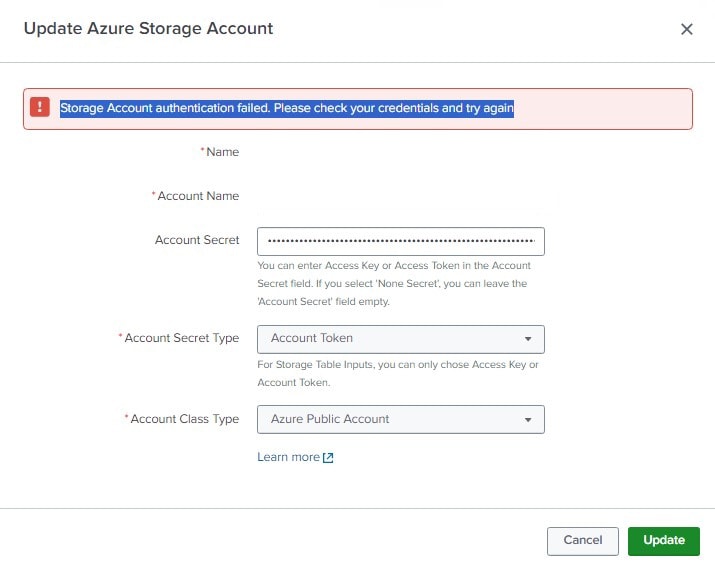
This error is specific to storage accounts that are configured with the 'Account Secret' type set to 'Shared Access Signature token'."
Investigation
To begin the investigation, the following SPL command was used to identify the error logs:
index=_internal sourcetype="mscs:storage:account:validation:log" ERRORFollowing errors are present in the logs:
ile=splunk_ta_mscs_rh_storageaccount.py:validate:82 | Verifying credentials for the MSCS Storage account
2023-06-26 16:04:14,531 INFO pid=9696 tid=MainThread file=splunk_ta_mscs_rh_storageaccount.py:validate:111 | Getting proxy details
2023-06-26 16:04:15,203 INFO pid=9696 tid=MainThread file=splunk_ta_mscs_rh_storageaccount.py:validate:130 | Proxy is enabled
2023-06-26 16:04:15,204 INFO pid=9696 tid=MainThread file=splunk_ta_mscs_rh_storageaccount.py:validate:145 | Changing proxy schemes to http as only http proxy is supported
2023-06-26 16:04:15,210 ERROR pid=9696 tid=MainThread file=splunk_ta_mscs_rh_storageaccount.py:validate:176 | Error You cannot use AzureSasCredential when the resource URI also contains a Shared Access Signature. while verifying the credentials: Traceback (most recent call last):
File "E:\Splunk\etc\apps\Splunk_TA_microsoft-cloudservices\bin\splunk_ta_mscs_rh_storageaccount.py", line 171, in validate
proxies=proxies,
File "E:\Splunk\etc\apps\Splunk_TA_microsoft-cloudservices\lib\mscs_storage_service.py", line 74, in _create_table_service
proxies=proxies,
File "E:\Splunk\etc\apps\Splunk_TA_microsoft-cloudservices\lib\azure\data\tables\_base_client.py", line 216, in __init__
super(TablesBaseClient, self).__init__(endpoint, credential=credential, **kwargs)
File "E:\Splunk\etc\apps\Splunk_TA_microsoft-cloudservices\lib\azure\data\tables\_base_client.py", line 98, in __init__
self._query_str, credential = format_query_string(sas_token, credential)
File "E:\Splunk\etc\apps\Splunk_TA_microsoft-cloudservices\lib\azure\data\tables\_base_client.py", line 404, in format_query_string
"You cannot use AzureSasCredential when the resource URI also contains a Shared Access Signature.")
ValueError: You cannot use AzureSasCredential when the resource URI also contains a Shared Access Signature.
The error message indicates a possible misconfiguration related to the SAS token in the Splunk Add-on for Microsoft Cloud Services when using Azure credentials.
The SAS token may have been incorrectly placed in both the resource URI and credentials field. This dual placement is not supported and could lead to configuration issues.
Upon further review of the configuration settings, it was found that:
- The Blob Service SAS URL was used in the Azure storage account configuration.
- Instead of placing the SAS token in the correct credentials field, the entire Blob Service SAS URL was provided.
Conclusion:
The use of the SAS URL in place of the SAS token in the configuration is likely the root cause of the error.
The Splunk Add-on expects the SAS token (not the full URL) to be provided in the credentials field.
Correct the configuration by replacing the Blob Service SAS URL with the actual SAS token in the appropriate field. Re-test the connection to ensure the issue is resolved.
Resolution
To resolve this error, the user needs to replace the Blob Service SAS URI with the correct SAS token in the Azure storage account configuration within Splunk.
- Go to Storage account --> Shared access signature --> Copy the SAS token

Revision History
| Revision | Publish Date | Comments |
|---|---|---|
1.0 |
29-Sep-2026
|
Initial Release |
 Feedback
Contact Cisco
- Open a Support Case

- (Requires a Cisco Service Contract)
This Document Applies to These Products
Related Articles
- Splunk Add-on for Microsoft Cloud Services Unable to connect with Azure Private Endpoint over EventHub.
- Authentication ERROR while trying to configure the storage account in Splunk add-on for Microsoft cloud services.
- Add-on Microsoft Cloud Services - Unable to Get Office 365 Data from Splunk Add-on for Microsoft Cloud Services