Latency issues with the CloudWatch Logs input configured in Splunk Add-on for Amazon Web Services(AWS).
Available Languages
Applicability
Splunk Apps & Add-ons Splunk Enterprise Splunk CloudDescription
The CloudWatch Logs input that utilizes AWS CloudWatch Log Groups to fetch the events at a given internal and is configured in the Splunk Add-on for Amazon Web Services (AWS) is not collecting all the logs in real-time.
Another observation made was that the other input types ie. SQS Based S3, CloudWatch Logs, etc were fetching the logs without any latency.
Investigation
1. Checked the latency in the associated index and the sourcetype with the help of the below SPL to determine the stats of latency.
index=<index_name> sourcetype=<sourcetyepe_name>
| eval diff_in_min= (_indextime - _time)/60
| eval capturetime=strftime(_time,"%Y-%m-%d %H:%M:%S")
| eval indextime=strftime(_indextime,"%Y-%m-%d %H:%M:%S")
| table capturetime indextime diff_in_min
There are multiple inputs have been configured and for most of the log_groups, latency was below 60 minutes and some huge spikes were also seen.
2. Therefore, checked the internal logs, with the below search query to check if there were any error messages in the _internal logs but found that there were no such logs that could explain about the cause of latency.
SPL:
index="_internal" sourcetype=*aws* datainput="input_name" level=ERROR
No Error logs, as mentioned above.
3. Additionally, checked the queue blockages on the instance where the inputs were configured but all the queues were unblocked.
SPL:
index="_internal" host=<hostname> blocked=true
No queue blockage was found.
4. In the internal logs, the below INFO log was seen multiple times:
SPL:
index="_internal" sourcetype=*aws* datainput="input_name"Logs:
2024-05-03 04:12:37,240 level=INFO pid=3110411 tid=Thread-4 logger=splunk_ta_aws.modinputs.cloudwatch_logs.aws_cloudwatch_logs_data_loader pos=aws_cloudwatch_logs_data_loader.py:_ignore_stream:224 | datainput="input_name" region="eu-central-1" log_group="/aws/eks/daya/prod" | message="Ignore stream_name=daya_log_stream because it has no events since 1694217172001"
Debugging the above INFO log further by reviewing the input behavior. CloudWatch Logs ModInput uses the lastEventTimestamp from the response of the AWS boto3 SDK method describe_log_streams to determine whether new data is available or not for ingestion.
As per the AWS Boto3 describe_log_streams API response lastEventTimestamp field description, the lastEventTimestamp value is updated on an eventual consistency basis. It updates in less than an hour from ingestion in the AWS CloudWatch Stream, and sometimes it takes more than one hour.
Due to this behavior, a latency of up to 60 minutes is expected while using the CloudWatch Logs inputs.
5. In the associated index, latency because of the timezone differences was also seen.
Logs in the AWS log_stream had an Australia Timezone timestamp in the event 'time' field and the AWS timestamp was of UTC timezone because of which more delay was seen in some logs.
The events were showing a delay of more than one hour because Splunk uses the “time” field of the sample event for the _time field during ingestion and as per the system timezone, _indextime was of UTC timezone. So it shows, more delay because of the timezone differences.
6. Checked the count of log_stream in the specific log_group and found that log_group contains a large number of log streams.
SPL:
index=_internal sourcetype=*aws* datainput=<input_name> | stats count by log_streamScreenshot:
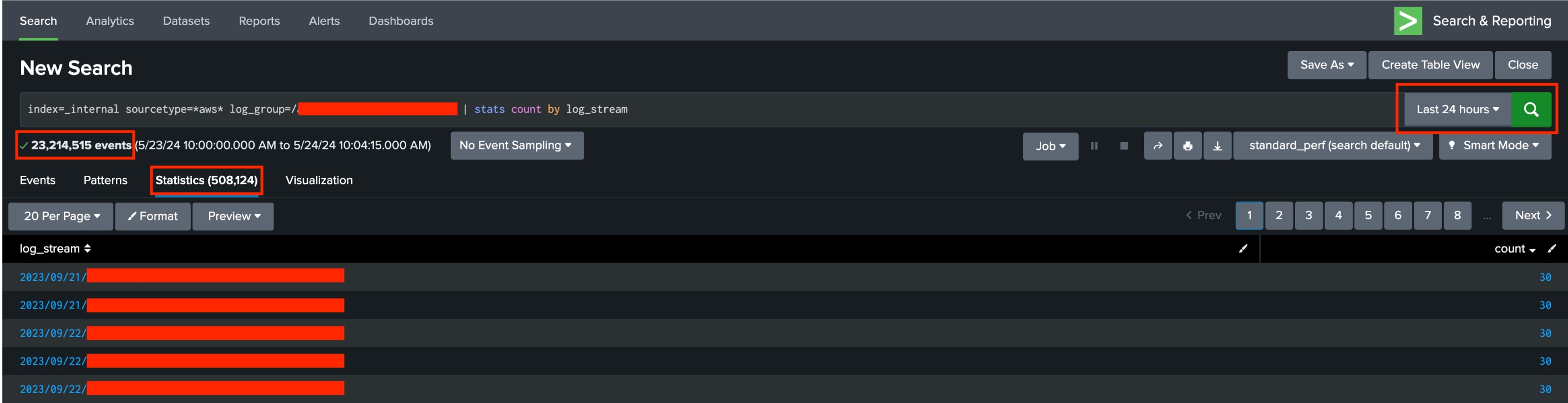
Because of the huge number of log_streams in the log_groups, input will take more time to fetch the log_stream which will result in additional latency.
7. It was also found that input was not getting invoked at the scheduled interval and there were multiple CloudWatch Logs inputs configured in the Add-on ie. around 300 of them.
CloudWatch Logs input is single-threaded and can only run 64 tasks at a time. One task consists of one log group from a specific region. Given this, it is recommended to split the inputs on a separate instance, to avoid any additional latency.
Resolution
In a nutshell, here are scenarios in which latency with the CloudWatch Logs input is expected.
1. Due to the "lastEventTimestamp" provided by the AWS Boto3 SDK being updated on an eventual consistency basis.
2. Because of the timezone difference.
3. If there are a large number of log streams in the associated log group.
4. The CloudWatch Logs input is single-threaded and can only run 64 tasks at a time. Multiple inputs will cause additional latency.
As a workaround, It is recommended to use the Push-Based mechanism to ingest CloudWatch Logs data in order to avoid ingestion delay.
Related Links
AWS Boto3 SKD - Describe Log Streams Doc
AWS Add-ons Troubleshooting Docs
Revision History
| Revision | Publish Date | Comments |
|---|---|---|
1.0 |
29-Sep-2026
|
Initial Release |
 Feedback
Contact Cisco
- Open a Support Case

- (Requires a Cisco Service Contract)
This Document Applies to These Products
Related Articles
- Generic S3 input stopped collecting new logs configured in Splunk Add-on for Amazon Web Services(AWS)
- Data Latency issues with Pub/Sub input configured in the Splunk Add-on for Google Cloud Platform(GCP).
- Data Latency issues with the Management Activity inputs configured in the Splunk Add-on for Office 365.
- Splunk Add-on for AWS : CloudWatch Logs Input AssumeRole Security Token Expiration