Data Latency issues with the Management Activity inputs configured in the Splunk Add-on for Office 365.
Available Languages
Applicability
Splunk Apps & Add-ons Splunk Enterprise Splunk CloudDescription
The Management Activity API input, configured in the Splunk Add-on for Office 365, is not collecting all logs in real-time from the Office 365 portal.
Other input types, such as Audit logs (using Microsoft Graph API) and Message Trace input, are successfully fetching logs without latency. The issue appears to be specific to the Management Activity API input, while other data sources remain unaffected.
Investigation
1. Checked the latency in the associated index and the sourcetype with the help of the below SPL to determine the stats of latency.
SPL:
index=<index_name> sourcetype=<sourcetyepe_name> source=<source_name>
| eval diff_in_min= (_indextime - _time)/60
| eval capturetime=strftime(_time,"%Y-%m-%d %H:%M:%S")
| eval indextime=strftime(_indextime,"%Y-%m-%d %H:%M:%S")
| table capturetime indextime diff_in_min
Found that multiple inputs in the Splunk Add-on for Office 365 utilizing Management Activity API had a latency of approximately 3000 minutes.
2. Therefore, checked the internal logs, with the below search query to check if there were any error messages in the _internal logs but found that there were no such logs that could explain about the cause of latency.
SPL:
index="_internal" sourcetype=*o365* datainput="b'<input_name>'" level=ERRORNo Error logs, as mentioned above.
3. Additionally, checked the queue blockages on the instance where the inputs were configured but no queue blockage were found.
SPL:
index="_internal" host=<hostname> blocked=trueNo queue blockage was found.
4. Upon reviewing the _internal logs other than the Error logs to check if the input is lagging behind to collect the logs or not, a significant time gap of around 12 hours was found between the _time field (2024-10-31 15:16:06.145) and the start_time (2024-10-31T00:28:21). Both timestamps are in a 24-hour format.
Screenshot:
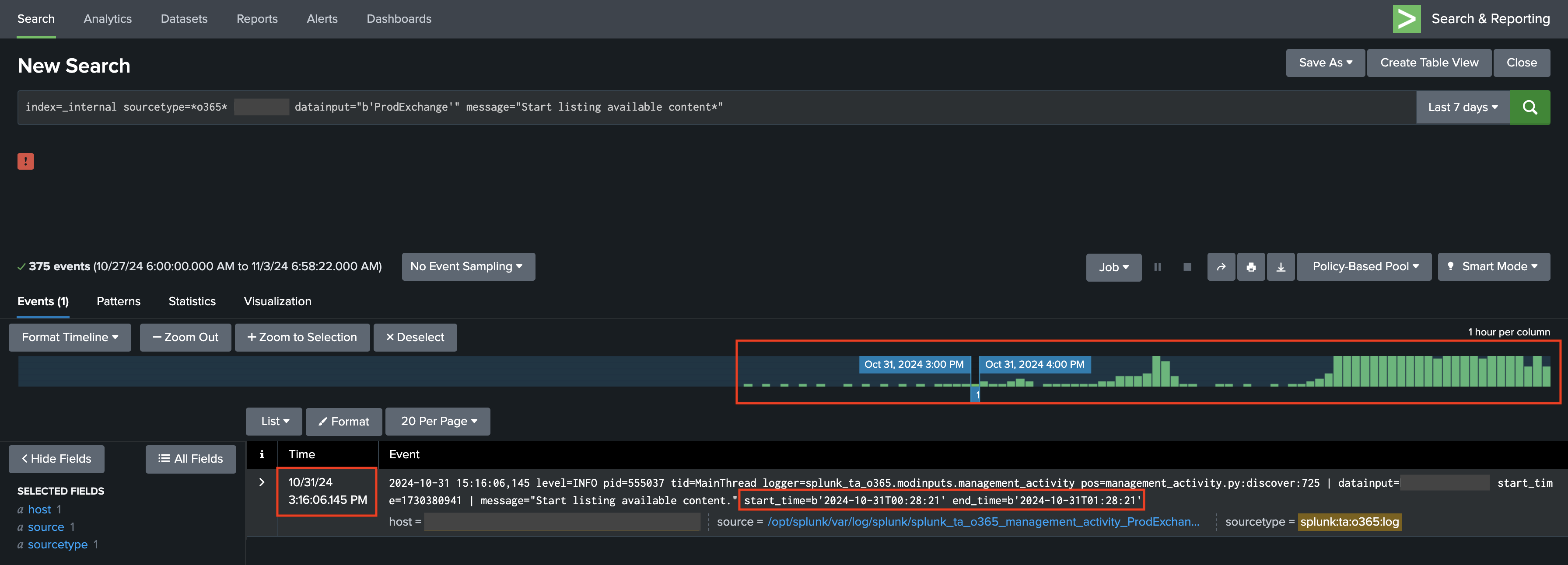
5. Based on the above, it was found that some part of the latency originates from Splunk’s end, as the input is lagging behind in collecting logs. Further investigation into Microsoft’s Management Activity API documentation revealed that:
- Core services (Exchange, SharePoint, OneDrive, Teams) typically have a 60 to 90-minute delay.
- Other services may have longer delays with no guaranteed delivery time.
Therefore, the remaining latency is due to Microsoft’s data availability rather than an issue within Splunk.
Resolution
The latency is caused by two main factors:
-
Microsoft API Delays:
- Microsoft’s Management Activity API has inherent delays, typically 60 to 90 minutes for core services and longer for others.
- Since event availability depends on Microsoft, this cannot be controlled from Splunk’s end.
-
Splunk Processing Latency:
- Splunk may lag in processing due to limited number_of_threads, resource constraints, or input backlog.
- Increasing the number_of_threads setting in inputs.conf can improve performance.
Resolution
- Microsoft API Latency: No fix available as delays depend on Microsoft's data availability.
- Splunk Latency: Increase number_of_threads in increments of 4 to optimize performance:
[splunk_ta_o365_management_activity] interval = 300 disabled = 0 sourcetype = o365:management:activity number_of_threads = 4 - Note: Gradually increase thread count and monitor performance. Avoid high values unless system resources support it.
Related Links
- What is the maximum time I will have to wait before a notification is sent about a given Office 365 event?
- How long before events show within the Office 365 service?
Revision History
| Revision | Publish Date | Comments |
|---|---|---|
1.0 |
29-Sep-2026
|
Initial Release |
 Feedback
Contact Cisco
- Open a Support Case

- (Requires a Cisco Service Contract)