Duplicated Kineses Firehose events ingested via HEC
Available Languages
Applicability
Splunk CloudDescription
Observed duplicated events from AWS Firehose in Splunk Cloud index.
Investigation
Confirm how the data is being ingested into Splunk.
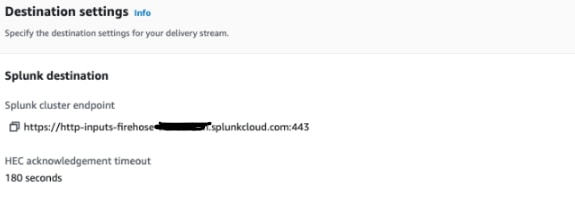
If via HEC, verify what is the endpoint being used.
This can be found under the AWS console firehose destination settings on the senders side:
Verify what errors are being reported on the client/source side, examples of messages on the client side:
If you have a proxy (ELB or other) between Kinesis Firehose and the HEC node, you must enable sticky sessions and not provide any session expiration to support HEC ACKs.
Splunk.ProxyWithoutStickySessions
Did not receive an acknowledgement from HEC before the HEC acknowledgement timeout expired. Despite the acknowledgement timeout, it's possible the data was indexed successfully in Splunk.Connection was closed while unacknowledged batches remained. These batches will be retried.
Splunk.ConnectionClosedFor Kinesis Firehose, the endpoint is "https://http-inputs-firehose-<stack_name>.splunkcloud.com:443. In this case, the endpoint being used was https://http-inputs-<stack_name>.splunkcloud.com:443
Resolution
Provide the proper HEC endpoint for Amazon Firehose.
For Firehose, the ELB URL should be in this format "https://http-inputs-firehose-<stack_name>.splunkcloud.com:443".
The endpoint being used, https://http-inputs-<stack_name>.splunkcloud.com:443", does not support ACK.
Configure Amazon Kinesis Firehose to send data to the Splunk platform
Related Links
Configure Amazon Kinesis Firehose to send data to the Splunk platform
Revision History
| Revision | Publish Date | Comments |
|---|---|---|
1.0 |
29-Sep-2026
|
Initial Release |
 Feedback
Contact Cisco
- Open a Support Case

- (Requires a Cisco Service Contract)