How to configure Splunk alert to trigger when the number of results greater than or equal to zero
Available Languages
Applicability
Splunk CloudDescription
When you want the alerts to trigger even when the number of results is zero.Investigation
1. When you run a SPL and save it as an alert or create an alert, you can only see "greater than" or "less than" options. There doesn't appear to be greater than or equal to.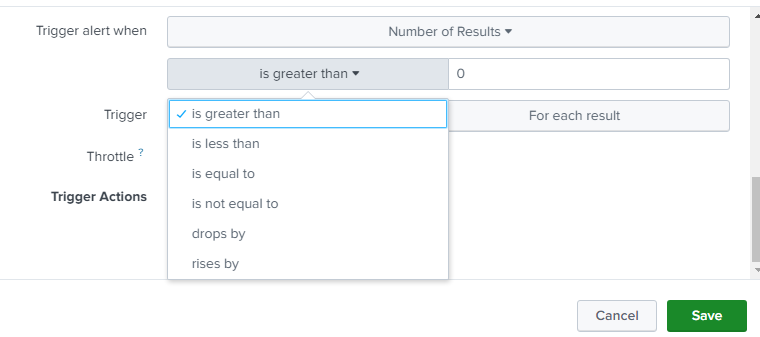
2. If you have requirement to set 2 or more conditions in one alert then you can also try setting custom condition: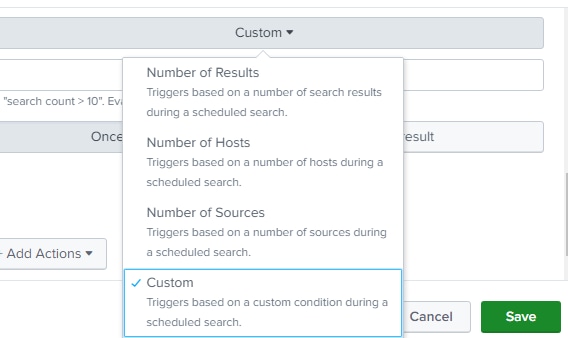
Resolution
You can add the below query to your search. it will help to trigger the alert in both conditions (if the results are greater than zero or equal to zero)Please add it in the last of your search:
| appendpipe
[| stats count
| search count=0
| eval _raw="my event if there is no results" ]
Since above SPL already has 2 conditions defined you can do that with the report, schedule it and then add alert action.
For example:
index=_internal sourcetype=splunkd
| appendpipe
[| stats count
| search count=0
| eval _raw="my event if there is no results" ]
Revision History
| Revision | Publish Date | Comments |
|---|---|---|
1.0 |
29-Sep-2026
|
Initial Release |
 Feedback
Contact Cisco
- Open a Support Case

- (Requires a Cisco Service Contract)
This Document Applies to These Products
Related Articles
- Splunk is unable to create ServiceNow Incident when alert has trigger condition as Number of results being equal to 0.
- Splunk is unable to create BMC Remedy Incidents when alert has trigger condition as Number of results being equal to 0 - Error: "action=remedy_incident STDERR - FileNotFoundError: [Errno 2] No such file or directory: