Splunk is unable to create ServiceNow Incident when alert has trigger condition as Number of results being equal to 0.
Available Languages
Applicability
This article is applicable to the Splunk add-on for servicenow v7.0.0 and later as this feature was introduced after that only. It is not available in any prior versions of this add-on where the SPLUNK ALERTS have trigger condition set as NUMBER OF RESULTS=0.Description
Splunk alerts having trigger condition set as NUMBER OF RESULTS = 0 are unable to create ServiceNow incidents. For same Search query and trigger condition, Splunk is able to send an email when trigger action is set as SEND EMAIL. It is not working just with SERVICENOW INTEGRATION as trigger action. The same alert does work when the SPL is appended with | stats Count and the trigger condition is defined as CUSTOM with count=0, creating incidents in ServiceNow. This KB Article explains this behavior of Splunk alert with trigger condition as NUMBER OF RESULTS=0.Investigation
In a Splunk environment, create an alert with an SPL and set trigger condition as NUMBER OF RESULTS being equal to 0. In the trigger action, select the following two actions:1) Send Email
2) ServiceNow Incident Integration
a sample of such alert is as shown below:
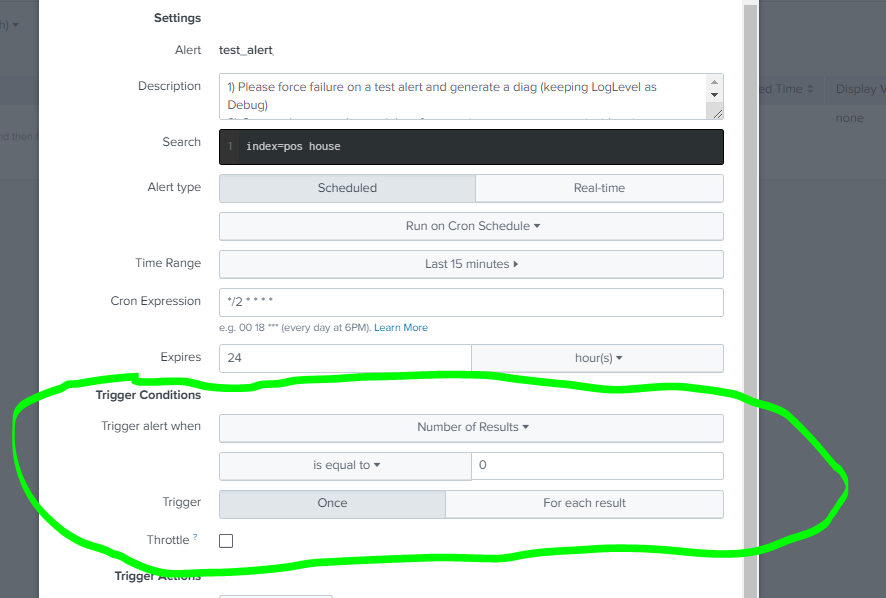
Whenever the trigger conditions are satisfied for this alert, email is triggered however it fails to create an incident in ServiceNOW. splunk_ta_snow_ticket.log file shows the following error:
ERROR SearchScheduler [60407 AlertNotifierWorker-0] - Error in 'sendalert' command: Alert script returned error code 2., search='sendalert snow_incident
results_file="/opt/splunk/var/run/splunk/dispatch/scheduler__zwu_cGV0c21hcnRfc2VhcmNo__RMD53968d4858da43898_at_1658817300_7963_BF351F1D-9AEB-44C4-81D6-52F2CB9A8CF0/results.srs.zst"
results_link="https://localhost:8000/app/petsmart_search/@go?sid=scheduler__zwu_cGV0c21hcnRfc2VhcmNo__RMD53968d4858da43898_at_1658817300_7963_BF351F1D-9AEB-44C4-81D6-52F2CB9A8CF0"'
When the trigger condition is changed to CUSTOM keeping a function is the SPL as shown below, both email as well as ServiceNow Incident is created successfully:
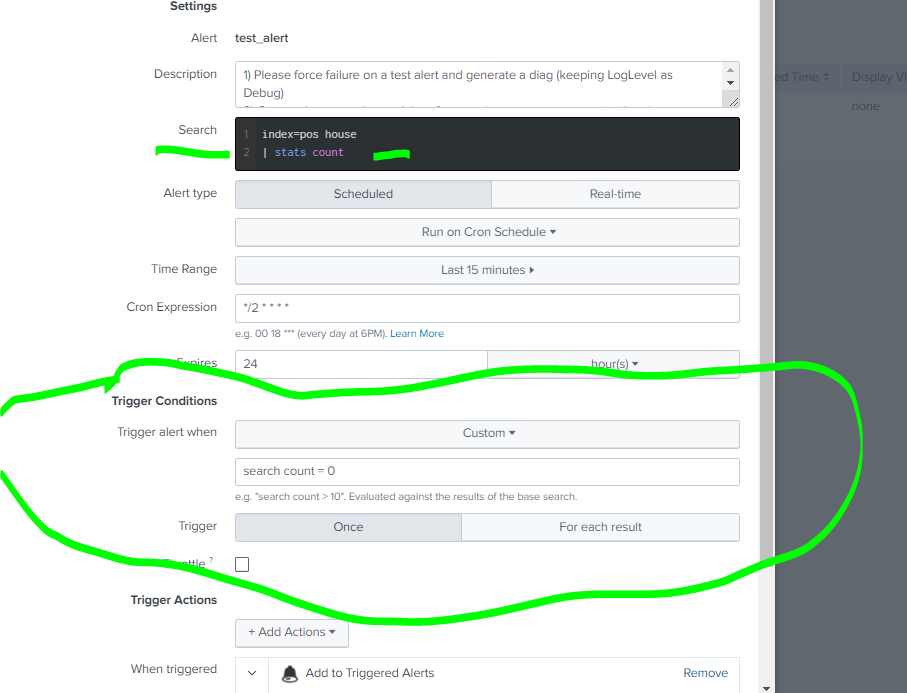
Given that the Email is triggered in the first scenario, it confirms that the alert is working. To make the number of results=0 work in the SERVICENOW INTEGRATION alert actions, a particular parameter is defined in the add-on configuration as mentioned in the resolution section.
Resolution
There is a custom feature to this add-on which allows users to create the incident in ServiceNow on zero search count for the alert action. There is a particular parameter in splunk_ta_snow_settings.conf file named as "create_incident_on_zero_results" which tells the app if the trigger condition for number of results as 0 should be honoured or not in the ServiceNow incident creation.This feature is available in $SPLUNK_HOME/etc/apps/Splunk_TA_snow/default/splunk_ta_snow_settings.conf defined under a stanza named [additional_parameter] as shown below:
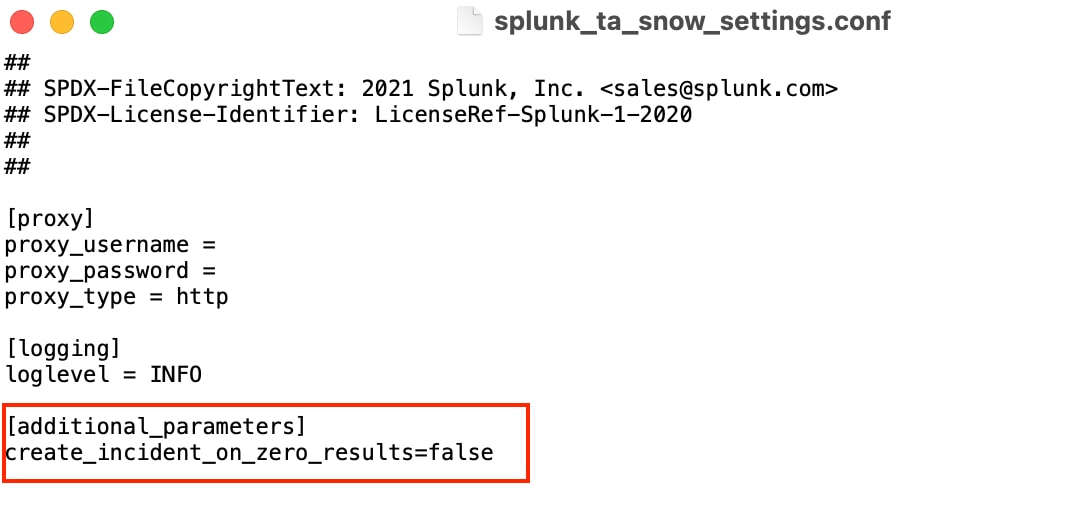
By default, this parameter always set to FALSE which means the add-on would not trigger any incidents if the number of results returned in any alert equals to 0.
In order to make the add-on trigger incidents with trigger condition set as number of results = 0in Splunk Alert, below changes are required:
1) Go to $SPLUNK_HOME/etc/apps/Splunk_TA_snow/local/splunk_ta_snow_settings.conf
2) Open the file and add below parameter in the mentioned stanza:
[additional_parameters]
create_incident_on_zero_results=true
3) Save the changes and restart the Splunk service.
Revision History
| Revision | Publish Date | Comments |
|---|---|---|
1.0 |
29-Sep-2026
|
Initial Release |
 Feedback
Contact Cisco
- Open a Support Case

- (Requires a Cisco Service Contract)