IP restriction on REST API
Available Languages
Applicability
Splunk CloudDescription
For some of the servers with specific IPs, REST API calls are successful, however from other servers with different/new IPs, it is getting timed out with the below error :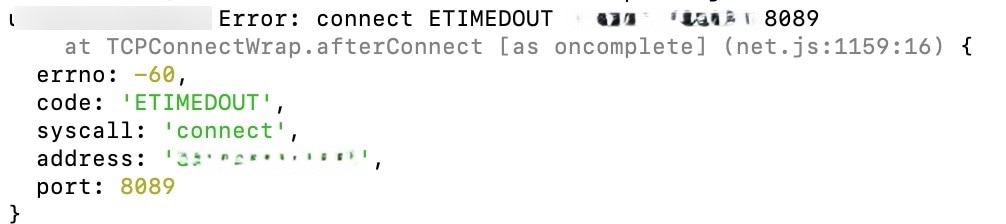
Investigation
In $SPLUNK_HOME/var/log/splunk/splunkd.log, this error was found by running the below search query:
index='_internal' sourcetype=splunkd ERROR
output :
({"errno":-110,"code":"ETIMEDOUT","syscall":"connect","address":"XXX.XXX.XXX.XXX","port":8089,"source":"connection","resolved":false,"occurredAt":1659607417008})
It was seen that IP restrictions are enabled in the deployment, which is why the error was reflected while making REST API calls from new IPs. Only IP addresses in the list can make REST API calls to Cloud SH.
Blocked addresses for REST API are not logged to Splunk Cloud.
Test REST API examples:
telnet es-splunk.splunkcloud.com 8089openssl s_client -connect es-splunk.splunkcloud.com:8089curl -k -u 'username' https://localhost:8089/services/catalog/metricstore/metrics
curl -k -u 'username' https://stack.splunkcloud.com:8089/services/catalog/metricstore/metricsTroubleshooting:
If unable to determine what Public IP address is being utilized, a viable workaround is to copy the allow list and then temporarily set port 8089 open to the world with IP range: 0.0.0.0/0
Rest API IP Addresses that connect successfully can be found in the _internal index using the search query:
index=_internal source=*splunkd_access.log* host=sh* user="<username>" NOT (clientip="127.0.0.1" OR clientip="10.*") | stats count by user clientip host
Resolution
Allow the required IP addresses in the allow list.
This can be done via Spunk Web GUI or using Admin Config Service (ACS) API.
About Admin Config Services
Admin Configure IP Allow List
Related Links
About Admin Config Services
Admin Configure IP Allow List
Revision History
| Revision | Publish Date | Comments |
|---|---|---|
1.0 |
29-Sep-2026
|
Initial Release |
 Feedback
Contact Cisco
- Open a Support Case

- (Requires a Cisco Service Contract)