| Feature |
Default Setting |
|---|---|
| Switch 802.1x enable state |
Disabled. |
| Per-port 802.1x enable state |
Disabled (force-authorized). The port sends and receives normal traffic without 802.1x-based authentication of the client. |
| AAA |
Disabled. |
| RADIUS server
|
|
| Host mode |
Single-host mode. |
| Control direction |
Bidirectional control. |
| Periodic re-authentication |
Disabled. |
| Number of seconds between re-authentication attempts |
3600 seconds. |
| Re-authentication number |
Two times (number of times that the switch restarts the authentication process before the port changes to the unauthorized state). |
| Quiet period |
60 seconds (number of seconds that the switch remains in the quiet state after a failed authentication exchange with the client). |
| Retransmission time |
30 seconds (number of seconds that the switch waits for a response to an EAP request/identity frame from the client before resending the request). |
| Maximum retransmission number |
Two times (number of times that the switch sends an EAP-request/identity frame before restarting the authentication process). |
| Client timeout period |
30 seconds (when relaying a request from the authentication server to the client, the amount of time the switch waits for a response before resending the request to the client). |
| Authentication server timeout period |
30 seconds (when relaying a response from the client to the authentication server, the amount of time the switch waits for a reply before resending the response to the server). You can change this timeout period by using the dot1x timeout server-timeout interface configuration command. |
| Inactivity timeout |
Disabled. |
| Guest VLAN |
None specified. |
| Inaccessible authentication bypass |
Disabled. |
| Restricted VLAN |
None specified. |
| Authenticator (switch) mode |
None specified. |
| MAC authentication bypass |
Disabled. |
| Voice-aware security |
Disabled. |
Troubleshoot Dot1x on Catalyst 9000 Series Switches
Available Languages
Contents
Introduction
This document describes how to configure, validate, and troubleshoot 802.1x network access control (NAC) on Catalyst 9000 series switches.
Prerequisites
Requirements
Cisco recommends that you have knowledge of these topics.
- Catalyst 9000 series switches
- Identity Services Engine (ISE)
Components Used
The information in this document is based on these software and hardware versions:
- Catalyst 9300
- Catalyst 9400
- Catalyst 9500
- Catalyst 9600
- Cisco IOS® XE 17.6.x and later
- ISE-VM-K9 version 3.0.0.458

Note: Consult the appropriate configuration guide for the commands that are used in order to enable these features on other Cisco platforms.
The information in this document was created from the devices in a specific lab environment. All of the devices used in this document started with a cleared (default) configuration. If your network is live, ensure that you understand the potential impact of any command.
Background Information
The 802.1x standard defines a client-server-based access control and authentication protocol that prevents unauthorized clients from connecting to a LAN through publicly accessible ports unless they are properly authenticated. The authentication server authenticates each client connected to a switch port before making available any services offered by the switch or the LAN.
802.1x authentication involves three distinct components:
Supplicant - Client that submits credentials for authentication
Authenticator - The network device that provides network connectivity between the client and the network and can allow or block network traffic.
Authentication Server — Server that can receive and respond to requests for network access, tells the authenticator if the connection can be allowed and various other settings that apply to the authentication session.
The intended audience for this document are engineers and support personnel who are not necessarily security-focused. For more information about 802.1x Port-Based authentication and components such as ISE, consult the appropriate configuration guide.
Basic Configuration
This section describes the basic configuration required to implement 802.1x port-based authentication. Additional feature explanation can be found within the addendums tab of this document. There are slight variations in configuration standards from version to version. Validate your configuration against your current version configuration guide.
Authentication, Authorization and Accounting (AAA) must be enabled prior to configuring 802.1x port-based authentication, and a method list must be established.
- Method lists describe the sequence and authentication method to be queried to authenticate a user.
- 802.1x must also be enabled globally.
C9300> enable
C9300# configure terminal
C9300(config)# aaa new-model
C9300(config)# aaa authentication dot1x default group radius
C9300(config)# dot1x system-auth-control
Define a RADIUS server on the switch.
C9300(config)# radius server RADIUS_SERVER_NAME
C9300(config-radius-server)# address ipv4 10.0.1.12
C9300(config-radius-server)# key rad123
C9300(config-radius-server)# exit
Enable 802.1x on the client interface.
C9300(config)# interface TenGigabitEthernet 1/0/4
C9300(config-if)# switchport mode access
C9300(config-if)# authentication port-control auto
C9300(config-if)# dot1x pae authenticator
C9300(config-if)# end
IBNS 2.0
Identity-Based Networking Services (IBNS) 2.0 builds upon and replaces the traditional IBNS 1.0 framework. It addresses the complexity and configuration of IBNS 1.0 by introducing a more streamlined and powerful policy engine called the Access Session Manager.
IBNS 2.0 Configuration
- In order to enable IBNS 2.0, you must execute the command in privilege mode on your Cisco switch:
#authentication display new-style
- Configure switchport for IBNS 2.0 with commands as shown:
access-session host-mode {single-host | multi-domain | multi-auth | multi-host}
access-session port-control auto
dot1x pae authenticator
{mab}
service-policy type control subscriber TEST
These commands enable dot1x authentication, and optionally, MAC Authentication Bypass (MAB) on the interface.
When you use the new syntax, you use commands which start with access-session.
The purpose of those commands is the same as for commands that use old syntax (starting with authentication keyword).
Apply service-policy to specify policy-map that can be used for the interface.
- The policy-map mentioned defines behavior of the switch (authenticator) during authentication.
For example, you can specify what can happen in case of authentication failure.
For each event you can configure multiple actions based on the type of the event matched in class-map configured under it.
As an example, take a look at the list as shown (policy-map TEST).
If dot1x endpoint, which is connected to the interface where this policy is applied fails, then action defined in DOT1X_FAILED is executed.
If you want to specify the same behavior for classes like MAB_FAILED and DOT1X_FAILED, then you can use default class - 'class-map' always.
policy-map type control subscriber TEST
(...)
event authentication-failure match-first
10 class DOT1X_FAILED do-until-failure
10 terminate dot1x
(...)
40 class always do-until-failure
10 terminate mab
20 terminate dot1x
30 authentication-restart 60
(...)
- Policy-map used for IBNS 2.0 always must have type control subscriber.
You can view the list of available events in this way:
Switch(config-event-control-policymap)#event ?
aaa-available aaa-available event
absolute-timeout absolute timeout event
agent-found agent found event
authentication-failure authentication failure event
authentication-success authentication success event
authorization-failure authorization failure event
authorization-success authorization success event
identity-update identity update event
inactivity-timeout inactivity timeout event
remote-authentication-failure authentication failure event
remote-authentication-success authentication remote success event
remote-update update from remote device
session-disconnected session disconnected event
session-started session started event
tag-added tag to apply event
tag-removed tag to remove event
template-activated template activated event
template-activation-failed template activation failed event
template-deactivated template deactivated event
template-deactivation-failed template deactivation failed event
timer-expiry timer-expiry event
violation session violation event
- In event configuration, you have the possibility to define how classes can be evaluated:
Switch(config-event-control-policymap)#event authentication-failure ?
match-all Evaluate all the classes
match-first Evaluate the first class
- You can define similar options for class-maps, although here you specify how actions can be executed in case your class is matched:
Switch(config-class-control-policymap)#10 class always ?
do-all Execute all the actions
do-until-failure Execute actions until one of them fails
do-until-success Execute actions until one of them is successful
- Last part (optional) of configuration in new style of dot1x is class-map.
It can also type control subscriber, and it is used to match specific behavior or traffic.
Configure requirements for class-map condition evaluation.
You can specify that all conditions or any condition must be matched, or none of the conditions match.
Switch(config)#class-map type control subscriber ?
match-all TRUE if everything matches in the class-map
match-any TRUE if anything matches in the class-map
match-none TRUE if nothing matches in the class-map
- This is an example of class-map used for matching dot1x authentication failure:
class-map type control subscriber match-all DOT1X_FAILED
match method dot1x
match result-type method dot1x authoritative
- For more details on IBMS 2.0, you can refer to these guides:
Configure IBNS 2.0 for Single Host and M
Troubleshoot Identity Based Networking
Verify Configuration and Operations
This section provides background information on 801.1x, and how to verify configuration and operations.
Introduction to 802.1x
802.1x involves two distinct types of traffic - Client to Authenticator (point-to-point) traffic over Extensible Authentication Protocol over LAN (EAPoL) and Authenticator to Authentication Server traffic that is encapsulated via RADIUS.
This diagram represents data flow for a simple dot1x transaction.
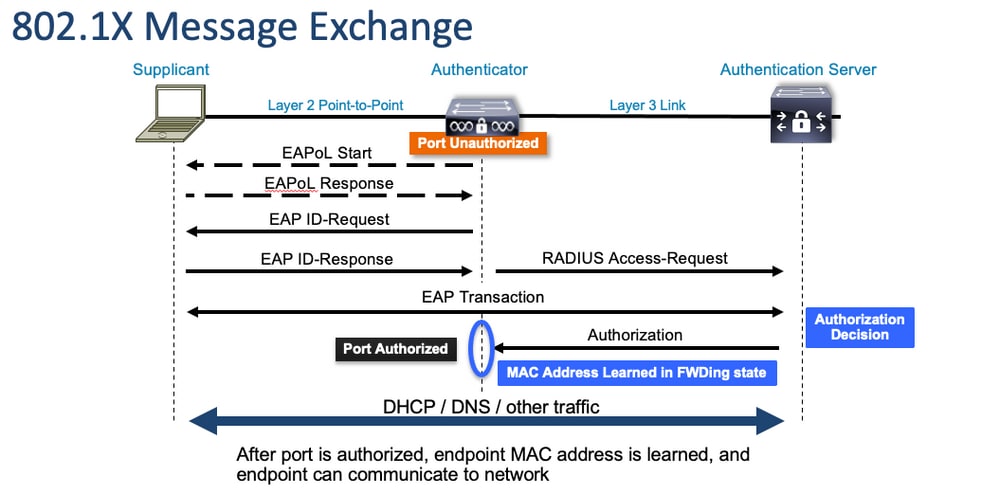
The Authenticator (switch) and Authentication Server (ISE, for example) are often separated by Layer 3. RADIUS traffic is routed over the network between authenticator and server. EAPoL traffic is exchanged on the direct link between supplicant (client) and authenticator. MAC learning occurs after authentication and authorization.
Here are a few questions to keep in mind as you approach a problem that involves 802.1x:
- Is it configured correctly?
- Is the authentication server reachable?
- What is the status of the Authentication Manager?
- Are there any problems with packet deliverability between client and authenticator or between authenticator and authentication server?
Configuration
Some configurations vary slightly between major releases. Refer to the relevant configuration guide for platform/code-specific guidance.
AAA must be configured to utilize 802.1x Port-Based Authentication.
An authentication method list must be established for 'dot1x'. This represents a common AAA configuration where 802.1X is enabled.
C9300#show running-config | section aaa
aaa new-model <-- This enables AAA.
aaa group server radius ISEGROUP <-- This block establishes a RADIUS server group named "ISEGROUP".
 server name DOT1x
 ip radius source-interface Vlan1
aaa authentication dot1x default group ISEGROUP <-- This line establishes the method list for 802.1X authentication. Group ISEGROUP is be used.
aaa authorization network default group ISEGROUP
aaa accounting update newinfo periodic 2880
aaa accounting dot1x default start-stop group ISEGROUP

C9300#show running-config | section radius
aaa group server radius ISEGROUP
 server name DOT1x
 ip radius source-interface Vlan1 <-- Notice 'ip radius source-interface' configuration exists in both global configuration and the aaa server group block. These need to agree if configured in both places.
ip radius source-interface Vlan1
radius server DOT1x
 address ipv4 10.122.141.228 auth-port 1812 acct-port 1813 <-- 1812 and 1813 are default auth-port and acct-port, respectively.
 key secretKey
This is an example interface configuration where 802.1x is enabled. MAB (MAC Authentication Bypass) is a common backup method for authenticating clients that do not support dot1x supplicants.
C9300#show running-config interface te1/0/4
Building configuration...

Current configuration : 148 bytes
!
interface TenGigabitEthernet1/0/4
 switchport access vlan 50
 switchport mode access
 authentication order dot1x mab <-- Specifies authentication order, dot1x and then mab
 authentication priority dot1x mab <-- Specifies authentication priority, dot1x and then mab
 authentication port-control auto <-- Enables 802.1x dynamic authentication on the port
 mab <-- Enables MAB
 dot1x pae authenticator <-- Puts interface into "authenticator" mode.
end
Determine if a MAC address is learned on the interface with show mac address-table interface <interface>. The interface only learns a MAC address when successfully authenticated.
C9300#show mac address-table interface te1/0/4
          Mac Address Table
-------------------------------------------

Vlan    Mac Address       Type        Ports
----    -----------       --------    -----
  50    0800.2766.efc7    STATIC      Te1/0/4 <-- The "type" is STATIC and the MAC persists until the authentication session is cleared.
Total Mac Addresses for this criterion: 1
Authentication Session
Show commands are available for validation of 802.1x authentication.
Use show authentication sessions or show authentication sessions <interface> in order to display information about the current authentication sessions. In this example, only Te1/0/4 has an active authentication session established.
C9300#show authentication sessions interface te1/0/4
Interface                MAC Address    Method  Domain  Status Fg  Session ID
--------------------------------------------------------------------------------------------
Te1/0/4                  0800.2766.efc7 dot1x   DATA    Auth        13A37A0A0000011DC85C34C5  <-- "Method" and "Domain" in this example are dot1x and DATA, respectively. Multi-domain authentication is supported.

Key to Session Events Blocked Status Flags:

  A - Applying Policy (multi-line status for details)
  D - Awaiting Deletion
  F - Final Removal in progress
  I - Awaiting IIF ID allocation
  P - Pushed Session
  R - Removing User Profile (multi-line status for details)
  U - Applying User Profile (multi-line status for details)
  X - Unknown Blocker

Runnable methods list:
  Handle  Priority  Name
      13         5  dot1xSup
       1         5  dot1x
       2        10  webauth
      14        15  mab
Show authentication sessions interface <interface> details provides additional details about a specific interface authentication session.
C9300#show authentication session interface te1/0/4 details
            Interface:  TenGigabitEthernet1/0/4
               IIF-ID:  0x14D66776
          MAC Address:  0800.2766.efc7
         IPv6 Address:  Unknown
         IPv4 Address:  Unknown
            User-Name:  alice
               Status:  Authorized
               Domain:  DATA
       Oper host mode:  multi-auth
     Oper control dir:  both
      Session timeout:  N/A
  Acct update timeout:  172800s (local), Remaining: 152363s
    Common Session ID:  13A37A0A0000011DC85C34C5
      Acct Session ID:  0x00000002
               Handle:  0xe8000015
       Current Policy:  POLICY_Te1/0/4 <-- If a post-authentication ACL is applied, it is listed here.


Local Policies:
	Service Template: DEFAULT_LINKSEC_POLICY_SHOULD_SECURE (priority 150)
      Security Policy:  Should Secure

Server Policies:


Method status list:
       Method           State
        dot1x           Authc Success <-- This example shows a successful 802.1x authentication session.
If authentication is enabled on an interface yet there is no active session, the runnable methods list is displayed. No sessions match supplied criteria is also displayed.
C9300#show authentication sessions interface te1/0/5
No sessions match supplied criteria.

Runnable methods list:
  Handle  Priority  Name
      13         5  dot1xSup
       1         5  dot1x
       2        10  webauth
      14        15  mab
If no authentication is enabled on the interface, there is no Auth Manager presence detected on the interface. No sessions match supplied criteria is also displayed.
C9300#show authentication sessions interface te1/0/6
No sessions match supplied criteria.
No Auth Manager presence on this interface
Reachability to Authentication Server
Reachability to the Authentication Server is a prerequisite for 802.1x authentication success.
Use ping <server_ip> for a quick test of reachability. Ensure your ping is sourced from the RADIUS source interface.
C9300#ping 10.122.141.228 source vlan 1
Type escape sequence to abort.
Sending 5, 100-byte ICMP Echos to 10.122.141.228, timeout is 2 seconds:
Packet sent with a source address of 10.122.163.19
!!!!!
Success rate is 100 percent (5/5), round-trip min/avg/max = 1/1/1 ms
The command show aaa servers identifies the server state and provides statistics on transactions with all configured AAA servers.
C9300#show aaa servers

RADIUS: id 3, priority 1, host 10.122.141.228, auth-port 1812, acct-port 1813, hostname DOT1x <-- Specific server
     State: current UP, duration 84329s, previous duration 0s <-- Current State
     Dead: total time 0s, count 1
     Platform State from SMD: current UP, duration 24024s, previous duration 0s
     SMD Platform Dead: total time 0s, count 45
     Platform State from WNCD (1) : current UP
     Platform State from WNCD (2) : current UP
     Platform State from WNCD (3) : current UP
     Platform State from WNCD (4) : current UP
     Platform State from WNCD (5) : current UP
     Platform State from WNCD (6) : current UP
     Platform State from WNCD (7) : current UP
     Platform State from WNCD (8) : current UP, duration 0s, previous duration 0s
     Platform Dead: total time 0s, count 0UP
     Quarantined: No
     Authen: request 510, timeouts 468, failover 0, retransmission 351   <-- Authentication Statistics
             Response: accept 2, reject 2, challenge 38
             Response: unexpected 0, server error 0, incorrect 12, time 21ms
             Transaction: success 42, failure 117
             Throttled: transaction 0, timeout 0, failure 0
             Malformed responses: 0
             Bad authenticators: 0
             Dot1x transactions:
             Response: total responses: 42, avg response time: 21ms
             Transaction: timeouts 114, failover 0
             Transaction: total 118, success 2, failure 116
             MAC auth transactions:
             Response: total responses: 0, avg response time: 0ms
             Transaction: timeouts 0, failover 0
             Transaction: total 0, success 0, failure 0
     Author: request 0, timeouts 0, failover 0, retransmission 0
             Response: accept 0, reject 0, challenge 0
             Response: unexpected 0, server error 0, incorrect 0, time 0ms
             Transaction: success 0, failure 0
             Throttled: transaction 0, timeout 0, failure 0
             Malformed responses: 0
             Bad authenticators: 0
             MAC author transactions:
             Response: total responses: 0, avg response time: 0ms
             Transaction: timeouts 0, failover 0
             Transaction: total 0, success 0, failure 0
     Account: request 3, timeouts 0, failover 0, retransmission 0
             Request: start 2, interim 0, stop 1
             Response: start 2, interim 0, stop 1
             Response: unexpected 0, server error 0, incorrect 0, time 11ms
             Transaction: success 3, failure 0
             Throttled: transaction 0, timeout 0, failure 0
             Malformed responses: 0
             Bad authenticators: 0
     Elapsed time since counters last cleared: 1d3h4m
     Estimated Outstanding Access Transactions: 0
     Estimated Outstanding Accounting Transactions: 0
     Estimated Throttled Access Transactions: 0
     Estimated Throttled Accounting Transactions: 0
     Maximum Throttled Transactions: access 0, accounting 0
     Consecutive Response Failures: total 115
             SMD Platform : max 113, current 0 total 113
             WNCD Platform: max 0, current 0 total 0
             IOSD Platform : max 2, current 2 total 2
     Consecutive Timeouts: total 466
             SMD Platform : max 455, current 0 total 455
             WNCD Platform: max 0, current 0 total 0
             IOSD Platform : max 11, current 11 total 11
     Requests per minute past 24 hours:
             high - 23 hours, 25 minutes ago: 4
             low  - 3 hours, 4 minutes ago: 0
             average: 0
Use the test aaa utility to confirm reachability from switch to authentication server. This utility is deprecated and is not available indefinitely.
C9300#debug radius <-- Classic Cisco IOS debugs are only useful in certain scenarios. See "Cisco IOS XE Debugs" for details.
C9300#test aaa group ISE username password new-code <-- This sends a RADIUS test probe to the identified server. The username and password is meant to elicit a rejection from RADIUS.
User rejected <-- This means that the RADIUS server received our test probe, but rejected our user. We can conclude the server is reachable and listening on the configured auth-port.
*Jul 16 21:05:57.632: %PARSER-5-HIDDEN: Warning!!! ' test platform-aaa group server-group ISE user-name username password new-code blocked count delay level profile rate users ' is a hidden command. Use of this command is not recommended/supported and will be removed in future.
*Jul 16 21:05:57.644: RADIUS/ENCODE(00000000):Orig. component type = Invalid
*Jul 16 21:05:57.644: RADIUS/ENCODE(00000000): dropping service type, "radius-server attribute 6 on-for-login-auth" is off
*Jul 16 21:05:57.644: RADIUS(00000000): Config NAS IP: 10.122.161.63
*Jul 16 21:05:57.644: vrfid: [65535] ipv6 tableid : [0]
*Jul 16 21:05:57.644: idb is NULL
*Jul 16 21:05:57.644: RADIUS(00000000): Config NAS IPv6: ::
*Jul 16 21:05:57.644: RADIUS(00000000): sending
*Jul 16 21:05:57.644: RADIUS/DECODE(00000000): There is no General DB. Want server details may not be specified
*Jul 16 21:05:57.644: RADIUS(00000000): Send Access-Request to 10.122.141.199:1812 id 1645/8, len 50 <-- Sending Access-Request to RADIUS server
RADIUS: authenticator 3B 65 96 37 63 E3 32 41 - 3A 93 63 B6 6B 6A 5C 68
*Jul 16 21:05:57.644: RADIUS: User-Password [2] 18 *
*Jul 16 21:05:57.644: RADIUS: User-Name [1] 6 "username"
*Jul 16 21:05:57.644: RADIUS: NAS-IP-Address [4] 6 10.122.161.63
*Jul 16 21:05:57.644: RADIUS(00000000): Sending a IPv4 Radius Packet
*Jul 16 21:05:57.644: RADIUS(00000000): Started 5 sec timeout
*Jul 16 21:05:57.669: RADIUS: Received from id 1645/8 10.122.141.199:1812, Access-Reject, len 20 <-- Receiving the Access-Reject from RADIUS server
RADIUS: authenticator 1A 11 32 19 12 F9 C3 CC - 6A 83 54 DF 0F DB 00 B8
*Jul 16 21:05:57.670: RADIUS/DECODE(00000000): There is no General DB. Reply server details may not be recorded
*Jul 16 21:05:57.670: RADIUS(00000000): Received from id 1645/8
Troubleshoot
This section provides guidance on how to troubleshoot most 802.1x problems on a Catalyst switch.
Methodology
Approach problems that involve 802.1x and authentication methodically for best results. Some good questions to answer are:
- Is the problem isolated to a single switch? A single port? A single client type?
- Has the configuration been validated? Is the authentication server reachable?
- Does the problem occur every time, or is it intermittent? Does it only occur with reauthentication or change of authorization?
Scrutinize a single failed transaction end-to-end if problems persist after the obvious has been ruled out. The best, most complete data set for investigation of an 802.1x transaction from client to server includes:
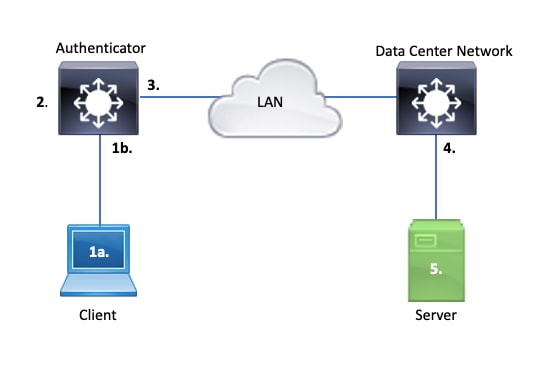
1a. Capture on Client and/or
1b. On the access interface where the Client connects
This point of reference is crucial to give us insight into the EAPoL packets exchanged between the access port where dot1x is enabled and the client. SPAN is the most dependable tool for viewing traffic between client and authenticator.
2. Debugs on authenticator
Debugs allow us to trace the transaction across the authenticator.
- The authenticator must punt the EAPoL packets received, and generate unicast RADIUS-encasulated traffic destined for the authentication server.
- Ensure appropriate debug levels are set for maximum effectiveness.
3. Capture adjacent to authenticator
This capture allows us to see the conversation between Authenticator and Authentication server.
- This capture accurately displays the entirety of the conversation from the perspective of the Authenticator.
- When paired with the capture in point 4, you can determine if there is loss between Authentication Server and Authenticator.
4. Capture adjacent to authentication server
This capture is a companion to the capture in point 3.
- This capture provides the entirety of the conversation from the perspective of the Authentication Server.
- When paired with the capture in point 3, you can determine if there is loss between Authenticator and Authentication Server.
5. Capture, debugs, logs on authentication server
The final piece of the puzzle, server debugs tell us what the server knows about our transaction.
- With this end-to-end set of data, a network engineer can determine where the transaction breaks and rule out components that do not contribute to the problem.
Example Symptoms
This section provides a list of common symptoms and problem scenarios.
- No Response from Client
If the EAPoL traffic generated by the switch does not elicit a response, this syslog is seen:
Aug 23 11:23:46.387 EST: %DOT1X-5-FAIL: Switch 1 R0/0: sessmgrd: Authentication failed for client (aaaa.bbbb.cccc) with reason (No Response from Client) on Interface Gi6/0/32 AuditSessionID CBFF000A000001056EFE9E73
The reason code, No Response from Client, indicates the switch has started the dot1x process, but no response has been received from the client within the timeout period.
This means either the client did not receive or understand the authentication traffic sent by the switch port, or the response from the client was not received on the switch port.
- Client abandons session
If an authentication session is started but does not complete, the Authentication Server (ISE for instance) reports that the client has started a session, but abandoned the session before completion.
Often, this means that the authentication process is only able to partially complete.
Ensure the entire transaction between the authenticator switch and authentication server is delivered end-to-end, and is correctly interpreted by the authentication server.
If RADIUS traffic is lost on the network, or delivered in a manner where it cannot be properly assembled, the transaction is incomplete and the client retries authentication. The server in turn reports that the client has abandoned its session.
- MAB client fails DHCP/falls back to APIPA
MAC Authentication Bypass (MAB) allows authentication based on MAC address. Often clients that do not support supplicant software authenticate via MAB.
If MAB is used as a fallback method for authentication while dot1x is the preferred and initial method that runs on a switch port, a scenario potentially results where the client is unable to complete DHCP.
The problem boils down to order of operations. While dot1x runs, the switch port consumes packets other than EAPoL until either authentication completes or dot1x times out. The client, however, immediately attempts to get an IP address and broadcasts its DHCP discover messages. These discover messages are consumed by the switch port until dot1x exceeds its configured timeout values and MAB is able to run. If the client DHCP timeout period is less than the dot1x timeout period, DHCP fails and the client falls back to APIPA or whatever its fall back strategy dictates.
This problem is prevented in multiple ways. Favor MAB on interfaces where MAB authenticated clients connect. If dot1x must run first, be mindful of client DHCP behavior and adjust timeout values appropriately.
Be careful to consider client behavior when dot1x and MAB is used. A valid configuration potentially leads to a technical problem, as described earlier.
Platform Specific Utilities
This section outlines many of the platform-specific utilities available on the Catalyst 9000 family of switches useful to troubleshoot problems of dot1x.
- Switch Port Analyzer (SPAN)
SPAN allows the user to mirror traffic from one or more ports to a destination port for capture and analysis. Local SPAN is the most 'rustworthy capture utility.
- Embedded Packet Capture (EPC)
EPC leverages CPU and memory resources to provide on-board local packet capture capability.
There are limitations to EPC that impact its effectiveness for investigating certain problems. EPC is rate-limited at 1000 packets per second. EPC also cannot reliably capture CPU-injected packets on egress of physical interfaces. This is significant when the focus is on the RADIUS transaction between the authenticator switch and the authentication server. Often, the traffic rate on interface that faces the server greatly exceeds 1000 packets per second. Also, an EPC on egress of interface that faces the server is unable to capture traffic generated by the authenticator switch.
Use bidirectional access lists to filter the EPC in order to avoid impact by the 1000 packet per second limitation. If interested in the RADIUS traffic between authenticator and server, focus on traffic between the authenticator RADIUS source interface address and the address of the server.
If the next upstream device towards the authentication server is a Catalyst switch, use a filtered EPC on the downlink towards the authenticator switch for best results.
See this configuration guide for details on configuration and implementation.
- Cisco IOS XE Debugs
Software architecture changes that start with Cisco IOS XE version 16.3.2 moved AAA components to a separate Linux daemon. Familiar debugs no longer enable viewable debugs in the logging buffer.

Tip: Traditional IOS AAA debugs no longer provide output in system logs for front-panel port authentication within the syslog buffer.
Instead, these classic Cisco IOS debugs for dot1x and RADIUS no longer enable viewable debugs within the switch logging buffer of the switch:
debug radius
debug access-session all
debug dot1x all
AAA component debugs are now accessible via system trace under the Session Manager Daemon (SMD).
- Like traditional syslogs, Catalyst system traces report at a default level and must be instructed to collect more in-depth logs.
- Change the routine trace level for the desired subcomponent with the command set platform software trace smd switch active r0 <component> debug.
Switch#set platform software trace smd switch active R0 auth-mgr debug <<<--- This sets the "auth-mgr" subcomponent to "debug" log level.
This table maps traditional IOS debugs to their trace equivalent.
| Old Style Command |
New Style Command |
| #debug radius |
#set platform software trace smd switch active R0 radius debug |
| #debug dot1x all |
#set platform software trace smd switch active R0 dot1x-all debug |
| #debug access-session all |
#set platform software trace smd switch active R0 auth-mgr-all debug |
| #debug epm all |
#set platform software trace smd switch active R0 epm-all debug |
Classic debugs enable all of the related component traces to debug level. Platform commands are also used to enable specific traces as required.
Use the command show platform software trace level smd switch active R0 in order to show the current trace level for SMD subcomponents.
Switch#show platform software trace level smd switch active R0
Module Name                    Trace Level
-----------------------------------------------
aaa                            Notice <--- Default level is "Notice"
aaa-acct                       Notice
aaa-admin                      Notice
aaa-api                        Notice
aaa-api-attr                   Notice
<snip>
auth-mgr                       Debug <--- Subcomponent "auth-mgr" traces at "debug" level
auth-mgr-all                   Notice
<snip>
Sub-component trace level can be restored to default in two ways.
- Use either undebug all or set platform software trace smd switch active R0 <sub-component> notice in order to restore.
- If the device reloads, the trace levels restore to default as well.
Switch#undebug all
All possible debugging has been turned off

or

Switch#set platform software trace smd switch active R0 auth-mgr notice <--- Sets sub-component "auth-mgr" to trace level "Notice", the system default.
Component trace logs can be viewed on console or written to archive and viewed offline. Traces are archived in zipped binary archives that require decoding. Contact TAC for debug assistance when dealing with archived traces. This workflow explains how to view the traces in CLI.
Show logging process is the updated utility for traces and the standard in version Cisco IOS XE 17.9.x and beyond.
C9300#show logging process smd ?
  <0-25>            instance number
  end               specify log filtering end location
  extract-pcap      Extract pcap data to a file
  filter            specify filter for logs
  fru               FRU specific commands
  internal          select all logs. (Without the internal keyword only
                    customer curated logs are displayed)
  level             select logs above specific level
  metadata          CLI to display metadata for every log message
  module            select logs for specific modules
  reverse           show logs in reverse chronological order
  start             specify log filtering start location
  switch            specify switch number
  to-file           decode files stored in disk and write output to file
  trace-on-failure  show the trace on failure summary
  |                 Output modifiers
Show logging process provides the same functionality as show platform software trace in a more elegant and accessible format.
C9300#clear auth sessions
C9300#show logging process smd reverse
Logging display requested on 2023/05/02 16:44:04 (UTC) for Hostname: [C9300], Model: [C9300X-24HX], Version: [17.09.01], SN: [FOC263569FP], MD_SN: [FOC2641Y2MK]

Displaying logs from the last 0 days, 0 hours, 10 minutes, 0 seconds
executing cmd on chassis 1 ...
===========================================================
 UTM [LUID NOT FOUND] .............. 0
 UTM [PCAP] ........................ 0
 UTM [MARKER] ...................... 0
 UTM [APP CONTEXT] ................. 0
 UTM [TDL TAN] ..................... 5
 UTM [MODULE ID] ................... 0
 UTM [DYN LIB] ..................... 0
 UTM [PLAIN TEXT] .................. 6
 UTM [ENCODED] ..................... 85839
 UTM [Skipped / Rendered / Total] .. 85128 / 722 / 85850
 Last UTM TimeStamp ................ 2023/05/02 16:44:03.775663010
 First UTM TimeStamp ............... 2023/05/02 15:52:18.763729918
===========================================================
----------------- Decoder Output Information --------------
===========================================================
 MRST Filter Rules ...... 1
 UTM Process Filter ..... smd
 Total UTM To Process ... 85850
 Total UTF To Process ... 1
 Num of Unique Streams .. 1
===========================================================
----------------- Decoder Input Information ---------------
===========================================================
======= Unified Trace Decoder Information/Statistics ======
===========================================================
2023/05/02 16:44:03.625123675 {smd_R0-0}{1}: [radius] [22624]: (ERR): Failed to mark Identifier for reuse
2023/05/02 16:44:03.625123382 {smd_R0-0}{1}: [radius] [22624]: (ERR): RSPE-  Set Identifier Free for Reuse : Input Validation Failed Level-2
2023/05/02 16:44:03.625116747 {smd_R0-0}{1}: [radius] [22624]: (info): Valid Response Packet, Free the identifier
2023/05/02 16:44:03.625091040 {smd_R0-0}{1}: [radius] [22624]: (info): RADIUS:  authenticator 2b f4 ea 87 d9 db 75 3a - 2c 8a c4 36 56 46 b5 57
2023/05/02 16:44:03.625068520 {smd_R0-0}{1}: [radius] [22624]: (info): RADIUS: Received from id 1813/9 10.122.141.228:0, Accounting-response, len 20
2023/05/02 16:44:03.610151863 {smd_R0-0}{1}: [radius] [22624]: (info): RADIUS: Started 5 sec timeout
2023/05/02 16:44:03.610097362 {smd_R0-0}{1}: [radius] [22624]: (info): RADIUS:  Acct-Delay-Time     [41]     6  0
2023/05/02 16:44:03.610090044 {smd_R0-0}{1}: [radius] [22624]: (info): RADIUS:  Event-Timestamp     [55]     6  1683045843
2023/05/02 16:44:03.610085857 {smd_R0-0}{1}: [radius] [22624]: (info): RADIUS:  Acct-Status-Type    [40]     6  Start                     [1]
2023/05/02 16:44:03.610040912 {smd_R0-0}{1}: [radius] [22624]: (info): RADIUS:  Class               [25]    63  ...
2023/05/02 16:44:03.610037444 {smd_R0-0}{1}: [radius] [22624]: (info): RADIUS:  Acct-Authentic      [45]     6  Remote                    [3]
2023/05/02 16:44:03.610032802 {smd_R0-0}{1}: [radius] [22624]: (info): RADIUS:  Acct-Session-Id     [44]    10  "00000004"
2023/05/02 16:44:03.610028677 {smd_R0-0}{1}: [radius] [22624]: (info): RADIUS:  Called-Station-Id   [30]    19  "00-01-02-02-AA-BF"
2023/05/02 16:44:03.610024641 {smd_R0-0}{1}: [radius] [22624]: (info): RADIUS:  Nas-Identifier      [32]     7  "C9300"
2023/05/02 16:44:03.610020641 {smd_R0-0}{1}: [radius] [22624]: (info): RADIUS:  Calling-Station-Id  [31]    19  "08-00-27-66-EF-C7"
2023/05/02 16:44:03.610016809 {smd_R0-0}{1}: [radius] [22624]: (info): RADIUS:  NAS-Port            [5]      6  50104
2023/05/02 16:44:03.610012487 {smd_R0-0}{1}: [radius] [22624]: (info): RADIUS:  NAS-Port-Type       [61]     6  Ethernet                  [15]
2023/05/02 16:44:03.610007504 {smd_R0-0}{1}: [radius] [22624]: (info): RADIUS:  NAS-Port-Id         [87]    25  "TenGigabitEthernet1/0/4"
2023/05/02 16:44:03.610003581 {smd_R0-0}{1}: [radius] [22624]: (info): RADIUS:  NAS-IP-Address      [4]      6  10.122.163.19
2023/05/02 16:44:03.609998136 {smd_R0-0}{1}: [radius] [22624]: (info): RADIUS:  Calling-Station-Id  [31]    19  "08-00-27-66-EF-C7"
2023/05/02 16:44:03.609994109 {smd_R0-0}{1}: [radius] [22624]: (info): RADIUS:  Called-Station-Id   [30]    19  "00-01-02-02-AA-BF"
2023/05/02 16:44:03.609989329 {smd_R0-0}{1}: [radius] [22624]: (info): RADIUS:   Cisco AVpair       [1]     14  "method=dot1x"
2023/05/02 16:44:03.609985171 {smd_R0-0}{1}: [radius] [22624]: (info): RADIUS:  Vendor, Cisco       [26]    20
2023/05/02 16:44:03.609981606 {smd_R0-0}{1}: [radius] [22624]: (info): RADIUS:   Cisco AVpair       [1]     43  "audit-session-id=13A37A0A0000011FDD598189"
2023/05/02 16:44:03.609976961 {smd_R0-0}{1}: [radius] [22624]: (info): RADIUS:  Vendor, Cisco       [26]    49
2023/05/02 16:44:03.609969166 {smd_R0-0}{1}: [radius] [22624]: (info): RADIUS:  User-Name           [1]      7  "alice"
2023/05/02 16:44:03.609963241 {smd_R0-0}{1}: [radius] [22624]: (info): RADIUS:  authenticator 0b 99 e3 50 d8 d3 8c 26 - e8 41 c3 f6 11 b9 ab 2f
2023/05/02 16:44:03.609953614 {smd_R0-0}{1}: [radius] [22624]: (info): RADIUS: Send Accounting-Request to 10.122.141.228:1813 id 1813/9, len 319
2023/05/02 16:44:03.609863172 {smd_R0-0}{1}: [auth-mgr] [22624]: (info): [0800.2766.efc7:Te1/0/4] Handling external PRE event AuthZ Success
2023/05/02 16:44:03.609695649 {smd_R0-0}{1}: [dot1x] [22624]: (info): [0800.2766.efc7:Te1/0/4] EAPOL packet sent to client
2023/05/02 16:44:03.609689224 {smd_R0-0}{1}: [dot1x] [22624]: (info): [0000.0000.0000:unknown] Pkt body: 03 68 00 04
2023/05/02 16:44:03.609686794 {smd_R0-0}{1}: [dot1x] [22624]: (info): [0800.2766.efc7:Te1/0/4] EAP Packet - SUCCESS, ID : 0x68
2023/05/02 16:44:03.609683919 {smd_R0-0}{1}: [dot1x] [22624]: (info): [0800.2766.efc7:Te1/0/4] Sent EAPOL packet - Version : 3,EAPOL Type : EAP, Payload Length : 4, EAP-Type = 0
2023/05/02 16:44:03.609334292 {smd_R0-0}{1}: [dot1x] [22624]: (info): [0000.0000.0000:Te1/0/4] Sending out EAPOL packet
2023/05/02 16:44:03.609332867 {smd_R0-0}{1}: [dot1x] [22624]: (info): [0000.0000.0000:Te1/0/4] Setting EAPOL eth-type to 0x888e, destination mac to 0800.2766.efc7
2023/05/02 16:44:03.609310820 {smd_R0-0}{1}: [dot1x] [22624]: (info): [0800.2766.efc7:Te1/0/4] Posting AUTHZ_SUCCESS on Client
2023/05/02 16:44:03.609284841 {smd_R0-0}{1}: [auth-mgr] [22624]: (info): [0800.2766.efc7:Te1/0/4] Raising ext evt AuthZ Success (21) on this session, client (unknown) (0)
Trace Examples
This section includes session manager traces for dot1x and radius components for a full, failed transaction (server rejects client credentials). It is intended to provide a basic guideline to navigate system traces related to front-panel authentication.
- A test client attempts to connect to GigabitEthernet1/0/2, and is rejected.
In this example, SMD component traces are set to 'debug'.
C9300#set platform software trace smd sw active r0 dot1x-all
C9300#set platform software trace smd sw active r0 radius debug
EAPoL: START
[dot1x]: [16498]: UUID: 0, ra: 0 (debug): [0000.0000.0000:unknown] Received EAPOL pkt (size=92) on l2 socket
[dot1x]: [16498]: UUID: 0, ra: 0 (info): [0000.0000.0000:Gi1/0/2] queuing an EAPOL pkt on Auth Q
[dot1x]: [16498]: UUID: 0, ra: 0 (info): [0000.0000.0000:Gi1/0/2] Dequeued pkt: CODE= 0,TYPE= 0,LEN= 0
[dot1x]: [16498]: UUID: 0, ra: 0 (info): [0000.0000.0000:Gi1/0/2] Received pkt saddr = 0040.E93E.0000 , daddr = 0180.C200.0003, pae-ether-type = 0x888E
[dot1x]: [16498]: UUID: 0, ra: 0 (info): [0000.0000.0000:Gi1/0/2] Couldn't find the supplicant in the list
[dot1x]: [16498]: UUID: 0, ra: 0 (info): [0040.E93E.0000:Gi1/0/2] New client detected, sending session start event for 0040.E93E.0000
[dot1x]: [16498]: UUID: 0, ra: 0 (debug): [0040.E93E.0000:Gi1/0/2] 0x0A00000E: initialising
[dot1x]: [16498]: UUID: 0, ra: 0 (debug): [0040.E93E.0000:Gi1/0/2] 0x0A00000E: disconnected
[dot1x]: [16498]: UUID: 0, ra: 0 (debug): [0040.E93E.0000:Gi1/0/2] 0x0A00000E: entering restart
[dot1x]: [16498]: UUID: 0, ra: 0 (info): [0040.E93E.0000:Gi1/0/2] Sending create new context event to EAP for 0x0A00000E (0040.E93E.0000)
[dot1x]: [16498]: UUID: 0, ra: 0 (debug): [0040.E93E.0000:Gi1/0/2] 0x0A00000E: entering init state
[dot1x]: [16498]: UUID: 0, ra: 0 (debug): [0040.E93E.0000:Gi1/0/2] 0x0A00000E:entering idle state
[dot1x]: [16498]: UUID: 0, ra: 0 (info): [0040.E93E.0000:Gi1/0/2] Created a client entry (0x0A00000E)
[dot1x]: [16498]: UUID: 0, ra: 0 (info): [0040.E93E.0000:Gi1/0/2] Dot1x authentication started for 0x0A00000E (0040.E93E.0000)
[dot1x]: [16498]: UUID: 0, ra: 0 (debug): [0040.E93E.0000:Gi1/0/2] Posting !EAP_RESTART on Client 0x0A00000E
[dot1x]: [16498]: UUID: 0, ra: 0 (debug): [0040.E93E.0000:Gi1/0/2] 0x0A00000E:enter connecting state
[dot1x]: [16498]: UUID: 0, ra: 0 (debug): [0040.E93E.0000:Gi1/0/2] 0x0A00000E: restart connecting
[dot1x]: [16498]: UUID: 0, ra: 0 (debug): [0040.E93E.0000:Gi1/0/2] Posting RX_REQ on Client 0x0A00000E
[dot1x]: [16498]: UUID: 0, ra: 0 (debug): [0040.E93E.0000:Gi1/0/2] 0x0A00000E: authenticating state entered
[dot1x]: [16498]: UUID: 0, ra: 0 (debug): [0040.E93E.0000:Gi1/0/2] 0x0A00000E:connecting authenticating action
[dot1x]: [16498]: UUID: 0, ra: 0 (debug): [0040.E93E.0000:Gi1/0/2] Posting AUTH_START for 0x0A00000E
[dot1x]: [16498]: UUID: 0, ra: 0 (debug): [0040.E93E.0000:Gi1/0/2] 0x0A00000E:entering request state
EAPoL: EAP REQUEST IDENTITY
[dot1x]: [16498]: UUID: 0, ra: 0 (info): [0000.0000.0000:Gi1/0/2] Sending EAPOL packet
[dot1x]: [16498]: UUID: 0, ra: 0 (info): [0000.0000.0000:Gi1/0/2] Sending out EAPOL packet
[dot1x]: [16498]: UUID: 0, ra: 0 (info): [0040.E93E.0000:Gi1/0/2] EAPOL packet sent to client 0x0A00000E
[dot1x]: [16498]: UUID: 0, ra: 0 (debug): [0040.E93E.0000:Gi1/0/2] 0x0A00000E:idle request action
EAPoL: EAP RESPONSE
[dot1x]: [16498]: UUID: 0, ra: 0 (debug): [0000.0000.0000:unknown] Received EAPOL pkt (size=92) on l2 socket
[dot1x]: [16498]: UUID: 0, ra: 0 (info): [0000.0000.0000:Gi1/0/2] Queuing an EAPOL pkt on Authenticator Q
[dot1x]: [16498]: UUID: 0, ra: 0 (info): [0000.0000.0000:Gi1/0/2] Dequeued pkt: CODE= 2,TYPE= 1,LEN= 14
[dot1x]: [16498]: UUID: 0, ra: 0 (info): [0000.0000.0000:Gi1/0/2] Received pkt saddr = 0040.E93E.0000 , daddr = 0180.C200.0003, pae-ether-type = 0x888E
[dot1x]: [16498]: UUID: 0, ra: 0 (debug): [0040.E93E.0000:Gi1/0/2] Posting EAPOL_EAP for 0x0A00000E
[dot1x]: [16498]: UUID: 0, ra: 0 (debug): [0040.E93E.0000:Gi1/0/2] 0x0A00000E:entering response state
[dot1x]: [16498]: UUID: 0, ra: 0 (info): [0040.E93E.0000:Gi1/0/2] Response sent to the server from 0x0A00000E
[dot1x]: [16498]: UUID: 0, ra: 0 (debug): [0040.E93E.0000:Gi1/0/2] 0x0A00000E:request response action
[aaa-authen]: [16498]: UUID: 0, ra: 0 (debug): AAA/AUTHEN/8021X (00000000): Pick method list 'default'
[radius]: [16498]: UUID: 0, ra: 0 (debug): RADIUS/ENCODE: Best Local IP-Address 172.28.99.147 for Radius-Server 172.28.99.252
[radius-failover]: [16498]: UUID: 0, ra: 0 (debug): RADIUS/ENCODE: Nas-Identifier "C9300"
[aaa-author]: [16498]: UUID: 0, ra: 0 (debug): VALID SG handle
RADIUS: ACCESS-REQUEST
[radius]: [16498]: UUID: 0, ra: 0 (debug): RADIUS(00000000): Send Access-Request to 172.28.99.252:1645 id 1812/82, len 242
[radius]: [16498]: UUID: 0, ra: 0 (debug): RADIUS: authenticator 59 c9 e0 be 4d b5 1c 11 - 02 cb 5b eb 78 d0 4b ad
[radius]: [16498]: UUID: 0, ra: 0 (debug): RADIUS: User-Name [1] 11 "ixia_data"
[radius]: [16498]: UUID: 0, ra: 0 (debug): RADIUS: Service-Type [6] 6 Framed [2]
[radius]: [16498]: UUID: 0, ra: 0 (debug): RADIUS: Vendor, Cisco [26] 27
[radius]: [16498]: UUID: 0, ra: 0 (debug): RADIUS: Cisco AVpair [1] 21 "service-type=Framed"
[radius]: [16498]: UUID: 0, ra: 0 (debug): RADIUS: Framed-MTU [12] 6 1500
[radius]: [16498]: UUID: 0, ra: 0 (debug): RADIUS: Calling-Station-Id [31] 19 "00-40-E9-3E-00-00"
0e 01 69 78 69 61 5f 64 61 74 61 [ ixia_data]
[radius]: [16498]: UUID: 0, ra: 0 (debug): RADIUS: EAP-Message [79] 16
69 87 3c 61 80 3a 31 a8 73 2b 55 76 f4 [ Ei<a:1s+Uv]
[radius]: [16498]: UUID: 0, ra: 0 (debug): RADIUS: Message-Authenticator[80] 18
[radius]: [16498]: UUID: 0, ra: 0 (debug): RADIUS: EAP-Key-Name [102] 2 *
[radius]: [16498]: UUID: 0, ra: 0 (debug): RADIUS: Vendor, Cisco [26] 49
[radius]: [16498]: UUID: 0, ra: 0 (debug): RADIUS: Cisco AVpair [1] 43 "audit-session-id=AC1C639300000017E53C6E8E"
[radius]: [16498]: UUID: 0, ra: 0 (debug): RADIUS: Vendor, Cisco [26] 20
[radius]: [16498]: UUID: 0, ra: 0 (debug): RADIUS: Cisco AVpair [1] 14 "method=dot1x"
[radius]: [16498]: UUID: 0, ra: 0 (debug): RADIUS: NAS-IP-Address [4] 6 172.28.99.147
[radius]: [16498]: UUID: 0, ra: 0 (debug): RADIUS: Nas-Identifier [32] 8 "C9300"
[radius]: [16498]: UUID: 0, ra: 0 (debug): RADIUS: NAS-Port-Id [87] 22 "GigabitEthernet1/0/2"
[radius]: [16498]: UUID: 0, ra: 0 (debug): RADIUS: NAS-Port-Type [61] 6 Ethernet [15]
[radius]: [16498]: UUID: 0, ra: 0 (debug): RADIUS(00000000): Sending a IPv4 Radius Packet
[radius]: [16498]: UUID: 0, ra: 0 (debug): RADIUS(00000000): Started 5 sec timeout
RADIUS: ACCESS-CHALLENGE
[radius]: [16498]: UUID: 0, ra: 0 (debug): RADIUS: Received from id 1645/82 172.28.99.252:0, Access-Challenge, len 127
[radius]: [16498]: UUID: 0, ra: 0 (debug): RADIUS: NAS-Port [5] 6 50014 RADIUS: authenticator 82 71 61 a5 30 bc 98 78 - fa f1 48 ec 05 fb ca 3a
RADIUS: 33 37 43 50 4d 53 65 73 73 69 6f 6e 49 44 3d 41 [37CPMSessionID=A]
[radius]: [16498]: UUID: 0, ra: 0 (debug): RADIUS: State [24] 81
[radius]: [16498]: UUID: 0, ra: 0 (debug): RADIUS: 43 31 43 36 33 39 33 30 30 30 30 30 30 31 37 45 [C1C639300000017E]
[radius]: [16498]: UUID: 0, ra: 0 (debug): RADIUS: 35 33 43 36 45 38 45 3b 33 36 53 65 73 73 69 6f [53C6E8E;36Sessio]
[radius]: [16498]: UUID: 0, ra: 0 (debug): RADIUS: 6e 49 44 3d 69 73 65 2d 70 6f 6c 2d 65 73 63 2f [nID=ise-pol-esc/]
[radius]: [16498]: UUID: 0, ra: 0 (debug): RADIUS: 32 34 30 31 39 38 34 32 39 2f 38 39 32 34 3b [ 240198429/8924;]
RADIUS: 01 f9 00 06 0d 20 [ ]
02/15 14:01:28.986 [radius]: [16498]: UUID: 0, ra: 0 (debug): RADIUS: EAP-Message [79] 8
RADIUS: 78 66 ec be 2c a4 af 79 5e ec c6 47 8b da 6a c2 [ xf,y^Gj]
[radius]: [16498]: UUID: 0, ra: 0 (debug): RADIUS: Message-Authenticator[80] 18
[radius]: [16498]: UUID: 0, ra: 0 (debug): RADIUS:rad_code 11, suppress reject flag 0
[radius-authen]: [16498]: UUID: 0, ra: 0 (debug): RADIUS(00000000): Received from id 1645/82
[dot1x]: [16498]: UUID: 0, ra: 0 (debug): [0040.E93E.0000:Gi1/0/2] Posting EAP_REQ for 0x0A00000E
[dot1x]: [16498]: UUID: 0, ra: 0 (debug): [0040.E93E.0000:Gi1/0/2] 0x0A00000E:exiting response state
[dot1x]: [16498]: UUID: 0, ra: 0 (debug): [0040.E93E.0000:Gi1/0/2] 0x0A00000E:entering request state########## EAPoL: EAP-REQUEST ##########
[dot1x]: [16498]: UUID: 0, ra: 0 (info): [0000.0000.0000:Gi1/0/2] Sending EAPOL packet
[dot1x]: [16498]: UUID: 0, ra: 0 (info): [0000.0000.0000:Gi1/0/2] Sending out EAPOL packet
[dot1x]: [16498]: UUID: 0, ra: 0 (info): [0040.E93E.0000:Gi1/0/2] EAPOL packet sent to client 0x0A00000E
[dot1x]: [16498]: UUID: 0, ra: 0 (debug): [0040.E93E.0000:Gi1/0/2] 0x0A00000E:response request action
EAPoL: EAP RESPONSE
02/15 14:01:28.988 [dot1x]: [16498]: UUID: 0, ra: 0 (debug): [0000.0000.0000:unknown] Received EAPOL pkt (size=92) on l2 socket
02/15 14:01:28.989 [dot1x]: [16498]: UUID: 0, ra: 0 (info): [0000.0000.0000:Gi1/0/2] Queuing an EAPOL pkt on Authenticator Q
02/15 14:01:28.989 [dot1x]: [16498]: UUID: 0, ra: 0 (info): [0000.0000.0000:Gi1/0/2] Dequeued pkt: CODE= 2,TYPE= 3,LEN= 6
02/15 14:01:28.989 [dot1x]: [16498]: UUID: 0, ra: 0 (info): [0000.0000.0000:Gi1/0/2] Received pkt saddr = 0040.E93E.0000 , daddr = 0180.C200.0003, pae-ether-type = 0x888E
02/15 14:01:28.989 [dot1x]: [16498]: UUID: 0, ra: 0 (debug): [0040.E93E.0000:Gi1/0/2] Posting EAPOL_EAP for 0x0A00000E
02/15 14:01:28.989 [dot1x]: [16498]: UUID: 0, ra: 0 (debug): [0040.E93E.0000:Gi1/0/2] 0x0A00000E:entering response state
02/15 14:01:28.989 [dot1x]: [16498]: UUID: 0, ra: 0 (info): [0040.E93E.0000:Gi1/0/2] Response sent to the server from 0x0A00000E
02/15 14:01:28.989 [dot1x]: [16498]: UUID: 0, ra: 0 (debug): [0040.E93E.0000:Gi1/0/2] 0x0A00000E:request response action
02/15 14:01:28.989 [aaa-authen]: [16498]: UUID: 0, ra: 0 (debug): AAA/AUTHEN/8021X (00000000): Pick method list 'default'
02/15 14:01:28.990 [radius]: [16498]: UUID: 0, ra: 0 (debug): RADIUS/ENCODE: Best Local IP-Address 172.28.99.147 for Radius-Server 172.28.99.252
02/15 14:01:28.990 [radius-failover]: [16498]: UUID: 0, ra: 0 (debug): RADIUS/ENCODE: Nas-Identifier "C9300"
02/15 14:01:28.990 [aaa-author]: [16498]: UUID: 0, ra: 0 (debug): VALID SG handle
RADIUS: ACCESS-REQUEST
[radius]: [16498]: UUID: 0, ra: 0 (debug): RADIUS(00000000): Send Access-Request to 172.28.99.252:1645 id 1812/83, len 315
[radius]: [16498]: UUID: 0, ra: 0 (debug): RADIUS: authenticator 3d 31 3f ee 14 b8 9d 63 - 7a 8b 52 90 5f 77 6d b8
[radius]: [16498]: UUID: 0, ra: 0 (debug): RADIUS: User-Name [1] 11 "ixia_data"
[radius]: [16498]: UUID: 0, ra: 0 (debug): RADIUS: Service-Type [6] 6 Framed [2]
[radius]: [16498]: UUID: 0, ra: 0 (debug): RADIUS: Vendor, Cisco [26] 27
[radius]: [16498]: UUID: 0, ra: 0 (debug): RADIUS: Cisco AVpair [1] 21 "service-type=Framed"
[radius]: [16498]: UUID: 0, ra: 0 (debug): RADIUS: Framed-MTU [12] 6 1500
[radius]: [16498]: UUID: 0, ra: 0 (debug): RADIUS: Calling-Station-Id [31] 19 "00-40-E9-3E-00-00"
RADIUS: 02 f9 00 06 03 04
02/15 14:01:28.991 [radius]: [16498]: UUID: 0, ra: 0 (debug): RADIUS: EAP-Message [79] 8
RADIUS: 8b 2a 2e 75 90 a2 e1 c9 06 84 c9 fe f5 d0 98 39 [ *.u9]
[radius]: [16498]: UUID: 0, ra: 0 (debug): RADIUS: Message-Authenticator[80] 18
[radius]: [16498]: UUID: 0, ra: 0 (debug): RADIUS: EAP-Key-Name [102] 2 *
[radius]: [16498]: UUID: 0, ra: 0 (debug): RADIUS: Vendor, Cisco [26] 49
[radius]: [16498]: UUID: 0, ra: 0 (debug): RADIUS: Cisco AVpair [1] 43 "audit-session-id=AC1C639300000017E53C6E8E"
[radius]: [16498]: UUID: 0, ra: 0 (debug): RADIUS: Vendor, Cisco [26] 20
[radius]: [16498]: UUID: 0, ra: 0 (debug): RADIUS: Cisco AVpair [1] 14 "method=dot1x"
[radius]: [16498]: UUID: 0, ra: 0 (debug): RADIUS: NAS-IP-Address [4] 6 172.28.99.147
[radius]: [16498]: UUID: 0, ra: 0 (debug): RADIUS: Nas-Identifier [32] 8 "C9300"
[radius]: [16498]: UUID: 0, ra: 0 (debug): RADIUS: NAS-Port-Id [87] 22 "GigabitEthernet1/0/2"
[radius]: [16498]: UUID: 0, ra: 0 (debug): RADIUS: NAS-Port-Type [61] 6 Ethernet [15]
[radius]: [16498]: UUID: 0, ra: 0 (debug): RADIUS: NAS-Port [5] 6 50014
RADIUS: 33 37 43 50 4d 53 65 73 73 69 6f 6e 49 44 3d 41 [37CPMSessionID=A]
[radius]: [16498]: UUID: 0, ra: 0 (debug): RADIUS: State [24] 81
[radius]: [16498]: UUID: 0, ra: 0 (debug): RADIUS: 43 31 43 36 33 39 33 30 30 30 30 30 30 31 37 45 [C1C639300000017E]
[radius]: [16498]: UUID: 0, ra: 0 (debug): RADIUS: 35 33 43 36 45 38 45 3b 33 36 53 65 73 73 69 6f [53C6E8E;36Sessio]
[radius]: [16498]: UUID: 0, ra: 0 (debug): RADIUS: 6e 49 44 3d 69 73 65 2d 70 6f 6c 2d 65 73 63 2f [nID=ise-pol-esc/]
[radius]: [16498]: UUID: 0, ra: 0 (debug): RADIUS: 32 34 30 31 39 38 34 32 39 2f 38 39 32 34 3b [ 240198429/8924;]
[radius]: [16498]: UUID: 0, ra: 0 (debug): RADIUS(00000000): Sending a IPv4 Radius Packet
[radius]: [16498]: UUID: 0, ra: 0 (debug): RADIUS(00000000): Started 5 sec timeout
RADIUS: ACCESS-CHALLENGE
[radius]: [16498]: UUID: 0, ra: 0 (debug): RADIUS: Received from id 1645/83 172.28.99.252:0, Access-Challenge, len 154
[radius]: [16498]: UUID: 0, ra: 0 (debug): RADIUS: authenticator 0c 8d 49 80 0f 51 89 fa - ba 22 2f 96 41 99 c2 4e
RADIUS: 33 37 43 50 4d 53 65 73 73 69 6f 6e 49 44 3d 41 [37CPMSessionID=A]
[radius]: [16498]: UUID: 0, ra: 0 (debug): RADIUS: State [24] 81
[radius]: [16498]: UUID: 0, ra: 0 (debug): RADIUS: 43 31 43 36 33 39 33 30 30 30 30 30 30 31 37 45 [C1C639300000017E]
[radius]: [16498]: UUID: 0, ra: 0 (debug): RADIUS: 35 33 43 36 45 38 45 3b 33 36 53 65 73 73 69 6f [53C6E8E;36Sessio]
[radius]: [16498]: UUID: 0, ra: 0 (debug): RADIUS: 6e 49 44 3d 69 73 65 2d 70 6f 6c 2d 65 73 63 2f [nID=ise-pol-esc/]
[radius]: [16498]: UUID: 0, ra: 0 (debug): RADIUS: 32 34 30 31 39 38 34 32 39 2f 38 39 32 34 3b [ 240198429/8924;]
RADIUS: 01 fa 00 21 04 10 5b d0 b6 4e 68 37 6b ca 5e 6f 5a 65 78 04 77 bf 69 73 65 2d [![Nh7k^oZexwise-]
[radius]: [16498]: UUID: 0, ra: 0 (debug): RADIUS: EAP-Message [79] 35
[radius]: [16498]: UUID: 0, ra: 0 (debug): RADIUS: 70 6f 6c 2d 65 73 63 [ pol-esc]
RADIUS: a3 0d b0 02 c8 32 85 2c 94 bd 03 b3 22 e6 71 1e [ 2,"q]
[radius]: [16498]: UUID: 0, ra: 0 (debug): RADIUS: Message-Authenticator[80] 18
[radius]: [16498]: UUID: 0, ra: 0 (debug): RADIUS:rad_code 11, suppress reject flag 0
[radius-authen]: [16498]: UUID: 0, ra: 0 (debug): RADIUS(00000000): Received from id 1645/83
[dot1x]: [16498]: UUID: 0, ra: 0 (debug): [0040.E93E.0000:Gi1/0/2] Posting EAP_REQ for 0x0A00000E
[dot1x]: [16498]: UUID: 0, ra: 0 (debug): [0040.E93E.0000:Gi1/0/2] 0x0A00000E:exiting response state
[dot1x]: [16498]: UUID: 0, ra: 0 (debug): [0040.E93E.0000:Gi1/0/2] 0x0A00000E:entering request state
EAPoL: EAP REQUEST
[dot1x]: [16498]: UUID: 0, ra: 0 (info): [0000.0000.0000:Gi1/0/2] Sending EAPOL packet
[dot1x]: [16498]: UUID: 0, ra: 0 (info): [0000.0000.0000:Gi1/0/2] Sending out EAPOL packet
[dot1x]: [16498]: UUID: 0, ra: 0 (info): [0040.E93E.0000:Gi1/0/2] EAPOL packet sent to client 0x0A00000E
[dot1x]: [16498]: UUID: 0, ra: 0 (debug): [0040.E93E.0000:Gi1/0/2] 0x0A00000E:response request action
EAPoL: EAP RESPONSE
[dot1x]: [16498]: UUID: 0, ra: 0 (debug): [0000.0000.0000:unknown] Received EAPOL pkt (size=92) on l2 socket
[dot1x]: [16498]: UUID: 0, ra: 0 (info): [0000.0000.0000:Gi1/0/2] Queuing an EAPOL pkt on Authenticator Q
[dot1x]: [16498]: UUID: 0, ra: 0 (info): [0000.0000.0000:Gi1/0/2] Dequeued pkt: CODE= 2,TYPE= 4,LEN= 31
[dot1x]: [16498]: UUID: 0, ra: 0 (info): [0000.0000.0000:Gi1/0/2] Received pkt saddr = 0040.E93E.0000 , daddr = 0180.C200.0003, pae-ether-type = 0x888E
[dot1x]: [16498]: UUID: 0, ra: 0 (debug): [0040.E93E.0000:Gi1/0/2] Posting EAPOL_EAP for 0x0A00000E
[dot1x]: [16498]: UUID: 0, ra: 0 (debug): [0040.E93E.0000:Gi1/0/2] 0x0A00000E:entering response state
[dot1x]: [16498]: UUID: 0, ra: 0 (info): [0040.E93E.0000:Gi1/0/2] Response sent to the server from 0x0A00000E
[dot1x]: [16498]: UUID: 0, ra: 0 (debug): [0040.E93E.0000:Gi1/0/2] 0x0A00000E:request response action
[aaa-authen]: [16498]: UUID: 0, ra: 0 (debug): AAA/AUTHEN/8021X (00000000): Pick method list 'default'
[radius]: [16498]: UUID: 0, ra: 0 (debug): RADIUS/ENCODE: Best Local IP-Address 172.28.99.147 for Radius-Server 172.28.99.252
[radius-failover]: [16498]: UUID: 0, ra: 0 (debug): RADIUS/ENCODE: Nas-Identifier "C9300"
[aaa-author]: [16498]: UUID: 0, ra: 0 (debug): VALID SG handle
RADIUS: ACCESS-REQUEST
radius]: [16498]: UUID: 0, ra: 0 (debug): RADIUS(00000000): Send Access-Request to 172.28.99.252:1645 id 1812/84, len 340
[radius]: [16498]: UUID: 0, ra: 0 (debug): RADIUS: authenticator 41 4d 76 8e 03 93 9f 05 - 5e fa f1 d6 ca 3c 84 08
[radius]: [16498]: UUID: 0, ra: 0 (debug): RADIUS: User-Name [1] 11 "ixia_data"
[radius]: [16498]: UUID: 0, ra: 0 (debug): RADIUS: Service-Type [6] 6 Framed [2]
[radius]: [16498]: UUID: 0, ra: 0 (debug): RADIUS: Vendor, Cisco [26] 27
[radius]: [16498]: UUID: 0, ra: 0 (debug): RADIUS: Cisco AVpair [1] 21 "service-type=Framed"
[radius]: [16498]: UUID: 0, ra: 0 (debug): RADIUS: Framed-MTU [12] 6 1500
[radius]: [16498]: UUID: 0, ra: 0 (debug): RADIUS: Calling-Station-Id [31] 19 "00-40-E9-3E-00-00"
RADIUS: 02 fa 00 1f 04 10 02 b6 bc aa f4 91 2b d6 cf 9e 3b d5 44 96 78 d5 69 78 69 61 5f 64 61 74 61 [ +;Dxixia_data]
[radius]: [16498]: UUID: 0, ra: 0 (debug): RADIUS: EAP-Message [79] 33
RADIUS: 3b 70 b1 dd 97 ac 47 ae 81 ca f8 78 5b a3 7b fe [ ;pGx[{]
[radius]: [16498]: UUID: 0, ra: 0 (debug): RADIUS: Message-Authenticator[80] 18
[radius]: [16498]: UUID: 0, ra: 0 (debug): RADIUS: EAP-Key-Name [102] 2 *
[radius]: [16498]: UUID: 0, ra: 0 (debug): RADIUS: Vendor, Cisco [26] 49
[radius]: [16498]: UUID: 0, ra: 0 (debug): RADIUS: Cisco AVpair [1] 43 "audit-session-id=AC1C639300000017E53C6E8E"
[radius]: [16498]: UUID: 0, ra: 0 (debug): RADIUS: Vendor, Cisco [26] 20
[radius]: [16498]: UUID: 0, ra: 0 (debug): RADIUS: Cisco AVpair [1] 14 "method=dot1x"
[radius]: [16498]: UUID: 0, ra: 0 (debug): RADIUS: NAS-IP-Address [4] 6 172.28.99.147
[radius]: [16498]: UUID: 0, ra: 0 (debug): RADIUS: Nas-Identifier [32] 8 "C9300"
[radius]: [16498]: UUID: 0, ra: 0 (debug): RADIUS: NAS-Port-Id [87] 22 "GigabitEthernet1/0/2"
[radius]: [16498]: UUID: 0, ra: 0 (debug): RADIUS: NAS-Port-Type [61] 6 Ethernet [15]
[radius]: [16498]: UUID: 0, ra: 0 (debug): RADIUS: NAS-Port [5] 6 50014
RADIUS: 33 37 43 50 4d 53 65 73 73 69 6f 6e 49 44 3d 41 [37CPMSessionID=A]
[radius]: [16498]: UUID: 0, ra: 0 (debug): RADIUS: State [24] 81
[radius]: [16498]: UUID: 0, ra: 0 (debug): RADIUS: 43 31 43 36 33 39 33 30 30 30 30 30 30 31 37 45 [C1C639300000017E]
[radius]: [16498]: UUID: 0, ra: 0 (debug): RADIUS: 35 33 43 36 45 38 45 3b 33 36 53 65 73 73 69 6f [53C6E8E;36Sessio]
[radius]: [16498]: UUID: 0, ra: 0 (debug): RADIUS: 6e 49 44 3d 69 73 65 2d 70 6f 6c 2d 65 73 63 2f [nID=ise-pol-esc/]
[radius]: [16498]: UUID: 0, ra: 0 (debug): RADIUS: 32 34 30 31 39 38 34 32 39 2f 38 39 32 34 3b [ 240198429/8924;]
[radius]: [16498]: UUID: 0, ra: 0 (debug): RADIUS(00000000): Sending a IPv4 Radius Packet
[radius]: [16498]: UUID: 0, ra: 0 (debug): RADIUS(00000000): Started 5 sec timeout
RADIUS: ACCESS REJECT
[radius]: [16498]: UUID: 0, ra: 0 (debug): RADIUS: Received from id 1645/84 172.28.99.252:0, Access-Reject, len 44---------->User not authenticaded
[radius]: [16498]: UUID: 0, ra: 0 (debug): RADIUS: authenticator d1 a3 eb 43 11 45 6b 8f - 07 a7 34 dd 3a 49 67 c6
RADIUS: 04 fa 00 04
[radius]: [16498]: UUID: 0, ra: 0 (debug): RADIUS: EAP-Message [79] 6
RADIUS: 80 77 07 f7 4d f8 a5 60 a6 b0 30 e4 67 85 ae ba [ wM`0g]
[radius]: [16498]: UUID: 0, ra: 0 (debug): RADIUS: Message-Authenticator[80] 18
[radius]: [16498]: UUID: 0, ra: 0 (debug): RADIUS:rad_code 3, suppress reject flag 0
[radius-authen]: [16498]: UUID: 0, ra: 0 (debug): RADIUS(00000000): Received from id 1645/84
[dot1x]: [16498]: UUID: 0, ra: 0 (info): [0040.E93E.0000:Gi1/0/2] Received an EAP Fail
[dot1x]: [16498]: UUID: 0, ra: 0 (debug): [0040.E93E.0000:Gi1/0/2] Posting EAP_FAIL for 0x0A00000E
[dot1x]: [16498]: UUID: 0, ra: 0 (debug): [0040.E93E.0000:Gi1/0/2] 0x0A00000E:exiting response state
[dot1x]: [16498]: UUID: 0, ra: 0 (debug): [0040.E93E.0000:Gi1/0/2] 0x0A00000E:entering fail state
[dot1x]: [16498]: UUID: 0, ra: 0 (debug): [0040.E93E.0000:Gi1/0/2] 0x0A00000E:response fail action
[dot1x]: [16498]: UUID: 0, ra: 0 (debug): [0040.E93E.0000:Gi1/0/2] 0x0A00000E:entering idle state
[dot1x]: [16498]: UUID: 0, ra: 0 (debug): [0040.E93E.0000:Gi1/0/2] Posting AUTH_FAIL on Client 0x0A00000E
[dot1x]: [16498]: UUID: 0, ra: 0 (debug): [0040.E93E.0000:Gi1/0/2] 0x0A00000E:exiting authenticating state
[dot1x]: [16498]: UUID: 0, ra: 0 (debug): [0040.E93E.0000:Gi1/0/2] 0x0A00000E:entering authc result state
[errmsg]: [16498]: UUID: 0, ra: 0 (note): %DOT1X-5-FAIL: Authentication failed for client (0040.E93E.0000) on Interface Gi1/0/2 AuditSessionID AC1C639300000017E53C6E8E
[dot1x]: [16498]: UUID: 0, ra: 0 (info): [0040.E93E.0000:Gi1/0/2] Added username in dot1x
[dot1x]: [16498]: UUID: 0, ra: 0 (info): [0040.E93E.0000:Gi1/0/2] Dot1x did not receive any key data
[dot1x]: [16498]: UUID: 0, ra: 0 (info): [0040.E93E.0000:Gi1/0/2] Received Authz fail (result: 2) for the client 0x0A00000E (0040.E93E.0000)
[dot1x]: [16498]: UUID: 0, ra: 0 (debug): [0040.E93E.0000:Gi1/0/2] Posting_AUTHZ_FAIL on Client 0x0A00000E
[dot1x]: [16498]: UUID: 0, ra: 0 (debug): [0040.E93E.0000:Gi1/0/2] 0x0A00000E: held
EAPoL: EAP REJECT
[dot1x]: [16498]: UUID: 0, ra: 0 (info): [0000.0000.0000:Gi1/0/2] Sending EAPOL packet
[dot1x]: [16498]: UUID: 0, ra: 0 (info): [0000.0000.0000:Gi1/0/2] Sending out EAPOL packet
[dot1x]: [16498]: UUID: 0, ra: 0 (info): [0040.E93E.0000:Gi1/0/2] EAPOL packet sent to client 0x0A00000E
[dot1x]: [16498]: UUID: 0, ra: 0 (debug): [0040.E93E.0000:Gi1/0/2] Posting FAILOVER_RETRY on Client 0x0A00000E
[dot1x]: [16498]: UUID: 0, ra: 0 (debug): [0040.E93E.0000:Gi1/0/2] 0x0A00000E: exiting held state
[dot1x]: [16498]: UUID: 0, ra: 0 (debug): [0040.E93E.0000:Gi1/0/2] 0x0A00000E: entering restart
[dot1x]: [16498]: UUID: 0, ra: 0 (info): [0040.E93E.0000:Gi1/0/2] Sending create new context event to EAP for 0x0A00000E (0040.E93E.0000)
[dot1x]: [16498]: UUID: 0, ra: 0 (debug): [0040.E93E.0000:Gi1/0/2] 0x0A00000E:restart action called
[dot1x]: [16498]: UUID: 0, ra: 0 (debug): [0040.E93E.0000:Gi1/0/2] Posting RESTART on Client 0x0A00000E
[dot1x]: [16498]: UUID: 0, ra: 0 (debug): [0040.E93E.0000:Gi1/0/2] Posting !EAP_RESTART on Client 0x0A00000E
[dot1x]: [16498]: UUID: 0, ra: 0 (debug): [0040.E93E.0000:Gi1/0/2] 0x0A00000E:enter connecting state
[dot1x]: [16498]: UUID: 0, ra: 0 (debug): [0040.E93E.0000:Gi1/0/2] 0x0A00000E: restart connecting
[dot1x]: [16498]: UUID: 0, ra: 0 (debug): [0040.E93E.0000:Gi1/0/2] Posting RX_REQ on Client 0x0A00000E
[dot1x]: [16498]: UUID: 0, ra: 0 (debug): [0040.E93E.0000:Gi1/0/2] 0x0A00000E: authenticating state entered
[dot1x]: [16498]: UUID: 0, ra: 0 (debug): [0040.E93E.0000:Gi1/0/2] 0x0A00000E:connecting authenticating action
[dot1x]: [16498]: UUID: 0, ra: 0 (debug): [0040.E93E.0000:Gi1/0/2] Posting AUTH_START for 0x0A00000E
[dot1x]: [16498]: UUID: 0, ra: 0 (debug): [0040.E93E.0000:Gi1/0/2] 0x0A00000E:entering request state
Additional Information
Default Settings
Optional Settings
Periodic Re-Authentication:
You can enable periodic 802.1x client re-authentication and specify how often it occurs:
- authentication periodic - Enables periodic re-authentication of the client.
-
inactivity — Interval in seconds after which if there is no activity from the client then it is unauthorized
-
reauthenticate — Time in seconds after which an automatic re-authentication attempt is initiated.
-
restart value— Interval in seconds after which an attempt is made to authenticate an unauthorized port.
-
unauthorized value— Interval in seconds after which an unauthorized session gets deleted.
authentication periodic
authentication timer {{[inactivity | reauthenticate | restart | unauthorized]} {value}}
Violation Modes:
You can configure an 802.1x port so that it shuts down, generates a syslog error, or discards packets from a new device when a device connects to an 802.1x-enabled port or the maximum number of allowed about devices have been authenticated on the port.
-
shutdown – Error disable the port.
-
restrict – Generate a syslog error.
-
protect – Drop packets from any new device that sends traffic to the port.
-
replace – Removes the current session and authenticates with the new host.
authentication violation {shutdown | restrict | protect | replace}
Changing the Quiet Period:
The authentication timer restart interface configuration command controls the idle period, which dictates the set period of time where the switch remains idle after a switch cannot authenticate the client. The range for the value is 1 to 65535 seconds.
authentication timer restart {seconds}
Changing the Switch-to-Client Retransmission Time:
The client responds to the EAP-request/identity frame from the switch with an EAP-response/identity frame. If the switch does not receive this response, it waits a set period of time (known as the retransmission time) and then resends the frame.
authentication timer reauthenticate {seconds}
Setting the Switch-to-Client Frame-Retransmission Number:
You can change the number of times that the switch sends an EAP-request/identity frame (assuming no response is received) to the client before restarting the authentication process. The range is 1 to 10.
dot1x max-reauth-req {count}
Configuring the Host Mode:
You can allow multiple hosts (clients) on a 802.1x authorized port.
-
multi-auth – Allows multiple authenticated clients on both the voice VLAN and data VLAN.
-
multi-host – Allows multiple hosts on an 802.1x-authorized port after a single host has been authenticated.
- multi-domain – Allows both a host and a voice device, such as an IP phone (Cisco or non-Cisco), to be authenticated on an IEEE 802.1x-authorized port.
authentication host-mode [multi-auth | multi-domain | multi-host | single-host]
Enabling MAC Move:
MAC move allows an authenticated host to move from one port on the device to another.
authentication mac-move permit
Enabling MAC Replace:
MAC replace allows a host to replace an authenticated host on a port.
-
protect - The port drops packets with unexpected MAC addresses without generating a system message.
-
restrict - Violating packets are dropped by the CPU and a system message is generated.
-
shutdown - The port is error disabled when it receives an unexpected MAC address.
authentication violation {protect | replace | restrict | shutdown}
Setting the Re-Authentication Number:
You can also change the number of times that the device restarts the authentication process before the port changes to the unauthorized state. The range is 0 to 10.
dot1x max-req {count}
Configuring a Guest VLAN:
When you configure a guest VLAN, clients that are not 802.1x-capable are put into the guest VLAN when the server does not receive a response to its EAP request/identity frame.
authentication event no-response action authorize vlan {vlan-id}
Configuring a Restricted VLAN:
When you configure a restricted VLAN on a device, clients that are IEEE 802.1x-compliant are moved into the restricted VLAN when the authentication server does not receive a valid username and password.
authentication event fail action authorize vlan {vlan-id}
Configuring Number of Authentication Attempts on a Restricted VLAN:
You can configure the maximum number of authentication attempts allowed before a user is assigned to the restricted VLAN by using the authentication event fail retry retry count interface configuration command. The range of allowable authentication attempts is 1 to 3.
authentication event fail retry {retry count}
Configuring 802.1x Inaccessible Authentication Bypass with Critical Voice VLAN:
You can configure a critical voice VLAN on a port and enable the inaccessible authentication bypass feature.
- authorize - Move any new hosts trying to authenticate to the user-specificied critical VLAN.
- reinitialize - Move all authorized hosts on the port to the user-specified critical VLAN.
authentication event server dead action {authorize | reinitialize} vlan vlan-id]
authentication event server dead action authorize voice
Configuring 802.1x Authentication with WoL:
You can enable 802.1x authentication with Wake on LAN (WoL).
authentication control-direction both
Configuring MAC Authentication Bypass:
mab
Configuring Flexible Authentication Ordering:
authentication order [ dot1x | mab ] | {webauth}
authentication priority [ dot1x | mab ] | {webauth}
Configuring Voice-Aware 802.1x Security:
You use the voice aware 802.1x security feature on the device to disable only the VLAN on which a security violation occurs, whether it is a data or voice VLAN. A security violation found on the data VLAN results in the shutdown of only the data VLAN. This is a global configuration.
errdisable detect cause security-violation shutdown vlan
errdisable recovery cause security-violation
Flowcharts
Authentication Flowchart:
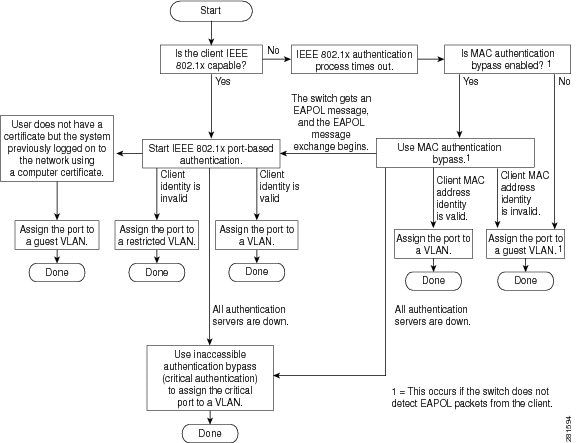
Port-Based Authentication Initiation and Message Exchange:
This image shows the client initiating message exchange to the RADIUS server.
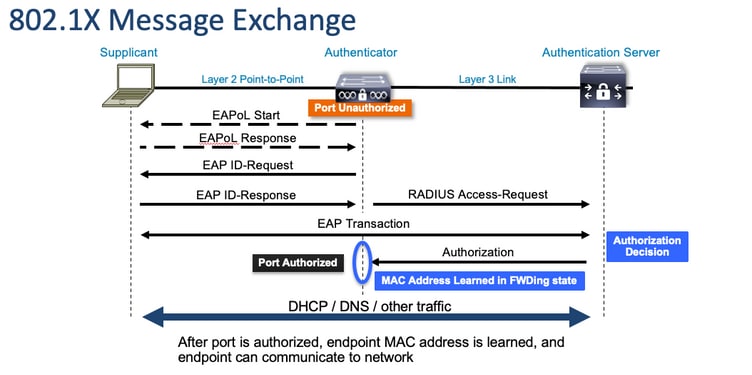
MAB Authentication Initiation and Message Exchange:
This image shows the message exchange during MAC authentication bypass (MAB).
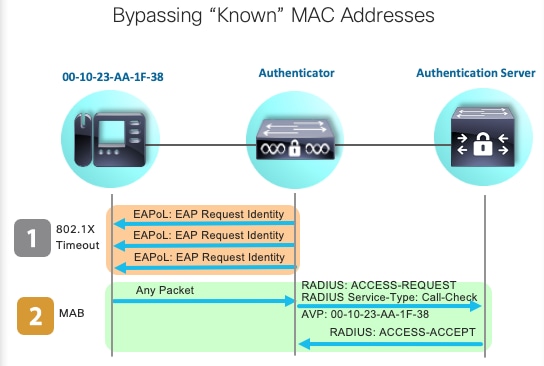
Related Information
- Demystifying RADIUS Server Configurations
- MAC Authentication Bypass Deployment Guide
- Wired 802.1x Deployment Guide
- Catalyst 9300 SPAN Configuration Guide
- Catalyst 9300 EPC Configuration Guide
- Cisco Technical Support & Downloads
Revision History
| Revision | Publish Date | Comments |
|---|---|---|
2.0 |
06-Oct-2026
|
Recertification - Updated Alt Text and Formatting. Removed Non-Working Link. |
1.0 |
21-Sep-2023
|
Initial Release |

 Feedback
Contact Cisco
- Open a Support Case

- (Requires a Cisco Service Contract)