Introduction
This document describes the general procedure, prerequisites, and best practices for upgrading Cisco IOS® XE software.
Prerequisites
Requirements
There are no specific requirements for this document.
Components Used
This document is not restricted to specific software and hardware versions.
The information in this document was created from the devices in a specific lab environment. All of the devices used in this document started with a cleared (default) configuration. If your network is live, ensure that you understand the potential impact of any command.
Other
- Backup Configuration: Always back up the current device configuration before starting the upgrade.
- Console Access: Establish a console session to the router for direct access during the upgrade.
- Remote Access: If you are planning to upgrade the voice gateway/CUBE remotely, verify SSH connection in advance.
- Verify Hardware Compatibility: Confirm that your device supports Cisco IOS 17.9.x or higher.
- ROMMON Upgrade: Minimum ROMMON for 17.9.x or higher is 16.12(2r). ROMMON needs to be upgraded to support the new Cisco IOS version.
- Sufficient Flash Memory: Ensure enough flash memory is available to store the new Cisco IOS image.
- TFTP or Other File Transfer Server: Have a reachable TFTP, FTP, or USB server with the new Cisco IOS image available.
Upgrade Path Considerations
- Direct upgrades from 15.X to 17.9.X or higher require intermediate steps depending on the device and current software version.
- Devices require upgrading first to 16.6.2 release before moving to 17.9.X or higher.
- Source IOS 15.X > ROMMON upgrade to 6.12(2r) > Reload > Cisco IOS Upgrade to 16.6.2 > Reload > Cisco IOS Upgrade to 17.9.X > Reload.
Upgrade Procedure
Step 1. Establish console connection.
- Connect to the device console port using a terminal emulator with settings:
- Speed: 9600 bps
- Data bits: 8
- Parity: None
- Stop bits: 1
- Flow control: None

Note: In case you are accessing the voice gateway/CUBE remotely, ignore Step 1.
Step 2. Verify connectivity to file server.
Ping the TFTP or FTP server from the device to ensure network connectivity.
Step 3. Copy the new Cisco IOS and ROMMON image.
- Use the command to copy the new Cisco IOS XE image from the server to the device flash memory:
Router# copy tftp: flash: or copy scp: flash:
- Provide the IP address of the server, filename, and other details when prompted.
Step 4. Verify the image.
- After copying, verify the image integrity using MD5 checksum if available.
- In privilege mode, use verify bootflash:<imagename.bin>.
Step 5. Upgrade ROMMON.
- Upgrade rom-monitor filename bootflash:<name_of_rommon_file> all:
- Router# write memory
- Router# reload
- Use show rom-monitor or show platform command in order to check current ROMMON version.
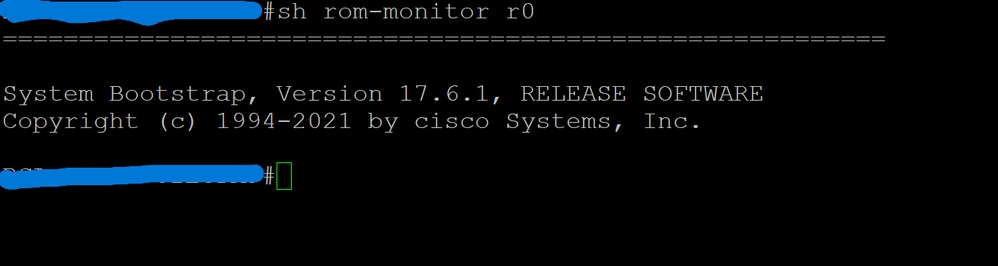
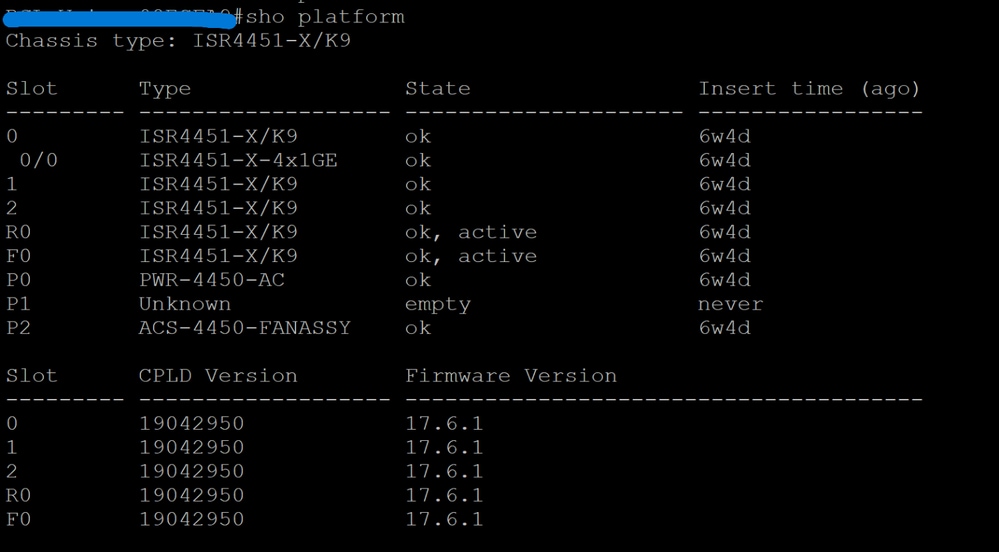
Step 6: Configure boot variable to intermediate Cisco IOS XE 16.6.2.
- Set the device to boot from the new image:
- Router(config)#no boot system
- Router(config)# boot system flash:<new-image-filename>
- Router(config)# boot system flash:<current-image-filename>
Step 7. Reload the device.
- Reload the device to boot with the new Cisco IOS XE version:
Step 8. Verify upgrade.
- After reload, verify the running version:
Step 9: Configure boot variable to target Cisco IOS 17.9.X XE or higher.
- Set the device to boot from the new image:
- Router(config)#no boot system
- Router(config)# boot system flash:<new-image-filename>
- Router(config)# boot system flash:<current-image-filename>
Step 10. Reload the device.
- Reload the device to boot with the new Cisco IOS XE version:
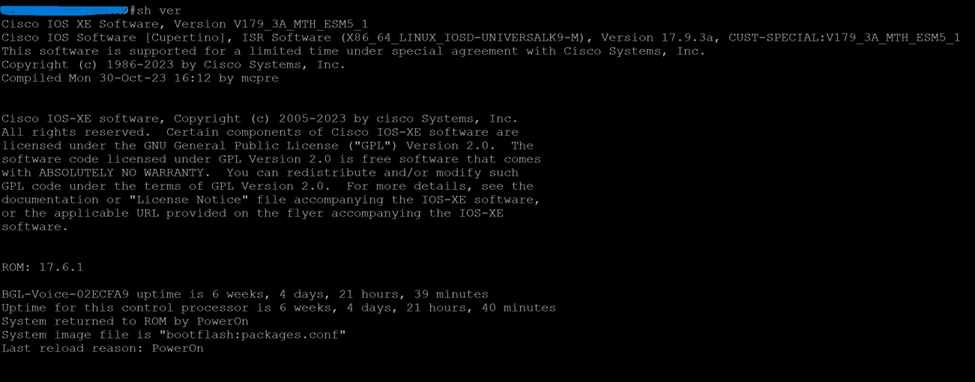
Step 11. Verify upgrade.
- After reload, verify the running version:
Summary
- Always check device-specific upgrade paths and prerequisites.
- Ensure you use the model specific Cisco IOS image and ROMMON image.
- Backup configurations and verify connectivity before starting.
- Use the appropriate commands to copy, verify, and activate the new Cisco IOS XE image.
- Verify the upgrade by checking the running Cisco IOS XE version after reloading.
- Please check the bug Cisco bug ID CSCvm54595: SSH connection loss after reloading. Make prearrangements considering this bug.
- Bug Cisco bug ID CSCwj23735: The 'rtp port range' configuration was lost after a CUBE reload. The workaround is to either manually re-enter this command after reloading the CUBE or upgrade the router to a fixed release, such as version 17.12.X.
Workaround: Implementation of EEM script.
- Bug Cisco bug ID CSCwm32946: This bug causes the CUBE to fail to relay or pass the 488 Media Unacceptable response between call legs for FAX (T.38) Re-invites.
 Feedback