Perform MDS Health and Configuration Check

Available Languages
Introduction
This document describes the procedure and requirements to perform automatic health and configuration checks for the MDS 9000 platforms.
Prerequisites
Requirements
Automated Health and Configuration Check is supported only for MDS platforms that run a supported version of NX-OS® software.
These hardware platforms are supported:
- All MDS 9000 series switches that have not yet reached the Last Date of Support: HW. Refer to the MDS End-of-Life and End-of-Sale Notices here:
End-of-Life and End-of-Sale Notices
Components Used
This document is not restricted to specific software and hardware versions.
The information in this document was created from the devices in a specific lab environment. All of the devices used in this document started with a cleared (default) configuration. If your network is live, ensure that you understand the potential impact of any command.
Conventions
Refer to Cisco Technical Tips Conventions for more information on document conventions.
Health and Configuration Check Procedure
To perform an automated Health and Configuration check on MDS switches, open a regular TAC Service Request at Cisco Support Case Manager with these set of keywords:
Tech: Data Center and Storage Networking
Sub-Tech: MDS9000 - Health and Config Check (AUTOMATED)
Problem Code: Health and Config Check
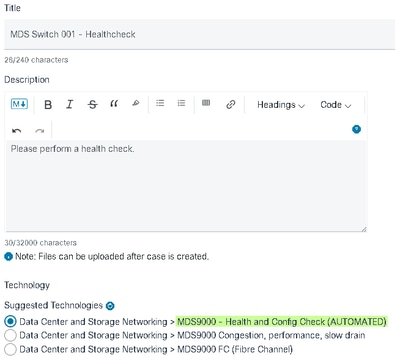 Selecting Health and Config Check
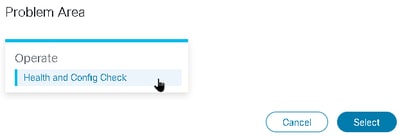 Problem Area - Health and Config Check
For the TAC SR opened, upload output of the show tech-support details command captured from the switch, either in .txt or .gz/.tar format. Currently, the show tech-support details file captured in ASCII and UTF-8 text formats are supported. For the upload instructions, refer to TAC Customer File Uploads.
Starting with NX-OS 8.4(2d) and 9.2(1), the MDS tac-pac command has been enhanced to quickly create a file on bootflash that contains a show tech-support details with an appended show logging onboard. This is the preferred method of creating the input file for any TAC Service Request (SR) requiring a show tech-support details including an automated health and configuration check case.
After the required output is attached to the SR, Cisco automation analyzes the logs and provides a report (in PDF format) attached to an email sent to you. The report contains a list of issues detected, relevant steps to troubleshoot the problems, and recommended action plan.
If there are questions in regards to the health check failures reported, you are advised to open a separate service request(s) with appropriate keywords to get further assistance. It is strongly recommended to refer to the Service Request (SR) number opened for the Automated Health and Config Check along with the report generated to expedite the investigation.
Severity Levels
In the table are the next standard NX-OS severity levels and their definitions used.
| Severity Level |
Description |
| Emergency(0) |
System is unusable. |
| Alert(1) |
Critical conditions, immediate attention needed. |
| Critical(2) |
Major conditions. |
| Error(3) |
Minor conditions. |
| Warning(4) |
Warning conditions. |
| Notice(5) |
Basic notification and informational messages. Possibly independently insignificant. |
| Information(6) |
Normal events signify returning to normal state. |
Health and Configuration Check Modules
Automated MDS Health and Configuration Check Version 1, May 2023 release, performs the checks listed in the Table 1.
Table 1: Health Check Modules and Associated CLIs used by the Modules
| Index |
Health Check Module |
Brief Description of the Module |
CLI(s) Used to Perform Health Check |
| 1 |
NX-OS Release Check |
Check if the device runs a Cisco-recommended NX-OS software release. |
show version |
| 2 |
MDS transceiver check for EOL/EOS |
Check if any transceiver is End-of-Life (EOL) or End-of-Sale (EOS). |
show version show clock show hardware |
| 3 |
Data rate usage for FC interfaces on MDS switch |
Checks interface input and output rates. Lists the top 10 interfaces and alerts on interfaces with more than 80% utilization. |
show version show interface brief show interface |
| 4 |
Transceiver detail information for MDS switch |
Checks interface temperature, voltage, current, tx power, or rx power values for nominal values. Suggests next steps if faults are detected. |
show version show hardware show interface transceiver details |
| 5 |
Check for PSIRT defects based on running NX-OS version |
Matches against a variety of PSIRTs according to the HW/SW and configuration. This is not exhaustive. |
show version show running-config |
| 6 |
MDS check for Clock Information |
Checks for recommended clock configuration and provides sample recommended clock configurations. |
show running-config show clock |
| 7 |
MDS hardware check for EOL/EOS |
Identifies End-of-Life (EOL) and End-of-Support (EOS) dates for MDS modules and chassis. |
show version show module show hardware show inventory |
| 8 |
MDS software check for EOL/EOS |
Identifies End-of-Life (EOL) and End-of-Support (EOS) dates for MDS NX-OS releases. |
show version show module |
| 9 |
MDS FCNS database and FLOGI database consistency check |
Check to see the consistency between the "show fcns database" and "show flogi database" outputs. |
show version show hardware show flogi database show fcns database local vsan 1-4093 |
| 10 |
MDS check for all VSANs up and active on all TF ports |
Check to ensure all the TF ports have all allowed VSANs in active state, no VSANs in isolated or initializing states. |
show version show hardware show interface show interface brief show port-channel database |
| 11 |
MDS check for all VSANs up and active on all TE ports |
Check to ensure all the TE ports have all allowed VSANs in active state, no VSANs in isolated or initializing states. |
show version show module show interface show interface brief show port-channel database |
| 12 |
MDS OUI Check Remote Devices |
Check to ensure MDS recognizes the OUI of connected through trunk and port-channel connections. |
show flogi internal event-history errors show port internal event-history errors show system internal fcfwd idxmap interface show flogi internal event-history debugs show accounting log |
| 13 |
MDS CFS Lock Check |
Check for the presence of cfs locks and suggest steps to clear them. |
show version show module show hardware show cfs lock show logging log show cfs internal session-history show cfs peers show fcdomain domain-list show cfs internal event-history errors show clock |
| 14 |
MDS Check active supervisor mgmt0 link |
Check if the active or only supervisor mgmt0 link status shows up. |
show version show interface mgmt0 |
| 15 |
MDS 9700 Check standby supervisor mgmt0 link |
Check if the standby supervisor mgmt0 link status shows up. Only valid for MDS 9700 directors running NX-OS 9.2(1) and higher versions. |
show version show interface mgmt0 standby |
| 16 |
MDS Suboptimal PC Member Allocation Check |
Port-channels are important for resiliency in multi-switch Fibre Channel SANs. Configuring port-channels for maximum fault-tolerance and hardware resource utilization contributes to the resiliency of the SAN. This module checks each Fibre Channel port-channel found to ensure its member interfaces are distributed as evenly as possible across the available modules and fwd-engines in the switch. |
show version show interface brief |
| 17 |
MDS FSPF Consistency Check |
Checks the FSPF costs on each ISL to ensure that adjacent switches have the same/consistent costs. If the costs are different on each side of the ISL then unexpected or asymmetric routing can occur. This check is not applicable to switches in NPV mode since there is no FSPF database in these switches. |
show switchname show fspf database show fcs ie show npv internal info |
| 18 |
MDS High CPU Utilization Check |
Verify that the current CPU utilization is within the predetermined limit by checking multiple command outputs. Notify the user if the usage exceeds 60%, inform the user if the usage exceeds 80%, and warn the user if the usage exceeds 90%. |
show processes cpu show processes cpu history show logging log |
| 19 |
MDS High Memory Utilization Check |
Check a few command outputs to determine if the current memory usage is less than the configured thresholds or if any processes are running within the allotted memory limit. If the usage exceeds 90%, notify the users. |
show version show processes memory show running-config |
| 20 | MDS Check Port-Monitor Tx-Datarate Configuration to Detect Over-Utilization |
Check active port-monitor policy(s) to determine if the tx-datarate and/or tx-datarate-burst counters are configured to properly detect over-utilization. |
show version show interface brief show running-config |
| 21 | MDS Check for FSPF route deletion errors caused by a bad supervisor |
Check for FSPF route deletion errors over last 20 days, and indicate them and thereafter verify if there are non-zero error counters recorded on inband sup-fc0 link. |
show version show logging log show hardware internal sup-fc0 interface-stats (MDS 9700s) show hardware internal sup-fc0 errstats (MDS fabric switches) |
| 22 | MDS Check non zero errors on sup-fc0 link |
Check for any non-zero error counters recorded on sup-fc0 inband interface. |
show version show hardware internal sup-fc0 interface-stats (MDS 9700s) show hardware internal sup-fc0 errstats (MDS fabric switches) |
| 23 | MDS Modules Version Consistency Check |
Check for version consistency across the modules to ensure the linecards and supervisors are all running the same software. |
show version show module |
| 24 | MDS Modules OK Check |
Check to see if all the modules on the MDS switch have reached their expected operational state. |
show module show hardware |
| 25 | MDS Core Files Check |
Check for any unexpected process crashes or terminations. |
show core |
| 26 | MDS File Systems Usage Check |
Check file system utilization and flag usage exceeding 90%. |
show system internal flash |
| 27 | MDS Enhanced Zoning Lock Check |
Check for the presence of enhanced zone locks across all VSANs. |
show zone status vsan 1-4093 |
| 28 | MDS ACLTCAM Consistencies Check |
Verify that ACLTCAM entries are programmed consistently between hardware and software while identifying and flagging any duplicate entries within both tables as errors. |
show process acltcam fwd-engine {x} input show process acltcam fwd-engine {x} output show process acltcam fwd-engine {x} input software show process acltcam fwd-engine {x} output software show process acltcam interface fc{module_number}/{x} output show process acltcam interface fc{module_number}/{x} output software |
| 29 | MDS Recent Credit Loss Events |
Checks for any interfaces experiencing credit-loss-recovery in the last 7 days from the time and date of the tech-support. It will output the last 10 events for each interface. It also outputs an extensive 'Recommendations' section to troubleshoot these. |
show switchname show version show interface show interface transceiver details show logging logfile show process creditmon credit-loss-events |
Reports and Caveats
- The Health and Config Check SR is automated and handled by the Virtual TAC Engineer.
- The report (in PDF format) is usually generated within 24 business hours after all necessary logs attached to the SR.
- The report is automatically shared over email (sourced from Cisco TAC Automated Emails <no-reply@cisco.com>) with all contacts (primary as well as secondary) associated with the service request.
- The report is also attached to the Service Request to allow its availability at any later point in time.
- Please be advised that the issues listed in the report are based on the logs provided and within the scope of the health check modules listed in Table 1 (shown previously).
- The list of health and configuration checks performed is non-exhaustive, and users are advised to perform further health checks as needed.
- New health and configuration checks can be added over time.
FAQs
Q1: Can I upload show tech-support details for more than one switch in the same SR to get the Health Check report for all the switches?
A1: This is an automated case handling, and the health checks are performed by the Virtual TAC Engineer. The health check is done for only the first "show tech-support details" uploaded.
Q2: Can I upload more than one show tech-support details for the same device, say, captured a few hours apart, to get a health check done for both?
A2: This is an automated and stateless case handling performed by the Virtual TAC Engineer, and the Health and Config Check is done for the first show tech-support details file uploaded to the SR, irrespective of whether the files uploaded are from the same switch or different switches.
Q3: Can I get health checks done for the switches that show tech-support details files compressed as a single rar/gz file and uploaded to the SR?
A3: No. If multiple show tech support details are uploaded as a single rar/zip/gz file, only the first file in the archive is processed for health checks.
Q4: What can I do if I have questions about one of the health check failures reported?
A4: Please open a separate TAC Service Request to get further assistance on the specific health check result. It is highly recommended to attach the health check report and refer to the Service Request (SR) Case number opened for the automated health and config check.
Q5: Can I use the same SR opened for the Automated Health and Config Check to troubleshoot the issues found?
A5: No. As the proactive health check is automated, please open a new Service Request to troubleshoot and resolve the issues reported. Please be advised that the SR opened for health check is closed within 24 hours after the health report is published.
Q6: Does the automated health and config check run against the show tech-support details file for the switch that runs versions older than the one mentioned previously?
A6: The automated health and configuration check is built for the platforms and software releases mentioned previously. For devices that run older versions, it is the best effort, and there is no guarantee of the accuracy of the report.
Q7: How do I close the SR opened for Health Check?
A7: The SR is closed within 24 hours after the first Health Check report is sent. No action is needed from the user towards SR closure.
Q8: How do I share comments or feedback about the Proactive Health and Configuration Check?
A8: Share them through email to MDS-HealthCheck-Feedback@cisco.com
Q9. What is the recommended method to capture show tech-support or show tech-support details from a switch?
A9: As mentioned earlier in this document, starting with NX-OS 8.4(2d) and 9.2(1), the MDS tac-pac command has been enhanced to quickly create a file on bootflash that contains a "show tech-support details" with an appended "show logging onboard". This is the preferred method of creating the input file for any TAC Service Request (SR) requiring a "show tech-support details" including an automated health and configuration check. The CLI output captured to a log file in the terminal application (for example, SecureCRT, PuTTY) could be in UTF-8-BOM format (or similar) which is NOT supported by the automated health check. The Automated Health & Config check supports files only in ASCII or UTF-8 formats.
Q10. Can the MDS health checker be used with switches configured for FICON protocol?
A10: Yes, this is possible, but at present, there are no specific checks for FICON VSANs.
Perform Nexus Health and Configuration Check
Refer to Perform Nexus Health and Configuration Check .
Feedback
Any feedback on the operation of these tools is much appreciated. If you have any observations, or suggestions (for example, about the ease of use, scope, quality of the reports generated and so on) share them here MDS-HealthCheck-Feedback@cisco.com.
Revision History
| Revision | Publish Date | Comments |
|---|---|---|
13.0 |
25-Feb-2026
|
Updated Formatting. |
12.0 |
23-Apr-2025
|
Added healthchecks 21 and 22 From Yuvaraj Ratnala
Added some screen shots and extrat text - Jason Mooney |
11.0 |
08-Apr-2025
|
Added healthchecks 21 and 22 From Yuvaraj Ratnala |
10.0 |
04-Dec-2024
|
Added a Note to the Requirements Section. |
9.0 |
10-Jul-2024
|
Updated Machine Translation, Style Requirements, and Formatting. |
8.0 |
29-May-2024
|
Updated and Revised. |
7.0 |
21-May-2024
|
Updated and Revised |
6.0 |
28-Feb-2024
|
Revision, updated. |
4.0 |
07-Nov-2023
|
Update |
3.0 |
06-Sep-2023
|
Updated Contributor List. |
2.0 |
25-Aug-2023
|
Added Sub-Tech, Problem Code and Links.
Updated Style Requirements and Formatting. |
1.0 |
19-Jul-2023
|
Initial Release |
 Feedback