Collect Tech Support Files for Hyperflex UI and CLI
Available Languages
Contents
Introduction
This document describes how to collect tech support files for the Hyperflex UI and CLI.
Prerequisites
Requirements
There are no specific requirements for this document.
Components Used
This document is not restricted to specific hardware and software versions.
The information in this document was created from the devices in a specific lab environment. All of the devices used in this document started with a cleared (default) configuration. If your network is live, ensure that you understand the potential impact of any command.
Background Information
When you contact Cisco TAC, tech support files are a critical part of the troubleshooting process.

Note: For customers who use Cisco Intersight and have UCS Manager and HyperFlex Connect connected to Intersight, Cisco TAC can collect UCS Hardware or Storage Controller (storfs-support) files without them being manually uploaded.
Contents
HX 4.0 Onwards : HyperFlex Data Platform Support Bundle
From HX Connect UI
The recommended method to collect support bundles is through the HX Connect user interface. You can generate a support bundle that collects the logs from every selected controller VM and ESXi host in the HX storage cluster. The vCenter logs are not collected through HX Connect.
All support bundle timestamps are listed in the UTC timezone regardless of cluster timezone or server timezone settings.
Step 1. Log in to HX Connect and click Settings and then Support Bundle.
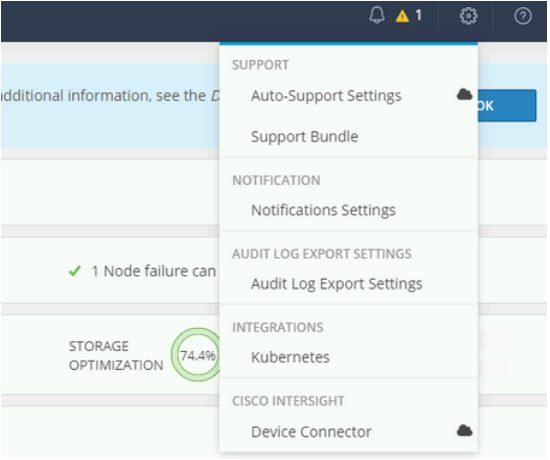
Step 2. Under Support Bundle, you can now see three options- Basic, Detailed and Extended.
Basic - Cisco HX Data Platform logs.
Detailed - Gathers Hyper-V logs and performance data for the environment in addition to the Basic support bundle. This is the default Support bundle as generated by storfs-support command.
Extended - When generated with just Extended support bundle option alone, then it only contains core files. When generated with the Recommended Support bundle and Extended Support bundle option, then it includes core files and detailed support bundles.

Step 3. Click Generate. This can give you a pop up to select the node and generate different types of support bundles for download.
- The default option is to generate Recommended Support Bundle.
- Recommended Support Bundle triggers creation of both Basic Support Bundle and Detailed Support Bundle from the same option.
- All the nodes are selected by default. Uncheck the Nodes which are not required manually.
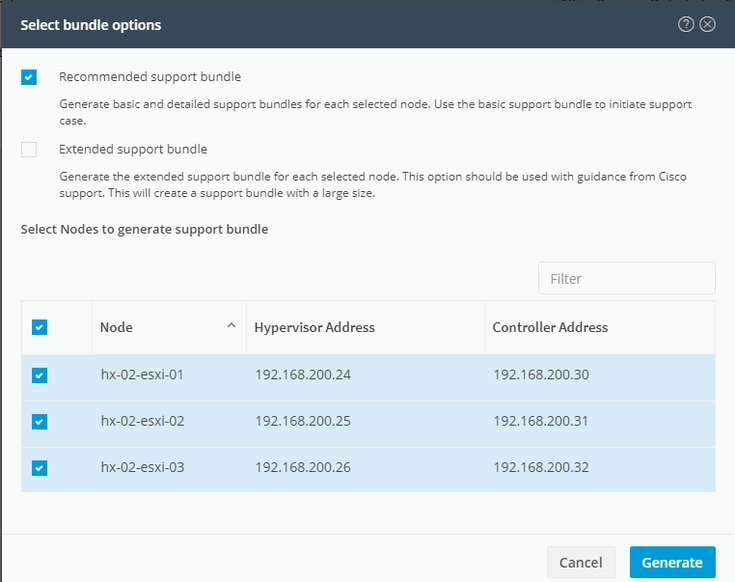
Click Generate to start the support bundle creation.
Once done, the Generate option can be greyed out and it can show you Basic support bundle generation in process.
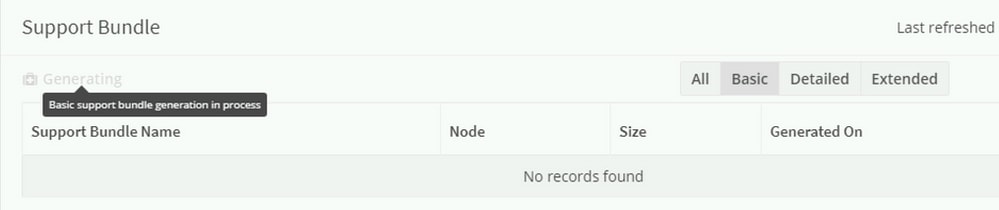
Once the basic support bundle generation is completed, it can start to generate the detailed support bundle. You can confirm this when you browse to the Basic tab.
The Generate option can be greyed out and it can show you Detailed support bundle generation in process.
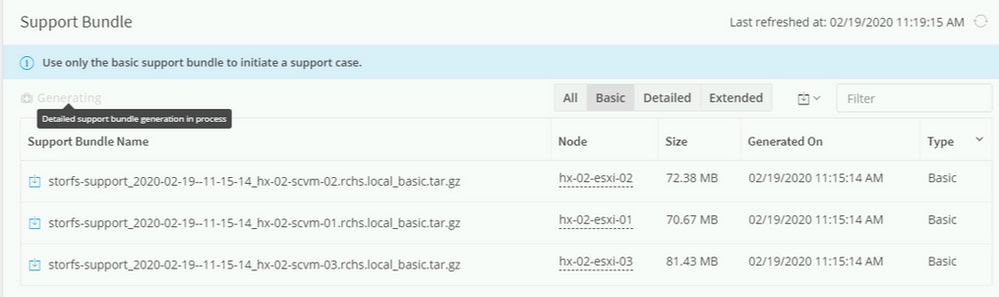
You can now open TAC cases that use Basic Supported bundle. Detailed supported bundles are required if the case needs to be escalated to Engineering.
Step 4. Once both the support bundles are generated, you see a prompt that says Support Bundle Generation Completed. Next, you can download Basic or Detailed support bundle as needed.
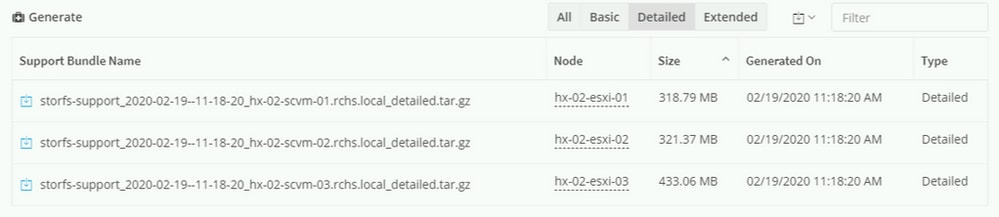
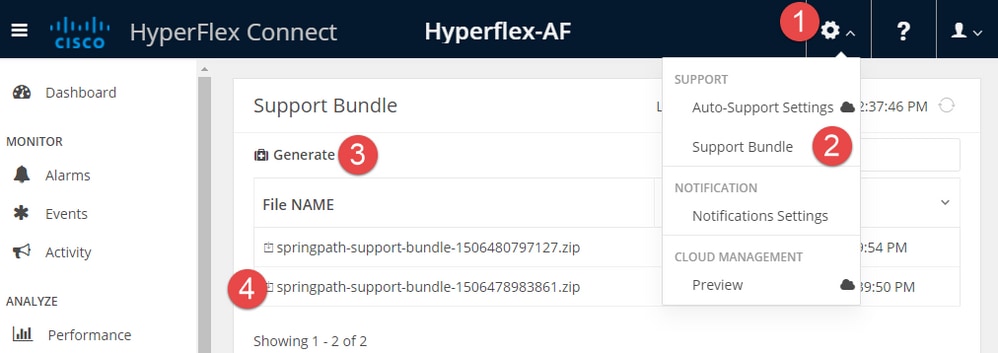
HyperFlex Data Platform Support Bundle: Hyperflex Cluster UI Method (HX Version 2.5 ~ 3.5)

To access this UI, navigate tohttps://{stctlvm mgmt ip}
stctlvm = Storage Controller VM
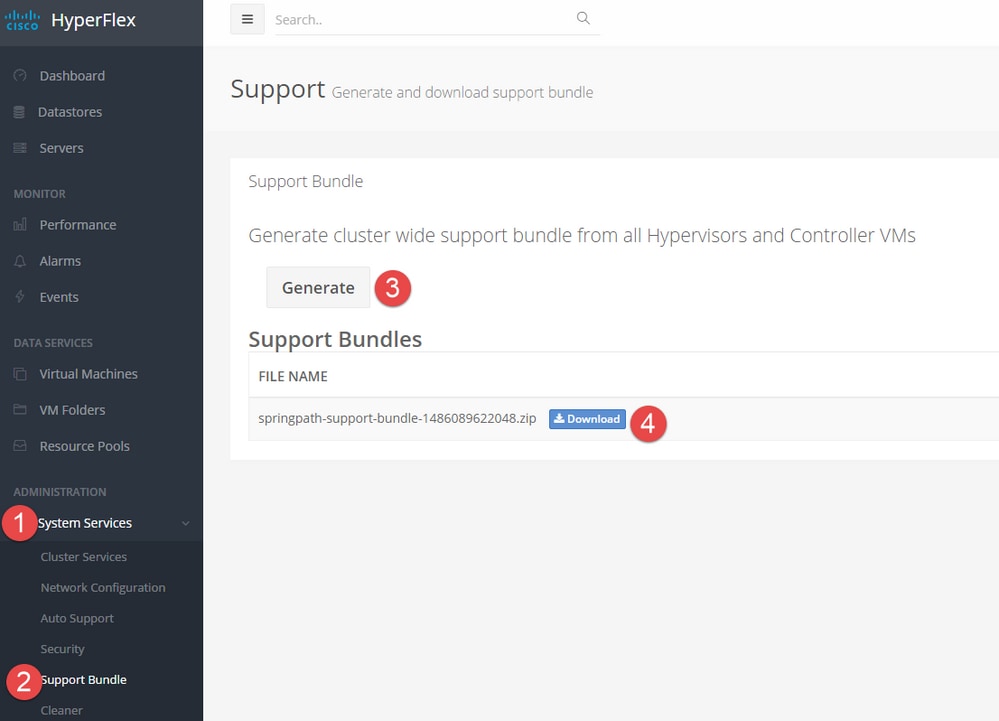
HyperFlex Data Platform Support Bundle: Hyperflex Cluster UI Method (Pre version 2.5)
To access this UI, navigate to https://{stctlvm mgmt ip}/ui
stctlvm = Storage Controller VM
HyperFlex Data Platform Support Bundle: Hyperflex Cluster CLI Method
Step 1. Use the storfs-support command.
Once you log into a storage controller with SSH client, you can run the given command to generate a tech support file. Later, it can be copied with SFTP client.
Detailed Support Bundle
Use the old method and run the CLI command storfs-support to generate the default (or detailed support bundle).
root@SpringpathController0FDF9RNMJK:~# storfs-support
2017-04-28 05:24:18,505 - Storfs-Support - INFO -
2017-04-28 05:24:18,505 - Storfs-Support - INFO -
2017-04-28 05:24:18,505 - Storfs-Support - INFO - Initiating support generation...
2017-04-28 05:24:18,506 - Storfs-Support - INFO -
2017-04-28 05:24:18,506 - Storfs-Support - INFO -
2017-04-28 05:24:18,506 - Storfs-Support - INFO - Generating support archive. This can take some time...
2017-04-28 05:24:18,506 - Storfs-Support - INFO -
2017-04-28 05:31:57,692 - Storfs-Support - INFO - Support archive generated at:
/var/support/storfs-support_2017-04-28--05-24-18_SpringpathController0FDF9RNMJK.tar.gz
2017-04-28 05:31:57,692 - Storfs-Support - INFO - Removing directory... /var/support/cmds_output
This CLI scrolls until all files are gathered.
CLI shows the output like this when the tech support bundle is finished:
2017-04-28 05:31:57,692 - Storfs-Support - INFO - Support archive generated at:
/var/support/storfs-support_2017-04-28--05-24-18_SpringpathController0FDF9RNMJK.tar.gz
2017-04-28 05:31:57,692 - Storfs-Support - INFO - Removing directory...         /var/support/cmds_output
2017-04-28 05:31:57,694 - Storfs-Support - INFO -
2017-04-28 05:31:57,694 - Storfs-Support - INFO -
2017-04-28 05:31:57,694 - Storfs-Support - INFO - Adding file...
             /var/support/storfs_support-20170428-052418.out
2017-04-28 05:31:57,698 - Storfs-Support - INFO - Removing file...
             /var/support/storfs_support-20170428-052418.out
root@SpringpathController0FDF9RNMJK:~#
Support bundle is saved to /var/support.
root@SpringpathController0FDF9RNMJK:~# ls -lh /var/support
total 398M
drwxrwxrwx+ 3 root root 4.0K Apr 28 05:19 asup
-rw-rw-rw-  1 root root 398M Apr 28 05:31
storfs-support_2017-04-28--05-24-18_SpringpathController0FDF9RNMJK.tar.gz
root@SpringpathController0FDF9RNMJK:~#
These are other options also available to use with the storfs-support command:
storfs-support --perf
storfs-support --extended
--perf
Gathers performance data for the environment.
--extended
It includes core files that are located in the /var/core directory in the support bundle.
New : Basic Support Bundle
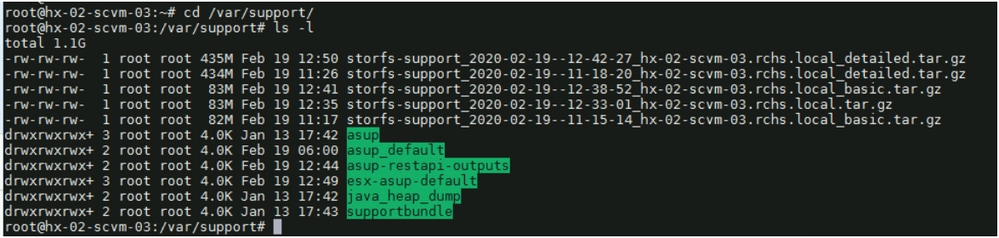
Note: storfs-support DOES have the option for the basic support bundle but DOES NOT have the capability to append the file name (basic vs detailed) to the support bundle file name.
As you can see below, the file name for basic bundle is the same as the one generated for detailed storfs-support without any apend.
root@hx-02-scvm-03:~# storfs-support --basic
/var/support
2020-02-19 12:33:01,315 - Storfs-Support - INFO -
2020-02-19 12:33:01,315 - Storfs-Support - INFO -
2020-02-19 12:33:01,315 - Storfs-Support - INFO - Initiating support generation...
2020-02-19 12:33:01,317 - Storfs-Support - INFO -
2020-02-19 12:33:01,317 - Storfs-Support - INFO -
2020-02-19 12:33:01,317 - Storfs-Support - INFO - Generating support archive. This can take some time...
2020-02-19 12:33:01,317 - Storfs-Support - INFO -
2020-02-19 12:33:01,317 - Storfs-Support - INFO -
2020-02-19 12:33:01,318 - Storfs-Support - INFO - STORFS_RUNTIMEDIR: /tmp
2020-02-19 12:33:01,318 - Storfs-Support - INFO - STORFS_SOURCEDIR:

2020-02-19 12:35:34,446 - Storfs-Support - INFO -
2020-02-19 12:35:34,446 - Storfs-Support - INFO - Support archive generated at:
/var/support/storfs-support_2020-02-19--12-33-01_hx-02-scvm-03.rchs.local.tar.gz
2020-02-19 12:35:34,446 - Storfs-Support - INFO - Removing directory... /var/support/cmds_output
Step 2. Use the asupcli command.
Run the command asupclie generate. You can run asupcli generate--help to get the list of options.
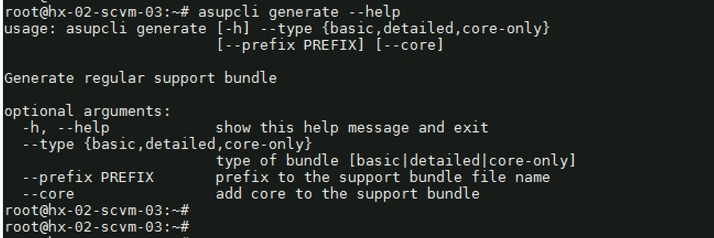
Generate Default/Detailed Support Bundle

Generate Basic Support Bundle

The logs are saved under /var/support.
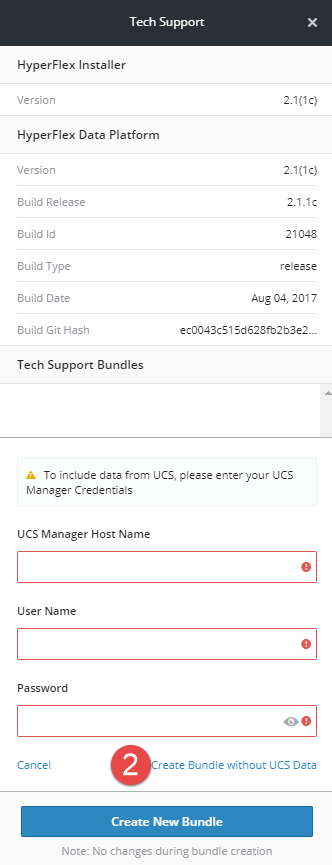
Capturing Hyperflex Installer Logs: Hyperflex Platform Installer UI Method
To access this UI, navigate tohttps://{HX Installer ip}.
Log in with credentials:
Username: root
Password: Cisco123

Capturing Hyperflex Installer Logs: Hyperflex Platform Installer CLI Method
Once you log in to the platform installer with either with an SSH client or via console, you can run the given command to generate a tech support file. Later, it can be copied with SFTP client.
root@Cisco-HX-Data-Platform-Installer:/var/support# deployment-support
/var/support
2012-12-07 19:59:52,857 - Storfs-Support - INFO -
2012-12-07 19:59:52,858 - Storfs-Support - INFO -
2012-12-07 19:59:52,858 - Storfs-Support - INFO - Initiating support generation...
2012-12-07 19:59:52,860 - Storfs-Support - INFO -
2012-12-07 19:59:52,860 - Storfs-Support - INFO -
2012-12-07 19:59:52,860 - Storfs-Support - INFO - Generating support archive. This can take some time...
2012-12-07 19:59:52,860 - Storfs-Support - INFO -
2012-12-07 19:59:52,860 - Storfs-Support - INFO -
2012-12-07 19:59:52,860 - Storfs-Support - INFO - STORFS_RUNTIMEDIR:             /tmp
2012-12-07 19:59:52,860 - Storfs-Support - INFO - STORFS_SOURCEDIR:
2012-12-07 19:59:52,860 - Storfs-Support - INFO - STORFS_SUPPORT_TARGETDIR:      /var/support
2012-12-07 19:59:52,860 - Storfs-Support - INFO - STORFS_INSTALLDIR:             /opt/springpath/storfs-support
2012-12-07 19:59:52,860 - Storfs-Support - INFO - STORFS_LOGDIR:                 /var/log
2012-12-07 19:59:52,860 - Storfs-Support - INFO - STORFS_ASUPDIR:                /var/log/asup
2012-12-07 19:59:52,861 - Storfs-Support - INFO - STORFS_COREDIR:                /var/core
This CLI scrolls until all files are gathered.
CLI shows the output like this when the tech support bundle is finished:
2012-12-07 19:59:52,994 - Storfs-Support - INFO - Support archive generated at:
/var/support/storfs-support_2012-12-07--19-59-52_Cisco-HX-Data-Platform-Installer.tar.gz
2012-12-07 19:59:52,994 - Storfs-Support - INFO - Removing directory...         /var/support/cmds_output
2012-12-07 19:59:52,994 - Storfs-Support - INFO -
2012-12-07 19:59:52,994 - Storfs-Support - INFO -
2012-12-07 19:59:52,995 - Storfs-Support - INFO - Adding file...
              /var/support/storfs_support-20121207-195952.out
2012-12-07 19:59:52,996 - Storfs-Support - INFO - Removing file...
            /var/support/storfs_support-20121207-195952.out
root@Cisco-HX-Data-Platform-Installer:/var/support#
Support bundle is saved to /var/support.
root@Cisco-HX-Data-Platform-Installer:~# ls -lh /var/support/
total 204K
-rw-rw-rw- 1 root root 203K Dec 7 19:59
storfs-support_2012-12-07--19-59-52_Cisco-HX-Data-Platform-Installer.tar.gz
root@Cisco-HX-Data-Platform-Installer:~#
Capturing VMware ESXi Logs
To collect VMware ESXi related logs, reference the VMware Knowledge Base articles:
Via GUI client: VM Ware Article 653
Via CLI session: VM Ware Article 1010705
Capturing VMware vCenter Logs
Full bundle: VM Ware Article 2032892
Virgo logs: Vsphere Monitoring Guide
EAM logs: VM Ware Article 2110014
Capturing UCS Logs
Visual Guide to Collect UCS Tech Support Files - B, C and S Series
Bias-Free Language
The documentation set for this product strives to use bias-free language. For purposes of this documentation set, bias-free is defined as language that does not imply discrimination based on age, disability, gender, racial identity, ethnic identity, sexual orientation, socioeconomic status, and intersectionality. Exceptions can be present in the documentation due to language that is hardcoded in the user interfaces of the product software, language used based on standards documentation, or language that is used by a referenced third-party product.
Revision History
| Revision | Publish Date | Comments |
|---|---|---|
3.0 |
28-May-2026
|
Updated SEO, Style Requirements, and Formatting. |
2.0 |
23-Feb-2023
|
Updated Alt Text, SEO, Legal Requirements, Title, Introduction, Style Requirements, Machine Translation, Gerunds, and Formatting. |
1.0 |
29-Apr-2017
|
Initial Release |

 Feedback
Contact Cisco
- Open a Support Case

- (Requires a Cisco Service Contract)