Field Notice: FN74403 - Cisco Identity Services Engine Shared Memory Allocation Errors Causing Replication Failures, GUI Access Issues, and Authentication Disruptions - Software Upgrade Recommended
Available Languages
Notice
THIS FIELD NOTICE IS PROVIDED ON AN "AS IS" BASIS AND DOES NOT IMPLY ANY KIND OF GUARANTEE OR WARRANTY, INCLUDING THE WARRANTY OF MERCHANTABILITY. YOUR USE OF THE INFORMATION ON THE FIELD NOTICE OR MATERIALS LINKED FROM THE FIELD NOTICE IS AT YOUR OWN RISK. CISCO RESERVES THE RIGHT TO CHANGE OR UPDATE THIS FIELD NOTICE AT ANY TIME.
Products Affected
| Affected Software Product | Affected Release | Affected Release Number | Comments |
|---|---|---|---|
| Identity Services Engine System Software | 3.2 | 3.2.0, 3.2.0 p1, 3.2.0 p2, 3.2.0 p3, 3.2.0 p4, 3.2.0 p5, 3.2.0 p6, 3.2.0 p7 | |
| Identity Services Engine System Software | 3.3 | 3.3 Patch 1, 3.3 Patch 2, 3.3 Patch 3, 3.3 Patch 4, 3.3.0 | |
| Identity Services Engine System Software | 3.4 | 3.4 Patch 1, 3.4.0 |
Defect Information
| Defect ID | Headline |
| CSCwk51948 | ISE MNT unable to connect to it's own database |
Problem Description
Due to memory allocation issues, Cisco Identity Services Engine (ISE) Monitoring and Troubleshooting (MnT) nodes may experience service disruptions such as losing synchronization to the primary Administration node or the Application Server service getting stuck in the initializing state.
This allocation problem affects MnT nodes and Cisco ISE nodes that have the MnT persona enabled.
Background
A shared resources memory allocation failure in Cisco ISE causes database connection errors, which impacts services that rely on the database storage.
Problem Symptom
If Cisco ISE is impacted by this issue, some or all of the following symptoms may be observed:
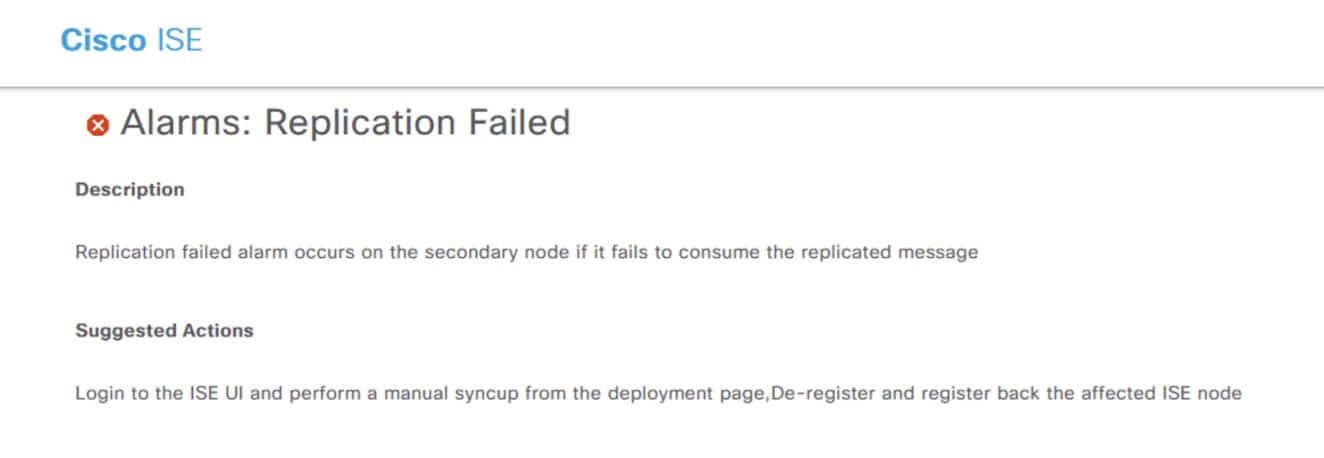
- Replication failure alarms, inability to synchronize one or both MnT nodes, or both. The following image shows the replication failure alarm as it appears in the Alarms dashlet on the Cisco ISE home page:
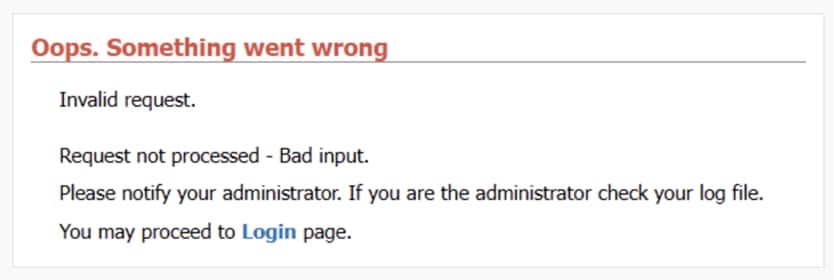
- The GUI of an affected node displays login failures or extreme slowness with error messages such as Oops. Something went wrong or Invalid request. The following image shows an error message that may appear:
- Log collection error alarms may appear in the Alarms dashlet on the Cisco ISE home page. The following text and image show the error as it appears in the Alarms dashlet:
ORA-04031: unable to allocate XXX bytes of shared memory ("shared pool","unknown object","sga heap(1,0)","krbmror")
- The Application Server service is stuck in initializing state or fails to start on affected nodes.
Workaround/Solution
Solution
To resolve this issue, upgrade Cisco ISE to the appropriate fixed release as indicated in the following table:
| Affected Cisco ISE Release | First Fixed Release |
|---|---|
| 3.2 | 3.2 Patch 8 |
| 3.3 | 3.3 Patch 5 |
| 3.4 | 3.4 Patch 2 |
Workaround
If an immediate upgrade is not possible, reloading the affected Cisco ISE MnT nodes will temporarily restore service and clear memory allocation errors.
Revision History
| Version | Description | Section | Date |
| 1.0 | Initial Release | — | 2026-MAY-27 |
For More Information
For further assistance or for more information about this field notice, contact the Cisco Technical Assistance Center (TAC) using one of the following methods:
Receive Email Notification About New Field Notices
To receive email updates about Field Notices (reliability and safety issues), Security Advisories (network security issues), and end-of-life announcements for specific Cisco products, set up a profile in My Notifications.
 Feedback
Contact Cisco
- Open a Support Case

- (Requires a Cisco Service Contract)
This Document Applies to These Products
Unleash the Power of TAC's Virtual Assistance