Field Notice: FN74366 - Multiple Issues Identified in Cisco NCS 2000 Series Node Controllers Software Release 11.14 - Workaround Provided
Available Languages
Notice
THIS FIELD NOTICE IS PROVIDED ON AN "AS IS" BASIS AND DOES NOT IMPLY ANY KIND OF GUARANTEE OR WARRANTY, INCLUDING THE WARRANTY OF MERCHANTABILITY. YOUR USE OF THE INFORMATION ON THE FIELD NOTICE OR MATERIALS LINKED FROM THE FIELD NOTICE IS AT YOUR OWN RISK. CISCO RESERVES THE RIGHT TO CHANGE OR UPDATE THIS FIELD NOTICE AT ANY TIME.
Products Affected
| Affected Software Product | Affected Release | Affected Release Number | Comments |
|---|---|---|---|
| Optical Networking Systems (ONS) System Software | 11 | 11.1.4 |
Defect Information
| Defect ID | Headline |
| CSCws50436 | Node Controller falls into roll reboot on upgrading to 11.14 on tSnmpd Task Exception |
| CSCws42717 | New User creation not working on CTC |
| CSCws82335 | 11.14: SSH Login fails when the "Enable Shell Password" is set |
Problem Description
Cisco has identified multiple issues that may affect Cisco Network Convergence System 2000 (NCS2K) Series devices after upgrading to Release 11.14. Cisco does not recommend that customers who are running Release 11.14 downgrade. Instead, apply the workarounds that are recommended in this Field Notice and then upgrade when a fixed release becomes available.
The following issues have been observed after a successful upgrade to Release 11.14:
- CSCws50436: Cisco NCS2K Series nodes that are configured with SNMPv3 in AuthPriv mode may experience continuous reboots of the node controller cards, making the node unmanageable. These affected nodes can become unrecoverable and will require on-site support, which involves replacing the controller cards with spares and restoring the nodes from a known good database.
- CSCws42717: User creation from Cisco Transport Controller (CTC) is not functional on Cisco NCS2K Series nodes.
- CSCws82335: Users are not able to connect to the node shell using the Secure Shell (SSH) protocol when the node is configured for Shell Access with the Access State set to Secure and the Enable Shell Password option enabled.
Background
Cisco is actively working on addressing the issues that are described in this Field Notice in future software releases that will include the fix. Customers are encouraged to follow the workarounds that are recommended in this Field Notice and wait for a fixed release.
Issue 1 (CSCws50436)
Cisco NCS2K Series devices support SNMPv3 with three security levels: AuthPriv (authentication and privacy), NoAuthNoPriv, and AuthNoPriv.
In Release 11.14, an issue has been identified that may impact nodes that are configured with the AuthPriv security level. When these nodes are upgraded to Release 11.14, the node controller cards may experience roll reboots.
Note: Devices that are configured with NoAuthNoPriv or AuthNoPriv security levels are not affected and continue to operate as expected.
Issue 2 (CSCws42717)
After successfully upgrading a node to Release 11.14, the user creation function through Cisco Transport Controller (CTC) does not work. Attempts by existing CTC users to create new users through CTC do not complete successfully.
Issue 3 (CSCws82335)
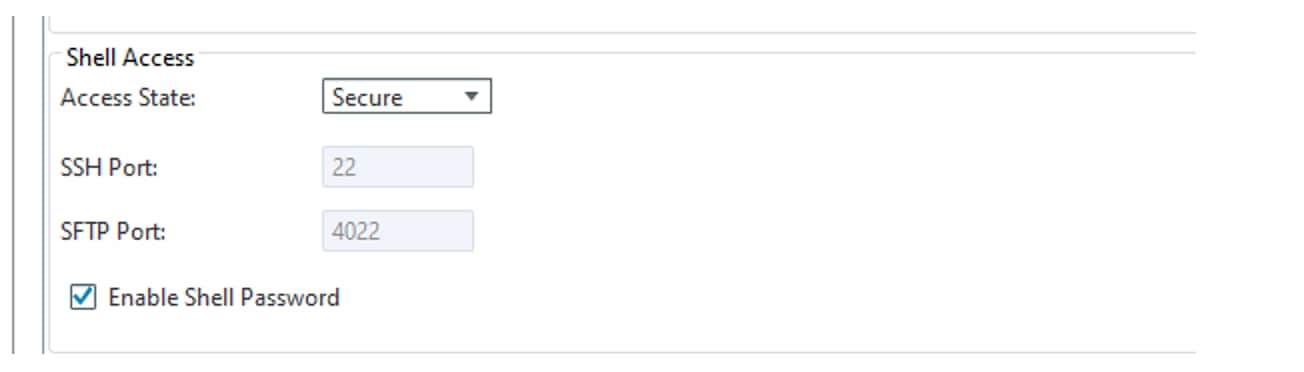
After upgrading to Release 11.14, users are not able to connect to the node shell using the SSH protocol if Shell Access is configured with the Access State set to Secure and the Enable Shell Password box is checked.
Cisco NCS2K Series nodes that are running Release 11.14 and are configured for Shell Access with the Access State set to Secure and the Enable Shell Password option enabled are affected.
Problem Symptom
The following symptoms have been observed for each of the issues described in the Problem Description section of this Field Notice:
Issue 1 (CSCws50436)
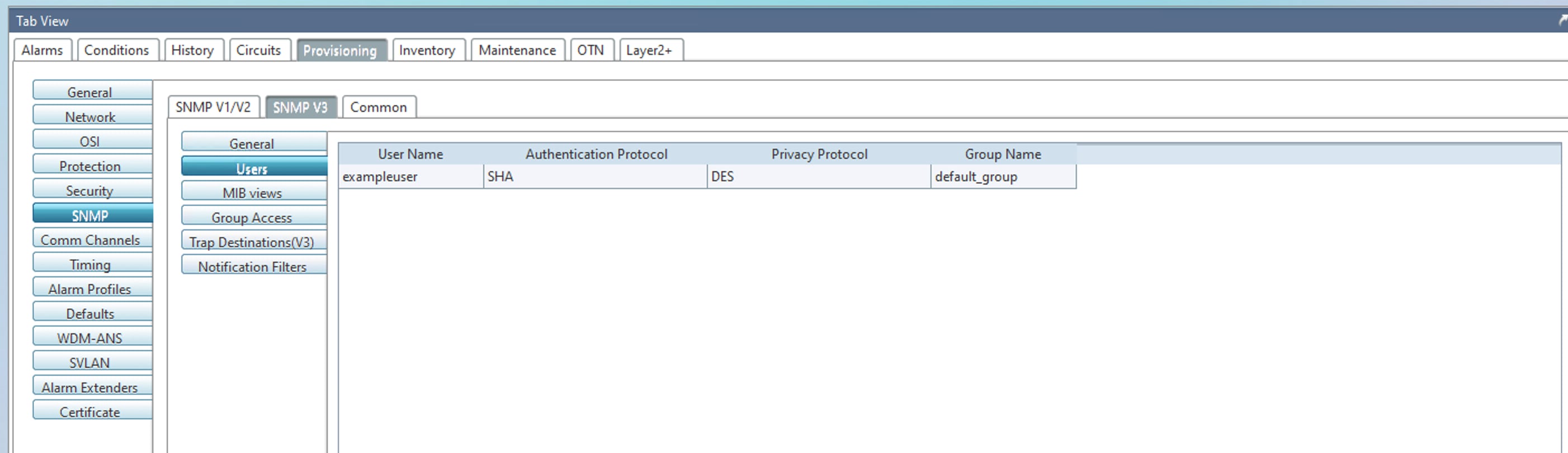
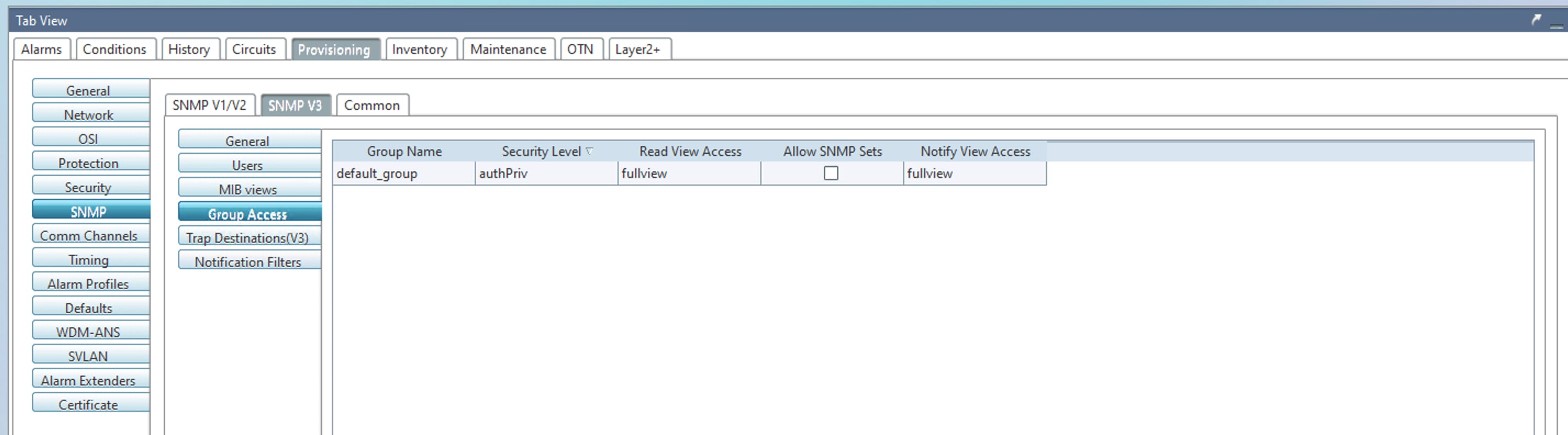
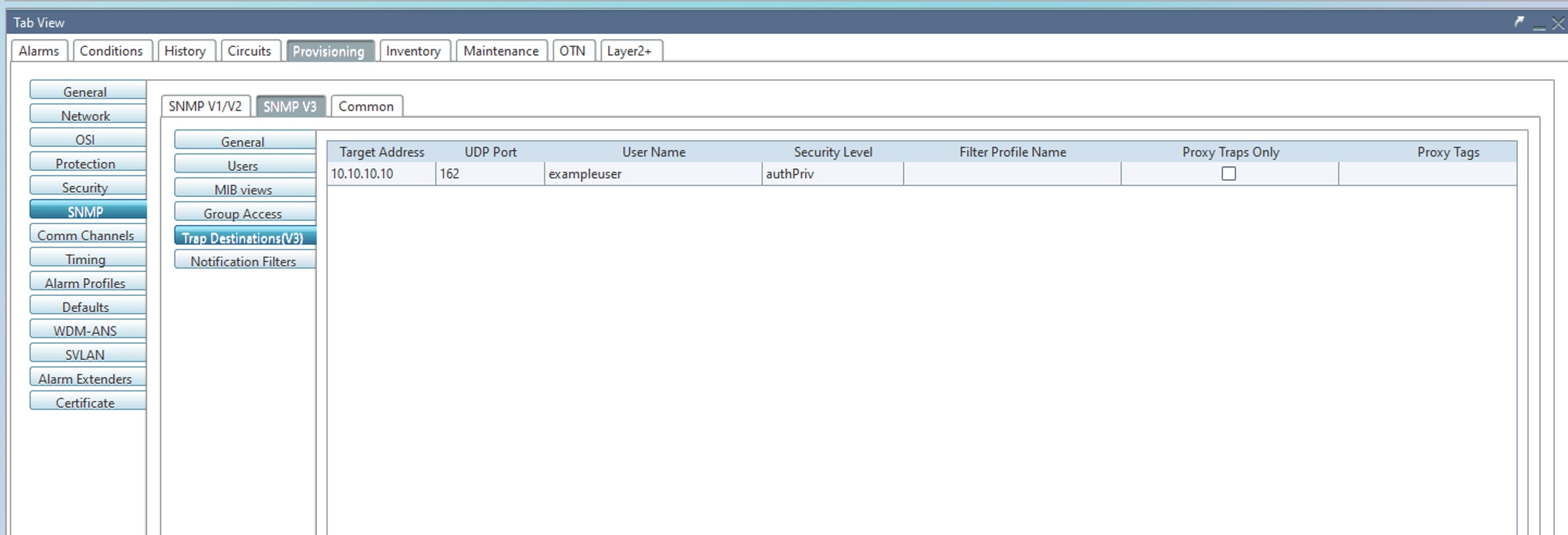
When Cisco NCS2K Series nodes with SNMPv3 configured in AuthPriv mode are upgraded to Release 11.14, node controller cards undergo consecutive roll reboots. As a result, the affected nodes become unreachable. The impacted configuration is illustrated in the following images.
Issue 2 (CSCws42717)
After a successful upgrade to Release 11.14, attempts to create new users through Cisco Transport Controller (CTC) do not succeed. When an existing CTC user initiates the user creation action, the process does not complete successfully. No error message is displayed, but the new user is not created.
Issue 3 (CSCws82335)
After upgrading Cisco NCS2K Series nodes that are configured for Shell Access with the Access State set to Secure and the Enable Shell Password option enabled to Release 11.14, users are unable to SSH into the shell of the node. During SSH login attempts, the system prompts for the SSH password. However, even when the correct password is entered, the system does not prompt for the shell password and access to the shell is not granted.
Workaround/Solution
Solution
To permanently resolve the issue that is described in this Field Notice, upgrade to the fixed software release when it becomes available. In the meantime, please apply the following interim workarounds.
Workarounds
Issue 1 (CSCws50436)
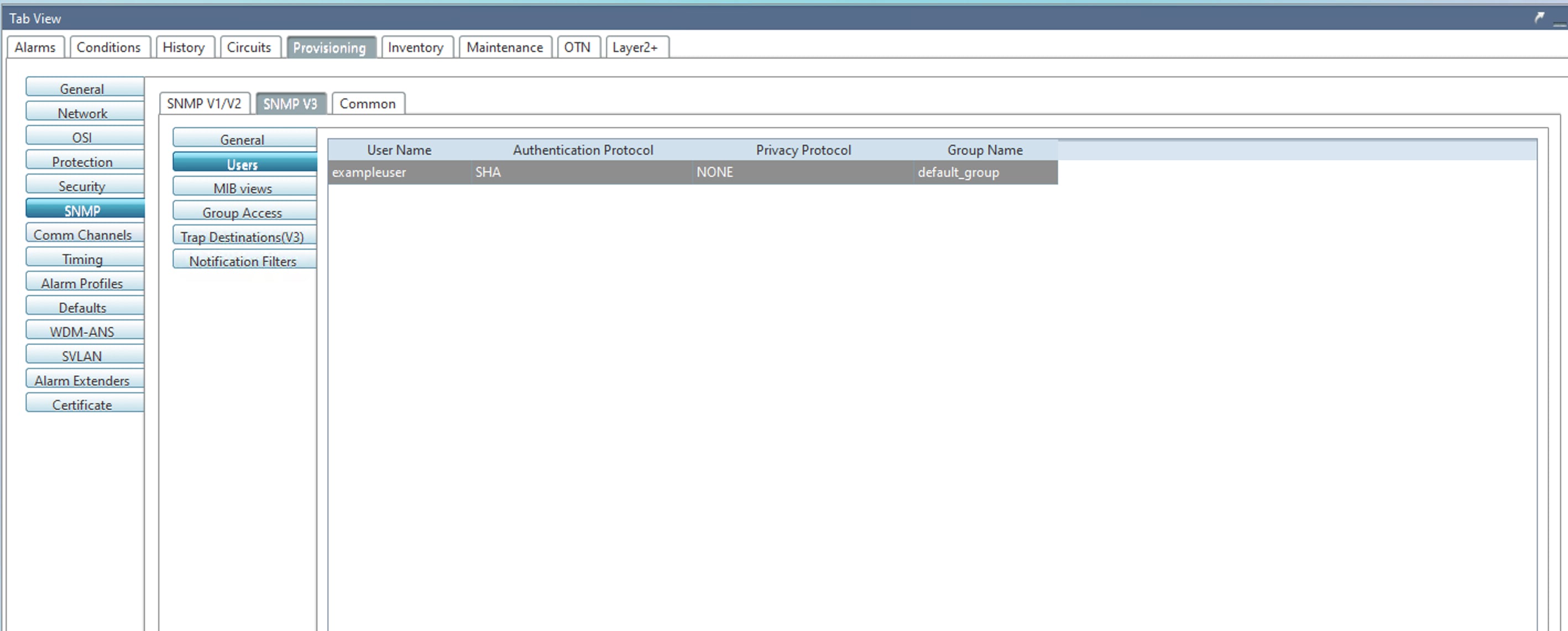
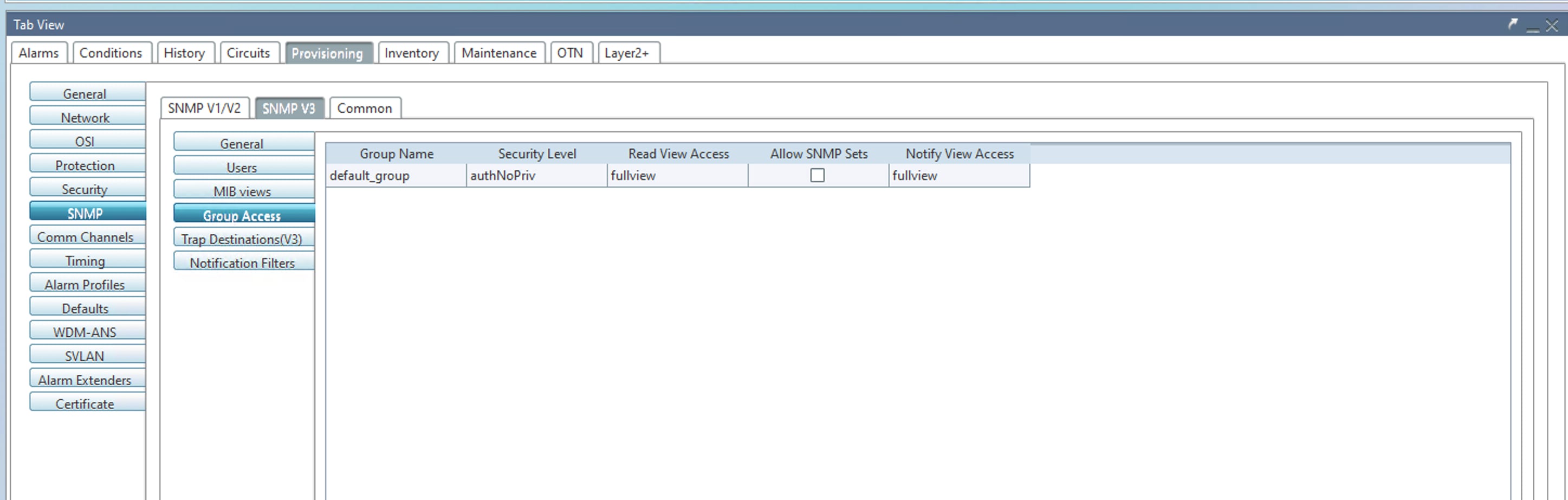
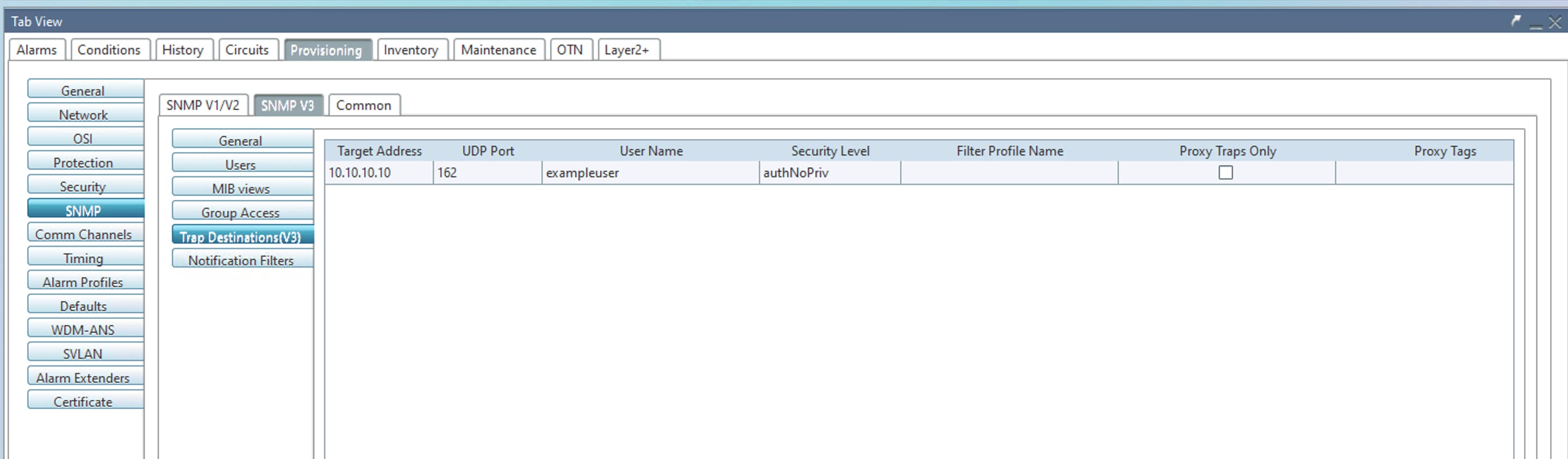
As a temporary workaround, stop using AuthPriv. Modify the SNMPv3 configuration to use the AuthNoPriv security level instead, because authentication (MD5/SHA) remains enabled and valid credentials are still required, but the privacy (encryption) layer is disabled. SNMP management data will be transmitted without encryption.
This workaround requires deleting and re-creating the SNMPv3 configuration using the CTC interface. Complete the following steps based on the current node status:
Scenario 1: Nodes Already Running Release 11.14
- Delete all existing SNMPv3 user and group configurations that use AuthPriv mode.
- Re-create the SNMPv3 configuration, and choose AuthNoPriv as the security level.
- Update and verify that the Network Management System (NMS) is configured to match the No Privacy setting to resume polling.
Scenario 2: Nodes Running a Release Earlier than Release 11.14
- Before upgrading, delete all existing SNMPv3 configurations that use AuthPriv mode.
- Proceed with the upgrade to Release 11.14 and ensure the upgrade completes successfully.
- Once the node is stable, re-create SNMPv3 configurations using the AuthNoPriv security level.
- Update and verify that the Network Management System (NMS) is configured to match the No Privacy setting to resume polling.
The following images show the sample SNMPv3 configuration with AuthNoPriv mode:
Issue 2 (CSCws42717)
As a workaround, new users can be created using TL1 commands. For example, to create a new SUPERUSER, use the appropriate TL1 command sequence, as shown in the following example:
ENT-USER-SECU:[<TID>]:<uid>:<CTAG>::<pid>,,<uap>[:];   <<<<<< Where <uap> = SUPER
Example
ENT-USER-SECU::username:1::password,,SUPER;
Issue 3 (CSCws82335)
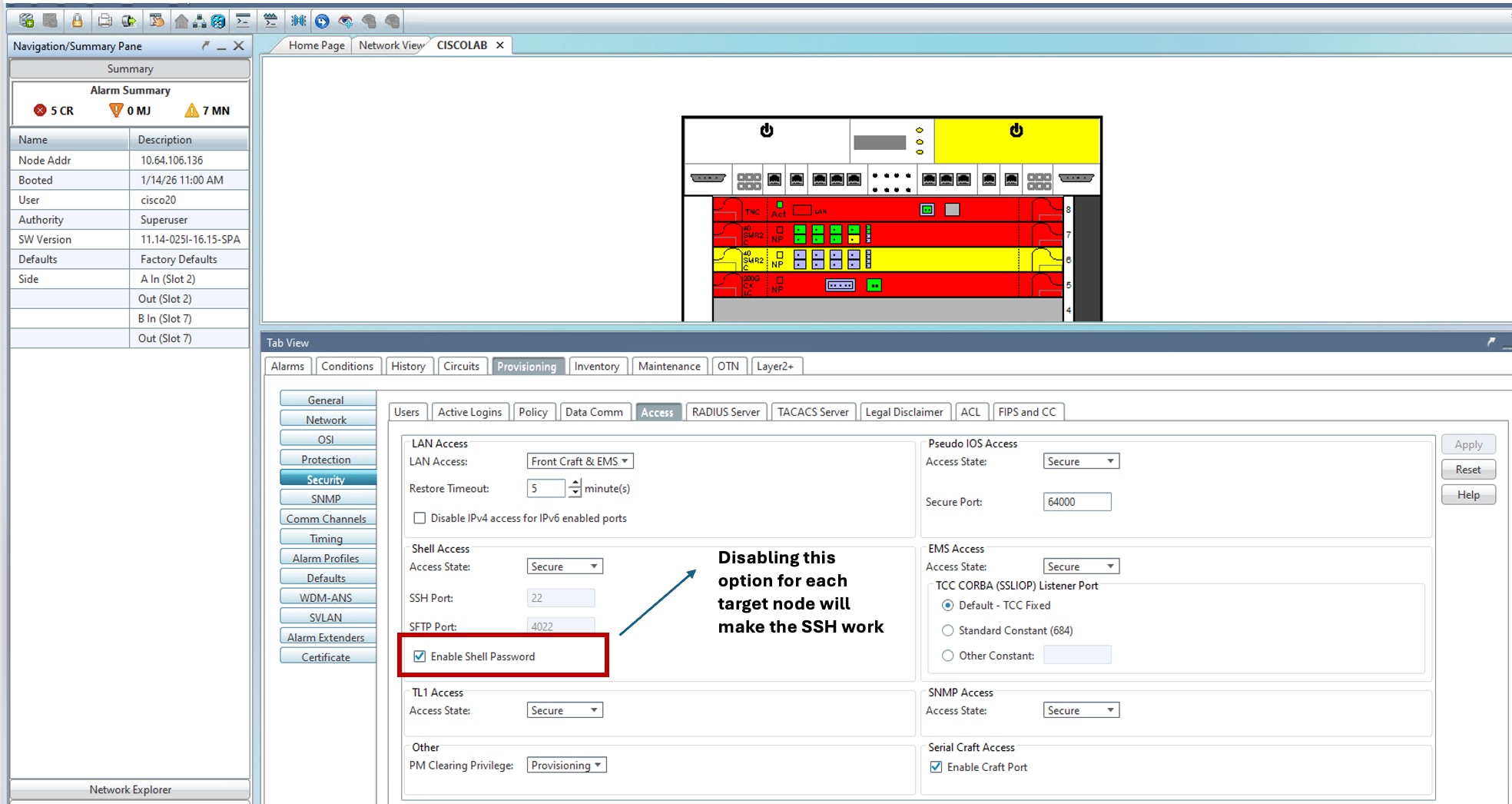
There is no direct workaround to restore SSH shell access after the issue occurs. However, to prevent this issue, disable Enable Shell Password option using CTC on all affected nodes before upgrading. This will help avoid the SSH access problem after the upgrade.
How to Identify Affected Products
The following criteria can be used to identify Cisco NCS2K Series nodes that are impacted by each issue:
Issue 1 (CSCws50436): Affected products may include all Cisco NCS2K Series nodes that have SNMPv3 configured in AuthPriv mode and are running, or are planned to be upgraded to, Release 11.14.
Issue 2 (CSCws42717): Cisco NCS2K Series nodes that are running Release 11.14 where there is a requirement to create new users using CTC are affected.
Issue 3 (CSCws82335): Cisco NCS2K Series nodes that are running Release 11.14 and are configured for Shell Access with the Access State set to Secure and the Enable Shell Password option enabled are affected.
Revision History
| Version | Description | Section | Date |
| 1.0 | Initial Release | — | 2026-FEB-02 |
For More Information
For further assistance or for more information about this field notice, contact the Cisco Technical Assistance Center (TAC) using one of the following methods:
Receive Email Notification About New Field Notices
To receive email updates about Field Notices (reliability and safety issues), Security Advisories (network security issues), and end-of-life announcements for specific Cisco products, set up a profile in My Notifications.
 Feedback
Unleash the Power of TAC's Virtual Assistance