Configure GPO on Nexus Multi-Site Fabric with NDFC 4.2
Available Languages
Contents
Introduction
This document describes GPO configuration and validation in VXLAN Multi-Site fabrics on Nexus Cloud Scale switches running NX-OS and NDFC 4.2.
Prerequisites
Requirements
Cisco recommends that you have knowledge of these areas:
- Virtual Extensible Local Area Network (VXLAN), Ethernet Virtual Private Network (EVPN) and Multi-Site fabric technologies
- Cisco Nexus Cloud Scale switches and NeXus Operating System (NX-OS) operation
- Nexus Fabric Network Controller (NDFC) 4.2 management and deployment workflows
- Network segmentation and security policy concepts
Components Used
The information in this document is based on these software and hardware versions:
- N9K-C93216TC-FX2
- N9K-C93108TC-EX
- NDFC 4.2
The information in this document was created from the devices in a specific lab environment. All of the devices used in this document started with a cleared (default) configuration. If your network is live, ensure that you understand the potential impact of any command.
Understand GPO Functionality in VXLAN EVPN Fabrics
Group Policy Option (GPO) is a policy-based segmentation mechanism designed to control communication between endpoints based on logical identity instead of only relying on IP addresses, VLANs, or subnets. The main purpose of GPO is to simplify security policy enforcement and provide scalable micro-segmentation between applications, servers, or workloads.
A simple analogy is to think of a hotel where every guest belongs to a specific category or access level, certain areas are accessible only to specific guests, and access permissions depend on the role of the guest instead of the room number. GPO works in a very similar way. Instead of treating endpoints purely as IP addresses, GPO classifies them into Security Groups (SGs). Policies are then applied between these groups to determine which communications are allowed or denied.
For example:
- Web servers can belong to one Security Group.
- Application servers can belong to another Security Group.
- Database servers can belong to a restricted Security Group.
Policies can then define:
- Web servers can communicate with application servers.
- Application servers can communicate with database servers.
- Web servers cannot communicate directly with database servers.
This approach simplifies operations because administrators no longer need to maintain large numbers of ACLs across multiple devices and VLANs.
Another major advantage is scalability. In large environments, workloads frequently move, scale dynamically, or change IP addresses. GPO allows security policies to remain consistent even when the endpoint location changes. Inside VXLAN EVPN fabrics, GPO extends this concept by distributing Security Group information across the fabric and enforcing Security Group ACLs (SGACLs) between endpoints. This becomes especially important in modern data centers because east-west traffic between workloads often represents the largest attack surface. GPO improves security posture by limiting unnecessary communication paths inside the data center fabric.
For a deeper technical understanding of GPO architecture, micro-segmentation concepts, and VXLAN policy enforcement, refer to the Cisco white paper available at: Securing Data Centers with Microsegmentation using VXLAN GPO
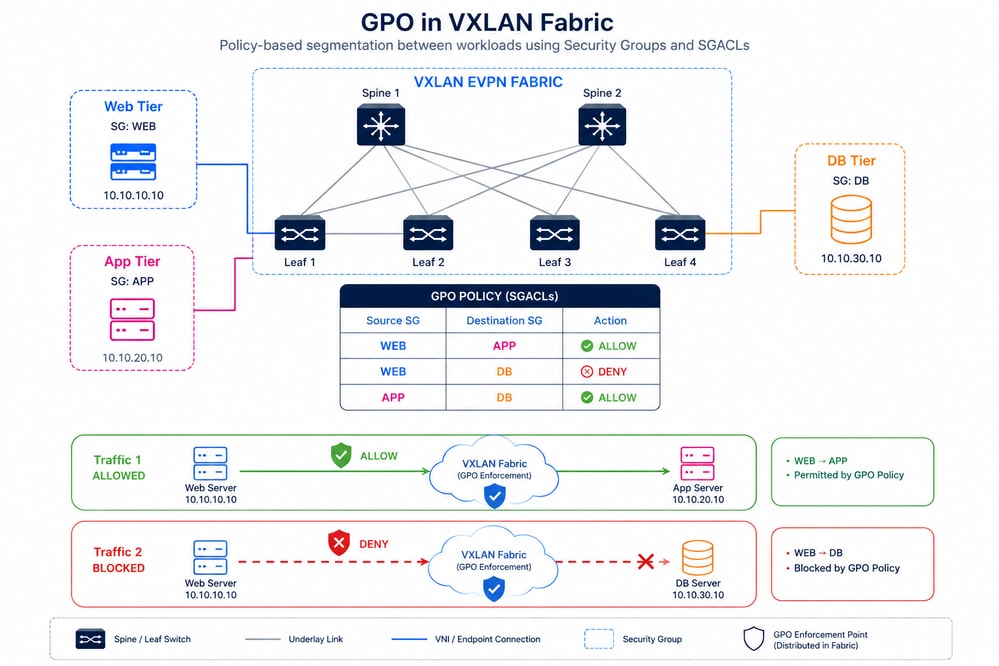 GPO in VxLAN Fabric
VXLAN Multi-Site GPO Deployment Scenario Using NDFC 4.2 and NX-OS 10.6(3)F
This topology represents a VXLAN Multi-Site fabric deployed across two geographically distributed sites: Mexico and USA. Each site contains dedicated BGWs, Spine switches, Leaf switches, virtual machines, and firewall segments running on Cisco Nexus 9300 switches with NX-OS 10.6(3)F. The underlay network uses Open Shortest Path First (OSPF), while the overlay control plane uses iBGP within each site and eBGP between BGW-1 and BGW-2 for inter-site VXLAN EVPN communication. Since this environment is a laboratory deployment, the Mexico and USA sites are interconnected through a directly connected link between both BGWs to simplify the Multi-Site connectivity model.
GPO is used to enforce policy-based micro-segmentation between Security Groups (SGs) independently of IP addressing or VLAN boundaries. Based on the connectivity policy table, ICMP traffic from VM-1 to VM-2, FW-1, and FW-2 is permitted, while TCP port 22 (SSH) traffic from VM-1 to FW-1 and FW-2 is denied. TCP port 22 communication between VM-1 and VM-2 remains permitted because both endpoints belong to the same Security Group (SG-10001). This behavior demonstrates how GPO dynamically enforces different traffic policies between intra-GPO and inter-GPO communications across the VXLAN Multi-Site fabric.

Note: Cisco NX-OS Release 10.6(3)F introduces that you can restrict communication among the endpoints within the same ESG (also known as SG) using intra-ESG isolation feature. This feature minimizes the risk of unauthorized access within ESG and enhances security posture.
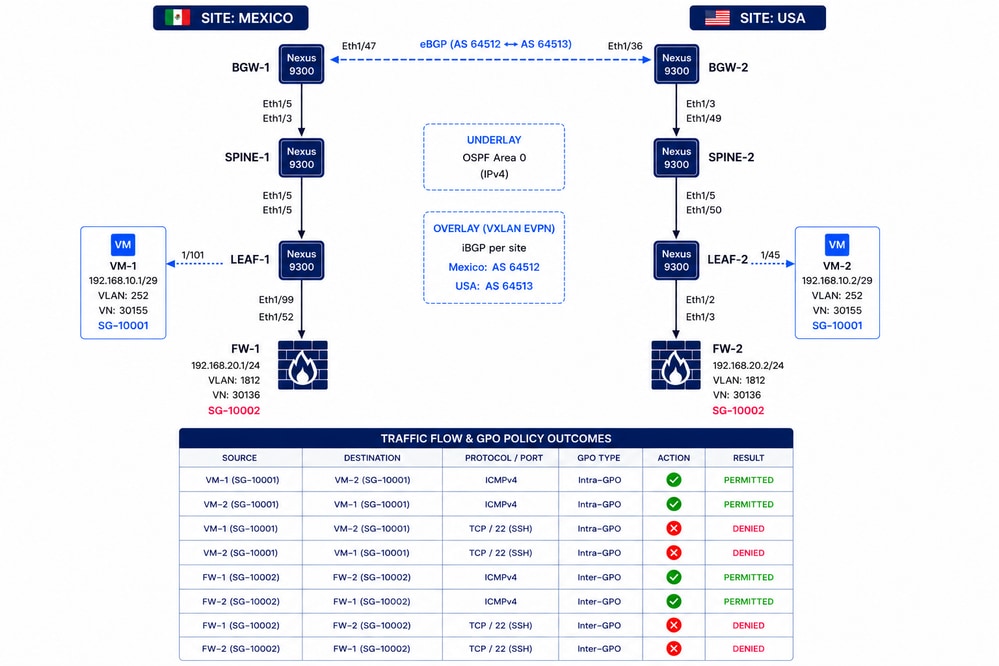
Configure GPO Step-by-Step with NDFC 4.2 in VXLAN EVPN Fabrics
These steps apply when the VXLAN Multi-Site fabric is already operational and configured with NDFC 4.2, and GPO needs to be implemented afterward. The section Automation Using Nexus Dashboard in Securing Data Centers with Microsegmentation Using VXLAN GPO shows the configuration starting from the creation of a VXLAN Single-Site fabric.

Caution: When GPO operates in a VXLAN EVPN fabric, communication occurs only if destination reachability exists and the security policy allows the traffic. Policy enforcement relies on IP information, which requires ARP entries and SVIs for internal networks. This means the VLAN that belongs to the tenant VRF must have an SVI configured. Consequently, enforcement does not apply to traffic that contains only Layer 2 headers and therefore cannot be used with VXLAN Layer 2 extension. NX-OS Release 10.6(2)F introduces MAC-based microsegmentation support.
Step 1. Enable Security Groups in the Parent Fabric
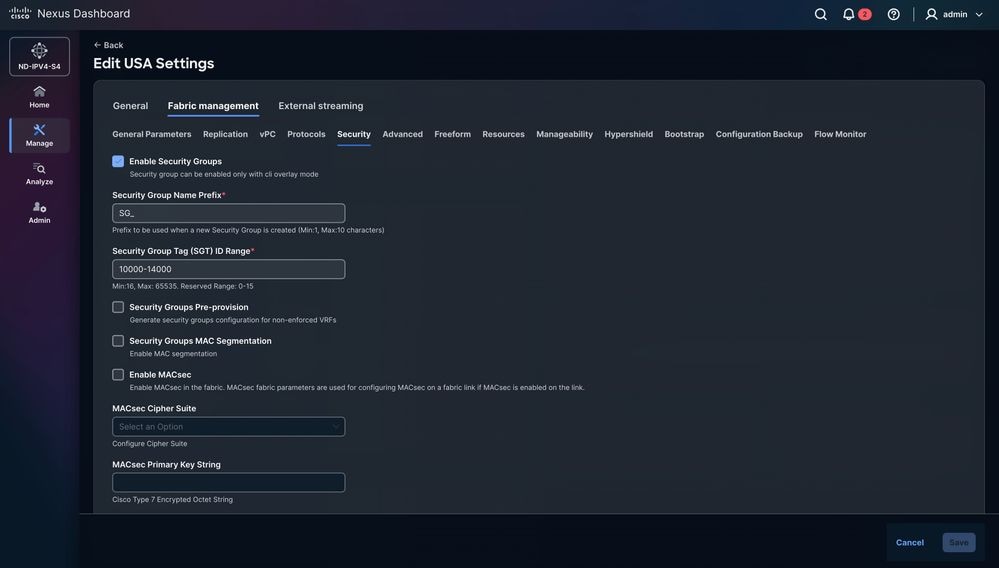
- Navigate to Manage > Fabric Groups, select the fabric group DAVIDM3, then choose Actions > Edit Fabric Group Settings. In the Security section, enable Security Groups, set the mode to Strict and set Security Groups Pre-provision.
- Select the fabric group of interest. For this example, the selected fabric group is called DAVIDM3, which is also the name of the Multi-Site Fabric.
- Repeat these steps for each child fabric.
- Navigate to Manage > Fabric, select USA, then navigate to Actions > Edit Fabric Group Settings. In the Security section, enable Security Groups and set the mode to Strict.
- Navigate to Manage > Fabric, select MEXICO, then navigate to Actions > Edit Fabric Group Settings. In the Security section, enable Security Groups and set the mode to Strict.
Note: If set to strict, all VXLAN child fabrics must be security groups capable and enabled. If set to loose, security groups is optional in VXLAN child fabrics.

Tip: To maintain clear visibility, use the same Security Group Tag (SGT) ID ranges in the parent fabric and in all child fabrics. The parent fabric range must cover the ranges used by all child fabrics.
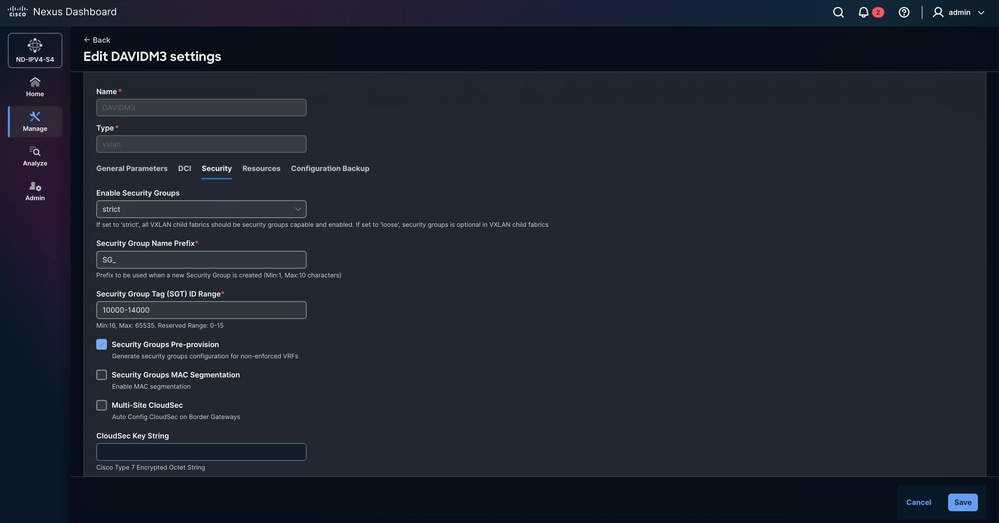
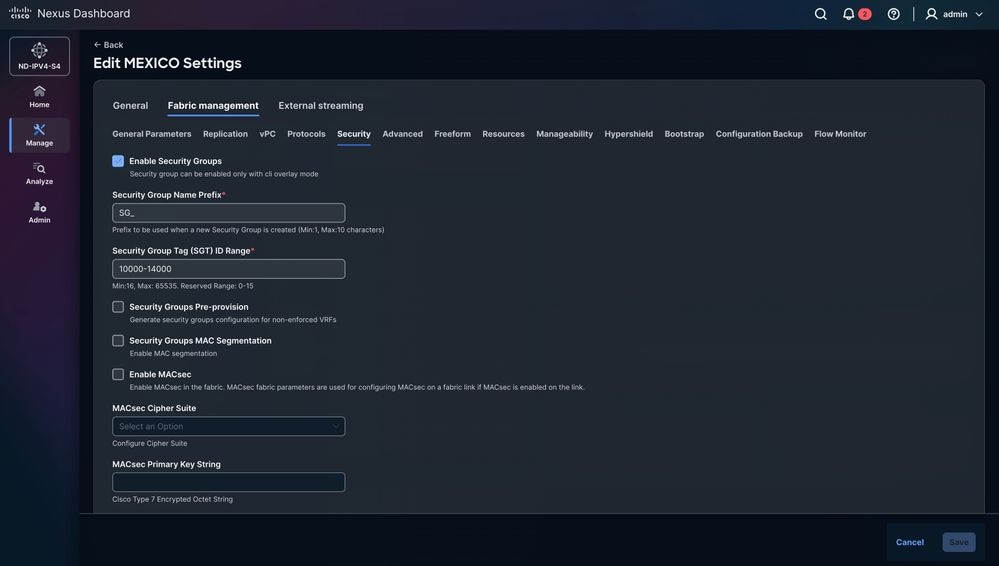
Step 2. Recalculate Fabric Configuration and Reload Switches for GPO Deployment
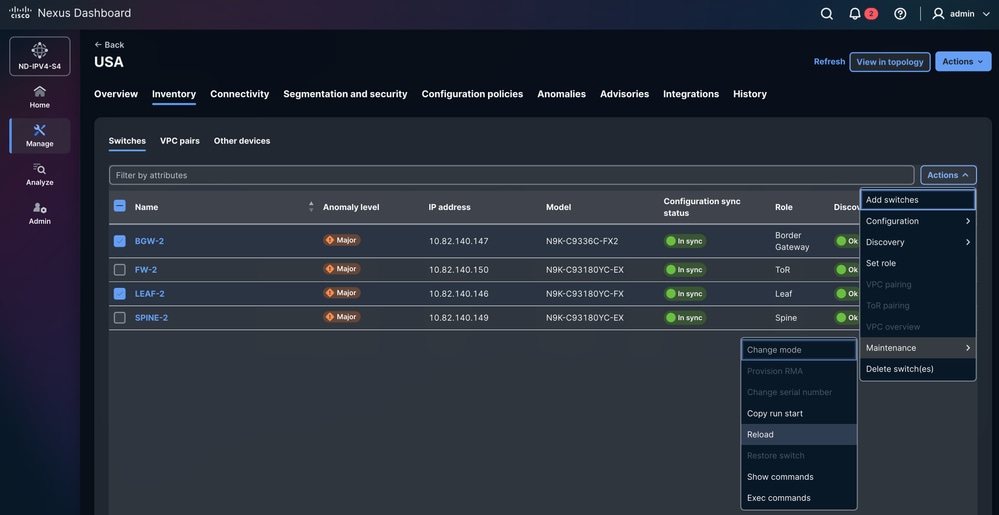
NDFC automatically prompts you to reload a specific group of Nexus switches based on their role. In this example, LEAF-1, LEAF-2, BGW-1, and BGW-2 must be reloaded. This action must be executed manually by the network administrator. The reload is required and cannot be skipped because GPO requires TCAM carving.
Note: If the device is not reloaded, the TCAM change can appear in the running configuration; however, since the switch has not been rebooted, the setting is not applied to hardware memory. As a result, the feature cannot function as expected.
To reload the Nexus switches:
Navigate to Manage > Fabrics > MEXICO/USA > Inventory > Switches > LEAF-1 / LEAF-2 / BGW-1 / BGW-2 > Actions > Maintenance > Reload.
Step 3. Create Security Group
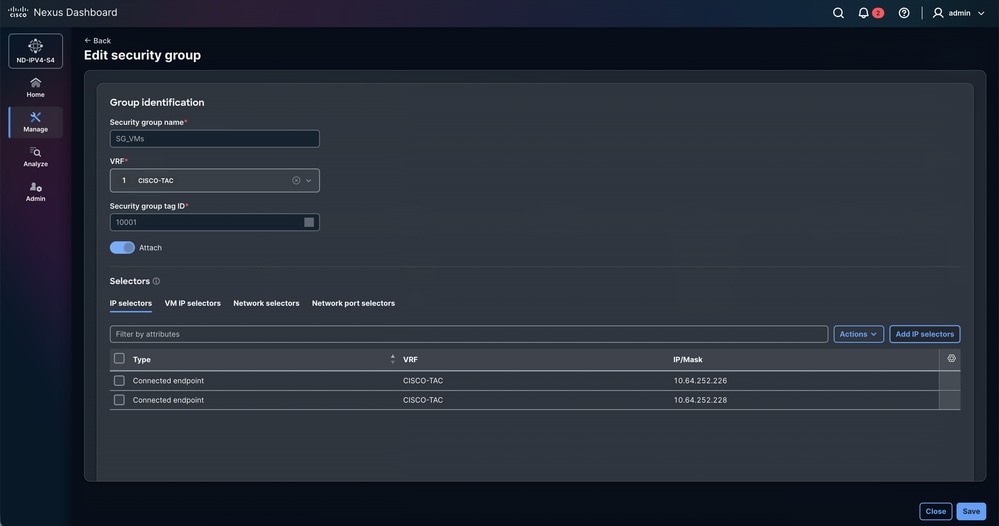
Define the Security Groups for each endpoint. Each endpoint in the VXLAN fabrics can have a single Security Group. This approach is not scale efficiently. Group endpoints globally (virtual machines, firewalls, TCP optimizers, among others).
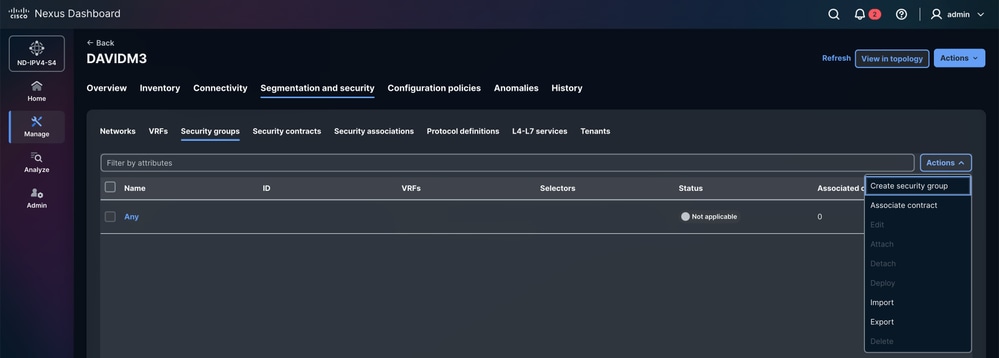
Navigate to Manage > Fabrics > Fabric groups > DAVIDM3 > Segmentation and security > Security Groups > Actions > Create security group.
Step 3.1 Configure Security Group Name
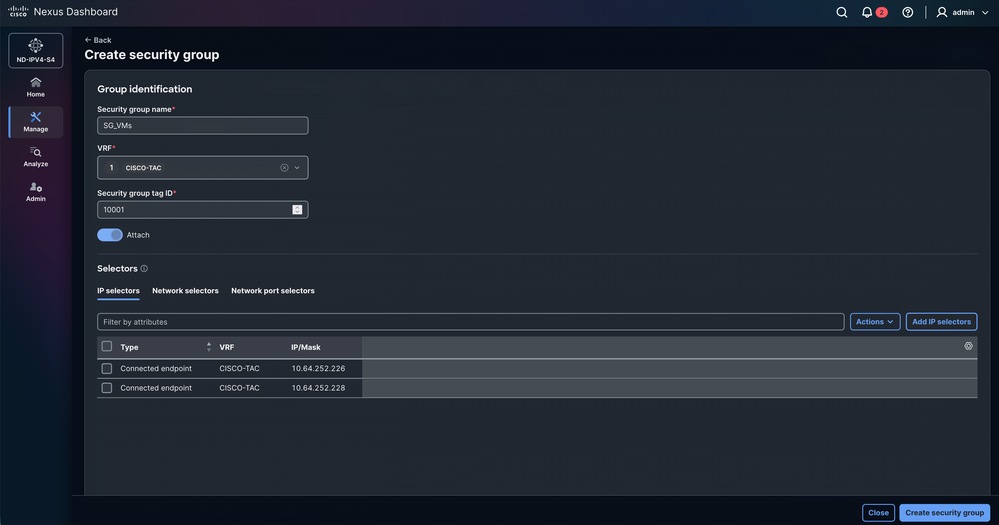
- NDFC automatically assigns a random name. The name can be changed; it is recommended to use a representative name that is easy for endpoints to identify.
- In this scenario:
- VMs -> SG_VMs
- FWs -> SG_FWs
Step 3.2 Configure VRF
- Select the tenant (VRF) to which the endpoints belong.
- In this scenario: The VMs and Firewalls belong to the CISCO-TAC tenant.
Optional, Create VRF.
By default, a newly created tenant VRF has the policy enforcement mode set to Unenforced. In this state, even if classification criteria and SGACLs between Security Groups are configured, no policy enforcement occurs. To activate SGACL enforcement, the VRF must be explicitly configured in Enforced mode.
When the VRF operates in Enforced mode, a default policy behavior is defined:
- Deny: All unicast traffic is dropped unless explicitly permitted by an allow rule.
- Permit: All unicast traffic is allowed unless explicitly blocked by a deny rule.
Endpoints that belong to the same Security Group can communicate with each other without the need for SGACL rules. SGACLs define security policies only between different Security Groups.
Cisco NX-OS Release 10.6(3)F introduces the capability to restrict communication among endpoints within the same GPO, also known as intra-GPO isolation feature. Prior to this release, rules applied to endpoints within the same Security Group are ignored, and traffic is permitted by default.
Step 3.3 Configure Security Group tag ID
NDFC automatically assigns a random Tag ID from the pre-defined range in the fabric configuration. Although a Tag ID can be selected manually, it must fall within the range defined for both the child and parent fabrics.
In this scenario:
- VM-1 & VM-2: 10001
- FW-1 & FW-2: 10002
Step 3.4 Attach
If the Attach option is not enabled, the Security Group is not applied to the CISCO-TAC tenant.
Step 3.5 Configure Selectors
- The selectors determine which endpoints and external IP addresses are associated with a specific Security Group.
NDFC 4.2 natively supports three types of selectors:
1) IP Selectors: IP selectors associate endpoints or IP subnets with a Security Group based on IP information.
- Connected Endpoint – Identifies endpoints directly attached to the fabric, such as virtual machines, servers, or physical hosts connected to leaf switches.
- External Subnet – Associates external IP prefixes with a Security Group. This type is used for networks that exist outside the VXLAN fabric, such as external data centers, WAN segments, or internet-facing networks. Traffic sourced from or destined to these prefixes is classified with the configured Security Group.
2) Network Selectors: Network selectors associate a Security Group with a specific VXLAN network segment. Classification is applied based on the network identifier (L2VNI). All endpoints belonging to that network inherit the assigned Security Group, which simplifies policy deployment when multiple endpoints share the same segment.
3) Network Port Selectors: Network port selectors classify traffic based on the physical switch interface through which traffic enters the fabric. A Security Group can be assigned to traffic received on a specific port or interface. This approach is typically used for devices connected via external networks, service appliances, or infrastructure links where endpoint IP classification is not feasible.
Security Group Configuration Summary
| Device | Security Group Name | VRF | Security Group Tag ID | Selectors |
| VM-1 | SG_VMs | CISCO-TAC | 10001 | IP selectors |
| VM-2 | SG_VMs | CISCO-TAC | 10001 | IP selectors |
| FW-1 | SG_FWs | CISCO-TAC | 10002 | IP selectors |
| FW-2 | SG_FWs | CISCO-TAC | 10002 | IP selectors |
Security Group Configuration for VMs
Security Group Configuration for FWs
Step 4. Configure Protocol Definitions
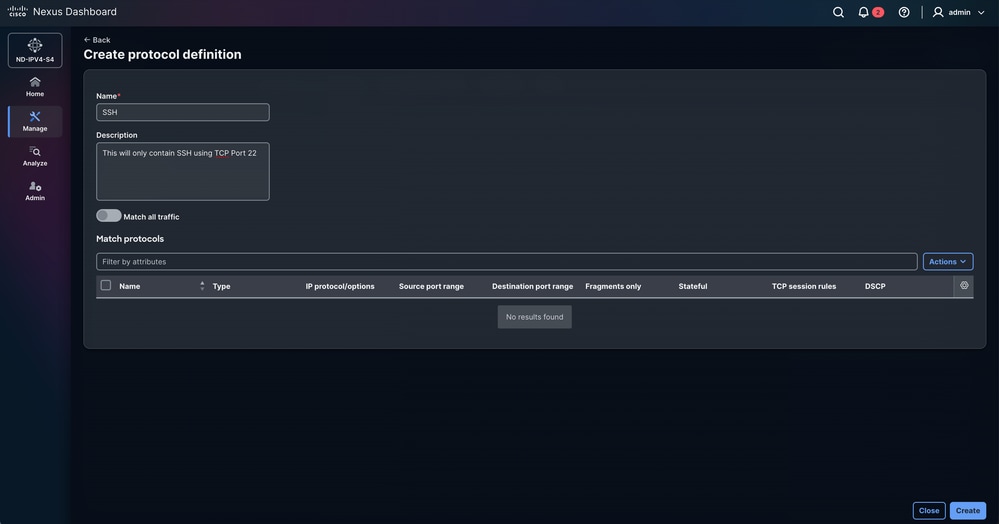
The Create Protocol Definition option is used to define the network protocol parameters and traffic characteristics that are matched by a Group Policy Object (GPO). It allows administrators to specify criteria such as protocol type, port numbers, and other packet attributes so that the corresponding policy can be applied to the desired traffic flows.
In this scenario, the objective is to allow only ICMP traffic while explicitly blocking TCP traffic on port 22 (SSH). This policy ensures that network reachability testing remains permitted, while unauthorized or undesired SSH access is manually restricted.
Navigate to Manage > Fabrics > Fabric groups > DAVIDM3 > Segmentation and security > Protocol definitions > Actions > Create protocol definition.
Enter the Name and Description.
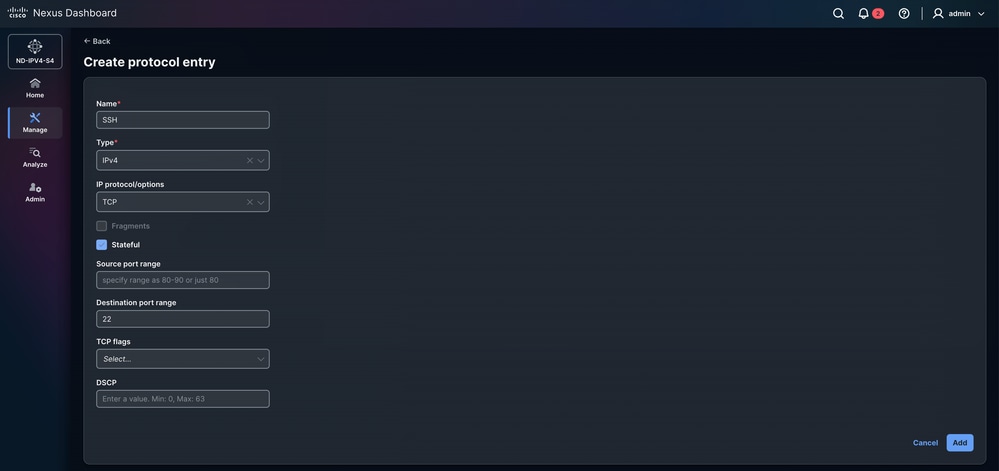
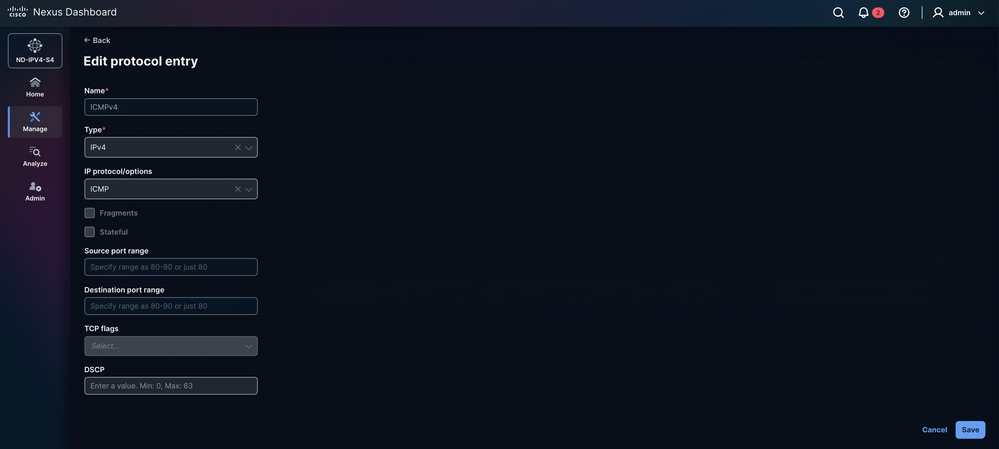
Navigate to Actions > Create protocol entry.
- Name: SSH
- Type: IPv4
- IP and IPv6 is also available.
- IP protocol/options: TCP
- UDP, EIGRP, and PIM, among others, are supported.
-
Fragments: Allows the rule to match fragmented IP packets. This is useful because large packets can be split into fragments when exceeding the network MTU. Enabling this ensures the policy also applies to those fragments.
-
Stateful: A process being stateful means that it keeps track of all changes or interactions that happened in the past, and a current process is performed with a context of those previous processes. In this case, TCP keeps track of areas such as the number packets to be transferred, the order of the packets and whether the receiver has received a packet or not. With the Stateful option selected, this information is stored as a state in TCP.
- Source port range: This option is available only if you selected TCP or UDP in the IP Protocol/Options field above.
- Destination port range: This option is available only if you selected TCP or UDP in the IP Protocol/Options field.
- TCP flags
-
This option is available only when TCP is selected in the IP Protocol/Options field.
-
It allows you to define the TCP flags used by the security protocol.
-
TCP flags are part of the TCP header and are used to control the establishment, maintenance, and termination of connections.
-
Available options:
- ACK (Acknowledgment): Indicates acknowledgment of received data or synchronization packets.
- EST (Established): Refers to already established TCP connections. When this option is enabled, no other TCP flags can be selected.
- FIN (Finish): Used to gracefully close a TCP connection.
- RST (Reset): Immediately terminates the connection and discards any data still in transit.
- SYN (Synchronization): Used during the initiation and establishment of a TCP connection.
-
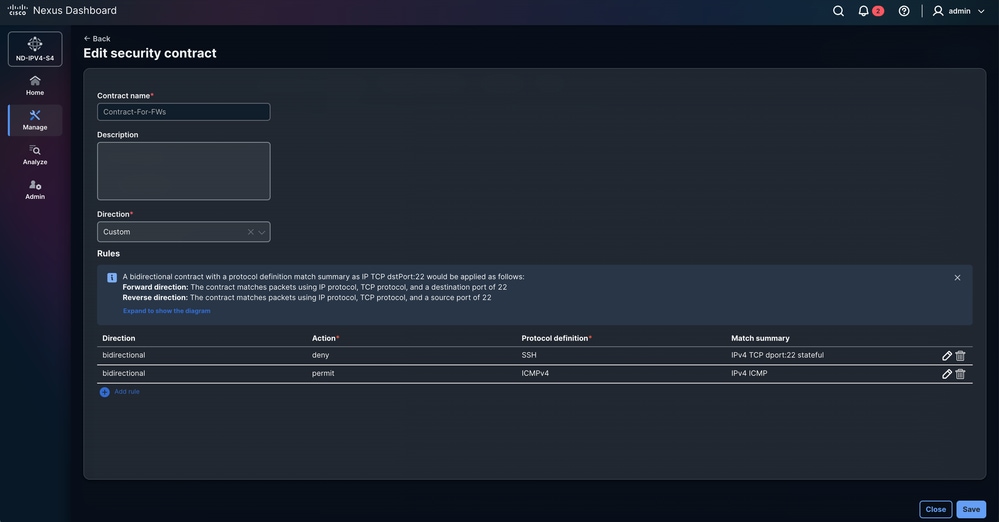
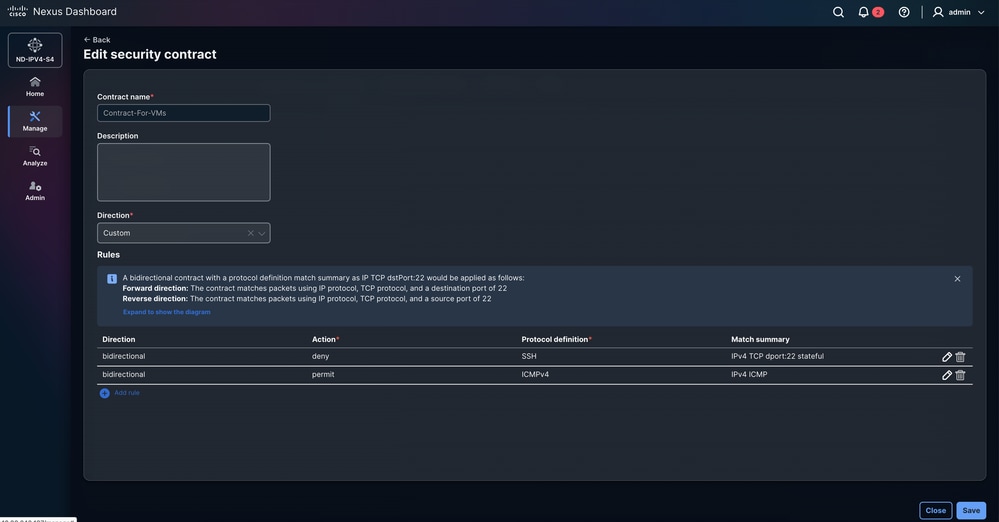
Step 5. Configure Security Contracts
The Contract defines the communication rules between endpoint groups by specifying which traffic is permitted or denied based on the associated policy definitions. It acts as the enforcement mechanism that applies the configured protocol rules, filters, and actions, ensuring that traffic between source and destination groups complies with the intended security and segmentation policies.
Navigate to Manage > Fabrics > Fabric groups > DAVIDM3 > Segmentation and security > Security contracts > Actions > Create security contract.
- Select Add rule and configure Direction, Action, and Protocol definition.
-
Bidirectional:
-
The bidirectional contract applies as follows with a protocol definition match summary as IP TCP Port 22.
-
Forward direction: The contract matches packets using IP protocol, TCP protocol, and a destination port of 22
-
Reverse direction: The contract matches packets using IP protocol, TCP protocol, and a source port of 22.
-
This applies regardless of the source or destination.
-
-
- Unidirectional:
- Unidirectional in a GPO Security Contract means the policy is enforced in only one direction of the traffic flow, allowing or denying communication from the source Security Group to the destination Security Group without automatically applying the same rule in the reverse direction.
-
Step 6. Configure Security Associations
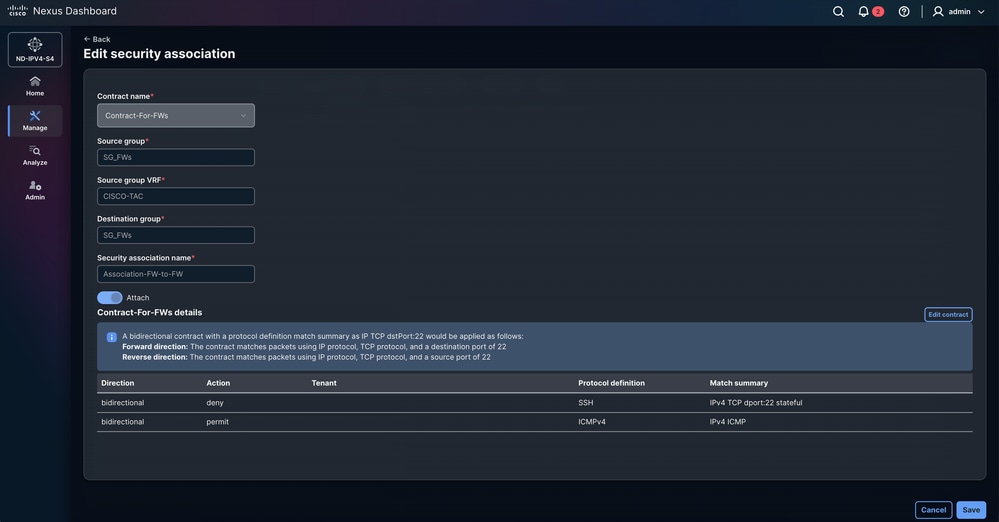
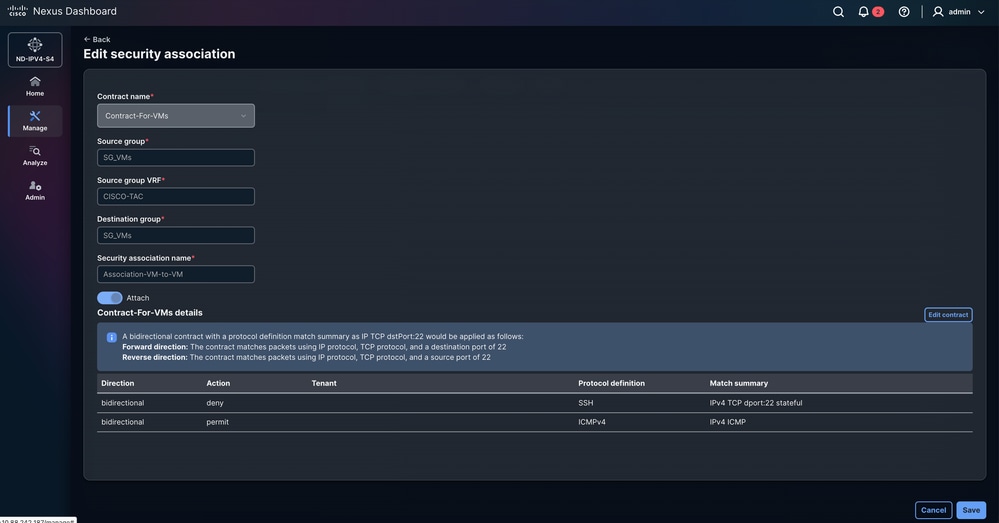
Navigate to Manage > Fabrics > Fabric groups > DAVIDM3 > Segmentation and security > Security associations > Actions > Create security association.
In Configure Security Associations, the policy model is defined by linking Security Groups, Protocol Definitions, and Security Contracts. Security Groups classify endpoints, Protocol Definitions specify the traffic types (such as protocols or ports), and Security Contracts define the policy applied between source and destination Security Groups using those protocol rules. Security Associations represent the relationship that binds these elements together so the fabric can enforce the defined security policies.
Step 7. Validate GPO Configuration
- Navigate to Manage > Fabrics > Fabric groups > DAVIDM3 > Actions > Recalculate and deploy.
- The GPO configuration is pushed to the Border Gateways from the parent fabric switch. Click the number of pending configuration lines to review and validate the configuration that can be deployed to the devices. This process must be repeated for each child fabric.
- Navigate to Manage > Fabrics > Fabric groups > DAVIDM3 > Inventory > Member fabrics > MEXICO > Actions > Recalculate and deploy.
- Navigate to Manage > Fabrics > Fabric groups > DAVIDM3 > Inventory > Member fabrics > USA > Actions > Recalculate and deploy.
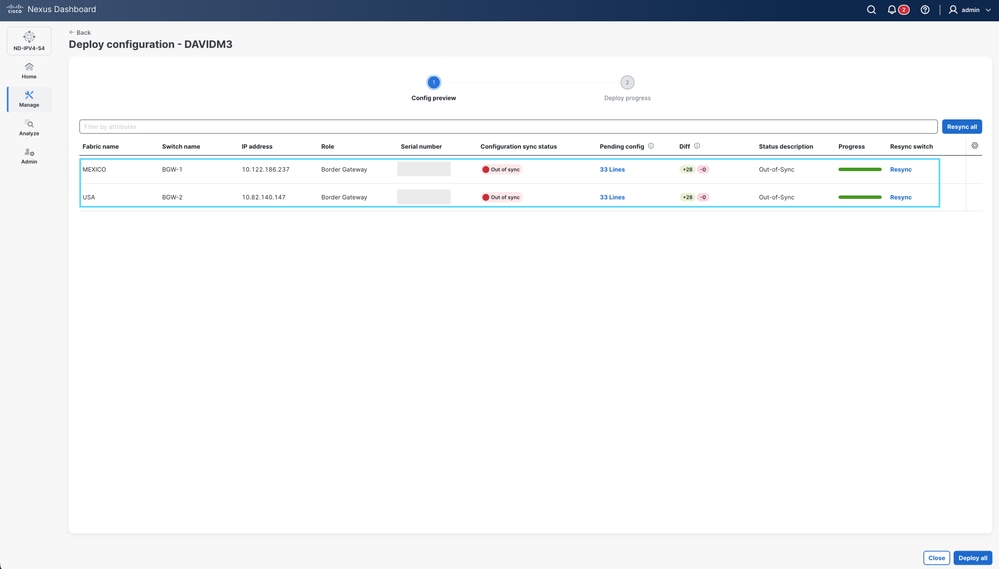
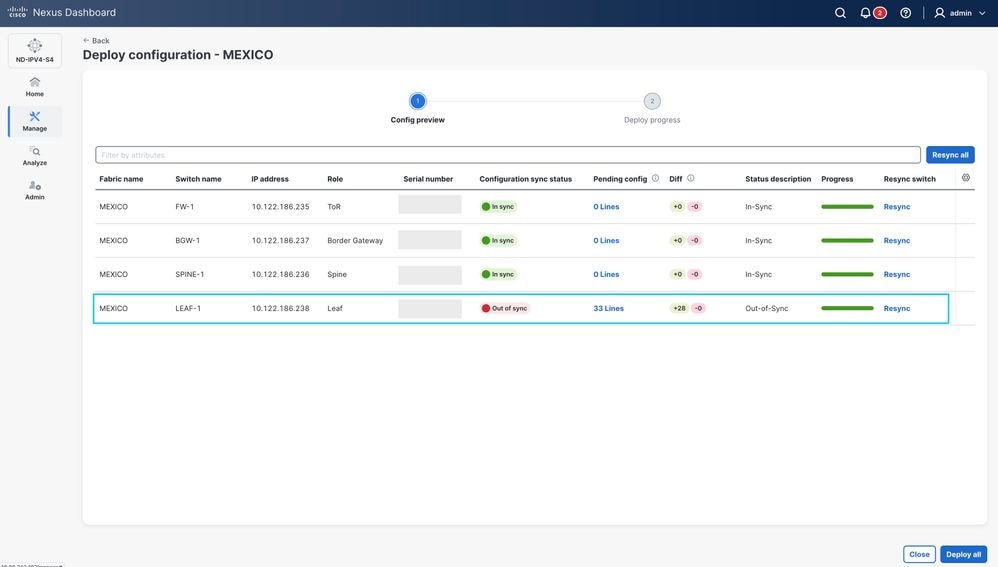
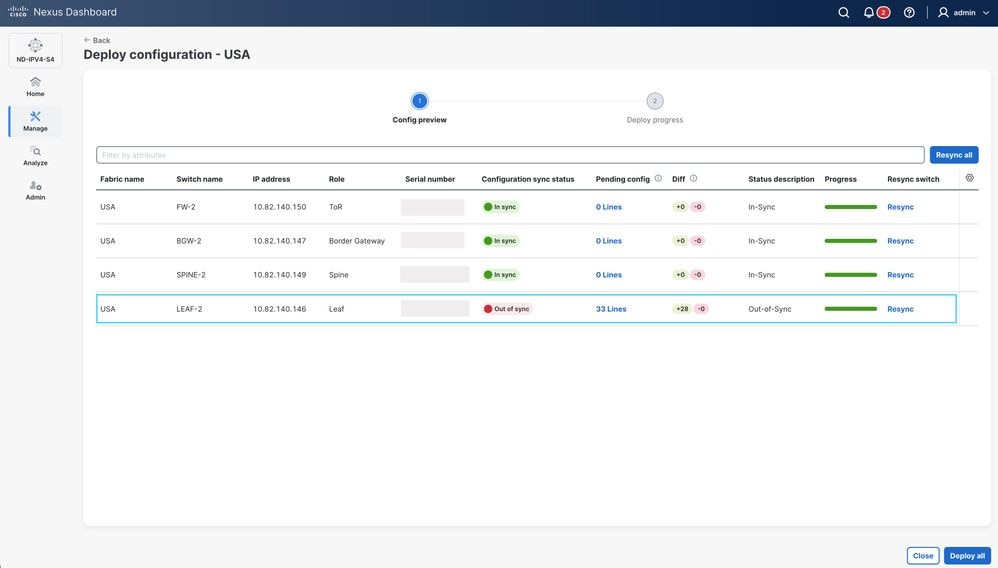
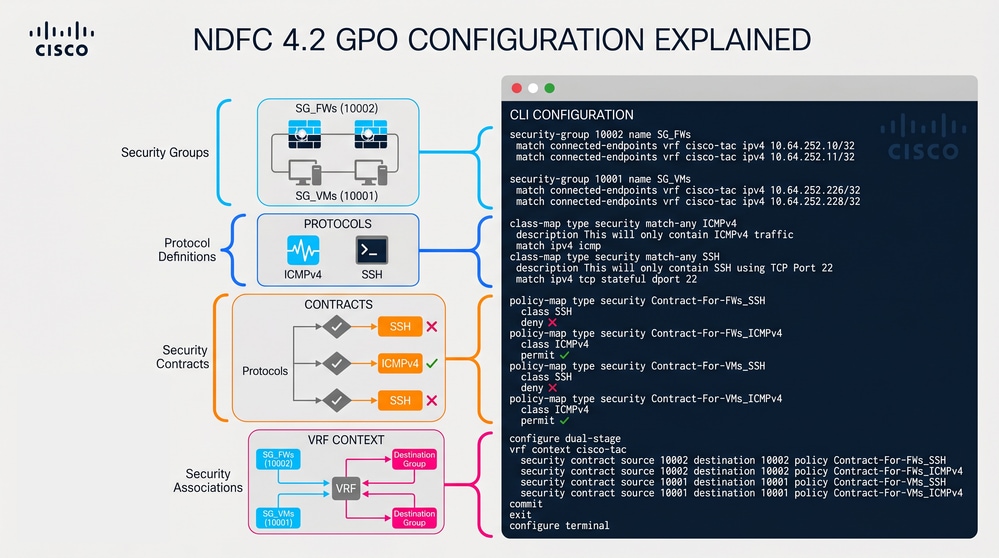
- The image shows the GPO configuration for BGW-1, BGW-2, LEAF-1, and LEAF-2. The configuration is identical on all switches. NDFC 4.2 does not apply the configuration in the exact order shown. This section illustrates the logical sequence of the CLI commands.
Troubleshooting VXLAN GPO Operability
Step 1. Verify the Security-Group Feature State
Validate whether the security-group feature is enabled on the switch. VXLAN GPO depends on this feature because it activates the Security Group Tag (SGT) infrastructure required for endpoint classification, contract enforcement, and SGACL hardware programming.
BGW-1# show feature | i i security-group
security-group 1 enabled
Step 2. Verify the System Routing Mode
Validate the configured and operational system routing mode on the switch. VXLAN GPO requires the Security-Groups Support routing mode because SGACL enforcement consumes dedicated hardware forwarding resources within the ASIC pipeline.
BGW-1# show system routing mode
Configured System Routing Mode: Security-Groups Support
Applied System Routing Mode: Security-Groups Support
Step 3. Verify VXLAN NVE Peer Establishment and GPO Capability
- Validate VXLAN NVE peer establishment between local fabric devices and remote Multi-Site peers. VXLAN GPO information propagates through the VXLAN EVPN control-plane, therefore stable NVE adjacencies are required for Security Group Tag (SGT) learning and contract synchronization across the fabric.
- The field Group policy capable is one of the most important indicators in this command because it confirms whether the remote VTEP supports VXLAN Group Policy extensions required for SGT propagation and SGACL contract enforcement across the VXLAN EVPN Multi-Site domain.
BGW-1# show nve peers detail

## Details of nve Peers:

----------------------------------------
Peer-Ip: 10.10.10.2 ---------> Corresponds to LEAF-1 Loopback1, used as the local VXLAN NVE source interface.
NVE Interface       : nve1
Peer State          : Up --------> Confirms that the VXLAN tunnel and EVPN adjacency are operational.
Peer Uptime         : 6d21h --------> Indicates long-term adjacency stability.
Router-Mac          : 44b6.beb3.b703 --------> Remote VTEP router MAC used for VXLAN forwarding.
Peer First VNI      : 50012
Time since Create   : 6d21h
Configured VNIs     : 30136,30155,50012 --------> VNIs expected across this VXLAN adjacency.
Provision State     : peer-add-complete --------> Confirms successful hardware and software programming.
Learnt CP VNIs      : 30136,30155,50012 --------> Confirms successful EVPN control-plane synchronization.
vni assignment mode : SYMMETRIC --------> Symmetric IRB forwarding mode is operational.
Peer Location       : FABRIC --------> Indicates a local fabric peer.
Group policy capable: yes --------> Confirms that the remote VTEP supports Group Policy extensions and can exchange Security Group Tags (SGTs) and contract information.

----------------------------------------
Peer-Ip: 10.20.20.2 ---------> Corresponds to BGW-2 Loopback1, used as the remote BGW NVE source interface.
NVE Interface       : nve1
Peer State          : Up
Peer Uptime         : 01:36:54
Router-Mac          : 4488.1618.f093
Peer First VNI      : 30136
Time since Create   : 01:36:54
Configured VNIs     : 30136,30155,50012
Provision State     : peer-add-complete
Learnt CP VNIs      : 30136,30155,50012
vni assignment mode : SYMMETRIC
Peer Location       : DCI
Group policy capable: yes

----------------------------------------
Peer-Ip: 10.150.150.2 ---------> Corresponds to BGW-2 Loopback100, used as the Multi-Site Loopback interface for DCI communication.
NVE Interface       : nve1
Peer State          : Up
Peer Uptime         : 01:32:58
Router-Mac          : 0200.0a96.9602
Peer First VNI      : 30136
Time since Create   : 01:32:58
Configured VNIs     : 30136,30155,50012
Provision State     : peer-add-complete
Learnt CP VNIs      : 30136,30155,50012
vni assignment mode : SYMMETRIC
Peer Location       : DCI
Group policy capable: yes

----------------------------------------
Step 4. Verify Security Group Learning and Endpoint Classification
Validate that endpoints are correctly classified into Security Groups (SGTs). VXLAN GPO enforcement depends on accurate endpoint-to-SGT mappings.
BGW-1# show security-group id all

Security Group ID 10001 , Name SG_VMs ---------> Security Group assigned to the Virtual Machines endpoint group.

  Selector Type : Connected IPv4 Endpoints ---------> Endpoints are classified dynamically based on locally connected IPv4 addresses.

    VRF-Name                            IPv4-Address/mask-len
    cisco-tac                           10.64.252.226/32 ---------> Endpoint mapped to Security Group 10001.
    cisco-tac                           10.64.252.228/32 ---------> Endpoint mapped to Security Group 10001.

Security Group ID 10002 , Name SG_FWs ---------> Security Group assigned to the Firewall endpoint group.

  Selector Type : Connected IPv4 Endpoints ---------> Endpoint classification occurs using locally learned connected endpoints.

    VRF-Name                            IPv4-Address/mask-len
    cisco-tac                           10.64.252.10/32 ---------> Firewall endpoint mapped to Security Group 10002.
    cisco-tac                           10.64.252.11/32 ---------> Firewall endpoint mapped to Security Group 10002.
Step 5. Verify Security Contracts and Policy Enforcement
Validate that VXLAN GPO contracts are correctly installed and operational. Contracts define the communication rules enforced between Security Groups and represent the core policy mechanism used by VXLAN GPO for micro-segmentation.
BGW-1# show contracts detail

VRF: cisco-tac ---------> Confirms that contract enforcement occurs inside the cisco-tac tenant VRF.

Contract source group 10001 dest group 10001 ---------> Policy enforcement between endpoints belonging to Security Group 10001.

  Policy: Contract-For-VMs_ICMPv4 Direction: bidir ---------> Bidirectional contract for ICMPv4 traffic.

    Stats: 0 ---------> No traffic has matched this contract yet.

    Class: ICMPv4 ---------> Traffic classification associated with ICMP traffic.

      match ipv4 icmp ---------> Matches ICMPv4 traffic including ping requests and replies.

    Action: permit ---------> ICMP traffic is explicitly allowed.

    OperSt: enabled ---------> Confirms that the contract is operational.

Contract source group 10001 dest group 10001

  Policy: Contract-For-VMs_SSH Direction: bidir

    Stats: 0

    Class: SSH

      match ipv4 tcp stateful dport 22 ---------> Matches SSH traffic using stateful TCP inspection.

    Action: deny ---------> SSH traffic is explicitly denied.

    OperSt: enabled

Contract source group 10002 dest group 10002

  Policy: Contract-For-FWs_ICMPv4 Direction: bidir

    Stats: 0

    Class: ICMPv4

      match ipv4 icmp

    Action: permit

    OperSt: enabled

Contract source group 10002 dest group 10002

  Policy: Contract-For-FWs_SSH Direction: bidir

    Stats: 0

    Class: SSH

      match ipv4 tcp stateful dport 22

    Action: deny

    OperSt: enabled
Step 6. Verify VRF Security Enforcement State
Validate the VXLAN GPO enforcement state for all VRFs configured on the switch. This command confirms whether SGACL policies and Security Group contracts are actively enforced within the tenant VRF.
The output confirms that the cisco-tac VRF is actively participating in VXLAN GPO enforcement with the mode set to enforced. The enforcement tag 13648 identifies the internal SGACL policy context programmed into hardware for this VRF. The default action deny log indicates that any traffic not explicitly permitted through a Security Group contract is denied and logged, implementing a default deny micro-segmentation policy. In contrast, the default, egress-loadbalance-resolution-management, and management VRFs operate in unenforced mode, meaning VXLAN GPO policies are not applied within those VRFs and traffic is permitted by default.
The field Stats tracks traffic matching the VRF security policy. The value 0 under the cisco-tac VRF indicates that no unmatched traffic triggered the default deny behavior at the time the command was executed, while the counter value 4364 under the default VRF indicates traffic activity within a VRF operating without VXLAN GPO enforcement.
BGW-1# show vrf all security

VRF                              Mode         TAG     Action     Scope   Stats
----------------------------------------------------------------------------------------
cisco-tac                        enforced     13648   deny,log   4       0
default                          unenforced   -       permit     1       4364
egress-loadbalance-resolution-   unenforced   -       permit     2       0
management                       unenforced   -       permit     3       0
Step 7. Verify VRF Security Enforcement State
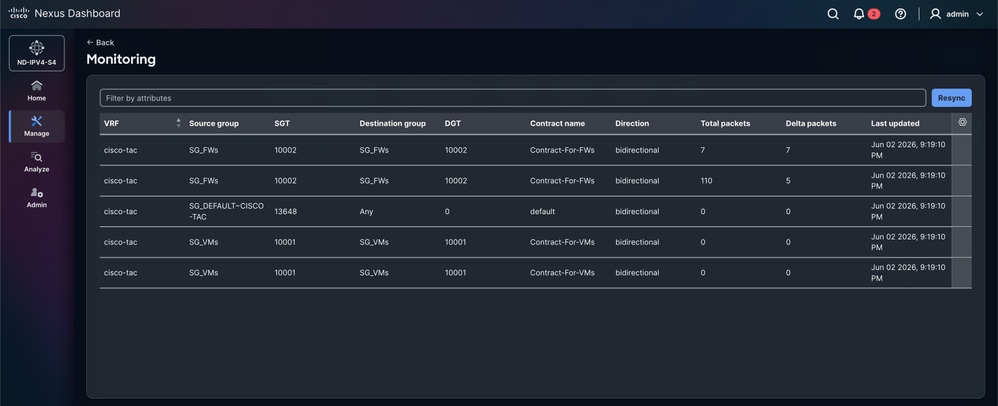
- Validate traffic matching statistics for VXLAN GPO contracts from the NDFC GUI. This verification confirms whether traffic is actively matching the configured Security Group contracts and whether SGACL enforcement is operational across the VXLAN EVPN Multi-Site fabric.
- In the NDFC GUI, navigate to Manage > Fabrics > Fabric Groups > USA / MEXICO > Segmentation and Security > Security Associations > Monitoring.
- This section provides visibility into Security Group communication flows, contract hit statistics, permit and deny actions, and operational contract activity between endpoint groups.
- The monitoring statistics are displayed individually inside each.
- Monitoring statistics from NDFC provide an operational validation layer that complements CLI-based troubleshooting by confirming real-time policy enforcement and traffic matching behavior across the fabric.
Note: On the first attempt to review traffic statistics in NDFC 4.2, the monitoring section can initially appear empty. In this situation, press the Resync button to trigger synchronization of contract statistics from the VXLAN fabric. While the synchronization process runs, the GUI displays the message Resync status: In progress. After the synchronization completes, press the Ok button to refresh the monitoring view. After the resynchronization finishes, the traffic statistics associated with each Security Group contract become visible in the monitoring section. In order to validate live traffic matching behavior, generate traffic between the endpoints and then press the Resync button again to update the contract statistics displayed in NDFC.
- From the previous scenario, ICMPv4 traffic is successfully permitted between the endpoints. However, if an SSH session is established, the connection times out because the VXLAN GPO contract explicitly denies TCP traffic destined to port 22.
FW-1# ping 10.64.252.11
PING 10.64.252.11 (10.64.252.11): 56 data bytes
64 bytes from 10.64.252.11: icmp_seq=0 ttl=254 time=1.131 ms
64 bytes from 10.64.252.11: icmp_seq=1 ttl=254 time=0.694 ms
64 bytes from 10.64.252.11: icmp_seq=2 ttl=254 time=0.675 ms
64 bytes from 10.64.252.11: icmp_seq=3 ttl=254 time=0.657 ms
64 bytes from 10.64.252.11: icmp_seq=4 ttl=254 time=0.648 ms

--- 10.64.252.11 ping statistics ---
5 packets transmitted, 5 packets received, 0.00% packet loss
round-trip min/avg/max = 0.648/0.761/1.131 ms
FW-1# ssh admin@10.64.252.11
ssh: connect to host 10.64.252.11 port 22: Connection timed out
Related Information
Cisco Nexus 9000 Series NX-OS VXLAN Configuration Guide, Release 10.6(x)
Securing Data Centers with Microsegmentation using VXLAN GPO
Revision History
| Revision | Publish Date | Comments |
|---|---|---|
1.0 |
24-Jun-2026
|
Initial Release |

 Feedback
Contact Cisco
- Open a Support Case

- (Requires a Cisco Service Contract)