Understand Smart Licensing in Unified Contact Center Express
Available Languages
Contents
Introduction
This document describes the Cisco Smart Software Licensing by use of the Cisco Unified Contact Center Express (UCCX).
Prerequisites
Requirements
Cisco recommends that you have knowledge of these topics:
- UCCX Release 12.5
-
Cisco License Central On-Prem Release 7
Components Used
The information in this document is based on these software and hardware versions:
- UCCX Release 12.5
- Cisco License Central On-Prem Release 7
The information in this document was created from the devices in a specific lab environment. All of the devices used in this document started with a cleared (default) configuration. If your network is live, ensure that you understand the potential impact of any command.
Background Information
Cisco Smart Software Licensing can use Unified Contact Center Express (UCCX), which is a flexible software license model that streamlines the way you activate and manage Cisco software licenses across your organization.
This solution allows you to easily track the status of your license and software usage trends. It pools the license entitlements in a single account and allows you to move licenses freely across virtual accounts. Smart Licensing is enabled across most of Cisco products and managed by a direct cloud-based or mediated deployment model.
Smart Licensing Architecture in UCCX
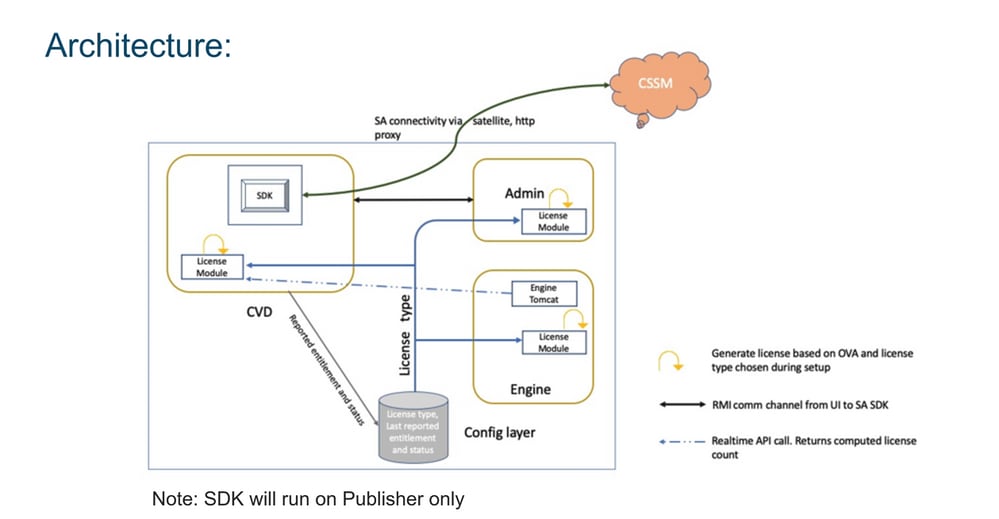
Advantage of Smart Licensing over Classic Licensing
- Smart licensing provides a complete view of licenses for software, services, and devices at one easy to use portal.
- No Product Activation Keys (PAK)-based registration is required in Smart Licensing.
- The license is not specific to only one device, but is flexible and can be used across devices.
- User and license can be added as per the requirement.
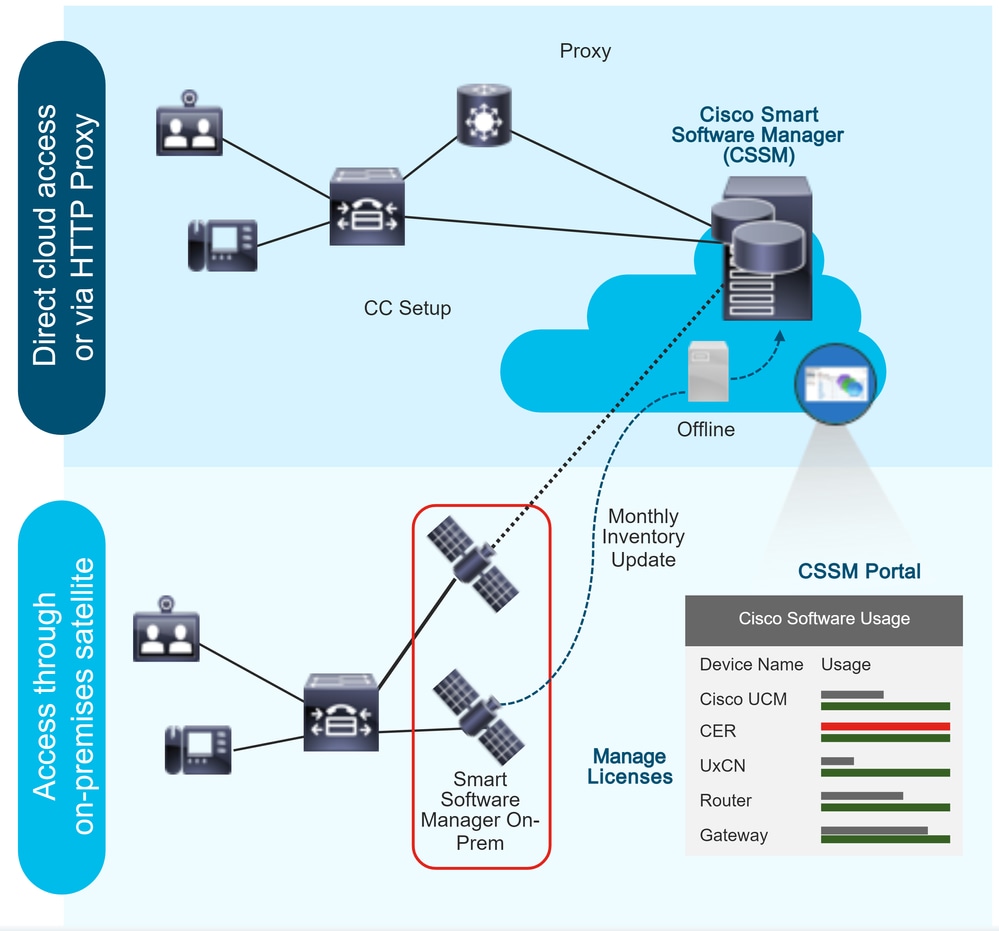
Smart Licensing Deployment Types
There are two software deployment options for Smart Licensing:
- Direct - Cisco License Central
- Cisco License Central On-Prem (Cisco License Central On-Prem)
Direct - Cisco License Central

Note: The UCCX server must have direct connectivity to the internet or by proxy server for direct deployment.
Cisco License Central allows you to:
- Create, manage, or view virtual accounts.
- Manage and track licenses.
- Move licenses across virtual accounts.
- Create and manage Product Instance Registration Tokens.
Cisco License Central On-Prem
Cisco License Central On-Prem is an on-premises component that handles your licensing needs. When you choose this option, Unified CCX registers and reports license consumption to the Cisco License Central On-Prem, which synchronizes its database regularly with Cisco License Central that is hosted on Cisco.com.
You can use the Cisco License Central On-Prem in either connected or disconnected mode, which depends on if the Cisco License Central On-Prem can connect directly to Cisco.com.
Configure the Transport URL for Cisco License Central On-Prem with Smart Call-Home URL:
- Connected: Use when there is connectivity to Cisco.com directly from the Cisco License Central On-Prem. Smart account synchronization occurs automatically.
- Disconnected: Use when there is no connectivity to Cisco.com from the Cisco License Central On-Prem. Cisco License Central On-Prem must synchronize with Cisco License Central manually to reflect the latest license entitlements.
Note: For more information on Cisco License Central On-Prem, visit Cisco License Central.
Licensing Options in UCCX Deployment
1. Fresh installation of UCCX 12.5 Smart Licensing is the only available licensing option in UCCX 12.5.
- Smart Licensing is the only available licensing option in UCCX 12.5.
2. Upgrade from UCCX version 12.0 to 12.5.
- System remains the Classic License by default.
- User(s) have the option to switch to Smart License (only once).
3. Upgrade from UCCX Version 10.X,11.X to 12.5.
- User(s) have the option to choose licensing mode: Classic License or Smart License.
- If the Classic Licensing option is selected, the user have the option to switch to Smart Licensing (only once; the reverse option is not applicable).
Note: Cisco Workforce Optimization licenses (WFO) are not supported with Smart Licensing. Consequently, users who upgrade to 12.5 must continue with Classic Licensing if they want to continue to use Cisco WFO.
Alternatively, users who want to move to Smart Licensing for Unified CCX must consider their migration to the Solutions Plus version of Workforce Optimization. In the case of WFO, if Smart Licensing was chosen, contact Cisco Technical Assistance Center for a workaround.
Smart License Types
There are five Smart License types available on UCCX:
1. Flex
- Standard
- Premium
2. Perpetual
- Premium
- Enhanced
3. Flex (Hosted Collaboration Solution (HCS))
4. Non Product System/Not For Resale (NPS/NFR)
Flex (HCS) is an option for users who use the Hosted Collaboration Solution of CCX and is not applicable for on-premis deployment of UCCX. The NPS/NFR licensing option is only used for lab purposes.
The features supported by each licensing type are shown in the image:
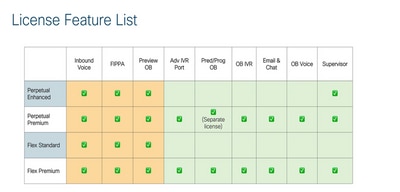
Note: To change from one licensing type to another, first, unregister the Smart Licensing from the drop-down list available in the Action tab in license management. Choose the To change the License type option in the license option and then the required option in the license type. A restart of the UCCX cluster is required once the license type is changed.
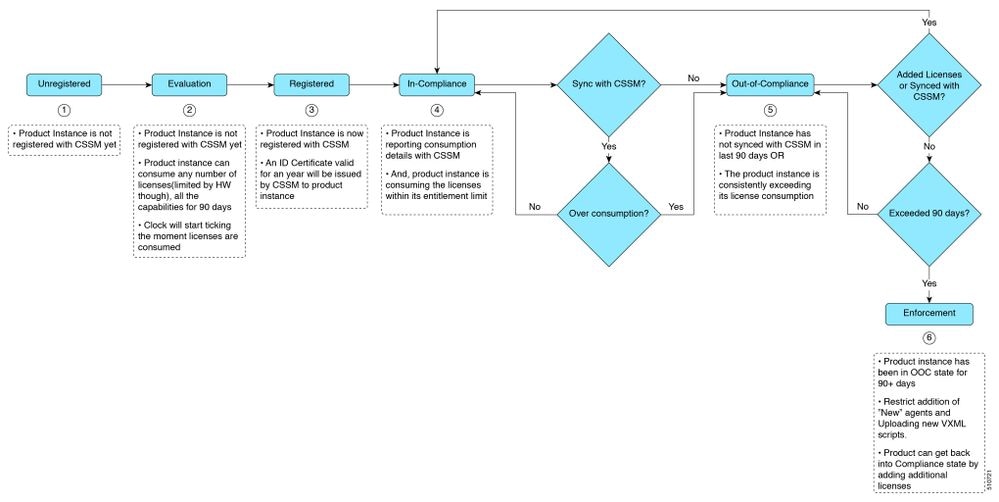
License States
1. Registration State
- Unregistered: Product Instance is unregistered.
- Registered: After you purchase the license, you must register the Product Instance with Cisco License Central. To register with Cisco License Central, generate a registration token from the Cisco License Central portal. Use the registration token to register your Product Instance.
- Registration Expired: Product Instance registration has expired because the ID Certificate issued by Cisco License Central is not renewed for more than 12 months. Reregister the Product Instance.
2. Authorization State
- No licenses in use.
- Evaluation Mode: The Product Instance license has an Evaluation period of 90 days. In the Evaluation period, you have unlimited access to the product with the highest set of product capabilities and an unlimited number of licenses. You must register the system with Cisco License Central within 90 days. If the system is not registered before the end of the Evaluation period, it is moved to the Enforcement state where certain system functions are restricted.
- In-Compliance: When the license consumption is as per the purchased quantity, the product is compliant.
- Evaluation Expired: Product Instance evaluation period has expired.
- Authorized: Product Instance is in authorized or in-compliance state (authorization is renewed every 30 days).
- Out of Compliance: Product Instance reports license usage to the Cisco License Central every 15 minutes. If your license consumption is more than the entitlements for five consecutive reporting intervals, the Product Instance is transitioned to the Out-of-Compliance state. The Out-of-Compliance period is for 90 days, which you must purchase the additional licenses. If you fail to take corrective action within the 90 day period, the Product Instance is transitioned to the Enforcement state.
Note: Starting from 12.5 (1) SU3 Release, the Product Instance reports license usage to the Cisco License Central every 8 hours. If Cisco License Central reports Out-of-Compliance for the reported value, then the Product Instance is transitioned to Out-of-Compliance state. The Out-of-Compliance period is for 90 days, which you must purchase the additional licenses. If you fail to take corrective action within the 90 days period, the Product Instance is transitioned to the Enforcement state.
- Authorization Expired: Product Instance authorization has expired. This usually happens when the product has not communicated with the Cisco License Central for more than 90 days. It is in an overage period for 90 days before restrictions are enforced.
3. Enforcement State
When the 90-day period of Out-of-Compliance, Evaluation period, or Authorization period has expired, the Product Instance is moved to the Enforcement state in which system operations are impacted for Contact Center components. The Product Instance is in the Enforcement state in the listed scenarios:
- Out-of-Compliance Expiry: When the Out-of-Compliance period of 90 days has expired. Purchase new licenses to exit the Enforcement state.
- Authorization Expiry: When the Product Instance has not communicated with the Cisco License Central for 90 days and has not automatically renewed the entitlement authorizations. Renew the license authorizations to exit the Authorization expiry state.
- Evaluation Expiry: When the license evaluation period of 90 days has expired and the Product Instance is not registered with the Cisco License Central. Register the Product Instance with the Cisco License Central to exit the Evaluation expiry state.
During the Enforcement mode, synchronization from Unified CM is blocked because any new addition, modification, or deletion of agents is not synchronized with the Unified CCX system.
A pictorial representation of the different license states is shown:
License Computation
Smart Licensing allows you to view the license consumption of your Cisco Unified CCX deployments. License consumption for an agent is computed as per the skills that are configured and log in status into the Finesse desktop.
License consumption is recomputed every 15 minutes. The aggregated data for all logged-in agents is sent to the Cisco License Central at fixed time intervals and exists in the Unified CCX database.
The license consumption details differ, based on the system license type.
Note: Starting from 12.5 (1) SU3 Release, the Product Instance reports license usage to the Cisco License Central every 8 hours.
License Computation Scenario 1
This scenario shows how the system computes the licenses and how the Out-of-Compliance state becomes irreversible.
Number of licenses purchased = 100
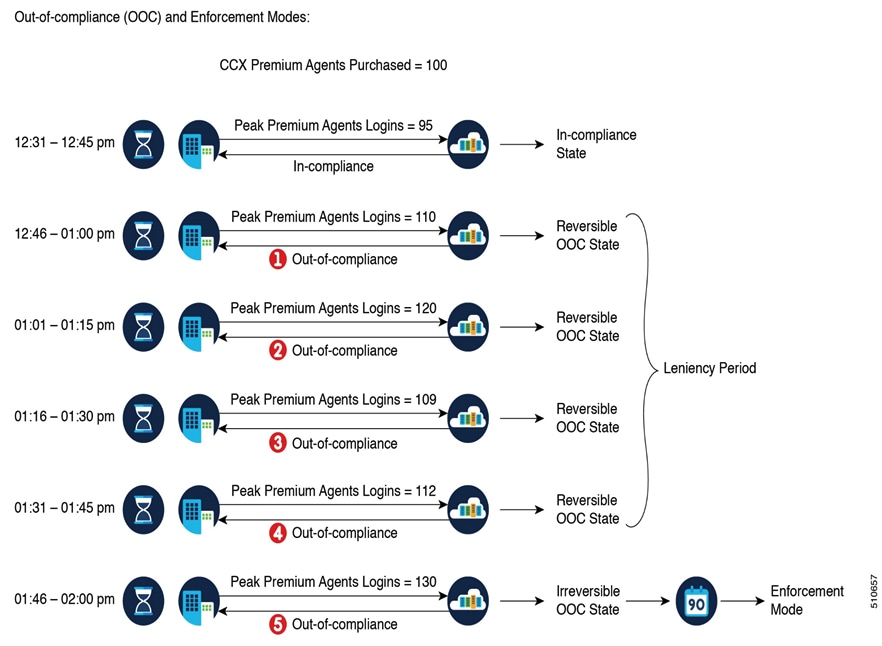
If the Cisco License Central registers five consecutive instances of licenses over usage in the span of one hour, the Product Instance transitions to irreversible Out-of-Compliance.
Thereafter, the Product Instance reports Locked usage quantity (130 in the previous scenario) until the deficit licenses (130 - 100 = 30) are purchased. The Locked usage is the highest number of license usage (130) in the Out-of-Compliance state. The Product Instance does not report the actual license usage when the Product Instance is in the Out-of-Compliance state.
Real Time Monitoring Tool (RTMT) alerts begin to generate when the system moves into Out-of-Compliance mode.
Cluster view daemon (MCVD) logs show the time that remains until the system moves into irreversible Out-of-Compliance mode:
%MCVD-LIB_LICENSE-1-SYSTEM_TO_ENTER_OOC_STATE: [REPORT_ENTITLE] com.cisco.smartlicense.util.SmartLicenseUtil This Product Instance will enter Out of Compliance state because of insufficient licenses.: This Product Instance will enter Out of Compliance state in =45 minutes %MCVD-LIB_LICENSE-0-SYSTEM_TO_ENTER_OOC_STATE_SHORTLY: [REPORT_ENTITLE] com.cisco.smartlicense.util.SmartLicenseUtil The time required for the Product to be in compliance is about to expire. Else, you will have to procure more licenses.: This Product Instance will enter Out of Compliance state in =15 minutesNote: Users can purchase additional licenses from the Cisco Commerce website (CCW) to exit the Out-of-Compliance state.
License Computation Scenario 2
In this scenario, you see how the system moves from Out-of-Compliance state back to In-Compliance mode:
Number of licenses purchased = 100
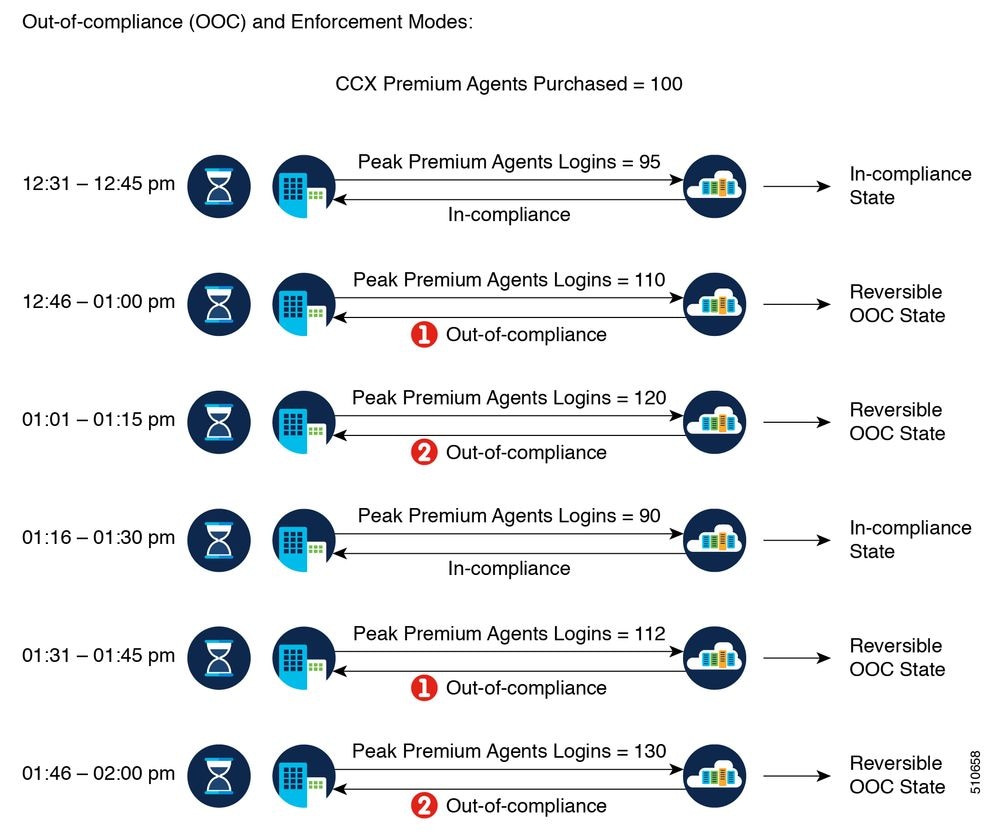
In this example, the Product Instance is back to the In-Compliance state after two instances of overage within one hour.
The next time the Product Instance goes Out-of-Compliance, the count is one of five. You get 45 minutes (after the first Out-of-Compliance notification from Cisco License Central) to bring back the consumption within the acceptable range to stay in the In-Compliance state.
Note: There can be other Out-of-Compliance scenarios. Make use of the license feature list table and the Unified License Consumption Report in the Cisco Unified Intelligence Center CUIC) to identify these scenarios.
License Computation Starting 12.5 SU3
The system reports peak license usage to Cisco License Central every 8 hours. If you are seen to have consumed more licenses than you are authorized to, the Product Instance is pushed to the Out-of-Compliance state. The Out-of-Compliance period is for 90 days, which you must purchase additional licenses. If you do not take corrective action within the 90 days period, the Product Instance is pushed to the Enforcement state in which, some of the operations are impacted.
Log in to Cisco License Central to view the detailed license consumption. Cisco License Central reports purchased quantity, in-use quantity, and balance licenses. At a quick glance, you can decide if the consumption of your licenses are in deficit or surplus, which you can make the right decision on the number of licenses that are required.
%MCVD-LIB_LICENSE-1-SYSTEM_IN_OOC_STATE: [REPORT_ENTITLE] com.cisco.smartlicense.util.SmartLicenseUtil This Product Instance is currently in Out of Compliance state because of insufficient licenses.
License Control
The overage allowance allows use of more licenses than purchased. To limit the license usage to the purchased quantity (or less), use the License Control feature in license management option.
With License Control, you can disable the Overage allowance option to restrict the number of agents and ports that can be used in Unified CCX.
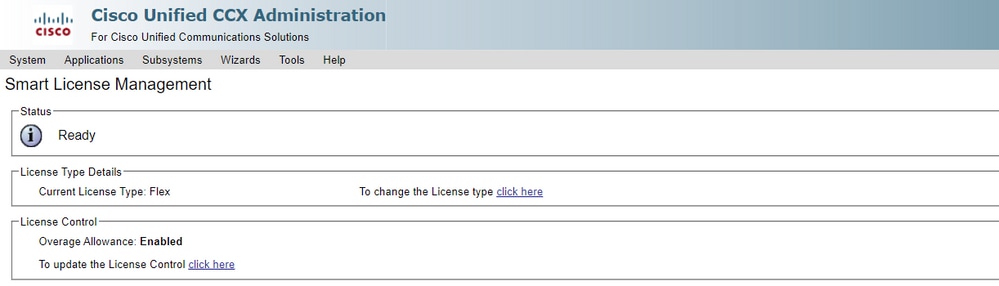
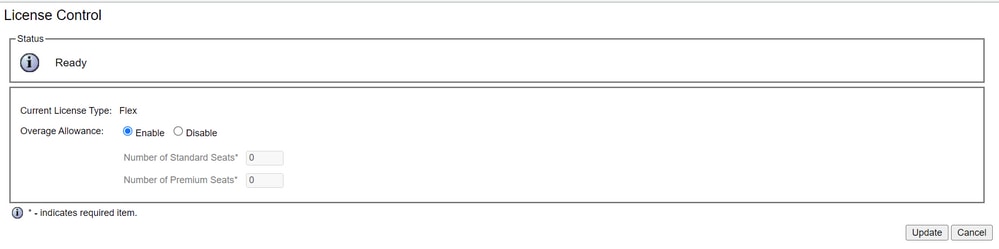
Note: Overage allowance is enabled by default on the UCCX and comes after the reversible and irreversible Out-of-Compliance state.
RTMT Alerts
Administrators are notified by alerts (on the landing page of Unified CCX Administration and RTMT) and event logs (Syslogs). Administrators are also notified through emails (that are configured in the Cisco License Central) on the status of licenses in the Smart and Virtual Accounts.
The Out-of-Compliance alert can be seen in the Unified CCX option in alert central of RTMT:

In the Event Viewer-System Log, you can see messages of the time left for the system to move in Out-of-Compliance and when the system moves into the Out-of-Compliance state:
%UC_LIB_LICENSE-0-SYSTEM_TO_ENTER_OOC_STATE_SHORTLY: %[The time remaining to enter OOC state=15 minutes][AppID=Cisco Unified CCX Cluster View Daemon][ClusterID=][NodeID=uccxpubsu1]: The time required for the Product to be in compliance is about to expire. Else, you will have to procure more licenses.%UC_LIB_LICENSE-1-SYSTEM_IN_OOC_STATE: %[AppID=Cisco Unified CCX Cluster View Daemon][ClusterID=][NodeID=uccxpubsu1]: This Product Instance is currently in Out of Compliance state because of insufficient licenses.Note: Starting from 12.5 (1) SU3 Release, UCCX goes in Out-of-Compliance immediately if Cisco License Central responds with Out-of-Compliance state.
%UC_LIB_LICENSE-1-SYSTEM_IN_OOC_STATE: %[AppID=Cisco Unified CCX Cluster View Daemon][ClusterID=][NodeID=uccx15]: This Product Instance is currently in Out of Compliance state because of insufficient licenses.
In the license management page of UCCX GUI, you can also see if the system has moved into the Out-of-Compliance mode.

Troubleshooting
1. Verify that the DNS A record of the Cisco License Central server is added into the DNS server of the UCCX for the Cisco License Central On-Prem deployment.
2. For direct deployment, port 80 and 443 are open on the firewall.
3. Collect the cluster view daemon and admin logs with the default lib_license level to further troubleshoot the issue.
4. For license computations, enable LIB_LICENSE and SS _RM to debugging level for the CCX engine.
5. Cisco Unified CCX Cluster View Daemon service under the Serviceability page is INSERVICE.
Revision History
| Revision | Publish Date | Comments |
|---|---|---|
6.0 |
22-Jun-2026
|
Updated spelling, grammar, sentence structure, alt text, spacing. |
5.0 |
28-May-2026
|
Replace references to "Cisco Smart Software Manager (SSM)" with "Cisco License Central." |
4.0 |
02-Apr-2026
|
Additions with respect to the newer versions added to the product. |
2.0 |
15-Feb-2023
|
Added the license control section. |
1.0 |
29-Sep-2021
|
Initial Release |

 Feedback
Contact Cisco
- Open a Support Case

- (Requires a Cisco Service Contract)