Cisco Meeting Intelligence Assistant Customer Guide
Available Languages
Contents
Introduction
This document describes the Cisco Meeting Intelligence Assistant customer guide.
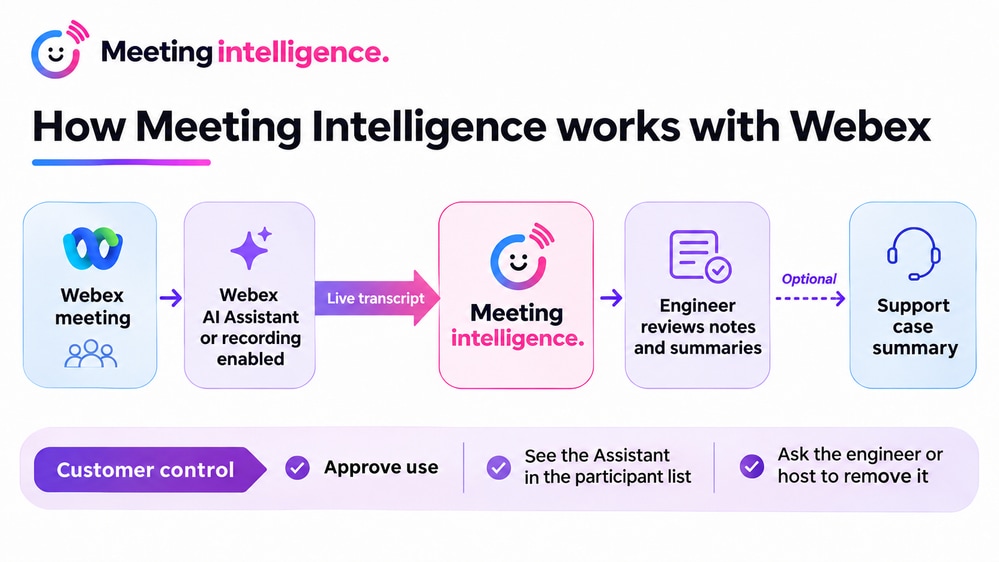 Meeting Intelligence Flow
Background Information
This document describes the Cisco Meeting Intelligence Assistant, what the Assistant does, when it is used during Cisco support meetings, and how Cisco ensures its use meets Cisco security, privacy, and Responsible AI standards.
This document is for customers who want to understand the Assistant before they approve its use in a Webex meeting.
What is the Cisco Meeting Intelligence Assistant?
The Cisco Meeting Intelligence Assistant is an AI note-taker that supports a Cisco engineer during a Webex meeting. The Assistant joins the meeting as a visible participant, usually with the name <Engineer Name>'s Assistant. The Assistant receives the live meeting transcript from Webex in order to help the engineer:
- Keep accurate notes of the discussion.
- Identify important technical points and requests as they come up.
- Prepare a clear summary and list of action items after the meeting.

Note: The Assistant uses the live Webex transcript to support note-taking. Webex AI Assistant or Webex recording must be enabled for the Assistant to receive the transcript.
Why does Cisco use the Meeting Intelligence Assistant?
Complex support work often requires long troubleshooting calls with multiple teams, technologies, and parties. Cisco engineers must solve the problem and keep accurate records at the same time.
The Meeting Intelligence Assistant handles the note-taking so that the engineer can focus on the customer and the issue. The result is faster engagement of the right Cisco expertise and more consistent documentation of each meeting.
How does the Meeting Intelligence Assistant Help?
Benefits for Customers
- Faster resolution: Important details and requests are identified right away, so the right Cisco expertise is involved sooner.
- Accurate follow-up: Action items, owners, and next steps are captured consistently.
- Less repetition: Clear notes in the Service Request (SR) mean that customers do not have to explain the same details again when work is handed over.
- Better continuity: If a Cisco engineer is briefly needed elsewhere, for example during a parallel critical incident, the engineer stays informed about the meeting and can respond quickly.
Benefits for Cisco Engineers
- Live notes from the meeting
- Alerts when key topics come up, for example, RMA or topology change.
- Summaries written for the type of meeting, such as a technical summary or a follow-up summary.
When is the Meeting Intelligence Assistant Used?
The Assistant is used only when all of these conditions are true:
- The customer approves its use. The Cisco engineer asks for approval before the Assistant is used. Approval can be recorded against the SR or confirmed in writing.
- The meeting is a Webex meeting. The Assistant only works in Webex meetings.
- Webex recording or the Webex AI Assistant is turned on for the meeting.
- The Assistant is visible. The Assistant appears in the participant list with a clear name, so all participants know that it is present.
- An authorized Cisco engineer starts it. Only the Cisco engineer assigned to the account or SR can start the Assistant.
Note: If the customer does not approve, the meeting continues as usual without the Assistant. The level of support does not change.
Key Features
| Feature | Description |
|---|---|
| Live note-taking |
Uses the live Webex transcript to provide a speaker-labeled record for the Cisco engineer. |
| Key topic alerts |
Notifies the engineer when topics that the engineer set up in advance come up in the conversation. |
| Meeting summaries |
Creates a structured summary with key points, decisions, action items, owners, and next steps. |
| Case documentation |
Adds a summary of the meeting to the SR so that the support history stays accurate and complete if opted by the engineer. |
| Support from Cisco knowledge resources |
Looks up information in Cisco internal knowledge resources in order to help the engineer give accurate answers faster during the call. |
| Answers based on the meeting |
Built-in safeguards keep AI output tied to what was actually said in the meeting. |
What the Meeting Intelligence Assistant is Not
The Meeting Intelligence Assistant is a note-taker that helps the Cisco engineer on the call. It is not a separate support agent.
- It does not replace the Cisco engineer. A qualified Cisco engineer stays fully responsible for the support case, recommendations, and communications.
- It does not make decisions or commitments for Cisco or for the customer.
- The Cisco engineer remains responsible for the support provided during the meeting.
- It does not send audio or video into the meeting.
- It does not make any changes to customer networks, devices, or systems.
Meeting Intelligence Assistant - Privacy and Security Considerations
The Meeting Intelligence Assistant was designed with security and privacy first:
- Customer approval comes first: Cisco policies require that the Meeting Assistant is never used in a customer meeting without explicit customer permission.
- Built on Webex: The Assistant uses the live transcript provided by Webex. Webex security controls and meeting policies continue to apply to the meeting.
- Reviewed and approved: The Assistant runs on platforms approved under the Cisco Secure Development Lifecycle (CSDL). The Assistant has completed the Cisco Responsible AI (RAI) review and internal security and engineering approvals.
- Cisco-managed AI: AI processing happens on Cisco-managed AI services. Customer meeting content is not used to train external AI models.
- Restricted access: Only authorized Cisco staff who work on the case can see the output.
- Information about the SR: When the engineer adds a meeting summary to a SR, it becomes part of the support case record. Contact your Cisco engineer or account team with questions about meeting information.
Customer Controls
At any time during the meeting, the customer can:
- Decline to have the Assistant join.
- Ask the Cisco engineer to remove the Assistant. The Assistant leaves immediately if expelled from the meeting.
- Remove the Assistant from the participant list, if the customer is the meeting host.
- If both Webex AI Assistant and recording are turned off, the Assistant stops receiving new live transcript content.
- Lock the meeting to control who can join.
Frequently Asked Questions (FAQs)
- How does the Assistant use the meeting transcript?
The Assistant receives the live transcript from Webex when Webex AI Assistant or recording is enabled. It uses the transcript to help the Cisco engineer prepare notes and summaries. Webex recording is a separate meeting feature; ask your meeting host or Cisco engineer about the recording settings for your meeting.
- How do I know that the Assistant is in the meeting?
The Assistant always appears in the participant list with a clear name, such as <Engineer Name>'s Assistant.
- Can I decline the use of the Assistant?
Yes, use of the Assistant is optional. If you decline, the quality and priority of your support do not change.
- Does the Assistant talk to me or answer my questions?
No, the Assistant only supports the Cisco engineer. All communication with you comes from your Cisco engineer.
- Is my data used to train AI models?
The Assistant uses Cisco-managed AI services. Customer meeting content is not used to train external AI models.
- Where is information about my case stored if call is related to TAC SR?
A meeting summary added to your SR becomes part of the support case record. For information about the support service, see the TAC offer disclosure.
- Can Assistant be added only to TAC SR meetings?
Not necessarily, this can cater to various Cisco roles and usecases. For example, a high touch engineer (HTE) or high touch manager (HTOM) can obtain consent from customer and have assistant join along with him/her or on behalf. This can help efficiently obtain custom live summary from multiple internal and external calls to help engineer collate information effectively.
- Can a Cisco engineer use the Assistant in my meeting without telling me?
Cisco policy requires your approval, and the Assistant is always visible to all participants.
- Who do I contact with questions or concerns?
Contact your Cisco engineer or account team. You can also review the resources in the Related Information section.
- How are participants made aware if they join post Assistant has joined the call?
The Assistant appears in the participant list, including for participants who join later. Ask the Cisco engineer to remove the Assistant if you do not want it in the meeting. If you are the meeting host, you can also remove it. If both Webex AI Assistant and recording are turned off, the Assistant stops receiving new live transcript content.
- Can Assistant join any Webex call if there is Webex link?
No, Cisco engineer has to authorize the Assistant to be able to join and this will be documened in TAC case notes if it is related to TAC case.
- Can I request a copy of meeting information?
Yes, contact your Cisco engineer or account team, identify the meeting and, if applicable, the support case, and specify the information requested. Access to a Webex recording or transcript depends on the meeting host and applicable Webex settings. Your Cisco contact can explain the process for requesting available Assistant-generated notes or case information.
- Can I request deletion of meeting information?
Yes, contact your Cisco engineer or account team, identify the meeting and the information you want deleted, such as a Webex recording, transcript, Assistant-generated notes, or a case summary. The applicable process and retention requirements can differ for each type of information.
- How can I confirm a deletion request was completed?
Your Cisco contact can explain the status of the request and the confirmation available for the information involved. Stopping the Assistant from receiving new transcript content does not itself delete information already captured.
Related Information
- Cisco Trust Portal
- TAC offer disclosure
- Cisco Online Privacy Statement
- Cisco Responsible AI Principles (available from the Cisco Trust Center)
- Cisco Technical Support & Documentation
Note: This document is for informational purposes only. It does not change or replace the terms of any agreement between Cisco and the customer. Features and processes described in this document can change.
Revision History
| Revision | Publish Date | Comments |
|---|---|---|
1.0 |
18-Nov-2026
|
Initial Release |

 Feedback
Contact Cisco
- Open a Support Case

- (Requires a Cisco Service Contract)