Introduction
This document describes the configuration steps needed to setup the Recorder on the Call Bridge (CB) component of a Cisco Meeting Server (CMS).
Prerequisites
Requirements
Cisco recommends that you have knowledge of the CMS configuration and Windows server 2016.
Components Used
The information in this document is based on these software and hardware versions:
- CMS version 3.12 service Callbridge and Recorder
- Windows Server 2016
The information in this document was created from the devices in a specific lab environment. All of the devices used in this document started with a cleared (default) configuration. If your network is live, ensure that you understand the potential impact of any command.
Background Information
The CMS Recorder is available from release 1.9 of the CMS (former Acano) server. The Recorder provides the capability to record meetings and save the recordings on a Network File System (NFS) document storage.
Prior to 3.0, the internal Recorder and streamer components of the Meeting Server were dependent upon the internal XMPP server component of the Meeting Server — in 3.0 this XMPP server is removed. Version 3.0 introduces a new internal Recorder and streamer, both SIP-based.
The new internal Recorder and streamer components and dialing out to third-party SIP Recorders are all configured using SIP URIs, so when recording or streaming is started the administrator - configured SIP URI is called.
Recorder license is needed and must be applied on the CallBridge component, and not on the Recorder server.
NFS directory is needed, and it can be setup on Windows Server or Linux.
Deployments
Supported Deployments
1. Permitted deployment for recording: remote mode.
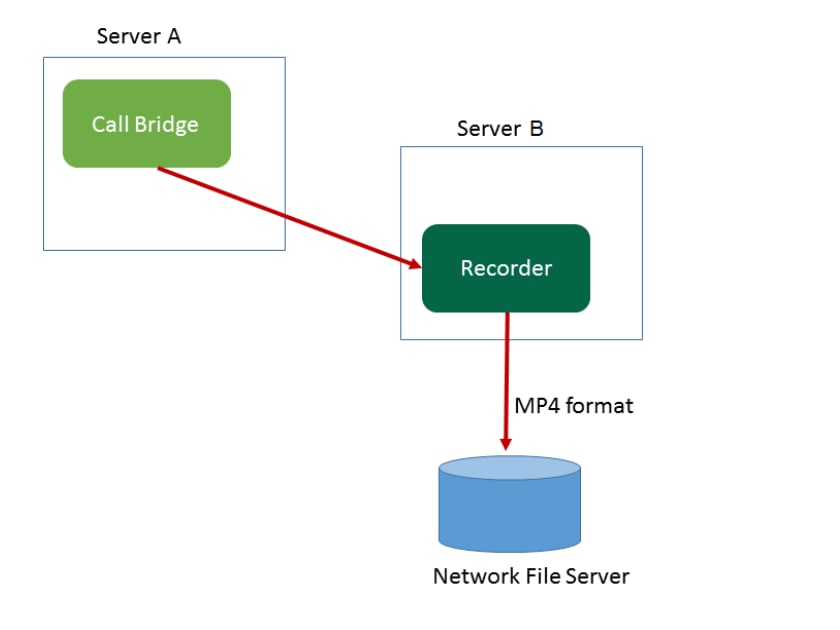 Remote Mode
2. Permitted deployment for testing purposes only: local mode.
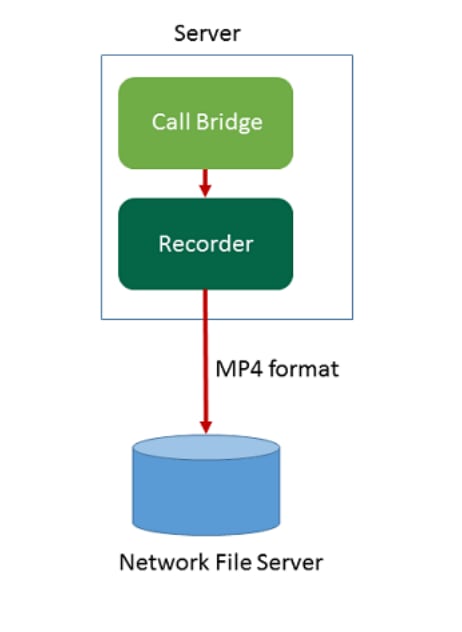 Local Mode
Configure
Step 1. Configure NFS on Windows Server 2016, refer the document:
Configure NFS Share to Use as Storage for CMS Recorder
Step 2. Configure and enable Recorder on the Recorder server.
Step 2.1. Configure the Recorder in order to listen on the interface(s) of your CMS with this command recorder sip listen <interface> <tcp-port|none> <tls-port|none>.
For example, if you want to only listen on the TLS port and not the TCP port, enter:
cms01> recorder sip listen a none 8888

Note: If you configure the Recorder on a node of clustered CB, the interface must be the local listening interface of the node on which the Recorder is being configured and need to special port different with other components.
Step 2.2. Set the certificate file to be used by the Recorder with the recorder sip certs <key-file> <crt-file> [<crt-bundle>] command.
cms01> recorder sip certs cms.key cms.cer root.cer
Note: You can use a certificate that already exists and private key file used by the CB. The crt-bundle must contain the certificate used by the CB, if different. If in a cluster, this must contain the certificates of every CB in the cluster.
Step 2.3. Specify the hostname or IP address of the NFS, and the directory on the NFS to store the recordings with command recorder nfs <hostname/IP>:<directory>.
cms01> recorder nfs 10.124.56.222:NFS
Note: The Recorder does not authenticate to the NFS but it is important that the Recorder Server has read/write access to the NFS directory.
Step 2.4. Enable Recorder service on CMS through SSH command in order to activate the Recorder service with command recorder enable.
cms01> recorder enable
Verify
Verify the Recorder status from the CMS SSH command line with command recorder.
cms01> recorder
Enabled : true
SIP interfaces : tcp a:8888, tls none
SIP key file : cms.key
SIP certificate file : cms.cer
SIP CA Bundle file : cms.cer
SIP traffic trace : Disabled
NFS domain name : 10.124.56.222
NFS directory : NFS
Resolution : 720p
Call Limit : none
Configure call profile with siprecorderuri on CMS/configuration/API. Then, configure the outbound rule, the rule must match the Recorder ports and encryption mode in Mainboard Management Processor (MMP).
 outbound rule
Troubleshoot
1. CMS system status of web page displays error "Recorder 'recorder@recorder.com' unavailable (connection failure)" if set encryption mode to auto on the outbound calls rule.
 encryption auto mode
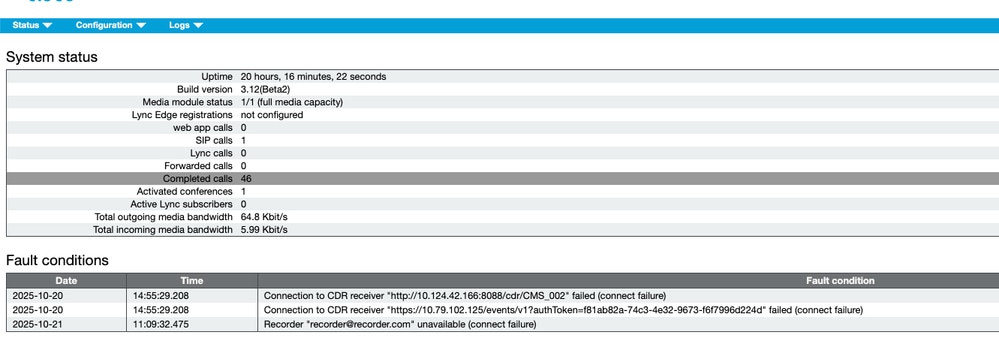 connection failure
2. CMS system status of web page displays error "Recorder 'recorder@recorder.com' unavailable (service unavailable)" if no specify ports match with MMP setting on the outbound calls rule.
 port
port
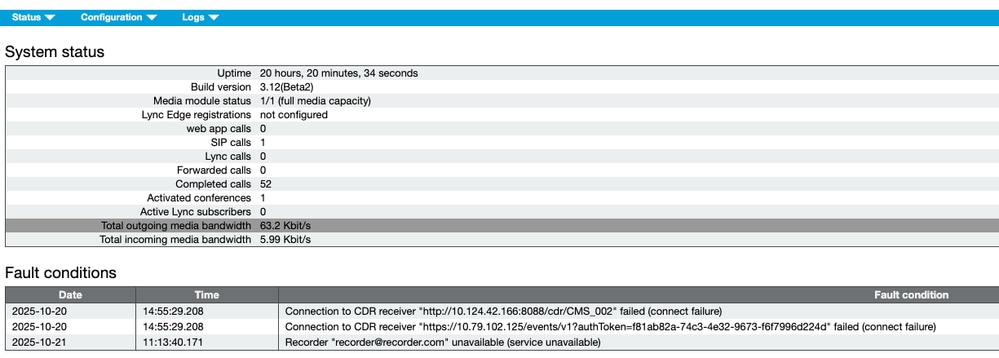 service unavailable
Related Information

 Feedback