Obtain Session Token for SCC PIAM Permission Issues
Available Languages
Introduction
This document describes how to collect the web browser PIAM session token for troubleshooting permissions or access issues.
Prerequisites
Requirements
There are no specific requirements for this document.
Components Used
This document is not restricted to specific software and hardware versions.
The information in this document was created from the devices in a specific lab environment. All of the devices used in this document started with a cleared (default) configuration. If your network is live, ensure that you understand the potential impact of any command.
Background Information
The Security Cloud Control (SCC) is a platform manages the permissions to your organizations' subscriptions and determine the level of access. The application that manages these permissions is called Provisioning, Identity and Access Management (PIAM). The goal of PIAM is to utilize one set of credentials to manage access and permissions across all products inside SCC.
Technical Assistance Center (TAC) can request PIAM session token details to troubleshoot PIAM issues.
Obtain the Token
The token can be obtained from your web browser as follows:
Chrome
Open the Developer Tools Window, then:
- Open the Chrome Menu.
- Select More Tools.
- Select Developer tools.
Navigate the application tab to locate the Session token:
- Select Applications.
- Select Storage.
- Select Session storage.
- Select Security.cisco.com.
- Select Okta token storage.
- Select Access token.
- Select Claims.
- Select Security cloud.
The result looks like this:
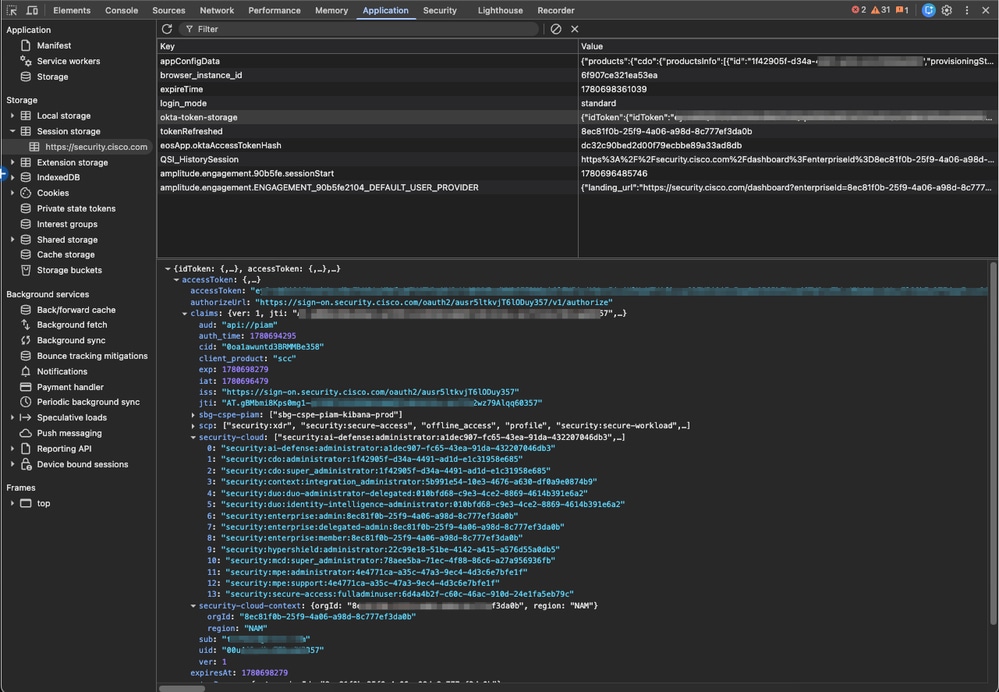 Piam token details
To copy the value token:
- Right-click {idToken: {,...}, accessToken :{,...},...}.
- Select Copy object.
 Copy Object
Firefox
Open the Developer Tools Window, then:
- Open the Firefox Menu.
- Select More Tools.
- Select Web Developer Tools.
Navigate the Application Tab to locate the Session token, then:
- Select Storage.
- Select Local Storage.
- Select https://security.cisco.com.
In the Items Column:
- Select Key okta-token-storage.
The result looks like this:
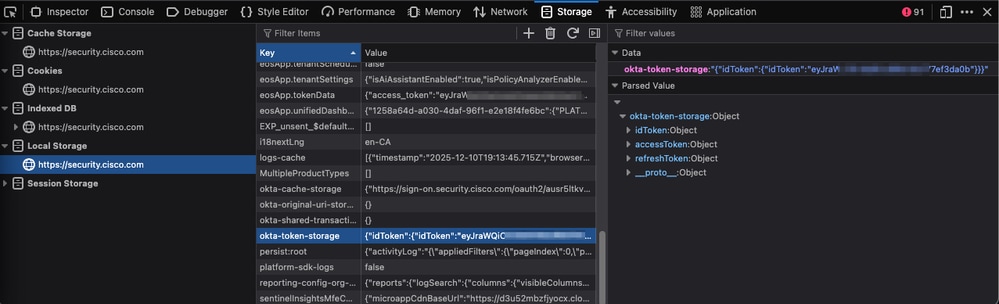 firefox token
In the Values column:
- Right-click click okta-token-storage: Object.
- Select Copy.

Paste the copied values and save it with your text editor. Include this file to your TAC case. The copied value must have multiple lines, and values.
Revision History
| Revision | Publish Date | Comments |
|---|---|---|
1.0 |
06-Jul-2026
|
Initial Release |

 Feedback
Contact Cisco
- Open a Support Case

- (Requires a Cisco Service Contract)