Configure SD-Access Silent Host with IP Directed Broadcast Feature
Available Languages
Contents
Introduction
This document describes managing silent hosts in SD-Access, addressing connectivity challenges using L2 flooding and IP directed broadcast.
Description
Most endpoints and their network interfaces transmit traffic periodically, especially control-related messages such as ARP or DHCP. However, certain endpoints respond only when prompted, rather than sending packets at regular intervals. These devices send control packets solely on an on-demand basis. In networking, such endpoints are commonly known as Silent Hosts. Within the context of SD-Access, Silent Hosts must cease all traffic or restrict their communication by withholding control-plane packets.
In the SDA fabric, broadcasts are either suppressed at each Edge node or forwarded to all Edges using L2 flooding—a process typically limited to Edge nodes and L2 Borders. Forwarding broadcasts to every port on a VLAN mimics the behavior of a traditional Layer 2 network, which significantly helps Silent Hosts remain active. However, managing silent hosts in a fabric environment presents challenges, as their lack of regular communication can disrupt authentication mechanisms, control-plane registrations, and forwarding.
Enabling L2 flooding addresses only part of the issue. Silent hosts can receive broadcast packets only when another device generates them, either from within the same VLAN inside the fabric or from a Fabric Border. An IP Directed Broadcast refers to an IP packet with a destination address set to the broadcast address of a subnet, originating from a host outside that subnet. This feature requires multicast support in the underlay. When IP directed broadcast is enabled in the fabric, all subnet broadcast packets reach every host within that subnet. This feature can also wake devices using standard unicast packets, effectively simulating the "unknown unicast" behavior found in traditional networks.
Topology
Hardware & Software
-
Catalyst 9000 series switches
-
Catalyst Center Version 2.3.7.9
-
Cisco IOS® XE 17.15.03 and later (Border/CP & Edge)
Topology:
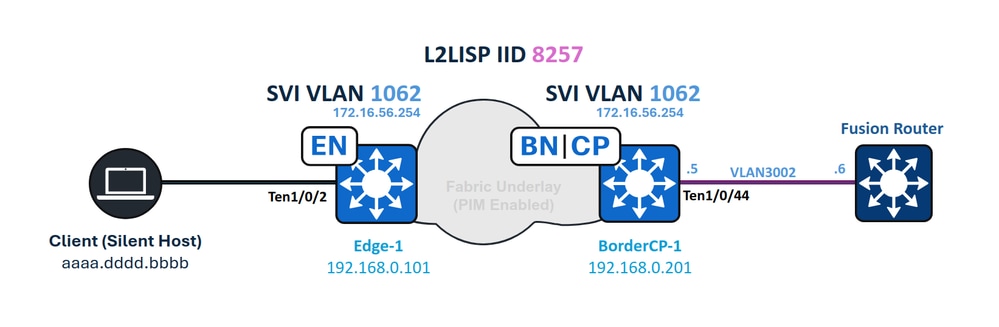 Network Diagram
Requirements
Cisco recommends that you have knowledge of these topics:
- Internet Protocol (IP) Forwarding
- Locator/ID Separation Protocol (LISP)
- Protocol Independent Multicast (PIM)
- Layer 2 Flooding in SD-Access
Requirements
- This feature requires Cisco Catalyst Center 1.3 or higher
- Cisco IOS XE 17.3 and Cisco DNA Advantage Licenses*
- For ASR and ISR Borders, Cisco IOS XE 17.3.1 or higher is required
- Catalyst 3000, 4000, 6000 series Switches or Nexus 7000 are not supported

Caution: Enabling the IP Directed Broadcast feature automatically activates L2 Flooding. Ensure that multicast functionality in the underlay operates correctly before enabling this feature.
You can enable or disable IP Directed Broadcast after creating the IP Pool, similar to managing wireless pools or L2 Flooding settings.
Catalyst Center Configuration
When IP Directed Broadcast is enabled, Catalyst Center initiates a fabric-wide provisioning task. All Edge nodes, L2 Borders, and Borders with L3 handoff are included in this provisioning process.
To trigger the IP Directed Broadcast workflow in the UI:
- Go to Provision.
- Select Fabric Sites.
- Choose the desired site.
- Navigate to Anycast Gateways.
From there, you can configure the required settings for IP Directed Broadcast.
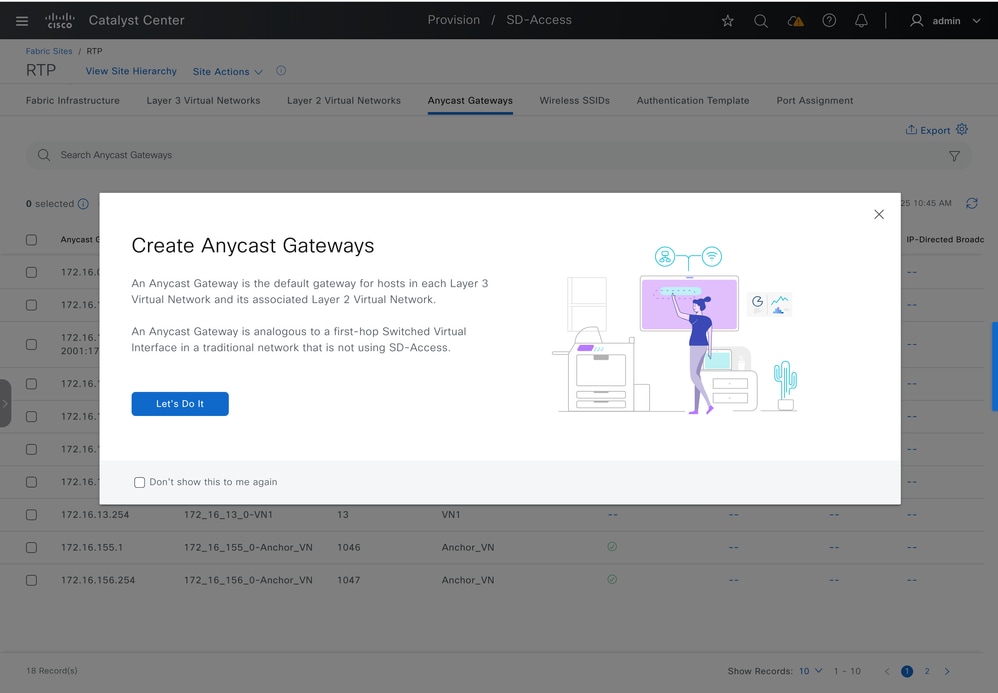 Create Anycast Gateways
Select the desired L3 Virtual Network, then click Next to proceed.
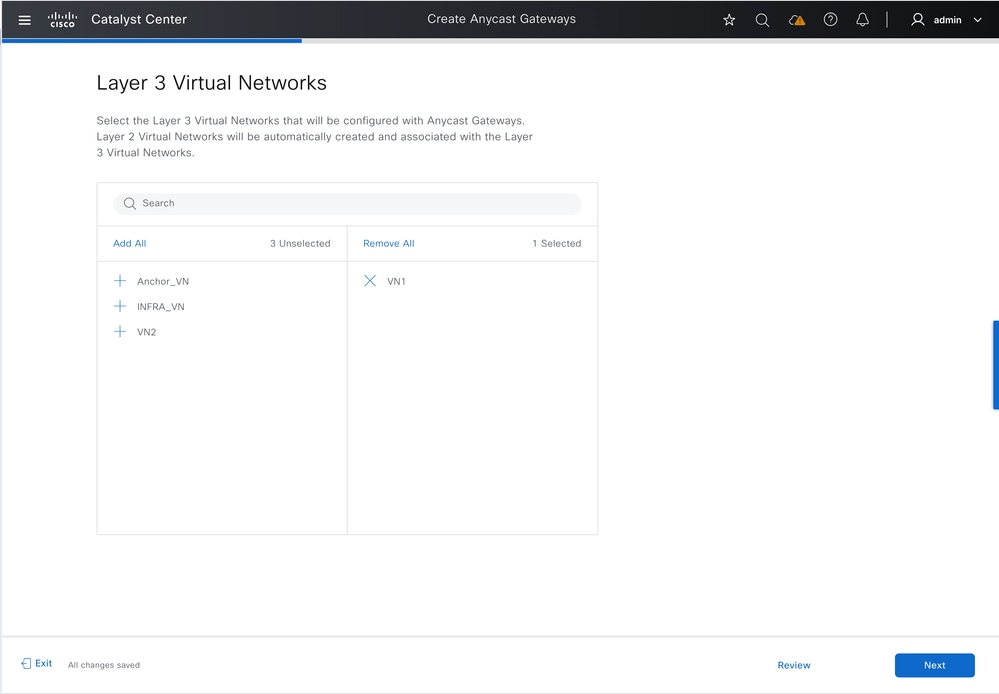 Select L3 Virtual Networks
Select the IP Pool, enable IP Directed Broadcast, and enter the VLAN name.

Tip: Enabling IP Directed Broadcast automatically activates L2 flooding.
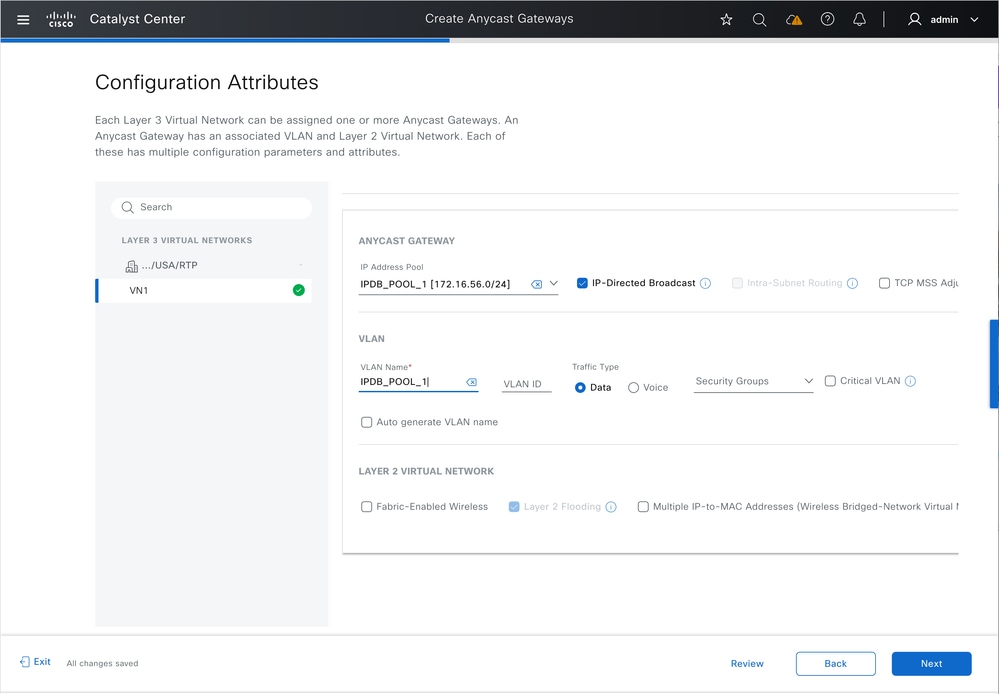 Enable IP Directed Broadcast
If Fabric Zones exist, you can optionally provision Anycast Gateways to one or more Fabric Zones within the site.
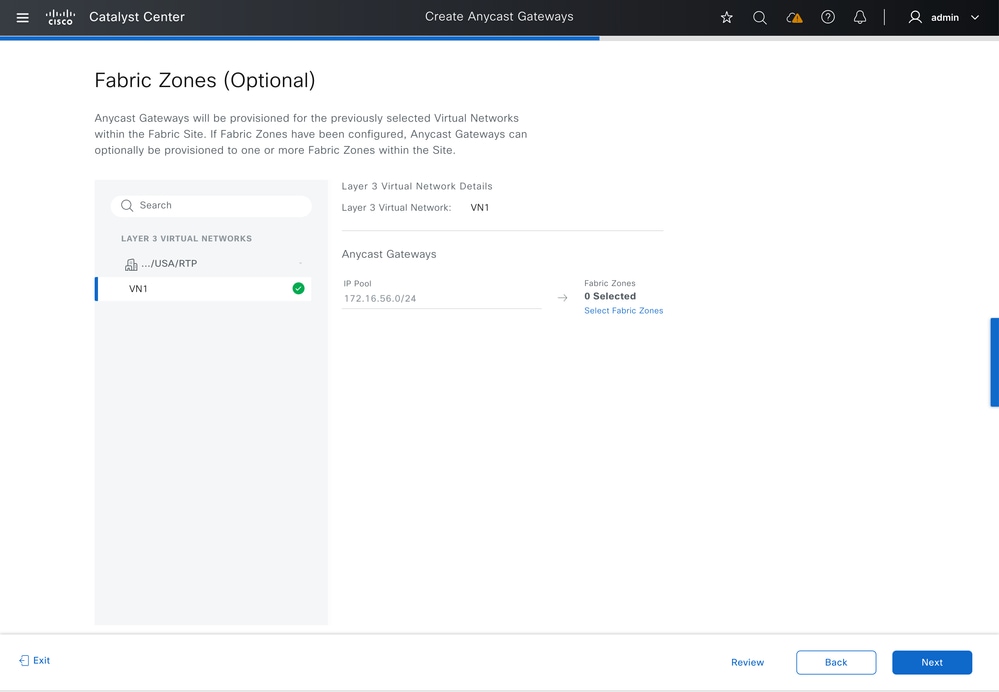 Select Fabric Zones
Review the summary of the configured settings to confirm accuracy before proceeding with deployment.
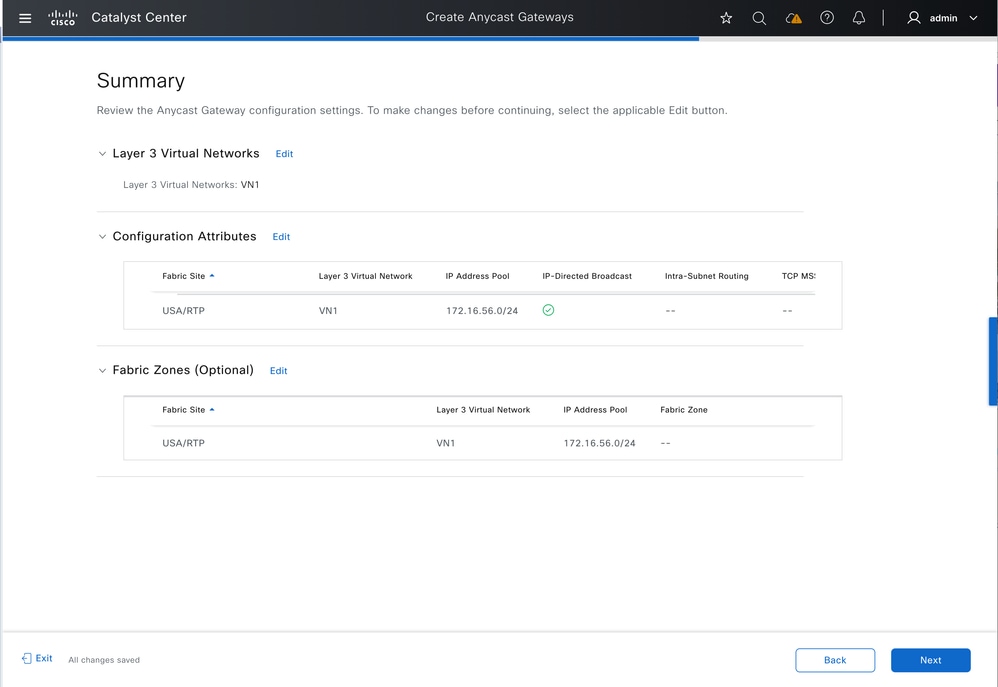 Summary
Preview the generated configurations. Click Deploy to apply the configuration to the fabric.
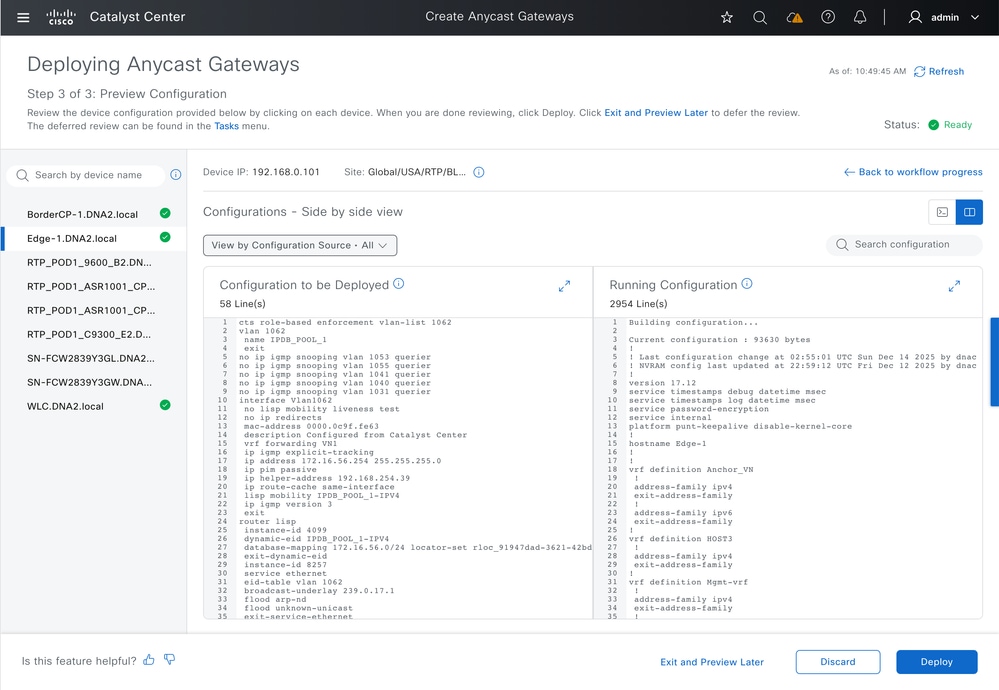 Configuration preview
Network Device Configuration
Border Configuration - IP Transit
Fabric Borders with IP Transit configured have their BGP peering interfaces set with "ip network-broadcast" to permit the forwarding of IP subnet broadcasts. The Anycast Gateway IP for the Fabric Pool (Endpoint VLAN) changes from a loopback interface to an SVI, which has "ip directed-broadcast" enabled. Both configurations are required for the Fabric Border to convert IP subnet broadcast packets into full broadcasts, allowing the process to function as intended.
IP Network Broadcast & IP Network Broadcast configuration:
vlan 1062
 name IPDB_POOL_1

interface TenGigabitEthernet1/0/44        -- L3 Handoff Interface
switchport mode trunk
 switchport trunk allowed vlan all

interface Vlan1062     -- Anycast Gateway interface, now converted to an SVI
 no lisp mobility liveness test
 no ip redirects
 mac-address 0000.0c9f.fe63
 description Configured from Catalyst Center
vrf forwarding VN1
ip address 172.16.56.254 255.255.255.0
 ip helper-address 192.168.254.39
 ip route-cache same-interface
 lisp mobility IPDB_POOL_1-IPV4
ip directed-broadcast-- Subnet broadcasts can be translated into full broadcasts
no autostate          -- Required to keep the SVI in up/up in absence of ports assigned to the VLAN

interface Vlan3002     -- BGP Peering interface, from IP Transit configuration
 description vrf interface to External router
 vrf forwarding VN1
 ip address 192.168.10.5 255.255.255.252
 no ip redirects
 ip network-broadcast  -- Enabled on all L3 handoff SVIs on the VRF where the target VLAN belongs to
 ip pim sparse-mode
 ip route-cache same-interface
This second part of the configuration enables the IP Directed-Broadcast feature to wake silent hosts using an ARP Request (broadcast), similar to the behavior of traditional networks when handling unknown unicast traffic. With this setup, sources outside the fabric can wake endpoints using standard unicast traffic, without depending on subnet broadcasts or Wake-on-LAN ("magic packet") mechanisms.
router lisp
 prefix-list SITE_LOCAL_EIDS_V4
 172.16.56.0/24
instance-id 4099
   dynamic-eid IPDB_POOL_1-IPV4
     database-mapping 172.16.56.0/24 locator-set rloc_0f43c5d8-f48d-48a5-a5a8-094b87f3a5f7
instance-id 8257
   service ethernet
     eid-table vlan 1062
     broadcast-underlay 239.0.17.1 -- Enables Layer 2 Flooding to use BUM group 239.0.17.1
     flood arp-nd                  -- Enables the flooding of ARP requests with Layer 2 Flooding
     flood unknown-unicast
     database-mapping mac locator-set rloc_0f43c5d8-f48d-48a5-a5a8-094b87f3a5f7
ip dhcp snooping vlan 1062
Edge Configuration
The fabric edge node configuration matches that of a standard wired pool with Layer 2 Flooding enabled. The "ip directed-broadcast" CLI command does not appear on Edge nodes.
cts role-based enforcement vlan-list 1062

vlan 1062
 name IPDB_POOL_1

interface Vlan1062
 no lisp mobility liveness test
 no ip redirects
 mac-address 0000.0c9f.fe63
 description Configured from Catalyst Center
 vrf forwarding VN1
 ip igmp explicit-tracking
ip address 172.16.56.254 255.255.255.0
 ip pim passive
 ip helper-address 192.168.254.39
 ip route-cache same-interface
 lisp mobility IPDB_POOL_1-IPV4
 ip igmp version 3

router lisp
 instance-id 4099
   dynamic-eid IPDB_POOL_1-IPV4
     database-mapping 172.16.56.0/24 locator-set rloc_91947dad-3621-42bd-ab6b-379ecebb5a2b
 instance-id 8257
   service ethernet
     eid-table vlan 1062
     broadcast-underlay 239.0.17.1
     flood arp-nd
     flood unknown-unicast
   remote-rloc-probe on-route-change
 instance-id-range 8240 , 8245 , 8249 , 8254 , 8256 - 8257 override
  remote-rloc-probe on-route-change
  service ethernet
    eid-table vlan 1041 , 1048 , 1053 , 1059 , 1061 - 1062
    database-mapping mac locator-set rloc_91947dad-3621-42bd-ab6b-379ecebb5a2b

 ip dhcp snooping vlan 1062
IP Directed Broadcast Forwarding
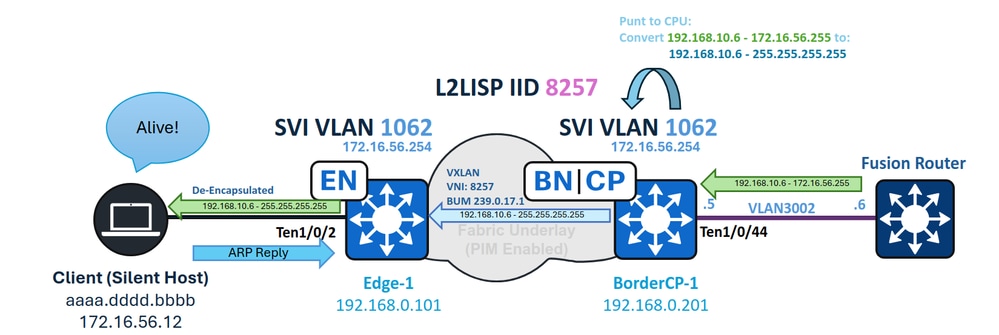 IPDB Forwarding
Border - Ingress CPU Punt and Subnet Broadcast conversion
In this example, an IP subnet broadcast with a destination IP of 172.16.56.255 (the broadcast address for the pool 172.16.56.0/24) is routed from the external network and first arrives at the Fabric Border. The ingress Layer 3 interface is the IP Transit SVI (VLAN 3002). Because "ip network-broadcast" is enabled on this interface, the packet is accepted for full-broadcast conversion; without this configuration, the packet would be dropped.
The packet arrives on SVI 3002 and, as a broadcast packet, is punted to the switch CPU. With IP network-broadcast configured, the packet is permitted and converted into a full broadcast.
BorderCP-1#show run interfave Vlan3002
interface Vlan3002
  vrf forwarding VN1
  ip address 192.168.10.5 255.255.255.252
  ip network-broadcast

BorderCP-1#show ip cef vrf VN1 172.16.56.255
172.16.56.255/32
   receive for Vlan1062       --- The routing result is "receive", indicating that the packet undergoes CPU processing.
During CPU processing, VLAN 1062—the destination interface—converts the packet to a full broadcast, since it is configured with "ip directed-broadcast."
BorderCP-1#show ip interface vlan 1062 | i Directed
  Directed broadcast forwarding is enabled
You can troubleshoot this event using the debug ip packet command. To avoid excessive output and high resource usage, always apply an access-list as a filter when running this debug.
ip access-list standard 10
10  permit 192.168.10.6     --- Directed Broadcast source IP

BorderCP-1#debug ip packet detail 10
IP: s=192.168.10.6 (Vlan3002), d=172.16.56.255 (nil), len 100, input feature
ICMP type=8, code=0, MCI Check(110), rtype 0, forus FALSE, sendself FALSE, mtu 0, fwdchk FALSE
IP: s=192.168.10.6 (Vlan3002), d=172.16.56.255 (nil), len 100, input feature
ICMP type=8, code=0, Role-based Proxy(116), rtype 0, forus FALSE, sendself FALSE, mtu 0, fwdchk FALSE
FIBipv4-packet-proc: route packet from Vlan3002 src 192.168.10.6 dst 172.16.56.255
FIBfwd-proc: VN1:172.16.56.255/32 receive entry
FIBipv4-packet-proc: packet routing failed
IP: tableid=3, s=192.168.10.6 (Vlan3002), d=172.16.56.255 (Vlan1062) nexthop=172.16.56.255, routed via RIB
IP: s=192.168.10.6 (Vlan3002), d=172.16.56.255 (Vlan1062), len 100, output feature
ICMP type=8, code=0, feature skipped, Role-based Access List(53), rtype 1, forus FALSE, sendself FALSE, mtu 0, fwdchk FALSE
IP: s=192.168.10.6 (Vlan3002), d=172.16.56.255 (Vlan1062), g=255.255.255.255, len 100, forward directed broadcast
The ingress border acts as the multicast source (S) and group (G) for BUM encapsulation, using its Loopback 0 as the source address and the configured BUM group as the destination.
On the PIM control plane, ensure that a downlink toward the Fabric Edges appears in the Outgoing Interface List for the multicast route. For the data plane, use the show ip mfib count command to verify that hardware forwarding counters are increasing for the S,G entry on the Border.
BorderCP-1#show ip mroute 239.0.17.1 192.168.0.201 | be \(
(192.168.0.201, 239.0.17.1), 5w0d/00:02:33, flags: FTA
 Incoming interface: Null0, RPF nbr 0.0.0.0
 Outgoing interface list:
  TenGigabitEthernet1/0/42, Forward/Sparse, 2d09h/00:03:23, flags:  -- Downlink to Fabric Edge or Intermediate Node

BorderCP-1#show ip mfib 239.0.17.1 192.168.0.201 count
Forwarding Counts: Pkt Count/Pkts per second/Avg Pkt Size/Kilobits per second
Other counts: Total/RPF failed/Other drops(OIF-null, rate-limit etc)
Default
  16 routes, 6 (*,G)s, 3 (*,G/m)s
Group: 239.0.17.1
  Source: 192.168.0.201,
    SW Forwarding: 1/0/130/0, Other: 0/0/0
 HW Forwarding: 2124804/0/116/0, Other: 0/0/0
 Totals - Source count: 1, Packet count: 2124805
Groups: 1, 1.00 average sources per group
This document does not provide an in-depth explanation of underlay multicast tree formation or Layer 2 flooding. In the case of missing, incomplete or wrong S,G states, the underlay mutlicast portion of the networm requires independent troubleshooting.
Edge - Ingress Broadcast
On Fabric Edges, the incoming broadcast encapsulated in VXLAN on multicast is de-encapsulated and forwarded to the VLAN associated with the VNI (8257), reaching all ports in a forwarding state in Spanning-Tree.
First, verify that the S,G entry from the border (with the Border loopback as the source) for the BUM group is present and forwarding traffic. Use the same mroute and mfib commands to check this, make sure that the L2LISP sub-interface corresponding to the VLAN (1062) is listed as outgoing interface.
Edge-1#show ip mroute 239.0.17.1 192.168.0.201 | be \(
(192.168.0.201, 239.0.17.1), 2d09h/00:01:10, flags: JT
  Incoming interface: TenGigabitEthernet1/1/2, RPF nbr 192.168.98.2
  Outgoing interface list:
    L2LISP0.8257, Forward/Sparse-Dense, 2d09h/00:02:21, flags:

Edge-1#show ip mfib 239.0.17.1 192.168.0.201 verbose | be Forwarding
Forwarding Counts: Pkt Count/Pkts per second/Avg Pkt Size/Kbits per second
Other counts: Total/RPF failed/Other drops
I/O Item Counts: HW Pkt Count/FS Pkt Count/PS Pkt Count Egress Rate in pps
Default
  (192.168.0.201,239.0.17.1) Flags: K HW DDE
   0x12C OIF-IC count: 0, OIF-A count: 1
   SW Forwarding: 2/0/402/0, Other: 0/0/0
   HW Forwarding: 145023/0/128/0, Other: 0/0/0
   TenGigabitEthernet1/1/2 Flags: RA A MA
   L2LISP0.8257, L2LISP Decap Flags: RF F NS
      CEF: OCE (lisp decap)
      Pkts: 0/0/2 Rate: 0 pps
After de-encapsulation, the packet is forwarded out on VLAN 1062 to all ports assigned to that VLAN.
Edge-1#show spanning-tree vlan 1062
VLAN1062
  Spanning tree enabled protocol rstp
  Root ID      Priority 33830
               Address 00b1.e331.d580
               This bridge is the root
               Hello Time 2 sec Max Age 20 sec Forward Delay 15 sec

   Bridge ID   Priority 33830 (priority 32768 sys-id-ext 1062)
               Address 00b1.e331.d580
               Hello Time 2 sec Max Age 20 sec Forward Delay 15 sec
               Aging Time 300 sec

Interface           Role Sts Cost      Prio.Nbr  Type
------------------- ---- --- --------- -------- --------------------------------
Te1/0/2             Desg FWD 20000     128.3     P2p Edge
Po1                 Desg FWD 20000     128.3049  P2p
After the endpoint receives the broadcast packet, it must recognize the packet as relevant and respond. As a result, the endpoint could send an ARP packet, which updates the device-tracking table on the switch.
Edge-1#show device-tracking database interface Te1/0/2 | be Network
    Network Layer Address Link Layer Address Interface vlan prlvl age state     Time left
ARP 172.16.56.12           aaaa.dddd.bbbb     Te1/0/2   1062 0005   0s REACHABLE 241 s
After the endpoint is re-registered in device-tracking, it is imported into the LISP database of the Edge node and then registered with the Control Plane.
For LISP Pub-Sub deployments, the Control Plane publishes the newly registered endpoint information to the Borders, instantly creating a LISP map-cache entry to forward traffic to the appropriate Edge Node.
BorderCP-1#show lisp instance-id 4099 ipv4 map 172.16.56.12/32
LISP IPv4 Mapping Cache for LISP 0 EID-table vrf VN1 (IID 4099), 1 entries

172.16.56.12/32, uptime: 5w0d, expires: never, via pub-sub, complete, local-to-site
 SGT: 2
 Sources: pub-sub
 State: complete, last modified: 5w0d, map-source: local
 Exempt, Packets out: 6(2432 bytes), counters are not accurate (~ 5w0d ago)
 Configured as EID address space
 Locator       Uptime State Pri/Wgt Encap-IID
 192.168.0.101 5w0d   up    10/10    -
  Last up-down state change: 5w0d, state change count: 1
  Last route reachability change: 5w0d, state change count: 1
  Last priority / weight change: never/never
  RLOC-probing loc-status algorithm:
    Last RLOC-probe sent: 00:22:19 (rtt 4ms)
For LISP/BGP (SDA 1.0) deployments, if the deployment is distributed (non-collocated), updating the LISP map-cache for an unknown endpoint can take up to one minute, as the Negative Map Replies (NMRs) must first expire.
A silent host must ignore packets such as subnet broadcasts if it is not programmed to respond to them. Some endpoints require a "magic packet" (such as a UDP Echo), while others respond only to a broadcast ARP. The silent host itself determines which type of packet triggers it to wake up. Among the most common options, an ARP request is typically preferred, as explained in the Unknown Unicast Forwarding section.
Unknown Unicast Forwarding
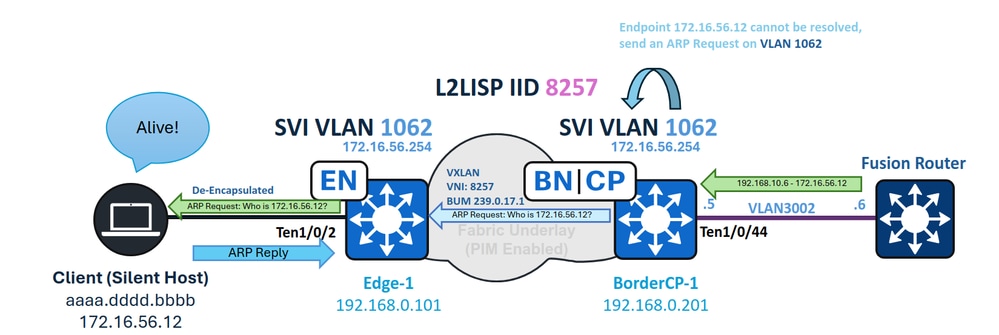 Unknown Unicast forwarding
When a pool is enabled for IP Directed Broadcast, it not only permits the handling of subnet broadcasts but also allows Fabric Borders to act as gateways for forwarding unknown unicast traffic. In this context, unknown unicast traffic refers to packets destined for endpoints that are not currently registered in the Control Plane.
Similar to a traditional network gateway sending an ARP request when it encounters an incomplete ARP entry, the Border generates an ARP request and floods it to all Fabric Nodes. This ensures the silent host receives the request, wakes up, and sends an ARP reply, thereby re-registering itself in the Control Plane.
This functionality is possible because the endpoint VLAN (1062) is configured both as an SVI and as a L2LISP instance on the Fabric Border. With "flood arp-nd" enabled in the L2 IID, the Border can flood ARP requests generated by the SVI whenever there is traffic directed to an unknown LISP EID, ensuring that silent hosts receive the ARP request and have the opportunity to respond and update their registration in the Control Plane.
BorderCP-1#show vlan id 1062
VLAN Name        Status Ports
---- -----------------------------------------
1062 IPDB_POOL_1 active L2LI0:8257, Te1/0/44

BorderCP-1#show run | se 8257
 instance-id 8257
 remote-rloc-probe on-route-change
  service ethernet
  eid-table vlan 1062
  broadcast-underlay 239.0.17.1
  flood arp-nd
  flood unknown-unicast
  database-mapping mac locator-set rloc_0f43c5d8-f48d-48a5-a5a8-094b87f3a5f7
When the Fabric Border receives a packet destined for 172.16.56.12 on SVI 3002—which is part of the endpoint VN/VRF—it attempts LISP resolution, since the CEF output is set to "glean" (meaning the device tries to resolve the destination adjacency using the downstream layer protocol). This process triggers both a LISP Map-Request and an ARP resolution for the unregistered (silent) host simultaneously.
BorderCP-1#show lisp instance-id 4099 ipv4 map-cache 172.16.56.12
LISP IPv4 Mapping Cache for LISP 0 EID-table vrf VN1 (IID 4099), 1 entries

172.16.56.0/24, uptime: 00:00:30, expires: never, via dynamic-EID, send-map-request, local-to-site
Sources: NONE
State: send-map-request, last modified: 00:00:30, map-source: local
Exempt, Packets out: 2(1152 bytes), counters are not accurate (~ 2d15h ago)
Configured as EID address space
Configured as dynamic-EID address space
Encapsulating dynamic-EID traffic
Negative cache entry, action: send-map-request   -- LISP Resolution attempted
BorderCP-1#show ip cef vrf VN1 172.16.56.12
172.16.56.0/24
  attached to LISP0.4099
BorderCP-1#show ip cef vrf VN1 172.16.56.12 internal | se output chain:
output chain:
PushCounter(LISP:172.16.56.0/24) 766CBD050CF0
glean for LISP0.4099
An incomplete ARP entry is created, prompting the Border to send an ARP request to the unknown endpoint 172.16.56.12. This ARP request, as a broadcast packet, is forwarded downstream using Layer 2 Flooding and the Flood ARP-ND feature.
To verify that Layer 2 flooding is operational, monitor the MFIB counters for the local S,G of the border.
BorderCP-1#show ip mroute 239.0.17.1 192.168.0.201 | be \(
(192.168.0.201, 239.0.17.1), 5w0d/00:02:33, flags: FTA
 Incoming interface: Null0, RPF nbr 0.0.0.0
 Outgoing interface list:
  TenGigabitEthernet1/0/42, Forward/Sparse, 2d09h/00:03:23, flags:  -- Downlink to Fabric Edge or Intermediate Node

BorderCP-1#show ip mfib 239.0.17.1 192.168.0.201 count
Forwarding Counts: Pkt Count/Pkts per second/Avg Pkt Size/Kilobits per second
Other counts: Total/RPF failed/Other drops(OIF-null, rate-limit etc)
Default
  16 routes, 6 (*,G)s, 3 (*,G/m)s
Group: 239.0.17.1
  Source: 192.168.0.201,
    SW Forwarding: 1/0/130/0, Other: 0/0/0
 HW Forwarding: 2124804/0/116/0, Other: 0/0/0
 Totals - Source count: 1, Packet count: 2124805
Groups: 1, 1.00 average sources per group
The flooded ARP packet reaches the silent host, waking it and prompting an ARP reply. This response updates the device-tracking (SISF) table on the Fabric Edge and creates a LISP database entry. As a result, the Fabric Edge initiates a registration to the Control Plane.
Edge-1#show device-tracking database interface Te1/0/2 | be Network
    Network Layer Address Link Layer Address Interface vlan prlvl age state     Time left
ARP 172.16.56.12           aaaa.dddd.bbbb     Te1/0/2   1062 0005   0s REACHABLE 241 s
After the endpoint is re-registered in device-tracking, it is imported into the LISP database of the Edge node and then registered with the Control Plane.
For LISP Pub-Sub deployments, the Control Plane publishes the newly registered endpoint information to the Borders, instantly creating a LISP map-cache entry to forward traffic to the appropriate Edge Node.
BorderCP-1#show lisp instance-id 4099 ipv4 map 172.16.56.12/32
LISP IPv4 Mapping Cache for LISP 0 EID-table vrf VN1 (IID 4099), 1 entries

172.16.56.12/32, uptime: 5w0d, expires: never, via pub-sub, complete, local-to-site
 SGT: 2
 Sources: pub-sub
 State: complete, last modified: 5w0d, map-source: local
 Exempt, Packets out: 6(2432 bytes), counters are not accurate (~ 5w0d ago)
 Configured as EID address space
 Locator       Uptime State Pri/Wgt Encap-IID
 192.168.0.101 5w0d   up    10/10    -
  Last up-down state change: 5w0d, state change count: 1
  Last route reachability change: 5w0d, state change count: 1
  Last priority / weight change: never/never
  RLOC-probing loc-status algorithm:
    Last RLOC-probe sent: 00:22:19 (rtt 4ms)
For LISP/BGP (SDA 1.0) deployments, if the deployment is distributed (non-collocated), updating the LISP map-cache for an unknown endpoint can take up to one minute, as the Negative Map Replies (NMRs) must first expire.
Tip: The Border never resolves ARP for the silent host; only the endpoint registration is required. When the silent host replies, the ARP packet is sent as a Layer 2 unicast, so it is not flooded toward the Border. As a result, do not expect to see an ARP entry or a device-tracking entry on the Border.
Enabling Wake-on-LAN in Authentication Templates
When fabric users have No Authentication enabled, flooded packets from the Border reach silent hosts as long as the port is part of the VLAN where flooding is enabled; however, with Closed Authentication (in particular), two main factors become important.
Manual VLAN Assignment for the Host Before Authentication
If no VLAN is assigned, the port does not receive flooded packets from its designated VLAN. When a VLAN is expected to be assigned by RADIUS, this creates a "Chicken or the Egg?" dilemma: the flooded packet cannot be forwarded to a different VLAN (commonly referred to as VLAN hopping) to trigger user authentication and obtain a VLAN assignment from RADIUS.
When configuring the port in Host-Onboarding, if the device is identified as "silent," manually assign the VLAN using the drop-down menu for the DATA pools.
The issue of silent hosts being unable to authenticate before VLAN assignment is not unique to SD-Access; it is a common design challenge found in any traditional secured network.
interface TenGigabitEthernet1/0/2
 switchport access vlan 1062
 switchport mode access
 device-tracking attach-policy IPDT_POLICY
 dot1x timeout tx-period 7
 dot1x max-reauth-req 3
 source template DefaultWiredDot1xClosedAuth
 spanning-tree portfast
 spanning-tree bpduguard enable
Access Control Direction
By default, if Wake-on-LAN is not enabled in the authentication template settings within Host-Onboarding, authentication templates use "access-session control-direction both." This configuration causes the port to drop both incoming packets and packets that would be forwarded out of the port. When Wake-on-LAN is enabled, the setting changes to "access-session control-direction in," restricting only ingress traffic. This adjustment allows packets to reach and wake the silent host, enabling it to initiate MAB authentication.
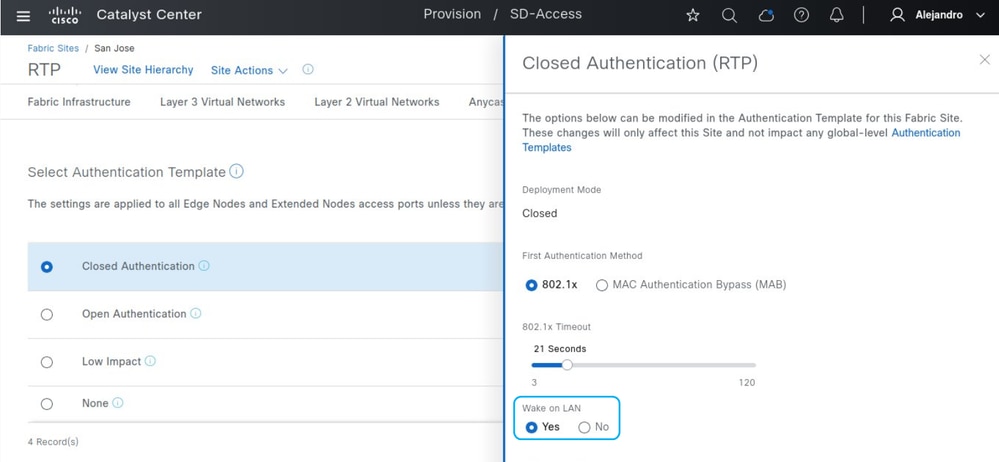 Wake on LAN
Without Wake-on-LAN:
Edge-1#show run all | se template DefaultWiredDot1xClosedAuth
template DefaultWiredDot1xClosedAuth
 dot1x pae authenticator
 dot1x timeout supp-timeout 7
 dot1x max-req 3
 switchport mode access
 switchport voice vlan 2046
 mab radius
 access-session host-mode multi-auth
 access-session control-direction both
 access-session closed
access-session port-control auto

Edge-1#show authentication session interface Te1/0/2 detail | i Oper
Oper host mode: multi-auth
Oper control dir: both
Oper host mode: multi-auth
Oper control dir: both
Before the endpoint authenticates, the interface assigned to it is not listed as flooding-enabled in the Spanning Tree states.
Edge-1#show spanning-tree interface Te1/0/2
no spanning tree info available for TenGigabitEthernet1/0/2
With Wake-on-LAN enabled:
Edge-1#show run | se template DefaultWiredDot1xClosedAuth
template DefaultWiredDot1xClosedAuth
 dot1x pae authenticator
 dot1x timeout supp-timeout 7
 dot1x max-req 3
 switchport mode access
 switchport voice vlan 2046
 mab
 access-session control-direction in
 access-session closed
 access-session port-control auto

Edge-1#show authen session interface Te1/0/2 de | i Oper
Oper host mode: multi-auth
Oper control dir: in
Oper host mode: multi-auth
Oper control dir: in
Even before authentication, the port is enabled for egress traffic, allowing packets to reach and wake the silent host.
Edge-1#show spanning-tree interface TenGigabitEthernet 1/0/2
Vlan                Role Sts Cost      Prio.Nbr Type
------------------- ---- --- --------- -------- --------------------------------
VLAN1062            Desg FWD 19        128.2    P2p Edge
Alternative Scenarios
Edge Nodes & Same VLAN - Layer 2 Flooding
If the goal is to wake a silent host from a device within the fabric on the same VLAN as the host, the IP Directed Broadcast feature is not required. Instead, enabling Layer 2 Flooding (in a non-wireless pool) is sufficient to allow the exchange of broadcast packets, subnet broadcasts, or ARP requests. For Closed Authentication, the Wake-on-LAN requirements are maintained.
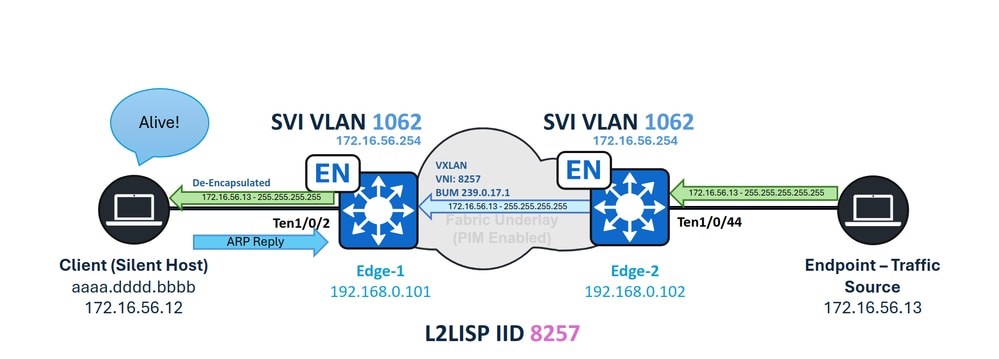 Same VLAN - Silent Host Handling
Edge Nodes & Different VLAN - Unknown Unicast
When an endpoint inside the fabric sends unicast traffic to a silent host connected to a Fabric Edge node, the Unknown Unicast forwarding path is not available. Unlike Fabric Borders, Fabric Edge nodes have Borders defined as LISP Proxy-ETRs, which automatically enable a forwarding feature called "Signal & Forward" when an unknown endpoint is detected. The Fabric Edge must trigger the required ARP request on the first attempt to resolve the address. However, once LISP identifies the endpoint as an unknown EID, subsequent packets do not trigger additional ARP requests. This scenario is considered unsupported.
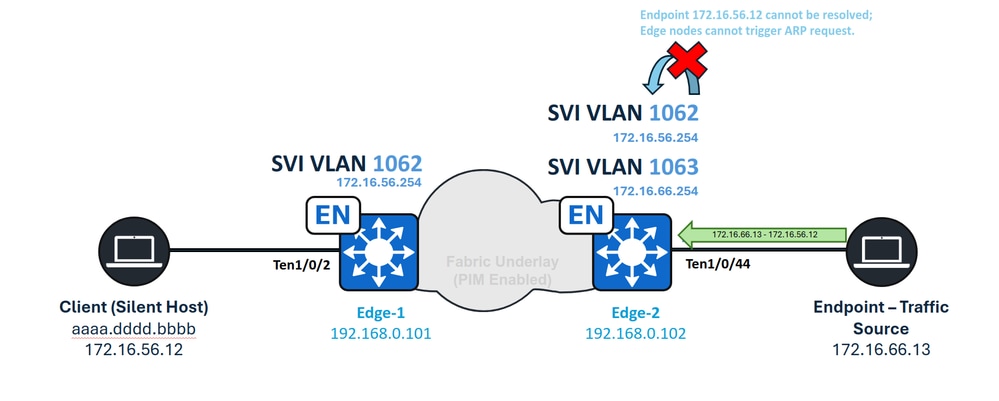 Unknown Unicast Inter-VLAN
SD-Access Transit - Unknown Unicast
In the case of SD-Access Transit, unknown unicast traffic is natively supported without any special requirements. Traffic originating from a remote border is routed through the SD-Access Transit network, with subnet broadcasts treated as regular routed traffic. When the traffic reaches the local-site border, standard operations are performed, including Traffic Glean, ARP Request flooding, and LISP resolution.
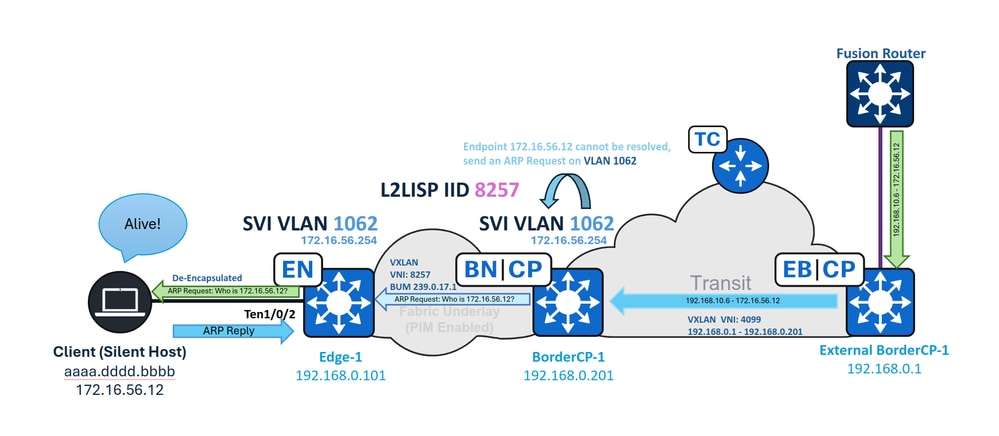 SD-Access Transit Unknown Unicast
SD-Access Transit - IP Directed Broadcast
When SD-Access Transit is in use, the local-site Border receives the IP Directed Broadcast on the LISP sub-interface for the VN (for example, interface 4099), rather than on an SVI. To ensure the broadcast is accepted and converted into a subnet broadcast by the IP Directed Broadcast feature, you must manually configure the "ip network-broadcast" parameter on the LISP sub-interface.
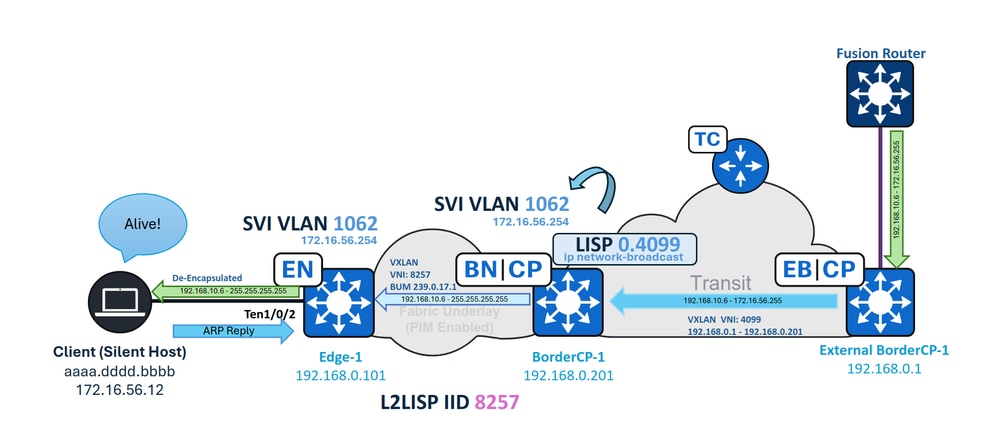 SD-Access Transit IPDB
On BorderCP-1 (Local-Site Border):
interface LISP0.4099
  ip network-broadcast
Revision History
| Revision | Publish Date | Comments |
|---|---|---|
1.0 |
04-May-2026
|
Initial Release |

 Feedback
Contact Cisco
- Open a Support Case

- (Requires a Cisco Service Contract)