Troubleshoot SNMP in Cisco ACI Fabric
Available Languages
Introduction
This document describes how to configure, verify, and troubleshoot SNMP in Cisco ACI for ACI release 5.x and later. It covers the SNMP policy model, required management contracts, trap configuration, operational verification using CLI and Managed Object (MO) queries, and structured troubleshooting workflows for the most common failure scenarios across leaf/spine switches and APIC controllers.
Background Information
The material in this document is drawn from the Cisco ACI Solutions Delivery Team internal technote SNMP in ACI: Overview, Configuration, Troubleshooting, and Caveats/Issues authored by Tomas de Leon, supplemented with the Cisco APIC System Management Configuration Guide (Release 5.x) and the Cisco ACI MIB Quick Reference Guide.
Overview
SNMP Architecture in ACI
SNMP (Simple Network Management Protocol) is a UDP-based protocol that governs network management and monitoring. In ACI, SNMP operates independently on each managed entity. Every leaf switch, spine switch, and APIC controller is its own SNMP agent — each must be polled or monitored independently.
ACI supports the following SNMP capabilities:
- Read operations (Get, GetNext, BulkGet, Walk) — supported on leaf/spine switches and APIC controllers.
- Notifications (Traps) — SNMPv1, v2c, and v3 traps supported on leaf/spine switches and APIC controllers.
- SNMPv3 — supported on leaf/spine switches and APIC controllers.
- Write operations (Set) — NOT supported on any ACI device.
- IPv6 — SNMP is supported over IPv4 only.
SNMPD Architecture on the APIC
The APIC runs the snmpd process, which has two internal components:
- Agent — An open-source net-snmp agent (version 5.7.6 or later) that handles SNMP protocol processing and session management.
- DME (Data Model Engine) — Interfaces with the APIC Management Information Tree (MIT) to read Managed Objects (MOs) and translate MO attributes into SNMP Object format. SNMP traps are generated from events and faults raised on MOs.
SNMP Policy Model and Deployment Chain
ACI uses a policy-driven model for SNMP. The SNMP configuration is abstracted as an snmpPol Managed Object and must be associated with the fabric's Pod Policy Group before it is deployed to any node. The full deployment chain is:
- SNMP Policy (
snmpPol) — defines admin state, community strings, client group policies (ACLs), and SNMPv3 users. - Pod Policy Group — references the SNMP Policy along with other pod-level policies (BGP, ISIS, NTP, etc.).
- Pod Profile Selector — applies the Pod Policy Group to the fabric pods.
Additionally, SNMP trap configuration requires:
- SNMP Monitoring Destination Group (
snmpGroup) — defines trap destination hosts, port, SNMP version, and community. - Monitoring Sources (
snmpSrc) — link the destination group to three distinct monitoring policy scopes: Fabric Default, Fabric Common Policy, and Access Policy Default.
Management contracts permitting UDP port 161 (SNMP requests) and UDP port 162 (SNMP traps) are required for APIC nodes. Leaf and spine nodes also require correct iptables rules, which are automatically programmed when Client Group Policies are configured.
Supported MIBs
MIBs supported on the APIC include:
- Entity MIB — PhysicalTable
- Cisco Entity Ext MIB — PhysicalProcessorTable, LEDTable
- Cisco Entity FRU Control MIB — PowerSupplyGroupTable, PowerStatusTable, FanTrayStatusTable, PhysicalTable
- Cisco Entity Sensor MIB — SensorValueTable, SensorThresholdTable
- Cisco Process MIB — CPUTotalTable, ProcessTable, ProcessExtRevTable, ThreadTable
Leaf and spine switches expose standard NX-OS MIBs including IF-MIB, IP-MIB, CISCO-CDP-MIB, CISCO-ENTITY-QFP-MIB, and the full CISCO-ENTITY-FRU-CONTROL-MIB suite.
SNMP traps generated on the APIC include: cefcFRUInserted, cefcFRURemoved, cefcFanTrayStatusChange, cefcModuleStatusChange, entSensorThresholdNotification, cefcPowerStatusChange, cpmCPURisingThreshold, cpmCPUFallingThreshold.
Configure SNMP in ACI
Step 1: Configure the SNMP Policy
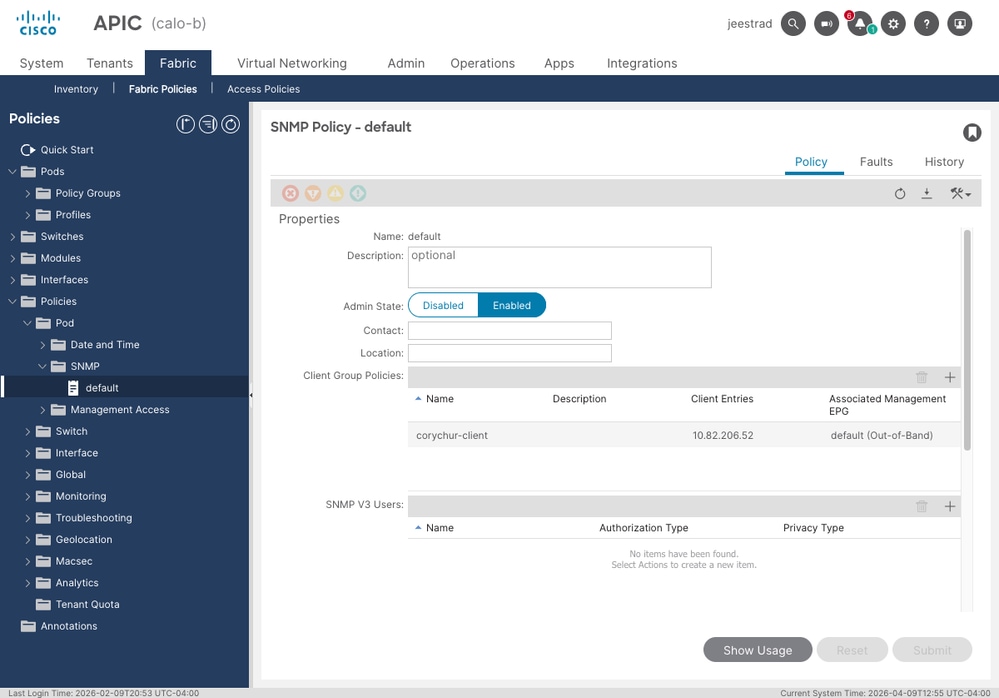
Navigate to Fabric > Fabric Policies > Policies > Pod > SNMP. Select (or create) the SNMP policy, typically named default. Configure:
- Admin State — set to Enabled.
- Community Policies — add the community string used by your NMS.
- Client Group Policies — define one or more client group profiles, each specifying the allowed SNMP client IPs and the associated management EPG (Out-of-Band or In-Band).
- SNMPv3 Users — if using SNMPv3, add users here with authentication and privacy parameters.
Step 2: Associate the SNMP Policy with the Pod Policy Group
Navigate to Fabric > Fabric Policies > Pods > Policy Groups. Select the active Pod Policy Group (typically named default). Set the SNMP Policy field to point to the SNMP policy created in Step 1. Verify that the Resolved SNMP Policy field shows the correct policy name.
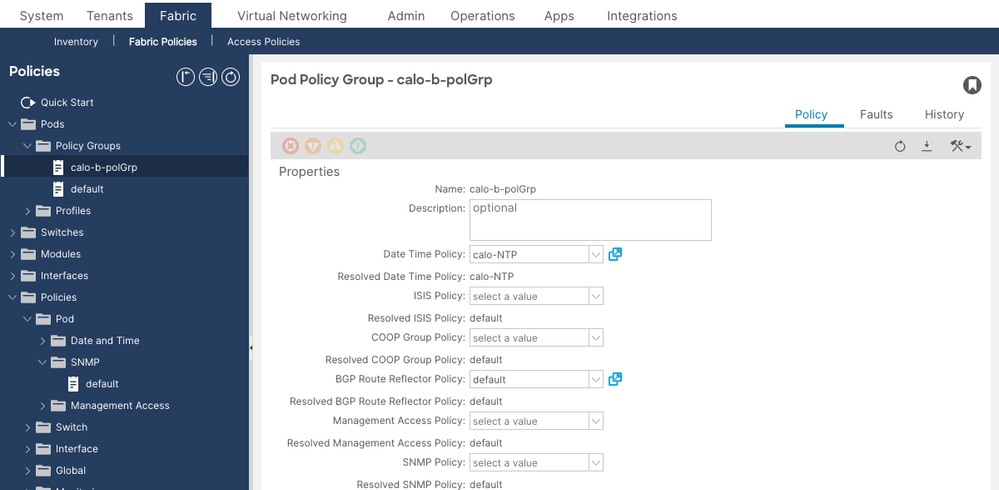
Then navigate to Fabric > Fabric Policies > Pods > Profiles, expand the default Pod Profile, and confirm the active selector references the correct Pod Policy Group.
Step 3: Configure Management Contracts for UDP Port 161
Navigate to Tenants > mgmt > Contracts > Out-Of-Band Contracts. Verify that the active OOB contract's Subject references a filter entry permitting UDP port 161 (SNMP requests). Without this contract on the APIC, all SNMP GET/WALK packets will be silently dropped.
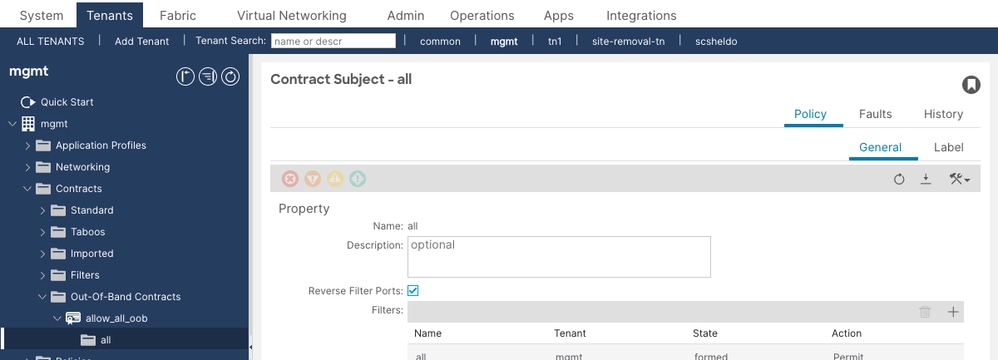
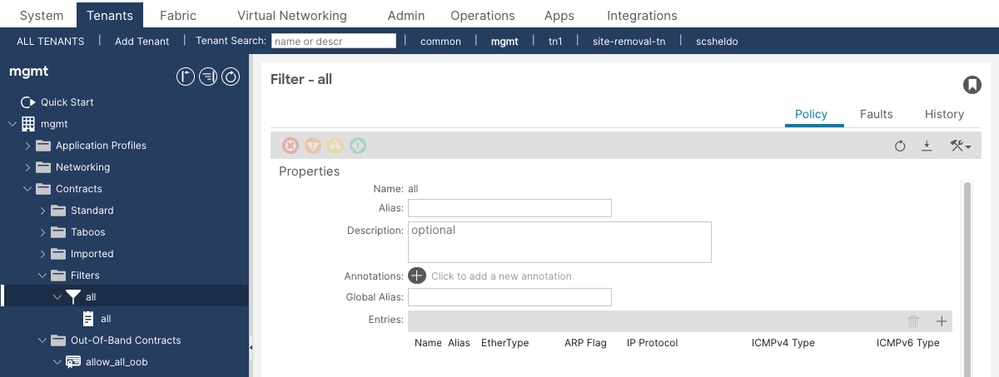
The filter entries attached to the contract subject must include an entry with EtherType IP, Protocol UDP, and Destination Port 161. The example above shows an allow-all (unspecified protocol) filter — this permits SNMP but is broader than recommended for production. A dedicated SNMP filter entry with specific UDP/161 and UDP/162 entries is preferred.
Step 4: Configure SNMP Trap Destinations
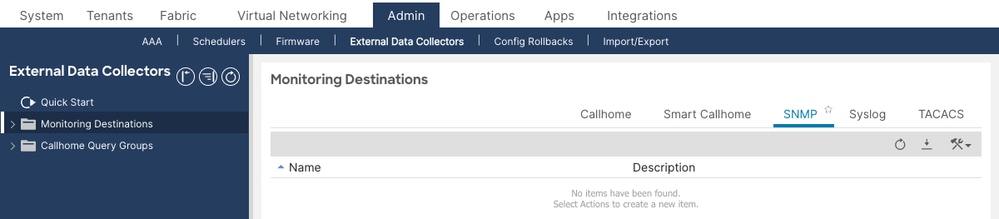
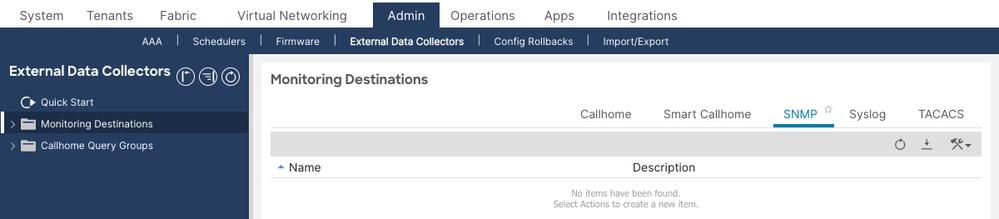
Navigate to Admin > External Data Collectors > Monitoring Destinations > SNMP. Right-click and select Create SNMP Monitoring Destination Group. The SNMP tab shows all configured destination groups. An empty table means no trap destinations have been configured yet.
Define:
- Group Name
- Trap Destinations: hostname/IP, UDP port (default 162), SNMP version, community string, and management EPG
Step 5: Configure Monitoring Sources
Monitoring sources link the SNMP destination group to the monitoring policies that control which events and faults generate traps. You must configure a monitoring source in all three of the following locations, or traps from some node types will not be sent:
- Fabric > Fabric Policies > Policies > Monitoring > default > Callhome/Smart Callhome/SNMP/Syslog/TACACS (covers fabric infrastructure events)
- Fabric > Fabric Policies > Policies > Monitoring > Common Policy > Callhome/Smart Callhome/SNMP/Syslog/TACACS (covers fabric-wide common events)
- Fabric > Access Policies > Policies > Monitoring > default > Callhome/Smart Callhome/SNMP/Syslog (covers access/infrastructure events)
In each location, select SNMP as the source type and create a new SNMP source referencing the destination group created in Step 4.
Verify Configuration
Verify SNMP Policy Deployment
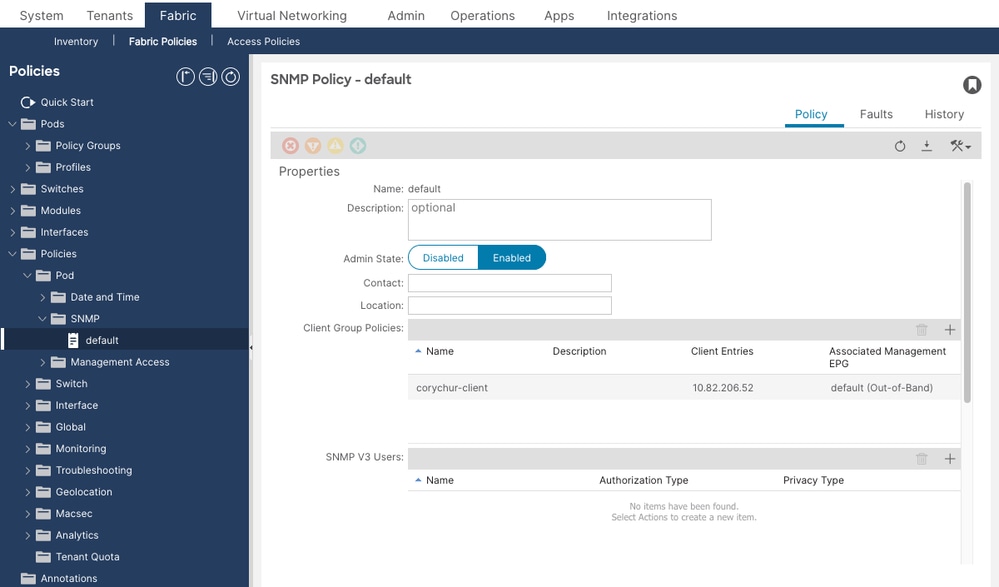
Navigate to Fabric > Fabric Policies > Policies > Pod > SNMP and confirm the default SNMP policy exists and its Admin State is set to Enabled. The Policy Groups list shows all configured SNMP policies with their admin state at a glance.

For detailed verification, click the policy name to open it. Confirm the Admin State toggle is set to Enabled, and that Client Group Policies list all permitted NMS hosts with their associated management EPG.
Run the following MO query on any APIC to confirm the SNMP policy is present and enabled in the fabric:
apic1# moquery -c snmpPol
Total Objects shown: 1

# snmp.Pol
name         : default
adminSt      : enabled                    <--- must be "enabled"
contact      : NOC Team
descr        : ACI Fabric SNMP Policy
dn           : uni/fabric/snmppol-default
loc          : DC1 ACI Fabric
monPolDn     : uni/fabric/monfab-default
If adminSt is disabled, SNMP will not function on any node. Enable it in the APIC GUI under Fabric > Fabric Policies > Policies > Pod > SNMP > default.
Verify Community String Configuration
apic1# moquery -c snmpCommunityP
Total Objects shown: 1

# snmp.CommunityP
name         : public                     <--- confirm this matches your NMS community string
dn           : uni/fabric/snmppol-default/community-public
descr        : SNMP Community String
If no community is returned, or the name does not match what the NMS is using, add or correct the community string under the SNMP policy.
Verify Client Group Policies (SNMP Access Control)
Client Group Policies function as an ACL for SNMP GET/WALK access. Each policy specifies which client IP addresses are permitted to poll leaf/spine nodes over which management VRF. On leaf/spine nodes, these policies are translated into iptables rules.
apic1# moquery -c snmpClientGrpP -x query-target=children
Total Objects shown: 3

# snmp.ClientP
addr         : 10.1.1.50                  <--- NMS server IP
dn           : uni/fabric/snmppol-default/clgrp-NMS-Clients/client-[10.1.1.50]
name         : nms-server1

# snmp.ClientP
addr         : 10.1.1.51
dn           : uni/fabric/snmppol-default/clgrp-NMS-Clients/client-[10.1.1.51]
name         : nms-server2

# snmp.ClientGrpP
name         : NMS-Clients
dn           : uni/fabric/snmppol-default/clgrp-NMS-Clients
Confirm the NMS server IP is present in the client entries. If a client IP is missing, SNMP GET/WALK requests from that host will be dropped by iptables on leaf/spine nodes.
Verify Pod Policy Group References SNMP Policy
Navigate to Fabric > Fabric Policies > Pods > Policy Groups and open the active Pod Policy Group. Confirm the SNMP Policy dropdown field is set to the desired SNMP policy and the Resolved SNMP Policy field shows the same name. A missing or unresolved policy means the SNMP configuration is never pushed to switches.
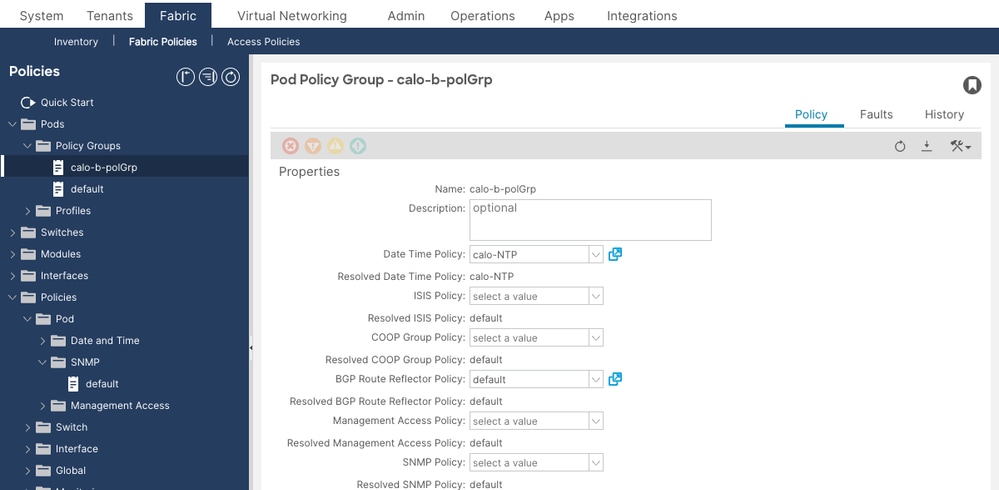
In the screenshot above, the SNMP Policy field shows “select a value” (empty) while the Resolved SNMP Policy shows “default” — this means the policy is inherited from the fabric default but not explicitly set. Explicitly setting the SNMP Policy field is recommended to avoid ambiguity.
Verify via REST API:
apic1# moquery -c fabricPodPGrp -x rsp-subtree=full
# fabric.PodPGrp
name          : default
dn            : uni/fabric/funcprof/podpgrp-default

  # fabric.RsSnmpPol
  tnSnmpPolName : default                  <--- must reference the SNMP policy
  state         : formed                   <--- must be "formed"
If state is not formed, the SNMP policy relationship is broken. Reselect the SNMP policy in the Pod Policy Group and submit.
Verify Management Contract for UDP 161 (APIC Nodes)
Navigate to Tenants > mgmt > Contracts > Out-Of-Band Contracts (and In-Band Contracts if using INB management). Open the active OOB contract and click the Policy tab. Verify that the Subject references a filter that permits UDP port 161.
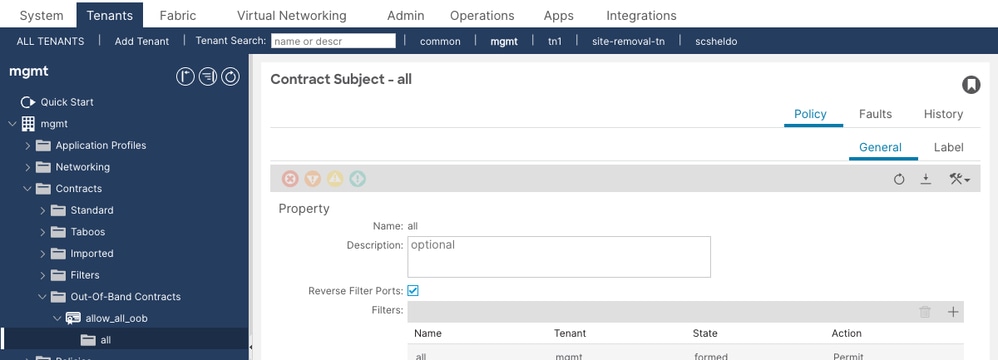
Expand the filter referenced by the subject and confirm its entries include an entry with EtherType IP, Protocol UDP, Destination Port 161. The filter entries determine which traffic is permitted through the OOB management contract to the APIC.
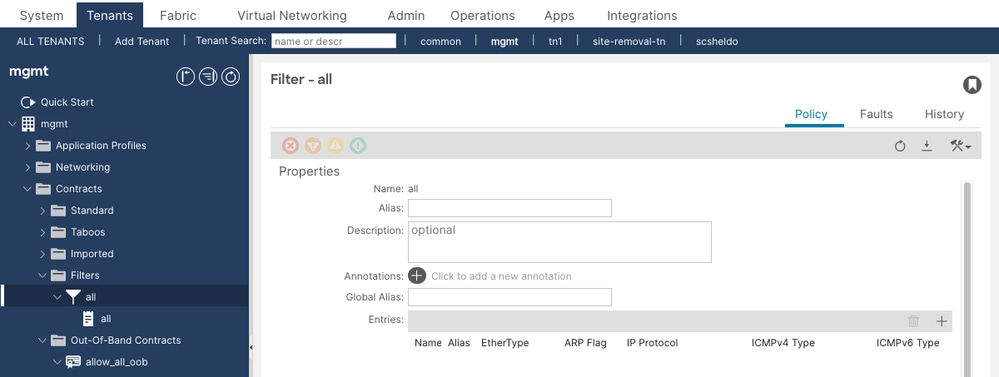
The filter should show:
- EtherType: IP
- IP Protocol: UDP
- Destination Port From: 161
- Destination Port To: 161
Also verify UDP port 162 is permitted if you want the APIC to send SNMP traps outbound via the OOB interface.
Check via MO query:
apic1# moquery -c vzEntry -x query-target-filter='and(eq(vzEntry.dFromPort,"161"),eq(vzEntry.prot,"17"))'
Total Objects shown: 2

# vz.Entry
name         : snmp-get
dn           : uni/tn-mgmt/flt-snmp-filter/e-snmp-get
dFromPort    : 161                        <--- destination port 161
dToPort      : 161
prot         : 17                         <--- UDP
stateful     : no
If no results are returned, no filter for UDP 161 exists. Add one to the management contract.
Verify SNMP Trap Destination Configuration
Navigate to Admin > External Data Collectors > Monitoring Destinations > SNMP to see all configured SNMP destination groups. An empty list means no trap destinations are configured and no traps will be sent from any node.
apic1# moquery -c snmpTrapDest
Total Objects shown: 1

# snmp.TrapDest
host         : 10.1.1.50                  <--- NMS trap receiver IP
port         : 162                         <--- trap UDP port
ver          : v2c                         <--- SNMP version
secName      : public                      <--- community string (v2c) or username (v3)
v3SecLvl     : noauth
notifT       : traps
vrfName      : mgmt:inb                    <--- VRF used to reach the trap receiver
epgDn        : uni/tn-mgmt/mgmtp-default/inb-default
dn           : uni/fabric/snmpgroup-NMS-DestGrp/trapdest-10.1.1.50-port-162
Confirm the trap destination IP, port, version, community string, and management VRF (either mgmt:inb or management for OOB) match your environment. The VRF must match the management EPG assigned to the destination.
Verify Monitoring Sources Are Configured in All Three Scopes
SNMP sources must exist in all three monitoring policy scopes. Missing a source in any scope means traps from related events will not be forwarded.
apic1# moquery -c snmpSrc | egrep "snmp.Src|name|dn|incl|minSev|monPolDn"
# snmp.Src
name         : NMS-snmpSrc
dn           : uni/fabric/monfab-default/snmpsrc-NMS-snmpSrc        <--- Fabric Default
incl         : audits,events,faults
minSev       : info
monPolDn     : uni/fabric/monfab-default

# snmp.Src
name         : NMS-snmpSrc
dn           : uni/fabric/moncommon/snmpsrc-NMS-snmpSrc              <--- Fabric Common
incl         : audits,events,faults
minSev       : info
monPolDn     : uni/fabric/moncommon

# snmp.Src
name         : NMS-snmpSrc
dn           : uni/infra/moninfra-default/snmpsrc-NMS-snmpSrc        <--- Access Default
incl         : audits,events,faults
minSev       : info
monPolDn     : uni/infra/moninfra-default
If any of the three are missing, create the missing SNMP source in the corresponding monitoring policy using the GUI.
Operational Verification
Verify SNMP State Using show snmp summary (APIC)
Run this command directly on each APIC to confirm the SNMP agent is running and the configuration has been applied:
apic1# show snmp summary
Active Policy:
default, Admin State: enabled             <--- admin state must be "enabled"

Local SNMP engineID: [Hex] 0x8000000980e2b692088976c75600000000

----------------------------------------
Community           Description
----------------------------------------
public              SNMP Community String  <--- community must be present

------------------------------------------------------------
User                Authentication   Privacy
------------------------------------------------------------
                                            <--- empty if using v2c only

------------------------------------------------------------
Client-Group        Mgmt-Epg              Clients
------------------------------------------------------------
NMS-Clients         default (In-Band)     10.1.1.50,10.1.1.51  <--- verify client IPs

------------------------------------------------------------
Host                Port    Version   Level       SecName
------------------------------------------------------------
10.1.1.50           162     v2c       noauth      public        <--- trap destination
What to verify in the output:
- Admin State must be
enabled. - Community must match what the NMS is configured to use.
- Client-Group must list all permitted NMS IPs with correct management EPG.
- Host (trap destination) must list the NMS trap receiver with correct port and version.
Verify SNMP State Using show snmp summary (Leaf/Spine)
leaf101# show snmp summary
Admin State : enabled, running (pid:8192)  <--- must show "enabled, running" with a PID

Local SNMP engineID: [Hex] 80000009037C69F6105BF9

----------------------------------------------------------------------
Community       Context         Status
----------------------------------------------------------------------
public                          ok                                     <--- community status must be "ok"

----------------------------------------------------------------------
Client          VRF             Status
----------------------------------------------------------------------
10.1.1.50       mgmt:inb        ok                                     <--- client entry must be "ok"
10.1.1.51       mgmt:inb        ok

-------------------------------------------------------------------------------
Host            Port    Ver     Level   SecName         VRF
-------------------------------------------------------------------------------
10.1.1.50       162     v2c     noauth  public          mgmt:inb       <--- trap destination
What to verify in the output:
- Admin State must be
enabled, runningwith a pid. If it showsdisabled, the SNMP policy is not applied or the pod policy chain is broken. - Community Status must be
ok. A status oferrorindicates a policy deployment problem. - Client VRF for each NMS host must match the management EPG's VRF (
mgmt:inbfor In-Band,managementfor OOB). - Trap Host must list the destination with correct VRF context.
Verify the snmpd Process Is Running
On a leaf or spine:
leaf101# ps aux | grep snmp
root      5881  2.5 1907404  411444 ?    Ssl  Apr05   /isan/bin/snmpd -f -s -d udp:161 udp6:161 tcp:161

leaf101# pidof snmpd
5881
On the APIC:
apic1# ps aux | grep snmp
ifc   32182  1.4   0.1  641196  239716  ?   Ssl  Apr10   /mgmt//bin/snmpd.bin \
  -f -p /tmp/snmpd2.pid -a -A -LE 0-2 -c /data//snmp/snmpd.conf
If no snmpd process is found on a leaf or spine, SNMP is not running on that node. Check that the SNMP policy Admin State is enabled and the pod policy chain is correctly configured.
Verify SNMP Port Is Listening
leaf101# netstat -lutn | grep 161
Active Internet connections (only servers)
Proto  Recv-Q  Send-Q  Local Address    Foreign Address  State
tcp         0       0  0.0.0.0:161      0.0.0.0:*        LISTEN   <--- SNMP agent is accepting requests
udp         0       0  0.0.0.0:161      0.0.0.0:*
udp6        0       0  :::161           :::*
If port 161 is not listed in the LISTEN state, the snmpd process is not running or has failed to bind to the port.
Verify iptables Rules on Leaf/Spine
Client Group Policies are translated into iptables rules on each leaf and spine. Use the following to inspect the rules:
leaf101# iptables -S | grep -i snmp
-N snmp_rules
-N vrf_2_snmp_rules
-N vrf_9_snmp_rules
-A INPUT -p udp -m udp --dport 161 -j snmp_rules    <--- SNMP port 161 redirects to snmp_rules chain
-A snmp_rules -m vrf --vrf 2 -j vrf_2_snmp_rules    <--- VRF 2 = OOB management
-A snmp_rules -m vrf --vrf 9 -j vrf_9_snmp_rules    <--- VRF 9 = In-Band management
-A snmp_rules -j DROP                                <--- default drop; only permitted clients pass
-A vrf_2_snmp_rules -s 10.1.1.50/32 -j ACCEPT       <--- permitted NMS client (OOB VRF)
-A vrf_9_snmp_rules -s 10.1.1.50/32 -j ACCEPT       <--- permitted NMS client (INB VRF)
To identify the correct VRF IDs for your fabric, run:
leaf101# show vrf
VRF-Name                VRF-ID  State   Reason
management              2       Up      --
mgmt:inb                9       Up      --
The VRF IDs in the iptables rules must match what show vrf reports. If a client IP is absent from the iptables rules, SNMP requests from that host will be silently dropped even if the snmpd process is running.
Use counters to check whether any SNMP packet has been matched or dropped:
leaf101# iptables -nvL | grep -A 20 "Chain snmp_rules"
Chain snmp_rules (1 references)
 pkts bytes target         prot opt in     out    source       destination
    1    73 vrf_9_snmp_rules all -- *      *      0.0.0.0/0    0.0.0.0/0    vrf 9
    0     0 DROP            all -- *      *      0.0.0.0/0    0.0.0.0/0    <--- if pkts>0 here, client IPs are missing
Verify Network Connectivity to SNMP Ports
leaf101# netstat -ai | grep eth0
Iface  MTU  Met  RX-OK  RX-ERR  RX-DRP  RX-OVR  TX-OK  TX-ERR  TX-DRP  TX-OVR  Flg
eth0   1500   0  501277      0       0       0  633546      0       0       0  BMRU

leaf101# netstat -ai | grep kpm_inb
Iface     MTU  Met    RX-OK  RX-ERR  RX-DRP  RX-OVR    TX-OK  TX-ERR  TX-DRP  TX-OVR  Flg
kpm_inb  9300   0  10361421     0       0       0   8958506      0     126       0  BMRU
Confirm the management interfaces are active (no RX-ERR increments) and passing traffic. eth0 is the OOB management interface; kpm_inb is the In-Band management interface on the switch.
Verify SNMP Trap Sending with tcpdump
To confirm that traps are being generated and sent from a leaf or spine node, capture traffic on the appropriate interface. Access the node as admin and use:
leaf101# tcpdump -i kpm_inb -f port 162 -vv
tcpdump: listening on kpm_inb, link-type EN10MB (Ethernet), capture size 65535 bytes
17:21:49.810052 IP (tos 0x0, ttl 64, id 63116, proto UDP, length 218)
    172.18.242.14.35582 > 10.1.1.50.snmp-trap: { SNMPv2c C=public
    { V2Trap(171) R=253 system.sysUpTime.0=5888267
      S:1.1.4.1.0=E:cisco.9.276.0.1
      interfaces.ifTable.ifEntry.ifIndex.436224000=436224000
      interfaces.ifTable.ifEntry.ifOperStatus.436224000=2 }}        <--- verify trap is being sent to NMS
For OOB:
leaf101# tcpdump -i eth0 -f port 162 -vv
For APIC traps (INB):
apic1# tcpdump -i bond0.1100 -f port 162
20:01:08.453473 IP apic1-inb.cisco.com.59417 > 10.1.1.50.snmptrap: C=public V2Trap(85) S:
1.1.4.1.0=E:cisco.9.117.2.0.2 E:cisco.9.117.1.1.2.1.1.10548=1 E:cisco.9.117.1.1.2.1.2.10548=2
Verify SNMP GET/WALK Requests with tcpdump
leaf101# tcpdump -i kpm_inb -f port 161 -vv
17:26:08.548149 IP 10.1.1.50.64245 > leaf101.cisco.com.snmp: { SNMPv2c C=public
  { GetRequest(28) R=949769396 system.sysDescr.0 }}              <--- GET request received
17:26:08.552290 IP leaf101.cisco.com.snmp > 10.1.1.50.64245: { SNMPv2c C=public
  { GetResponse(191) R=949769396
    system.sysDescr.0="Cisco NX-OS(tm) aci, Software (aci-n9000-system), \
Version 15.0(1k), RELEASE SOFTWARE" }}                           <--- response returned; SNMP working
If you see the GetRequest but no GetResponse, the request is being received but not answered. Check the snmpd process and community string. If you see neither request nor response, the request is being blocked before reaching the node (check routing and iptables).
Troubleshooting Workflow
Triage Decision Tree
Use this decision tree when engineers report that SNMP is not working. Start from the observed symptom and follow the branches to isolation.
Symptom: No response to SNMP GET/WALK requests
- Check SNMP Admin State on APIC. Run
moquery -c snmpPol. IfadminStisdisabled, enable it and proceed to Step 7. - Check snmpd process. On the affected node, run
ps aux | grep snmporpidof snmpd. If no process is running, the SNMP policy is not deployed. Verify the pod policy chain (SNMP Policy → Pod Policy Group → Pod Profile). - Check port 161 is listening. Run
netstat -lutn | grep 161. If port 161 is not in LISTEN state, the snmpd process has failed; collect logs from/var/log/dme/log/svc_ifc_dbgrelem.log*and restart the process. - Check routing. Run
show ip route vrf managementandshow ip route vrf mgmt:inb. Confirm a route to the NMS host exists in the correct VRF. - Check management contract on APIC. If the target is an APIC (not a leaf/spine), verify UDP 161 is permitted in the OOB or INB management contract.
- Perform tcpdump on the node. Run
tcpdump -i kpm_inb -f port 161 -vv(oreth0for OOB). If the GetRequest appears but no GetResponse follows, the request reaches the node but snmpd is not responding — check the community string. If no request appears at all, the problem is upstream (routing or contract). - Test from a permitted client. Run
snmpget -v2c -c [community] [node-ip] SNMPv2-MIB::sysDescr.0from an NMS host listed in the Client Group. A successful response confirms SNMP is fully operational.
Symptom: No SNMP traps received at the NMS
- Check trap destination configuration. Run
moquery -c snmpTrapDest. Confirm the NMS IP, port, version, and community match the NMS expected values. - Check monitoring sources exist in all three scopes. Run
moquery -c snmpSrc | egrep "snmp.Src|name|dn". Confirm entries exist withmonPolDnvalues foruni/fabric/monfab-default,uni/fabric/moncommon, anduni/infra/moninfra-default. If any are missing, add the SNMP source in the corresponding monitoring policy. - Check snmpd process. Verify snmpd is running on the node that should be sending the trap.
- Generate a test event and capture with tcpdump. Flap an interface or change a state to generate an event. On the node, run
tcpdump -i kpm_inb -f port 162 -vv. If no trap traffic appears on the wire, the event is not generating a trap — recheck monitoring sourceinclattribute (must includefaultsorevents). - Check connectivity to the trap receiver. Confirm the trap receiver is reachable from the management VRF:
show ip route vrf mgmt:inbshould show a path to the NMS host. - If traps appear on tcpdump but not at the NMS, the problem is network-side: firewall, routing, or the NMS configuration. Check that the NMS is listening on UDP 162 from the ACI node's management source IP.
Common Scenarios
Scenario 1: SNMP Policy Enabled but No Data Returned from Leaf/Spine
Problem: The SNMP Policy on the APIC shows Admin State enabled. The NMS can reach the leaf's management IP. snmpget times out with no response.
Configuration Check: Verify the Pod Policy Group references the SNMP policy and the Resolved SNMP Policy shows the correct name. If the Pod Policy Group's SNMP Policy field is empty or the relationship is not formed, the snmpd process may not start on the switches.
Operational Check: SSH to the affected leaf and run show snmp summary. If the output shows Admin State: disabled even though the APIC shows enabled, the policy has not been deployed. Check the pod policy chain for a missing or incorrectly referenced Pod Policy Group.
Root Cause: The SNMP policy is not linked to the Pod Policy Group, or the Pod Profile selector is not applying the correct Pod Policy Group to this pod.
Solution:
- Navigate to Fabric > Fabric Policies > Pods > Policy Groups > default.
- Confirm the SNMP Policy field points to the enabled SNMP policy.
- Navigate to Fabric > Fabric Policies > Pods > Profiles and confirm the active selector references this Pod Policy Group.
- After saving, recheck
show snmp summaryon the leaf within 2 minutes.
Scenario 2: SNMP GET/WALK Works for Some NMS Hosts But Not Others
Problem: One NMS server can poll ACI nodes successfully. A second NMS server on a different subnet gets no response.
Configuration Check: Run moquery -c snmpClientGrpP -x query-target=children on the APIC. Confirm the second NMS server's IP is listed as a client entry. If it is missing, that IP will be blocked by the iptables DROP rule at the bottom of the snmp_rules chain.
Operational Check: On the affected leaf, confirm UDP 161 is permitted in the OOB or INB management contract. If no contract or filter has SNMP ports, the request is dropped.
Root Cause: The second NMS server IP is not in the Client Group Policy.
Solution: Add the missing NMS IP as a Client Entry in the SNMP Client Group Policy under Fabric > Fabric Policies > Policies > Pod > SNMP > default > Client Group Policies. The iptables rules on all nodes will be updated within minutes of saving the policy.
Scenario 3: SNMP Traps Not Received — Traps Are Generated but Not Delivered
Problem: Faults are visible in the APIC fault table. moquery -c snmpTrapDest shows the correct NMS IP. The NMS receives no traps.
Configuration Check: Run moquery -c snmpSrc | egrep "snmp.Src|name|dn". Verify that monitoring sources exist in all three scopes (monfab-default, moncommon, moninfra-default). A common oversight is configuring the source only in the Fabric Default policy, which misses access-policy events.
Operational Check: Trigger a test event (e.g., toggle an interface into admin-down state). On the relevant node, run tcpdump -i kpm_inb -f port 162. If trap packets appear at the node's interface, the ACI side is working and the problem is in the network path to the NMS (firewall, routing). If no trap appears on the wire, the ACI monitoring source is missing or the event type is not included in the source's incl attribute.
Root Cause 1: One or more monitoring sources are missing from the required scopes.
Root Cause 2: Monitoring source incl attribute excludes the event type being generated (e.g., incl: events without faults means fault-based traps will not be sent).
Solution:
- Add missing monitoring sources in the GUI for each of the three scopes (Fabric Default, Fabric Common, Access Default). Set the destination group to your configured SNMP destination group.
- Verify the
inclattribute includesaudits,events,faultsfor comprehensive trap coverage. - After changes, re-trigger the test event and recheck tcpdump.
Scenario 4: SNMPv3 Client Group Enforcement Not Working on APIC
Problem: An SNMP client that is NOT in the Client Group Policy can successfully query the APIC using SNMPv3, even though the same query fails from leaf/spine nodes.
Root Cause: This is a known caveat. Client Group Policies (iptables-based source IP enforcement) are not applied for SNMPv3 GETs/Walks to APIC controllers. Any host can query the APIC via SNMPv3 regardless of Client Group configuration. On leaf and spine switches, Client Group enforcement works identically for SNMPv2c and SNMPv3.
Mitigation: Use management contract filters on the APIC to restrict SNMP access by source subnet. Client Groups are effective for leaf/spine nodes. For the APIC with SNMPv3, rely on management contract source-based filtering as the access control mechanism.
Scenario 5: SNMP Queries Succeed but MIB Data Is Incomplete or Stale
Problem: SNMP GET/WALK returns data, but certain MIB OIDs return empty or stale values. In particular, interface statistics or operational state data does not reflect the current fabric state.
Operational Check: Confirm which APIC is being queried. Each APIC only returns MIB objects for the data local to it. Run show snmp summary on the APIC being queried and compare the result with what you expect. For switch-level data (IF-MIB, entityMIB), query the switch directly, not the APIC.
Root Cause: Querying an APIC for leaf-level MIB data. Each APIC provides MIB objects only for its own managed objects. Switch-level data (interface stats, CPU, memory, environmental sensors) must be retrieved by polling each leaf and spine directly.
Solution: Configure your NMS to poll leaf and spine management IPs directly for interface and hardware MIB data. Use APIC management IPs only for APIC-native MIBs (entity, FRU, process, sensor related to the APIC server hardware).
Scenario 6: SNMP Works to Leaf/Spine But Not to the APIC
Problem: SNMPv2c GET from NMS to leaf and spine nodes succeeds. The same NMS cannot poll the APIC.
Configuration Check: APIC SNMP requires an explicit management contract permitting UDP 161. Navigate to Tenants > mgmt and check the OOB/INB contract and its filter for UDP 161.
Operational Check: On the APIC, run iptables -S | grep 161. If no ACCEPT rules for UDP 161 appear under the fp-137 (or equivalent OOB contract) chain, the contract filter for UDP 161 is missing or not deployed.
apic1# iptables -S | grep 161
-A fp-137 -s 10.0.0.0/8 -p udp -m udp --dport 161 -j ACCEPT     <--- permit SNMP from the management subnet
-A fp-137 -s 172.18.0.0/16 -p udp -m udp --dport 161 -j ACCEPT  <--- permit SNMP from INB management subnet
If these rules are absent, add a filter entry for UDP 161 to the management contract subject and re-verify.
Root Cause: Missing or misconfigured management contract. In ACI 5.x, APIC nodes enforce the management contract strictly — SNMP packets are dropped unless an explicit permit exists.
Solution:
- Navigate to Tenants > mgmt > Security Policies > Out-Of-Band Contracts.
- Expand the OOB contract, select the Subject, and verify/add a filter for UDP port 161.
- Repeat for the In-Band contract if the NMS is reaching the APIC over INB management.
- Verify with
iptables -S | grep 161on the APIC after saving.
Scenario 7: SNMP iptables Rules Are Absent or Incorrect
Problem: show snmp summary shows the SNMP policy is applied but iptables -S | grep snmp returns no rules, or the NMS client IP is absent from the rules.
Operational Check: Confirm snmpd is running with pidof snmpd. If snmpd is running but iptables has no SNMP rules, the process was started before the Client Group Policy was deployed. Restart snmpd to force rule reprogramming if the number of restarts is less than 250:
leaf101# pidof snmpd
5881

leaf101# show system internal sysmgr service name snmpd
Service "snmpd" ("snmpd", 127):
UUID = 0x1A, PID = 5881, SAP = 1545
State: SRV_STATE_HANDSHAKED (entered at time Mon Aug 25 19:23:50 2025).
Restart count: 3
Time of last restart: Mon Aug 25 19:23:48 2025.
Previous PID: 32080
Reason of last termination: SYSMGR_DEATH_REASON_FAILURE_SIGNAL
Tag = N/A
Plugin ID: 0
leaf101# kill -9 5881
The ACI process manager will automatically restart snmpd. After restart, verify:
leaf101# iptables -S | grep -i snmp
The snmp_rules chains and per-VRF client ACCEPT rules should now appear.
Root Cause: snmpd process was restarted or started before the Client Group Policy was fully deployed to the node, leaving iptables without the SNMP access rules.
Log Files for Extended Troubleshooting
When the above verification steps do not resolve the issue, the following log files on leaf, spine, and APIC nodes contain SNMP-related diagnostic information:
leaf101# zgrep "snmp" /var/log/dme/log/svc_ifc_dbgrelem.log*
leaf101# zgrep "snmpd" /var/log/dme/log/svc_ifc_dbgrelem.log*
leaf101# zgrep "snmpd_log" /var/log/dme/log/*
These logs contain snmpd restart events, policy deployment events, and community/client configuration errors that are not visible through show snmp summary.
References
- Cisco APIC System Management Configuration Guide, Release 5.x — Managing SNMP
- Cisco ACI MIB Quick Reference Guide
Revision History
| Revision | Publish Date | Comments |
|---|---|---|
1.0 |
21-Apr-2026
|
Initial Release |

 Feedback
Contact Cisco
- Open a Support Case

- (Requires a Cisco Service Contract)