Troubleshoot Remote Access Problems in an ACI Fabric
Available Languages
Introduction
This document describes how to verify, troubleshoot, and resolve remote access issues in a Cisco Application Centric Infrastructure (ACI) fabric. It covers Secure Shell (SSH) and Hypertext Transfer Protocol Secure (HTTPS) access to APICs and fabric switches, remote Authentication, Authorization and Accounting (AAA) with Terminal Access Controller Access-Control System Plus (TACACS+), Remote Authentication Dial-In User Service (RADIUS), and Lightweight Directory Access Protocol (LDAP), and Role-Based Access Control (RBAC) authorization. A triage decision tree and detailed troubleshooting scenarios are included for each area.
Background Information
The material from this document was synthesized from the Troubleshoot ACI Management and Core Services — Pod Policies guide, the Cisco APIC Basic Configuration Guide, Release 6.1(x) — Management chapter, and the Cisco APIC Security Configuration Guide — Access, Authentication, and Accounting chapter.
Overview
Remote access to an ACI fabric involves three distinct layers, each of which must be working for an engineer to successfully log in and operate:
- Transport — the management network path (OOB or in-band) and the protocol service (SSH or HTTPS) must be reachable and enabled.
- Authentication — the user's credentials must be validated, either locally on the APIC or against a remote AAA server (TACACS+, RADIUS, or LDAP).
- Authorization — the authenticated user must be assigned the correct RBAC roles and security domains in order to view and modify the intended ACI objects.
A failure at any layer produces different symptoms. A transport failure prevents the connection entirely. An authentication failure returns a credentials error. An authorization failure allows login but restricts visibility or produces "403 Forbidden" errors in the API.
Management Access Policy
The Management Access Policy (commPol) is the central object that controls which remote access protocols are enabled on the fabric. It is located under Fabric > Fabric Policies > Policies > Pod > Management Access > default. The policy contains child objects that configure:
- SSH (
commSsh) — administrative state, port, ciphers, Key Exchange (KEX) algorithms, Message Authentication Codes (MACs), and host key algorithms. - HTTPS (
commHttps) — administrative state, port, Transport Layer Security (TLS) protocol version, throttle rate, and client certificate authentication. - Telnet (
commTelnet) — administrative state and port. Telnet is disabled by default and Cisco recommends it remain disabled.
OOB and In-Band Management
ACI nodes support two management access paths:
- Out-of-Band (OOB) — uses the dedicated management port on the APIC or switch. OOB management addresses are allocated from a pool under the mgmt tenant and assigned to nodes via
mgmtRsOoBStNode. On the APIC, OOB contracts are enforced throughiptablesrules. If an OOB contract is applied, only traffic explicitly permitted by the contract can reach the APIC management interface. - In-Band (INB) — uses the fabric data plane for management traffic. In-band management requires a Bridge Domain (BD), subnet, Endpoint Group (EPG), contract, and node management address assignment. In-band IP addresses are not reachable from outside the fabric without additional routing or policy configuration.
AAA Architecture
ACI uses a three-tier AAA model:
- Login Domain (
aaaLoginDomain) — groups AAA providers under a named realm. Users specify the login domain at the login screen (for example,apic:TACACS-Domainor via the drop-down in the UI). A special fallback login domain always exists and maps to local authentication. - Provider Group (
aaaTacacsPlusProviderGroup,aaaRadiusProviderGroup,aaaLdapProviderGroup) — references one or more AAA servers and defines the order in which they are tried. - Provider (
aaaTacacsPlusProvider,aaaRadiusProvider,aaaLdapProvider) — defines the server IP, port, shared secret (or bind DN for LDAP), timeout, retries, management EPG, and monitoring credentials.
The Default Authentication Realm (aaaDefaultAuth) determines which login domain is used when the user does not specify one at login. The Console Authentication Realm controls authentication for console sessions.
Key AAA Log Files
AAA authentication events are logged in several files on both the APIC and fabric switches. These logs are the primary tool for validating authentication outcomes, identifying the realm and provider group being used, and diagnosing role assignment failures.
| Log File | Location (APIC) | Location (Switches) | Description |
|---|---|---|---|
| nginx.bin.log (APIC) nginx.log (switches) |
/var/log/dme/log/nginx.bin.log |
/var/sysmgr/tmp_logs/dme_logs/nginx.log |
Primary AAA log. Contains the full authentication flow: PAM request, realm selection, provider lookup, LDAP/TACACS+/RADIUS communication, AV pair parsing, domain and role assignment, and success or denial result. The file name differs between platforms but the content format is the same. |
| access.log | /var/log/dme/log/access.log |
/var/log/dme/log/access.log |
NGINX HTTP request log. One line per API request. On the APIC, shows aaaLogin and aaaRefresh calls with HTTP status codes (200 = success, 401 = denied). On switches, shows internal DME API requests and aaaRefresh calls. |
| pam.module.log | /var/log/dme/log/pam.module.log |
/var/log/dme/log/pam.module.log |
PAM module log. Shows the authentication result for SSH sessions: authenticated user, source IP, and assigned UNIX user ID. On switches, this is the quickest way to confirm whether a user was authenticated or rejected. |
AAA entries in the nginx log follow this format:
PID||TIMESTAMP||aaa||SEVERITY||CONTEXT||MESSAGE||SOURCE_FILE||LINE
Filter AAA-related log entries for a specific user's authentication flow:
! On the APIC:
apic1# grep '||aaa||' /var/log/dme/log/nginx.bin.log | grep -i 'username' | tail -20

! On a leaf or spine switch:
leaf101# grep '||aaa||' /var/sysmgr/tmp_logs/dme_logs/nginx.log | grep -i 'username' | tail -20
Or view all recent authentication requests and outcomes:
! On the APIC:
apic1# grep '||aaa||' /var/log/dme/log/nginx.bin.log | grep -i 'PAM authenticate\|was denied\|Unauthorized\|DENIED' | tail -20

! On a leaf or spine switch:
leaf101# grep '||aaa||' /var/sysmgr/tmp_logs/dme_logs/nginx.log | grep -i 'PAM authenticate\|was denied\|Unauthorized\|DENIED' | tail -20
A typical successful authentication flow shows these key messages in order:
Received PAM authenticate request from nginx for Username: <user>— the login request was received.DefaultAuthMo specifies realm <N>. Provider Group <name> !— the realm was selected (0=fallback/local, 2=TACACS+, 3=LDAP).- Provider-specific messages (LDAP bind, TACACS+ provider lookup, or RADIUS request).
Found UserDomain <domain> under remote Username: <user>— the domain assignment from the AAA response.Found Username: admin with admin write privileges under UserDomain all - user is an admin user— the role check passed.
A failed authentication logs:
User <user> was denied during AAA authenticationUnauthorized user <user> error: AAA Server Authentication DENIED
! On the APIC:
apic1# zegrep '||aaa||' /var/log/dme/log/nginx.bin.log.*.gz | grep 'PAM authenticate'

! On a leaf or spine switch:
leaf101# zegrep '||aaa||' /var/sysmgr/tmp_logs/dme_logs/nginx.log.*.gz | grep 'PAM authenticate'
RBAC Model
ACI RBAC controls what an authenticated user can see and do. The model has three components:
- Security Domain (
aaaDomain) — a scope limiter that maps to ACI objects (tenants, access policies, fabric policies). The built-in domains all, common, and mgmt are always present. Custom domains restrict a user's visibility to specific tenants or policy areas. - Role (
aaaRole) — defines a set of privileges. Pre-built roles include admin, aaa, tenant-admin, tenant-ext-admin, read-all, access-admin, fabric-admin, ops, and nw-svc-admin. - Privilege — each role grants either read or write (which implies read) access to a specific functional area.
A user account is assigned one or more security domain and role pairs. For remote users authenticated via TACACS+, RADIUS, or LDAP, the role mapping is delivered via vendor-specific attributes in the AAA response (for example, the cisco-av-pair attribute).
Triage Decision Tree
Use this decision tree when a user reports that they cannot access the ACI fabric remotely:
- Can you ping the APIC or switch management IP?
- No → Troubleshoot the management network path. Please reference the "Troubleshoot OOB and In-Band Management" section.
- Yes → Continue.
- Can you establish an SSH or HTTPS connection (does the connection open at all)?
- No → The protocol service can be disabled, the port can be filtered, or a cipher mismatch can be present. Please reference the "Troubleshoot SSH Access" or "Troubleshoot HTTPS Access" sections.
- Yes → Continue.
- Does the login screen appear (HTTPS) or does the SSH handshake complete and prompt for credentials?
- No → SSH key exchange or TLS handshake failure. Please reference the "Troubleshoot SSH Access" section for cipher and KEX mismatches.
- Yes → Continue.
- Do credentials fail with "Authentication Failed" or similar?
- Yes → Authentication issue. Please reference the "Troubleshoot AAA Authentication" sections (TACACS+, RADIUS, or LDAP depending on the login domain in use).
- No → Continue.
- Does the user log in but cannot see expected objects, or receives "403 Forbidden" errors?
- Yes → Authorization or RBAC issue. Please reference the "Troubleshoot RBAC and User Privileges" section.
- No → Access is working. Verify the specific issue the user is experiencing.
Verify Configuration
Before you troubleshoot operational state, verify the configuration chain is complete. Misconfiguration is the most common root cause of remote access issues.
Verify the Management Access Policy (SSH and HTTPS)
Navigate to Fabric > Fabric Policies > Policies > Pod > Management Access > default.
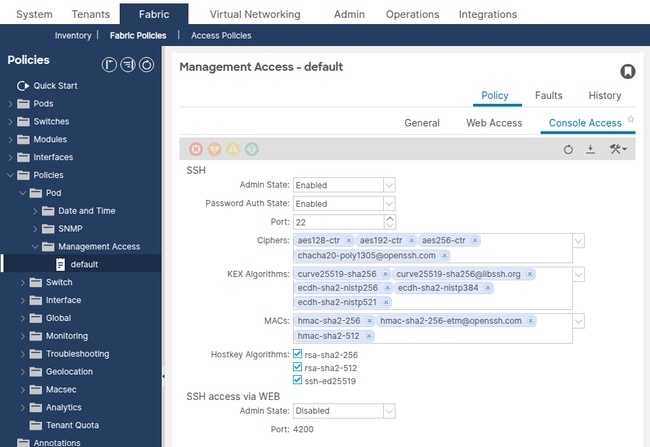
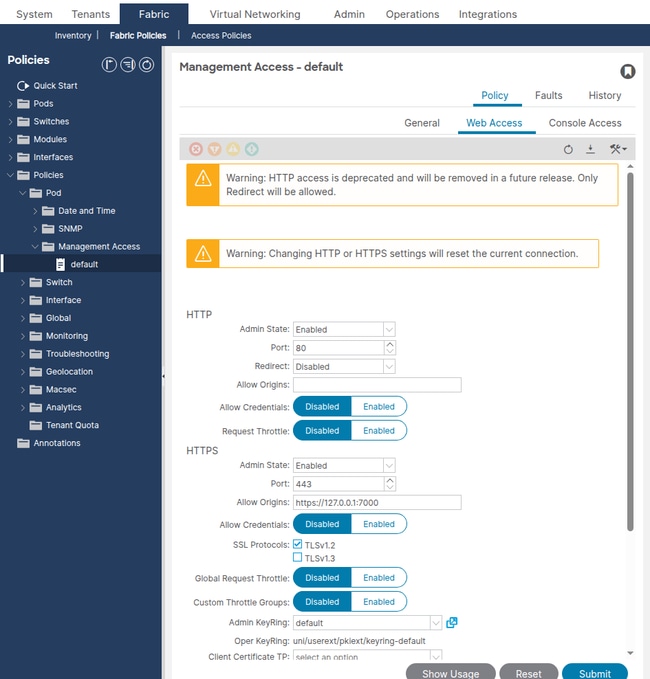
Confirm the following SSH settings:
- Admin State — must be enabled.
- Port — default 22. If changed, the SSH client must use the custom port.
- Password Authentication — enabled (unless certificate-only authentication is intended).
- SSH Ciphers — must include at least one cipher supported by the SSH client.
- KEX Algorithms — must include at least one algorithm supported by the SSH client.
- SSH MACs — must include at least one MAC supported by the SSH client.
Query the SSH managed object via the API:
apic1# moquery -c commSsh
dn              : uni/fabric/comm-default/ssh
adminSt         : enabled                      <--- must be enabled
port            : 22
passwordAuth    : enabled
sshCiphers      : aes128-ctr,aes192-ctr,aes256-ctr,chacha20-poly1305@openssh.com
kexAlgos        : curve25519-sha256,curve25519-sha256@libssh.org,ecdh-sha2-nistp256,ecdh-sha2-nistp384,ecdh-sha2-nistp521
sshMacs         : hmac-sha2-256,hmac-sha2-256-etm@openssh.com,hmac-sha2-512
hostkeyAlgos    : rsa-sha2-256,rsa-sha2-512,ssh-ed25519
Confirm the following HTTPS settings:
- Admin State — must be enabled.
- Port — default 443.
- SSL Protocols — TLSv1.2 (default). Older clients can require TLSv1.1 to be explicitly added.
- Throttle State — if enabled, the Throttle Rate limits requests per second per user. A very low value can cause API timeout errors.
apic1# moquery -c commHttps
dn              : uni/fabric/comm-default/https
adminSt         : enabled                      <--- must be enabled
port            : 443
sslProtocols    : TLSv1.2
throttleSt      : enabled
throttleRate    : 2
Common Misconfigurations
- SSH ciphers restricted too aggressively — in ACI release 5.2(1) and later, the default SSH ciphers were hardened. Older SSH clients (for example, PuTTY versions before 0.75, or OpenSSH versions that only offer
diffie-hellman-group14-sha1) can fail the key exchange. The SSH client displays "no matching cipher found" or "no matching key exchange method found". - Password authentication disabled — if
passwordAuthis set to disabled, only SSH key-based authentication is allowed. Users who connect with passwords will see "Permission denied (publickey)". - Custom SSH port without client awareness — if the SSH port was changed from 22, the SSH client must specify the new port (for example,
ssh -p 2222 admin@10.1.1.1).
Verify OOB Management Addresses
Navigate to Tenants > mgmt > Node Management Addresses.
Confirm that every APIC and switch node has an OOB management IP address assigned with a valid gateway. Nodes without management addresses will not be reachable over the management network.
Query the OOB static node assignments via the API:
apic1# moquery -c mgmtRsOoBStNode
# Example output for one node:
dn      : uni/tn-mgmt/mgmtp-default/oob-default/rsooBStNode-[topology/pod-1/node-201]
addr    : 10.1.1.104/27                <--- OOB IP assigned
gw      : 10.1.1.97                    <--- gateway for the OOB subnet
tDn     : topology/pod-1/node-201      <--- target node
Common Misconfigurations
- Missing OOB address assignment — a switch does not have an entry under
mgmtRsOoBStNode. The node will not have a management IP and will not respond to SSH or HTTPS on the OOB interface. - Incorrect gateway — the gateway address does not match the actual gateway on the OOB management network. The node can receive packets but cannot send return traffic.
- Subnet mask mismatch — the OOB subnet mask does not match the physical management network. This can cause the node to believe the management station is on a different subnet and route traffic through a gateway that does not exist or is incorrect.
Verify OOB Contracts
Navigate to Tenants > mgmt > Contracts.
If an OOB contract is applied to the OOB management EPG, only traffic explicitly permitted by that contract will reach the APIC management interface. On the APIC, OOB contracts are enforced via iptables rules.
Query the OOB EPG provided contracts:
apic1# moquery -c mgmtRsOoBProv -x 'query-target-filter=wcard(mgmtRsOoBProv.dn,"oob-default")'
If the query returns results, contracts are applied. Verify the contract subjects and filters permit the required protocols:
- SSH — TCP port 22 (or custom port)
- HTTPS — TCP port 443 (or custom port)
- ICMP — for ping verification
Common Misconfigurations
- OOB contract does not include SSH or HTTPS — the engineer can ping the APIC but cannot connect via SSH or HTTPS. The
iptablesrules on the APIC silently drop the traffic. - Source IP restriction in the OOB contract filter — the contract filter limits access to specific source subnets. Engineers outside that subnet cannot connect.
Verify AAA Configuration
Navigate to Admin > AAA > Authentication > AAA.
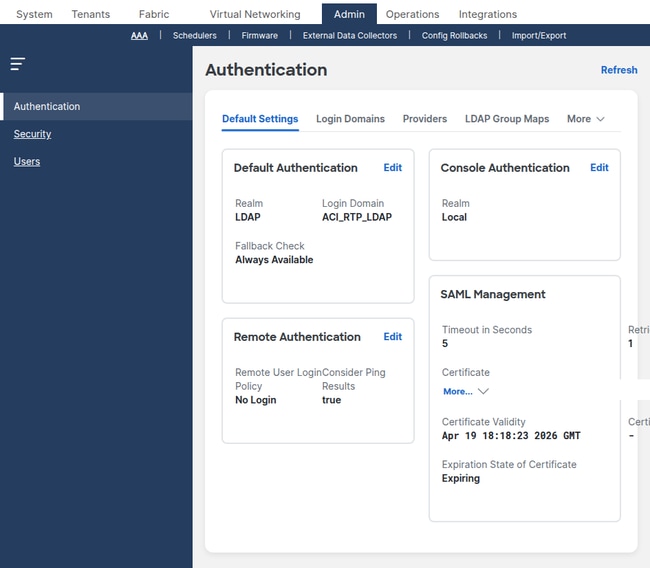
Confirm the following:
- Default Authentication Realm — identifies which login domain is used when the user does not specify one. If set to a remote AAA login domain, the corresponding server must be reachable.
- Console Authentication Realm — controls console access. If set to local, console login always uses local credentials (recommended).
Verify Login Domains
Navigate to Admin > AAA > Authentication > Login Domains.
apic1# moquery -c aaaLoginDomain
# Example output:
dn    : uni/userext/logindomain-TACACS-Domain
name  : TACACS-Domain

dn    : uni/userext/logindomain-LOCAL
name  : LOCAL

dn    : uni/userext/logindomain-fallback
name  : fallback
descr : Special login domain to allow fallback to local authentication
Verify that the login domain used for authentication is present and that it references the correct provider group.
Verify TACACS+ Providers
Navigate to Admin > AAA > Authentication > TACACS+ > TACACS+ Providers.
apic1# moquery -c aaaTacacsPlusProvider
dn              : uni/userext/tacacsext/tacacsplusprovider-10.1.1.50
name            : 10.1.1.50
authProtocol    : pap
port            : 49                          <--- default TACACS+ port
monitorServer   : disabled
epgDn           : uni/tn-mgmt/mgmtp-default/oob-default    <--- management EPG
Verify RADIUS Providers
Navigate to Admin > AAA > Authentication > RADIUS > RADIUS Providers.
apic1# moquery -c aaaRadiusProvider
dn              : uni/userext/radiusext/radiusprovider-10.1.1.51
name            : 10.1.1.51
authPort        : 1812                        <--- default RADIUS auth port
authProtocol    : pap
retries         : 1
timeout         : 5
epgDn           : uni/tn-mgmt/mgmtp-default/oob-default    <--- management EPG
Verify LDAP Providers
Navigate to Admin > AAA > Authentication > LDAP > LDAP Providers.
apic1# moquery -c aaaLdapProvider
dn              : uni/userext/ldapext/ldapprovider-10.1.1.52
name            : 10.1.1.52
port            : 389                         <--- 389 for LDAP, 636 for LDAPS
enableSSL       : no
rootdn          : CN=binduser,CN=Users,DC=example,DC=com
basedn          : CN=Users,DC=example,DC=com
filter          : sAMAccountName=$userid
attribute       : memberOf                    <--- attribute used for group map
epgDn           : uni/tn-mgmt/mgmtp-default/oob-default    <--- management EPG
Common AAA Misconfigurations
- Shared secret mismatch — the key configured on the ACI TACACS+ or RADIUS provider does not match the key on the server. Authentication silently fails.
- Wrong management EPG — the provider's
epgDnis empty or points to the wrong EPG (for example, in-band when the server is on the OOB network). The APIC cannot reach the server. - Login domain realm mismatch — the login domain is configured as LDAP but the user expects TACACS+ authentication. Login domains must reference the correct provider group type.
- LDAP bind DN incorrect — the
rootdn(bind DN) orbasednare wrong. LDAP authentication fails with a bind error even when the user credentials are correct. - LDAP filter does not match the directory schema — for Active Directory, use
sAMAccountName=$userid. For OpenLDAP, usecn=$useridoruid=$userid.
Verify RBAC Configuration
Navigate to Admin > AAA > Users in order to view local user accounts and their security domain and role assignments.
Query security domains via the API:
apic1# moquery -c aaaDomain
# Built-in domains:
dn      : uni/userext/domain-all
name    : all                              <--- full fabric access

dn      : uni/userext/domain-common
name    : common                           <--- access to tenant common

dn      : uni/userext/domain-mgmt
name    : mgmt                             <--- access to tenant mgmt
A user assigned to domain all with role admin has full read-write access to the entire fabric. A user assigned to a custom security domain with role tenant-admin can only manage tenants associated with that domain.
Common RBAC Misconfigurations
- User created without a security domain — the user can log in but sees no tenants and receives "403 Forbidden" on API calls. At least one security domain must be assigned.
- Read-only role assigned when write access is needed — the user can view objects but cannot submit changes. Verify the role privilege is set to writePriv.
- Remote user role mapping missing from the AAA server — the TACACS+ or RADIUS server does not return the
cisco-av-pairattribute containingshell:domains=all/admin/. The user authenticates successfully but has no roles and cannot see anything in the fabric.
Troubleshoot OOB and In-Band Management
If the APIC or switch management IP is not reachable on the network, troubleshoot the management path before you investigate SSH, HTTPS, or AAA.
Scenario: Cannot Ping the APIC OOB IP
Problem: The management station cannot ping the APIC OOB management IP address.
Verification Steps:
- Verify the APIC management port is physically connected and the link is up.
- Verify the management station is on the same L2 segment or has a route to the OOB subnet.
- Verify the OOB management IP is correctly assigned:
apic1# ifconfig oobmgmt oobmgmt: flags=4163<UP,BROADCAST,RUNNING,MULTICAST> mtu 1500 inet 10.1.1.1 netmask 255.255.255.224 broadcast 10.1.1.31 - Verify the default gateway is reachable:
apic1# netstat -rn | grep oobmgmt
0.0.0.0         10.1.1.97       0.0.0.0         UG    0      0        0 oobmgmt
10.1.1.96       0.0.0.0         255.255.255.224  U     0      0        0 oobmgmt
- If an OOB contract is applied, verify it permits the required protocols. Query the OOB EPG provided contracts as shown in the "Verify OOB Contracts" section. OOB contracts are enforced as
iptablesrules on the APIC. You can view the saved rules from the APIC shell:apic1# cat /etc/sysconfig/iptables | grep -A 20 "filter"
If the INPUT policy is DROP and there is no ACCEPT rule for the required protocol, the OOB contract is filtering the traffic.
Root Cause: Missing or misconfigured OOB management address, incorrect gateway, or OOB contract filtering traffic.
Solution: Correct the OOB address assignment, verify the physical network path, or update the OOB contract to permit the required protocols.
Scenario: Cannot Reach a Switch Management IP
Problem: The management station can reach the APIC but cannot reach a switch via OOB.
Verification Steps:
- Verify the switch has an OOB address assigned:
apic1# moquery -c mgmtRsOoBStNode -x 'query-target-filter=eq(mgmtRsOoBStNode.tDn,"topology/pod-1/node-101")'
dn      : uni/tn-mgmt/mgmtp-default/oob-default/rsooBStNode-[topology/pod-1/node-101]
addr    : 10.1.1.101/27
gw      : 10.1.1.97
- Verify the switch management interface has the assigned IP:
leaf101# ifconfig eth0 eth0 Link encap:Ethernet HWaddr 20:db:ea:14:42:54 inet addr:10.1.1.101 Bcast:10.1.1.127 Mask:255.255.255.224 UP BROADCAST RUNNING MULTICAST MTU:1500 - Verify the management VRF default route:
leaf101# ip route show
default via 10.1.1.97 dev eth0
10.1.1.96/27 dev eth0 proto kernel scope link src 10.1.1.101
Root Cause: Missing OOB address assignment, incorrect gateway, or the switch management physical port is down.
Solution: Assign the OOB address under Tenants > mgmt > Node Management Addresses. Verify the physical management link is up.
Troubleshoot SSH Access
This section covers scenarios where the management IP is reachable (ping succeeds) but the SSH session fails to establish or authenticate.
Scenario: SSH Connection Refused
Problem: The SSH client reports "Connection refused" when connecting to the APIC or switch.
Verification Steps:
- Verify SSH is enabled in the Management Access Policy:
apic1# moquery -c commSsh -x 'query-target-filter=eq(commSsh.adminSt,"enabled")'
dn        : uni/fabric/comm-default/ssh
adminSt   : enabled
port      : 22
If
adminStis disabled, SSH connections are rejected. - Verify the correct port is being used. If the SSH port was changed from 22:
$ ssh -p custom-port admin@10.1.1.1
- Verify the OOB contract permits TCP on the SSH port. Please reference the "Verify OOB Contracts" section.
Root Cause: SSH disabled in the management access policy, custom port not known to the client, or OOB contract filtering.
Solution: Enable SSH in the management access policy or use the correct port.
Scenario: SSH Key Exchange Failure (Cipher or KEX Mismatch)
Problem: The SSH client fails with "no matching cipher found", "no matching key exchange method found", or "no matching MAC found".
Verification Steps:
- Check the SSH client verbose output in order to identify which algorithms the client offers:
$ ssh -vv admin@10.1.1.1
debug2: KEX algorithms: curve25519-sha256,diffie-hellman-group14-sha256,diffie-hellman-group14-sha1
debug2: host key algorithms: ssh-ed25519,rsa-sha2-512,rsa-sha2-256
debug2: ciphers ctos: aes128-ctr,aes192-ctr,aes256-ctr
debug2: MACs ctos: hmac-sha2-256,hmac-sha1
- Compare the client-offered algorithms with the APIC-configured algorithms:
apic1# moquery -c commSsh
sshCiphers   : aes128-ctr,aes192-ctr,aes256-ctr,chacha20-poly1305@openssh.com
kexAlgos     : curve25519-sha256,curve25519-sha256@libssh.org,ecdh-sha2-nistp256,ecdh-sha2-nistp384,ecdh-sha2-nistp521
sshMacs      : hmac-sha2-256,hmac-sha2-256-etm@openssh.com,hmac-sha2-512
hostkeyAlgos : rsa-sha2-256,rsa-sha2-512,ssh-ed25519
- Identify the intersection. If there is no common algorithm in any category, the handshake fails.
Root Cause: No common cipher, KEX algorithm, or MAC between the SSH client and the APIC after an ACI upgrade or cipher hardening.
Solution: Either update the SSH client in order to support modern algorithms, or re-add the required legacy algorithm to the Management Access Policy. Re-adding legacy algorithms introduces security risk and is not recommended long term.
Scenario: SSH Connects But Authentication Fails for Local Users
Problem: SSH handshake succeeds (password prompt appears) but the password is rejected for a local user.
Verification Steps:
- Verify the user exists locally:
apic1# moquery -c aaaUser -x 'query-target-filter=eq(aaaUser.name,"admin")'
dn        : uni/userext/user-admin
name      : admin
accountStatus : active                 <--- must be active, not inactive or locked
- Check if the account is locked due to excessive failed login attempts:
apic1# moquery -c aaaUserEp
dn                 : uni/userext
pwdStrengthCheck   : no
Check the login domain lockout policy under Admin > AAA > Security Management > Lockout Policy.
- Verify the user is logging in with the correct login domain. If the Default Authentication Realm is set to a remote AAA login domain, the user must prepend
apic:LOCAL\\usernameorapic:fallback\\usernamein order to force local authentication. - Validate the authentication outcome in the logs. Check
nginx.bin.logon the APIC for the login event:apic1# grep '||aaa||' /var/log/dme/log/nginx.bin.log | grep -i 'admin' | tail -20
Look for the realm and provider group assigned to the login attempt:
! Working — Successful local authentication via the fallback domain (Realm 0 = fallback/local):
||aaa||INFO||Received PAM authenticate request from nginx for Username:  apic#fallback\\admin
||aaa||INFO||auth-domain realm = local, LocalUser admin
||aaa||DBG4||Decoded username string to Domain: fallback Username: admin Realm 0, PG
||aaa||DBG4||Found password for local Username: apic#fallback\\admin
||aaa||DBG4||Calling UpdateLastLogin method for user: apic#fallback\\admin

! Not Working — Login was sent to the LDAP realm because the Default Authentication Realm is set to LDAP.
! The admin user does not exist in the LDAP directory, so the LDAP search returns empty and the login is denied:
||aaa||INFO||Received PAM authenticate request from nginx for Username:  apic#LDAP-Domain\\admin
||aaa||DBG4||Decoded username string to Domain: LDAP-Domain Username: admin Realm 3, PG LDAP-Domain
||aaa||DBG4||Adding LdapProvider ldap-server.example.com to the list, order 1
||aaa||INFO||LDAP search to server ldap-server.example.com for baseDn CN=Users,DC=example,DC=com, filter sAMAccountName=admin
||aaa||INFO||LDAP search to server ldap-server.example.com for baseDn CN=Users,DC=example,DC=com, filter sAMAccountName=admin returned empty set
||aaa||INFO||User apic#LDAP-Domain\\admin was denied during AAA authentication
||aaa||DBG4||Setting error LDAP/AD Server Authentication DENIED
||aaa||ERROR||Unauthorized Username: admin error: LDAP/AD Server Authentication DENIED
If the realm is not 0 (fallback/local), the login was sent to a remote AAA server instead of the local database. The user must prepend
apic:fallback\\usernameorapic:LOCAL\\usernamein order to force local authentication.
Root Cause: Incorrect password, locked account, or the login attempt is being sent to a remote AAA server instead of the local database.
Solution: Reset the password, unlock the account, or use the correct login domain prefix.
Troubleshoot HTTPS Access
This section covers scenarios where the APIC web UI or Representational State Transfer (REST) Application Programming Interface (API) is unreachable over HTTPS.
Scenario: HTTPS Connection Times Out
Problem: The browser shows "ERR_CONNECTION_TIMED_OUT" or the API call hangs when connecting to the APIC on port 443.
Verification Steps:
- Verify HTTPS is enabled:
apic1# moquery -c commHttps -x 'query-target-filter=eq(commHttps.adminSt,"enabled")'
dn        : uni/fabric/comm-default/https
adminSt   : enabled
port      : 443
- Verify the OOB contract permits TCP 443. Please reference the "Verify OOB Contracts" section.
- Test from the APIC itself to confirm the HTTPS process is listening:
apic1# ss -tlnp | grep 443
LISTEN  0  128  *:443  *:*  users:(("nginx",pid=12345,fd=6))
Root Cause: HTTPS disabled, OOB contract filtering TCP 443, or the nginx process on the APIC has crashed.
Solution: Enable HTTPS in the management access policy, update the OOB contract, or restart the web service on the APIC.
Scenario: Browser Shows TLS Handshake Error
Problem: The browser displays "ERR_SSL_VERSION_OR_CIPHER_MISMATCH" or a similar TLS error.
Verification Steps:
- Check the TLS protocol version configured on the APIC:
apic1# moquery -c commHttps
sslProtocols : TLSv1.2
- Verify the browser supports TLSv1.2. Very old browsers (for example, Internet Explorer 10 and older) do not support TLSv1.2 by default.
Root Cause: The APIC only offers TLSv1.2 (the default) and the browser or API client only supports older TLS versions.
Solution: Update the browser or client. If you must support older clients temporarily, add TLSv1.1 to the Management Access Policy, but this introduces security risk.
Scenario: API Throttle Limiting
Problem: REST API calls intermittently fail with HTTP 503 errors or the web UI becomes sluggish during heavy automation.
Verification Steps:
apic1# moquery -c commHttps
throttleSt   : enabled
throttleRate : 2                       <--- requests per second per user
If the throttle rate is very low and automation scripts send many requests per second, the APIC rejects excess requests.
Root Cause: The per-user throttle rate is too low for the automation workload.
Solution: Increase the throttle rate under the Management Access Policy, or optimize the automation scripts in order to reduce request frequency. Alternatively, disable throttling if the fabric is not shared.
Troubleshoot AAA — TACACS+
This section covers TACACS+ authentication failures. The APIC communicates with the TACACS+ server over TCP port 49.
Operational Verification
ACI switches do not support the test aaa command available on standalone NX-OS. To verify TACACS+ operation, use the APIC to check provider status, faults, and login session history.
Check for active faults on the TACACS+ provider:
apic1# moquery -c faultInst -x 'query-target-filter=wcard(faultInst.dn,"tacacsplusprovider")'
If no faults are returned, the APIC considers the provider reachable. If faults are present, the output includes fault codes such as F1773 (provider unreachable) or F1774 (authentication failure).
Verify the TACACS+ provider configuration:
apic1# moquery -c aaaTacacsPlusProvider
dn              : uni/userext/tacacsext/tacacsplusprovider-10.1.1.50
name            : 10.1.1.50
authProtocol    : pap
port            : 49
epgDn           : uni/tn-mgmt/mgmtp-default/oob-default
Verify basic network reachability from the APIC to the TACACS+ server:
apic1# ping 10.1.1.50
PING 10.1.1.50 (10.1.1.50): 56 data bytes
64 bytes from 10.1.1.50: icmp_seq=0 ttl=64 time=0.5 ms
Attempt a login to the APIC with the TACACS+ login domain and check the session result:
apic1# moquery -c aaaSessionLR -x 'order-by=aaaSessionLR.created|desc' -x page-size=5
Look at the descr field to determine whether the failure was due to authentication rejection or a connectivity issue.
Validate the TACACS+ authentication flow in the APIC logs. Filter for the username in question:
apic1# grep '||aaa||' /var/log/dme/log/nginx.bin.log | grep -i 'username' | tail -20
TACACS+ logins follow the same nginx.bin.log authentication flow as LDAP (see the LDAP Operational Verification section for complete real log examples). The key differences for TACACS+ are:
DefaultAuthMo specifies realm 2— Realm 2 indicates TACACS+ (vs. Realm 3 for LDAP).Adding TacacsProvider <IP> to the list— identifies the TACACS+ server being contacted (vs.LdapProviderfor LDAP).TACACS+ Cisco-avpair (shell:domains=all/admin/)— the AV pair is returned directly by the TACACS+ server (vs. being converted from an LDAP group map).
A successful TACACS+ login shows the same progression: PAM request → realm selection → provider lookup → AV pair parsing → user injection → UserDomain and role assignment → admin write privileges.
A failed TACACS+ login ends with User <username> was denied during AAA authentication and Unauthorized ... error: AAA Server Authentication DENIED, the same pattern as an LDAP denial.
Scenario: TACACS+ Authentication Failed
Problem: Login fails with "Authentication Failed" when the user selects a TACACS+ login domain.
Verification Steps:
- Check for active faults on the TACACS+ provider:
apic1# moquery -c faultInst -x 'query-target-filter=wcard(faultInst.dn,"tacacsplusprovider")'
Fault F1773 indicates a connectivity issue. Fault F1774 indicates an authentication rejection.
- Verify network reachability from the APIC to the TACACS+ server:
apic1# ping 10.1.1.50
PING 10.1.1.50 (10.1.1.50): 56 data bytes
64 bytes from 10.1.1.50: icmp_seq=0 ttl=64 time=0.5 ms
- If ping succeeds but authentication fails, verify the shared secret matches on both the APIC provider configuration and the TACACS+ server configuration.
- Check the most recent login sessions to see the failure detail:
apic1# moquery -c aaaSessionLR -x 'order-by=aaaSessionLR.created|desc' -x page-size=5
- Check the TACACS+ server logs for the authentication attempt. A successful attempt logged on the server but rejected indicates a user configuration issue on the server side (for example, password mismatch or missing user account).
- Check the APIC
nginx.bin.logfor the full authentication flow. Filter by the username rather than specific keywords so that intermediate messages are not missed:apic1# grep '||aaa||' /var/log/dme/log/nginx.bin.log | grep -i 'tacuser1' | tail -20
Compare the output against the working and non-working examples in the Operational Verification section above. Key indicators:
was deniedorDENIED— the TACACS+ server was reached but rejected the credentials. Verify the user exists on the server and the password matches.- No provider-specific messages after
Adding TacacsProvider— the server is unreachable or timed out. Verify network reachability and the management EPG. Injection of remote user ... was completedfollowed by role check lines — authentication succeeded but the issue can be with role assignment (see the AV pair section below).
TACACS+ cisco-av-pair for RBAC
For remote users authenticated via TACACS+, the server must return the cisco-av-pair attribute in the authorization response. This attribute maps the user to ACI security domains and roles.
Format:
shell:domains=domain/role/
Examples:
- Full admin:
shell:domains=all/admin/ - Read-only for all:
shell:domains=all/read-all/ - Tenant admin for a specific domain:
shell:domains=TenantA/tenant-admin/ - Multiple domains:
shell:domains=all/admin/,TenantA/tenant-admin/
If this attribute is missing or malformed, the user authenticates successfully but has no roles and cannot see any objects in the APIC UI.
Validate the AV pair that was received by checking nginx.bin.log. Filter by the username in order to see the full role injection flow:
apic1# grep '||aaa||' /var/log/dme/log/nginx.bin.log | grep -i 'username' | tail -20
For TACACS+, the AV pair is logged as TACACS+ Cisco-avpair (shell:domains=...). A successful injection shows Injection of remote user <username> was completed followed by Found UserDomain and admin write privileges lines (see the LDAP Operational Verification section for complete examples of this flow with real log output).
If the AV pair format is invalid, the log shows Injection of remote user <username> data FAILED - error message is Invalid shell:domains string. If the user authenticates with a non-admin role, SSH to switches is denied with non admin logins on switch are denied.
Root Cause: Shared secret mismatch, server unreachable from the management network, user does not exist on the TACACS+ server, or the management EPG on the provider is incorrect.
Solution: Correct the shared secret, fix reachability, or create the user on the TACACS+ server.
Validate Leaf Switch Authentication Logs
On leaf and spine switches, SSH login events are logged in both pam.module.log and nginx.log. The pam.module.log shows the PAM authentication result (accept or reject). The nginx.log contains the full AAA flow — realm selection, provider lookup, LDAP/TACACS+/RADIUS communication, AV pair parsing, and role assignment — identical to nginx.bin.log on the APIC. These logs apply to all remote AAA types (TACACS+, RADIUS, LDAP).
Check pam.module.log for the authentication result:
leaf101# cat /var/sysmgr/tmp_logs/pam.module.log | tail -30
Working — successful remote authentication on the switch:
||pam||INFO||Received pamauth request for jsmith
||pam||INFO||User: jsmith, rhost: 10.1.1.50, tty: ssh
||pam||INFO||Connecting to default PAM socket path /var/run/mgmt/socket/pam
||pam||INFO||Securitymgr is ALIVE
||pam||INFO||Connection successful - attempting to authenticate user jsmith client ssh
||pam||INFO||Sent authentication credentials (total pkt len 58)
||pam||INFO||Received authentication response from PAM server
||pam||INFO||User jsmith from 10.1.1.50 authenticated by securitymgrAG with UNIX user id 16004
||pam||INFO||pam_putenv username=jsmith
||pam||INFO||pam_putenv remote=1
||pam||INFO||pam_putenv unix_user_id=16004
||pam||INFO||pam_putenv groupuid=15374
||pam||INFO||returning success
The remote=1 flag confirms the user was authenticated by a remote AAA server.
Not Working — the user was rejected. The securitymgrAG denies the user and the switch attempts a local user lookup as a final fallback:
||pam||INFO||Received pamauth request for baduser
||pam||INFO||User: baduser, rhost: 10.1.1.50, tty: ssh
||pam||INFO||Connection successful - attempting to authenticate user baduser client ssh
||pam||INFO||ERROR: securitymgrAG rejected user baduser from 10.1.1.50
||pam||INFO||You entered user baduser ...attempting to match against local users
||pam||INFO||Username baduser is not a special local auth user
If no PAM entries appear at all for the user, the SSH connection was likely rejected before reaching the PAM stage (for example, due to a cipher mismatch or the user cancelling the connection).
For a more detailed view of the authentication flow on the switch, check nginx.log. This log contains the full AAA decision chain — the same format and messages as nginx.bin.log on the APIC:
leaf101# grep '||aaa||' /var/sysmgr/tmp_logs/dme_logs/nginx.log | grep -i 'username' | tail -20
Working — successful LDAP authentication on a switch (compare with the APIC LDAP examples in the LDAP Operational Verification section — the messages are the same):
||aaa||INFO||Received PAM authenticate request from nginx for Username:  jsmith
||aaa||DBG4||Decoded username string to Domain:  Username: jsmith Realm 3, PG LDAP-Domain
||aaa||DBG4||Username: jsmith does not exist locally
||aaa||DBG4||Initialized LdapAuthenticationBroker for lookup of jsmith (address 10.1.1.100, hostname ssh)
||aaa||INFO||LDAP search to server ldap-server.example.com for baseDn CN=Users,DC=example,DC=com, filter sAMAccountName=jsmith
||aaa||INFO||LDAP Record DN : CN=jsmith,CN=Users,DC=example,DC=com
||aaa||DBG4||Bind to UserDN CN=jsmith,CN=Users,DC=example,DC=com using user password successful
||aaa||INFO||User AAA authentication was successful
||aaa||DBG4||Injection of remote user jsmith was completed
||aaa||DBG4||Checking all UserDomains under remote Username: jsmith
||aaa||DBG4||Found UserDomain all under remote Username: jsmith
||aaa||DBG4||Found Username: admin with admin write privileges under UserDomain all - user is an admin user
The switch nginx.log is particularly useful when pam.module.log shows a rejection but does not explain why. The nginx.log reveals the AAA realm, provider, and specific failure reason (for example, LDAP search returned empty, TACACS+ timeout, or AV pair injection failed).
Troubleshoot AAA — RADIUS
This section covers RADIUS authentication failures. The APIC communicates with the RADIUS server over UDP port 1812 (authentication) and optionally UDP port 1813 (accounting).
Operational Verification
ACI switches do not support the test aaa command available on standalone NX-OS. Use the following methods to verify RADIUS operation.
Verify the RADIUS server configuration and reachability statistics from a leaf switch:
leaf101# show radius-server
timeout value:5
retransmission count:3
deadtime value:0
source interface:any available
total number of servers:1

following RADIUS servers are configured:
        10.1.1.51:
                available for authentication on port: 1812
                Radius shared secret:********
                timeout:5
                retries:1
Scenario: RADIUS Authentication Failed
Problem: Login fails when a user selects a RADIUS login domain.
Verification Steps:
- Check RADIUS server statistics from a switch for signs of timeouts or failures:
leaf101# show radius-server statistics 10.1.1.51
Authentication Statistics
	failed transactions: 0
	sucessfull transactions: 5
	requests sent: 5
	requests timed out: 0
A high count under requests timed out indicates the RADIUS server is unreachable or the shared secret is mismatched (RADIUS silently drops packets on shared secret mismatch).
- Verify network reachability to the RADIUS server:
apic1# ping 10.1.1.51
PING 10.1.1.51 (10.1.1.51): 56 data bytes
64 bytes from 10.1.1.51: icmp_seq=0 ttl=64 time=0.5 ms
- Verify the shared secret matches between the APIC and the RADIUS server. Unlike TACACS+ which uses TCP and reports connection failures, RADIUS uses UDP and silently drops packets when the shared secret is mismatched. The only symptom is a timeout.
- Check the RADIUS server logs. FreeRADIUS in debug mode (
radiusd -X) shows each request and indicates whether it was accepted, rejected, or had a shared secret mismatch. - Check the APIC
nginx.bin.logfor the RADIUS authentication flow. Filter by the username:apic1# grep '||aaa||' /var/log/dme/log/nginx.bin.log | grep -i 'username' | tail -20
RADIUS logins follow the same
nginx.bin.logauthentication flow as LDAP and TACACS+ (see the LDAP Operational Verification section for complete real log examples). The key differences for RADIUS are:Adding RadiusProvider <IP> to the list— identifies the RADIUS server (vs.TacacsProviderorLdapProvider).- Realm number for RADIUS varies by configuration.
A successful RADIUS login ends with
Injection of remote user ... was completedandadmin write privileges.A failed RADIUS login ends with
was denied during AAA authenticationandDENIED.If no RADIUS-specific messages appear after the
Adding RadiusProviderline, the server timed out. Unlike TACACS+ which uses TCP and reports connection failures, RADIUS uses UDP and silently drops packets when the shared secret is mismatched. The only symptom is a timeout followed by denial. - Check for active faults on the RADIUS provider:
apic1# moquery -c faultInst -x 'query-target-filter=wcard(faultInst.dn,"radiusprovider")'
RADIUS cisco-av-pair for RBAC
RADIUS uses the same cisco-av-pair attribute as TACACS+ for RBAC role mapping. The RADIUS server must return this attribute in the Access-Accept response:
# FreeRADIUS users file entry:
labadmin  Cleartext-Password := "password"
          Cisco-AVPair = "shell:domains=all/admin/"
In FreeRADIUS, this is configured in the users file or LDAP backend. For ISE, it is configured under the Authorization Profile as an Advanced Attribute.
Root Cause: Shared secret mismatch (most common with RADIUS — causes silent timeouts), server unreachable, incorrect auth port, or missing user account on the RADIUS server.
Solution: Correct the shared secret, verify UDP 1812 reachability, or configure the user on the RADIUS server.
Troubleshoot AAA — LDAP
This section covers LDAP authentication failures. The APIC connects to the LDAP server over TCP port 389 (LDAP) or TCP port 636 (LDAPS with SSL).
Operational Verification
ACI switches do not support the test aaa command available on standalone NX-OS. To verify LDAP operation, check provider faults and configuration from the APIC.
Check for active faults on the LDAP provider:
apic1# moquery -c faultInst -x 'query-target-filter=wcard(faultInst.dn,"ldapprovider")'
Fault F1777 indicates a connectivity issue. Fault F1778 indicates an authentication or bind failure. If no faults are returned, the APIC considers the provider reachable.
Verify basic network reachability to the LDAP server:
apic1# ping 10.1.1.52
PING 10.1.1.52 (10.1.1.52): 56 data bytes
64 bytes from 10.1.1.52: icmp_seq=0 ttl=64 time=0.5 ms
For LDAP, also verify TCP connectivity to port 389 (or 636 for LDAPS). If the APIC can ping the server but LDAP faults persist, the issue is typically an incorrect bind DN, wrong password, or a firewall blocking the LDAP port.
Validate the LDAP authentication flow in the APIC logs. Filter by the username:
apic1# grep '||aaa||' /var/log/dme/log/nginx.bin.log | grep -i 'jsmith' | tail -20
Working — A successful LDAP login shows the full search, bind, and role assignment flow:
||aaa||INFO||Received PAM authenticate request from nginx for Username:  jsmith
||aaa||DBG4||DefaultAuthMo specifies realm 3. Provider Group LDAP-Domain !
||aaa||DBG4||Decoded username string to Domain:  Username: jsmith Realm 3, PG LDAP-Domain
||aaa||DBG4||Username: jsmith does not exist locally
||aaa||DBG4||Initialized LdapAuthenticationBroker for lookup of jsmith (address 10.1.1.50, hostname ssh)
||aaa||INFO||LDAP search to server ldap-server.example.com for baseDn CN=Users,DC=example,DC=com, filter sAMAccountName=jsmith
||aaa||INFO||LDAP Record DN : CN=jsmith,CN=Users,DC=example,DC=com
||aaa||DBG4||Bind to UserDN CN=jsmith,CN=Users,DC=example,DC=com using user password successful
||aaa||DBG4||	Adding WriteRole: admin
||aaa||DBG4||Converted to CiscoAVPair string shell:domains = all/admin/
||aaa||DBG4||Injection of remote user jsmith was completed
||aaa||DBG4||Checking all UserDomains under remote Username: jsmith
||aaa||DBG4||Found UserDomain all under remote Username: jsmith
||aaa||DBG4||Found Username: admin with admin write privileges under UserDomain all - user is an admin user
Not Working — user not found in the LDAP directory (search returns empty set):
||aaa||INFO||Received PAM authenticate request from nginx for Username:  baduser
||aaa||DBG4||Decoded username string to Domain:  Username: baduser Realm 3, PG LDAP-Domain
||aaa||DBG4||Username: baduser does not exist locally
||aaa||DBG4||Initialized LdapAuthenticationBroker for lookup of baduser (address 10.1.1.50, hostname REST)
||aaa||INFO||LDAP search to server ldap-server.example.com for baseDn CN=Users,DC=example,DC=com, filter sAMAccountName=baduser
||aaa||INFO||LDAP search to server ldap-server.example.com for baseDn CN=Users,DC=example,DC=com, filter sAMAccountName=baduser returned empty set
||aaa||INFO||User baduser was denied during AAA authentication
||aaa||ERROR||Unauthorized Username: baduser error: LDAP/AD Server Authentication DENIED
Scenario: LDAP Authentication Failed
Problem: Login fails when a user selects an LDAP login domain.
Verification Steps:
- Verify LDAP server reachability from the APIC:
apic1# ping 10.1.1.52
PING 10.1.1.52 (10.1.1.52): 56 data bytes
64 bytes from 10.1.1.52: icmp_seq=0 ttl=64 time=0.5 ms
- Check for active LDAP provider faults:
apic1# moquery -c faultInst -x 'query-target-filter=wcard(faultInst.dn,"ldapprovider")'
- Verify the LDAP provider configuration:
apic1# moquery -c aaaLdapProvider -x 'query-target-filter=eq(aaaLdapProvider.name,"10.1.1.52")'
rootdn    : CN=binduser,CN=Users,DC=example,DC=com    <--- bind DN
basedn    : CN=Users,DC=example,DC=com                 <--- search base
filter    : sAMAccountName=$userid                      <--- search filter
attribute : memberOf                                    <--- group mapping attribute
enableSSL : no                                          <--- LDAP vs LDAPS
port      : 389
- Verify the user exists in the LDAP directory under the configured base DN and matches the filter. For Active Directory, the user's
sAMAccountNameattribute must match the username entered at login. For OpenLDAP, thecnoruidattribute must match. - If using LDAPS (port 636), verify the SSL certificate chain. If
SSLValidationLevelis set to strict, the APIC will reject the connection if the server certificate is not trusted or has expired. - Check the APIC
nginx.bin.logfor the full LDAP authentication flow. Filter by the username so that intermediate messages are not missed:apic1# grep '||aaa||' /var/log/dme/log/nginx.bin.log | grep -i 'jsmith' | tail -20
Compare the output against the working and non-working examples in the Operational Verification section above. Additional LDAP-specific failure patterns can be found by searching the log broadly:
apic1# grep '||aaa||' /var/log/dme/log/nginx.bin.log | grep -i 'LDAP\|ldap' | tail -20
Common non-working patterns (compare against the Operational Verification examples above for the full flow):
! Not Working — User not found (wrong baseDn, wrong filter, or user does not exist).
! Real example — "baduser" does not exist in the LDAP directory:
||aaa||INFO||LDAP search to server ldap-server.example.com for baseDn CN=Users,DC=example,DC=com, filter sAMAccountName=baduser
||aaa||INFO||LDAP search to server ldap-server.example.com for baseDn CN=Users,DC=example,DC=com, filter sAMAccountName=baduser returned empty set
||aaa||INFO||User baduser was denied during AAA authentication
||aaa||ERROR||Unauthorized Username: baduser error: LDAP/AD Server Authentication DENIED
Other LDAP failure patterns to look for:
- LDAP search timed out (server unreachable, slow, or firewall blocking port 389/636) — look for
Ldap Search failed: return code for ldap_search_ext_s: -5: Timed out - Bind failed (rootdn or bind password incorrect, or server refused the connection) — look for
Ldap Search failed: return code for ldap_search_ext_s: -1: Can't contact LDAP server - User found but password is wrong (bind with user password fails) — the log shows the
LDAP Record DNline but is followed by a denied message with noBind to UserDN ... successfulline.
- LDAP search timed out (server unreachable, slow, or firewall blocking port 389/636) — look for
LDAP Group Map for RBAC
LDAP uses group maps instead of the cisco-av-pair attribute. The LDAP provider's attribute field specifies which LDAP attribute contains the group information. For Active Directory, this is typically memberOf.
The APIC matches the returned group DN against the configured LDAP Group Map Rules (aaaLdapGroupMapRule) in order to assign the appropriate security domain and role. If no group map rule matches, the user authenticates but has no roles.
Alternatively, you can set the attribute to CiscoAVPair and store the shell:domains=all/admin/ value directly in the user's LDAP attributes, which follows the same format as TACACS+ and RADIUS.
Root Cause: Incorrect bind DN or password, base DN does not contain the user, search filter does not match directory schema, LDAPS certificate validation failure, or missing group map rules.
Solution: Correct the provider configuration (bind DN, base DN, filter, SSL settings). For RBAC issues, verify group map rules match the LDAP groups the user belongs to.
Troubleshoot RBAC and User Privileges
This section covers scenarios where the user successfully authenticates but does not have the expected level of access.
Scenario: User Logged In But Sees No Tenants
Problem: A remote user logs in via TACACS+, RADIUS, or LDAP. The login succeeds, but the user sees no tenants in the UI and API calls return empty results or "403 Forbidden".
Verification Steps:
- Check the user's session to see what roles were assigned at login:
apic1# moquery -c aaaSessionLR -x 'query-target-filter=wcard(aaaSessionLR.descr,"jsmith")' -x 'order-by=aaaSessionLR.created|desc' -x page-size=1
dn          : subj-[uni/userext/remoteuser-jsmith]/sess-123456789
descr       : [user jsmith] From-10.1.1.100-client-type-https-Success
The
descrfield shows the login result. If the user authenticated successfully but has no RBAC roles, the AAA server did not return a validcisco-av-pairor LDAP group map match. - Check the APIC
nginx.bin.logto see the AV pair and role assignment during the login. Filter by the username:apic1# grep '||aaa||' /var/log/dme/log/nginx.bin.log | grep -i 'jsmith' | tail -20
Look for the role injection and domain assignment messages:
Working — AV pair converted from LDAP group map, user gets admin role:
||aaa||DBG4||	Adding WriteRole: admin
||aaa||DBG4||Converted to CiscoAVPair string shell:domains = all/admin/
||aaa||DBG4||Injection of remote user jsmith was completed
||aaa||DBG4||Checking all UserDomains under remote Username: jsmith
||aaa||DBG4||Found UserDomain all under remote Username: jsmith
||aaa||DBG4||Found Username: admin with admin write privileges under UserDomain all - user is an admin user
Not Working — if a
Cisco-avpairorConverted to CiscoAVPairline does not appear in the flow, the AAA server did not return the attribute and no LDAP group map rule matched. Look forChecking all UserDomainswith noFound UserDomainlines following it — the user was authenticated but has no role assignments. If aInjection ... data FAILEDmessage appears, the AV pair string format is invalid. - Verify the AAA server is returning the
cisco-av-pairattribute (for TACACS+ or RADIUS) or the correct LDAP group membership (for LDAP). Check the AAA server configuration:- TACACS+: Verify the user profile includes
cisco-av-pairwith the formatshell:domains=all/admin/. - RADIUS: Verify the user profile returns
Cisco-AVPair = "shell:domains=all/admin/"in the Access-Accept. - LDAP: Verify the user is a member of an LDAP group that matches a configured LDAP Group Map Rule (
aaaLdapGroupMapRule).
- TACACS+: Verify the user profile includes
- If the attribute is present but the user still has no access, verify the security domain name in the attribute matches an existing security domain on the APIC:
apic1# moquery -c aaaDomain
If the
cisco-av-pairreferences a domain that does not exist (for example,shell:domains=NonExistentDomain/admin/), the role assignment fails silently.
Root Cause: The AAA server does not return the RBAC mapping attributes, the attribute format is incorrect, or the security domain referenced in the attribute does not exist on the APIC.
Solution: Configure the AAA server to return the correct cisco-av-pair or group mapping. Verify the security domain exists on the APIC.
Scenario: User Can View But Cannot Modify Configuration
Problem: A user can log in and browse objects but receives an error when they attempt to submit changes.
Verification Steps:
- Check the user's role assignments:
apic1# moquery -c aaaUserRole -x 'query-target-filter=wcard(aaaUserRole.dn,"user-jsmith")'
dn        : uni/userext/user-jsmith/userdomain-all/role-read-all
name      : read-all
privType  : readPriv                   <--- read only, no write privilege
- If the user needs write access, the role must grant
writePriv. Common roles with write privileges include admin, tenant-admin, access-admin, and fabric-admin. - Validate the role assignment in the APIC logs. Filter by the username:
apic1# grep '||aaa||' /var/log/dme/log/nginx.bin.log | grep -i 'jsmith' | tail -20
Look for the role assignment messages near the end of the authentication flow:
Working — user has the admin write role (from a real LDAP login):
||aaa||DBG4||Checking all UserDomains under remote Username: jsmith
||aaa||DBG4||Found UserDomain all under remote Username: jsmith
||aaa||DBG4||Found Username: admin with admin write privileges under UserDomain all - user is an admin user
Not Working — if the log shows
non-admin UserRolewithread privilegesinstead ofadmin write privileges, the user has a read-only role and cannot modify configuration. Look for lines like:||aaa||DBG4||Found non-admin UserRole read-all (read privileges) under UserDomain all
If the log shows only
read privilegesand nowrite privileges, update the user’s role or AV pair on the AAA server.
Root Cause: The user has a read-only role (for example, read-all or ops) instead of a write-capable role.
Solution: Update the user's role assignment on the APIC (for local users) or update the cisco-av-pair on the AAA server (for remote users) in order to include a role with write privileges.
Scenario: User Can Access Some Tenants But Not Others
Problem: A user can see and manage one tenant but cannot see other tenants, even though they need access.
Verification Steps:
- Check the user's security domain assignment:
apic1# moquery -c aaaUserDomain -x 'query-target-filter=wcard(aaaUserDomain.dn,"user-jsmith")'
dn    : uni/userext/user-jsmith/userdomain-TenantA
name  : TenantA                       <--- only has access to TenantA
- Security domains map to tenants. If the user needs access to TenantB, they must also be assigned to the security domain associated with TenantB, or assigned to the all domain.
- For remote users, confirm the AV pair or LDAP group map assigns the correct domains. Check the APIC
nginx.bin.logfor the domain assignment at login. Filter by the username:apic1# grep '||aaa||' /var/log/dme/log/nginx.bin.log | grep -i 'jsmith' | tail -20
Working — user has the all domain (full visibility), from a real LDAP login:
||aaa||DBG4||Converted to CiscoAVPair string shell:domains = all/admin/
||aaa||DBG4||Injection of remote user jsmith was completed
||aaa||DBG4||Found UserDomain all under remote Username: jsmith
||aaa||DBG4||Found Username: admin with admin write privileges under UserDomain all - user is an admin user
Not Working — if the user has only a single tenant domain, only that domain appears in the
Found UserDomainmessages instead of all. For example,Found UserDomain TenantAmeans the user can only see TenantA. The user needs additional domains added to the AV pair on the AAA server, or the all domain for full access.
Root Cause: The user is assigned to a restricted security domain that only covers specific tenants.
Solution: Add the required security domains to the user's configuration, or use the all domain for full access.
Password Recovery and Emergency Access
If all admin accounts are locked out or the remote AAA server is unreachable and the default realm has been changed, use one of these recovery methods:
Fallback Login Domain
ACI provides a built-in fallback login domain that always uses local authentication, regardless of the Default Authentication Realm. To use it:
- SSH: Log in as
apic:fallback\\admin(orapic#fallback\\admindepending on the version). - GUI: In the Domain drop-down on the login screen, select fallback and use local credentials.
Console Access
If the Console Authentication Realm is set to local (the default), you can always log in via the APIC console port with local credentials. If the local admin password is unknown, the password can be reset through the Cisco Integrated Management Controller (CIMC) (for physical APICs) or hypervisor console (for virtual APICs).
Common Faults Reference
The following ACI faults are commonly associated with remote access and AAA issues:
- F1773 — TACACS+ provider connectivity issue. The APIC cannot reach the TACACS+ server.
- F1774 — TACACS+ authentication failure. The server is reachable but rejected the authentication attempt.
- F1775 — RADIUS provider connectivity issue.
- F1776 — RADIUS authentication failure.
- F1777 — LDAP provider connectivity issue.
- F1778 — LDAP authentication failure.
- F0532 — Management subnet not configured for a node.
Query active AAA faults:
apic1# moquery -c faultInst -x 'query-target-filter=or(wcard(faultInst.dn,"tacacsplusprovider"),wcard(faultInst.dn,"radiusprovider"),wcard(faultInst.dn,"ldapprovider"))'
References
- Troubleshoot ACI Management and Core Services — Pod Policies
- Cisco APIC Basic Configuration Guide, Release 6.1(x) — Management
- Cisco APIC Security Configuration Guide — Access, Authentication, and Accounting
Revision History
| Revision | Publish Date | Comments |
|---|---|---|
1.0 |
09-Apr-2026
|
Initial Release |

 Feedback
Contact Cisco
- Open a Support Case

- (Requires a Cisco Service Contract)