Troubleshoot NTP in a Cisco ACI Fabric
Available Languages
Introduction
This document describes how to verify, troubleshoot, and resolve Network Time Protocol (NTP) issues in a Cisco ACI fabric. It covers the NTP policy model, configuration verification, operational verification commands, a triage workflow for common NTP symptoms, and detailed troubleshooting scenarios.
Background Information
The material from this document was extracted from the Troubleshoot ACI Management and Core Services — Pod Policies guide, the Cisco APIC Basic Configuration Guide, Release 6.1(x) — Provisioning Core ACI Fabric Services chapter, and the Cisco ACI Design Guide.
Overview
Time synchronization is a crucial capability in an ACI fabric upon which monitoring, operational, and troubleshooting tasks depend. Clock synchronization ensures proper analysis of traffic flows, correlation of debug and fault timestamps across multiple fabric nodes, and full utilization of the atomic counter capability upon which application health scores depend. Nonexistent or improper NTP configuration does not necessarily trigger a fault or a low health score, so it is important to configure time synchronization early in the fabric deployment.
NTP Policy Model in ACI
NTP in ACI is managed through a chain of four policy objects:
- Date and Time Policy (
datetimePol) — defines the NTP configuration including administrative state, authentication state, server state, and master mode. Located under Fabric > Fabric Policies > Policies > Pod > Date and Time. - NTP Provider (
datetimeNtpProv) — defines individual NTP server entries (providers) within a Date and Time policy, including the server IP/FQDN, management EPG selection (out-of-band or in-band), preferred flag, and polling intervals. - Pod Policy Group (
fabricPodPGrp) — references the Date and Time policy along with other pod-level policies (BGP RR, SNMP, etc.). Located under Fabric > Fabric Policies > Pods > Policy Groups. - Pod Profile (
fabricPodP) — associates a Pod Policy Group with a pod selector. Located under Fabric > Fabric Policies > Pods > Profiles.
All four links in this chain must be configured for NTP to be applied to the fabric nodes. If any link is broken, the NTP provider configuration will not be pushed to the switches.
Prerequisites
- Fabric discovery must be completed.
- Node management addresses (OOB or in-band) must be assigned to all APICs and switches under the mgmt tenant.
- For out-of-band NTP, the OOB management EPG must allow UDP port 123.
- For in-band NTP, an in-band management EPG with appropriate contracts and reachability to the NTP server must be configured. In-band IP addresses are not reachable from outside the fabric without additional policy.
NTP Authentication
ACI supports three NTP authentication schemes: MD5, SHA-1, and AES128-CMAC. AES128-CMAC was introduced in APIC release 6.1(1) and is the recommended scheme, as MD5 is considered weak and insecure. When FIPS mode is enabled, only AES128-CMAC and SHA-1 are supported.
NTP Server Functionality
ACI leaf switches can act as NTP servers for downstream clients (e.g., servers connected to the fabric). This feature is disabled by default and must be explicitly enabled via the Server State option in the Date and Time policy. When enabled, clients can use the leaf switch in-band, out-of-band, bridge domain SVI, or L3Out IP address as the NTP server address.
Verify Configuration
Before troubleshooting NTP operational state, verify the configuration chain is complete. Misconfiguration is the most common root cause of NTP issues in ACI.
Step 1: Verify Node Management Addresses
Navigate to Tenants > mgmt > Node Management Addresses (for static assignment) or Node Management EPGs (for connectivity groups).
Confirm that every APIC and switch node has a management IP address assigned. Nodes without management addresses cannot communicate with the NTP server.
Alternatively, query the API:
apic1# moquery -c mgmtRsOoBStNode
Step 2: Verify the Date and Time Policy Has an NTP Provider
Navigate to Fabric > Fabric Policies > Policies > Pod > Date and Time > [Your Policy].
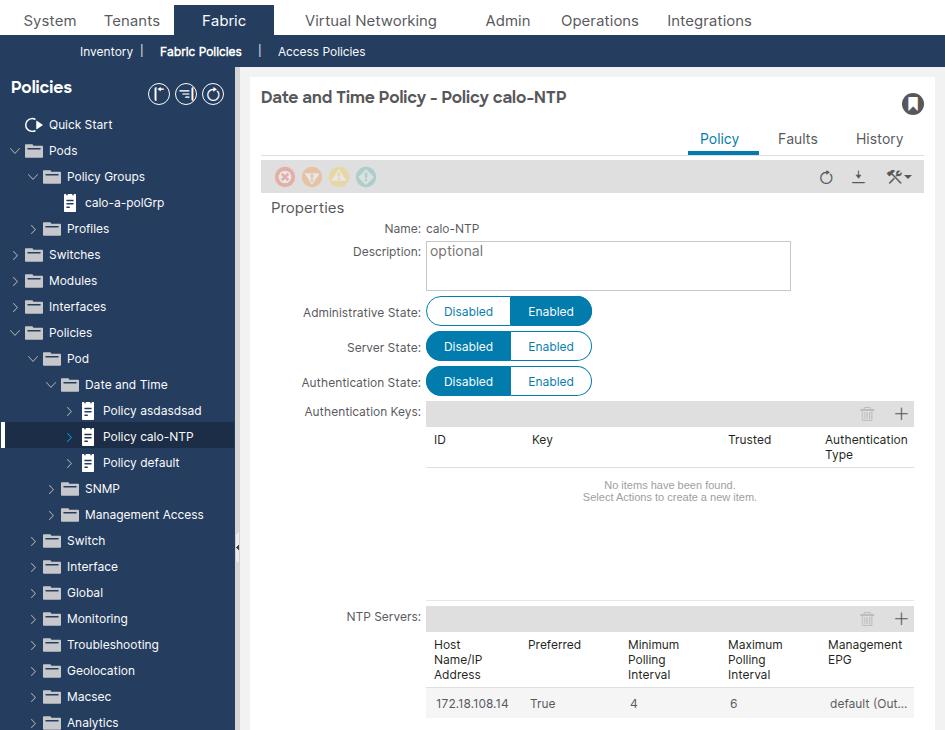
Confirm that at least one NTP provider (server) is configured. If multiple providers exist, flag at least one as Preferred.
Verify the NTP provider via the API:
apic1# moquery -c datetimeNtpProv
# datetimeNtpProv
dn           : uni/fabric/time-NTP-Policy/ntpprov-10.1.1.100
name         : 10.1.1.100
preferred    : yes                   <--- at least one should be "yes"
epgDn        : uni/tn-mgmt/mgmtp-default/oob-default   <--- management EPG
minPoll      : 4
maxPoll      : 6
keyId        : 0
Common Misconfigurations
- No NTP provider configured — the Date and Time policy exists but has zero providers. The policy will be applied but nodes will have no NTP server to sync against.
- Wrong Management EPG selected — the NTP provider references the out-of-band EPG but the NTP server is only reachable via in-band (or vice versa). Verify which management EPG provides reachability to the NTP server.
- FQDN and IP of the same server added as separate providers — this generates a Duplicate IP fault. Delete the duplicate entry.
- FQDN-based provider with no DNS policy — if using a hostname for the NTP provider, ensure a DNS service policy is configured and the appropriate DNS label is applied to the management VRF.
Step 3: Verify the Pod Policy Group References the Date and Time Policy
Navigate to Fabric > Fabric Policies > Pods > Policy Groups > [Your Pod Policy Group].
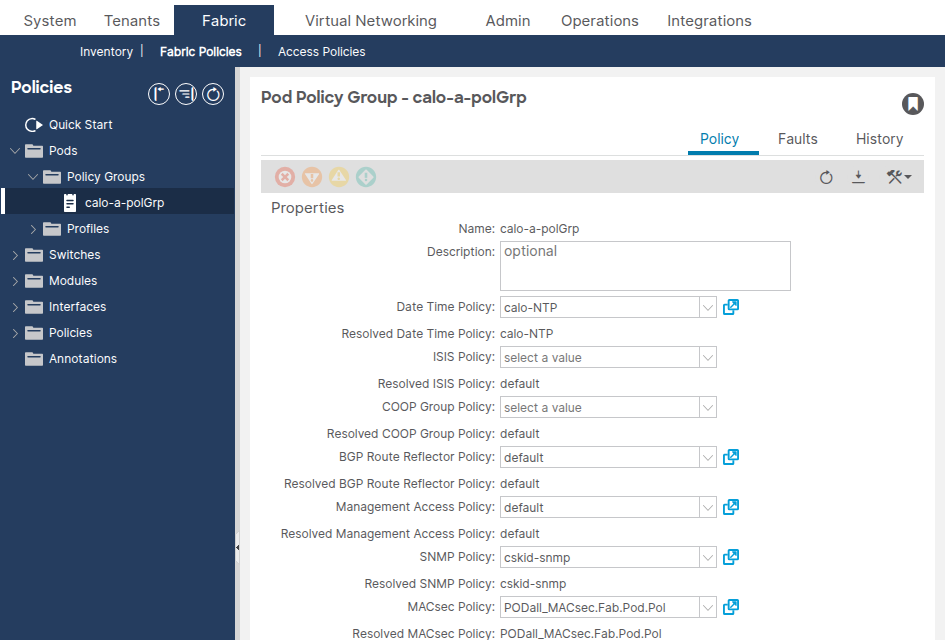
Confirm the Date Time Policy field references the correct Date and Time policy.
apic1# moquery -c fabricPodPGrp -f 'fabricPodPGrp.name=="default"'
Look for the datetimePolName attribute or the associated fabricRsTimePol relationship.
Common Misconfigurations
- Pod Policy Group references the wrong Date and Time policy — if multiple Date and Time policies exist (e.g., "default" and a custom one), verify the Pod Policy Group references the intended policy.
- Pod Policy Group not created at all — the default Pod Policy Group may not have the Date and Time policy associated. Always verify.
Step 4: Verify the Pod Profile References the Pod Policy Group
Navigate to Fabric > Fabric Policies > Pods > Profiles > [Your Pod Profile].
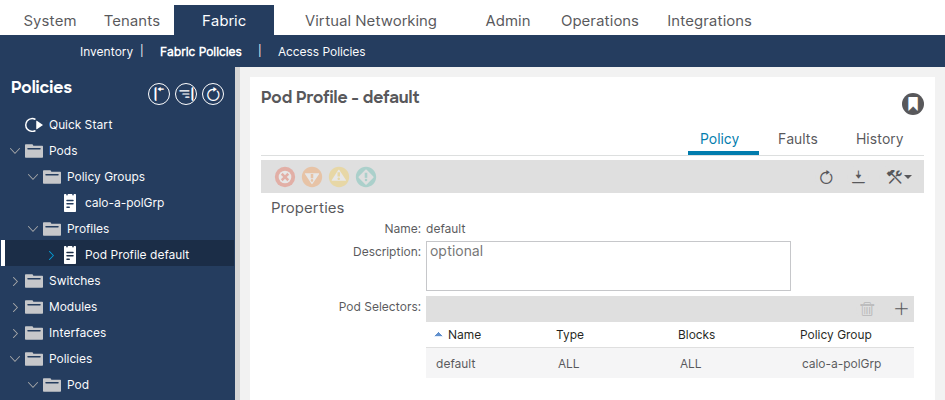
Confirm the Fabric Policy Group field references the correct Pod Policy Group.
Common Misconfigurations
- Pod Profile references the wrong Pod Policy Group — especially in multi-pod environments, each pod profile must reference the correct pod policy group.
Step 5: Verify Date and Time Format
Navigate to System > System Settings > Date and Time.
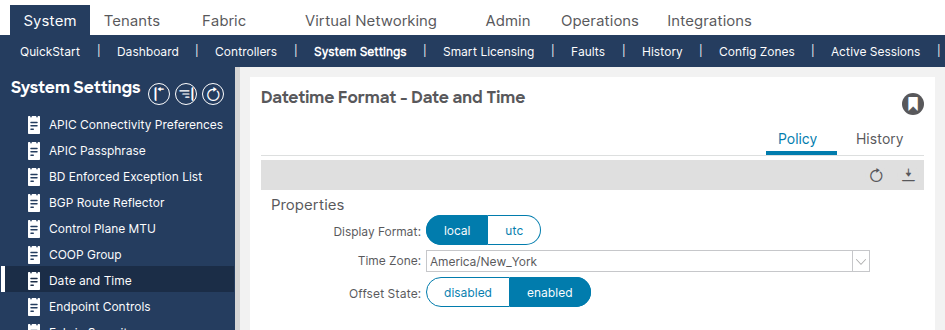
Confirm the display format (local or UTC) and time zone are set as expected. This setting is a separate default Date Time Format policy that cannot be deleted or duplicated.
Operational Verification
After confirming the configuration chain is correct, use the following commands to verify NTP is functioning at runtime.
APIC Verification
show ntpq
This command shows NTP synchronization status across all APICs. The * symbol indicates the server is selected for synchronization.
apic1# show ntpq
 nodeid     remote                          refid                           st        t   when      poll      reach     auth  delay     offset    jitter
 ------  -  ------------------------------  ------------------------------  --------  --  --------  --------  --------  ----  --------  --------  --------
 1       *  ntp.example.com                 .GPS.                           1         u   20        64        377       none  0.213     +0.102    0.005
 2       *  ntp.example.com                 .GPS.                           1         u   6         64        377       none  0.196     +0.007    0.004
 3       *  ntp.example.com                 .GPS.                           1         u   27        64        377       none  0.216     -0.008    0.006
What good looks like:
- All APICs show
*(selected for sync) next to the remote server. reachis377(octal), indicating the last 8 polls were all successful.st(stratum) is between 1–15. Stratum 16 means the server is unsynchronized.offsetis low (typically under 100 ms for a healthy environment).
What bad looks like:
- No
*next to any server — no server is selected for sync. reachis0— no NTP responses have been received.stis16— the NTP server is not synchronized to its upstream time source.offsetis extremely large (thousands of milliseconds) — the clock is significantly drifted.
show clock
apic1# show clock
Time : 11:24:18.391 UTC-04:00 Tue Apr 07 2026
Confirm the time is accurate. Compare with the expected time to detect clock drift.
APIC Bash (alternative)
apic1# bash
admin@apic1:~> date
Tue Apr 7 11:24:45 EDT 2026
Switch Verification (Leaf/Spine)
show ntp peers
Verify that the NTP provider has been pushed to the switch.
leaf1# show ntp peers
-----------------------------------------------------------------------------
  Peer IP Address                         Serv/Peer Prefer KeyId   Vrf
-----------------------------------------------------------------------------
  10.1.1.100                              Server    yes    None    management
What good looks like: The NTP server IP or hostname appears with Serv/Peer = Server and the correct VRF (typically management for OOB).
What bad looks like: No peers listed, or the NTP server IP does not match the configured provider. This typically indicates the Date and Time policy was not applied through the Pod Policy Group / Pod Profile chain.
show ntp peer-status
Verify the NTP server is selected for synchronization.
leaf1# show ntp peer-status
Total peers : 1
* - selected for sync, + - peer mode(active),
- - peer mode(passive), = - polled in client mode
    remote                               local           st poll reach delay vrf
--------------------------------------------------------------------------------
*10.1.1.100                              0.0.0.0         1  64   377   0.000  management
The * character is essential — it confirms the NTP server is being used for synchronization.
What bad looks like:
- No
*next to the server — the switch is not syncing to the server. reachis0— no NTP responses have been received. This indicates a reachability issue.stis16— the NTP server is unsynchronized and cannot provide valid time.
show ntp statistics peer ipaddr
Verify NTP packet exchange to confirm reachability. Replace the IP address with the NTP provider address for the affected switch.
leaf1# show ntp statistics peer ipaddr 10.1.1.100
...
packets sent:     9256
packets received:   9256
...
What good looks like: packets sent and packets received are roughly equal and incrementing.
What bad looks like: packets sent is incrementing but packets received is 0 or barely incrementing — NTP responses are not reaching the switch.
show clock
leaf1# show clock
11:24:24.121066 EDT Tue Apr 07 2026
GUI Verification
Navigate to Fabric > Fabric Policies > Policies > Pod > Date and Time > [Your Policy] > [NTP Provider].
The Sync Status column should show Synced to Remote NTP Server for all nodes. It can take several minutes for the sync status to converge after initial deployment.
API Verification
Query the datetimeNtpq class to check NTP synchronization across all APICs:
apic1# moquery -c datetimeNtpq
# datetimeNtpq
dn        : topology/pod-1/node-1/sys/ntpq-ntp.example.com
remote    : ntp.example.com
tally     : *                            <--- selected for sync
stratum   : 1
reach     : 377                          <--- all recent polls successful
offset    : +0.102
delay     : 0.213
jitter    : 0.005
refid     : .GPS.
Troubleshooting Workflow
Use this decision tree when an NTP issue is reported on any ACI node.
Step 1: Are NTP peers configured on the switch?
Log into the affected switch and run:
leaf1# show ntp peers
- No peers listed → the Date and Time policy was not applied to this node. Go to Scenario 1: NTP Provider Not Pushed to Switch.
- Peers listed → continue to Step 2.
Step 2: Is the NTP server selected for sync?
leaf1# show ntp peer-status
*present → NTP is syncing. If the time still appears wrong, go to Scenario 5: Large Offset / Clock Drift.- No
*present → continue to Step 3.
Step 3: Is the reach value zero?
Check the reach column in show ntp peer-status.
reach=0→ no responses from the NTP server. Go to Scenario 2: NTP Server Unreachable.reach>0but no*→ responses are arriving but sync is not established. Check stratum — go to Step 4.
Step 4: Is the stratum value 16?
- Stratum = 16 → the NTP server is not synchronized to its own upstream source. Go to Scenario 3: NTP Server Unsynchronized (Stratum 16).
- Stratum 1–15 but no sync → go to Scenario 4: NTP Authentication Mismatch.
Common Troubleshooting Scenarios
Scenario 1: NTP Provider Not Pushed to Switch
Symptom: show ntp peers on the switch returns no entries.
Configuration Check:
- Verify the Date and Time policy has at least one NTP provider configured.
- Verify the Pod Policy Group references the correct Date and Time policy.
- Verify the Pod Profile references the correct Pod Policy Group.
- Verify the node has a management IP address assigned under the mgmt tenant.
Root Cause: One of the four links in the policy chain (Date and Time Policy → NTP Provider → Pod Policy Group → Pod Profile) is broken. The most common cause is the Pod Policy Group not being associated with the Pod Profile, or the Date and Time policy not being selected in the Pod Policy Group.
Solution: Complete the missing link in the policy chain. Ensure the Pod Profile for the affected pod references a Pod Policy Group that contains the correct Date and Time policy. Once applied, the NTP provider configuration will be pushed to the switches within a few minutes.
Scenario 2: NTP Server Unreachable
Symptom: show ntp peer-status shows reach = 0. show ntp statistics peer ipaddr 10.1.1.100 shows packets received = 0.
Configuration Check: Verify the NTP provider is associated with the correct management EPG (OOB or in-band). If using OOB, verify the OOB contracts allow UDP port 123.
Operational Check:
- Ping the NTP server from the affected switch using the management VRF:
leaf1# ping 10.1.1.100 vrf management
- Run a tcpdump on the switch to check if NTP packets are leaving and arriving:
leaf1# tcpdump -n -i eth0 dst port 123
tcpdump: verbose output suppressed, use -v or -vv for full protocol decode
listening on eth0, link-type EN10MB (Ethernet), capture size 65535 bytes
16:49:01.431624 IP 10.1.20.23.123 > 10.1.1.100.123: NTPv4, Client, length 48
16:49:01.440303 IP 10.1.1.100.123 > 10.1.20.23.123: NTPv4, Server, length 48
Root Cause: Typically one of the following:
- The switch does not have a management IP address assigned.
- The default gateway for the management VRF is missing or incorrect.
- A firewall is blocking UDP port 123 between the switch and the NTP server.
- The OOB contract does not permit UDP port 123.
- The NTP provider references the wrong management EPG (e.g., OOB selected but only in-band has reachability).
Solution: Resolve the reachability issue. Assign a management address if missing, fix the default gateway, update firewall rules, or correct the management EPG selection on the NTP provider.
Scenario 3: NTP Server Unsynchronized (Stratum 16)
Symptom: show ntp peer-status shows stratum (st) = 16. The switch will not sync to a stratum 16 server.
Operational Check: Log into the NTP server or query it from an external host to verify it is synchronized to its own upstream time source.
Root Cause: The NTP server itself has lost synchronization with its upstream reference clock. A server with stratum 16 is advertising that it does not have a reliable time source.
Solution: Fix the NTP server. This is outside the ACI fabric — check the NTP server configuration and its upstream time source. If the NTP server cannot be fixed immediately, configure an alternative NTP provider in the Date and Time policy.
Scenario 4: NTP Authentication Mismatch
Symptom: show ntp peer-status shows reach > 0 and stratum is valid, but no * is displayed. The NTP server responds but the switch does not accept the response.
Configuration Check:
- Verify whether the NTP server requires authentication.
- If authentication is required, verify the Date and Time policy has Authentication State set to Enabled.
- Verify the authentication key ID, key value, and algorithm (MD5, SHA-1, or AES128-CMAC) match between the ACI fabric and the NTP server.
- Verify the key is marked as Trusted in the NTP Client Authentication Keys table.
Root Cause: The authentication key, algorithm, or key ID is mismatched between ACI and the NTP server, causing the switch to reject the NTP response as unauthenticated.
Solution: Align the authentication configuration. Ensure the same key ID, key value, and algorithm are configured on both ACI and the NTP server. AES128-CMAC is recommended for APIC release 6.1(1) and later.
Scenario 5: Large Offset / Clock Drift
Symptom: The switch appears to be synced (* present, reach = 377), but the offset value in show ntp peer-status or show ntpq is very large (hundreds or thousands of milliseconds), or the clock is visibly wrong.
Operational Check:
apic1# show ntpq
Check the offset column. A healthy offset is typically under 100 ms.
Root Cause: The clock drifted significantly before NTP synchronization was established, or the hardware clock (RTC) was reset during a reboot (e.g., due to a dead CMOS battery). NTP corrects the clock gradually via slewing, which can take time for large offsets.
Solution: If the offset is very large and NTP is actively syncing, wait for the clock to converge. NTP slews the clock gradually — large offsets may take hours to fully correct. If the offset does not decrease, verify the NTP server is providing accurate time. If the issue recurs after every reboot, investigate the hardware clock (RTC/CMOS battery) on the affected node.
Scenario 6: Standby APIC Faults with In-Band NTP
Symptom: Faults are generated on a standby APIC related to NTP or monitoring policy when NTP is configured for in-band management.
Root Cause: When an NTP policy is applied for in-band management, the standby APIC also requires in-band configuration. Without it, faults are raised.
Solution: Configure in-band management for the standby APIC as well. This clears the faults.
Scenario 7: Duplicate IP Fault
Symptom: A Duplicate IP fault is raised after adding NTP providers.
Root Cause: An FQDN was added as an NTP provider, and then the resolved IP address of that FQDN was added as a second NTP provider. ACI detects the duplicate.
Solution: Delete the most recently added duplicate provider (the IP address entry if the FQDN was added first, or vice versa). Use only one entry per NTP server — either FQDN or IP address, not both.
Scenario 8: DNS Resolution Failure for FQDN-Based NTP Provider
Symptom: NTP provider configured with a hostname is not resolving. show ntp peers does not show the expected IP address, or NTP is not syncing.
Configuration Check:
- Verify a DNS Service Policy is configured under Fabric > Fabric Policies > Policies > Global > DNS Profiles.
- Verify the DNS provider (DNS server) is reachable from the management VRF.
- Verify the appropriate DNS label is configured for the in-band or out-of-band VRF instance of the management EPG.
Root Cause: The DNS server cannot be reached or is not configured, causing hostname resolution to fail for the NTP provider.
Solution: Configure the DNS service policy, ensure DNS reachability, and apply the correct DNS label. Alternatively, use the NTP server IP address instead of the hostname.
Related Faults and Events
The following are NTP-related conditions that may generate faults in ACI:
- Duplicate IP fault — raised when an FQDN and the IP address of the same NTP server are both added as providers. Resolution: remove the duplicate entry.
- Standby APIC in-band NTP faults — raised when a monitoring or NTP policy is applied for in-band but the standby APIC lacks in-band configuration.
- Sync Status not converging — the GUI shows "Not Synced" or a status other than "Synced to Remote NTP Server" for one or more nodes. This is not a fault code but an operational status indicator. Follow the troubleshooting workflow above to diagnose.
Escalation Criteria
Consider escalating to Cisco TAC if:
- The configuration chain is verified correct and the NTP server is reachable (ping works, tcpdump shows NTP responses), but the switch still does not sync.
- NTP synchronization is lost repeatedly without configuration changes or NTP server issues.
- The
show ntp peer-statusoutput shows unexpected behavior such as persistent stratum 16 on a server that is confirmed synchronized externally. - The clock drifts significantly between reboots, which may indicate a hardware clock (RTC) issue.
When engaging TAC, provide the following data:
- Output of
show ntpqfrom all APICs. - Output of
show ntp peers,show ntp peer-status,show ntp statistics peer ipaddr <IP>, andshow clockfrom all affected switches. - Output of
moquery -c datetimePol,moquery -c datetimeNtpProv, andmoquery -c datetimeNtpqfrom the APIC. - A techsupport from the affected node(s).
References
- Cisco APIC Basic Configuration Guide, Release 6.1(x) — Provisioning Core ACI Fabric Services
- Troubleshoot ACI Management and Core Services — Pod Policies
- Cisco Application Centric Infrastructure (ACI) Design Guide
Revision History
| Revision | Publish Date | Comments |
|---|---|---|
1.0 |
07-Apr-2026
|
Initial Release |

 Feedback
Contact Cisco
- Open a Support Case

- (Requires a Cisco Service Contract)