Test Bullet 3
Available Languages
Contents
API testing isa type of software testing that validates an application programming interface (API) to ensure it meets expectations forfunctionality, reliability, performance, and security. It primarily focuses on the business logic layer and data exchange between software systems, independent of a user interface (UI)
This is to test URL's between texts
https://policycentral.cloudapps.cisco.com/cppc/policy-advisor/policies/view-policy/1624
Cisco’s Code of Business Conduct (COBC) reflects how we work and make decisions with integrity. It also provides resources to help navigate complex issues, like responsible AI use and conflicts of interest.
function reverseString(str) {
  return str.split("").reverse().join("");
}
https://cisco.account.box.com/login
Request assistance with an issue you are having. An incident record will be created and managed through to successful resolution. You will also be notified of progress.
https://www.geeksforgeeks.org/software-testing/software-testing-manual-testing/
In Black Box Testing technique, the tester or the QA analyst will only check the functionality of the particular module or particular method or sometimes the entire application by providing the different test cases manually. Here, the tester will give the input for the application and test it manually.
If it returns the expected output, then the tester will proceed with another set of inputs and report all the results to the team. If the input given by the user manually is failed during the testing, then he/she will report this issue to the development team.
TEST VIDEO
| Check | Table |
| Check LINK |
TESTING TABLE
https://cisco.service-now.com/now/sow/record/incident/507c393193e672502c66ff60ed03d632
White Box Testing
In White Box Testing technique, the person will check the internal structure of the system like designs, coding, etc., manually. Here, the development team will review the entire coding part line by line to ensure the correctness of the code.
If he/she finds any dissimilarities or errors in the code, they will correct or fix the errors in the coding or designs. Here, the process is entirely carried out manually and the process is efficient since the checking code or design is manually checked by humans.
https://en.wikipedia.org/wiki/Manual_testing
The "bdb developer role" check has migrated from ART API to Entra ID within One Access. When requesting access, please ensure you select "Integration Method: memberOf", as there are two entitlements with the same name.
- Communication at the Message Layer: Instead of using a GUI, API tests interact directly with the application's endpoints (URIs) using various HTTP methods (GET, POST, PUT, DELETE) and data formats like JSON or XML.
- Early Defect Detection: API testing can be performed early in the software development lifecycle, even before the UI is built, allowing teams to find and fix issues more efficiently and at a lower cost.
- Automation Focus: Due to the nature of direct interaction and consistent structure, API tests are well-suited for automation, which is critical in modern Agile and DevOps environments for continuous testing in CI/CD pipelines.
- Comprehensive Coverage: It offers broader test coverage compared to UI testing alone, including testing edge cases, error handling, and security vulnerabilities that might be difficult to access through the UI.
Katalon
- Functional Testing: Verifies that the API performs its intended operations correctly, handling inputs, outputs, and status codes as specified.
- Performance Testing: Assesses the API's speed, stability, and scalability under various load conditions (e.g., peak traffic, stress).
- Security Testing: Identifies vulnerabilities such as SQL injection, cross-site scripting (XSS), and broken authentication/authorization to protect sensitive data.
- Integration Testing: Confirms that different parts of a system or external services that the API interacts with work together seamlessly.
- Contract Testing: Ensures that the API adheres to an agreed-upon contract (specification likeOpenAPI/Swaggeror WSDL), preventing breaking changes between service updates.
- End-to-End Testing: Validates entire user journeys that involve multiple API calls chained together.
-
Types of API TestingDifferent types of API tests are used to cover various aspects of an application's quality:
Manual testing begins with understanding what the software is expected to do.
- Functional Requirements: Verify features such as correct user login.
- Non-Functional Requirements: Validate performance, usability, and security (e.g., page load time under 2 seconds).
- User Stories & Design Documents: Understand user interactions and workflows.
- Stakeholder Input: Clarify requirements with clients, product managers, or designers.
Step 2: Creating a Test Plan
A test plan defines the testing strategy and objectives.
- Scope:Identifies features to be tested and exclusions.
- Objectives: Ensures core functionality and user experience.
- Resources: Specifies team members, tools, and timelines.
- Testing Techniques: Includes functional, usability, and exploratory testing.
- Environments: Defines staging or production-like setups.
Step 3: Design Test Cases
Test cases are clear, step-by-step scripts that ensure thorough manual testing. Test cases act as detailed guides for testers, ensuring every scenario is checked. Each test case includes:
- Test ID: A unique code, like TC_001, for easy tracking.
- Description: The goal, such as verifying with valid inputs.
- Preconditions: What’s needed before starting, like being on the search page.
- Steps: Actions to take, like pick tomorrow’s date, and click “Search.”
- Expected Result: The desired outcome, like a list of flights sorted by price.
- Postconditions: The system shows the results page.
Read More: How to Write Test Cases?
Step 4: Set Up the Test Environment
The test environment should closely resemble production.
- Install required applications.
- Configure project-specific settings.
- Ensure availability of test data.
- Verify hardware and software requirements.
Step 5: Execute Test Cases
Execute test cases step by step and interacting with the application as a user.
- Actual Results: What happens during execution.
- Pass/Fail Status: Whether the actual result matches the expected result.
- Observations: Any unexpected behavior or usability issues.
Step 6: Log and Report Defects
When a test fails or unexpected behavior occurs, log defects with:
- Defect ID: Unique identifier.
- Summary: Brief description of what the actual defect is
- Steps to Reproduce: Detailed steps to trigger the issue.
- Actual vs. Expected Results:What happened vs. what should have happened.
- Severity: Check whether the impact is critical, major, or minor.
- Attachments:Screenshots, logs, or videos for proof of the defect.
Step 7: Track and Verify Defects
After fixes are applied:
- Track defect status in the tool.
- Retest the fixed issues.
- Close or reopen defects based on results.
Step 8: Conduct Regression Testing
Regression testing ensures that defect fixes or new changes haven’t broken existing functionality.
- Affected areas are checked after resolving bugs.
- Check critical features.
- Check integration points to ensure they are working as before.
Step 9: Prepare Test Closure Reports
Once testing is complete, calculate the results against the test plan’s objectives and create a test closure report for the same:
- Summary: Overview of testing activities.
- Test Results: Number of test cases executed, passed, and failed.
- Defects Found: Total defects, their severity, and resolution status.
- Outstanding Issues: Any unresolved defects or risks.
- Lessons Learned: Insights for future testing.
Step 10: Provide Feedback and Recommendations
Analyze testing outcomes to provide actionable feedback to stakeholders, such as:
- Software quality.
- Process improvements.
- Future testing strategies.
- User experience insights.
Tools Used for Manual Testing
- TestRail: A user-friendly test management tool for organizing, executing, and reporting manual test cases with strong integrations and dashboards
- Xray (for Jira): A Jira-based test management tool that supports manual, automated, and BDD testing with full traceability and seamless integration
- Qase: A modern cloud-based test management platform with a simple UI, AI-powered test case creation, and built-in defect tracking
- Zephyr: A scalable test management solution supporting manual and exploratory testing with strong Jira integration and reporting features
- Tuskr: A lightweight and affordable cloud-based test management tool with an intuitive interface and collaboration features.
Need for Manual Testing
- Bug-free and Stability:The main goal of manual testing is to ensure that the application is bug-free, stable, in conformance with requirements, and delivers a stable product to the customers.
- Familiarity with the product: Manual testing helps the test engineers get more familiar with the product and get an end-user perspective. This helps them to write correct test cases for the software.
- Fixing the defects: Manual testing helps to ensure that the defects are fixed by the developer and that retesting has been done on the fixed defects.
Advantages of Manual Testing
- Fast and accurate visualfeedback:It detects almost every bug in the software application and is used to test the dynamically changing GUI designs like layout, text, etc.
- Less expensive:It is less expensive as it does not require any high-level skill or a specific type of tool.
- No coding is required:No programming knowledge is required when using the black box testing method. It is easy to learn for the new testers.
- Efficient for unplanned changes:Manual testing is suitable in case of unplanned changes to the application, as it can be adopted easily.



Katalon- Functional Testing: Verifies that the API performs its intended operations correctly, handling inputs, outputs, and status codes as specified.
- Performance Testing: Assesses the API's speed, stability, and scalability under various load conditions (e.g., peak traffic, stress).
- Security Testing: Identifies vulnerabilities such as SQL injection, cross-site scripting (XSS), and broken authentication/authorization to protect sensitive data.
- Integration Testing: Confirms that different parts of a system or external services that the API interacts with work together seamlessly.
- Contract Testing: Ensures that the API adheres to an agreed-upon contract (specification likeOpenAPI/Swaggeror WSDL), preventing breaking changes between service updates.
- End-to-End Testing: Validates entire user journeys that involve multiple API calls chained together.
-
How It Works
Visual, codeless tools let you easily create, extend, and organize tests across APIs, web UIs, databases, ESBs, even MCP servers common in AI-infused systems. No deep technical skills are required. Supporting over 120 protocols and message formats, SOAtest gives you a unified framework to validate business logic end-to-end.
UsingSOAtest, you can:
- Create scenario-based flows that mimic real business transactions, helping you find hidden bugs triggered by specific sequences.
- Build test logic, complex assertions, loops, and data-driven flows with minimal technical expertise.
- Run individual tests or full suites, and attach regression controls to catch unexpected changes immediately.
<!DOCTYPE html>
<html>
<body>
<h1>JavaScript Statements</h1>

<p>Multiple statements on one line are allowed.</p>

<p id="demo1"></p>

<script>
let a, b, c;
a = 5; b = 6; c = a + b;

document.getElementById("demo1").innerHTML = c;
</script>

</body>
</html>

<!DOCTYPE html>
<html>
<body>
<h1>JavaScript Statements</h1>

<p>Multiple statements on one line are allowed.</p>

<p id="demo1"></p>

<script>
let a, b, c;
a = 5; b = 6; c = a + b;

document.getElementById("demo1").innerHTML = c;
</script>

</body>
</html>

<!DOCTYPE html>
<html>
<body>
<h1>JavaScript Statements</h1>

<p>Multiple statements on one line are allowed.</p>

<p id="demo1"></p>

<script>
let a, b, c;
a = 5; b = 6; c = a + b;

document.getElementById("demo1").innerHTML = c;
</script>

</body>
</html>

<!DOCTYPE html>
<html>
<body>
<h1>JavaScript Statements</h1>

<p>Multiple statements on one line are allowed.</p>

<p id="demo1"></p>

<script>
let a, b, c;
a = 5; b = 6; c = a + b;

document.getElementById("demo1").innerHTML = c;
</script>

</body>
</html>

<!DOCTYPE html>
<html>
<body>
<h1>JavaScript Statements</h1>

<p>Multiple statements on one line are allowed.</p>

<p id="demo1"></p>

<script>
let a, b, c;
a = 5; b = 6; c = a + b;

document.getElementById("demo1").innerHTML = c;
</script>

</body>
</html>
What is Software Manual Testing?
The manual testing is the procedure to verify the software with the help of its various features, and functionalities. It is guided by a preconceived set of tests which validate the software, and provides a final outcome report. This type of testing takes time for completion since it is conducted completely through the manual efforts. Hence, there is always a scope of human error while performing this type of testing.
Every new software is first manually tested before adopting automation. It consumes more time to manually verifying a complete software. Once all the features, and functionalities of the software are stable, and working fine, some of the manual test cases can be converted into automation. The manual test cases are evaluated first to check whether they can be fully automated. This type of testing does not require usage of any automation tools to complete the entire process.
Characteristics of Software Manual Testing
The characteristics of software manual testing are listed below −
- The manual testing is performed completely with the help of human intervention.
- Exploratory testing is an important part of manual testing. In the exploratory testing, the testers verify the software without any predetermined set of tests. It detects unpredicted defects, and improves the customer satisfaction.
- The manual testing is flexible as it allows modification of test cases based on the changes in the requirements, and other testing conditions.
- The manual testing can be adopted from the very initial stages of the software development life cycle (SDLC).
- Some of the complicated test cases can be executed only manually without any automation.
- The manual testing is useful to validate the user interface of the software. It helps to verify the display, responsiveness, and normal design of the software.
Why is the Software Manual Testing Needed?
The software manual testing is needed for the reasons listed below −
- The manual testing confirms that the software is without any defects, works correctly as per the requirements, and is stable enough to be deployed in production.
- The manual testing allows the testers to get accustomed with the software, and to understand how the software responds with the customers. This helps to develop effective test cases.
- The manual testing identifies, and resolves defects in the software.
Steps of Software Manual Testing
The different steps of the software manual testing are listed below −
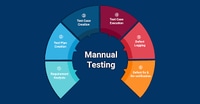
Step 1− The first step involves the requirement analysis phase by going through the requirements and specifications documents, guides, etc.
Step 2− The second step involves the creation of a test plan touching all the requirements.
Step 3− The third step involves the creation of test cases covering every requirement.
Step 4− The fourth step involves the execution of test cases at the correct test environment.
Step 5− The fifth step involves the analysis of the test execution results, and report the discrepancies as defects.
Step 6− The sixth step involves the defect fix, and retesting. It also includes re-executing the failed test cases.
Types of Software Manual Testing
The different types software manual testing are listed below −
- Black Box Testing− It is the testing technique in which the tester does not have any knowledge of the internal working of the software. It mainly deals with verifying whether features and functionalities work correctly as per the user requirements.
- White Box Testing− It is the testing procedure which includes verification of the internal structure, and the program source code of the software.
- Grey Box Testing− It is the testing technique which uses both the principles of the black box, and white box testing techniques.
Tools Used for Software Manual Testing
The different tools used for the software manual testing are listed below −
- Test Link
- Bugzilla
- Jira
- LoadRunner
- Apache JMeter
- Perfecto
Differences Between Software Manual and Automation Testing
Heres a comparison of software manual testing and automation testing −
| Manual Testing | Automation Testing |
|---|---|
| It is the procedure to verify the software with manual efforts. | It is the procedure to verify the software with the help of the automation tools. |
| It involves the execution of the test cases manually. | It involves the execution of the test cases via automation scripts, and tools. |
| It is less productive, and requires more time for completion. | It is more productive, and requires less time for completion. |
| It does not ensure hundred percent test coverage. | It ensures more test coverage than the manual testing. |
| It does not require programming skills. It can be performed only with the knowledge of the software. | It requires programming skills. |
Advantages of Software Manual Testing
The advantages of software manual testing are listed below −
- The manual testing helps to verify the dynamically changing elements on the screen.
- The manual testing is cheap, and does not rely on skilled resources.
- The manual testing can be carried out by testers having no programming knowledge.
- The manual testing can be adopted very quickly, and is appropriate to accommodate unpredictable changes in the software.
Disadvantages of Software Manual Testing
The disadvantages of software manual testing are listed below −
- The manual testing is not very reliable and gives scope for human errors.
- Separate sets of manual test cases need to be developed for different modules, allowing very less scope of reusability.
- The manual testing is totally dependent on execution of tests manually. However, some of the test steps cannot be performed with the manual efforts.
- The testers performing manual testing should have the experience working with the software. Besides, there is no surety that all the features of the software have been covered while executing the manual tests.
- The manual testing is mostly a time consuming activity.
Conclusion
This concludes our comprehensive take on the tutorial on Software Manual Testing. Weve started with describing what is software manual testing, what are the characteristics of the software manual testing, why is the software manual testing needed, what are the different steps of the software manual testing, what are the different types of software manual testing, what are the different tools used for software manual testing, what are the differences between the software manual and automation testing, what are the advantages of software manual testing, and what are the disadvantages of software manual testing. This equips you with in-depth knowledge of Software Manual Testing. It is wise to keep practicing what youve learned and exploring others relevant to Software Testing to deepen your understanding and expand your horizons.
What is accessibility Testing?
Accessibility testing is a subset of usability testing where in the users under consideration are people with all abilities and disabilities. The significance of this testing is to verify both usability and accessibility.
Accessibility aims to cater people of different abilities such as:
-
Visual Impairments
-
Physical Impairment
-
Hearing Impairment
-
Cognitive Impairment
-
Learning Impairment
A good web application should cater to all sets of people and NOT just limited to disabled people. These include:
-
Users with poor communications infrastructure
-
Older people and new users, who are often computer illiterate
-
Users using old system (NOT capable of running the latest software)
-
Users, who are using NON-Standard Equipment
-
Users, who are having restricted access
How to Perform Accessibility Testing
The Web Accessibility Initiative (WAI) describes the strategy for preliminary and conformance reviews of web sites. The Web Accessibility Initiative (WAI) includes a list of software tools to assist with conformance evaluations. These tools range from specific issues such as colour blindness to tools that will perform automated spidering tools.
Web accessibility Testing Tools
| Product | Vendor | URL |
|---|---|---|
| AccVerify | HiSoftware | http://www.hisoftware.com |
| Bobby | Watchfire | http://www.watchfire.com |
| WebXM | Watchfire | http://www.watchfire.com |
| Ramp Ascend | Deque | http://www.deque.com |
| InFocus | SSB Technologies | http://www.ssbtechnologies.com/ |
Role of Automated Tools in Acceptance Testing
The above said automated accessibility testing tools are very good at identifying pages and lines of code that need to be manually checked for accessibility.
-
check the syntax of the site's code
-
Search for known patterns that humans have listed
-
identify pages containing elements that may cause problems
-
identify some actual accessibility problems
-
identify some potential problems
The interpretation of the results from the automated accessibility testing tools requires experience in accessibility techniques with an understanding of technical and usability issues.

Testing is done in both formal and informal ways to enhance software quality. After the formal testing has been completed, a round of informal and arbitrary testing is conducted. This is known as the ad hoc testing.
What is Ad Hoc Testing?
An ad hoc testing is an informal testing technique done on the software to find defects. It is conducted in a random format, and is also known as the monkey testing. An ad hoc testing does not follow a systematic approach, and devoid of any well documented test cases.
Ad hoc testing does not have any documentations, test scenarios, cases etc. The developers find it difficult to fix defects detected by ad hoc testing because of the absence of these testing documents. Also, some critical, rare, and unanticipated bugs are only identified by conducting a random and informal testing on the software. It is also a kind of acceptance testing and saves the time of creating new test cases.
A practical example of ad hoc testing is suppose a software needs to be shipped to client in a day, and its development is finished just a day before that, at this point there is no time left to create and execute test cases so the test team conducts ad hoc testing on entire software based on overall product knowledge and experience.
Types of Ad Hoc Testing
The difference types of ad hoc testing are listed below −
Buddy Testing
In buddy testing, there is involvement of at least two members during the testing process - one developer, and one tester. Once the developer completes implementing a component, he does unit testing on it. Post that the tester feeds some random, arbitrary data to the same component and examines the outcomes. In cases of any errors, the developer fixes those defects.
Pair Testing
In pair testing, there is involvement of two testers. One of them performs informal and random verification of the software, and the other one keeps a record of the test results. Thus both of them work in a pair and exchange ideas, knowledge so that the testing is done properly.
Features of Ad Hoc Testing
The features of ad hoc testing are listed below −
- It is a random and informal approach to testing.
- It is not supported by any documentation, test scenarios, cases etc.
- It is performed after formal testing is completed.
- It does not follow a methodical or structured approach.
- It takes less time to conduct ad hoc testing.
- It detects bugs on the software where test cases are not available.
When is Ad Hoc Testing Done?
The ad hoc testing is done in the scenarios listed below &minu;
- There is limited time available for testing the software.
- Formal testing has been completed.
- Test cases are not available.
When is Ad Hoc Testing not Done?
The ad hoc testing is not done in the scenarios listed below −
- It is not done if bugs are detected by executing the test cases.
- At the time of beta testing, it is not done.
Advantages of Ad Hoc Testing
The advantages of ad hoc testing are listed below −
- It does not adhere to any process, so ad hoc testing can be done at any point in the software development life cycle.
- The testing team can verify the software and find errors by applying new test techniques without relying only on the test cases.
- A developer can perform ad hoc testing on the same module he is developing, and increase his code quality.
- While the formal testing process takes a lot of time, ad hoc testing can be performed in a short time.
- It does not require any documentation.
Disadvantages of Ad Hoc Testing
The disadvantages of ad hoc testing are listed below −
- Ad hoc testing needs to be performed by team members who have testing experiences and sound knowledge on the product. Any inexperienced member of the team cannot perform an ad hoc testing.
- In case of a bug, it is difficult to reproduce the same since the ad hoc testing is not driven by any planning.
Best Practices to be Followed in Ad Hoc Testing
The best practices to be followed in ad hoc testing are listed below −
- Gather all knowledge on the product.
- Identify the defect prone components of the software and prioritize them.
- Use of suitable testing tools.
Conclusion
This concludes our comprehensive take on the tutorial on Software Ad Hoc Testing. Weve started with describing what is ad hoc testing, what are the types, features, techniques, advantages, disadvantages, time, and best practices of ad hoc testing.
This equips you with in-depth knowledge of Software Ad Hoc Testing. It is wise to keep practicing what youve learned and exploring others relevant to Software Testing to deepen your understanding and expand your horizons.
Revision History
| Revision | Publish Date | Comments |
|---|---|---|
1.0 |
21-May-2026
|
Initial Release |
 Feedback