Cisco SD-WAN Next Generation Firewall (NGFW) for IIoT Routers Secured Substations
Available Languages
Bias-Free Language
The documentation set for this product strives to use bias-free language. For the purposes of this documentation set, bias-free is defined as language that does not imply discrimination based on age, disability, gender, racial identity, ethnic identity, sexual orientation, socioeconomic status, and intersectionality. Exceptions may be present in the documentation due to language that is hardcoded in the user interfaces of the product software, language used based on RFP documentation, or language that is used by a referenced third-party product. Learn more about how Cisco is using Inclusive Language.
- US/Canada 800-553-2447
- Worldwide Support Phone Numbers
- All Tools
 Feedback
 Feedback
Executive Summary
Substation routers perform not only the role of a WAN router, but also act as a localized Zone-Based Firewall (ZBFW), establishing a secure communication between multiple zones. By implementing a Zone-Based policy Firewall (ZBFW) policy, the router provides stateful inspection and granular control of traffic flowing between multiple zones. In Secured Substations, a zone can group one or more VPNs or Interfaces creating security boundaries across the SD-WAN service side. Traffic crossing a zone boundary is evaluated against the applicable zone-pair policy. Cisco documents NGFW as a localized security policy supporting stateful inspection of TCP, UDP and ICMP flows.
This white paper presents a design in which Security Operations & Management Services (VPN 100), Physical Security Service (VPN 101), Workforce Service(VPN 102), VoIP Service (VPN 103) and SCADA Service (VPN 201) and Internet/Transport-facing connectivity are separated by policy. The examples use a default-deny posture between security zones and selectively allow required application flows. Stateful inspection is preferred where return traffic should be dynamically permitted.
In this design Physical Security Service (VPN 101), Workforce (VPN 102), VoIP Service (VPN 103) are the part of Multi-Service Perimeter (MSP) and SCADA Service (VPN 201) is part of Electronic Security Perimeter Zone (ESP)
Architecture Overview
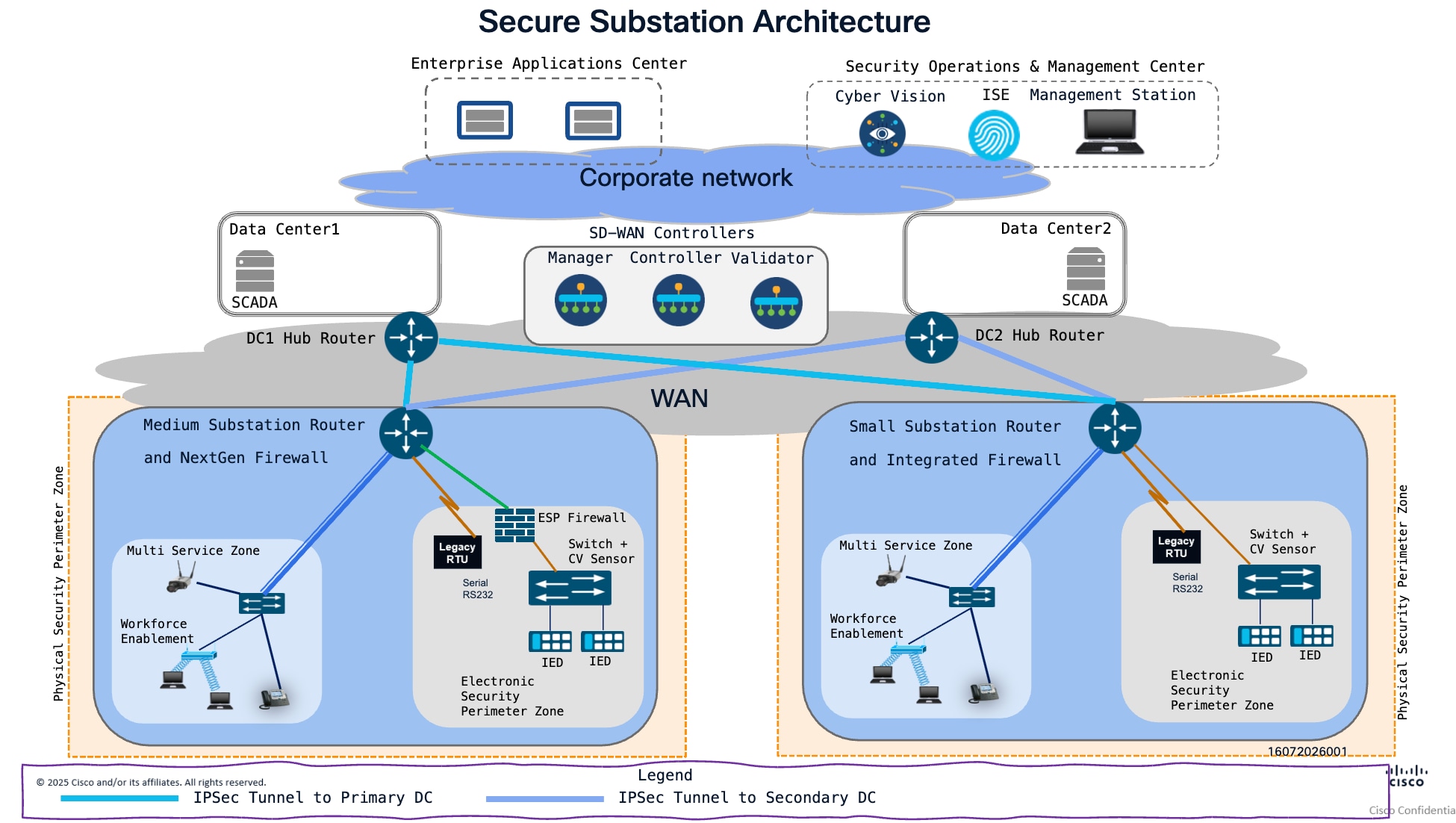
The architecture uses a hub-and-spoke model. Centralized services reside in the “Enterprise Applications Center" and "Security Operations & Management Center”. Each substation operates as a spoke that aggregates local traffic, connects to the utility WAN edge router, and maps firewall policies into the appropriate logical zones and service VPNs. This model provides a repeatable structure that can be applied across small and medium substations while allowing each site to scale according to device count, available WAN transport, and operational requirements.
The architecture separates traffic by operational function. SCADA monitoring and control, station bus services, phasor measurement, physical security, management, workforce access, enterprise integration, and field area network communications are represented as distinct architectural domains. These domains are connected through defined conduits and mapped to VRFs or service VPNs where logical separation is required.
Logical Segmentation of Secured Substation Router
In Cisco Catalyst SD-WAN, service-side VPNs provide logical segmentation on Cisco IR routers (IR1101). NGFW adds a security enforcement boundary between those segments. The SD-WAN overlay continues to provide encrypted transport and policy-based forwarding; NGFW controls whether traffic is allowed to cross the defined security boundaries at the edge.
A zone definition in Cisco SD-WAN ZBFW is a logical security group used to identify where traffic comes from and where it is going.
In VPN-based ZBFW, you put one or more service VPNs into a zone. In interface-based ZBFW, you can assign interfaces to zones. A zone definition groups those VPNs or interfaces; it does not itself allow or block traffic. A zone pair connects a source zone to a destination zone, and a firewall policy on that pair sets the traffic rules
ServiceVPN
A separate routed network, similar to a VRF, that carries user or application traffic.
Zone
A security group that contains one or more service VPNs. The firewall uses zones to decide how traffic between groups is handled.
In this white paper we have created multiple zones
ESP (Electronic Security Perimeter) Zone:
An ESP zone is the protected network segment inside that boundary. It contains critical SCADA equipment such as IEDs and protection relays. Cisco’s substation design treats these assets as highly trusted and restricts communications to and from them. This zone is created based on the interface of WAN Edge router IR1101
ESP (Electronic Security Perimeter) Zone Creation:
The process for creating a zone, which can be done by associating WAN Edge router interface to ESP zone.
The below screenshot shows how to create ESP-ZONE in SDWAN web UI.
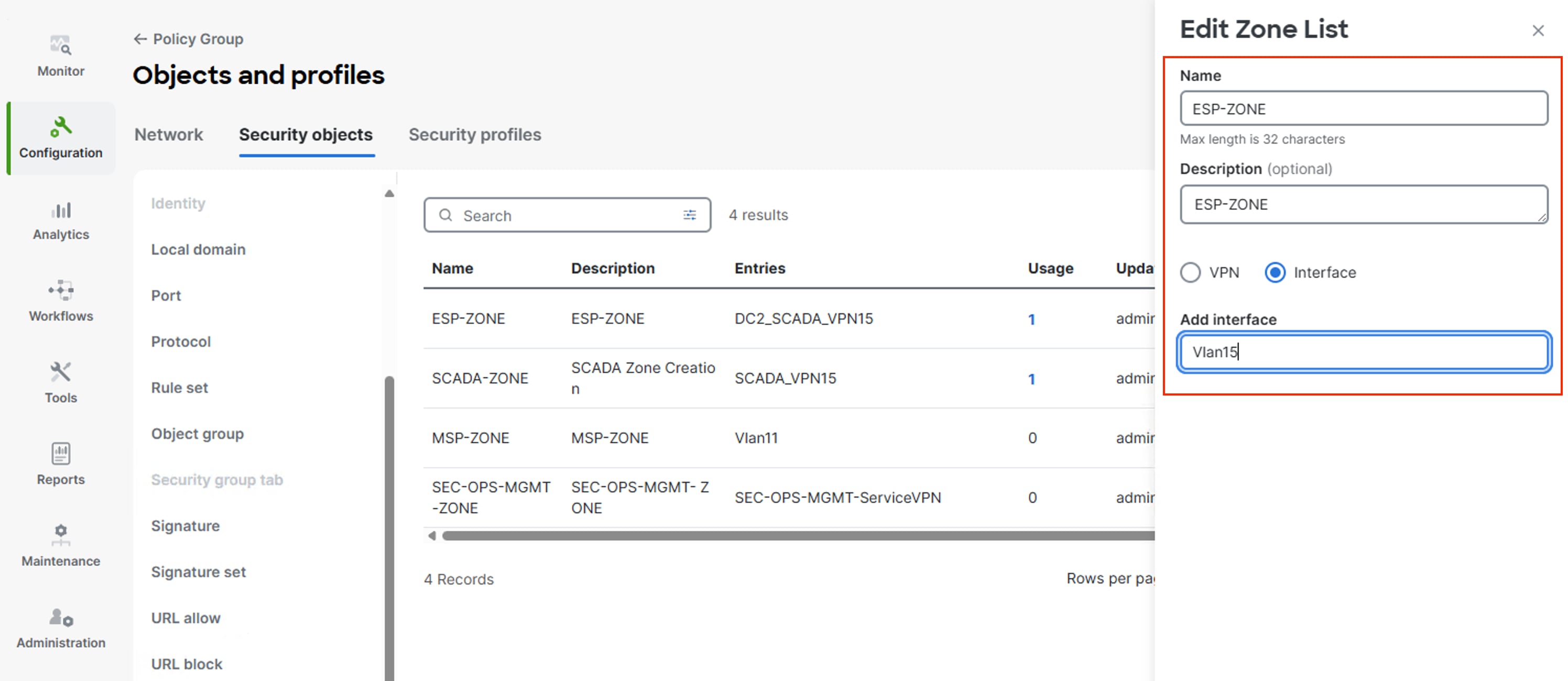
Navigate in Cisco SD-WAN Manager through Configuration > Policy Group > Objects and Profiles > Security Objects > Zones > Add Zones to Interface to create ESP zone.
MSP-ZONE (Multi-Service Perimeter):
Aggregates non-critical services—specifically physical security, workforce mobility, and VoIP—by mapping the PHYSEC-SVC, WORKFORCE-SVC, and VOIP-SVC service VPNs into a single security container. This zone is created based on the interface of WAN Edge router IR1101
MSP-ZONE (Multi-Service Perimeter) Zone Creation :
The process for creating a zone, which can be done by associating WAN Edge router interface to MSP zone
The below screenshot shows how to create MSP-ZONE in SDWAN web UI
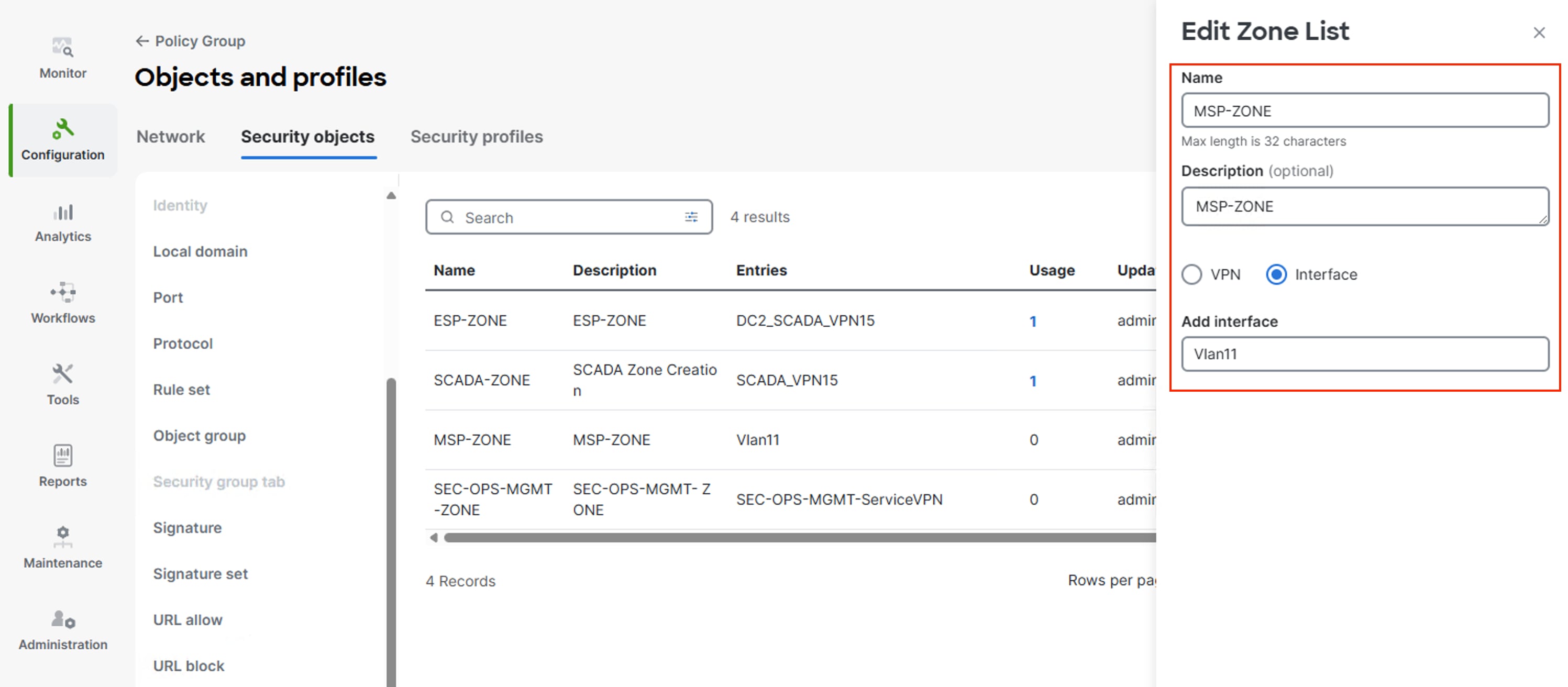
Navigate in Cisco SD-WAN Manager through Configuration > Policy Group > Objects and Profiles > Security Objects > Zones > Add Zones to Interface to create MSP zone.
SCADA Zone:
Dedicated to SCADA system communications. This zone is mapped exclusively to the SCADA-SVC service VPN to ensure secure, isolated connectivity. This zone is created based on the SCADA Service VPN
SCADA Zone Creation :
The process for creating a zone, which can be done by associating WAN Edge router interface to MSP zone
The below screenshot shows how to create SCADA-ZONE in SDWAN web UI
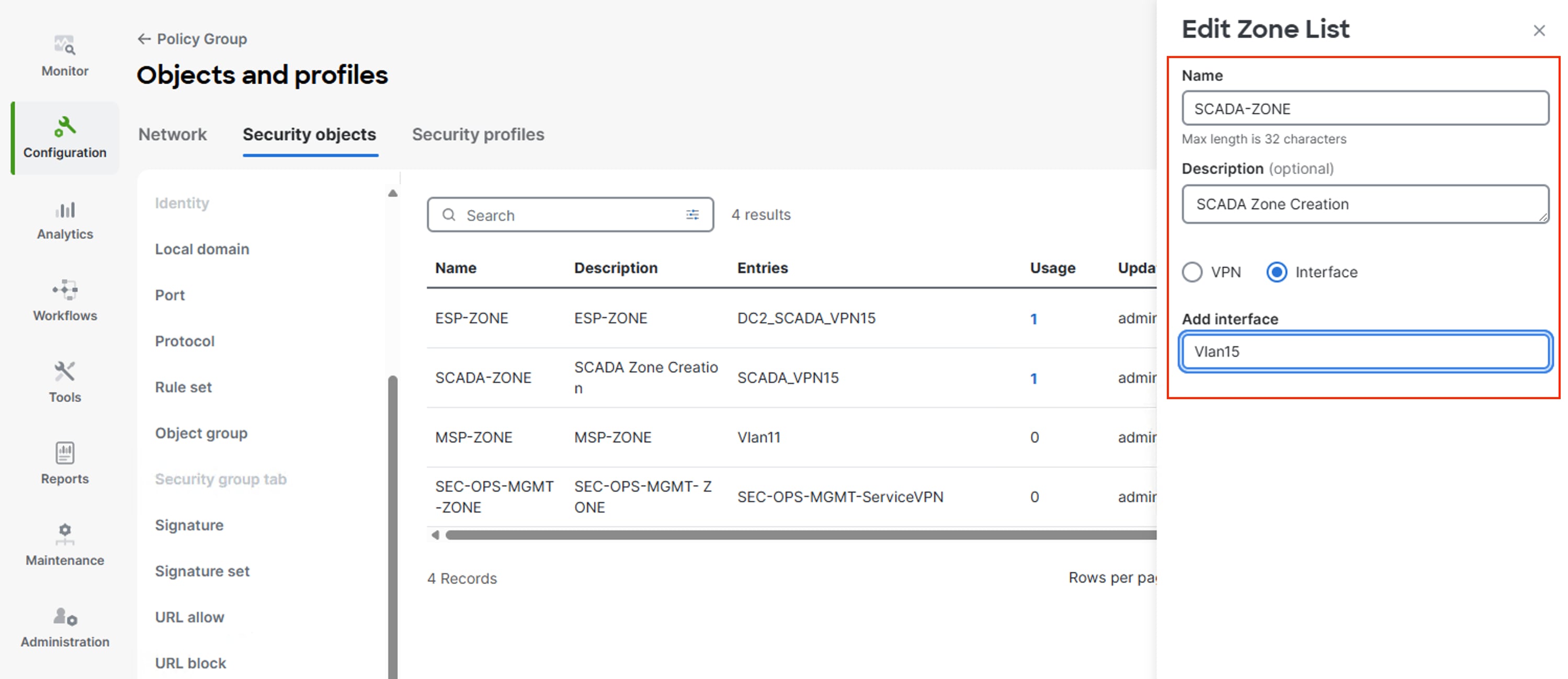
Navigate in Cisco SD-WAN Manager through Configuration > Policy Group > Objects and Profiles > Security Objects > Zones > Add Zones to Interface to create MSP zone.
Here are the different services:
● Security Operations Management Services: SEC-OPS-MGMT-SVC
● Physical Security: PHYSEC-SVC
● Workforce: WORKFORCE-SVC
● VoIP Service: VOIP-SVC
● SCADA Service: SCADA-SVC
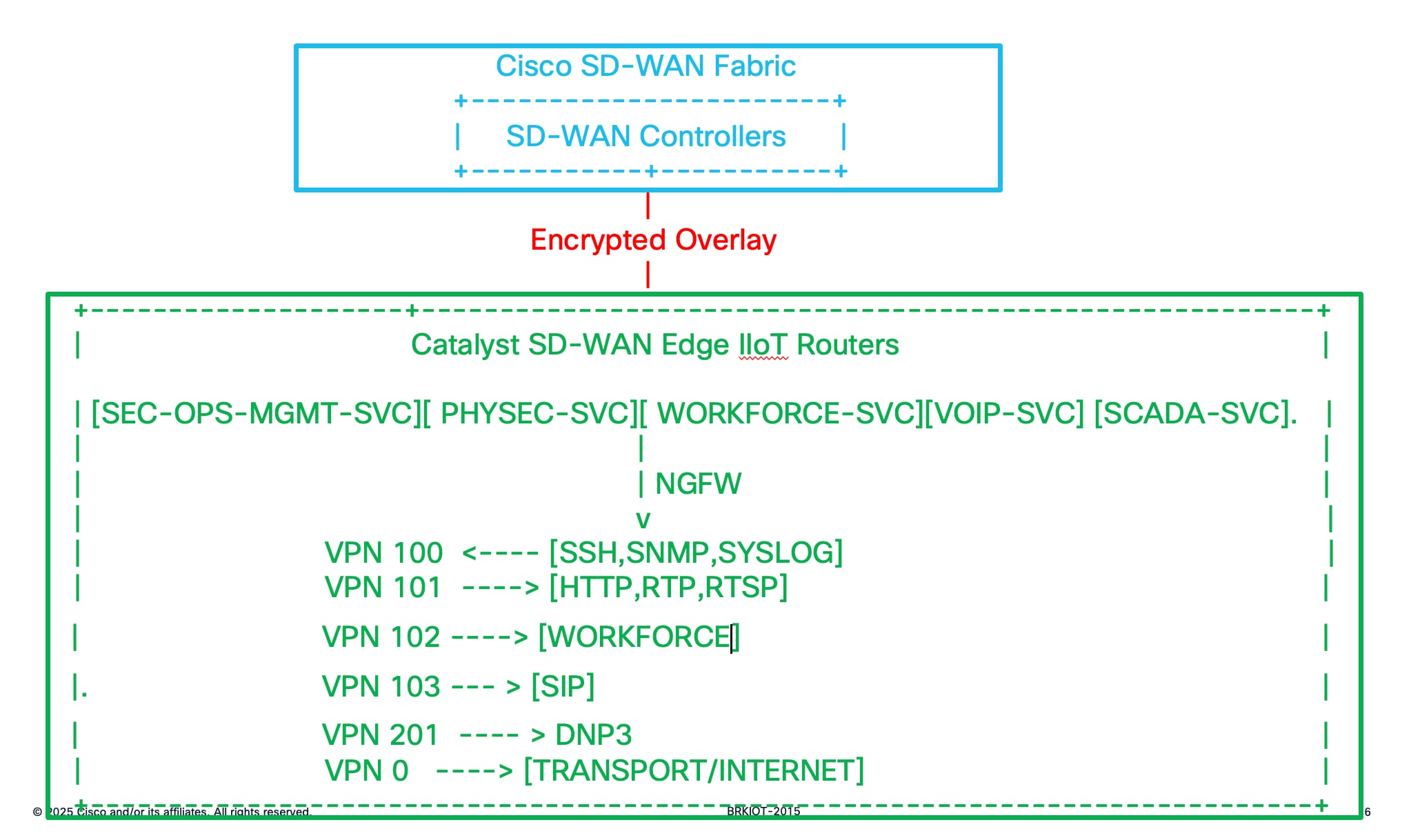
The above picture shows the different ServiceVPN associated with differnt services
Mapping Of Services to Zones :
SEC-OPS-MGMT-SVC -> MSP-ZONE& ESP-ZONE
SCADA. -> ESP-ZONE
PHYSEC. -> MSP-ZONE
VOIP. -> MSP-ZONE
MSPZone -> ESP-ZONE
WORKFORCE -> INTERNET
INTERNET -> LAN
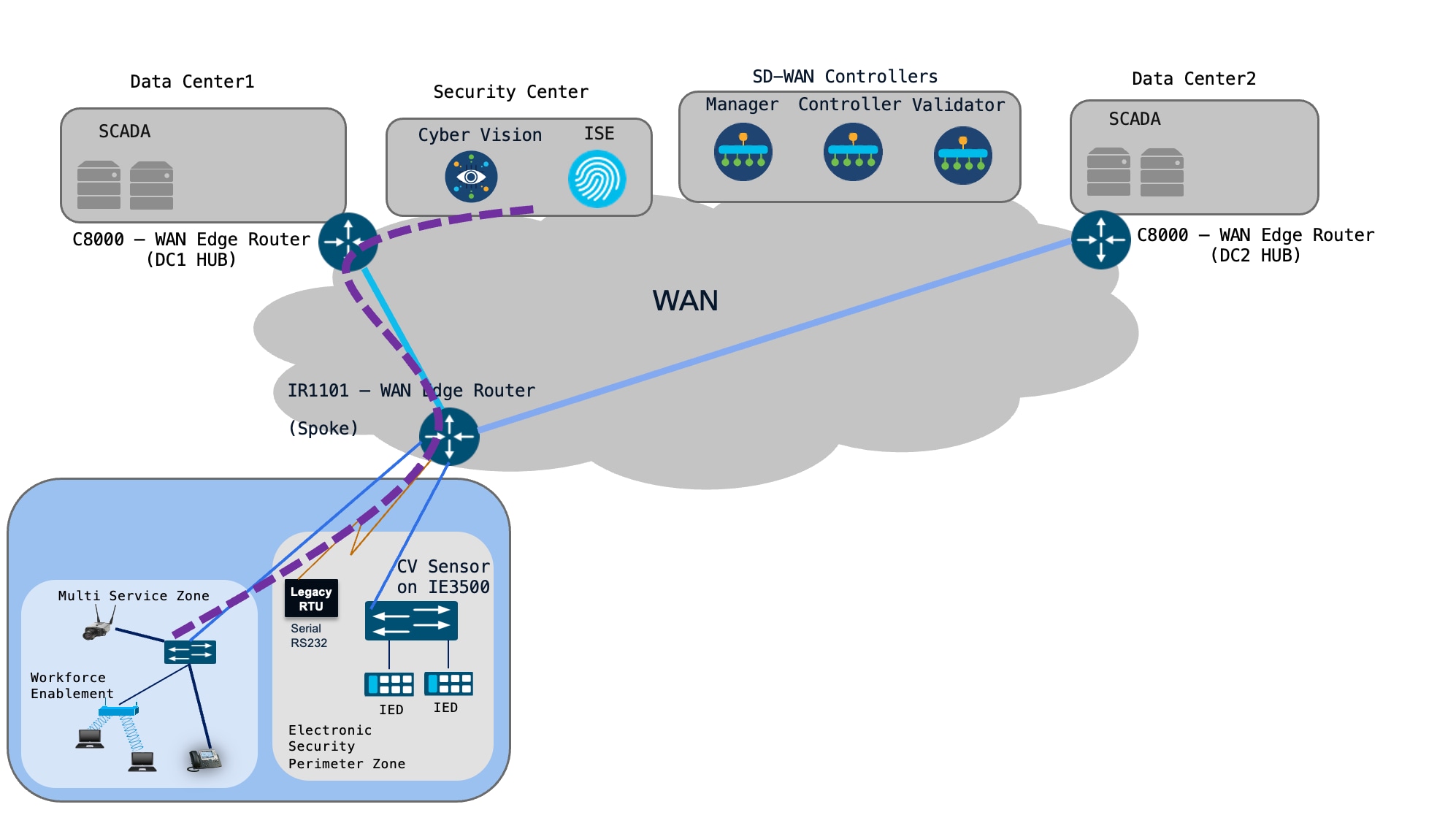
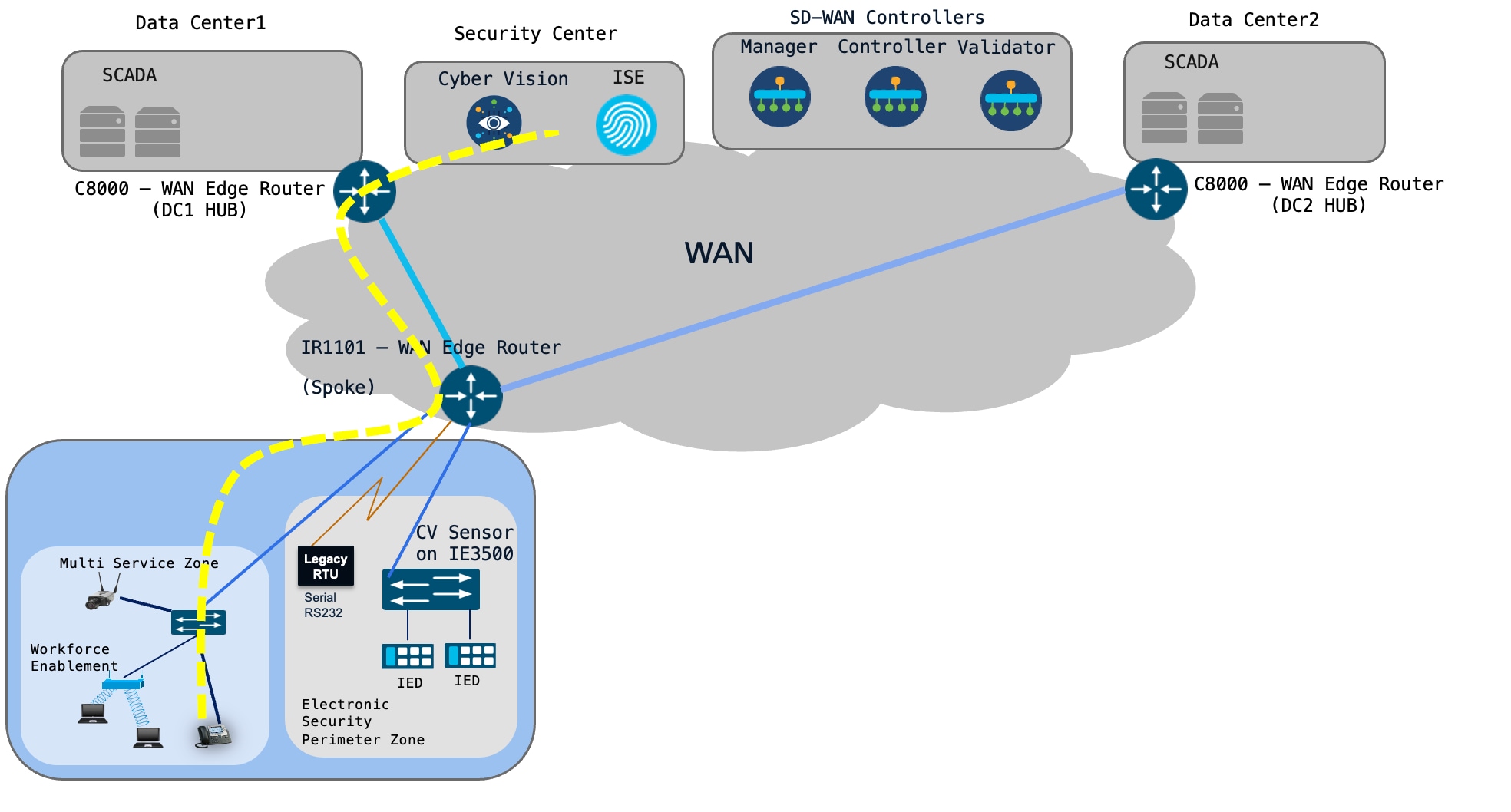
Topology Diagram
The below topology describe how different traffic from different zones and the connectivity of the whole setup
Core NGFW Concepts
Table 1. Core NGFW concepts and design implications
| Concept |
Meaning |
Design implication |
| Zone |
Logical security boundary containing VPNs and/or interfaces. |
Group networks with the same trust/security intent. |
| Source zone |
Zone where the flow originates. |
Policy is evaluated from source toward destination. |
| Destination zone |
Zone where the flow terminates. |
Create an explicit zone-pair when traffic must cross a boundary. |
| Zone-pair |
Association of source and destination zones. |
The firewall policy is attached to the zone-pair. |
| Inspect |
Stateful inspection action. |
Return traffic for an inspected flow is automatically permitted. |
| Pass |
Permits the flow without stateful inspection. |
Use only when stateless behavior is intentional; return traffic needs its own policy. |
| Drop |
Discards the matching traffic. |
Useful for explicit deny rules and segmentation enforcement. |
Recommended Security Model
● Use a default-deny inter-zone posture and create explicit permits for business-required flows.
● Use Inspect for client/server protocols where return traffic should be dynamically allowed.
● Prefer application-aware or tightly scoped service rules over broad any/any permits.
● Test both forward and return paths after policy changes, especially when routing, NAT, service insertion, or asymmetric paths are involved.
Cisco documents that the default policy between different zones is deny. This makes a least-privilege model practical: explicitly create the zone-pairs that are required and leave prohibited inter-zone paths without a permitting policy.
Example Of Substation Design
The following example is intentionally generic so it can be adapted to any substation. The VPN IDs and addresses are illustrative.
Table 2. Example SD-WAN VPN and security-zone design
| SDWAN VPN / Zone |
Trust level |
Purpose |
| VPN 100 / SEC-OPS-MGMT-SVC |
High |
Workforce Enablement |
| VPN 101 / PHYSEC-SVC |
High |
Camera Endpoints |
| VPN 102 / WORKFORCE |
Controlled |
WORKFORCE Application services |
| VPN 103 / VOIP |
High |
IP Phone |
| VPN 201 / SCADA |
High |
DNP3 Traffic |
| VPN 0 / TRANSPORT |
Untrusted transport |
Internet/MPLS/underlay connectivity |
Security Policy Matrix
Table 3. Example security policy matrix
| Services |
Destination |
Example Requirement |
Action |
Description |
| SEC-OPS-MGMT-SVC |
MSP-ZONE/ESP-ZONE |
SSHv2, HTTPS, SNMPv3 |
Inspect / permit |
Management Access to MSP/ESP Zone |
| PHYSEC-SVC |
MSP-ZONE |
HTTP, RTP, RTSP |
Inspect / permit |
Security Surveillance Access |
| WORKFORCE-SVC |
SEC-OPS-MGMT-SVC |
No user-to-user access |
Drop |
Access to Internet |
| VOIP-SVC |
MSP-ZONE |
SIP, RTP |
Inspect / permit |
IP Phone call Access |
| SCADA-SVC |
ESP-ZONE |
DNP3 |
Inspect / permit |
OT traffic Access |
| INTERNET |
Workforce,MSP,ESP |
Unsolicited inbound |
Drop |
Internet Access |
Configuration of ZBFW Policy
Steps Involved to create and deploy the ZBFW Policy
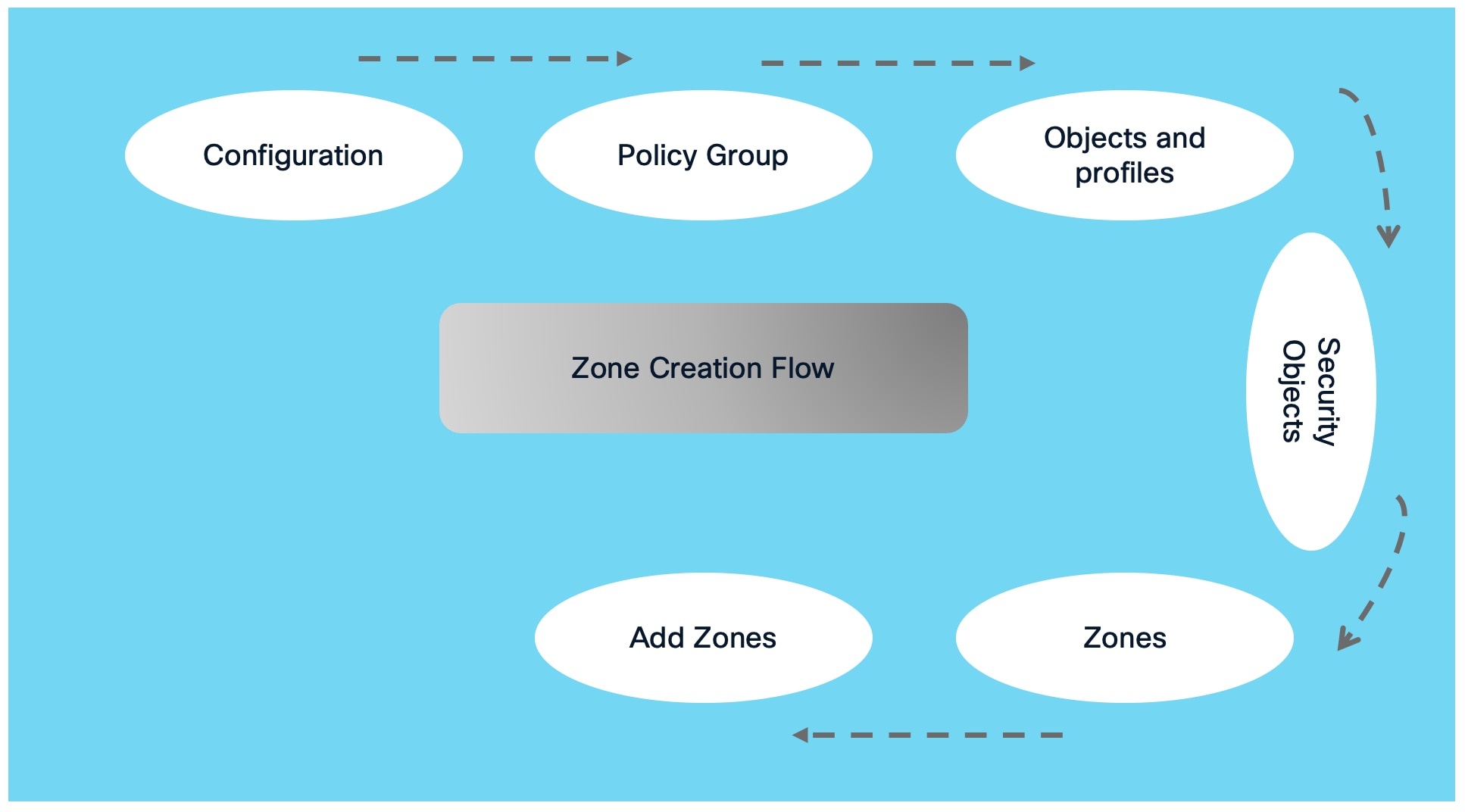
Procedure 1. : Create Zones
Here is the flow diagram involved to create the Zone in SDWAN web UI
The following SDWAN screenshot illustrates how to create the Zone Creation in SD-WAN
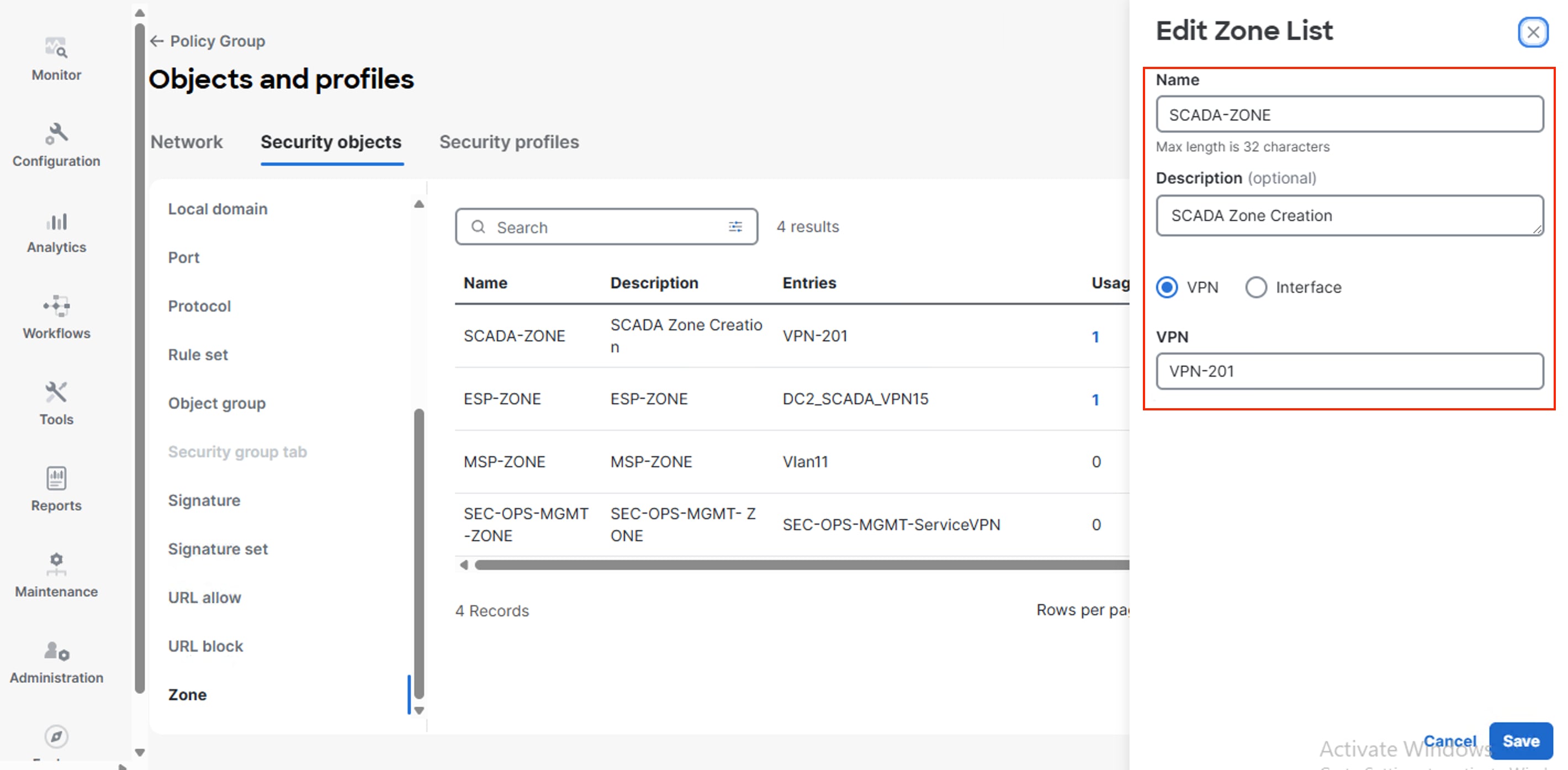
The figure illustrates the process for creating a zone, which can be done by associating it with one or more service VPNs. Alternatively, a zone can also be established by mapping it directly to an interface instead of a service VPN
Navigate in Cisco SD-WAN Manager through Configuration > Policy Group > Objects and Profiles > Security Objects > Zones > Add Zones to create a new zone.
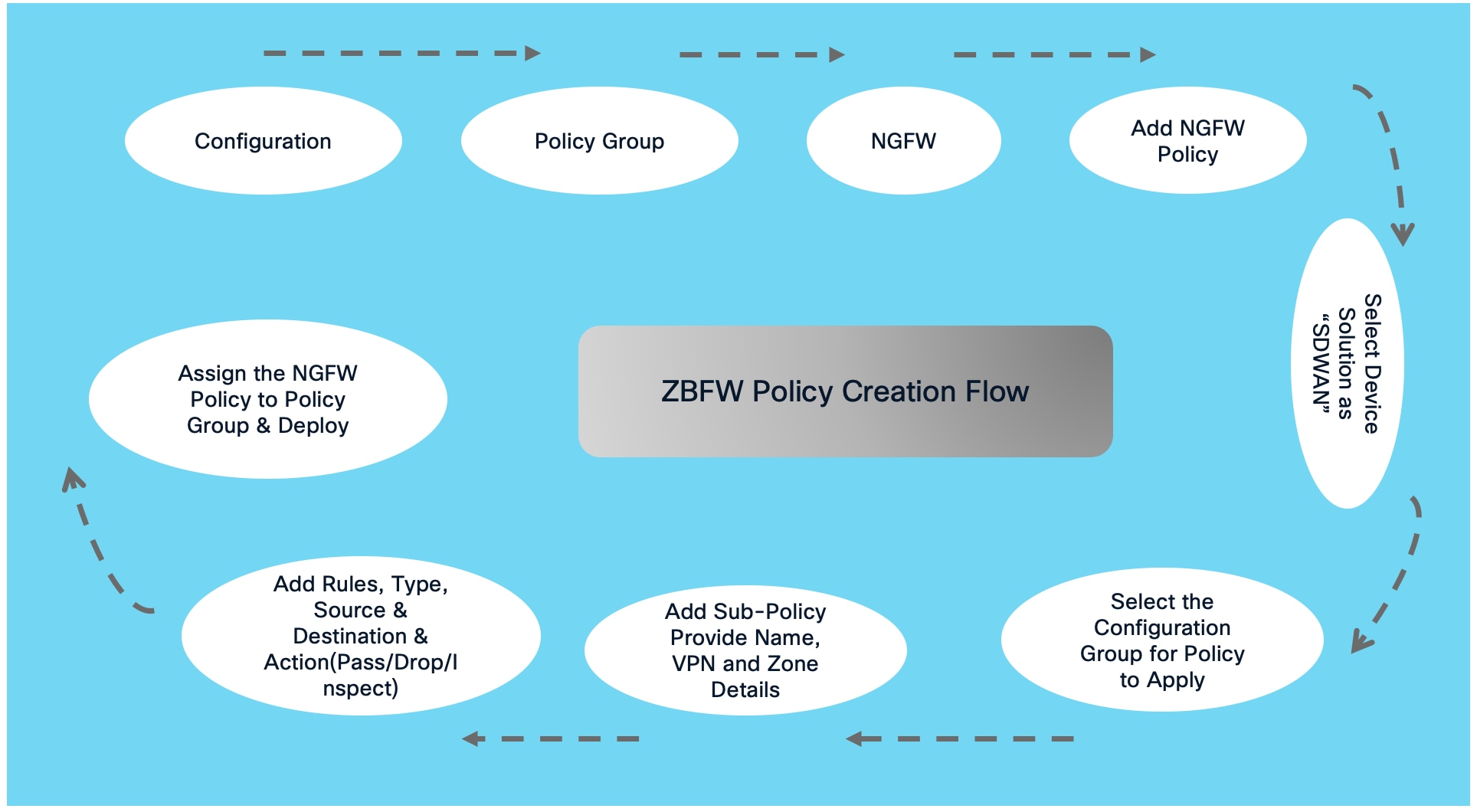
Procedure 2. : Create ZBFW Policy
A ZBFW policy is required to control and enforce how traffic is allowed between security zones. It defines the permitted applications, protocols, source/destination addresses, and actions—such as inspect, pass, or drop—for traffic associated with a zone pair. This provides network segmentation, prevents unauthorized interzone communication, and enables stateful inspection so that return traffic for approved sessions is handled automatically
Here is the flow diagram involved to create the ZBFW Policy in SDWAN web UI
The following SDWAN screenshot illustrates the ZBFW Policy Creation Process
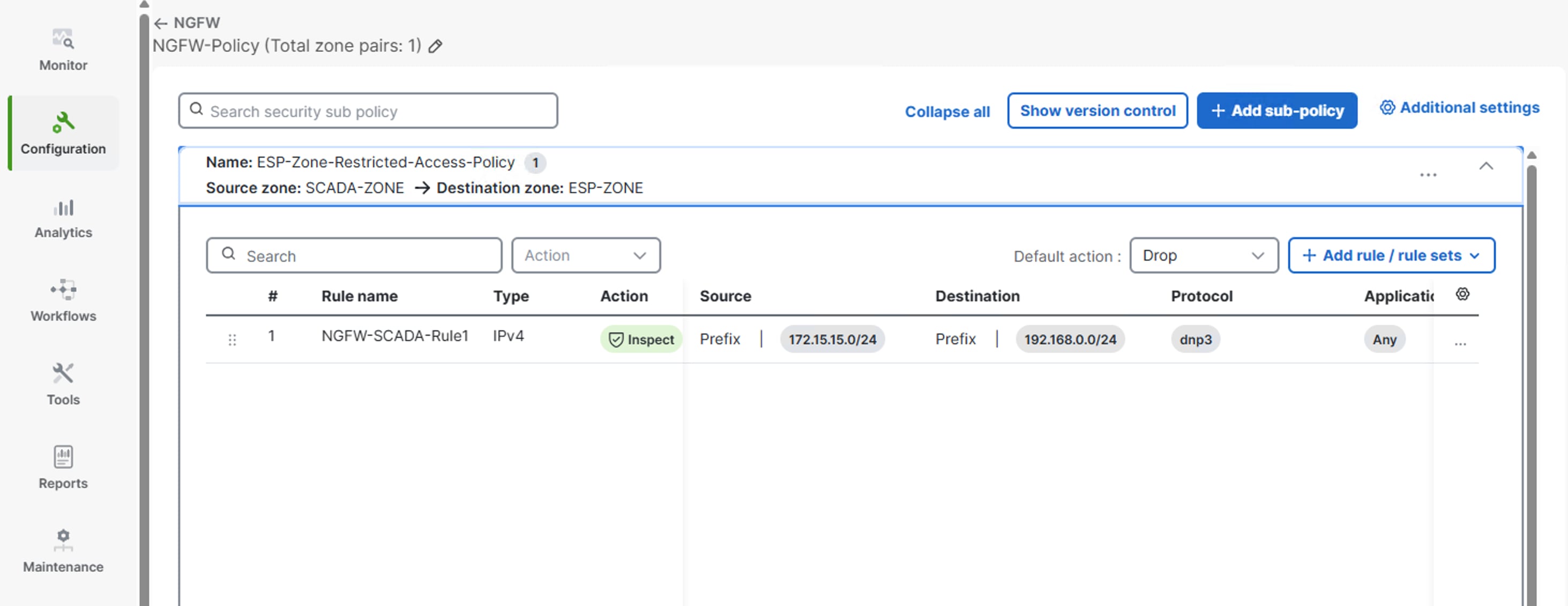
In the above picture shows, how to create Zone Based Firewall policy with its parameter
The figure illustrates the process for creating a ZBFW Policy, which can be done by associating it with one or more ZONEs.
The ESP-Zone-Restricted-Access-Policy enforces controlled access to devices within the ESP Zone by permitting only explicitly authorized traffic flows.
All other traffic is denied by default, helping maintain segmentation and protect ESP Zone assets from unauthorized access.
Navigate in Cisco SD-WAN Manager through Configuration > Policy Group > NGFW > Add NGFW Policy to create a new ZBFW Policy
Policy Groups simplify policy management by allowing administrators to define a common set of policies once and consistently apply them to selected WAN Edge devices or device groups, rather than configuring each device individually.
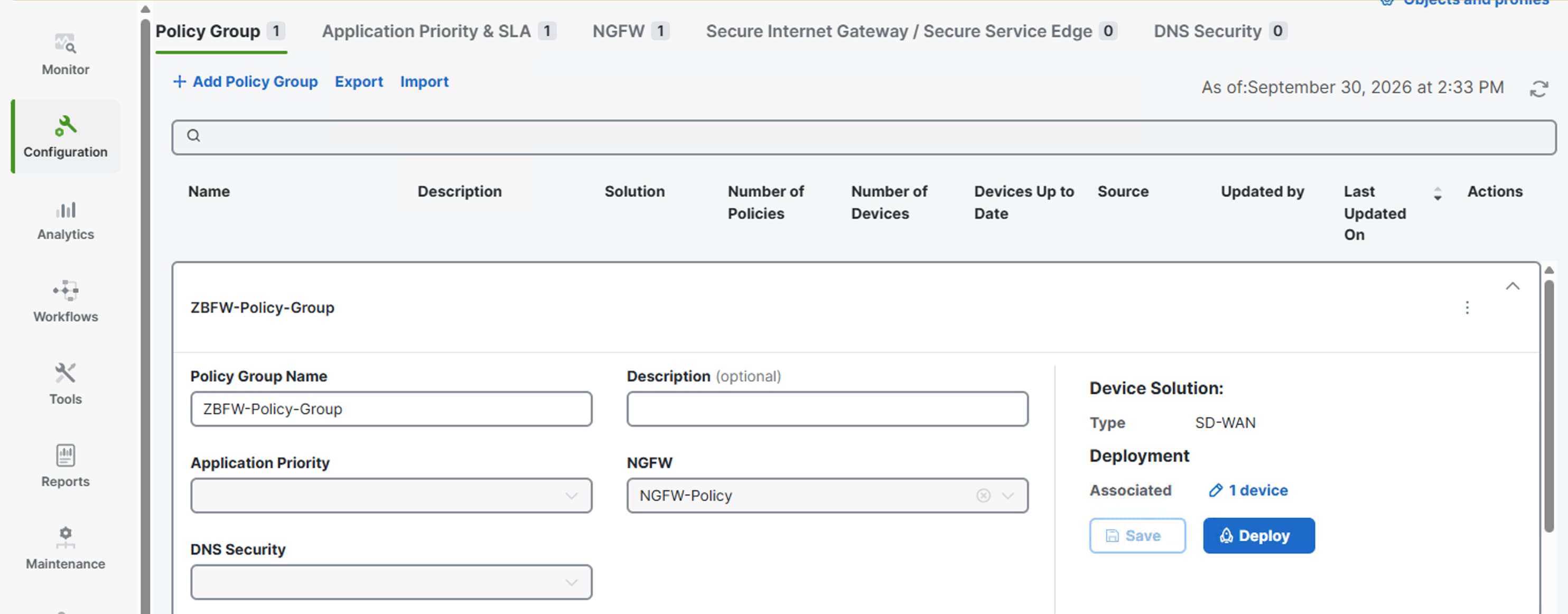
The figure above illustrates how to associate a NGFW policy with a Policy Group by selecting the required firewall policy in the NGFW field. When the Policy Group is deployed, the associated firewall policy is pushed to and enforced on all devices assigned to that Policy Group
Configuration Example — VPN-Based Zones - Stateful Inspection
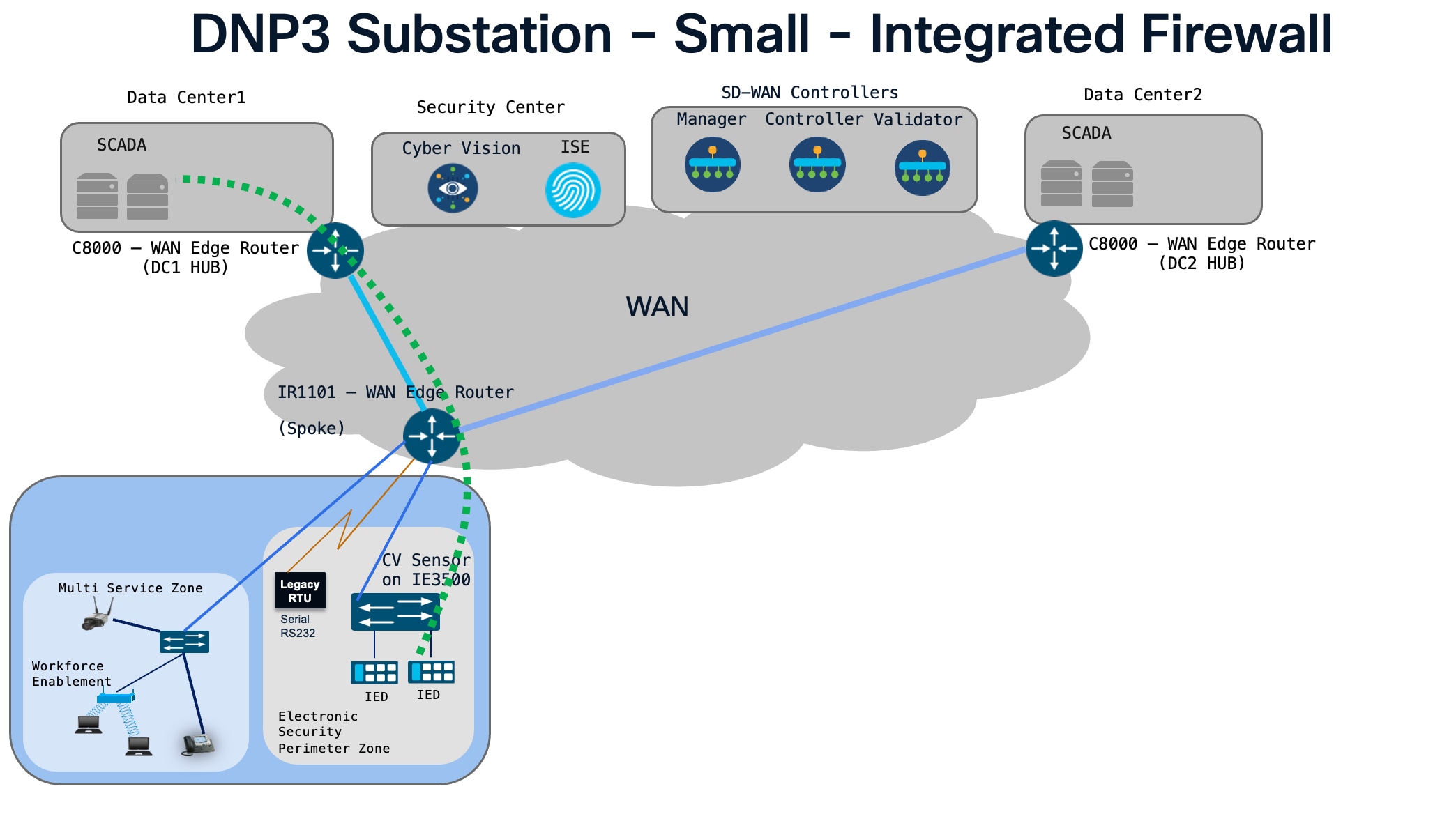
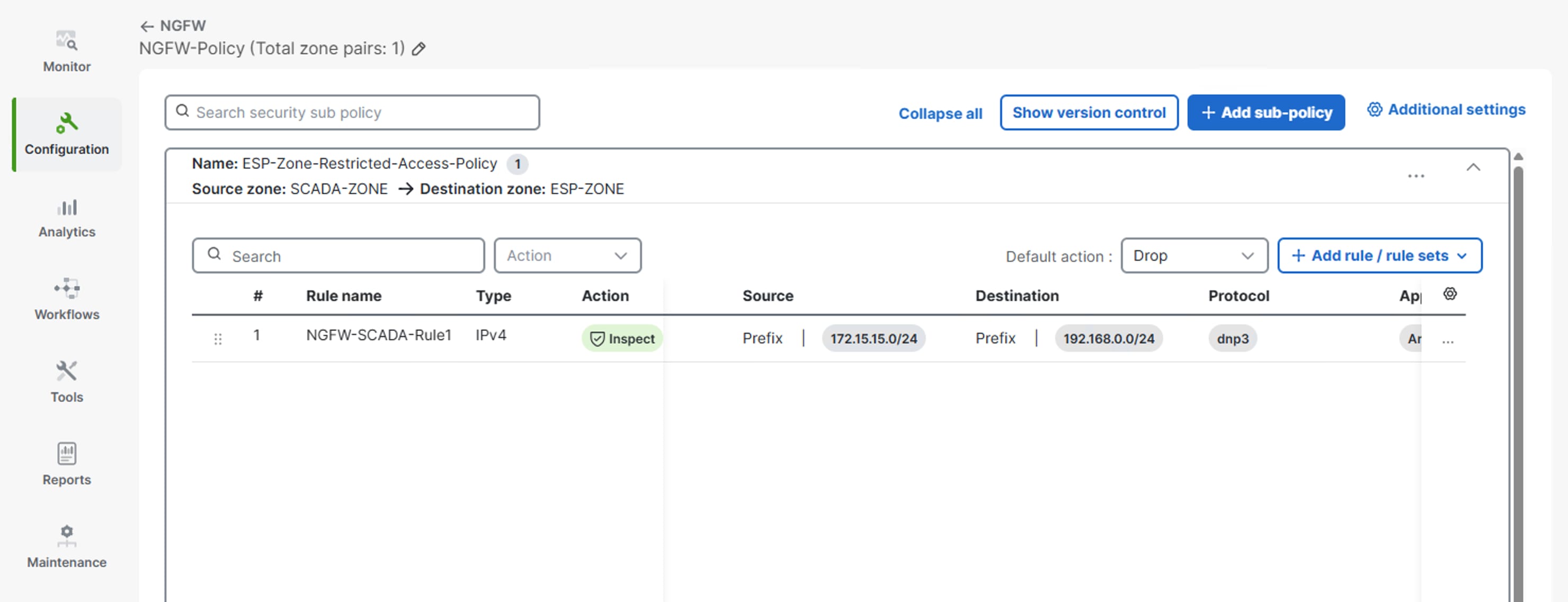
Source Zone : SCADA-ZONE
Destination Zone : ESP ZONE
Access to the DNP3 resource (with IP configured from 192.168.0.0/24) and located within ESP is permitted for access only from 172.15.15.0/24 as per the rule configured
The ESP-Zone-Restricted-Access-Policy explicitly authorizes traffic flows to resources within the ESP Zone through the rules defined in the zone pair.
DNP3 traffic to ESP Zone resources in the 192.168.0.0/24 network is permitted only when sourced from the 172.15.15.0/24 network. All traffic that does not match an explicitly configured rule is denied by the default Drop action.
The following CLI illustrates the logical structure. Exact command availability and feature behavior must be checked against the target IOS XE Catalyst SD-WAN release and SD-WAN Manager release.
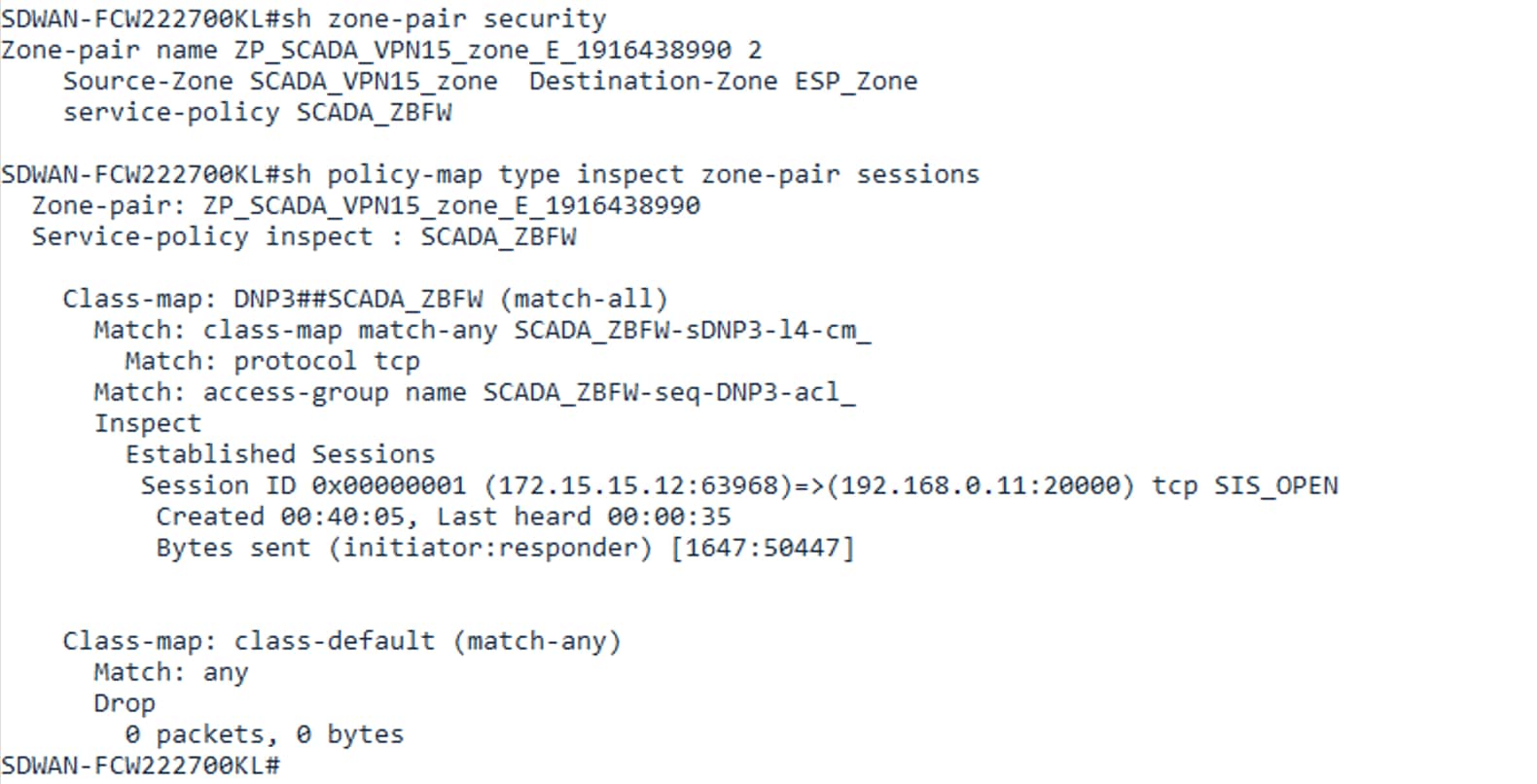
The above picture shows the configuration from SDWAN web UI reflects on CLI of the router
Architecture Diagram for Management Traffic:
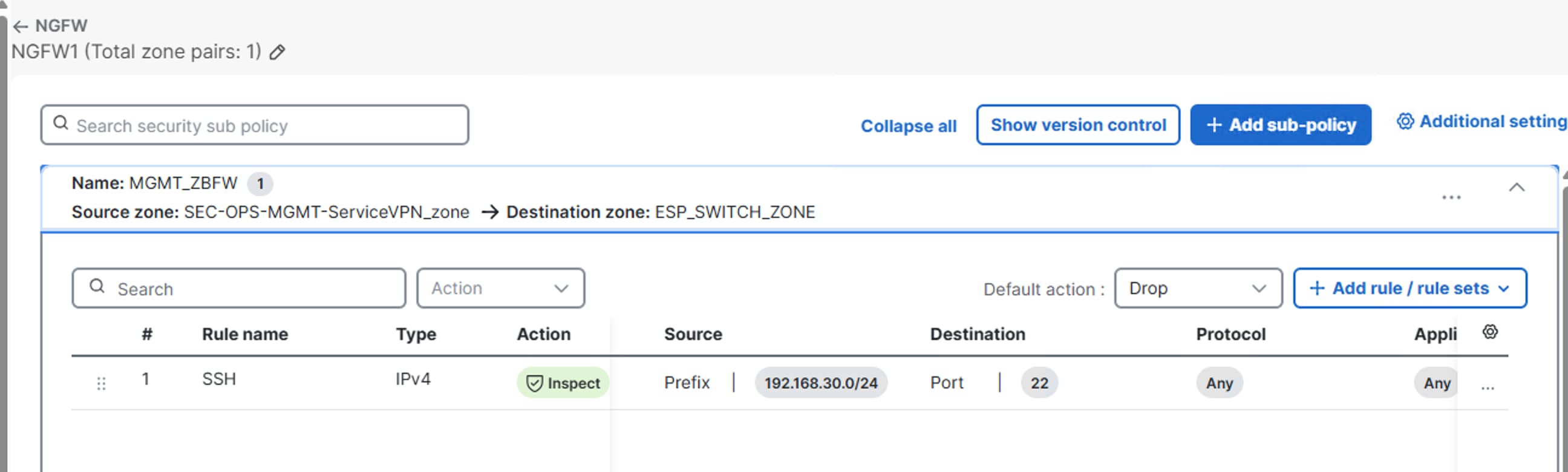
Source Zone : SEC-OPS-MGMT-ZONE
Destination Zone : ESP-ZONE
Access to the switch resources located within ESP and MSP is permitted for access only from control center as per the rule configured
The MGMT_ZBFW policy explicitly authorizes traffic flows to resources within the ESP & MSP Zone through the rules defined in the zone pair.
The following CLI illustrates the logical structure. Exact command availability and feature behavior must be checked against the target IOS XE Catalyst SD-WAN release and SD-WAN Manager release
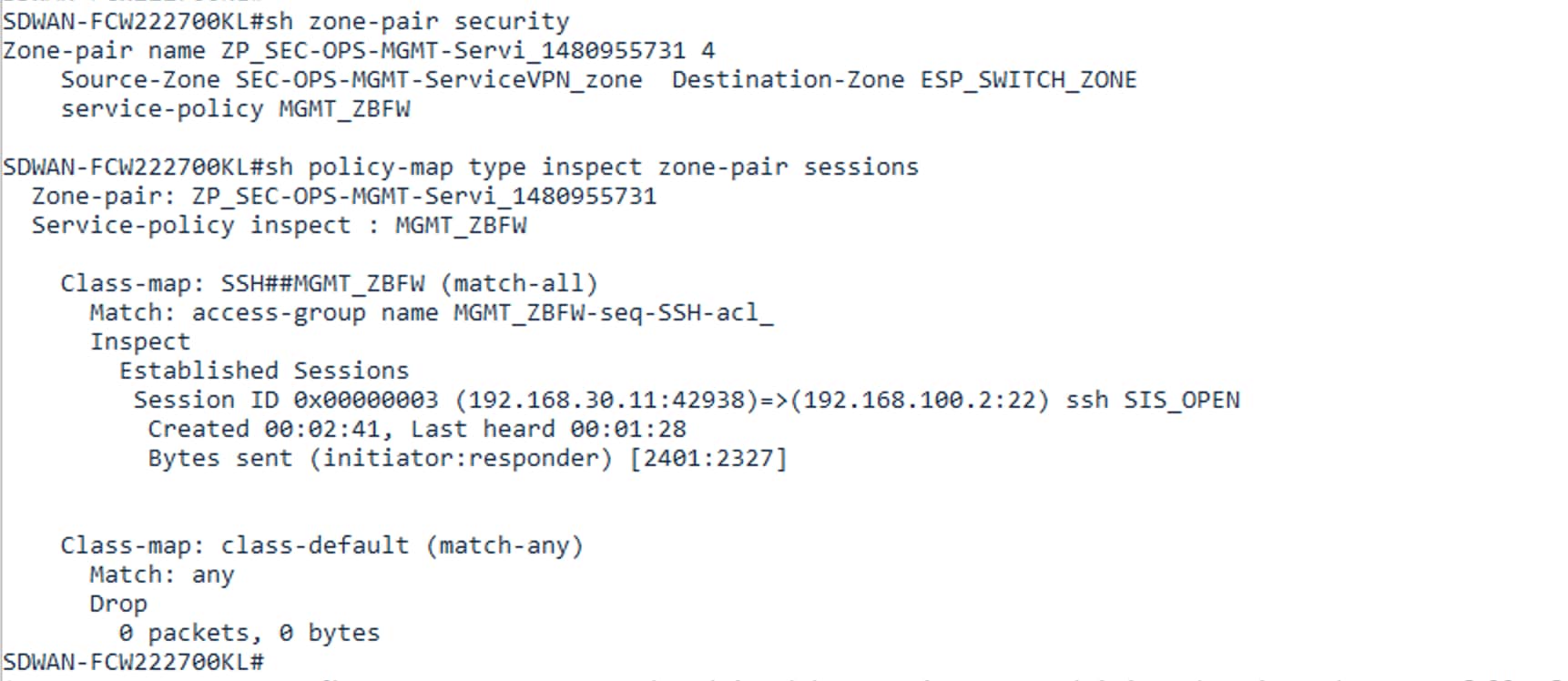
The above picture shows the configuration from SDWAN web UI reflects on CLI of the router
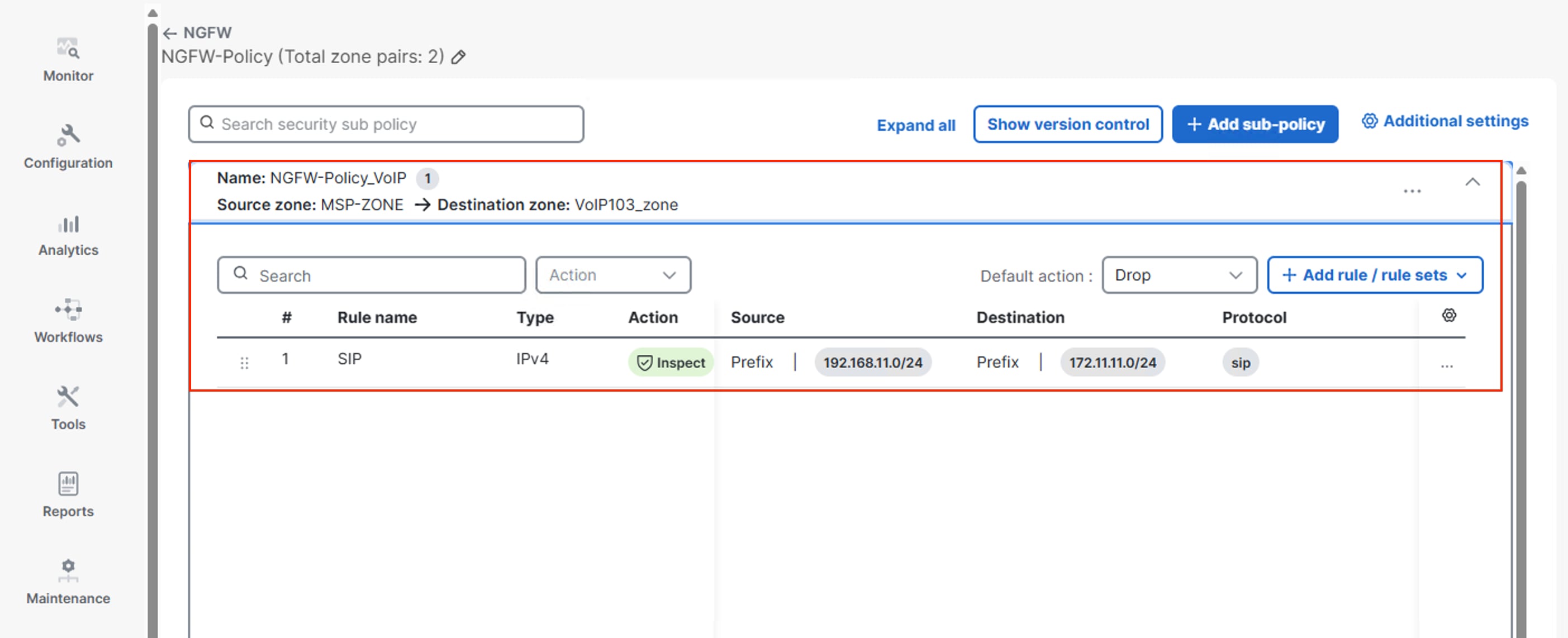
Source Zone : VOIP_ZONE
Destination Zone : MSP-ZONE
Access to the VoIP resources located within MSP is permitted for access only from control center as per the rule configured
The VOIP_ZBFW policy explicitly authorizes traffic flows to resources within the MSP-Zone through the rules defined in the zone pair.
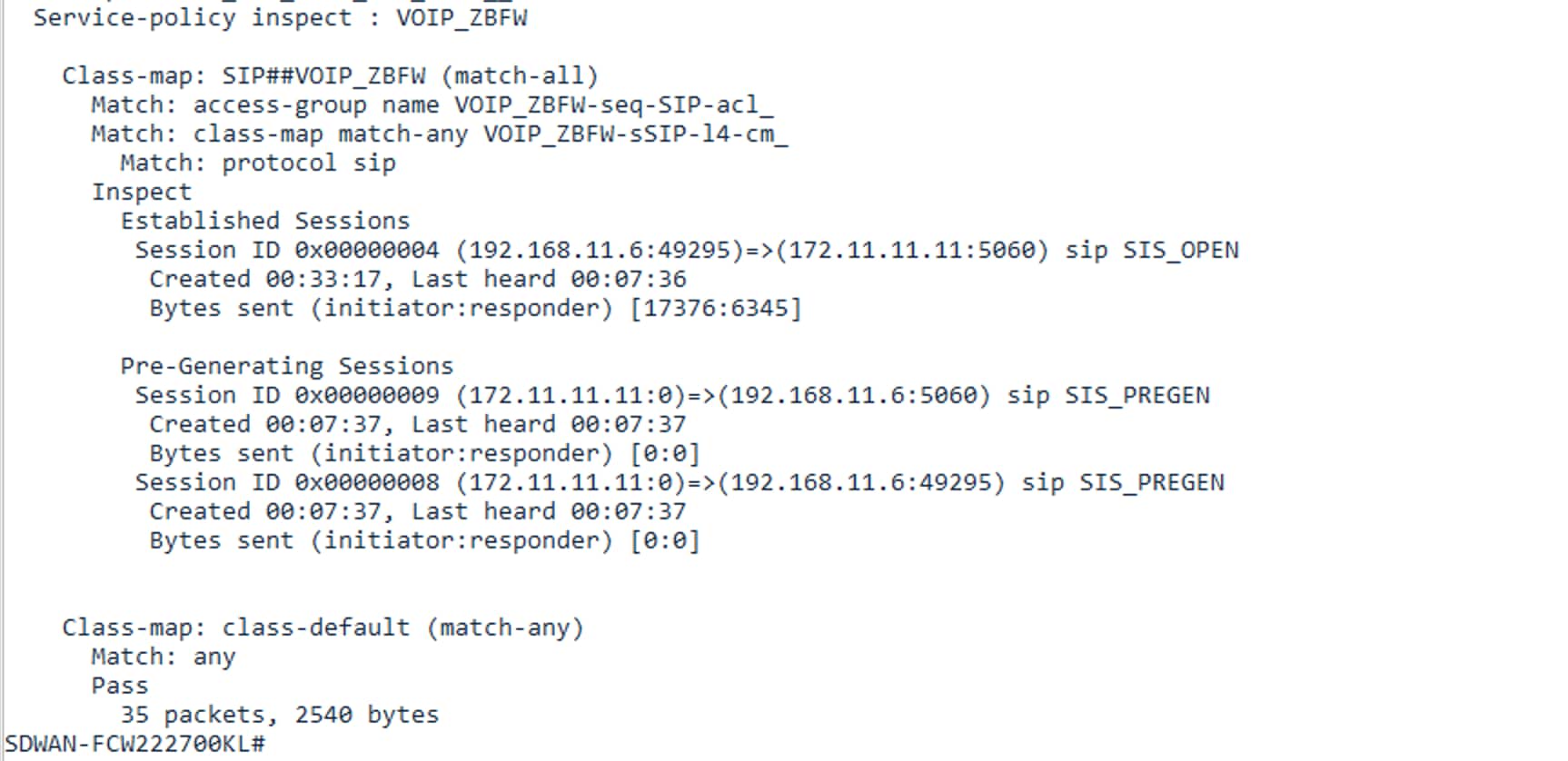
The following CLI illustrates the logical structure. Exact command availability and feature behavior must be checked against the target IOS XE Catalyst SD-WAN release and SD-WAN Manager release
SD-WAN Manager Workflow
1. Navigate to Configuration > Security and create/add a security policy.
2. Define the security zones and associate the required VPNs or interfaces.
3. Create firewall rules or reusable rule sets that represent the required application flows.
4. Define the zone-pair relationship between source and destination zones.
5. Choose the appropriate action: inspect, pass, or drop.
6. Review the generated policy and validate the intended traffic matrix.
7. Attach/deploy the policy to the intended device(s) and verify post-deployment behavior.
Cisco's current documentation describes a Security configuration wizard and supports reusable rule sets. The exact menu names may change between SD-WAN Manager releases.
Verification and Monitoring
1. Confirm zone membership and VPN/interface association.
2. Confirm the zone-pair exists in the expected direction.
3. Confirm the service policy is attached to the zone-pair.
4. Generate a controlled test flow from the source subnet to the destination subnet.
5. Test return traffic and confirm stateful inspection behavior.
6. Check firewall statistics and dropped-packet counters.
! Common IOS XE verification commands (availability varies by release)
show zone security
show zone-pair security
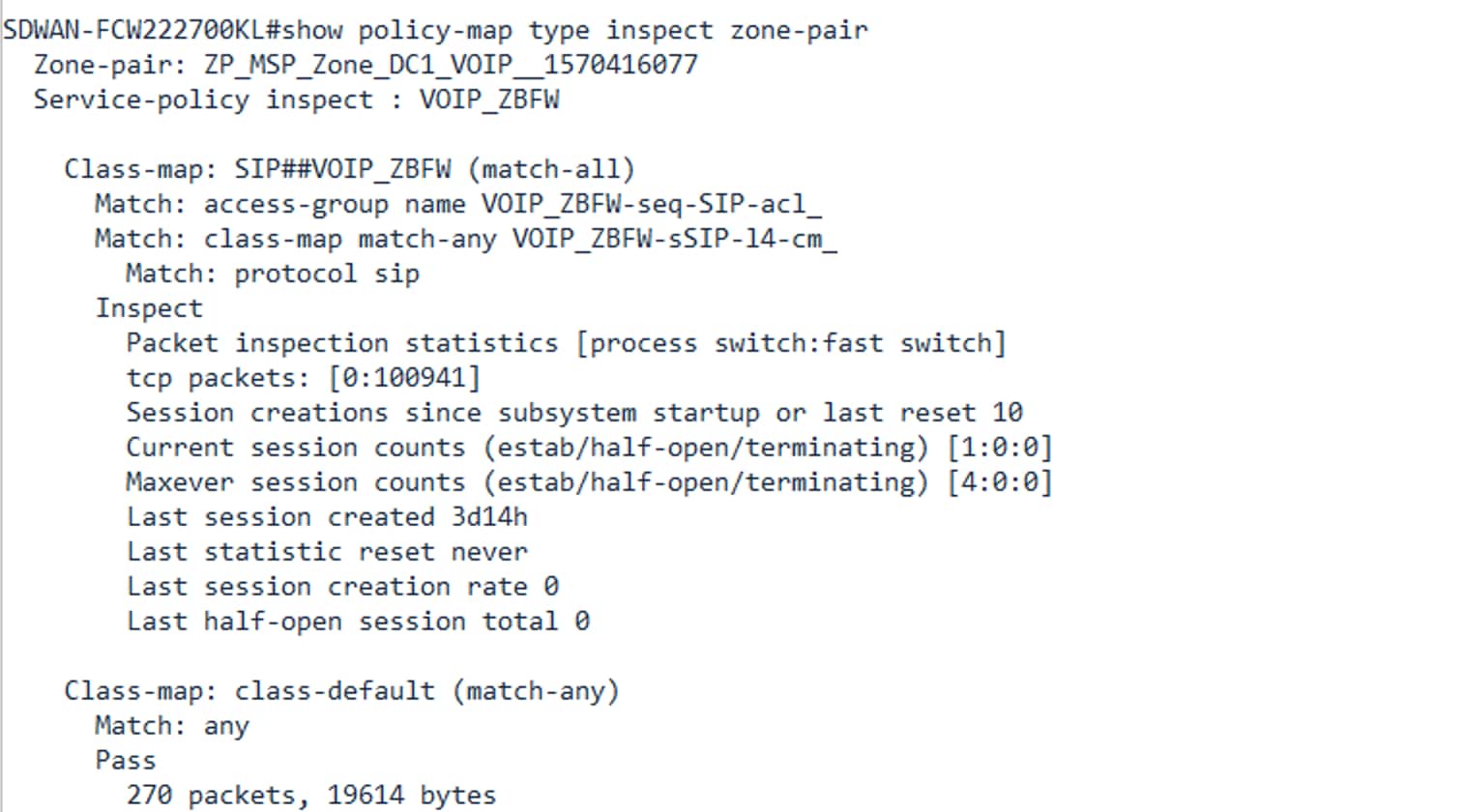
show policy-map type inspect zone-pair
show policy-map type inspect
show class-map type inspect
Example :
Troubleshooting Methodology
Table 4. Troubleshooting checks by symptom
| Symptom |
First checks |
| Traffic is dropped immediately |
Check source/destination zone membership, zone-pair direction, default action and rule order. |
| Forward flow works but return traffic fails |
Check whether the rule uses stateful inspect versus stateless pass; investigate asymmetric routing. |
| Only one VPN is affected |
Validate that the VPN is assigned to the intended zone and not an overlapping/default zone. |
| Policy appears correct but no hits |
Check routing, NAT, interface/VPN classification and whether the flow actually crosses the zone boundary. |
Design Considerations and Caveats
● NGFW is a traffic-policy enforcement mechanism; it is not a replacement for endpoint security, secure DNS, IPS/IDS, identity controls, or broader Zero Trust architecture.
● Do not assume that an SD-WAN overlay's encryption automatically provides segmentation between service-side VPNs; segmentation and security policy still need to be designed.
● Keep rule order and default actions explicit. A broad permit placed above a specific deny can defeat the intended security posture.
Implementation Checklist
● Inventory VPNs, interfaces and business trust relationships.
● Define zones and document their security intent.
● Build the source-to-destination policy matrix.
● Choose Inspect vs Pass vs Drop for each permitted flow.
Cisco References
● Cisco Catalyst SD-WAN Security Configuration Guide, Releases 26.x and Later — Enterprise Firewall with Application Awareness — https://www.cisco.com/c/en/us/td/docs/routers/sdwan/26x-later/security/security-configuration-guide/app-aware-firewall.html
● Cisco Support: Configure SD-WAN Zone-Based Firewall (NGFW) and Route Leaking — https://www.cisco.com/c/en/us/support/docs/routers/sd-wan/217758-cisco-sd-wan-zone-based-firewall-NGFW.html
Disclaimer
This white paper is an engineering reference prepared from Cisco public documentation. It is not a Cisco-published document and should not be represented as an official Cisco design guide. Commands, GUI workflows, feature support, and platform limitations can change between releases and hardware families. Validate all configurations against the exact Cisco IOS XE Catalyst SD-WAN and SD-WAN Manager versions deployed in the environment.