Cisco SD-WAN with Google Cloud WAN White Paper Solution for Modern Enterprise Networking
Available Languages
Bias-Free Language
The documentation set for this product strives to use bias-free language. For the purposes of this documentation set, bias-free is defined as language that does not imply discrimination based on age, disability, gender, racial identity, ethnic identity, sexual orientation, socioeconomic status, and intersectionality. Exceptions may be present in the documentation due to language that is hardcoded in the user interfaces of the product software, language used based on RFP documentation, or language that is used by a referenced third-party product. Learn more about how Cisco is using Inclusive Language.
The adoption of multicloud environments has introduced significant challenges for IT and network operations teams. As organizations shift to hybrid work models and multicloud application strategies, the network experience becomes fragmented, less secure, and harder to manage and scale.
There is a growing need for simple and secure connectivity between on-premises infrastructure and cloud environments, and for technologies that provide the flexibility, performance, and cost-effectiveness required for modern cloud applications.
This solutions whitepaper describes how customers can leverage Cloud WAN with Cisco’s industry-leading SD-WAN and security solutions to simplify network operations, enhance security, and elevate the user experience.
As users, devices, and applications continue to become distributed, managing a Wide Area Network (WAN) becomes increasingly complex. Organizations struggle with consistent application delivery, cloud connection optimization, troubleshooting issues, and maintaining security in dispersed environments. IT teams need solutions that simplify network management, provide real-time insights, and adapt to evolving needs, especially for remote workers and multicloud access.
Cisco SD-WAN is a software-defined networking solution designed to optimize and simplify WAN management for enterprises. It provides intelligent automation for seamless connectivity across branch offices, data centers, and cloud environments, integrating advanced security and multicloud capabilities within a Secure Access Service Edge (SASE) architecture.
Customers benefit from centralized management, enhanced network visibility, intelligent traffic steering, and optimized application performance, all while reducing WAN complexity and costs. This solution enables businesses to build agile, secure, and high-performing networks that adapt to evolving needs and deliver consistent user experiences across multiple locations and cloud platforms.
Over the years, enterprise customers have built multiple bespoke networks to support changing business requirements, leading to inconsistent security and reliability concerns. Cloud WAN alleviates these challenges by offering a fully managed global WAN solution unifying enterprise backbones and SD-WANs into a single network backed by Google’s planet-scale, reliable, high-capacity backbone network and native integration with Cloud Next Generation Firewall (NGFW) and third-party security solutions. Cloud WAN is designed to simplify hybrid and multicloud networking by delivering customers with global reach, optimal performance, and on-demand scale to meet different connectivity needs. Cloud WAN provides up to a 40% savings in Total Cost of Ownership (TCO) over a customer-managed WAN solution1. Cloud WAN is a cornerstone of Cross-Cloud Network, enabling enterprises with any-to-any connectivity built on Google’s high-performing, low-latency global network.
Using Cisco SD-WAN with Cloud WAN for building a global distributed enterprise architecture
Cisco and Google Cloud are partnering to bring to our joint customers the power of Cisco SD-WAN’s networking and security solutions with Cloud WAN to build a globally distributed enterprise architecture.
The solution features end-to-end automation and scripts to deploy Cisco’s Catalyst 8000v or the Meraki vMX products as an SD-WAN headend in a Virtual Private Cloud (VPC) within Google Cloud to consolidate bespoke networks such as branch sites, data centers, and more, over Cloud WAN.
Deploying a Cisco SD-WAN virtual appliance in Google Cloud creates a gateway into the cloud and can greatly simplify and consolidate network connectivity between branches, private datacenters, and the cloud, as shown below. Cisco SD-WAN for Catalyst further allows automated discovery of and connectivity to workload VPCs through its Cloud OnRamp offering.
Customers can benefit from Google Cloud’s global Premium Tier network routing for global middle-mile connectivity instead of relying on managing bespoke networks.
The SD-WAN cloud gateways act as connectivity nodes and can be leveraged for the following use cases:
1. Site-to-cloud connectivity, enabling the reachability of cloud applications from all remote and on-premises locations
2. Site-to-site connectivity, by leveraging the Cloud WAN backbone for multi-region connectivity and building a global middle mile
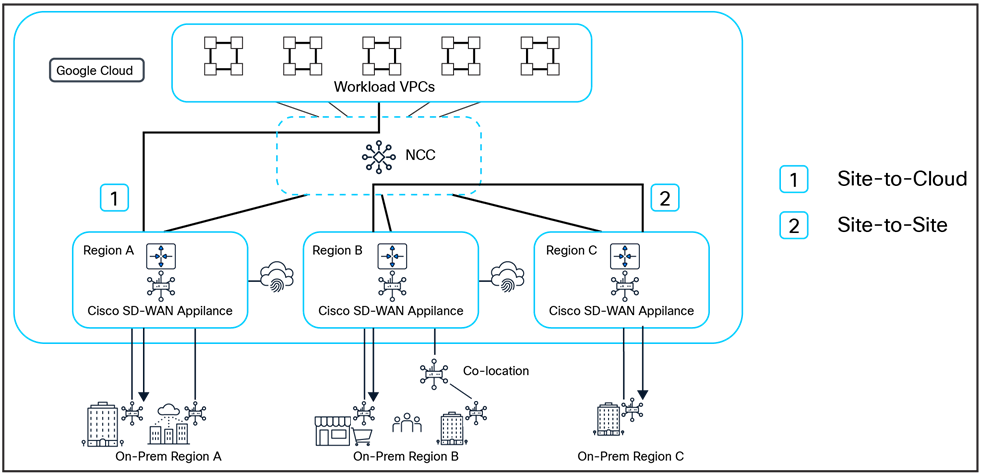
Cisco offers a wide variety of deployment options to meet the customer needs, be it full end-to-end automation or a more DevOps-centric approach. Customers can also leverage Cisco and Google APIs to build their network in a scalable and efficient manner.
Start by preparing the Google Cloud environment by selecting the appropriate project, configuring VPC resources, including subnets, firewall rules, etc., for deploying Cisco SD-WAN headends. In order to ensure that traffic sourced from the branch sites is routed over Google’s backbone network, make sure Network Service Tier in the Google Cloud console is set to Premium.
Cisco Catalyst SD-WAN Cloud OnRamp Automation: The solution deployment steps, as detailed below, are simplified and fully automated using Cisco Catalyst SD-WAN Cloud OnRamp for Multicloud. This multicloud solution standardizes public cloud infrastructure deployment and extends the Cisco SD-WAN fabric into the cloud. The automation allows network administrators to manage and visualize connectivity to Google Cloud in the Cisco Catalyst SD-WAN Manager.
Solution deployment steps:
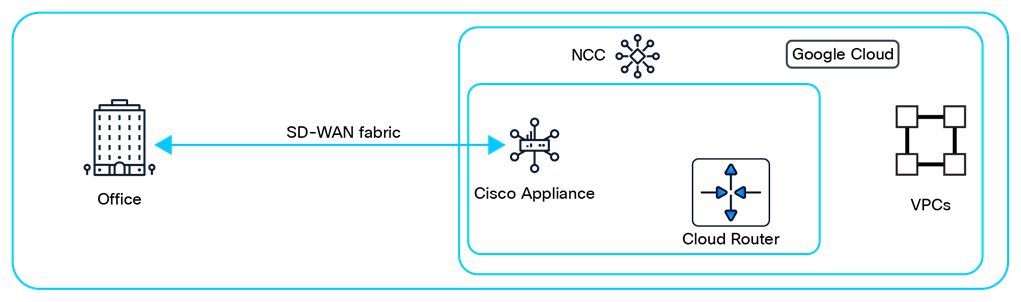
Step 1: Deploy Cisco SD-WAN headend in a VPC
Depending on the choice of SD-WAN headend, you can either deploy a Catalyst 8000v or a Meraki vMX.
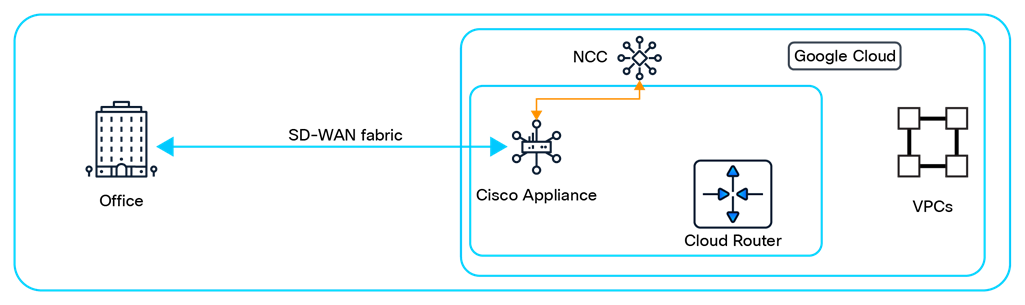
Step 2: Associate Cisco SD-WAN headend as a router appliance spoke of NCC Hub
Network Connectivity Center (NCC) hub enables configuring the SD-WAN headend as a router appliance spoke, allowing exchange of dynamic routes from other branch site locations and Cloud Router by using Border Gateway Protocol (BGP).
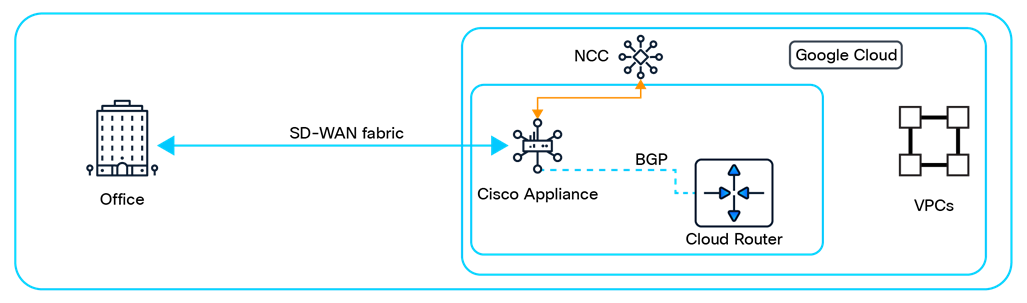
Step 3: Configure the Cisco SD-WAN headend and branch site appliance
Configure the BGP sessions between the Cisco SD-WAN headend and Cloud Router to dynamically exchange routes. Extend the connectivity between the other branch sites and the Cisco SD-WAN headend.
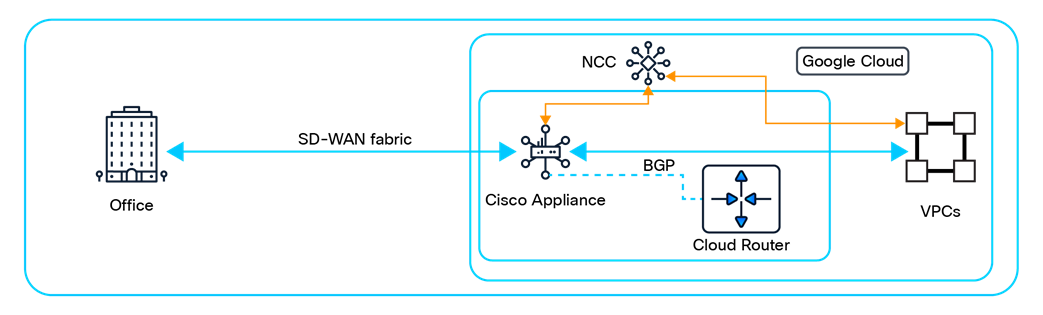
Step 4: Extend connectivity to other workload VPCs
There are two ways to connect to workload VPCs
● Option 1: Using VPC peering to connect workloads with Cisco’s secure virtual appliances. This has been the traditional deployment model.
● Option 2: Using NCC to orchestrate the connectivity and route exchange between the workload VPCs and Cisco’s secure virtual appliances. This model allows extending connectivity to other hybrid spokes, such as Cloud Interconnect’s VLAN attachments or Cloud VPN tunnels.
Note: Cisco Cloud OnRamp automation for this step provides peering-based connectivity intent management in the user interface and APIs.
For a detailed step-by-step guide, please refer to the following articles based on your choice of Cisco SD-WAN headend:
· vMX Setup Guide for Google Cloud Platform (GCP)
Cisco SD-WAN offers robust security capabilities designed to protect enterprise networks and data across distributed locations. The solution offers flexible deployments where security enforcement can be applied at the edge or extended to Secure Service Edge (SSE) for cloud-based security. Encryption is used for all branch-to-branch, branch-to-cloud, as well as branch-to-SSE communication.
The Cisco SD-WAN appliances also have built-in advanced security features, such as application-aware firewalls, Intrusion Prevention Systems (IPS), Advanced Malware Protection (AMP), and URL filtering. These capabilities ensure secure communication between branch offices, the internet, and the cloud, while providing centralized control and visibility over network traffic. Cisco SD-WAN’s Next Generation Firewall also includes threat intelligence powered by Cisco Talos to help organizations proactively defend against potential cyber threats and maintain compliance with industry standards.
These security functions become paramount as customers extend their network footprint from their branch sites and private data centers to the Google Cloud network. Cisco SD-WAN offers the flexibility to choose from the native security stack of Catalyst and Meraki products, or insert firewalls/virtual security appliances in the path of network traffic. The latter can be achieved using the service insertion functionality of Cisco and/or Google Cloud. This feature enhances the Cisco SD-WAN and Cloud WAN solution by seamlessly integrating inline traffic inspection capabilities for all network traffic, utilizing security services from Cisco, Google, or third-party providers.
Google Cloud’s Network Security Integration (NSI) uses Generic Network Virtualization Encapsulation, a.k.a. Geneve tunneling with packet intercept, to securely deliver traffic to third-party inspection destinations without modifying the original packets. The cloud-native architecture of NSI complements the customers’ existing VPC deployments and eliminates the often complex and time-consuming need to re-architect their network infrastructure to accommodate third-party security appliances.
Future-proofing today’s enterprise architecture
● Customers can migrate off their existing MPLS-based network to a cloud-backbone based network by deploying Cisco’s SD-WAN headend in Google Cloud.
● Google Cloud’s Premium Tier network ensures that traffic from the branch sites is routed closest to one of the 200+ Google Points of Presence (PoPs), ensuring a low latency and highly reliable path.
● Customers can leverage Cisco Advance Cloud Security or Google’s native NGFW offering and/or third-party security stack integration using Cisco’s Service Insertion Automation to secure their workloads in the cloud.
● Cisco SD-WAN virtual appliance enables dynamic learning of VPCs’ networks in Google Cloud and the branch sites.
● To meet the demands of evolving enterprise infrastructure, Cisco is investing in performance enhancements of SD-WAN virtual appliances on Google Cloud, with a potential 10Gbps throughput capability targeted later in 2025.
The integration of Cloud WAN with Cisco SD-WAN offers enterprise customers a robust framework for building a global, distributed, and secure network architecture. Cisco SD-WAN automation simplifies network operations and facilitates hybrid and multicloud networking while capitalizing on Google Cloud’s Premium Tier network. Furthermore, the solution integrates security either using Cisco’s advanced security stack or service insertion capabilities supporting Cisco, Google, and third-party security services. This ensures comprehensive traffic inspection capabilities and enhances the customer’s security posture, thereby future-proofing their network infrastructure for evolving business needs and security demands.