Cisco UCS with Red Hat OpenShift Virtualization and Citrix for VDI White Paper
Available Languages
Bias-Free Language
The documentation set for this product strives to use bias-free language. For the purposes of this documentation set, bias-free is defined as language that does not imply discrimination based on age, disability, gender, racial identity, ethnic identity, sexual orientation, socioeconomic status, and intersectionality. Exceptions may be present in the documentation due to language that is hardcoded in the user interfaces of the product software, language used based on RFP documentation, or language that is used by a referenced third-party product. Learn more about how Cisco is using Inclusive Language.
Organizations are increasingly modernizing their virtualization strategies to support a mix of traditional and cloud-native workloads, with Cisco® architecture—particularly the Cisco Unified Computing System™ (Cisco UCS®)—at the core of on-premises infrastructure. The addition of the Cisco UCS X-Series, a cloud-managed, modular system, to the Cisco UCS portfolio helps meet the evolving requirements of virtualized environments by enhancing operational efficiency, agility, and scalability through an adaptable, future-ready design. It combines the functionalities of both blade and rack servers, offering compute density, storage capacity, and expandability in a single system. The latest introduction of Cisco UCS M8 servers has achieved top performance results across several key categories, enabling faster application response times, improved user experiences, and the ability to support the most demanding virtualized workloads.
This white paper explores the deployment of Red Hat OpenShift Virtualization on Cisco UCS X-Series M8 servers to deliver a modern virtualization platform for Citrix Virtual Apps and Desktops environments. By integrating virtual machine management with Kubernetes orchestration, this solution provides a consistent and scalable foundation for running virtualized workloads alongside containerized applications, simplifying operations and enabling a streamlined path toward application modernization. As organizations evaluate alternatives to traditional virtualization platforms, OpenShift Virtualization provides a consistent operational model that enables virtual machines and containerized applications to coexist on a common infrastructure platform.
Key features of Cisco UCS X210c M8 Compute Node:
● Processors: supports up to two Intel® Xeon® 6700P or 6500P processors, providing high performance and flexibility for various workloads
● Memory: enhances performance for data-intensive applications with up to 8 TB of main memory with 32x 256 GB DDR5 6400 MT/s DIMMs
● Storage: supports a versatile range of storage options, including hot-swappable Small-Form-Factor (SFF) E3.SNVMe, SAS/SATA, and NVMe drives
● Management: is managed through Cisco Intersight®, including cloud-based lifecycle management
Red Hat OpenShift Virtualization
Red Hat OpenShift Virtualization helps organizations migrate, run, and manage traditional Virtual Machines (VMs) alongside modern workloads on a unified, hybrid-cloud application platform. OpenShift Virtualization is built on KubeVirt technology, enabling organizations to run virtual machines and containers side by side on a common Kubernetes platform.
As an included feature of Red Hat OpenShift, OpenShift Virtualization lets you respond to change with confidence, keep critical VMs running reliably, and move forward on a single foundation that supports innovation, growth, and emerging requirements, such as for AI. With OpenShift Virtualization, you can:
● Migrate and run VMs with cloud-native benefits
● Manage VMs alongside containers and serverless workloads with a unified set of tools
● Modernize your workloads at your own pace by adopting containers, implementing microservices, or integrating AI, without disrupting your traditional VMs
For additional details, refer to the Red Hat OpenShift Virtualization documentation here.
Citrix Virtual Apps and Desktops 2603
Citrix Virtual Apps and Desktops 2603 provides the following features and enhancements:
● New features and enhancements: improved user experience with updates to the graphical interface and performance optimizations. Enhanced security features to protect data and ensure compliance with industry standards. Updates to the management and monitoring tools for better control and visibility.
● Support and compatibility: extended support for the latest operating systems and compatibility with various client devices. Integration improvements with third-party applications and services.
● Bug fixes and stability improvements: resolution of known issues from previous versions to enhance system stability and performance. Optimizations to reduce system resource consumption and improve overall efficiency.
For additional details, refer to the Citrix documentation here.
Citrix integration considerations for OpenShift Virtualization
Red Hat OpenShift Virtualization provides a flexible platform for deploying Citrix Virtual Apps and Desktops infrastructure and desktop workloads. During validation activities, several configuration considerations were identified that can help simplify Citrix integration and improve operational consistency. These recommendations are based on deployment and testing performed using Red Hat OpenShift Virtualization and Citrix Virtual Apps and Desktops 2603.
OpenShift Virtualization readiness
Before deploying Citrix infrastructure components or desktop workloads, organizations should verify that OpenShift Virtualization and its supporting services are fully operational. This includes validation of storage classes, DataVolume functionality, and network connectivity for virtual machine workloads. Establishing a stable OpenShift Virtualization foundation helps ensure successful provisioning and lifecycle management of Citrix virtual machines.
Citrix service account configuration
Citrix hosting connections require appropriate permissions within the OpenShift environment to manage virtual machines and supporting resources. Prior to integrating Citrix with OpenShift Virtualization, administrators should validate service account permissions and confirm access to the resources required for desktop provisioning and management operations.
Virtual machine configuration best practices
During validation testing, virtual machines configured with explicitly defined CPU and memory resources provided the most consistent integration experience with Citrix management components. Cisco recommends using standardized virtual machine templates with clearly defined hardware characteristics rather than relying on automatically assigned resource profiles.
Recommended practices include:
● Explicit CPU and memory assignments
● Consistent virtual machine templates
● Standardized operating system images
● VirtIO-based storage devices
● Dedicated master images for desktop catalog creation
These practices simplify image management and improve desktop provisioning consistency.
Master image preparation
A properly prepared master image is critical to successful desktop deployment. The master image should include the target operating system, Citrix Virtual Delivery Agent (VDA), current operating system updates, required enterprise applications, and all necessary virtualization drivers and guest tools.
Prior to desktop catalog creation, the master image should be validated, updated, and preserved as a dedicated source image. This approach simplifies ongoing desktop lifecycle management and reduces operational risk during future updates.
Validation and operational testing
Before onboarding production users, organizations should validate the complete desktop delivery workflow, including virtual machine provisioning, desktop registration, user authentication, application delivery, and desktop launch operations. Cisco also recommends establishing baseline performance metrics using workload simulation tools such as Login Enterprise to characterize user experience and platform scalability.
These practices help ensure a successful Citrix deployment while providing a repeatable operational framework for future growth and lifecycle management activities.
Deploying Red Hat OpenShift Virtualization on Cisco UCS
Cisco UCS X-Series servers provide a scalable and highly automated platform for deploying Red Hat OpenShift Virtualization. By combining Cisco UCS X210c M8 Compute Nodes, Cisco fabric interconnects, Cisco Nexus® networking, and Cisco Intersight management, organizations can establish a consistent infrastructure foundation for running both virtual machines and containerized applications.
Red Hat OpenShift Virtualization extends the capabilities of Red Hat OpenShift by enabling organizations to run and manage traditional virtual machines alongside Kubernetes-native workloads on a unified platform. Built on KubeVirt technology, OpenShift Virtualization provides enterprise virtualization features, including virtual machine lifecycle management, live migration, high availability, and integration with Kubernetes-native automation and operations.
Cisco UCS infrastructure preparation
Prior to deploying OpenShift Virtualization, Cisco UCS infrastructure should be configured using Cisco Intersight policies and profiles to ensure consistent server configuration across all cluster nodes.
Recommended Cisco UCS configuration tasks:
● Configure Cisco UCS service profiles for OpenShift control plane and worker nodes
● Apply BIOS policies optimized for virtualization workloads
● Configure network connectivity for management, storage, workload, and migration traffic
● Deploy redundant network paths through Cisco fabric interconnects
● Configure boot policies and local storage for OpenShift installation
● Verify firmware consistency across all cluster nodes
Cisco Intersight simplifies these activities through centralized policy management and automated server provisioning.
OpenShift cluster deployment
The validated environment uses Red Hat OpenShift deployed on Cisco UCS X210c M8 compute nodes using the Red Hat Assisted Installer. This deployment method simplifies cluster creation by providing guided installation workflows, automated node discovery, and infrastructure validation.
A typical OpenShift deployment consists of:
● Three control plane nodes
● Three or more worker nodes
● Optional infrastructure nodes for platform services
The Red Hat Assisted Installer generates a discovery image that is booted on each Cisco UCS server. Once discovered, nodes are assigned roles and configured as part of the cluster deployment process.
After installation, administrators can validate cluster health using the OpenShift web console and Command-Line Interface (CLI).
Enabling OpenShift Virtualization
OpenShift Virtualization is installed using the OpenShift OperatorHub.
To enable OpenShift Virtualization:
1. Access OperatorHub from the OpenShift Console.
2. Install the OpenShift Virtualization Operator.
3. Create and configure the HyperConverged resource.
4. Verify successful deployment of KubeVirt components.
5. Configure storage classes for virtual machine workloads.
6. Configure networking for virtual machine connectivity and live migration.
Following deployment, OpenShift Virtualization provides a complete virtual machine management platform integrated into the OpenShift administration experience.
Virtual machine readiness
Once OpenShift Virtualization is operational, administrators can create virtual machine templates, deploy guest operating systems, and establish standardized images for Citrix infrastructure components and desktop workloads.
The platform supports:
● Windows and Linux virtual machines
● Virtual machine templates
● Live migration
● High availability
● Snapshot and cloning operations
● Integration with enterprise storage platforms
These capabilities enable organizations to deploy Citrix Virtual Apps and Desktops components using familiar virtual machine workflows while benefiting from the automation, scalability, and operational consistency of Kubernetes.
Operational benefits
Deploying Red Hat OpenShift Virtualization on Cisco UCS provides organizations with a modern virtualization platform capable of supporting both traditional and cloud-native workloads. Combined with Cisco Intersight, administrators gain centralized visibility into infrastructure health, lifecycle management, and policy compliance across the entire OpenShift environment.
This architecture provides a foundation for virtualization modernization while preserving enterprise-class availability, scalability, and operational simplicity for Citrix Virtual Apps and Desktops deployments.
Solution architecture
The validated solution architecture consists of four primary layers: the user access layer, the Citrix control plane, the OpenShift Virtualization platform, and the Cisco UCS infrastructure layer.
At the user access layer, end users connect through Citrix Workspace and Citrix Gateway services to access virtual desktops and published applications. The Citrix control plane provides desktop brokering, authentication, licensing, monitoring, and application delivery services through components such as Citrix Delivery Controllers, StoreFront, and Citrix Director.
The OpenShift Virtualization layer provides the virtual machine runtime environment. Citrix infrastructure services and Citrix Virtual Delivery Agents (VDAs) are deployed as virtual machines managed by OpenShift Virtualization and scheduled across Cisco UCS worker nodes. This architecture enables virtual machines and containerized workloads to coexist on a common Kubernetes platform while maintaining operational separation where required.
Underlying the virtualization platform, Cisco UCS X210c M8 compute nodes provide the compute resources necessary to support enterprise-scale Citrix deployments. Cisco Intersight provides centralized visibility, policy-based automation, and lifecycle management capabilities that simplify the deployment and ongoing operation of OpenShift Virtualization clusters across distributed environments.
Figure 1 provides an overview of the solution’s physical architecture.

Physical architecture
Table 1 lists the software and hardware versions used in the solution described in this document.
Table 1. Software and firmware versions
| Component |
Version |
| Cisco Nexus C9332D-GX2B Switch |
10.5(3) |
| Cisco UCSX-X210c-M8 Compute Node |
6.0(1.250194) |
| Red Hat OpenShift |
4.18 |
| Red Hat OpenShift Virtualization |
4.18 |
| Citrix Virtual Apps and Desktops 7 2603 |
2603.0.100 |
Citrix Virtual Apps and Desktops on Red Hat OpenShift Virtualization with Cisco UCS
This section provides an overview of the deployment architecture using Cisco UCS X210c M8 Compute Servers for Virtual Desktop Infrastructure (VDI) environments leveraging Red Hat OpenShift Virtualization, and Citrix Virtual Apps and Desktops 2603 for enterprise end users. The document focuses on the use case of OpenShift Virtualization within VDI deployments and does not cover detailed design or configuration of individual components.
While this paper does not present exhaustive testing results, it demonstrates the successful deployment of Citrix Virtual Apps and Desktops on a Cisco UCS X210c M8–based platform incorporating Red Hat OpenShift Virtualization. This provides a validated starting point for organizations looking to modernize their virtualization strategy. Readers are encouraged to follow Citrix, Red Hat, and Cisco documentation to guide their own implementations. Cisco has a long history of supporting a broad range of VDI management solutions, and this validation highlights Cisco UCS X210c M8 Compute Nodes with OpenShift Virtualization as a compelling infrastructure choice for VDI deployments. We encourage further exploration of this approach.
Logical architecture
The logical architecture used in this white paper illustrates Red Hat OpenShift Virtualization running on Cisco UCS X210c M8 Compute Nodes as the foundation for delivering Citrix Virtual Apps and Desktops (CVAD) 2603 environments. OpenShift Virtualization provides the virtual machine runtime environment for Citrix infrastructure components and Virtual Delivery Agent (VDA) desktops, enabling organizations to manage virtual machines alongside containerized applications on a unified Kubernetes-based platform.
The architecture consists of a user access layer, a Citrix control plane layer, an OpenShift Virtualization layer, and the underlying Cisco UCS infrastructure. Citrix Delivery Controllers, StoreFront servers, licensing services, and supporting infrastructure components are deployed as virtual machines managed by OpenShift Virtualization, while Citrix desktop workloads are provisioned as VDA virtual machines across Cisco UCS worker nodes. This architecture is illustrated in Figure 2.
This design is intended to provide a reference architecture and validation framework for deploying Citrix Virtual Apps and Desktops on Red Hat OpenShift Virtualization using Cisco UCS X210c M8 Compute Nodes. The solution demonstrates how organizations can modernize virtualization infrastructure while maintaining the performance, scalability, and operational capabilities required for enterprise virtual desktop environments.

Logical architecture
Table 2. Citrix software versions
| Component |
Version |
| Citrix Virtual Apps and Desktops 2603 |
2603.0.100 |
| Citrix Virtual Apps and Desktops 2603 – StoreFront |
2603.0.100 |
| Citrix Virtual Apps and Desktops 2603– Virtual Delivery Agent |
2603.0.100 |
It is essential to test the virtual desktops to ensure they fully meet the expected performance and accessibility standards. Validation focused on the deployment and operation of Citrix Virtual Apps and Desktops 2603 running on Red Hat OpenShift Virtualization hosted on Cisco UCS X210c M8 Compute Nodes. Testing included virtual machine provisioning, Citrix infrastructure deployment, desktop registration, user authentication, desktop launch operations, and workload characterization using Login Enterprise. The objective was to verify functional operation, operational consistency, and end-user experience on Cisco UCS infrastructure.
One of the tools available for assessing Virtual Desktop Infrastructure (VDI) environments is Login Enterprise, developed by Login VSI. This industry-standard software simulates human-centric workloads to benchmark the capacity and performance of Virtual Desktop Infrastructure (VDI) solutions. Cisco Technical Marketing utilizes Login Enterprise to evaluate Cisco VDI architectures for Cisco Validated Designs (CVDs).
About Login VSI
Cisco Technical Marketing used Login Enterprise as part of the validation process to characterize the performance and user experience of the Citrix Virtual Apps and Desktops environment running on Red Hat OpenShift Virtualization and Cisco UCS. Login Enterprise is an industry-recognized workload simulation tool that generates repeatable user activity to evaluate the performance, scalability, and responsiveness of Virtual Desktop Infrastructure (VDI) environments.
Using representative user workloads, Login Enterprise enables validation of desktop provisioning, user logon performance, application launch times, and overall desktop responsiveness under controlled test conditions. This approach provides a consistent methodology for evaluating VDI environments across a range of user workloads and deployment scenarios.
For additional information about Login Enterprise, visit www.loginvsi.com.
This testing approach with Login Enterprise is well suited for continuous validation, load testing, and application compatibility testing. It simulates representative end-user workloads to evaluate the performance, scalability, and responsiveness of virtual desktop infrastructures, providing a repeatable methodology for validating user experience across a range of desktop workloads and deployment scenarios.

Load testing with Login Enterprise test dashboard
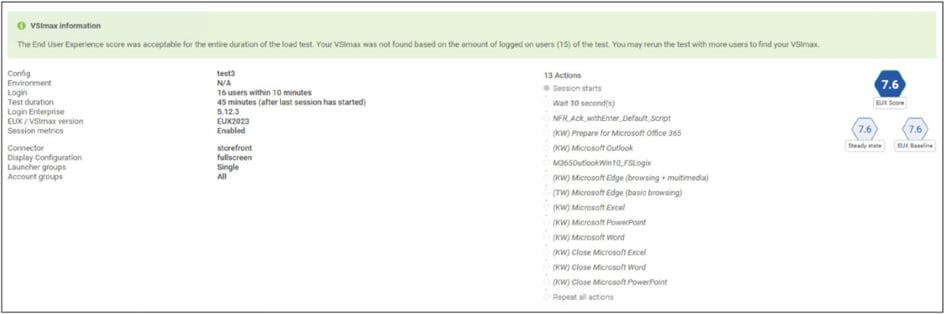
Load testing with Login Enterprise results
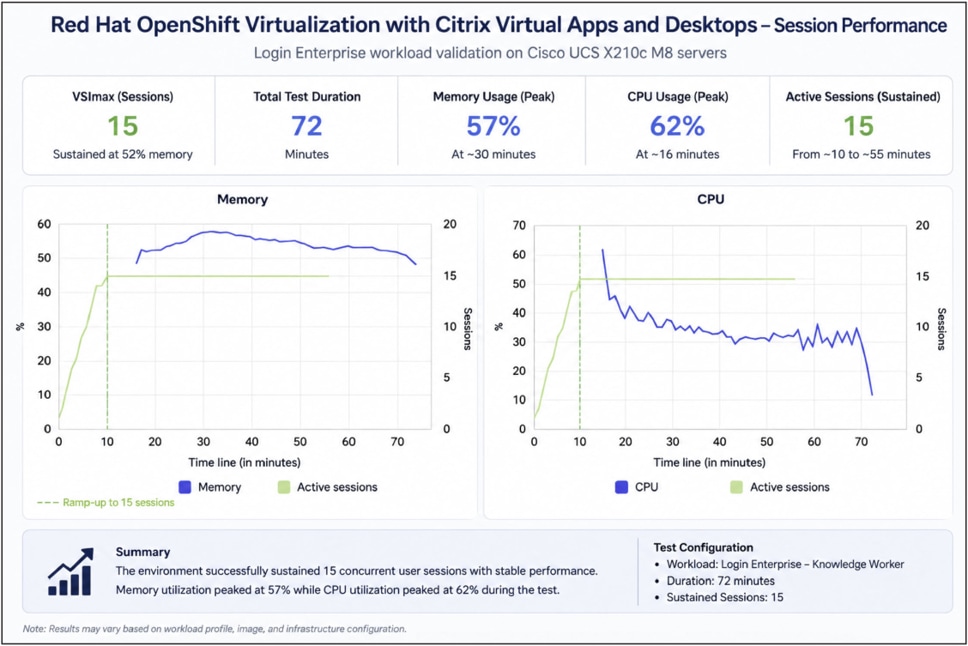
Performance details for VDI sessions running on Red Hat OpenShift Virtualization
Validation testing demonstrated the successful deployment of Citrix Virtual Apps and Desktops 2603 on Red Hat OpenShift Virtualization running on Cisco UCS X210c M8 Compute Nodes.
Key findings included:
● Successful deployment and operation of Citrix infrastructure services on OpenShift Virtualization
● Consistent desktop registration and launch performance
● Successful virtual machine lifecycle operations through OpenShift Virtualization
● Simplified infrastructure management through Cisco Intersight
● Efficient utilization of Cisco UCS compute resources
● A scalable architecture capable of supporting future virtualization modernization initiatives
Red Hat OpenShift Virtualization provides organizations with a modern platform for running traditional virtual machines alongside cloud-native applications on a unified Kubernetes-based architecture. Combined with Citrix Virtual Apps and Desktops and Cisco UCS X-Series servers, organizations can deliver scalable, secure, and high-performance virtual desktop environments while reducing operational complexity.
Cisco UCS X210c M8 Compute Nodes provide the compute performance, memory scalability, and operational consistency required for enterprise desktop virtualization deployments. Through Cisco Intersight, organizations can implement policy-based infrastructure management and lifecycle automation that simplifies deployment and ongoing operations across OpenShift Virtualization environments.
The validation presented in this paper demonstrates the successful deployment of Citrix Virtual Apps and Desktops on Red Hat OpenShift Virtualization running on Cisco UCS infrastructure. The resulting architecture provides organizations with a flexible and scalable platform for virtualization modernization while maintaining the performance, availability, and operational capabilities required for enterprise virtual desktop environments.
Jeff Nichols, Technical Marketing Engineer, Cisco Systems, Inc.