Cisco Security Ordering Guide for Providers
Available Languages
Bias-Free Language
The documentation set for this product strives to use bias-free language. For the purposes of this documentation set, bias-free is defined as language that does not imply discrimination based on age, disability, gender, racial identity, ethnic identity, sexual orientation, socioeconomic status, and intersectionality. Exceptions may be present in the documentation due to language that is hardcoded in the user interfaces of the product software, language used based on RFP documentation, or language that is used by a referenced third-party product. Learn more about how Cisco is using Inclusive Language.
Secure Access ordering guide for providers
Introduction
This ordering guide is designed to help Cisco sales teams, partners, and distributors order Cisco Secure Access subscriptions. This guide will help you:
● Understand the Cisco Secure Access product and support offerings.
● Understand the specific Cisco Global Price List (GPL) offers.
● Help customers purchase the correct quantities and types of SKUs to reduce the risk of order rejection.
● Provide information about the end-to-end quote-to-fulfillment process in Cisco Commerce for this offer.
Audience
This guide is intended for Cisco sales teams, partners, and distributors qualified to sell Cisco Secure Access on the Cisco Global Price List and participating in the Provider Pricing for Secure Access, XDR and Security Suites program.
Scope
The ordering guide provides information about pricing, packaging, and ordering for the Cisco Secure Access Essentials and Advantage packages: Secure Internet Access and Secure Private Access.
Understanding the products
Product overview
Cisco Secure Access is a converged cloud security solution, grounded in zero trust, that enforces modern cybersecurity, while radically reducing risk and delighting both end-users and IT staff. It provides a seamless and secure experience as users connect from anything to anywhere, enabling frictionless work via a single, common access approach. It mitigates risk across your business by applying ZTNA principles and enforcing granular security policies. It simplifies and automates IT operations through a single, cloud-managed console and client, centralized policy creation, and aggregated reporting. Market leading Talos threat intelligence fuels unmatched threat blocking capabilities and reveals attack details to mitigate risk and speed investigations. Experience Insights powered by Cisco ThousandEyes provides digital experience monitoring for end users, to help quickly identify and remediate network and connectivity issues.
Product packaging
Cisco Secure Access has two primary tiers: Secure Access Essentials and Secure Access Advantage. Both tiers are divided into two use cases: Secure Internet Access (SIA) and Secure Private Access (SPA). Both use cases are purchased as part of a single subscription and are delivered as a single, unified dashboard and service. A customer can choose to purchase only one use case depending on their needs.
| Product Name |
Description |
| Secure Access Essentials |
Secure Access Essentials includes everything you need to securely connect users to the Internet, public apps, and private apps.
● Secure private access using Zero Trust Network Access and VPNaaS for managed and unmanaged devices; includes posture assessment.
● Secure internet access enabled through roaming security, VPN tunnel, IPsec tunnel, PAC files, proxy chain, and SD-WAN integration.
● DNS protection and Cloud Delivered Firewall for layer 3 and layer 4 controls of web and private apps.
● Secure web gateway capabilities including proxy for web traffic, URL filtering, content filtering, advanced app controls.
● CASB: Cloud app discovery, risk scoring, blocking, cloud malware detection; SaaS app activity controls and tenant controls.
● Malware analytics (sandbox) for suspicious files. Limited to 100 samples per day.
● Experience Insights (Digital Experience Monitoring) provides end-to-end monitoring of end-user experience when accessing the Internet and corporate resources.
|
| Secure Access Advantage |
Secure Access Advantage includes everything you need to securely connect users to the Internet, public apps, and private apps. In addition to Secure Access Essentials capabilities, it includes:
● Malware analytics (sandbox) on suspicious files with unlimited samples per day. Access to three full console logins, manual file submissions, and glove box.
● Layer 7 application visibility and control identifies thousands of applications and blocks/allows them.
● RBI for any website.
● Multimode Data Loss Protection (DLP) to detect and protect sensitive information.
● Intrusion Prevention System (IPS) that examines network traffic flows (including decryption for private and internet traffic) and prevents vulnerability exploits with an added layer of threat prevention.
|
Please refer to the Cisco Secure Access datasheet for all the latest details: cisco.com/c/en/us/products/collateral/security/hybrid-workforce-cloud-agile-security-ds.html.
All Cisco Secure Access packages include access to download the Cisco Secure Client from the Software Download center for use with Cisco Secure Access. Cisco Secure Client is required for VPN, client based Zero Trust Access, Internet Security features, and Experience Insights. There is also a link to the Secure Client in the Secure Access dashboard for customers to easily access the Secure Client software.
The Cisco support contract generated provides access to those with their Cisco.com ID associated, to download the Cisco Secure Client only for the purpose of using Secure Access. For all other use cases, including the use of Secure Client with on-prem ASA/FTD devices, a separate Cisco Secure Client license is required. Please refer to the Secure Client ordering guide for further details: cisco.com/c/en/us/products/collateral/security/ anyconnect-secure-mobility-client/secure-client-og.html.
Understanding the licensing model
Subscriptions overview
Cisco Secure Access is licensed on a subscription basis. Each end customer has only one subscription, though each subscription may comprise multiple types of users: Secure Internet Access (SIA) and/or Secure Private Access (SPA). Subscriptions are available for standard term lengths of 12, 36, and 60 months. Following the completion of the term, the subscription will be renewed automatically for an additional 12-month term unless the renewal is cancelled or auto-renewal was deselected at the time of initial order. Subscriptions can be changed mid-term or manually renewed using the Change-Subscription flow.
Cisco Secure Access licensing
Cisco Secure Access is licensed per covered user. A covered user is defined as an internet connected employee, subcontractor or other authorized individual covered by the deployment of the Software or Cloud Service, as applicable. The subscription quantity should cover the total quantity of covered users.
Provider Pricing for Security Suites and A La Carte eliminated user bands and offers one flat list price across all customer deployments.
User Subscription PID
There is only one subscription PID for Cisco Secure Access for Providers. The term of the subscription and quantity of Users purchased applies to all products included in the subscription.
Subscription changes
Existing subscriptions may be changed during the term of the subscription. Changes may be made to products and/or quantities ordered. Additional quantities may be added to the subscription at any time during the subscription term by placing a "Change-Subscription" order. Quantities added through a Change-Subscription order will co-terminate with the existing subscription. Quantities may be decreased for a subscription renewal, but not midterm for a current subscription. Each end customer may have only one subscription to Cisco Secure Access. Attempts to change subscriptions by placing a new order for an existing customer will result in an error and guidance to place a change order.
Understanding ser vices and support
Cisco Solution Support is included. Included with Solution support is:
● Solution Support TAC.
● 24/7 access to Cisco Solution Support Center for assistance via phone, fax, email, or internet.
● Fast response times: Within 30 minutes for Severity 1 and 2 calls; within one hour or next business day for severity 3 and 4 calls.
● Access to Cisco.com for technical and general information on the Solution and Cisco Products.
● Management of technical issues and escalation to Solution Support Alliance Partners when necessary.
Note: Embedded Solution Support is solely partner-entitled, so in no event will Cisco have any obligation to provide support directly to, or respond to support requests from, an end customer.
Understanding the quoting and ordering process
New versus change subscriptions
Each end customer may have only one subscription. For new Cisco Secure Access customers, the orders team will create a new subscription beginning on the requested start date and lasting for the specified term. Existing Cisco Secure Access customers should place a Change-Subscription order rather than an order for a new subscription.
Cisco Secure Access SKU overview
Orders for Cisco Secure Access involve three SKU types.
1. The subscription SKU, which is used to define the subscription term and start date.
2. The product SKUs, which are used to define the products and quantities that make up the subscription.
3. The support SKU is included.
Orders start with the selection of the Secure Access subscription SKU. This is followed by the configuration of the subscription by selecting the product(s) and support SKUs that will constitute the subscription. When adding the product(s) SKUs, the $0 Experience Insights SKU will be automatically added, and cannot be removed.
Subscription SKU
There is only one subscription SKU for Cisco Secure Access. The term of the subscription applies to all products included in the subscription.
| SKU Type |
SKU |
Description |
| Subscription |
PRP-SECACC-SUB |
Provider Pricing for Secure Access Subscription Offer |
Product SKU: Secure Internet Access (SIA) and Secure Private Access (SPA)
There are four SKUs for Secure Access Essentials and Advantage packages. Pricing follows a tiered pricing model and is calculated dynamically based on the SIA and SPA user counts and term of the subscription.
| SKU type |
SKU |
Description |
| Product |
PRP-SA-SIA-ESS |
Provider Pricing for Secure Internal Access Essentials |
| Product |
PRP-SA-SPA-ESS |
Provider Pricing for Secure Private Access Essentials |
| Product |
PRP-SA-SIA-ADV |
Provider Pricing for Secure Internal Access Advantage |
| Product |
PRP-SA-SPA-ADV |
Provider Pricing for Secure Private Access Advantage |
Step 1: Selecting the subscription SKU
There is one Cisco Secure Access subscription SKU (PRP-SECACC-SUB). There is no price for the subscription SKU. Pricing is determined when product SKUs are added and configured. Select a quantity of one because each end customer may have only one subscription. Product quantities will be entered when the product SKUs are added to the subscription.
Note: Each end customer may have only one active subscription of Cisco Secure Access. This means that:
● Each order may contain only one top-level line item of PRP-SECACC-SUB.
● Each order can only contain all Essentials or all Advantage SKUs (no mixing).
● Each order may contain only SIA, or only SPA or both SIA and SPA SKUs.
● Each end customer may have only one active order for PRP-SECACC-SUB.
Attempts to place multiple concurrent orders for PRP-SECACC-SUB or to place an order with multiple line items of PRP-SECACC-SUB will be rejected. To change products or quantities for an end customer, place a Change- Subscription order.

After selecting the subscription SKU, choose Edit Options to edit the subscription term and the requested start date.
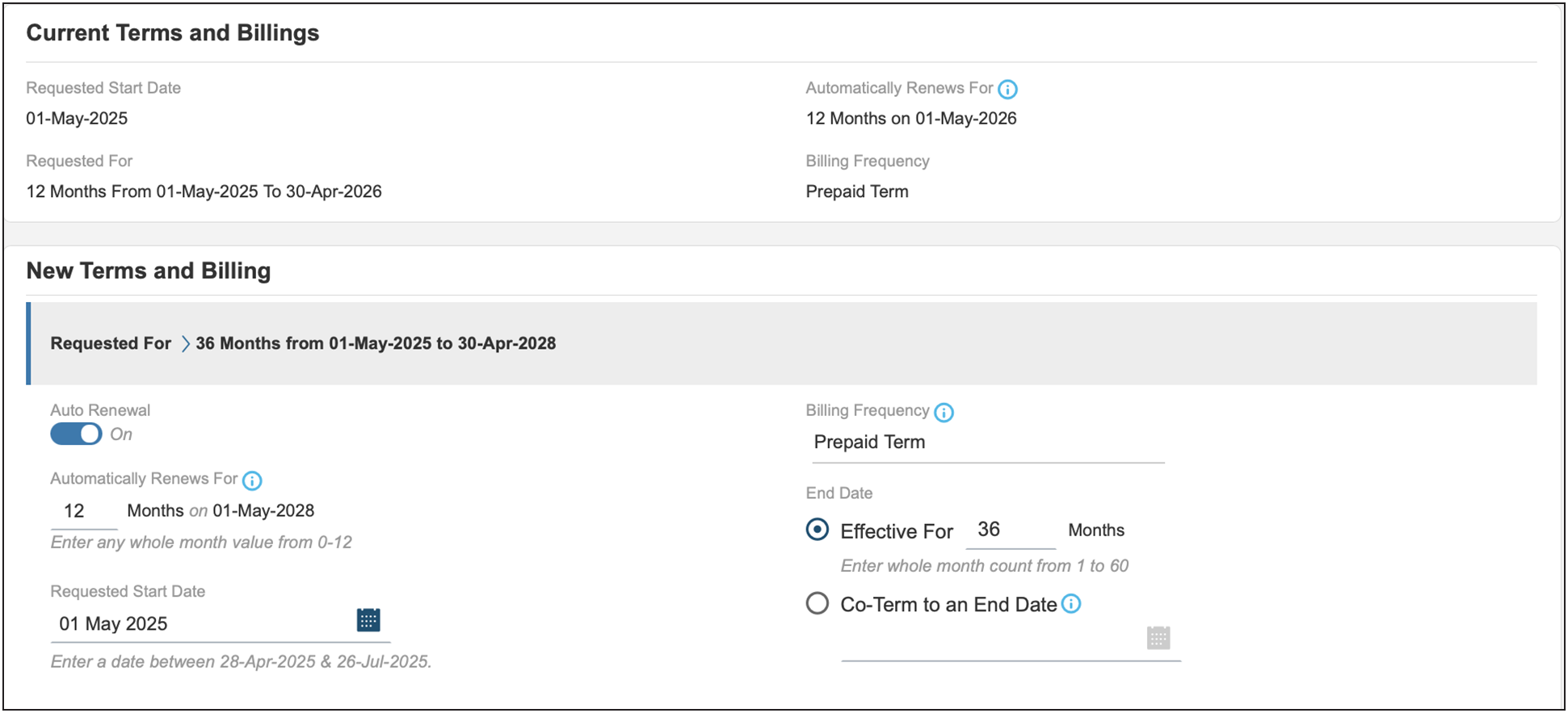
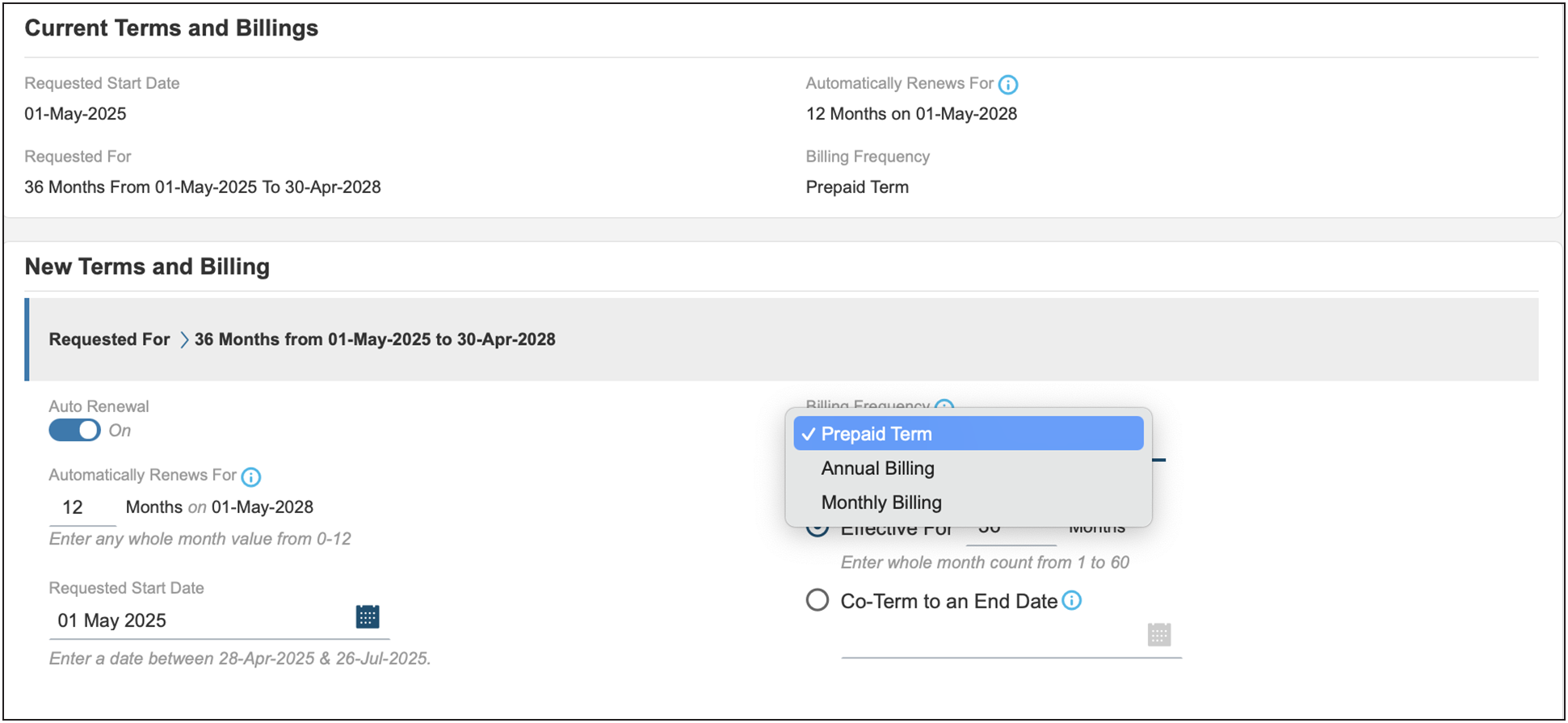
The subscription term will default to a 12-month term and prepaid term billing. Billing frequency can be changed to pre-paid, monthly or annual from the drop-down selection. The requested start date may also be changed at this time.
Note: Annual billing option.
● Only terms that are multiples of 12 months (for example, 12, 24, 36) are allowed (for example, no 42 month "co-term" subscriptions with annual billing).
● The PO needs to be issued for the full amount of the entire term, but billing will occur annually at the start of each service year.
● While billing is annual or monthly, the subscription is for the entire term and cannot be cancelled mid-term.
The service is provisioned, and the subscription starts on the service start date. The provisioning of the service may take up to 72 hours, assuming the order information is complete and correct.
Step 2: Selecting the product SKU
When the subscription terms have been set, the next step is to add products to the subscription. The term for the product is defined by the subscription term. Start by selecting the appropriate product(s) in the subscription configuration summary. The guidance below uses Secure Private Access (SPA) Essentials as an example. Having chosen to configure the subscription for the product, you then enter the quantity based on the number of covered users for the service.
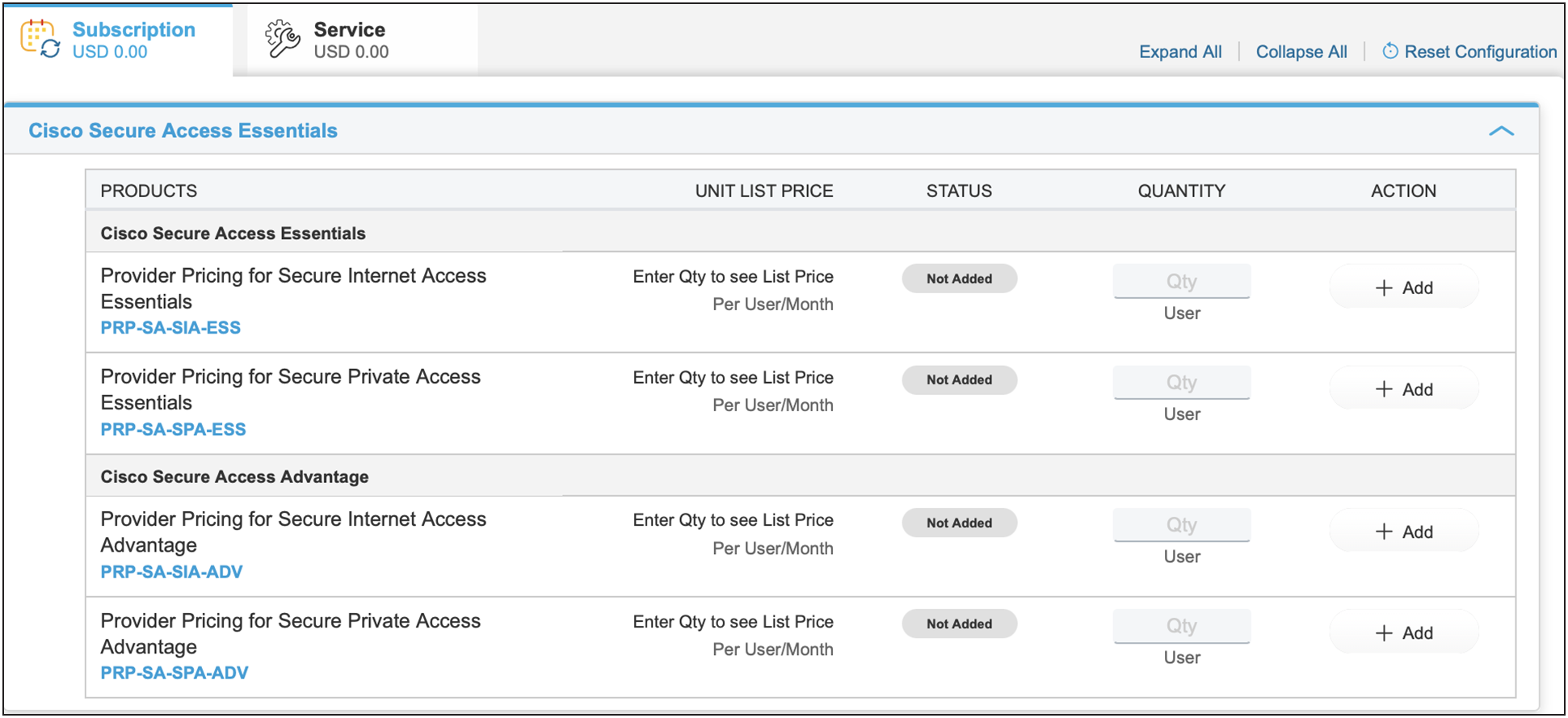
A selection from Secure Internet Access (SIA) and/or Secure Private Access (SPA) is allowed within a single tier, Essentials or Advantage. Selecting billing SKUs from both tiers will result in an invalid configuration. There is a minimum quantity of 50 users for each billing SKU selected.
Pricing is determined dynamically according to the quantity ordered and term and is based on a tiered pricing model. Annualized "per 12 months" prices are displayed for the selected SKU. However, billing is monthly, annual or prepaid for the full term of the subscription, and the term amount is shown in the subtotal.
Step 3: Selecting a support SKU
Cisco Solution Support is in all license tiers. Included with Solution Support is:
● Solution Support TAC.
● 24/7 access to Cisco Solution Support Center for assistance via phone, fax, email, or internet.
● Fast response times: Within 30 minutes for Severity 1 and 2 calls; within one hour or next business day for Severity 3 and 4 calls.
● Access to Cisco.com for technical and general information on the Solution and Cisco Products.
● Management of technical issues and escalation to Solution Support Alliance Partners when necessary.
Note: Embedded Solution Support is solely partner-entitled, so in no event will Cisco have any obligation to provide support directly to, or respond to support requests from, an end customer.
Step 4: Provisioning information
All orders require you to provide the following end-customer information, including deployment site address.
When it comes to properly provisioning licenses, be sure to provide partner contact information.
● Input the admin email/alias of the deployment specialist team, NOT the end customer.
Failure to provide this information will delay the order provisioning process. Relevant services will be provisioned, and the subscription will begin on the service start date specified on the order. You can enter provisioning information by clicking the View/Edit link in the Provision Details section.

In the provisioning details page, enter the relevant deployment team specialist information/whomever is going to be provisioning the instance. (Do not enter end customer information, partner is responsible for information.)
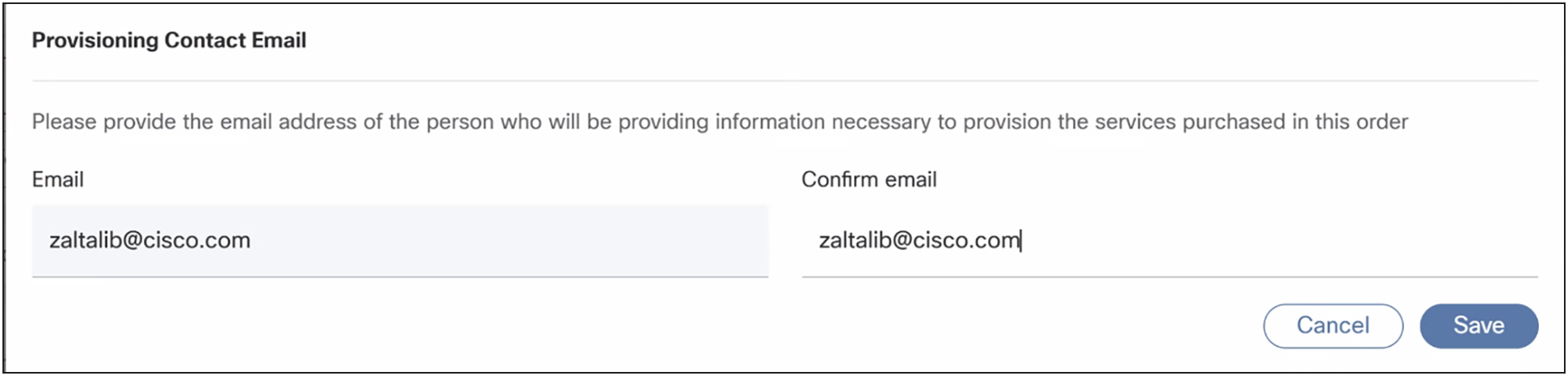
After the order has been placed, a claim code will be created for the provider and emailed to the address specified for subsequent provisioning. Refer to the Security Cloud Control user guide for details. Upon activation, the managed service provider administrator will receive a welcome email with instructions to log in to the Dashboard to set up their services. When administrators have logged in to the dashboard, they will be aided by a setup guide as well as access to support resources in order to make sure their accounts are properly set up.
Security Cloud Control
Suites are provisioned through Security Cloud Control. Security Cloud Control is a web application that provides centralized management of Cisco Secure product activation, user identity, and user access management across the Cisco Security Cloud. Security Cloud Control administrators can create new Security Cloud enterprises, manage users in an enterprise, claim domains, and integrate their organization's SSO identify provider, among other tasks.
When a new Suite subscription is purchased from Cisco, a subscription claim code is emailed to the initial provisioning contact specified during the purchase process. This contact is entered into the mandatory "Provisioning Contact Email" field. Be sure to specify the appropriate contact who will be responsible for provisioning the new subscription as only the specified contact will receive this email. This person will be designated as the Security Cloud enterprise administrator and will use the code received via email to claim the subscription for the current enterprise. If for any reason the order is inadvertently or incorrectly completed with the wrong contact email, the claim code email can be forwarded to the right contact if the claim code has not been already used.
Step 5: Verify and save once properly configured
User protection suite ordering guide for providers
Introduction
The ordering guide is designed to help Cisco sales, partners, and distributors order the Cisco User Protection Suite. This guide will help you:
● Understand Cisco User Protection Suite products and service tiers.
● Understand specific Cisco User Protection Suite offers and identify the right ones for your customers.
● Make sure that the right quantities and types of the product are selected to reduce the risk of order rejection.
● Provide information about the end-to-end quote-to-fulfillment process in the Cisco Commerce Workspace.
Audience
This guide is intended for Cisco sales, partners, and distributors qualified to sell security products and services on the Cisco Global price list and participating in the Provider Pricing for Secure Access, XDR and Security Suites program.
Scope
This ordering guide provides information about quoting, ordering, and pricing for Cisco User Protection Suite products and services that are available on the Cisco Global Price List.
Overview of solution
The Cisco User Protection Suite is designed to protect against all attack vectors that target users while providing secure and easy access to any application, on any device, from anywhere to implement zero trust, with zero friction. Users have a better experience and are more productive at work with frictionless access to SaaS and private applications, communication tools, and other business resources. Since users are frequently the target of attacks like phishing, malware, credential compromise and ransomware, organizations need end-to-end user security that is responsive, easy to use, and addresses compliance requirements, all while remaining cost-effective. Organizations can take a robust security approach with our consolidated tools that close gaps in user protection and adapt to an evolving threat landscape and increasing complexity of modern IT environments, at the speed of business. Cisco uniquely offers a broad security portfolio that integrates with third-party telemetry and security, distinct insights from hundreds of thousands of customers, deep visibility from being a networking leader, and extensive threat intelligence from Cisco Talos.
The Cisco User Protection Suite is currently offered for partners participating in the program through two tiers:
● Essentials
● Advantage
The products available as a part of the respective tiers are as follows.
|
|
Entitlements¹ |
User Protection Essentials |
User Protection Advantage |
| Duo Advantage |
N/A (per user) |
X |
X |
| Email Threat Defense |
N/A (per user) |
X |
X |
| Cisco Secure Access Essentials Secure Internet Access: SIA Essentials and Secure Private Access: SPA Essentials |
N/A (per user) |
X |
X |
| Cisco Secure Access Advantage Secure Internet Access: SIA Advantage and Secure Private Access: SPA Advantage |
N/A (per user) |
|
X |
| Secure Endpoint Advantage |
Two endpoints per user purchased² |
|
X |
| Identity Services Engine (ISE) Premier³ |
Two devices per user purchased⁴ |
|
|
Cisco user protection tiers
The Essentials tier provides the following products. (For expanded definitions on each product, please see the Appendix.)
Duo Advantage
● Multi-Factor Authentication (MFA).
● Phishing Resistant Authentication.
● Single Sign On (SSO).
● Passwordless sign-on.
● Trusted Endpoints.
● Device Health Check.
● Risk-Based Authentication.
● Threat Detection.
● Provides support for internal web applications (HTTPS) and servers via SSH, RDP and SMB.
● Provides integration with Cisco Secure Endpoint to prevent infected devices from accessing resources.
● Checks for presence of EDR/AV agents.
Cisco Secure Access essentials
Secure Access Essentials includes everything you need to securely connect users to the Internet, public apps, and private apps.
● Secure Private Access (SPA).
● Secure Internet Access (SIA).
● DNS.
● Secure web gateway.
● CASB.
● Remote Browser Isolation (for a set of risky sites).
● Secure Malware Analytics (sandbox).
● Experience Insights (Digital Experience Monitoring).
● Email Threat Defense.
In addition to the products and features in the Essentials tier, the Advantage tier provides the following products:
● Cisco Secure Access Advantage.
● Secure Endpoint Advantage.
● Threat Grid Cloud.
● Risk-based Vulnerability.
● Secure Malware Analytics (sandbox) for suspicious files.
Identity Services Engine (ISE) Premier
The Premier tier of ISE includes:
● All existing features and offerings in ISE Essentials, such as AAA, guest, and more for general user visibility and enforcement, and ISE Advantage such as device profiling, network segmentation (TrustSec), context sharing (pxGrid, pxGrid Direct, and pxGrid Cloud), and Adaptive Network Control (ANC).
● Secure Your Endpoints with Posture.
● Leverage MDM for Compliance.
● Threat Containment and Control Access.
Cisco user protection suite support services
Cisco Solution Support is included in all license tiers. Included with Solution support is:
● Solution Support TAC.
● 24/7 access to Cisco Solution Support Center for assistance via phone, fax, email, or internet.
● Fast response times: Within 30 minutes for Severity 1 and 2 calls; within one hour or next business day for Severity 3 and 4 calls.
● Access to Cisco.com for technical and general information on the Solution and Cisco Products.
● Management of technical issues and escalation to Solution Support Alliance Partners when necessary.
Note: Embedded Solution Support is solely partner-entitled, so in no event will Cisco have any obligation to provide support directly to, or respond to support requests from, an end customer.
Add-Ons
Breach Protection Suite Add-On: The Breach Protection Suite add-on is available in two tiers: Essentials and Advantage.
Breach Essentials Add-On: The Breach Protection Essentials tier adds on XDR Essentials. XDR Essentials includes the following capabilities, with all Cisco telemetry sources:
● Built by practitioners for practitioners with built-in integrations across the Cisco security portfolio so analysts can detect and respond to the most sophisticated threats.
● Native integration of the full Cisco security portfolio so analysts can detect and respond to the most sophisticated threats.
● Data ingestion limit of 2GB per user per month.
● Data retention limit of 90 days by default.
If Endpoint Advantage is not in the tier of User Protection that is selected (e.g., if customer has purchased the Essentials tier of the User Protection suite), this would also be included.
Breach Advantage Add-On: The Breach Protection Advantage add-on includes:
● XDR Advantage, which includes all software features in XDR Essentials plus commercially supported and curated integrations with select third-party tools to rapidly respond to threats regardless of vector or vendor.
● Secure Endpoint Premier, which includes threat hunting by Cisco Talos to help identify threats found within the customer environment.
● Cisco Secure Network Analytics, a Network Detection and Response offering, provides visibility and advanced analytics across the modern network to rapidly identify, hunt for and respond to threats.
How to order user protection suite
Provider Pricing for Security Suites eliminated user bands and offers one flat list price across all customer deployments.
Subscription PID
There is only one subscription PID for Cisco User Protection Suite. The term of the subscription and quantity of Users purchased applies to all products included in the subscription.
● Each order may contain only one top-level line item of PRP-USRPRT-SUITE.
● Each end customer may have only one active order for PRP-USRPRT-SUITE.
| PID type |
PID |
Description |
| Subscription |
PRP-USRPRT-SUITE |
Provider Pricing for User Protection Suite |
Product PIDs
There are two product PIDs for User Protection Suite, Essentials and Advantage packages. Pricing follows a tiered pricing model and is calculated dynamically based on user counts and term of the subscription.
● Attempts to place multiple concurrent orders for PRP-USRPRT-SUITE or to place an order with multiple line items of PRP-USRPRT-SUITE will be rejected. To change products or quantities for an end customer, place a Change-Subscription order.
| PID type |
PID |
Description |
| Product |
PRP-USRPRT-SEC-ESS |
Provider Pricing for User Protection Essential tier |
| Product |
PRP-USRPRT-SEC-ADV |
Provider Pricing for User Protection Advantage tier |
Step 1: Selecting the subscription PID
There is one Cisco Provider User Protection Suite subscription PID (PRP-USRPRT-SUITE). There is no price for the subscription PID. Pricing is determined when the product PIDs are added and configured. Select a quantity of one because each end customer may have only one subscription. Product quantities will be entered when the product PIDs are added to the subscription.
Note: Each end customer may have only one active subscription of Cisco Provider User Protection Suite.
This means that:
● Each order may contain only one top-level line item of PRP-USRPRT-SUITE.
● Each end customer may have only one active order for PRP-USRPRT-SUITE.
Attempts to place multiple concurrent orders for PRP-USRPRT-SUITE or to place an order with multiple line items of PRP-USRPRT-SUITE will be rejected. To change products or quantities for an end customer, place a Change- Subscription order.

After selecting the subscription PID, choose Select Options to edit the subscription term and the requested start date.
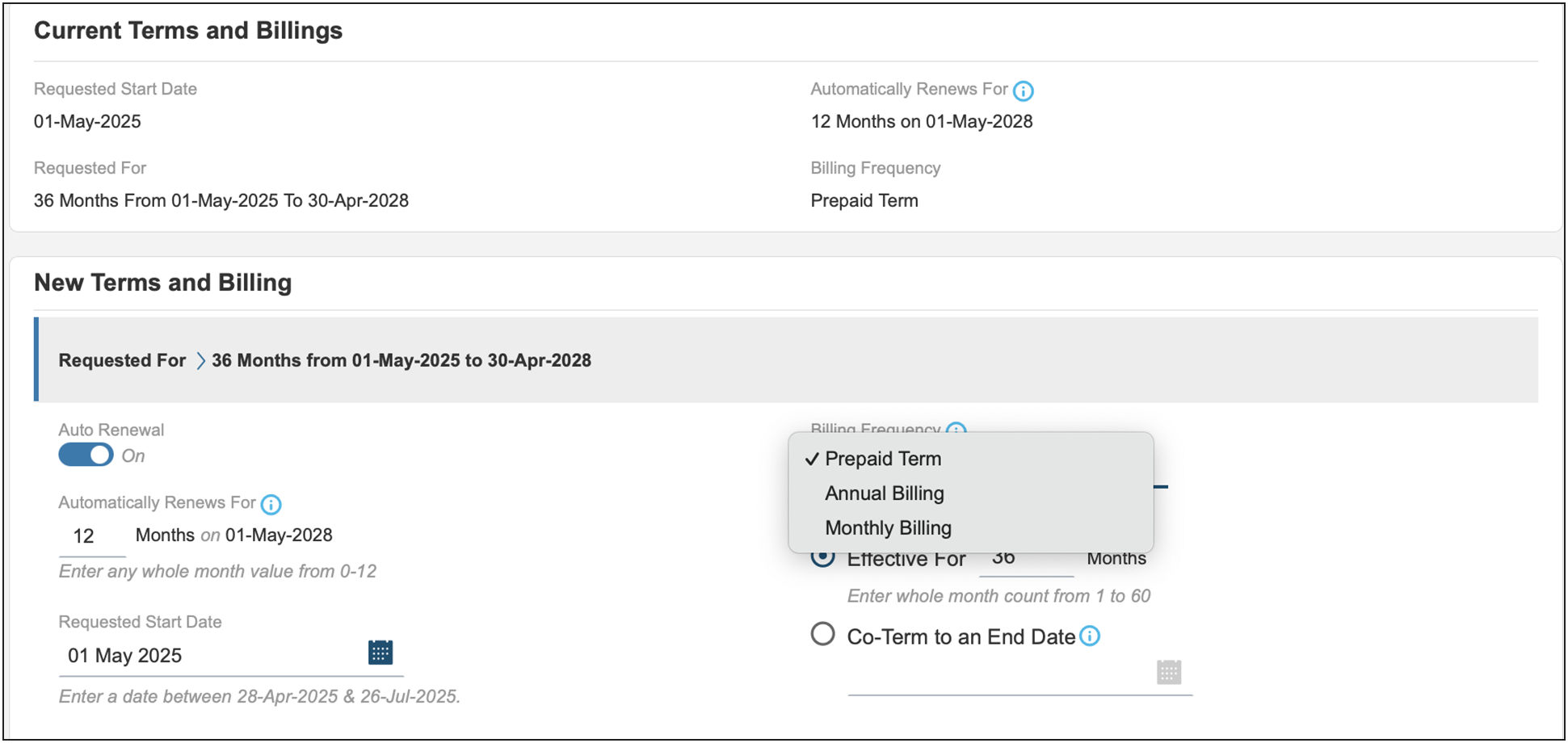
The subscription term will default to a 36-month term and prepaid term billing. Billing frequency can be changed to quarterly or annual from the drop-down section. The requested start date may also be changed at this time.
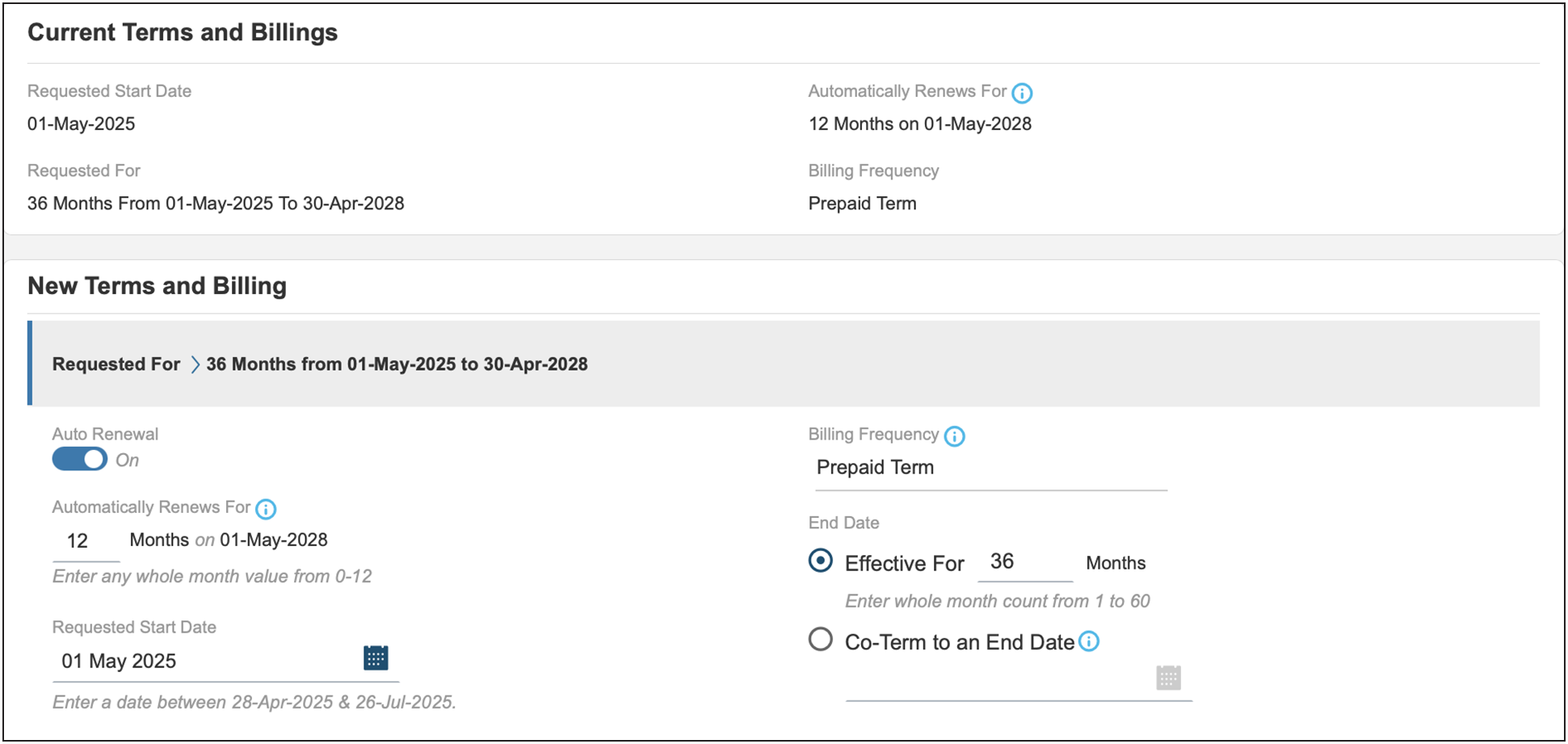
Only terms that are multiples of 12 months (for example, 12 or 36) are allowed (for example, no 42 month "co-term" subscriptions with annual billing).
The PO needs to be issued for the full amount of the entire term, but billing will occur annually or monthly at the start of each service period.
While billing is annual, monthly or upfront, the subscription is for the entire term and cannot be cancelled mid-term.
The service is provisioned, and the subscription starts on the service start date. The provisioning of the service may take up to 72 hours, assuming the order information is complete and correct.
Step 2: Selecting the product PID
When the subscription terms have been set, the next step is to add products to the subscription. The term for the product is defined by the subscription term.
Start by selecting the appropriate product(s) in the subscription configuration summary.
The guidance below uses User Protection Suite Advantage as an example. Having chosen to configure the subscription for the product, you then enter the quantity based on the number of covered users for the service.
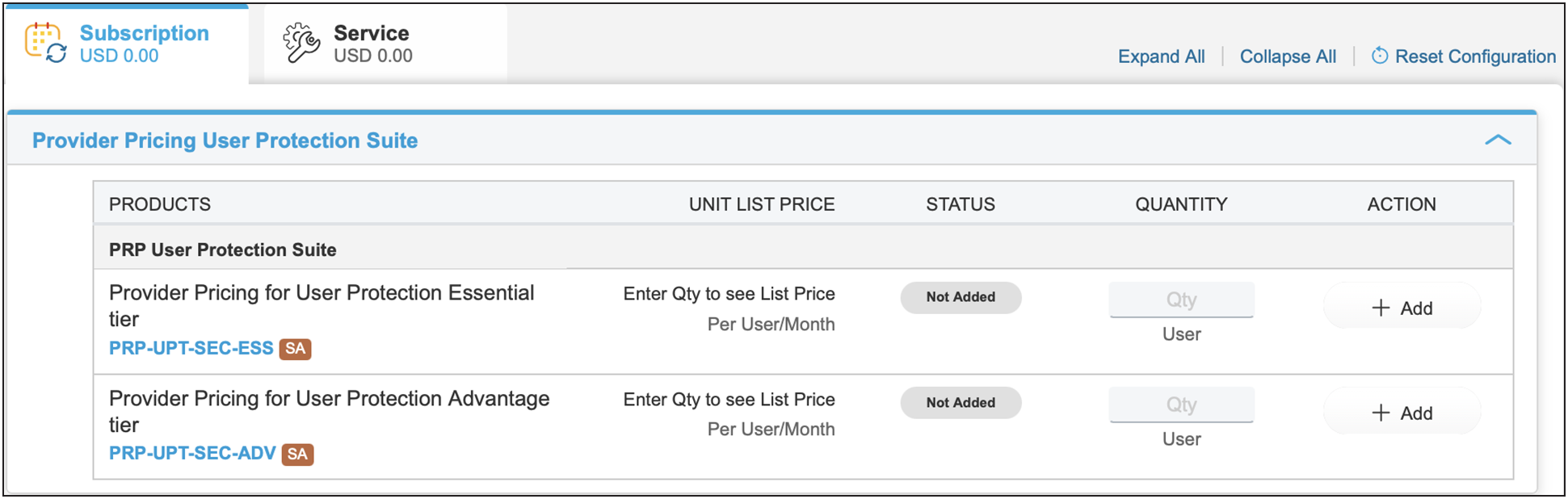
Pricing is determined dynamically according to the quantity ordered and term and is based on a tiered pricing mode. Annualized "per 12 months" prices are displayed for the selected PID. However, billing is either annual, monthly, or prepaid for the full term of the subscription, and the term amount is shown in the subtotal. There is a minimum quantity of 100 users.
Provider user protection suite and provider breach protection suite combination purchase
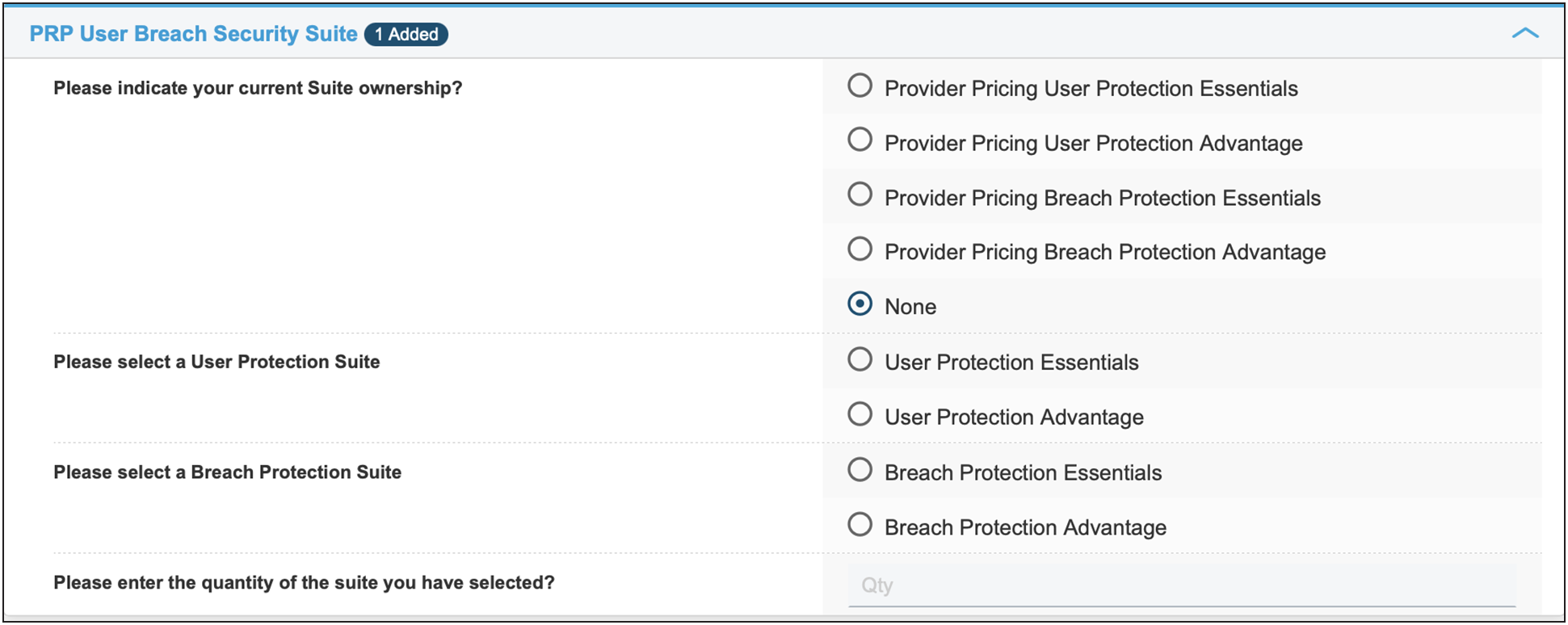
To purchase the Provider User Protection Suite and Provider Breach Protection Suite simultaneously, you can user the PRP-USRBRCH-SUITE Product PID.

Select "None" for current Suite ownership.
Select both the "Breach Protection Suite" tier and the "User Protection Suite" tier that is applicable.
Step 3: Selecting the support SKU
There is a $0 support SKU embedded.
Cisco Solution Support is in all license tiers. Included with Solution Support is:
● Solution Support TAC.
● 24/7 access to Cisco Solution Support Center for assistance via phone, fax, email, or internet.
● Fast response times: Within 30 minutes for Severity 1 and 2 calls; within one hour or next business day for Severity 3 and 4 calls.
● Access to Cisco.com for technical and general information on the Solution and Cisco Products.
● Management of technical issues and escalation to Solution Support Alliance Partners when necessary.
Note: Embedded Solution Support is solely partner-entitled, so in no event will Cisco have any obligation to provide support directly to, or respond to support requests from, an end customer.
Step 4: Provisioning information
All orders require you to provide the following end-customer information, including deployment site address.
When it comes to properly provisioning licenses, be sure to provide partner contact information.
● Input the admin email/alias of the deployment specialist team, NOT the end customer.
Failure to provide this information will delay the order provisioning process. Relevant services will be provisioned, and the subscription will begin on the service start date specified on the order. You can enter provisioning information by clicking the View/Edit link in the Provision Details section.
In the provisioning details page, enter the relevant deployment team specialist information/whomever is going to be provisioning the instance. (Do not enter end customer information, partner is responsible for information.)
After the order has been placed, a claim code will be created for the provider and emailed to the address specified for subsequent provisioning. Refer to the Security Cloud Control user guide for details. Upon activation, the managed service provider administrator will receive a welcome email with instructions to log in to the Dashboard to set up their services. When administrators have logged in to the dashboard, they will be aided by a setup guide as well as access to support resources in order to make sure their accounts are properly set up.
Step 5: Verify and save once properly configured
Cisco XDR Ordering guide for providers
Introduction
The ordering guide is designed to assist Cisco sales, partners, and distributors in ordering Cisco XDR. This guide will help you to:
● Understand the Cisco XDR product and service offers.
● Understand specific Cisco XDR offers and identify the right ones for your customers.
● Make sure that the right quantities and types of the product are selected to reduce the risk of order rejection.
● Provide information about the end-to-end quote-to-fulfillment process in the Cisco Commerce Workspace for these offers.
Audience
This guide is intended for Cisco sales, partners, and distributors qualified to sell security products and services on the Cisco Global price list and participating in the Provider Pricing for Secure Access, XDR and Security Suites program.
Scope
This ordering guide provides information about quoting, ordering, and pricing for Cisco XDR products and services that are available on the Cisco Global price list.
Cisco XDR Overview
Cisco XDR combines multiple security technologies, leveraging AI for enhanced threat detection, streamlined security operations, and improved efficiency, providing a unified defense approach. Designed to address the challenges faced by security analysts, it offers a cloud-native, extensible solution that brings data from multiple security tools and applies machine learning and analytics to arrive at correlated detections. Additionally, it allows for remediation actions to mitigate threats.
With Cisco XDR, security teams can detect threats beyond the endpoint by making the network equally foundational. The solution brings the entire environment together by connecting third-party offerings and providing underlying threat intelligence from Cisco Talos to enrich incidents with added context and asset insights. It reduces false positives and enhances threat detection and response through clear prioritization of alerts and providing the shortest path from detection to response.
With a focus on remediating the most critical incidents using evidence-backed automation, Cisco XDR presents a new approach that surpasses the traditional approach centered on endpoint detection and response (EDR). It shifts the focus of security teams to achieve and address outcomes such as detecting threats sooner, prioritizing threats by impact, speeding up investigations, and accelerating response. This empowers SOC teams to act with increased efficiency, confidence, and speed, without getting bogged down in endless investigation.
License tiers
Cisco XDR is offered in two license tiers:
● Cisco XDR Essentials
● Cisco XDR Advantage
Cisco XDR Essentials tier
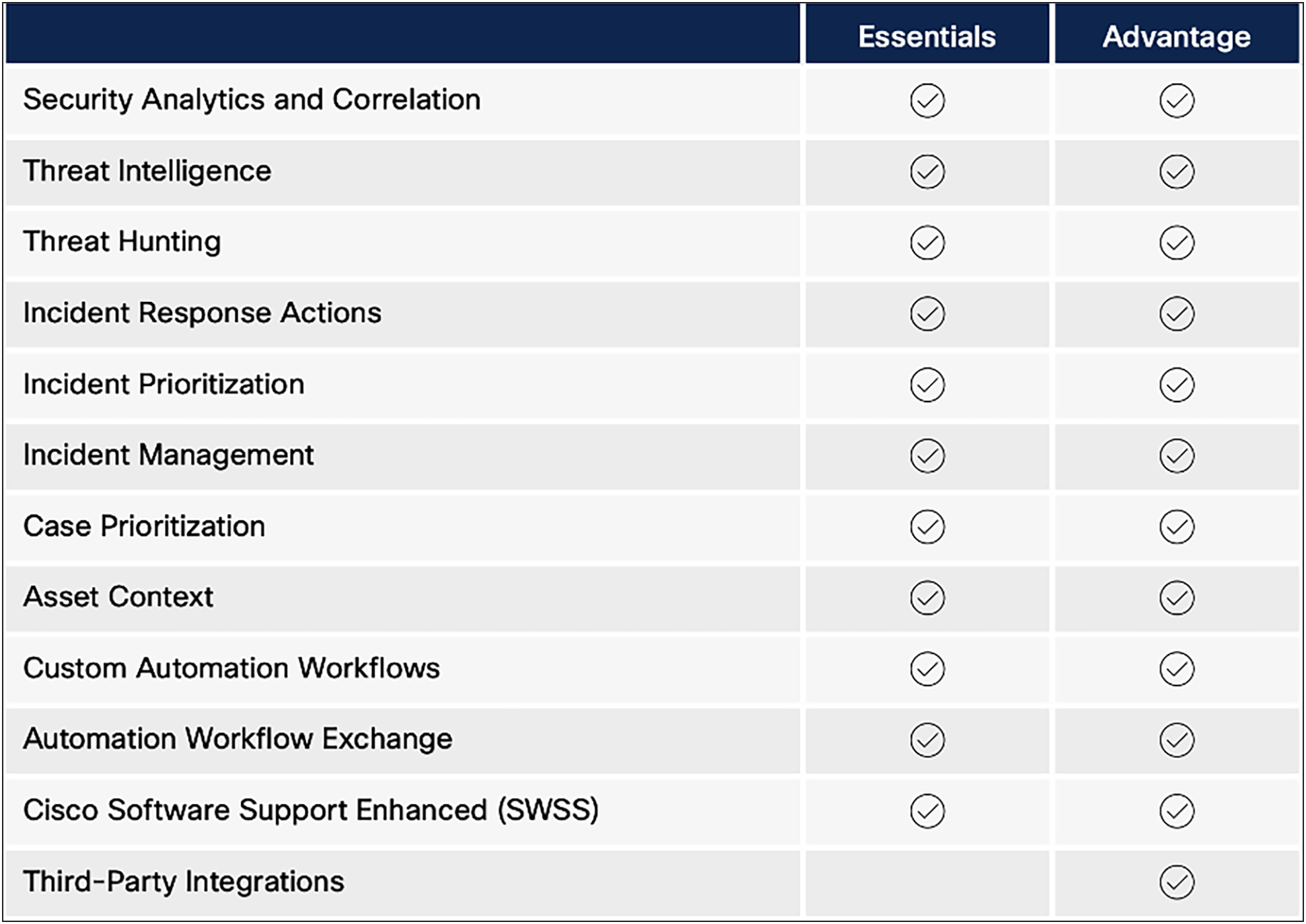
The Cisco XDR Essentials license tier provides the following capabilities:
● Built by practitioners for practitioners with built-in integrations across the Cisco security portfolio so analysts can detect and respond to the most sophisticated threats.
● Data ingestion limit of 2GB per user per month.
● Data retention limit of 90 days by default.
● Cisco Solution Support included at no additional cost.
Cisco XDR Advantage tier
The Cisco XDR Advantage license tier includes all features and included Solution support in the Essentials tier, plus commercially supported and curated integrations with select third party tools to rapidly respond to threats regardless of vector or vendor.
Cisco XDR Support services
Cisco Solution Support is in all license tiers. Included with Solution Support is:
● Solution Support TAC.
● 24/7 access to Cisco Solution Support Center for assistance via phone, fax, email, or internet.
● Fast response times: Within 30 minutes for Severity 1 and 2 calls; within one hour or next business day for Severity 3 and 4 calls.
● Access to Cisco.com for technical and general information on the Solution and Cisco Products.
● Management of technical issues and escalation to Solution Support Alliance Partners when necessary.
● Note:Note: Embedded Solution Support is solely partner-entitled, so in no event will Cisco have any obligation to provide support directly to, or respond to support requests from, an end customer.
How to order Cisco XDR
Cisco XDR can be ordered using the appropriate license and subscription part numbers.
| SKU Type |
SKU |
Description |
| Subscription |
PRP-XDR-SEC-SUB |
Provider Pricing for XDR Subscription Offer |
| Product |
PRP-XDR-ADV |
Provider Pricing for XDR Advantage tier |
| Product |
PRP-XDR-ESS |
Provider Pricing for XDR Essentials tier |
Please take the following steps to order Cisco XDR through the respective billing platforms.
Step by Step Order Flow
1. All orders can be submitted directly through Cisco Commerce Workspace.
2. Begin by searching for the Cisco XDR license part number: PRP-XDR-SEC-SUB and "Add" it.

3. Go to "Edit Options."
4. Enter the quantity of Covered Users for the desired tier being purchased: Cisco XDR Essentials (PRP-XDR-ESS) or Cisco XDR Advantage (PRP-XDR-ADV). After the number is entered, the Configuration Summary is updated with pricing for the default options.
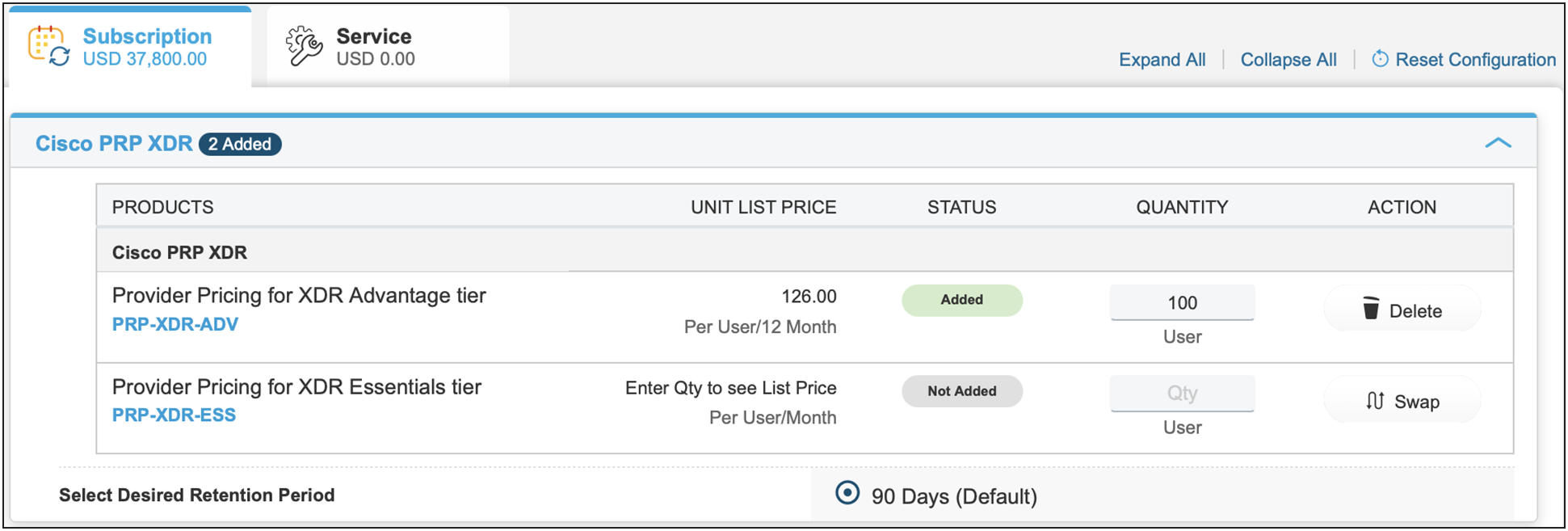
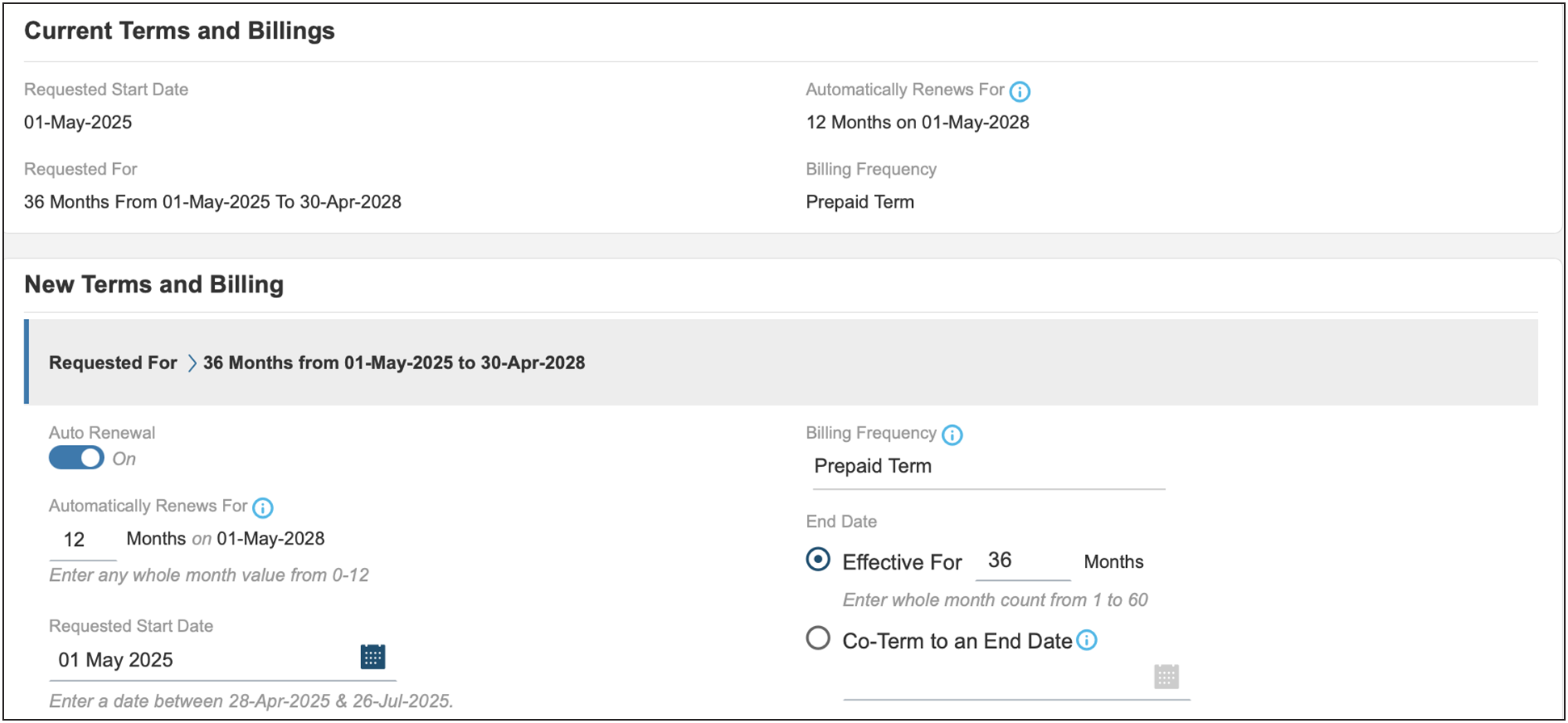
5. Cisco XDR accounts are term-based subscriptions of 1, 3, or 5 years. Terms of 1 or 5 years will require editing the "Requested Terms and Billing."
6. Cisco XDR accounts allow pre-paid as well as Periodic billing. Periodic billing (Annual or Monthly) will require editing the "Requested Terms and Billing."
7. Cisco Solution Support is included in the Cisco XDR subscription license.
8. Once the configuration has been saved and added to the order, add the provisioning contact email address. Note that this is the managed service provider or NOC email address that will receive instructions for provisioning the product and become an administrator in the product.
Provisioning information
All orders require you to provide the following end-customer information, including deployment site address.
When it comes to properly provisioning licenses, be sure to provide partner contact information.
● Input the admin email/alias of the deployment specialist team, NOT the end customer.
Failure to provide this information will delay the order provisioning process. Relevant services will be provisioned, and the subscription will begin on the service start date specified on the order. You can enter provisioning information by clicking the View/Edit link in the Provision Details section.
In the provisioning details page, enter the relevant deployment team specialist information/whomever is going to be provisioning the instance. (Do not enter end customer information, partner is responsible for information.)
After the order has been placed, a claim code will be created for the provider and emailed to the address specified for subsequent provisioning. Refer to the Security Cloud Control user guide for details. Upon activation, the managed service provider administrator will receive a welcome email with instructions to log in to the Dashboard to set up their services. When administrators have logged in to the dashboard, they will be aided by a setup guide as well as access to support resources in order to make sure their accounts are properly set up.
9. Verify and save once properly configured.
Cisco breach protection suite ordering guide for providers
Introduction
The ordering guide is designed to help Cisco sales, partners, and distributors order the Cisco Breach Protection Suite. This guide will help you:
● Understand Cisco Breach Protection Suite products and service offers.
● Understand specific Cisco Breach Protection Suite offers and identify the right ones for your customers.
● Make sure that the right quantities and types of the product are selected to reduce the risk of order rejection.
● Provide information about the end-to-end quote-to-fulfillment process in the Cisco Commerce Workspace.
Audience
This guide is intended for Cisco sales, partners, and distributors qualified to sell security products and services on the Cisco Global price list.
Scope
This ordering guide provides information about quoting, ordering, and pricing for Cisco Breach Protection Suite products and services that are available on the Cisco Global price list.
Overview of solution
Cisco Breach Protection Suite empowers security teams to simplify operations and accelerate incident response across the most prominent attack vectors including email, endpoints, network, and cloud environments. It provides unified protection that combines multiple security technologies and leverages AI for enhanced threat detection, streamlined security operations, and improved efficiency. Breach Protection Suite addresses challenges faced by security analysts with a cloud native, extensible approach that brings data from multiple security tools and applies machine learning and analytics to arrive at correlated detections. Additionally, it allows for guided remediation actions to mitigate threats. Moreover, Breach Protection Suite brings email, endpoint, network, and cloud environments together by integrating Cisco security portfolio solutions as well as select third-party tools while providing underlying threat intelligence from Cisco Talos to enrich incidents with added context and asset insights. This allows customers to quickly detect and prevent advanced attacks such as phishing, ransomware, insider threats, unknown malware, and data exfiltration. As a result, security teams can shift their focus to achieving outcomes such as detecting threats sooner, prioritizing threats by impact, speeding up investigations, and accelerating response. This empowers SOC teams to act with increased efficiency, confidence, and speed, without getting bogged down in endless investigations.
The Cisco Breach Protection Suite is currently offered for partners participating in the program through two tiers.
● Essentials
● Advantage
The products available as a part of the respective tiers are as follows.
|
|
Entitlements |
Breach Protection Essentials |
Breach Protection Advantage
|
| Secure Endpoint Advantage |
Two endpoints per user purchased |
X |
X |
| Cisco XDR Essentials All Cisco Telemetry |
N/A (per user) |
X |
X |
| Email Threat Defense |
N/A (per user) |
X |
X |
| Cisco XDR Advantage Third Party and Public Cloud Telemetry |
N/A (per user) |
|
X |
| Secure Endpoint Premier Includes Talos Threat Hunting |
Two endpoints per user purchased |
|
X |
| Secure Network Analytics |
Five flows per second per user purchased |
|
X |
| Cisco Telemetry Broker |
0.2 of 100GB per user purchased |
|
X |
Cisco breach protection tiers
The Essentials tier provides the following products. (For expanded definitions on each product, please see the Appendix.)
Secure endpoint advantage
The Advantage tier of Secure Endpoint includes advanced Endpoint Detection and Response capabilities.
Cisco XDR Essentials
XDR Essentials includes the following capabilities, with all Cisco telemetry sources:
● Built by practitioners for practitioners with built-in integrations across the Cisco security portfolio so analysts can detect and respond to the most sophisticated threats.
● Native integration of the full Cisco security portfolio so analysts can detect and respond to the most sophisticated threats.
● Data ingestion limit of 2GB per user per month.
● Data retention limit of 90 days by default.
● Data residency and sovereignty in the United States by default.
Email threat defense
In addition to the products found in the Essentials tier, the Advantage tier provides the following products.
Cisco XDR Advantage
The Advantage tier provides the following capabilities:
Includes all software features and Enhanced support in Essentials, plus commercially supported and curated integrations with select third-party tools to rapidly respond to threats regardless of vector or vendor.
Secure network analytics
Cisco telemetry broker
As a part of the Breach Protection Suite Advantage tier, customers are explicitly entitled to Flow Rate Licenses. Along with the Flow Rate Licenses, access to all necessary virtual appliances required to run the software (Secure Network Analytics Manager, Flow Collector and Data Store) are also included. These individual virtual appliances are no longer individually licensed and can be downloaded from software.cisco.com. As long as the customer has flow rate license activated with Smart Licensing, their virtual appliances will self-entitle and register with the customer's smart account. Note: This does not include the Flow Sensor or the Threat Intelligence license, which would need to be added separately.
When ordering the Breach Protection Suite, the customer can also add on the "User Protection Suite Add-On," which includes only the incremental products needed to create a comprehensive User Protection and Breach Protection solution. Additional details on these add-on PIDS are available in the ordering section.
Add-Ons
User protection suite Add-On
The User Protection Suite add-on is available in two tiers: Essentials and Advantage.
User Essentials Add-On
● Cisco Secure Access Essentials: Cisco Secure Access Essentials Secure Internet Access: SIA Essentials and Secure Private Access- SPA Essentials) includes everything you need to securely connect users to the Internet, public apps, and private apps. This includes zero trust network access, cloud access security broker, DNS protection, secure web gateway, layers 3 and 4 cloud delivered firewall, limited secure malware analytics, and remote browser isolation for risky apps.
● Duo Advantage: Duo Advantage offers everything needed to secure access and boost user productivity, including MultiFactor Authentication, Phishing Resistant Authentication, Single Sign On, Passwordless, Trusted Endpoints, Device Checks, and Risk-Based Authentication.
User Advantage Add-On
In addition to the products in the Essentials Tier, the User Protection Advantage add-on includes:
● Secure Access Advantage (Secure Internet Access: SIA Advantage and Secure Private Access: SPA Advantage), which includes everything you need to securely connect users to the Internet, public apps, and private apps. In addition to core capabilities, it includes layer-7 cloud delivered firewall, an intrusion prevention system, data loss prevention for web apps, and remote browser isolation for all apps.
● ISE Premier.
● Secure Access Advantage.
Cisco breach protection support services
Cisco Solution Support is embedded in all license tiers. Included with Solution Support is:
● Solution Support TAC.
● 24/7 access to Cisco Solution Support Center for assistance via phone, fax, email, or internet.
● Fast response times: Within 30 minutes for Severity 1 and 2 calls; within one hour or next business day for Severity 3 and 4 calls.
● Access to Cisco.com for technical and general information on the Solution and Cisco Products.
● Management of technical issues and escalation to Solution Support Alliance Partners when necessary.
● Note: Embedded Solution Support is solely partner-entitled, so in no event will Cisco have any obligation to provide support directly to, or respond to support requests from, an end customer.
How to order Cisco breach protection suite
Cisco Breach Protection Suite can be ordered using the appropriate License and Subscription part numbers. Provider Pricing for Security Suites eliminates user bands and offers one flat list price across all end customer deployments.
Subscription PID
There is only one subscription PID for Cisco Breach Protection Suite. The term of the subscription and quantity of Users purchased applies to all products included in the subscription.
| PID type |
PID |
Description |
| Subscription |
PRP-BRCHPRT-SUITE |
Provider Pricing for Breach Protection Suite |
Product PIDs
There are three PIDs for Breach Protection Suite, Essentials, Advantage and Premier packages. Pricing follows a tiered pricing model and is calculated dynamically based on user counts and the term of the subscription.
| PID type |
PID |
Description |
| Product |
PRP-BPT-SEC-ESS |
Provider Pricing for Breach Protection Essential |
| Product |
PRP-BPT-SEC-ADV |
Provider Pricing for Breach Protection Advantage |
Support SKUs
There is one $0 SKU for embedded support.
Step 1: Selecting the subscription SKU
There is one Cisco Breach Protection Suite subscription PID (PRP-BRCHPRT-SUITE). There is no price for the subscription PID. Pricing is determined when product PIDs are added and configured. Select a quantity of one because each end customer may have only one subscription. Product quantities will be entered when the product PIDs are added to the subscription.

Note: Each end customer may have only one active subscription of Cisco Breach Protection Suite.
This means that:
● Each order may contain only one top-level line item of PRP-BRCHPRT-SUITE.
● Each end customer may have only one active order for PRP-BRCHPRT-SUITE.
Attempts to place multiple concurrent orders for PRP-BRCHPRT-SUITE or to place an order with multiple line items of PRP-BRCHPRT-SUITE will be rejected. To change products or quantities for an end customer, place a Change- Subscription order.
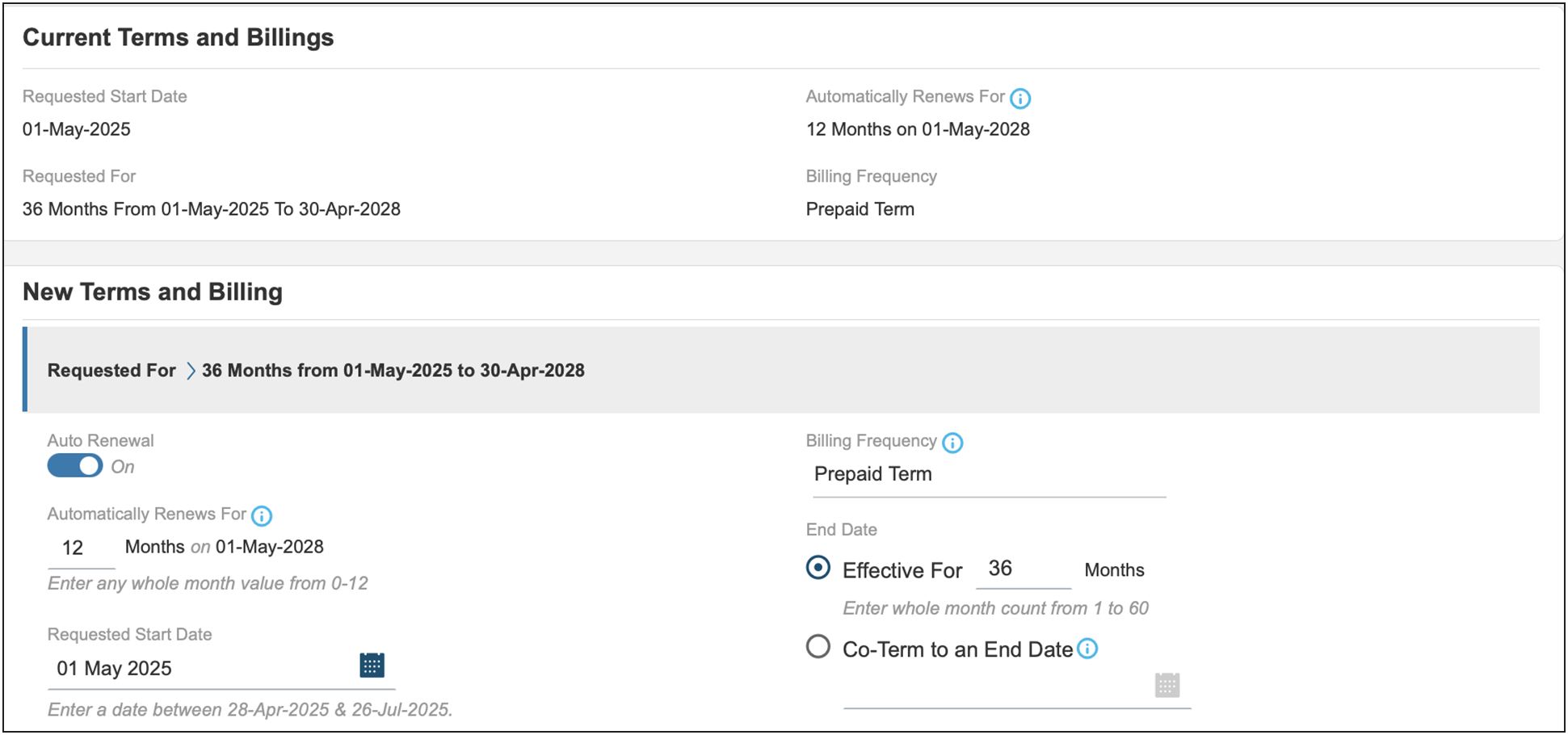
Only terms that are multiples of 12 months (for example, 12 or 36) are allowed (for example, no 42 month "co-term" subscriptions with annual billing).
The PO needs to be issued for the full amount of the entire term, but billing will occur annually or monthly at the start of each service period.
While billing is annual, monthly or upfront, the subscription is for the entire term and cannot be cancelled mid-term.
The service is provisioned, and the subscription starts on the service start date. The provisioning of the service may take up to 72 hours, assuming the order information is complete and correct.
Step 2: Selecting the product PID
When the subscription terms have been set, the next step is to add products to the subscription. The term for the product is defined by the subscription term.
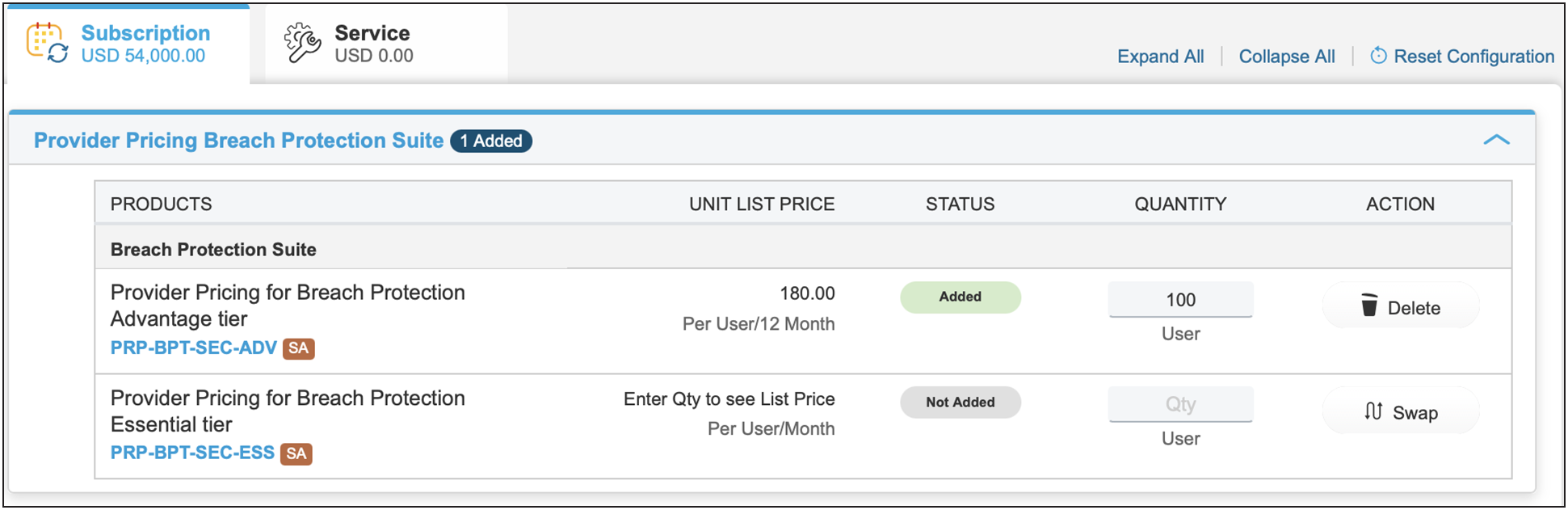
Start by selecting the appropriate product(s) in the subscription configuration summary. The guidance below uses Breach Protection Suite Advantage as an example. Having chosen to configure the subscription for the product, you then enter the quantity based on the number of covered users for the service.
Provider user protection suite and provider breach protection suite combination purchase
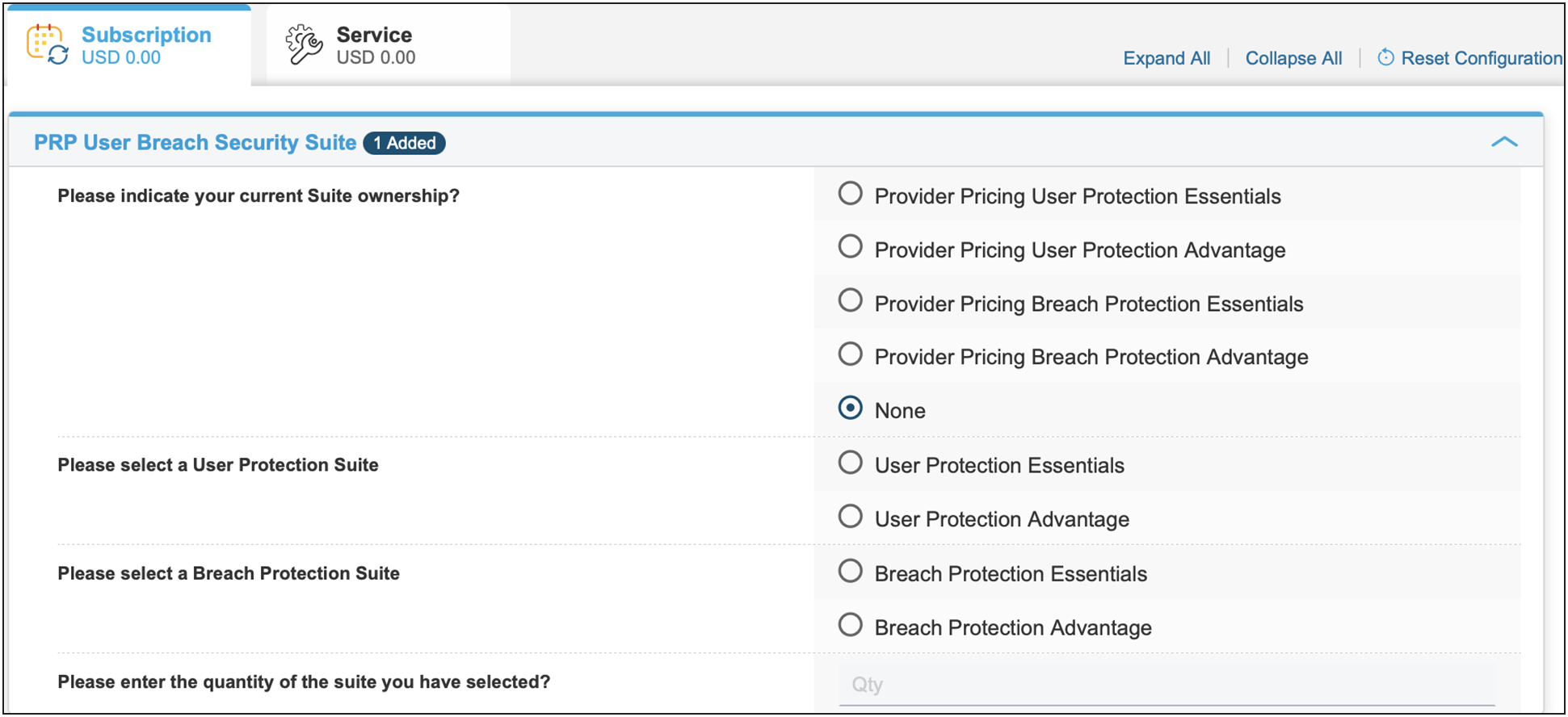
To purchase the Provider User Protection Suite and Provider Breach Protection Suite simultaneously, you can user the PRP-USRBRCH-SUITE Product PID.

Select "None" for current Suite ownership.
Select both the "Breach Protection Suite" tier and the "User Protection Suite" tier that is applicable.
Step 3: Selecting the support SKU
There is a $0 support SKU embedded.
Cisco Solution Support is in all license tiers. Included with Solution Support is:
● Solution Support TAC.
● 24/7 access to Cisco Solution Support Center for assistance via phone, fax, email, or internet.
● Fast response times: Within 30 minutes for Severity 1 and 2 calls; within one hour or next business day for Severity 3 and 4 calls.
● Access to Cisco.com for technical and general information on the Solution and Cisco Products.
● Management of technical issues and escalation to Solution Support Alliance Partners when necessary.
● Note: Embedded Solution Support is solely partner-entitled, so in no event will Cisco have any obligation to provide support directly to, or respond to support requests from, an end customer.
Step 4: Provisioning information
All orders require you to provide the following end-customer information, including deployment site address.
When it comes to properly provisioning licenses, be sure to provide partner contact information.
● Input the admin email/alias of the deployment specialist team, NOT the end customer.
Failure to provide this information will delay the order provisioning process. Relevant services will be provisioned, and the subscription will begin on the service start date specified on the order. You can enter provisioning information by clicking the View/Edit link in the Provision Details section.
In the provisioning details page, enter the relevant deployment team specialist information/whomever is going to be provisioning the instance. (Do not enter end customer information, partner is responsible for information.)
After the order has been placed, a claim code will be created for the provider and emailed to the address specified for subsequent provisioning. Refer to the Security Cloud Control user guide for details. Upon activation, the managed service provider administrator will receive a welcome email with instructions to log in to the Dashboard to set up their services. When administrators have logged in to the dashboard, they will be aided by a setup guide as well as access to support resources in order to make sure their accounts are properly set up.
Security Cloud Control
Suites are provisioned through Security Cloud Control. Security Cloud Control is a web application that provides centralized management of Cisco Secure product activation, user identity, and user access management across the Cisco Security Cloud. Security Cloud Control administrators can create new Security Cloud enterprises, manage users in an enterprise, claim domains, and integrate their organization's SSO identify provider, among other tasks.
When a new Suite subscription is purchased from Cisco, a subscription claim code is emailed to the initial provisioning contact specified during the purchase process. This contact is entered into the mandatory "Provisioning Contact Email" field. Be sure to specify the appropriate contact who will be responsible for provisioning the new subscription as only the specified contact will receive this email. This person will be designated as the Security Cloud enterprise administrator and will use the code received via email to claim the subscription for the current enterprise. If for any reason the order is inadvertently or incorrectly completed with the wrong contact email, the claim code email can be forwarded to the right contact if the claim code has not been already used.
Step 5: Verify and save once properly configured
Definitions
Duo Advantage
● Multi-Factor Authentication (MFA) designed to protect against stolen credentials and account takeover.
● Phishing Resistant Authentication to help prevent attackers from bypassing MFA (includes verified Duo push and support for FIDO2 authenticators).
● Single Sign On (SSO) allows users to log in only once to access multiple applications with Duo SSO.
● Passwordless sign-on enables secure log in without a password, using Duo Mobile or FIDO2 authenticators.
● Trusted Endpoints, checks that device is registered or managed, before allowing access.
● Device Health Check confirms device security posture before granting access and provides visibility into security health of devices trying to gain access.
● Risk-Based Authentication dynamically adjusts the authentication requirements in real-time based on risk signals.
● Threat Detection detects potential attack attempts in progress using Machine Learning with DuoTrust Monitor.
● Provides support for internal web applications (HTTPS) and servers via SSH, RDP and SMB.
● Provides integration with Cisco Secure Endpoint to prevent infected devices from accessing resources.
● Checks for presence of EDR/AV agents.
Cisco Secure access essentials
● Secure Access Essentials includes everything you need to securely connect users to the Internet, public apps, and private apps.
● Secure Private Access (SPA) using Zero Trust Network Access and VPNaaS for managed and unmanaged devices.
● Secure Internet Access (SIA) enabled through roaming security, VPN tunnel, IPsec tunnel, PAC files, proxy chain, and SD-WAN integration.
● DNS protection and Firewall-as-a-Service for layer 3 and layer 4 controls of web and private apps.
● Secure web gateway capabilities including proxy for web traffic, URL filtering, content filtering, advanced app controls.
● CASB: Cloud app discovery, risk scoring, blocking, cloud malware detection; SaaS app activity controls and tenant controls.
● Secure Malware Analytics (sandbox) for suspicious files. Limited to 500 samples per day.
● Experience Insights (Digital Experience Monitoring) provides end-to-end monitoring of end-user experience when accessing the Internet and corporate resources.
Email threat defense
Cisco Secure Email Threat Defense (formerly known as Cloud Mailbox) includes:
● Detect and block threats with superior threat intelligence from Cisco Talos, one of the largest threat research and efficacy teams.
● Combat advanced threats using Cisco Secure Email Threat Defense and Malware Analytics.
● Get complete visibility into inbound, outbound, and internal messages.
● Leverage fast, API-driven remediation of messages with malicious content.
● Use an integrated dashboard for search, reporting, and tracking, including conversation view and message trajectory.
● Enhance Microsoft 365 email security in less than 5 minutes without changing the mail flow.
Cisco Secure access advantage
Secure Access Advantage includes everything you need to securely connect users to the Internet, public apps, and private apps. In addition to Secure Access Essentials capabilities, it includes Secure Internet Access (SIA) Advantage and Secure Private Access (SPA) Advantage features:
● Layer 7 application visibility and control identifies thousands of applications and blocks/allows them.
● Multimode Data Loss Protection (DLP) to detect and protect sensitive information.
● Intrusion Prevention System (IPS) that examines network traffic flows (including decryption for private and internet traffic) and prevents vulnerability exploits with an added layer of threat prevention.
● Remote Browser Isolation (extended set of options beyond the core set of risky sites): Isolates web traffic from the user device and the threat, so that users can safely access any websites.
● Secure Malware Analytics (sandbox) for suspicious files. Unlimited samples per day. Three Secure Malware Analytics cloud users.
Secure endpoint advantage
The Advantage tier of Secure Endpoint includes advanced Endpoint Detection and Response capabilities:
● Defense of endpoints and remote workers against sophisticated malware from the point of entry through propagation to post-infection remediation.
● Detection and blocking of malware, confirmation of infection, path-tracing behavior analysis, target remediation, and a report on malware impact.
● Speedy response times and automation of remediation to prevent future attacks, mitigate damage and eliminate the risk of reinfection.
● Identification of indicators of compromise at both the network and system levels, typically missed by single-purpose detection technologies.
● Use of Cisco Security Intelligence Operations global network of sensors, as well as intelligence collected from the Talos Security Intelligence and Research Group, to provide collective security intelligence protection to benefit from the billions of malware samples analyzed monthly.
● Ability to isolate infected endpoints from the rest of the network to contain threats without loss of forensic data. Fast endpoint reactivation upon completion of remediation.
● Orbital Advanced Search: On-demand deep endpoint search using osquery for capturing forensic data and other observables on an endpoint.
● Threat Grid Cloud: Access to Threat Grid Cloud Console for in-depth malware threat intelligence.
● Risk-based Vulnerability: Identify vulnerabilities in your environment, with risk scores to prioritize remediation. Enabled through integration with Kenna Security.
● Secure Malware Analytics (sandbox) for suspicious files. 200 samples per day. Three Secure Malware Analytics cloud users if purchase 500 or more Users. One Secure Malware Analytics cloud user if purchase less than 500 Users.
Secure network analytics
Cisco Secure Network Analytics uses a combination of behavioral modeling, machine learning, and global threat intelligence. Providing enterprise-wide network visibility and application of advanced security analytics to detect and respond to potential threats such as insider threats, command and control attacks, ransomware, Distributed Denial-Of-Service (DDoS) attacks, illicit cryptomining, and unknown malware. This coverage is across the entire distributed network.
Cisco telemetry broker
Telemetry Broker optimizes telemetry pipelines for the hybrid cloud by simplifying the consumption of data for customers' business critical tools. Telemetry Broker includes the ability to route and replicate telemetry data from a source location to multiple destination consumers, the ability to filter data that is being replicated to consumers for fine grain control over what consumers are able to see and analyze, and the ability to transform data protocols from the exporter to the consumer's protocol of choice.
Understanding the ordering process
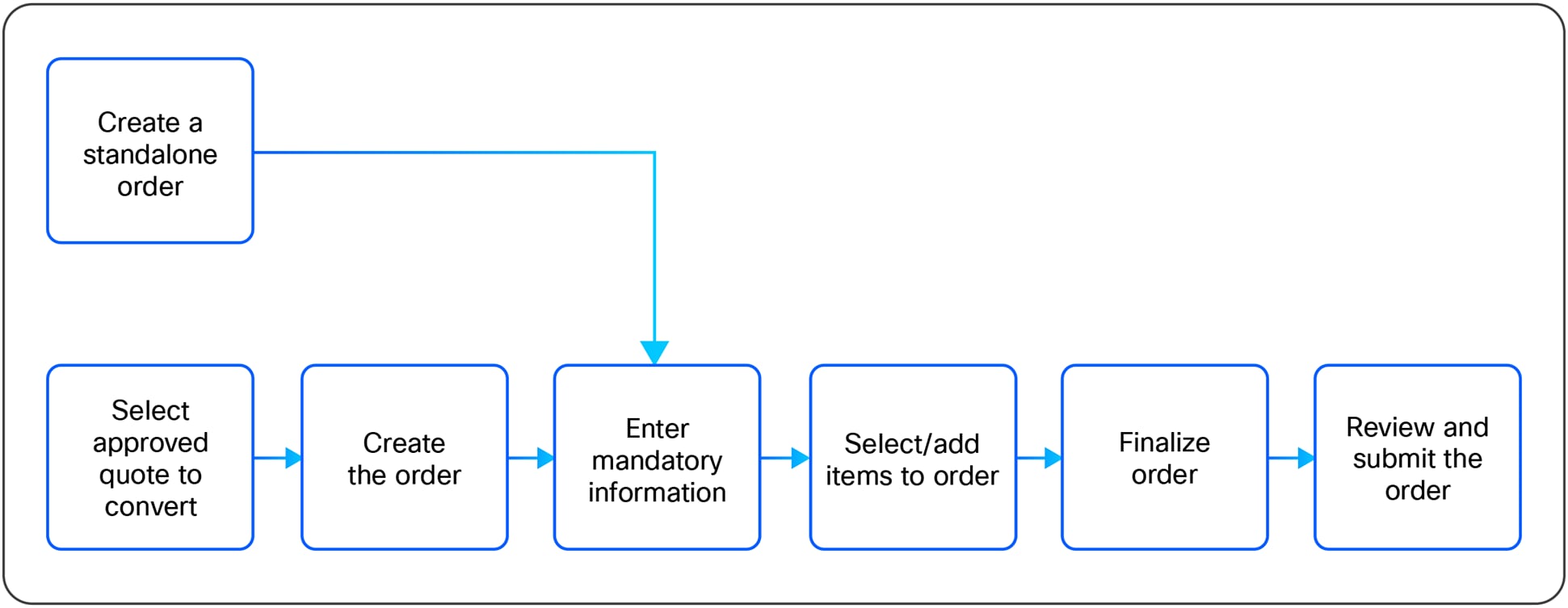
Cisco Commerce Workspace (CCW) CCW is the primary tool used for ordering Cisco products and new services offered on the Cisco Price List. Three main steps are involved in creating an order: Creating a quick quote, converting a quote to an order, and submitting an order. For more details about how to use the Cisco Commerce Workspace, visit forums.cisco.com/OperationsExchange.
The Cisco Commerce Workspace also acts as a quoting, pricing, configuration, and status tool.
Cisco suites and A La Carte renewals, cancellations, and changes
Automatic renewal: Cisco User Protection subscriptions automatically renew for an additional 12-month term by default. No quoting or ordering is required. Starting 120 days before the end of the initial term, renewal notices will be sent to the customer or partner. The customer or partner will receive an invoice at the start of the new term. You can cancel a renewal up to 30 days before the start date of the new term. If the subscription is not canceled 30 days before the start of the new term, the subscription will auto-renew. Midterm cancellations of subscriptions for credit are not allowed.
Manual renewal: Any subscription can be manually renewed if the customer or partner desires, with standard terms of 12 or 36 months. For manual renewals, quotes are created using the same process as the Change- Subscription process outlined below. This process will create a new quote. After a quote is approved, it can be converted to an order following the standard process.
Subscription cancellations: Renewals may be canceled up to 30 days before the start date of the new term. If the subscription is not canceled 30 days before the start of the new term, the subscription will automatically renew. Midterm cancellations of subscriptions for credit are not allowed.
Renewals for term and content platform: All Cisco User Protection Suite renewal quotes will be initiated by Cisco to make sure that partners, distributors, and customers receive incentives offered as part of renewal programs or promotions. The Customer Experience Operations (CEOps) team will identify these quotes anywhere from 60 to 90 days before expiration. Once a quote is created, a member of the Renewals Specialists team will contact the appropriate partner or distributor to engage with the customer for the order.
Customer, Partner, or Distributor-Led quoting: If you have not received a quote and need to request one, please reach out to your renewal sales representative with the following information:
● End customer information: Name, address, email of contact.
● Partner information: Name, address, email, Cisco.com ID of the person placing the order.
● Distributor name and contact information (if purchasing from a distributor).
● Serial numbers or contract numbers for coverage: Review the Cisco welcome letter for contract numbers or the Cisco Services Contract Center.
● Start and end dates of new coverage.
● Previous sales order (if available): The Security Renewals Specialists Team will generate the quote and return the information to discuss pricing. Depending on the complexity, the completeness of information, and the pricing requested, this process takes seven to ten days.
Note:
● The software license contract start date is one day after the ship date.
● The software license start date is the day the license is activated.
● The software license end date is the end date of the software license contract.
● The renewal start date is one day after the end date of the old contract.
● The customer has the option to delay the license PAK delivery up to 60 days. However, this option must be selected during ordering.
Partner and distributor ordering guidelines
Channel Booking Neutrality and Distribution Sales Visibility (DSV)
Cisco Secure Access is a SaaS offer. Any quote lines for SaaS offers will be automatically confirmed for Channel Booking Neutrality (CBN) order processing. A US $100,000 minimum threshold must be met for non-SaaS offers to be eligible for CBN processing. This threshold does not apply to SaaS offers, which will be processed using CBN regardless of deal size.
Distributors using Distribution Sales Visibility (DSV) should continue to use the CBN process for SaaS offers, which cannot be processed with DSV.
Non standard discounting and DART
Cisco Secure Access quote lines are not included in the distributor authorization Deviation Authentication Request Tool (DART). As a SaaS offer, Cisco Secure Access will be automatically confirmed for CBN order processing, where any approved nonstandard discount is provided to the distributor at the time of ordering. A DART is therefore not needed for the distributor to claim the discount after the order is processed. CBN-confirmed quote lines are not included in the DART, but will be included with the Deal ID that is approved along with any discounts.
Hybrid orders by distributors
Cisco is able to process hybrid orders. These are defined as SaaS SKUs and hardware and/ or software SKUs that are quoted and ordered together. For CBN order creation, the distributor can place orders with their CBN Direct Value-Add Distributor (DVAD) ID. SaaS SKU order lines will be automatically confirmed. You can manually confirm hardware and on-premises lines if the total order is greater than US $100,000.
Note: Cisco distributors have an assigned CBN DVAD ID for processing orders on Cisco Commerce. When ordering SaaS SKUs, distributors must use their CBN DVAD ID unless they are DSV enabled and their CBN profile flag is disabled. Distributors that are DSV enabled and whose CBN profile is disabled will place SaaS and hybrid orders using contractual BIDs and the net-price flow. (Refer to the net-price solution for SaaS and on-premises orders).
Additional resources
For more information on quoting, ordering, and product support, please visit the web pages described in Table 8.
| Topic |
Description |
| General ordering support |
Use My Cisco Workspace to open and manage service cases for orders, quotes, returns, deals, service contracts, profiles and logins, tool access, training, reporting, feedback, and more. |
| Product support |
For products purchased from Cisco, customers partners will obtain product support from Cisco TAC using the Online Support Case Manager tool. |
| IT-specific support (internal only) |
For Internal audiences experiencing IT issues, go to the Service Request Management tool to open and track cases. |
| Licensing and PAK registration |
A self-service License Registration Portal is available for many licensing functions. You may also get assistance from the Global Licensing Operation (GLO) team by opening a case using the Support Case Manager tool. |
| Partner program support licenses |
Visit the Partner main page for more information on partner programs, trainings, specializations, certifications, and much more. |
| Partner helpline |
The Partner helpline provides presales product support, and the Cisco Commerce Workspace provides full Commerce Workspace support. |
| Deal registration guidance contracts |
For help transitioning your existing deals to Cisco, please work with your account managers and security account managers to obtain the necessary guidance. |
| Cisco commerce workspace |
Submit hardware and new service orders, check order status, and create configurations at cisco-apps.cisco. com/cisco/psn/commerce. Training link: forums.cisco.com/OperationsExchange |
| Cisco web-based tool suite |
View, renew, and make changes to service contracts at cisco.com/ web/services/ordering/cscc/index.html. |