Cisco Multicloud Defense for Government Ordering Guide
Available Languages
Bias-Free Language
The documentation set for this product strives to use bias-free language. For the purposes of this documentation set, bias-free is defined as language that does not imply discrimination based on age, disability, gender, racial identity, ethnic identity, sexual orientation, socioeconomic status, and intersectionality. Exceptions may be present in the documentation due to language that is hardcoded in the user interfaces of the product software, language used based on RFP documentation, or language that is used by a referenced third-party product. Learn more about how Cisco is using Inclusive Language.
This document describes the pricing, packaging, and ordering process for Cisco Multicloud Defense for Government as an à la carte offering.
Audience: This guide is intended for Cisco field teams and any customer, distributor, or partner with access to Cisco Commerce Workspace (CCW). CCW provides an integrated commerce experience for registering deals, configuring and pricing products, software, and related services, and placing orders through a single platform.
Scope: This ordering guide covers the following tiers:
● Multicloud Defense for Government Advantage
● Multicloud Defense for Government Premier
For more detailed information on Multicloud Defense, visit cisco.com/go/multicloud-defense.
Multicloud Defense for Government operates as an integrated component of Security in Cisco Cloud Control for Government, purpose-built for federal, state, and local government compliance demands. Designed to secure distributed hybrid and multicloud environments across Amazon Web Services (AWS), Microsoft Azure, and Google Cloud Platform (GCP), the solution is fully aligned with critical public sector mandates.
To meet stringent federal security requirements, the government deployment paradigm fundamentally differs from the commercial offering. The SaaS management controller, telemetry analytics, and policy definitions are physically and logically segregated into a U.S.-only sovereign boundary. This ensures that federal data remains entirely isolated from commercial operations while still delivering cloud-native auto-scaling, infrastructure-as-code orchestration, and dynamic threat intelligence capabilities.
Multicloud Defense for Government licensing
The product licensing is based on the purchased amount of aggregated gateway hours across all the cloud environments. The product has two tiers available, “Advantage” and “Premier.” Even though the licensing is based on consumption, this is not a pay-as-you-go offering; however, hours can be added to current subscriptions in 1-, 3-, or 5-year intervals with the change subscription workflow (documented under the “Subscription renewals, changes, and cancellations” section).
The comparison between “Advantage” and “Premier”
|
|
Advantage |
Premier |
| Visibility |
ü |
ü |
| Unlimited accounts |
ü |
ü |
| FQDN egress filtering (outbound) |
ü |
ü |
| Malicious IP and geography-based blocking |
ü |
ü |
| IPS/IDS |
ü |
ü |
| Cisco Talos® Threat Intelligence |
ü |
ü |
| TLS decryption |
ü |
ü |
| 3rd-party integrations |
ü |
ü |
| URL filtering |
|
ü |
| DLP (block exfiltration) |
|
ü |
| Web application firewall |
|
ü |
| API rate limiting |
|
ü |
| Antivirus |
|
ü |
| Multicloud connectivity |
|
ü |
| Hybrid segmentation |
|
ü |
| Cisco Firewall (virtual)-based Gateway with Threat, Malware, and Content licensing – requires Security in Cisco Cloud Control for Government |
|
ü |
Optional Cisco Firewall (virtual) orchestration and licensing
Multicloud Defense for Government can deploy and orchestrate two types of Cisco enforcement points: Multicloud Defense for Government gateway and virtual Firewall instances. The virtual Firewall instances can be licensed in two ways:
1. Hourly with the Multicloud Defense for Government Premier gateway hour, or
2. Traditional Cisco Smart Licenses. Only the virtual Firewall licenses included with the Premier tier count against Multicloud Defense for Government gateway hour subscriptions. Traditional PIDs for virtual Firewall can be found in the Network Security Ordering Guide.
A subscription to Security in Cisco Cloud Control for Government is required to leverage virtual Firewall with this orchestration and licensing functionality.
Multicloud Defense for Government does not actively enforce gateway licensing or usage limits; however, all usage is monitored. If consumption exceeds the purchased hours, traffic and functionality will not be affected. In cases of significant overconsumption, the customer will be notified. If the customer does not respond after three notifications, administrative access will be revoked, and the product will remain available in read-only mode until the account’s commercial status is restored.
Options to transact Multicloud Defense for Government
There are three ways to transact Multicloud Defense for Government:
1. Cisco Commerce Workspace (CCW)
2. Enterprise Agreement (EA) Workspace
3. Cisco Cloud Protection Suite (available through both CCW and EA buying programs)
Below are instructions to transact through each of these methods.
The subscription SKU for Multicloud Defense for Government is MCD-FED-SUB. Pricing is determined when product SKUs are added and configured. Gateway hour license quantity will be entered when the product SKUs are added to the subscription.
Click “Edit Options” to configure the order
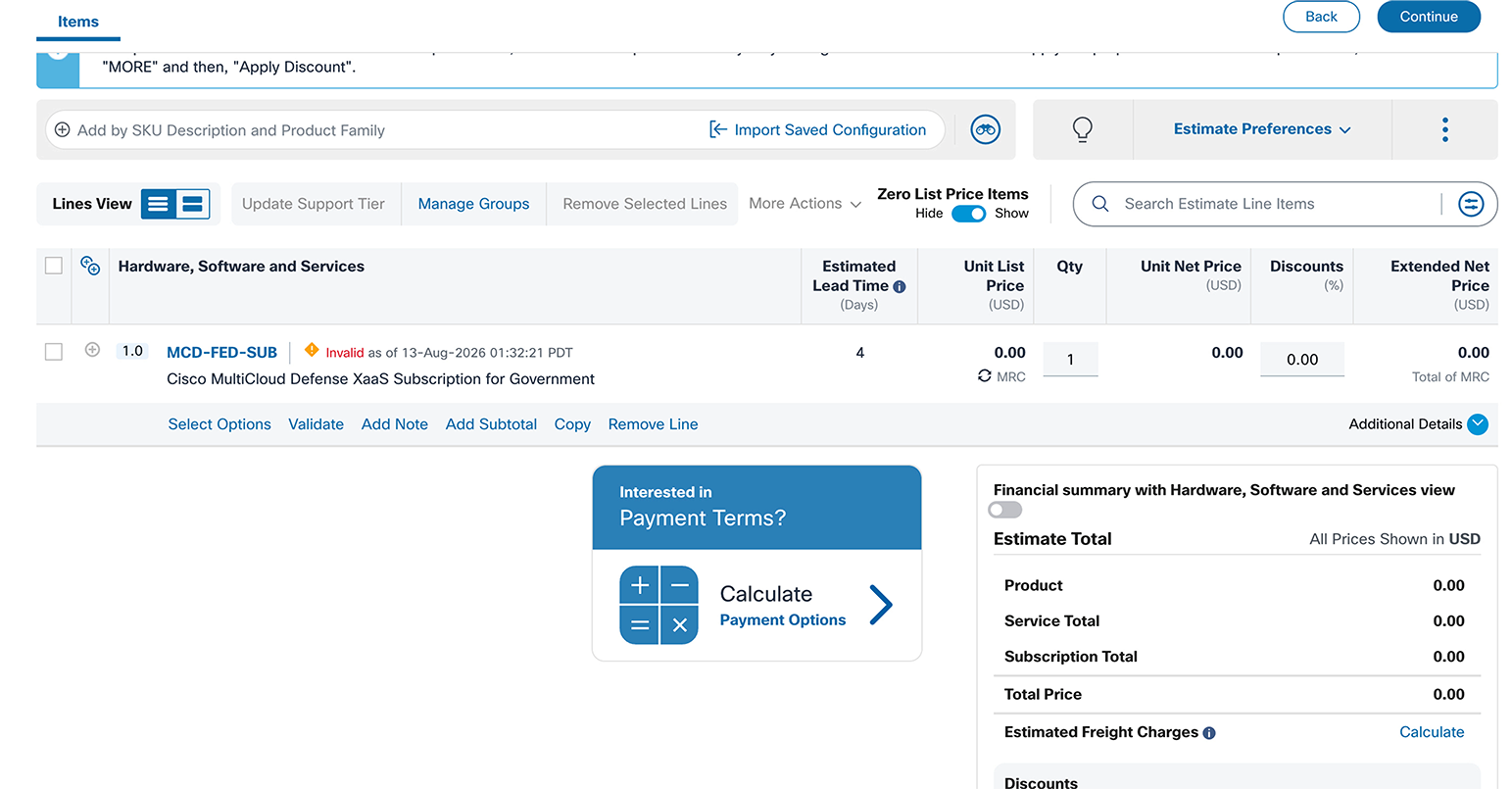
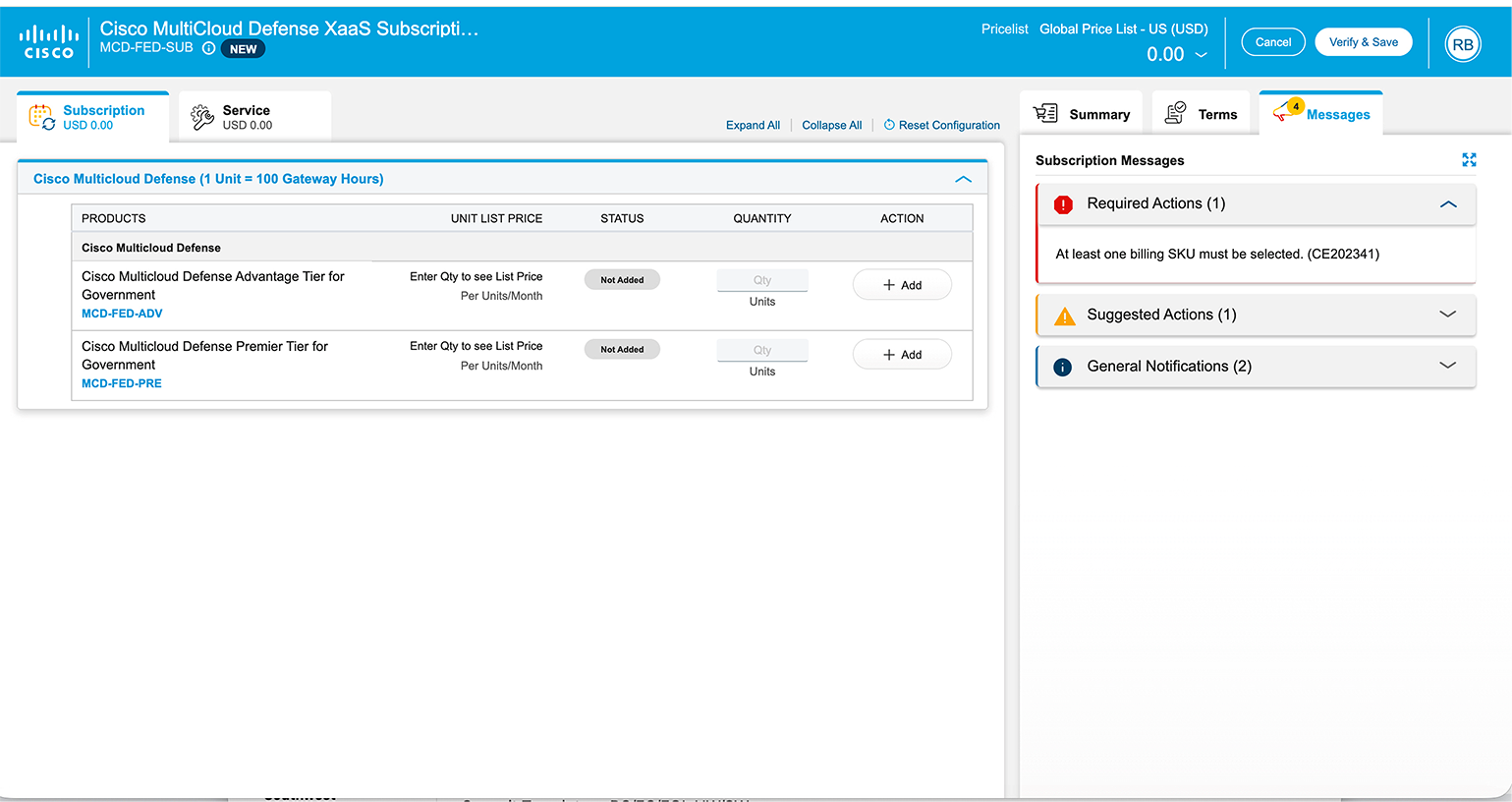
Next, fill out the requested amount of gateway hours for the required tier—please note that the quantity you will enter here is the estimated amount of gateway hours. (The system will automatically convert them to units by dividing this number with 100).
1. Let’s estimate one enforcement point is running, consistently, for a year. That’s 365 days * 24 hours. On average, the monthly hours are 730. In this new subscription model, the hours reset each month.
2. To calculate the number of licenses required, devide 730 by 100 = 7.3, then round up to the nearest whole number: 8.
3. For this example, note that we would like to have this on the Premier tier.
4. Fill out the “quantity of gateway hours” for the correct tier with “8” and hit enter.
In the image below, the price calculations changed accordingly, and some additional items have been automatically included in the quote.
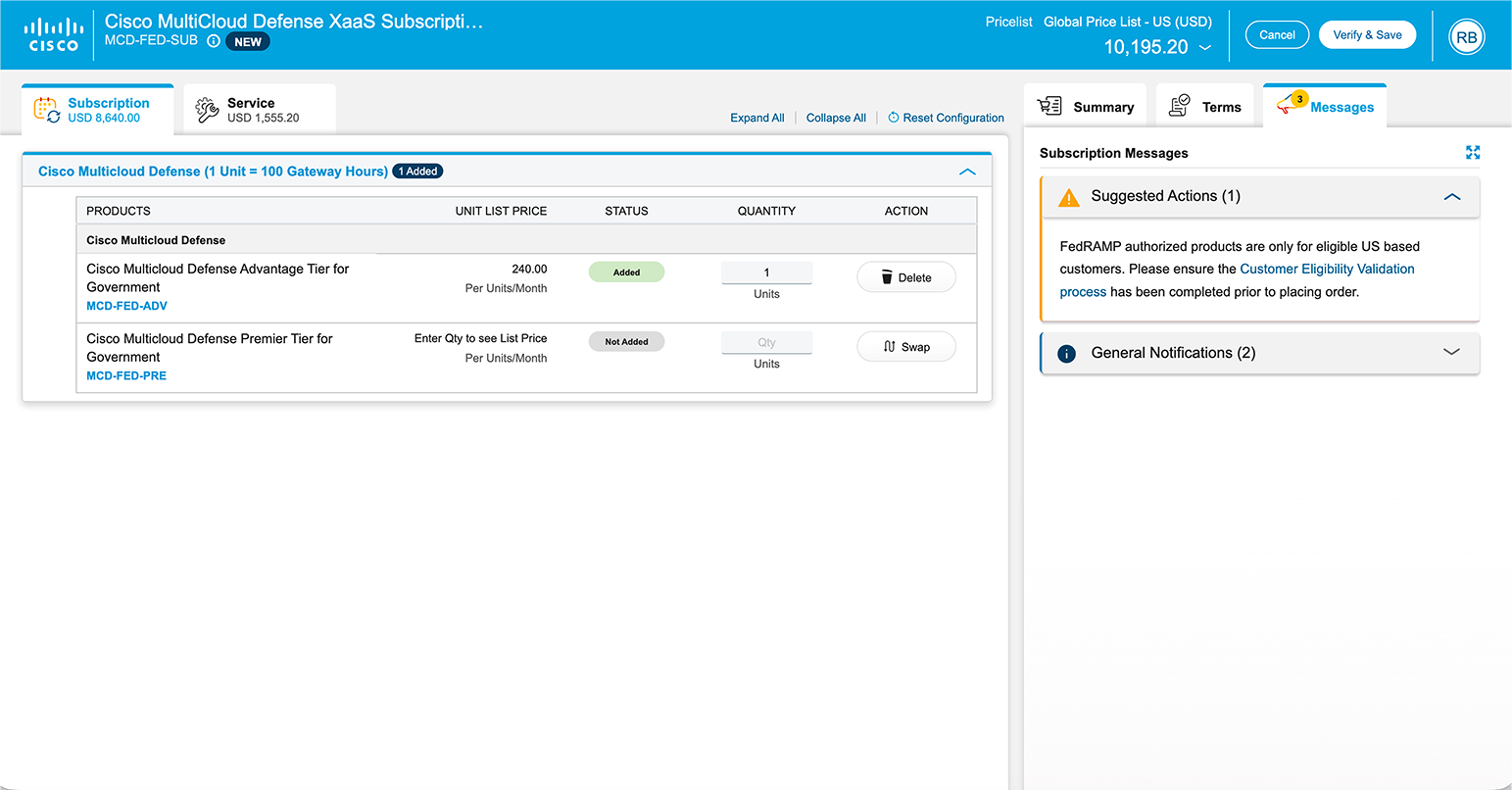
The items automatically included are:
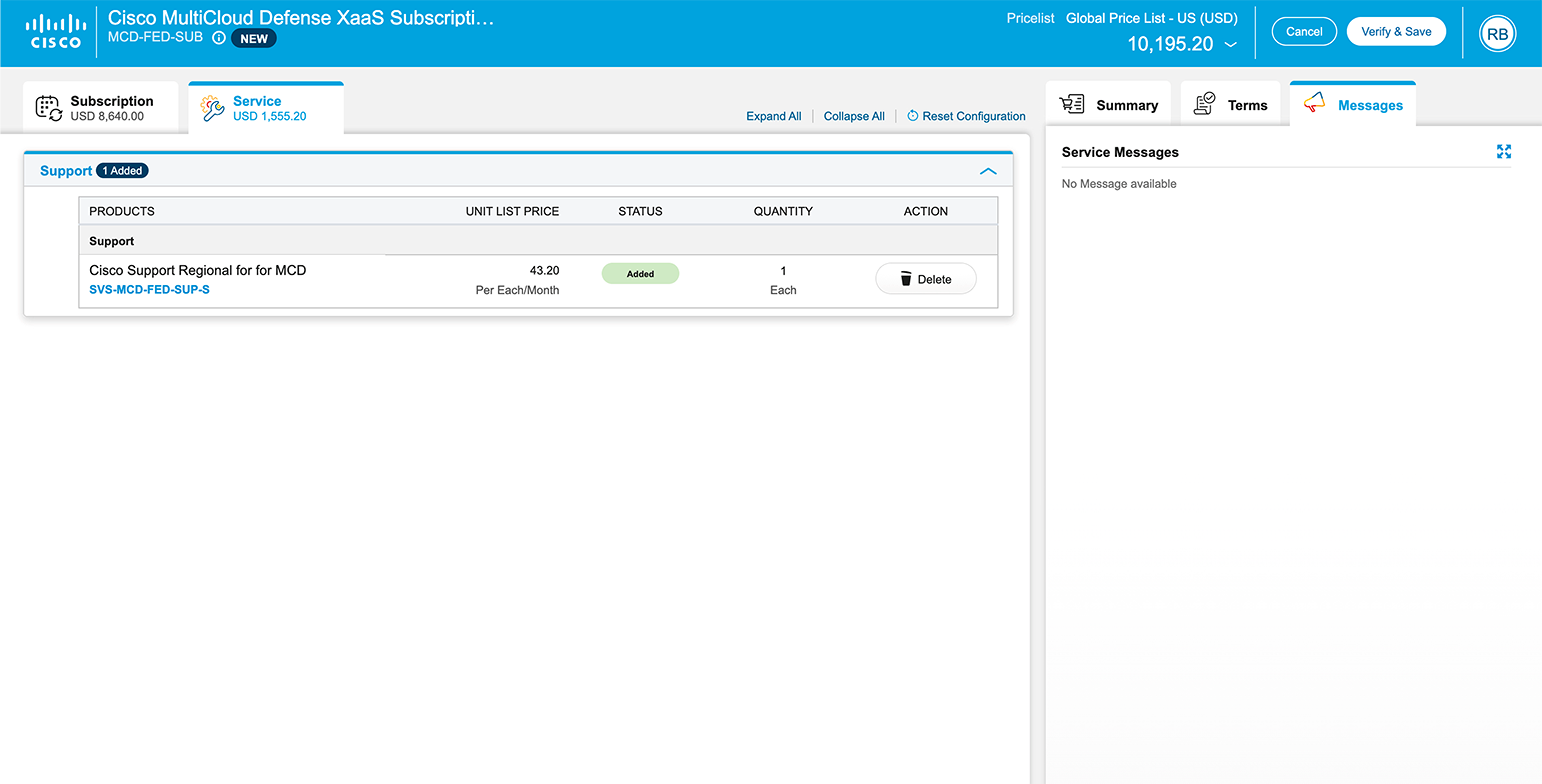
● SVS-MCD-FED-SUP-S: This item is the services contract for support for Multicloud Defense for Government. This includes customer success onboarding services.
The service level can be modified under the “Service” tab by clicking the “Swap” button to the desired service level:
After selecting the desired product options, choose “Requested Terms and Billing” to edit the subscription term and the requested start date.
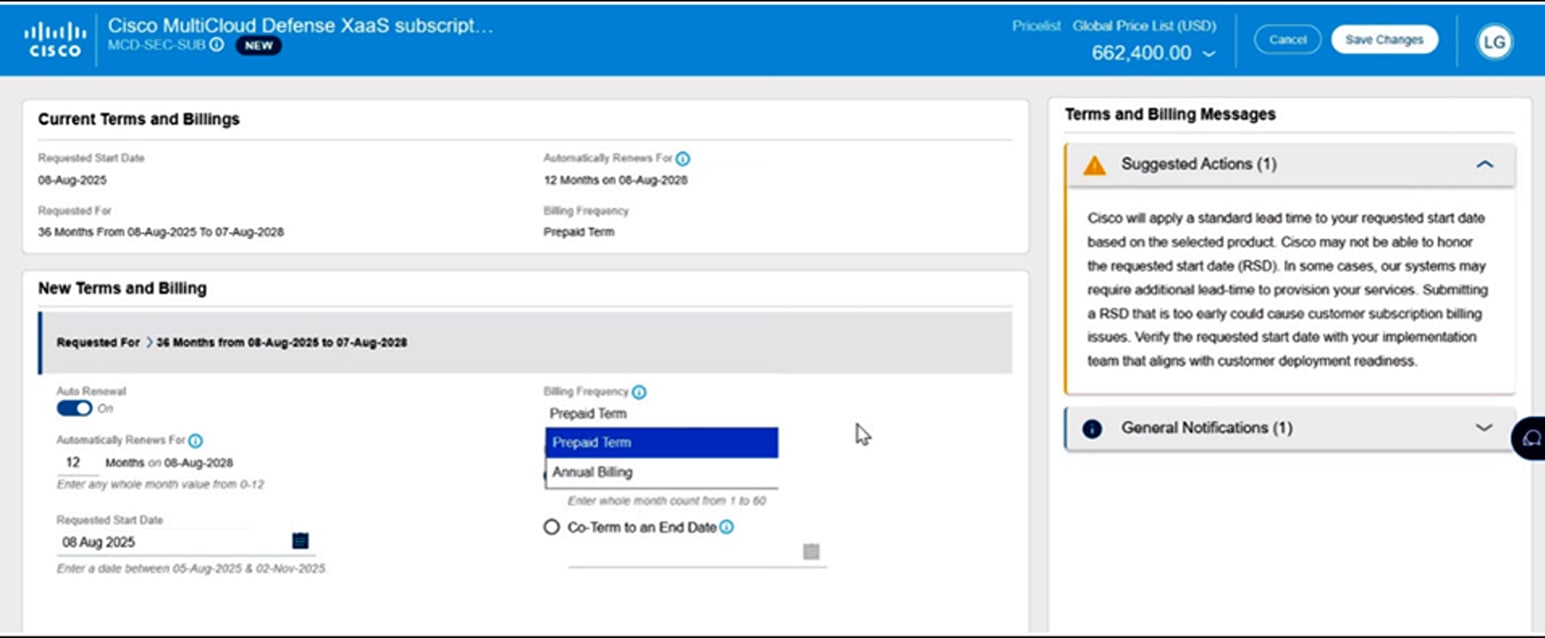
Note: Annual billing option.
● Only terms that are 12 to 60 months are allowed (1 to 11 months require nonstandard approval and can only be requested to co-term to another contract greater than 12 months).
● A Purchase Order (PO) needs to be issued for the full amount, and billing will occur annually before the start date of each service year.
● While billing is annual, the subscription is for the entire term and cannot be cancelled midterm. The service is provisioned, and the subscription starts on the service start date. The provisioning of the service may take up to 72 hours, assuming the order information is complete and correct.
The subscription term will default to a 36-month term and prepaid term billing. The requested start date and the frequency of billing may also be changed at this time.
Enterprise Agreement ordering process
Enterprise Agreements give customers the most flexibility and option for managing their Cisco software subscriptions.
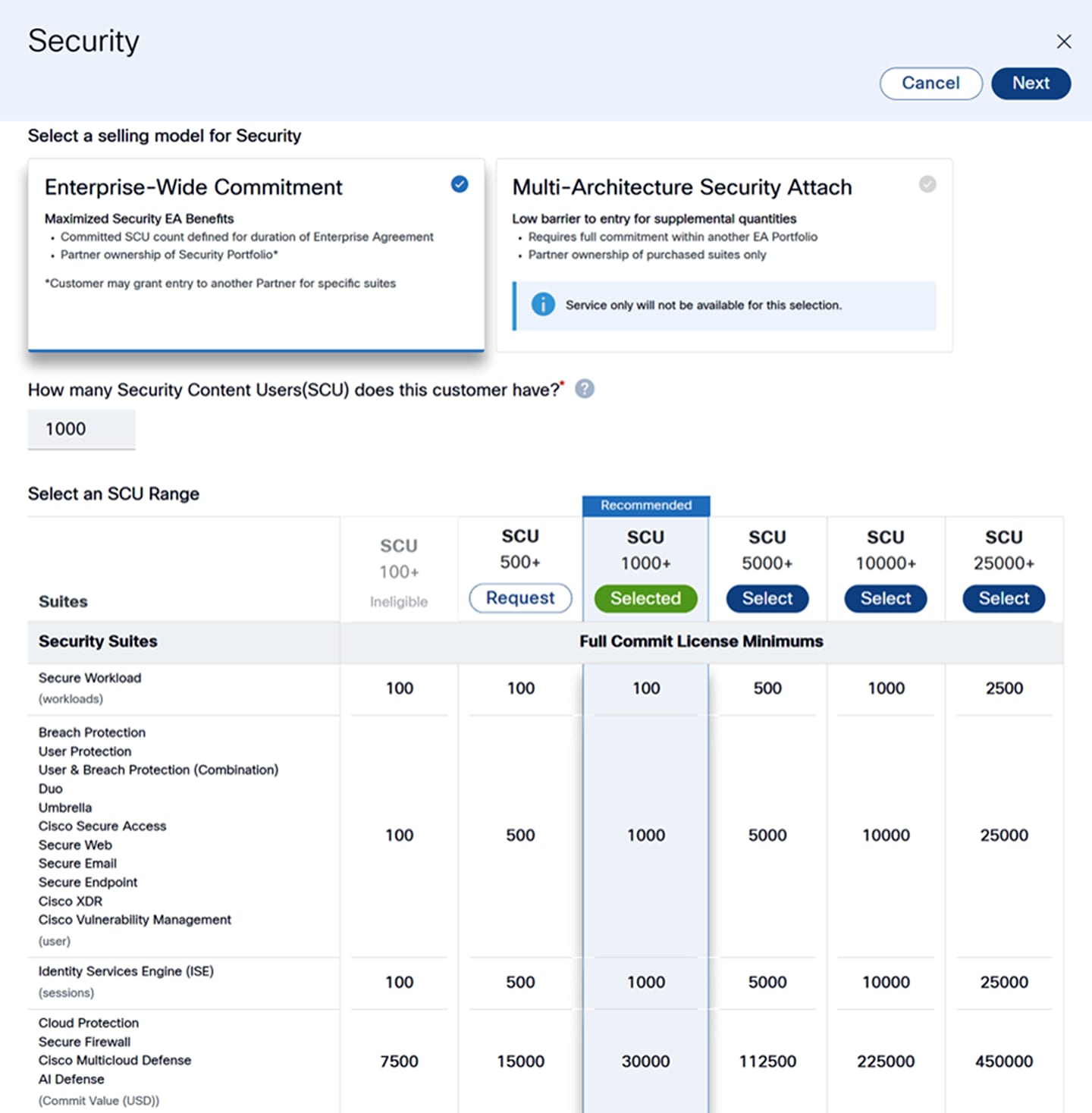
Start by selecting “Enterprise-Wide Commitment” and entering how many security users the enterprise has. A recommendation on the number of licenses will be available to select:
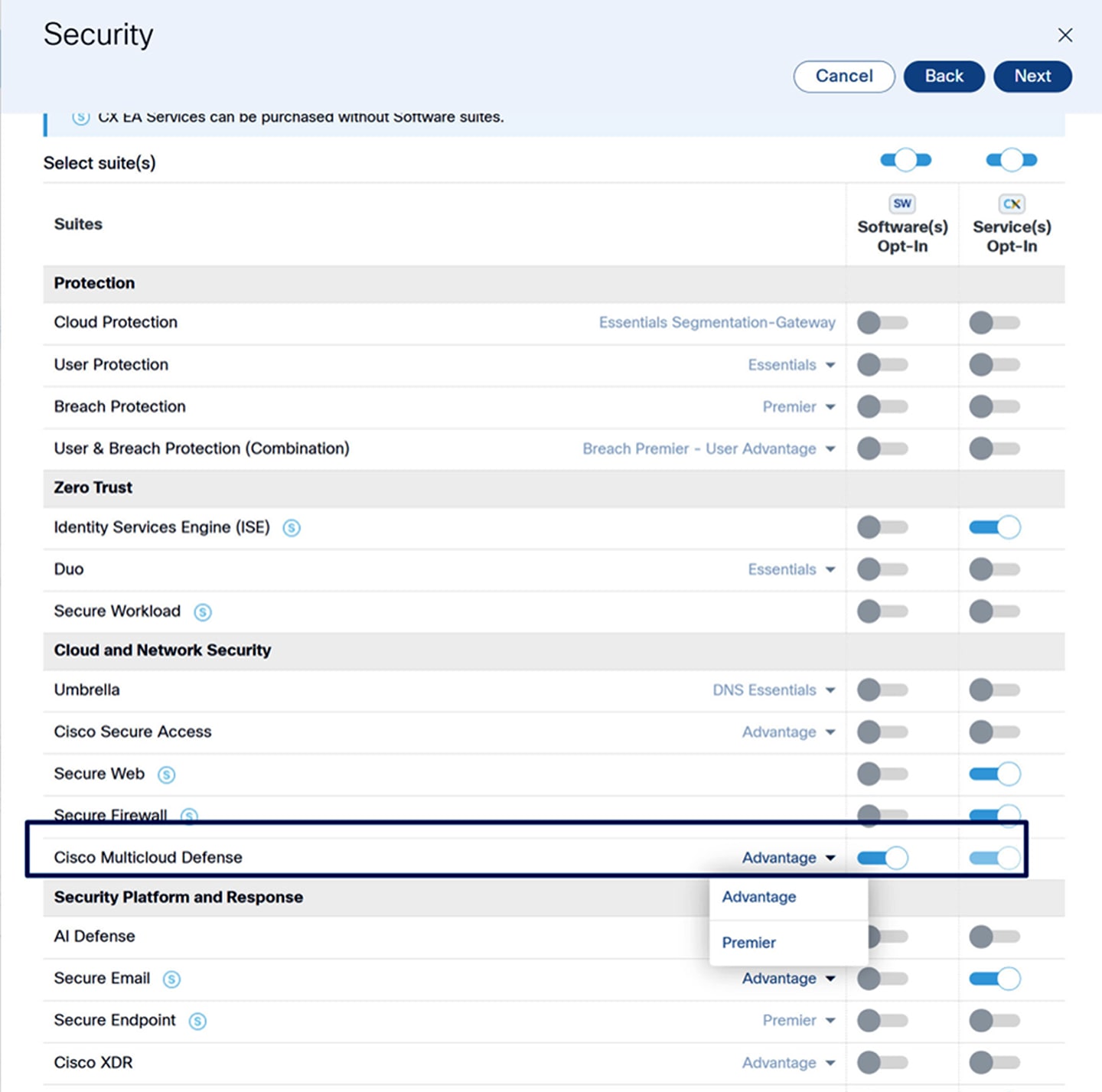
Toggle the Cisco Multicloud Defense option to “on” and use the dropdown to select the tier of features:
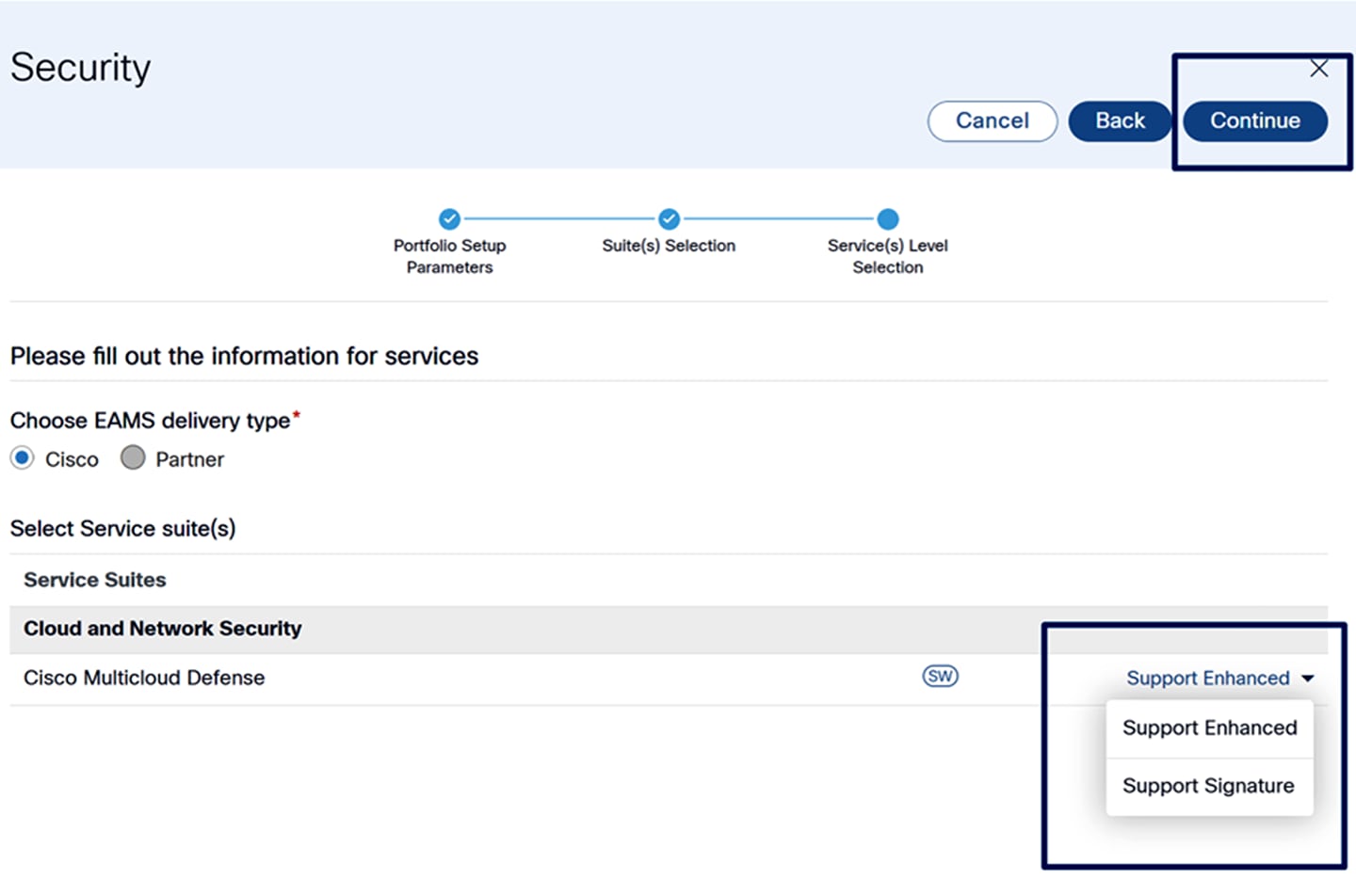
Continue and select the level of support
Configure the billing model and then select “configure suite”
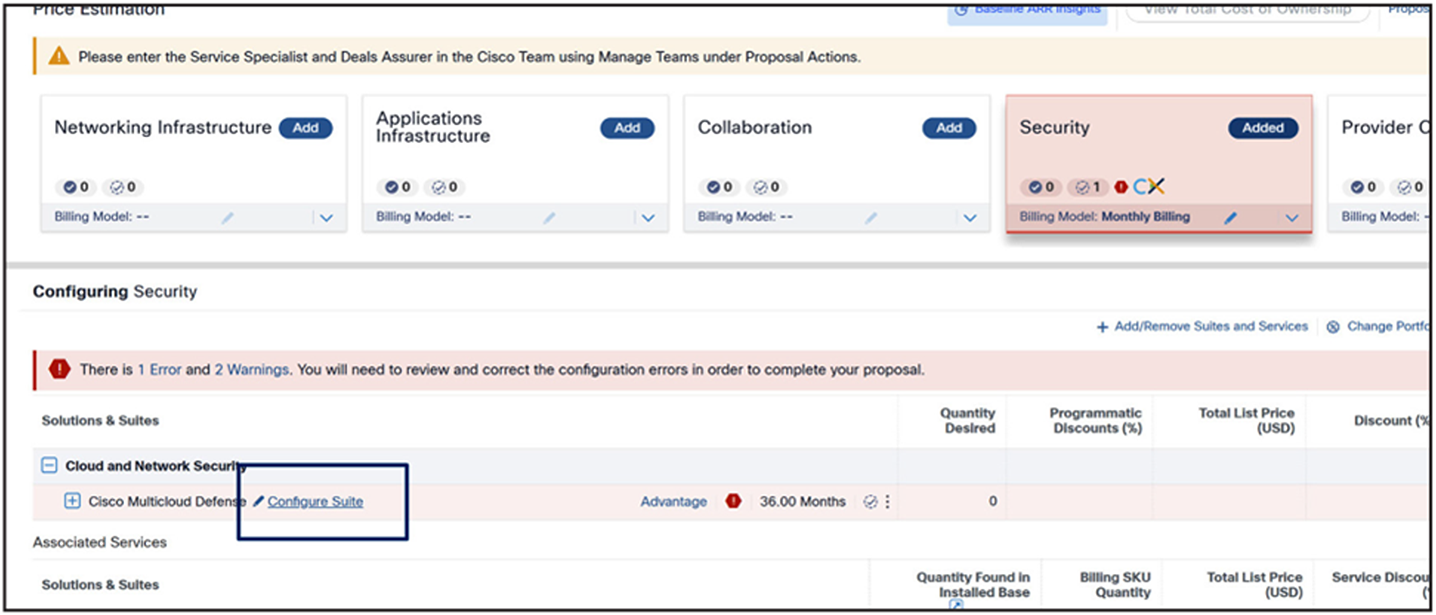
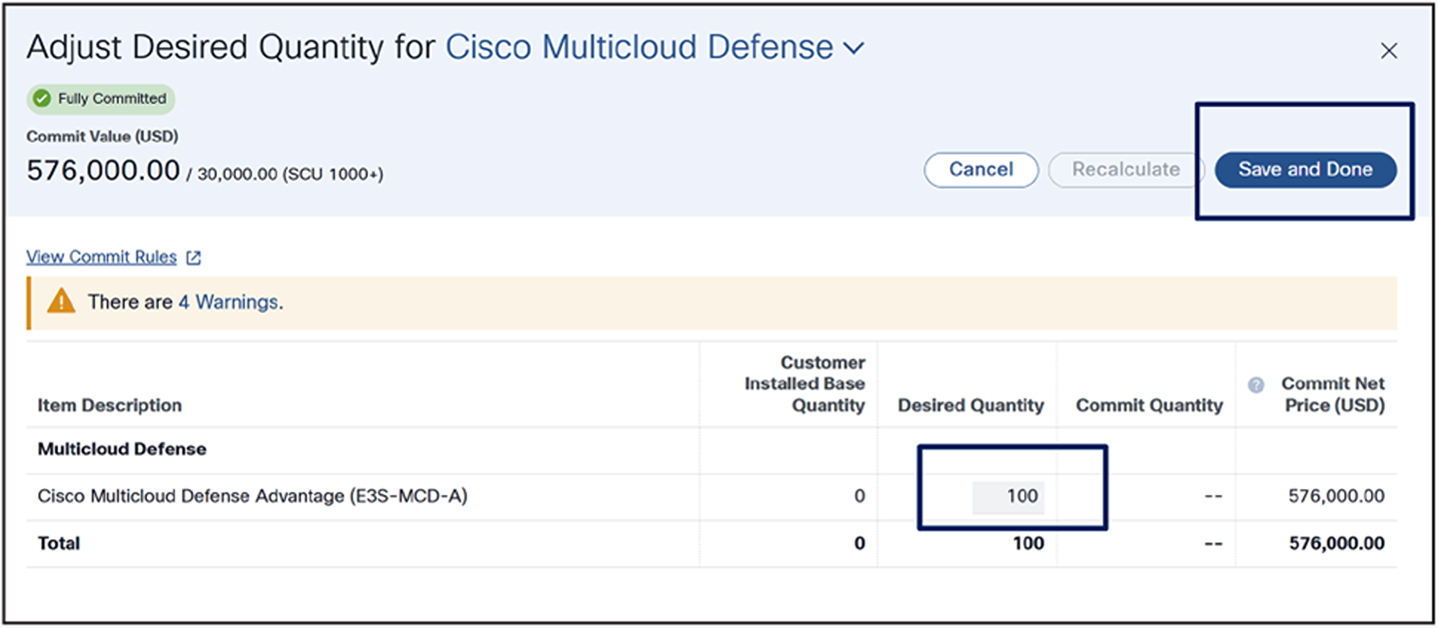
Enter the number of licenses, then press “Save and Done”
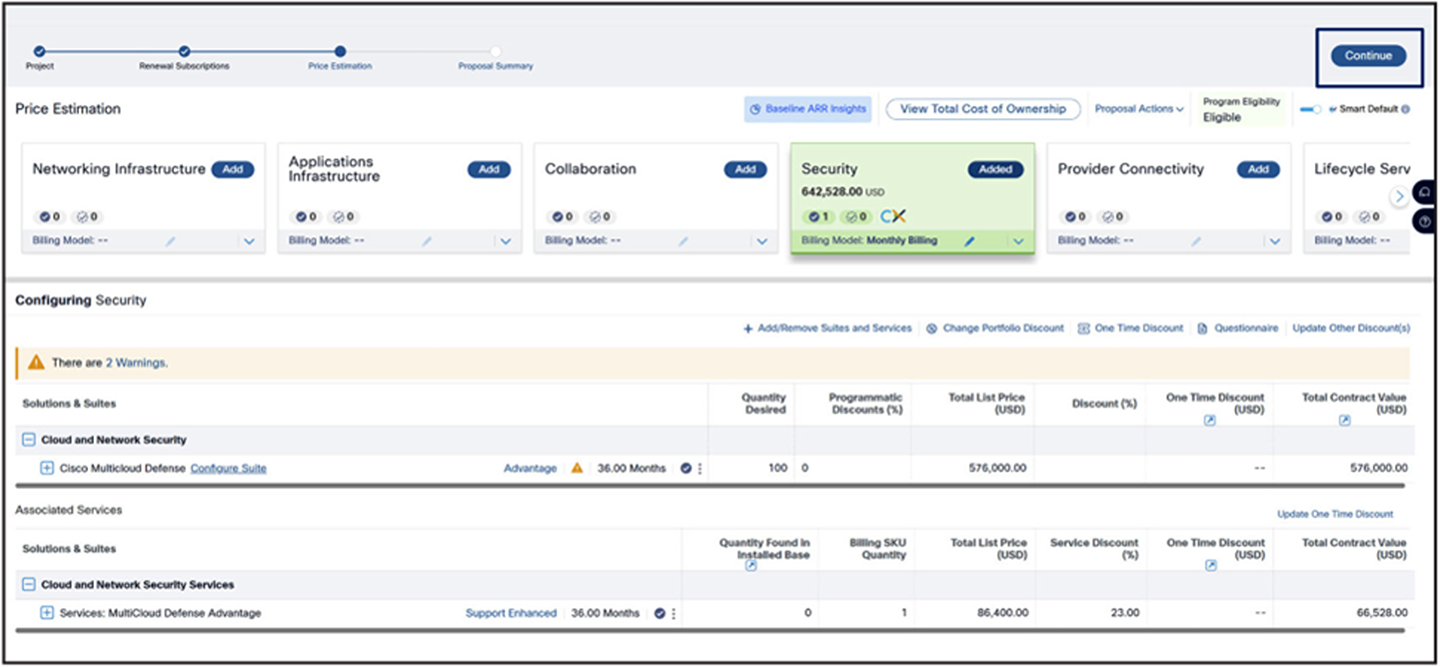
After the proposal is completed, it can be convered into the required CCW quote:
For quoting or ordering questions, please contact cs-support@cisco.com, or
open a case at www.cisco.com/cisco/psn/web/workspace.
Multicloud Defense for Government and Security in Cisco Cloud Control for Government are available in US only.