Building a Resilient Geo-Redundant Hybrid Workspace with Cisco Security on AWS
Available Languages
Bias-Free Language
The documentation set for this product strives to use bias-free language. For the purposes of this documentation set, bias-free is defined as language that does not imply discrimination based on age, disability, gender, racial identity, ethnic identity, sexual orientation, socioeconomic status, and intersectionality. Exceptions may be present in the documentation due to language that is hardcoded in the user interfaces of the product software, language used based on RFP documentation, or language that is used by a referenced third-party product. Learn more about how Cisco is using Inclusive Language.
Large global enterprises commonly support tens or hundreds of thousands of employees, contractors, administrators, and application teams working from geographically distributed locations. These users require secure remote access to applications and resources hosted across corporate data centers and multiple Amazon Web Services (AWS) Regions. A traditional remote access VPN architecture based on a small number of centralized VPN gateways can introduce latency, regional dependencies, scalability limitations, and a larger failure domain.
Consider a global enterprise with remote users distributed across multiple continents. The organization requires a single VPN service that users can access through a common hostname, regardless of their physical location. VPN connectivity must remain available if an individual VPN headend, Availability Zone (AZ), or an entire AWS Region becomes unavailable. At the same time, the architecture should direct users toward an optimal healthy regional VPN service without requiring users to manually select a VPN gateway.
This Cisco® Validated Design presents a globally distributed remote access VPN architecture using Cisco Secure Client, Cisco Firewall, and AWS services such as Route 53, Global Accelerator, and Network Load Balancer (NLB).
The architecture provides users with a single global VPN service URL:
vpn.examplevpn.click/geovpn
Amazon Route 53 maps the global VPN service Fully Qualified Domain Name (FQDN), vpn.examplevpn.click, to AWS Global Accelerator. Global Accelerator provides static Anycast IP addresses advertised through the AWS global edge network and directs incoming connections toward healthy regional NLB endpoints. Each regional NLB distributes VPN connections across firewall instances deployed in multiple Availability Zones. Transport Layer Security (TLS) termination and remote access VPN processing remain on the firewall; the NLB operates as a Layer 4 transport service rather than terminating the VPN TLS session.
Cisco Identity Services Engine (ISE) provides the option of centralized identity and policy services using a distributed deployment model. Policy Service Nodes are positioned regionally near the Firewall VPN headends, while Administration and Monitoring personas are distributed across primary and secondary AWS locations for management resiliency.
The resulting architecture separates the global VPN service identity from the physical AWS Region and individual VPN headend serving a connection, providing a scalable and highly available foundation for enterprise remote access VPN.
Target audience
This document is intended for:
● Network and security architects
● Cloud security architects
● Network engineering teams responsible for enterprise remote access VPN
● Technical decision makers designing globally distributed VPN services
This document combines architectural guidance with validated implementation considerations for AWS and Cisco components.
Reference architecture
The reference architecture consists of five AWS Regions:
● US East (N. Virginia) — us-east-1
● US West (N. California) — us-west-1
● Europe (London) — eu-west-2
● Asia Pacific (Mumbai) — ap-south-1
● Asia Pacific (Tokyo) — ap-northeast-1
Each AWS Region contains:
● AWS Network Load Balancer
● Firewall (VPN headends)
● One firewall in each of the two Availability Zones
● ISE Policy Service Nodes, distributed across Availability Zones
The ISE administration and monitoring functions are distributed between US-East and US-West, with the primary Administration/Monitoring node located in US-East and the secondary Administration/Monitoring node located in US-West.
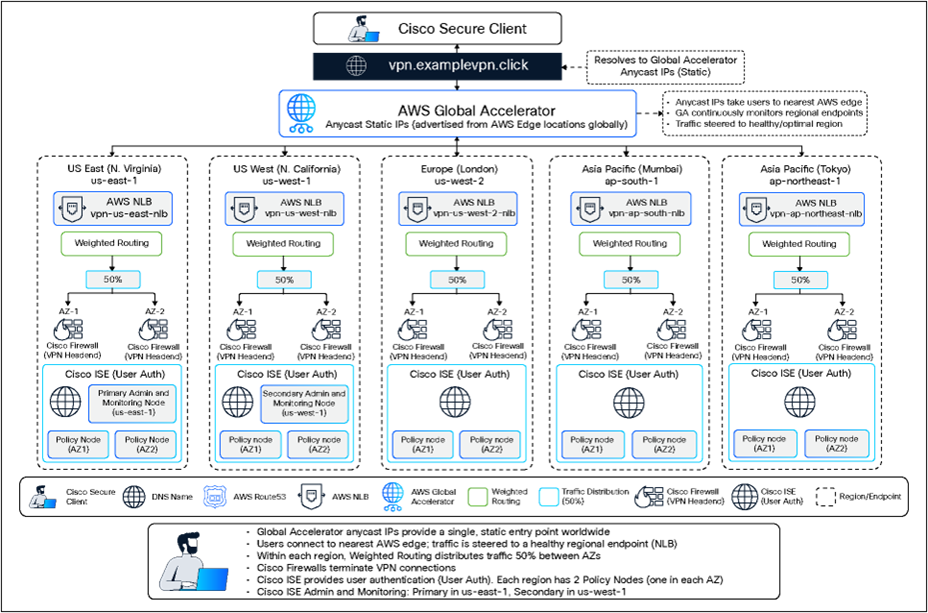
Global geo-redundant Cisco VPN architecture
The logical user connection path is:
Secure Client → vpn.examplevpn.click/geovpn → Amazon Route 53 → AWS Global Accelerator → Regional NLB → Firewall → Enterprise Resources
Secure Client establishes the remote access VPN directly with the selected firewall. AWS infrastructure provides DNS, global traffic steering, health-based regional selection, and regional load distribution without terminating the VPN TLS session.
Single global VPN service
Users connect to a single service URL:
vpn.examplevpn.click/geovpn
The same Secure Client profile can therefore be deployed globally. Users do not need separate regional VPN entries. The AWS infrastructure determines the appropriate backend infrastructure without exposing the regional topology to the end user.
VPN Headend failure
Each regional NLB distributes VPN connections across multiple firewall instances.
If one firewall fails its configured health check, the NLB removes that target from service and directs new VPN connections to the remaining healthy firewall.
Existing VPN sessions terminating on the failed firewall are lost because the VPN encryption and session state reside on that firewall. The user must establish a new VPN session, either manually or through supported Secure Client reconnect behavior.
Availability Zone failure
Firewall and ISE Policy Service Nodes are distributed across Availability Zones.
Loss of an individual Availability Zone therefore does not necessarily remove the regional VPN service. The regional NLB can continue directing new connections toward healthy targets in the surviving Availability Zone.
AWS Region failure
AWS Global Accelerator provides the global traffic steering layer.
If the VPN infrastructure associated with one regional NLB becomes unavailable, Global Accelerator can direct new connections toward a healthy endpoint in another configured AWS Region.
The user continues connecting to vpn.examplevpn.click/geovpn using the same Global Accelerator Anycast IP addresses.
DNS caching during regional failure
This is one of the primary reasons Global Accelerator is introduced into the architecture. In a Route 53 latency-based architecture where DNS resolves the VPN FQDN directly toward regional NLBs, a client can retain DNS information associated with a failed region until the cached record expires or is refreshed. Lowering the Route 53 TTL can reduce this interval, but regional failover remains dependent on DNS behavior at the endpoint and intermediate resolvers.
With Global Accelerator, Route 53 maps vpn.examplevpn.click to the Global Accelerator service rather than selecting a regional NLB for the client.
The Global Accelerator static Anycast IP addresses remain unchanged when the selected backend AWS Region changes. Regional failover can therefore occur in the traffic-steering layer without requiring the VPN client to obtain a different regional destination through DNS.
This provides an important separation between the VPN service address and the regional infrastructure currently servicing the connection.
Amazon Route 53 — Global service discovery
Amazon Route 53 provides DNS resolution for the enterprise VPN service.
The public VPN FQDN:
vpn.examplevpn.click
is mapped to AWS Global Accelerator.
Route 53 does not perform regional VPN endpoint selection in this architecture. Its primary function is to provide the DNS abstraction between the user-facing VPN FQDN and Global Accelerator. Regional selection is moved from the DNS layer into Global Accelerator.
AWS Global Accelerator — Global traffic steering
Global Accelerator provides the global network entry point for the VPN service.
A standard Global Accelerator provides static Anycast IP addresses that are advertised from the AWS edge network. Users connecting from different geographic locations use the same IP addresses, while AWS accepts the connection through its global edge infrastructure and directs the traffic toward an appropriate configured regional endpoint.
The regional NLBs are configured as Global Accelerator endpoints.
Global Accelerator provides several important functions in this architecture:
● Static global Anycast IP addresses
● Global entry points independent of individual AWS Regions
● Health-aware regional endpoint selection
● Steering of new connections away from unhealthy regional endpoints
● Reduced dependency on DNS TTL and client-side DNS caching for regional failover
● Use of the AWS global network after traffic enters an AWS edge location
● Ability to control regional traffic distribution using endpoint groups, traffic dials, and endpoint weighting where required
Global Accelerator supports Transmission Control Protocol (TCP) and User Datagram Protocol (UDP) listeners. Listener and client-affinity behavior should be selected according to the VPN transport being validated.
AWS Network Load Balancer — Regional VPN distribution
Each AWS Region contains a Network Load Balancer.
Example:
| AWS Region |
NLB |
| us-east-1 |
vpn-us-east-nlb |
| us-west-1 |
vpn-us-west-nlb |
| eu-west-2 |
vpn-eu-west-2-nlb |
| ap-south-1 |
vpn-ap-south-nlb |
| ap-northeast-1 |
vpn-ap-northeast-nlb |
The NLB performs regional, rather than global, distribution.
Each NLB forwards connections to a target group containing the outside/private interface
IP addresses of the firewall VPN headends in that Region.
For TLS passthrough, the NLB uses a Layer 4 listener. The NLB does not terminate the VPN TLS session and therefore does not require the VPN server certificate. TLS termination remains on the firewall.
The NLB also provides the health mechanism that determines whether a firewall remains eligible to receive new connections.
A typical health check can use:
TCP 443
When a firewall stops responding to the configured health check, the NLB marks the target unhealthy and removes it from normal new-connection distribution.
Division of responsibilities between Route 53, Global Accelerator, and NLB
| Service |
Primary responsibility |
| Amazon Route 53 |
Maps vpn.examplevpn.click to Global Accelerator |
| AWS Global Accelerator |
Selects and steers connections toward healthy regional NLB endpoints |
| AWS Network Load Balancer |
Distributes connections across healthy VPN headends within a Region |
| Cisco Firewall |
Terminates VPN sessions and applies security/VPN policy |
| Cisco ISE |
Authenticates users and provides centralized identity/policy services |
This layered architecture creates three separate abstractions:
Service abstraction: vpn.examplevpn.click
Regional abstraction: AWS Global Accelerator
VPN headend abstraction: AWS Network Load Balancer
The Secure Client therefore does not need awareness of the AWS Region, Availability Zone, NLB, or individual selected for the connection.
Cisco Firewall provides the remote access VPN termination point.
Each in the design provides:
● Secure Client VPN termination
● TLS termination
● VPN connection profile
● VPN address pool
● Authentication, Authorization, and Accounting (AAA) integration with Cisco ISE
● Access-control and security-policy enforcement
● Routing toward enterprise and AWS resources
The regional NLB remains transparent to the VPN security relationship. From a TLS perspective, the important relationship remains:
Secure Client ↔ Firewall
Because TLS terminates on the rather than the NLB, each firewall must present a certificate valid for the common VPN service FQDN:
vpn.examplevpn.click
Two certificate models can be considered.
Option 1 — Wildcard certificates
Each firewall can use a certificate covering:
*.examplevpn.click
This allows the certificate to cover the common VPN identity:
vpn.examplevpn.click
as well as device-specific identities such as:
useast-az1-vpn.examplevpn.click
useast-az2-vpn.examplevpn.click
A unique private key and independently issued certificate should be used for each firewall rather than exporting and installing the same wildcard certificate/private-key pair across all VPN headends. This limits the impact of compromise of an individual private key.
Option 2 — SAN-based certificates
Individual certificates can instead explicitly identify the common service name and the individual firewall.
For example:
Firewall1
● vpn.examplevpn.click
● useast-az1-vpn.examplevpn.click
Firewall2
● vpn.examplevpn.click
● useast-az2-vpn.examplevpn.click
This provides tighter identity scope while preserving the common VPN service identity.
The wildcard model is operationally simpler, while the SAN-based model limits each certificate to explicitly defined identities.
No VPN certificate is required on the NLB when the NLB is configured for Layer 4 passthrough.
Cisco ISE distributed identity architecture
ISE provides centralized authentication and identity services for remote access VPN users.
The reference architecture uses a geographically distributed ISE deployment.
Administration and monitoring
The design places:
● Primary Administration and Monitoring — us-east-1
● Secondary Administration and Monitoring — us-west-1
This separates primary and secondary management functions across AWS Regions.
Regional Policy Service Nodes
Each VPN region contains two ISE Policy Service Nodes (PSNs):
● PSN-AZ1
● PSN-AZ2
The VPN headends use the regional PSNs for user authentication.
Locating PSNs near the VPN headends provides:
● Reduced authentication path latency
● Regional authentication availability
● Reduced dependency on a distant centralized PSN
● Authentication resiliency if an individual PSN fails
● Consistent centralized identity policy across globally distributed VPN headends
The exact Policy Administration Node (PAN), Monitoring and Troubleshooting Node (MnT), and PSN scale and placement should be validated against the supported ISE release, node sizing, latency requirements, and expected authentication load.
End-to-end VPN connection flow
A normal VPN connection proceeds as follows:
1. The remote user launches Secure Client.
2. Secure Client connects to vpn.examplevpn.click/geovpn.
3. DNS resolution through Route 53 maps vpn.examplevpn.click to AWS Global Accelerator.
4. The client connects to one of the Global Accelerator static Anycast IP addresses.
5. The connection enters the AWS global network through an AWS edge location.
6. Global Accelerator selects an eligible healthy regional NLB endpoint based on endpoint health, client location, and configured traffic policies.
7. The regional NLB selects a healthy firewall target.
8. The VPN TLS session terminates on that firewall.
9. The firewall authenticates the user through the regional ISE Policy Service Nodes.
10. Following successful authentication and authorization, the firewall establishes the remote access VPN tunnel.
11. The firewall assigns the user an address from the appropriate VPN address pool and applies the configured VPN and security policies.
Failure scenario 1 — Individual Firewall failure
If Firewall-AZ1 fails:
● Existing VPN sessions terminating on that firewall are lost.
● The NLB health check detects the failure.
● The target is marked unhealthy.
● New connections are directed toward Firewall-AZ2.
● Reconnecting users establish a new VPN session on the surviving firewall.
The failure remains contained within the Region.
Failure scenario 2 — Availability Zone failure
If AZ1 becomes unavailable:
● The firewall and PSN in AZ1 become unavailable.
● The NLB continues using healthy targets in AZ2.
● The surviving firewall uses available ISE services according to the configured AAA server behavior.
Regional VPN service remains available as long as the remaining components have sufficient capacity.
Failure scenario 3 — Complete regional VPN failure
If both firewall targets in a region become unavailable:
● The regional NLB no longer has healthy VPN targets.
● Global Accelerator evaluates the health of the regional NLB endpoint.
● New connections are steered toward another healthy regional endpoint.
● Secure Client continues using vpn.examplevpn.click/geovpn and the same GA Anycast destination.
● The user establishes a new VPN session through the surviving Region.
This avoids requiring Route 53 to return a different regional NLB destination to the client.
Active VPN session behavior during failure
● Neither AWS Global Accelerator nor NLB replicates the firewall VPN session state.
● An established VPN session contains security state on the firewall, including tunnel and cryptographic information.
● Consequently, if the firewall terminating a session fails, the active VPN session is lost.
● Global Accelerator and NLB solve connection placement and reconnection availability, not stateful VPN session migration.
● Secure Client can attempt reconnection according to its configured reconnect behavior. However, reconnect behavior must be validated carefully because the client can attempt to recover the existing session before initiating an entirely new VPN connection.
● This distinction is particularly important when validating regional failover.
Deploy Regional Firewall Instances
Deploy two firewall instances per AWS Region, with each instance located in a separate Availability Zone.
Configure the required:
● Management interfaces
● Outside interfaces
● Inside interfaces
● Security groups
● Routing
● Internet and enterprise connectivity
The firewall outside interfaces become the targets for the regional NLB.
Create AWS Regional Target Groups
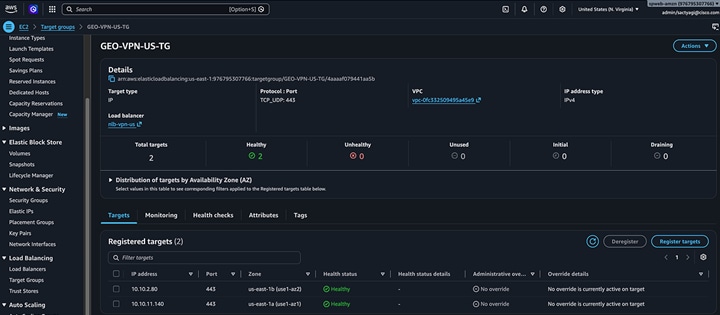
Create one Network Load Balancer target group in each AWS Region and register the outside interface IP addresses of the regional firewall instances as targets.
Recommended parameters for TLS-based remote access VPN traffic:
● Target type: IP
● Protocol: TCP
● Port: 443
● IP address type: IPv4
● Health check protocol: TCP
● Health check port: Traffic port (443)
● Stickiness: Enabled
● Stickiness type: Source IP
● Proxy Protocol v2: Disabled
● Client IP preservation: Validate based on the deployment requirements
● Cross-zone load balancing: Configure consistently with the regional NLB design
Register the outside interface private IP address of each firewall instance in the Region. Verify that all registered targets report a Healthy state before associating the target group with the NLB listener.
Source-IP stickiness helps maintain affinity between a VPN client and the same firewall target for subsequent connections. It should not be considered a VPN session-state replication mechanism. If the selected firewall becomes unhealthy, the NLB can direct new connections to another healthy target.
For example:
US Region target group
● Name: Geo-VPN-US-TG
● Targets: Firewall -US-01 outside IP, Firewall -US-02 outside IP

Create the AWS Network Load Balancers
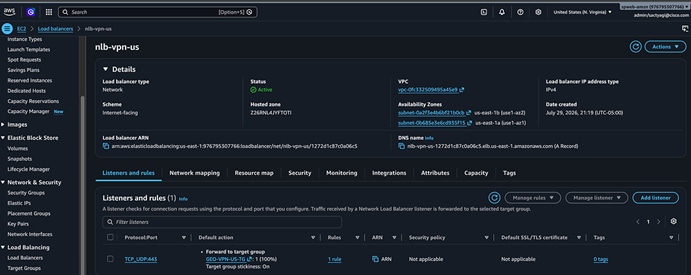
Create one AWS Network Load Balancer (NLB) in each region to provide regional load balancing across the VPN headends.
For TLS passthrough, configure the NLB as follows:
● Load balancer type: Network Load Balancer
● Scheme: Internet-facing
● IP address type: IPv4
● Listener protocol: TCP
● Listener port: 443
● Default action: Forward to the regional firewall target group
● TLS termination: Firewall
● NLB certificate: Not required
The NLB operates as a Layer-4 load balancer and forwards TCP/443 traffic to the selected firewall without terminating TLS. The VPN server certificate is therefore installed on the firewall instances, and Secure Client establishes the TLS session directly with the firewall.
Associate each regional NLB listener with its corresponding firewall target group, example:
US Region NLB: vpn-us-lb → Geo-VPN-US-TG
Deploy the NLB across at least two Availability Zones in each Region and enable the Availability Zones that contain the firewall outside interfaces.
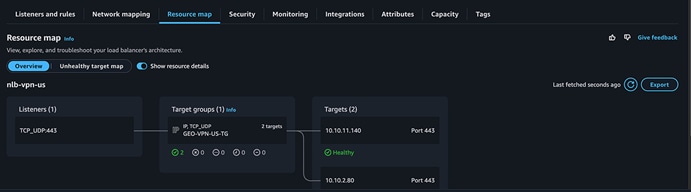
After creating the NLB, verify that:
● TCP/443 listener is active.
● The correct regional firewall target group is associated.
● All registered firewall targets report Healthy.
● The NLB DNS name resolves successfully.
● TCP/443 connectivity reaches the firewall VPN service.

Create AWS Global Accelerator
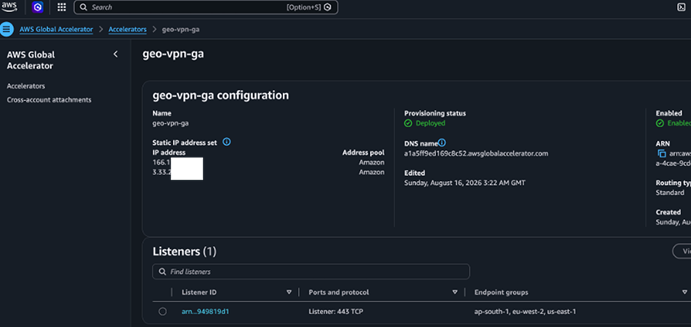
Create a standard Global Accelerator to provide a global entry point for remote access VPN connections and direct users to healthy regional VPN infrastructure.
For SSL/TLS-based remote access VPN, configure the accelerator as follows:
● Accelerator type: Standard
● IP address type: IPv4
● Listener protocol: TCP
● Listener port: 443
● Client affinity: Source IP
Global Accelerator assigns two static Anycast IPv4 addresses to the accelerator. These addresses are advertised globally through the AWS edge network and provide consistent entry points for VPN clients.
Create Regional Endpoint Groups
Create one endpoint group for each of the five participating AWS Regions and associate the corresponding regional NLB as the endpoint:
● us-east-1 → vpn-us-east-nlb
● us-west-1 → vpn-us-west-nlb
● eu-west-2 → vpn-eu-west-2-nlb
● ap-south-1 → vpn-ap-south-nlb
● ap-northeast-1 → vpn-ap-northeast-nlb
Configure the endpoint groups with the following initial settings:
● Traffic dial: 100%
● Endpoint weight: 128 (default)
● Health status: Verify that each regional NLB reports as healthy before enabling production traffic.
With all regional traffic dials set to 100%, Global Accelerator uses the AWS global network and endpoint health to direct client connections toward an optimal healthy regional endpoint.
Client affinity is configured as Source IP to help maintain affinity for connections originating from the same client source address.
If a regional NLB becomes unhealthy, Global Accelerator removes the unhealthy endpoint from consideration and directs new connections toward healthy endpoints in other participating Regions.
Before enabling production traffic, verify that:
● All five regional endpoint groups are configured.
● Each endpoint group contains the correct regional NLB.
● All NLB endpoints report Healthy.
● TCP/443 is configured on the Global Accelerator listener.
● Both Global Accelerator static Anycast IPv4 addresses are assigned and reachable.
● VPN connections successfully reach the expected regional firewall infrastructure.

Configure AWS Route 53
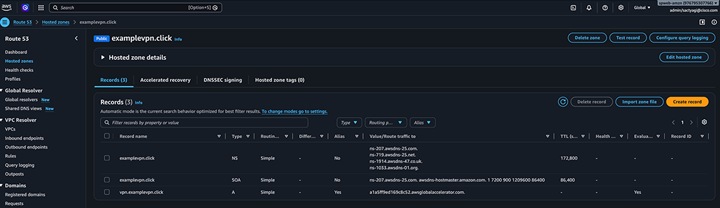
Create a public DNS record for the remote access VPN service:
VPN FQDN: vpn.examplevpn.click
In the Route 53 public hosted zone for examplevpn.click, create the following record:
● Record name: vpn.examplevpn.click
● Record type: A
● Alias: Yes
● Route traffic to: Alias to AWS Global Accelerator
● Target: Select the Global Accelerator created for the VPN service
● Routing policy: Simple
Route 53 resolves the VPN service FQDN to the static Anycast IP addresses associated with Global Accelerator. Global Accelerator then directs the VPN connection to an optimal healthy regional NLB based on endpoint health, AWS network routing, and the configured traffic policies.
Route 53 does not perform regional VPN endpoint selection in this architecture. Do not create latency-based or failover records that directly reference the five regional NLBs.
The traffic flow is:
Secure Client → vpn.examplevpn.click → Route 53 → Global Accelerator → Regional NLB → Firewall
After configuring the record, verify that:
● vpn.examplevpn.click resolves successfully.
● DNS resolution returns the Global Accelerator static Anycast IP addresses.
● The DNS record does not directly reference any regional NLB.
● TCP/443 connections to vpn.examplevpn.click successfully reach the VPN service.

Validate AWS health propagation
Validate the complete health chain:
Firewall → NLB target health → NLB endpoint health → Global Accelerator regional eligibility
Test:
● Single firewall shutdown
● Both firewall instances in one region shutdown
● Recovery of one firewall
● Regional endpoint recovery
Record the observed detection and reconnection intervals as part of Cisco Validated Design (CVD) validation.
Configure Remote Access VPN
Using Cisco Secure Firewall Management Center, configure the remote access VPN deployment for each firewall.
The configuration should include:
● Remote access VPN policy
● Connection profile
● Secure Client profile
● VPN address pools
● Group policy
● DNS settings
● Split-tunnel or full-tunnel policy
● AAA configuration
● Cisco ISE RADIUS servers
● Identity certificate
● Trusted certificate authority (CA)
The common connection URL should remain consistent across all VPN headends:
vpn.examplevpn.click/geovpn
Configure the Cisco Firewall Certificate
Install a trusted identity certificate on each firewall.
The certificate presented by every possible VPN headend must be valid for:
vpn.examplevpn.click
Use either the wildcard or SAN-based certificate model described earlier.
Configure Cisco ISE authentication
Configure the regional ISE Policy Service Nodes as AAA/RADIUS servers for the VPN deployment.
Where appropriate, configure multiple ISE servers so authentication can continue if an individual PSN becomes unavailable.
Validate:
● User authentication
● Authorization
● Group-policy assignment
● RADIUS timeout behavior
● PSN failure
● Cross-region authentication fallback, if configured
Configure Cisco Secure Client
Deploy a common Secure Client VPN profile containing the global service entry.
Host Display Name: Corporate Global VPN
VPN URL: vpn.examplevpn.click/geovpn
Users should not need to select a geographic region.
VPN transport considerations — TLS and DTLS
● The initial design can be validated using TLS over TCP/443.
● If Datagram Transport Layer Security (DTLS) is required, the architecture must also be validated for the required UDP transport through both Global Accelerator and NLB.
● Because VPN is a stateful application, special attention should be given to ensuring that the TCP and UDP flows associated with a user are directed consistently toward the required VPN infrastructure.
● This should be a specific CVD test case rather than assuming that behavior validated for TCP/443 automatically applies to DTLS.
Recommended validation test plan
A Cisco Validated Design should test both normal operation and failure behavior.
The validation should include:
● VPN connection from multiple geographic locations
● DNS resolution of vpn.examplevpn.click
● GA Anycast IP consistency
● Firewall TLS certificate validation
● Authentication through regional ISE PSNs
● NLB distribution across firewall targets
● Single firewall failure
● Single ISE PSN failure
● Availability Zone failure
● Complete regional VPN failure
● GA regional endpoint failover
● VPN client reconnection behavior
● DNS caching during regional failure
● Firewall recovery and return to service
● NLB health-check convergence
● GA endpoint-health convergence
● TLS/TCP VPN operation
● DTLS/UDP operation, if enabled
● Source-IP/client-affinity behavior
● Long-running VPN session stability
Measured failover and recovery times should be recorded rather than inferred from configured timers.
Design considerations and limitations
1. VPN sessions are not statefully replicated
This architecture provides service availability but does not provide stateful VPN session migration between independent firewall instances.
Failure of the terminating firewall causes the affected user to establish a new VPN session.
2. Global Accelerator does not eliminate the need for endpoint health design
Regional failover depends on accurate health propagation from the firewall through the NLB and ultimately to Global Accelerator.
Health-check thresholds should therefore be validated carefully.
3. Secure Client reconnect behavior must be tested
AWS may have already redirected new connections toward another region while Secure Client is still attempting to recover an existing VPN session.
The CVD should explicitly document this behavior and the tested client-side convergence interval.
4. Capacity must survive a failure
Each Region and Availability Zone should be sized so the surviving infrastructure can handle the additional VPN load expected during a failure.
5. Identity infrastructure is part of the failure domain
A healthy firewall cannot establish new authenticated sessions if the required identity services are unavailable.
For this reason, the distributed ISE architecture should be validated together with the VPN architecture rather than treated as an independent service.
Backend Resources connectivity
Resources in AWS VPC
Resources in on-prem datacenters
Organizations implementing this architecture can achieve:
● A single global remote-access VPN service with Secure Client through vpn.examplevpn.click/geovpn
● Regional remote access VPN termination closer to user populations
● Firewall redundancy across AWS Availability Zones
● VPN service resiliency across AWS Regions
● Health-based global traffic steering
● Reduced regional failover dependency on endpoint DNS caching
● Static global VPN service IP addresses through AWS Global Accelerator
● Layer 4 NLB distribution while retaining VPN TLS termination on
● Centralized identity policy through ISE
● Distributed authentication services near regional VPN headends
● A modular architecture that can expand to additional AWS Regions
Additional DNS-Layer Protection with Cisco Secure Access – DNS Defense
The geo-redundant remote-access VPN architecture can optionally be complemented with Secure Access – DNS Defense to provide DNS-layer protection for remote users. DNS Defense evaluates DNS requests before IP connections are established and can block access to malicious or unwanted destinations before those connections reach the network or endpoint.
For roaming users, DNS-layer protection is delivered through the Secure Access roaming module within Secure Client, extending protection to users both on and off the corporate network.
Benefits
DNS Defense complements the VPN architecture by providing:
● Pre-connection threat protection: Blocks DNS requests to destinations associated with malware, phishing, botnets, and other threats before a connection is established.
● Protection for roaming users: Extends DNS-layer security to remote users regardless of their location or network.
● Advanced DNS threat detection: Provides AI-enhanced DNS tunneling mitigation and Domain Generation Algorithm (DGA) detection.
● Web and application controls: Supports content filtering, custom block/allow lists, and domain-based application controls.
● Global DNS infrastructure: Uses Cisco's global Anycast-based recursive DNS infrastructure to provide resilient DNS resolution and automatic failover.
● Centralized policy and visibility: Provides identity-based policies, DNS activity reporting, centralized management, log export, and API capabilities.
Traffic Flow with DNS Defense
DNS Defense operates in the recursive DNS resolution path and does not replace the authoritative DNS service used by the VPN architecture. Amazon Route 53 remains authoritative for the VPN FQDN, while DNS Defense provides recursive DNS resolution and security enforcement.
The high-level flow is:
Secure Client → Secure Access → Route 53 → DNS Response → Secure Client → Global Accelerator → Regional NLB → Firewall
When Secure Client requests vpn.examplevpn.click, DNS Defense first evaluates the DNS request against configured security and content policies. If the request is allowed, normal DNS resolution proceeds to the authoritative Amazon Route 53 hosted zone.
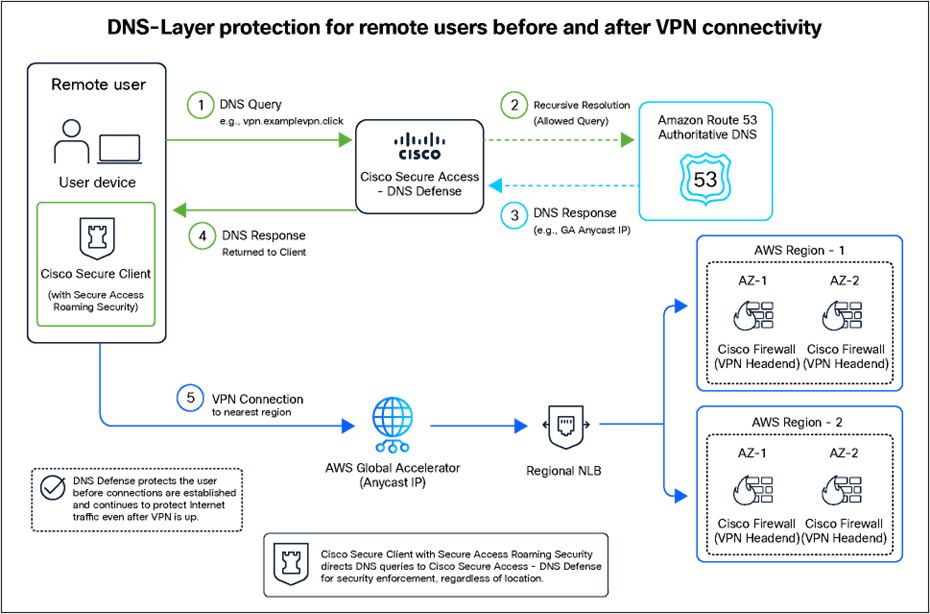
DNS-Layer Protection for Remote Users Before and after VPN Connectivity
Why Cisco DNS Defense?
DNS Defense provides cloud-delivered DNS security that protects users both on and off the corporate network without requiring additional security hardware. Cisco's global DNS infrastructure also provides extensive threat visibility that can be used to identify and block malicious domains and emerging DNS-based threats.
DNS Defense can be deployed as an additional security layer while preserving the existing VPN architecture. It also provides an evolution path toward broader Secure Access capabilities, including Secure Internet Access (SIA) and Secure Private Access (SPA). For this geo-redundant design, Secure Access – DNS Defense provides DNS-layer threat protection, while Cisco Firewall and AWS continue to provide VPN termination, traffic steering, and regional resiliency.
Global enterprises require remote access VPN architectures that extend availability beyond an individual firewall, Availability Zone, or cloud Region.
The architecture presented in this document combines Cisco Secure Client, Cisco Firewall, Cisco ISE, AWS Route 53, Global Accelerator, and Network Load Balancer to create a globally distributed remote access VPN service with a single user-facing URL:
vpn.examplevpn.click/geovpn
Route 53 provides the DNS abstraction for vpn.examplevpn.click. Global Accelerator provides static Anycast entry points and health-aware regional traffic steering. Regional Network Load Balancers distribute new VPN connections across healthy headends. Cisco Firewall terminates and secures the VPN session, while distributed Cisco ISE nodes provide centralized identity and authentication services.
Most importantly, Global Accelerator separates the VPN destination presented to the endpoint from the AWS Region currently providing the VPN service. A regional failure therefore does not require the VPN client to learn a different regional NLB address through DNS before a new connection can be directed toward surviving infrastructure.
The architecture does not attempt to migrate active VPN state between independent instances. Instead, it provides a stable global entry point and rapid placement of new or reconnecting VPN sessions onto healthy infrastructure, while maintaining the ISE security model across globally distributed AWS deployments.
Sachin Tyagi (sactyagi@cisco.com), Solutions Engineer
CCIE #22399 (Security & Data Center), CCDE #20260019, CISSP #275767
Ashish Binjola (abinjola@cisco.com), Solutions Engineer
CCIE Security #21941, AWS Certified Solutions Architect – Professional, CEH, VMware Certified Professional
Anubhav Swami (answami@cisco.com), Principal Architect
CCIEx2 #21208 (Security and Data Center), AWS Certified Solutions Architect – Professional, VMware Certified Professional