Cisco Optical Network Controller (CONC) Data Sheet
Available Languages
Bias-Free Language
The documentation set for this product strives to use bias-free language. For the purposes of this documentation set, bias-free is defined as language that does not imply discrimination based on age, disability, gender, racial identity, ethnic identity, sexual orientation, socioeconomic status, and intersectionality. Exceptions may be present in the documentation due to language that is hardcoded in the user interfaces of the product software, language used based on RFP documentation, or language that is used by a referenced third-party product. Learn more about how Cisco is using Inclusive Language.
The Cisco® Optical Network Controller (CONC) provides an SDN-compliant domain controller for Cisco optical networks. Using an industry-standard OIF transport API (T-API) interface over RESTCONF, CONC gives a Hierarchical Controller (HCO) or orchestrator abstracted visibility and control for Cisco optical networks.
CONC is a hybrid optical domain controller with centralized PCE (path computation engine) and distributed APC (automatic power control). It has a Web UI with multiple applications providing full CRUD (create, read, update, and delete) services and NMS (Network Management System).
CONC design is based on microservices to enable scaling and alignment with Cisco automation products and platforms.
CONC support REST-APIs and SNMP traps, for Machine-to-machine automation, as well as MCP Server for AI/ML integration.
● Cisco Site Manager for NCS1000 and/or NCS2000
CONC is built to address several challenges in network management:
● Controller, NMS, and EMS functions.
● Integration into an SDN management environment including abstraction of vendor details.
● Integration with Cisco automation software products like HCO, COSM, and CONP.
● Support for current and future network topologies, including routed optical networking.
● Centralized software control of the Cisco optical network, including distributed-PCE (Path Computation Element) and centralized-PCE.
● Web UI with applications like inventory, topology, service manager, service assurance, backup/restore/upgrade orchestration, etc.
● Single sign-on for seamless node (site) manager cross-launch.
Cisco Optical Network Controller architecture
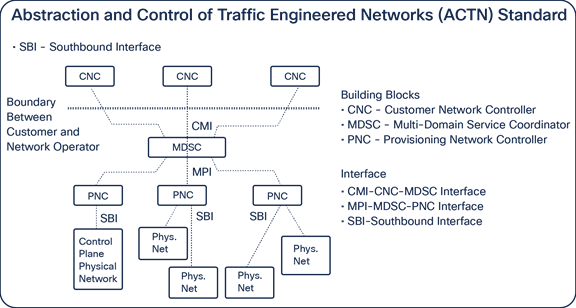
Cisco Optical Network Controller was designed to align with an ACTN (abstraction and control of traffic-engineered networks) standard architecture. CONC acts as a Provisioning Network Controller (PNC) in an ACTN as shown in the following figure.
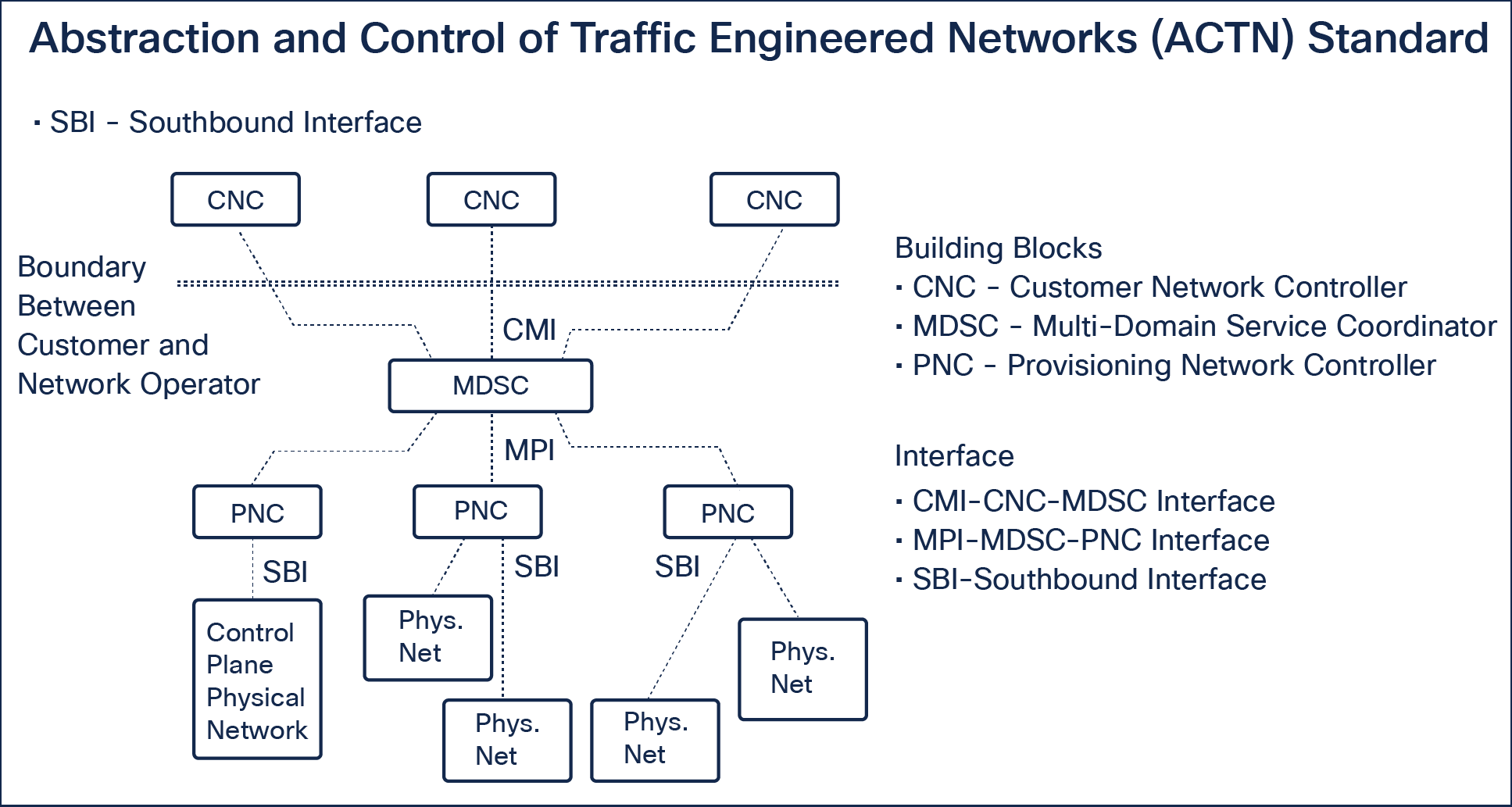
ACTN standard architecture
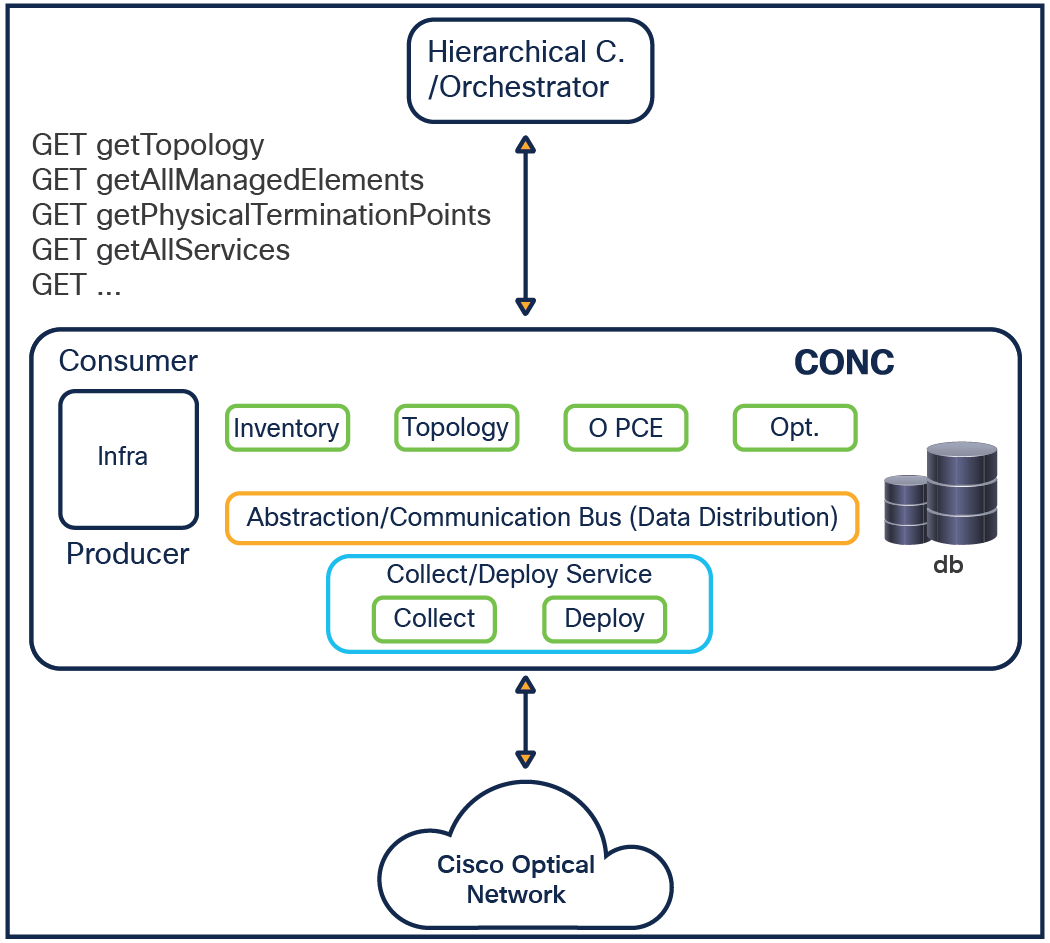
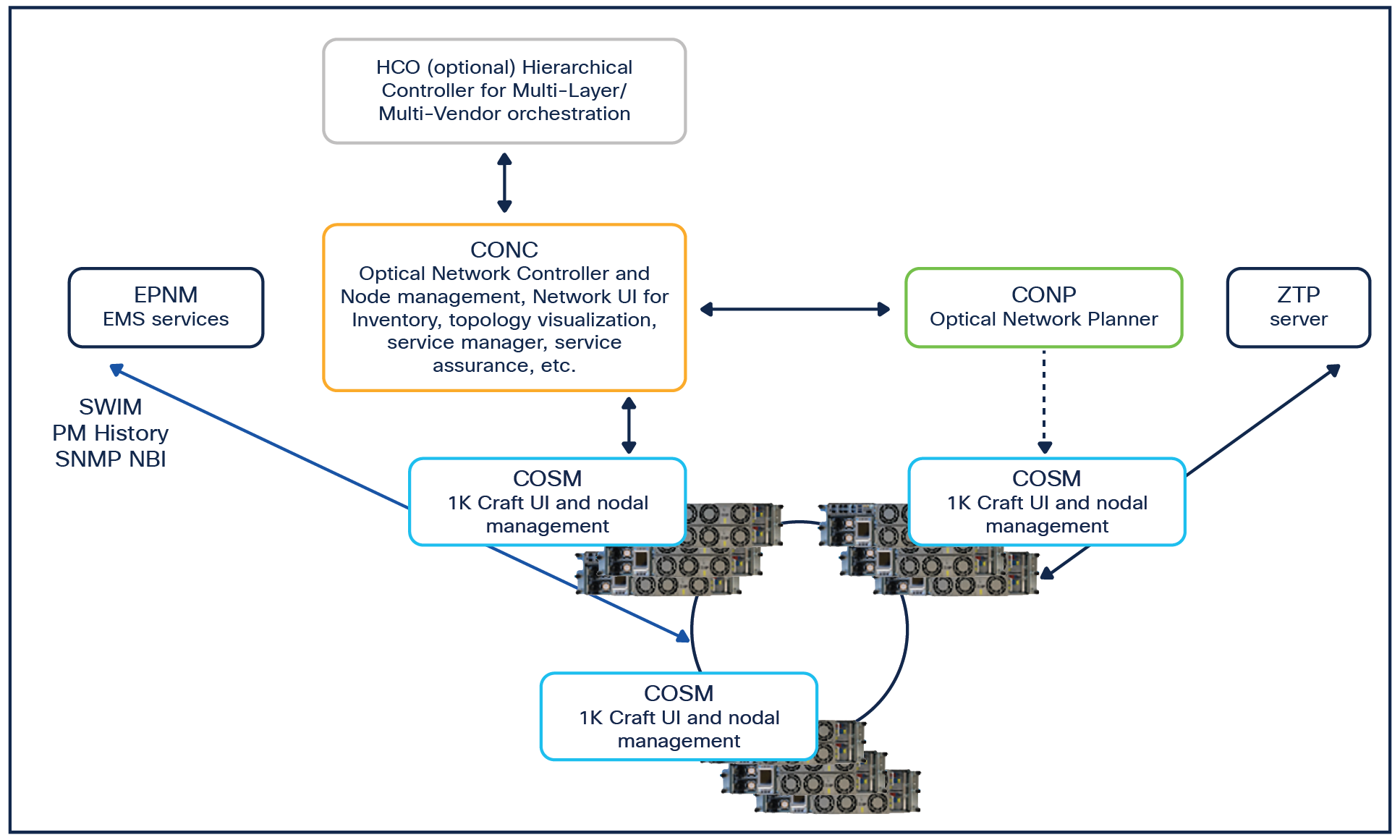
The following figure shows the CONC architecture and interaction with other software application for end-to end NCS 2000 and NCS 1000 optical devices management.
HCO/MDO – Cisco Crosswork Hierarchical Controller (HCO) / Multi-Domain-Orchestrator
Network Planning (CONP)
● Photonic simulation
● BOM, Sites configuration (export to XR / COSM)
● Live Network Import (from CONC)
Network Controller Interfaces (CONC)
● NBI – REST API, TAPI, SNMP Traps
Network functions (CONC)
● Topology, Inventory, Alarms & Events
● Circuit discovery / provisioning: OCH-NC/OCH-Trail /CH-CC
● PM History, Audit Logs
● SWIMU – backup/restore/upgrade
● Workspace – troubleshooting tools
Site functions (COSM)
● Mechanical Layout & Inventory
● OAM & Configurations - Loopbacks, CV, OTDR, OCM, TCA, Alarm profiles, etc.
NCS1000, NCS2000
● 1001/1004/1010/1014 - All, 2002/2006/2015 – Selected cards
Nodes application
Nodes (enrollment) app provides:
● COSM enrolment for NCS 1000 sites (nodes)
● COSM enrolment for NCS 2000 sites (nodes)
● Add/edit lat/long values
● Resync a specific site or multiple selected sites
● Periodic network sync
● Cross-launch a specific node functional view
● Bulk enrollment—import from excel file
● Export to an Excel file
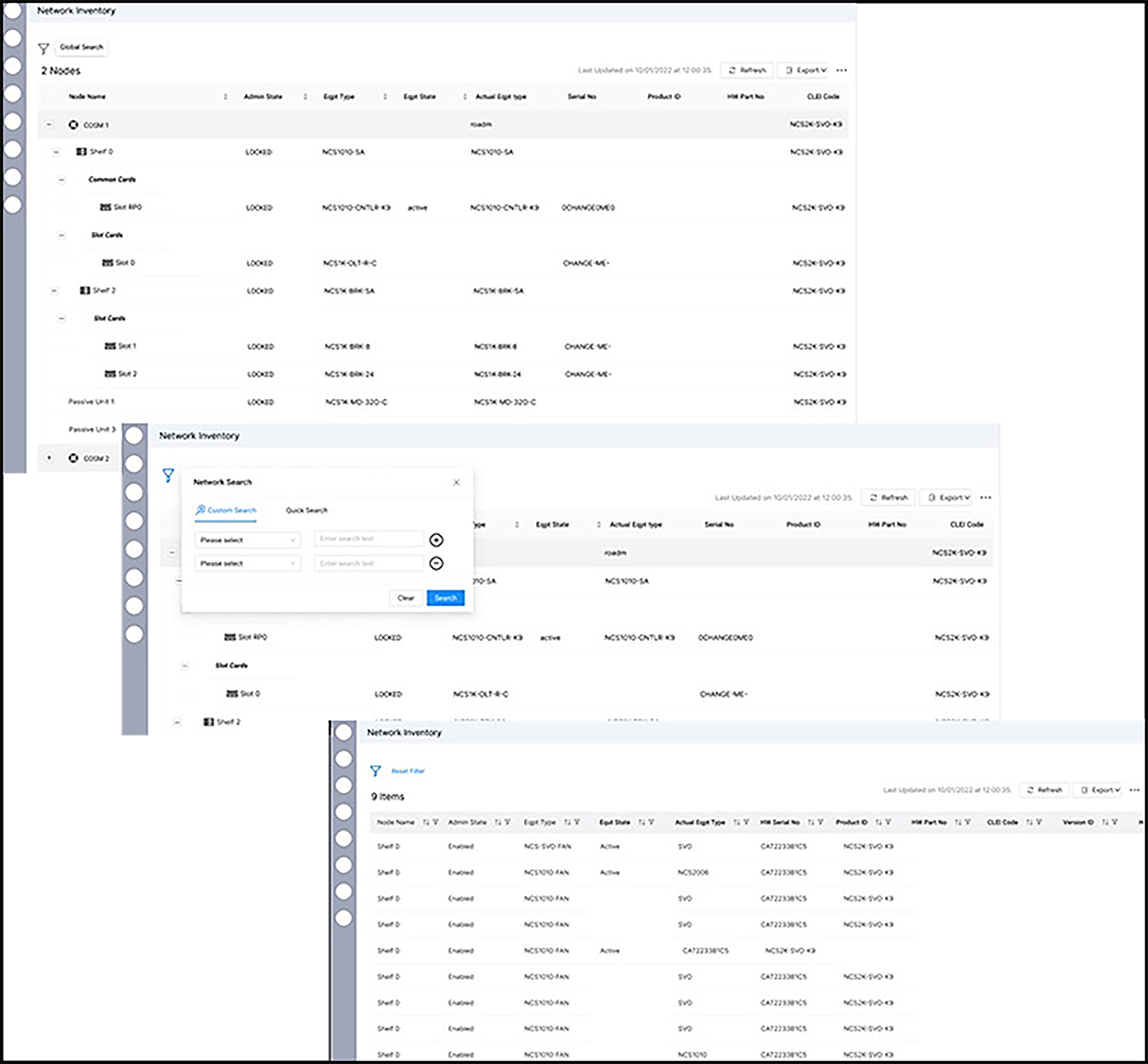
Inventory application
The Inventory application provides the following information: node name, admin state, equipment type, equipment state, actual equipment type, serial number, product ID, hardware part number, CLEI code, version ID, hardware rev, software rev, boot ROM rev, manufacturing date, manufacturing id, and site location.
This is represented in a tree view (hierarchical view) when browsed “manually” by the user or in flat view as a reply to a user search.
Search supports the two types of searches: (1) Quick search—This is a free text search (minimum 3 characters are required) or (2) a Custom search—Search will be based on the column’s names and string entered in the text box.
The user can add/remove columns and filter the data.
The user can export a tree table or a flat tabled after a search or the entire network inventory data.
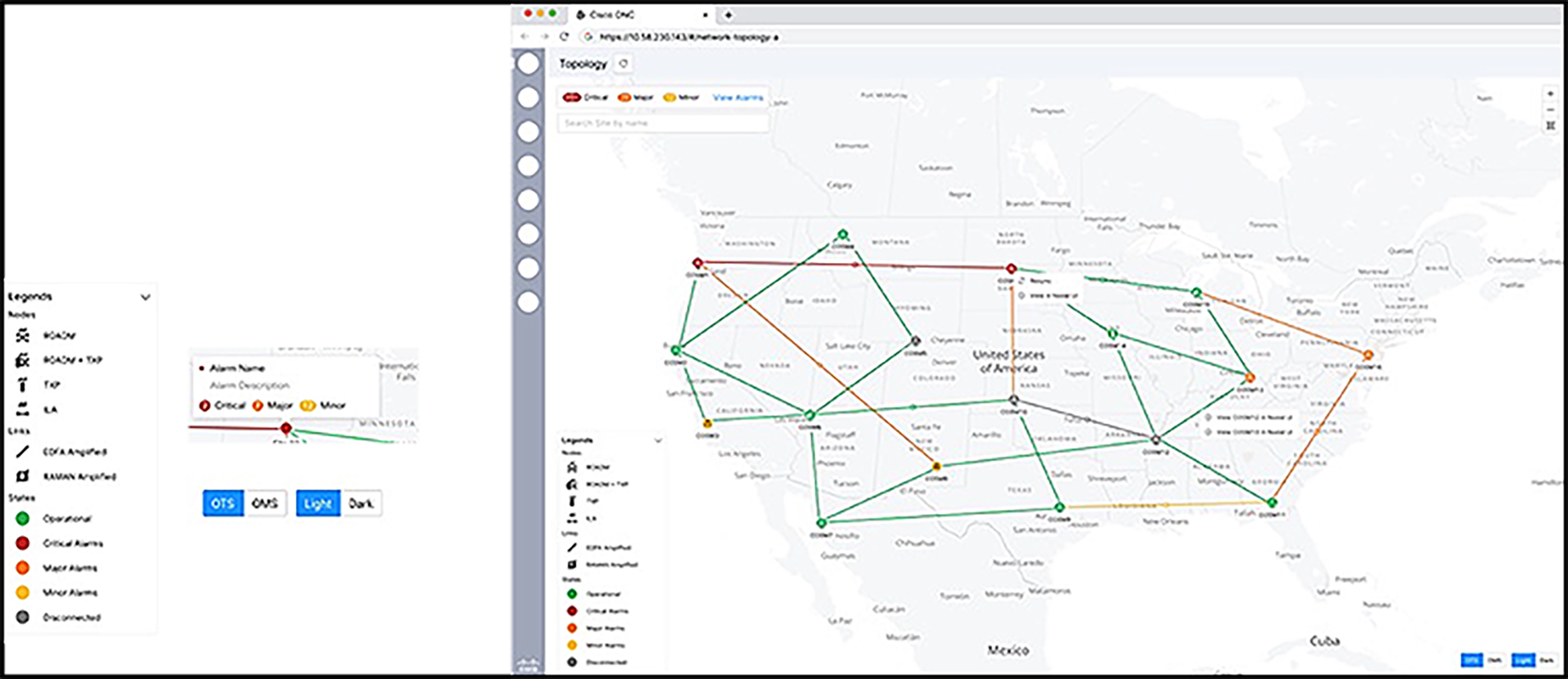
Topology application
The topology application provides:
● Sites and links assembling the topology
● Expandable/collapsible legend
● Per site alarm popovers: On hovering each site, highest severity current and alarm summary
● Site search flies into the site’s location
● Link info (free text user subscription)
● Cross-launch to COSM for deep-dive site info
● Resync a site with an indicator
● OTS/OMS toggle
● A light/dark mode toggle
Alarm application
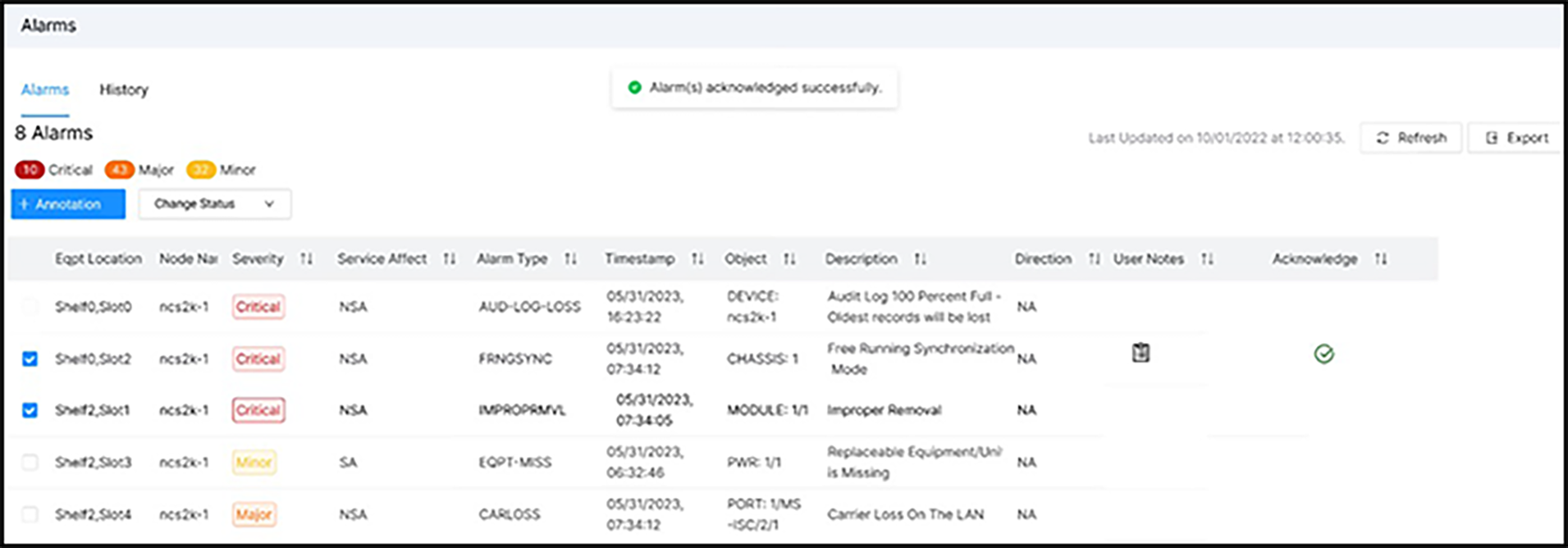
The alarm application provides:
● Up to 72 weeks of current and history alarms
● Up to 12 weeks of events
● Site/chassis/card/port/pluggable—fetched from COSM, stored in CONC DB + updates notified by COSM
● Service-level alarms
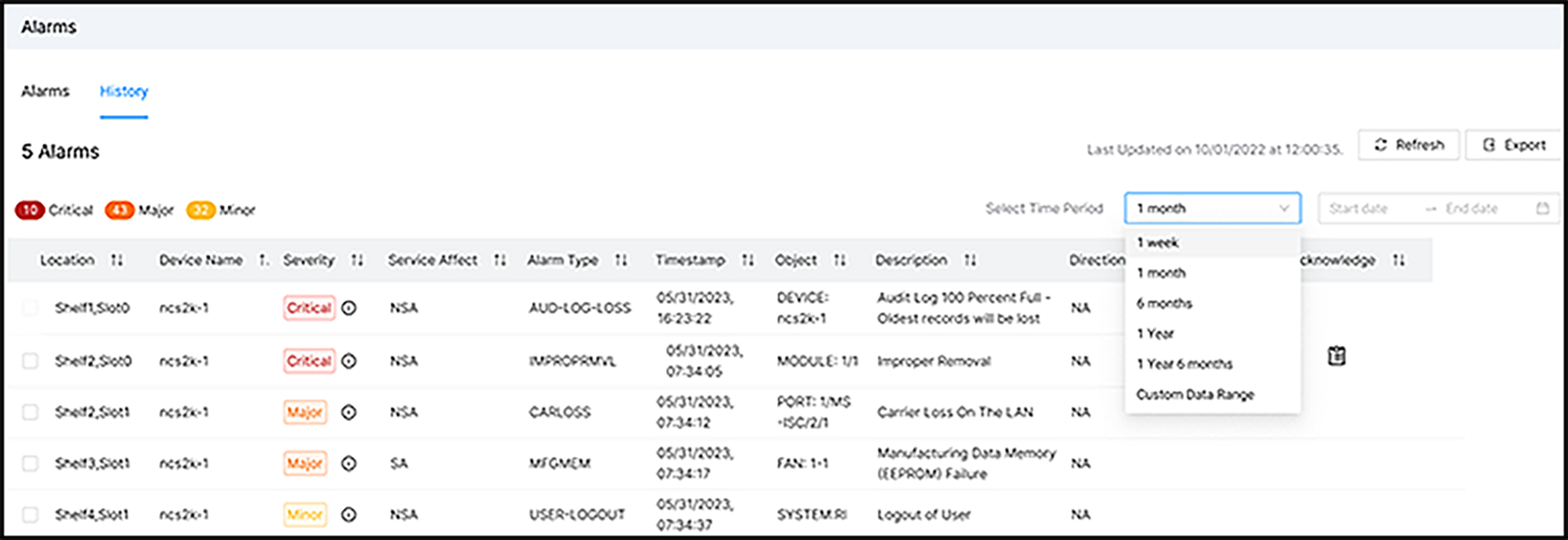
● List of current alarms; alarm history (selected range date/time)
● Search/filter/sort add/remove columns
● Alarm acknowledgement
● User notes
● Cross-launch relevant alarms to COSM
● Show alarm severity in the topology/show in site (COSM)
● Auto filter alarms to other apps (topology, service assurance, service manager)
● Alarms exportable to XSLX file, saved in the local user storage
● User could cross-launch each alarm to the relevant COSM view
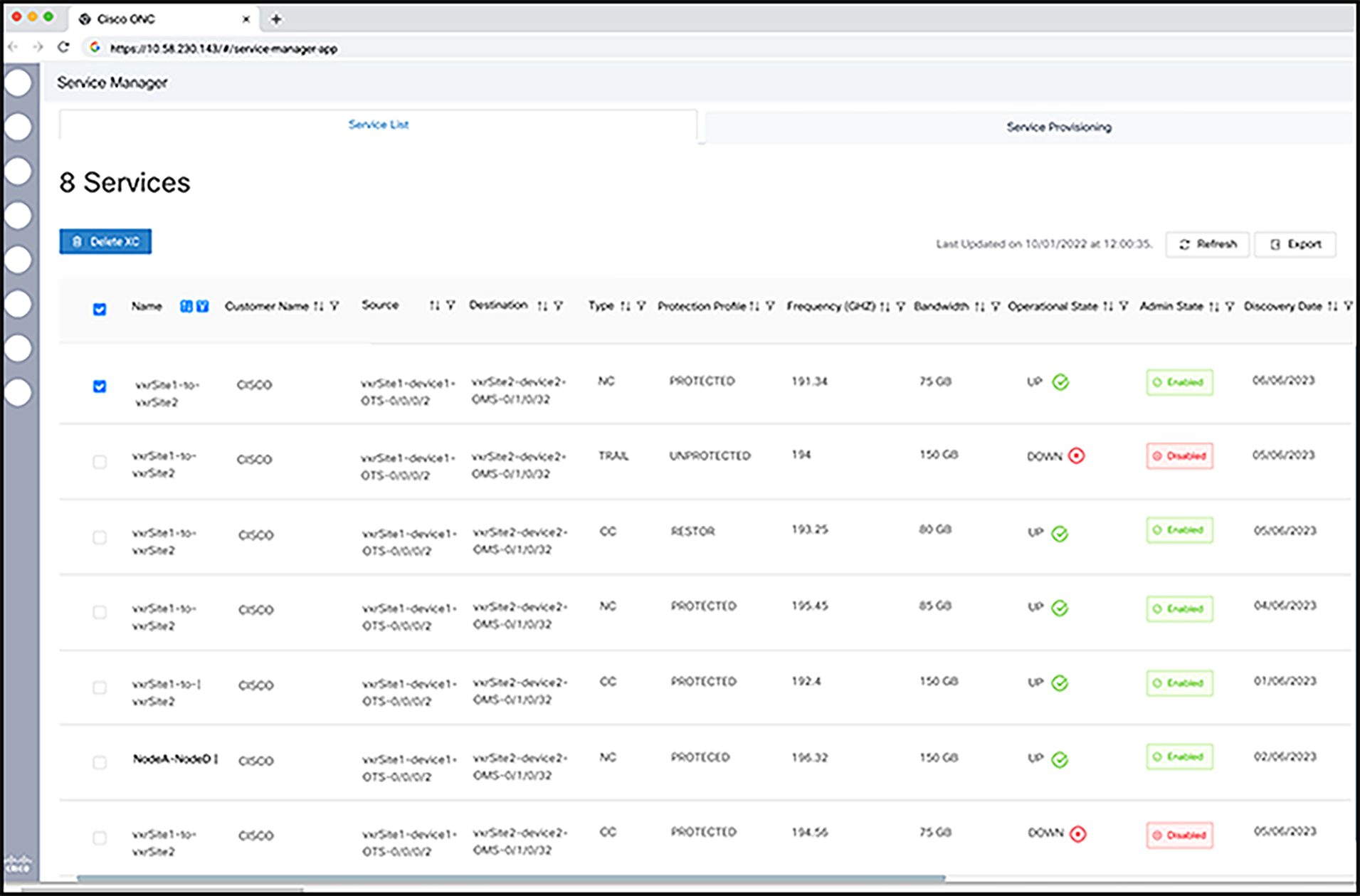
Service manager application
The service manager application provides:
● A list of discovered/provisioned services—search/sort/filter add/remove columns.
● A list of circuits filtered by topology selection—link (all the circuits running through that link), site (all the circuits running through that site), multiple links/sites.
● List fields are service name; source and destination endpoints; tag (customer name); type (NC/trail); profile (unprotected/etc.); rate; central-freq + BW; related services (trail over NC).
● The list is exportable to XSLX.
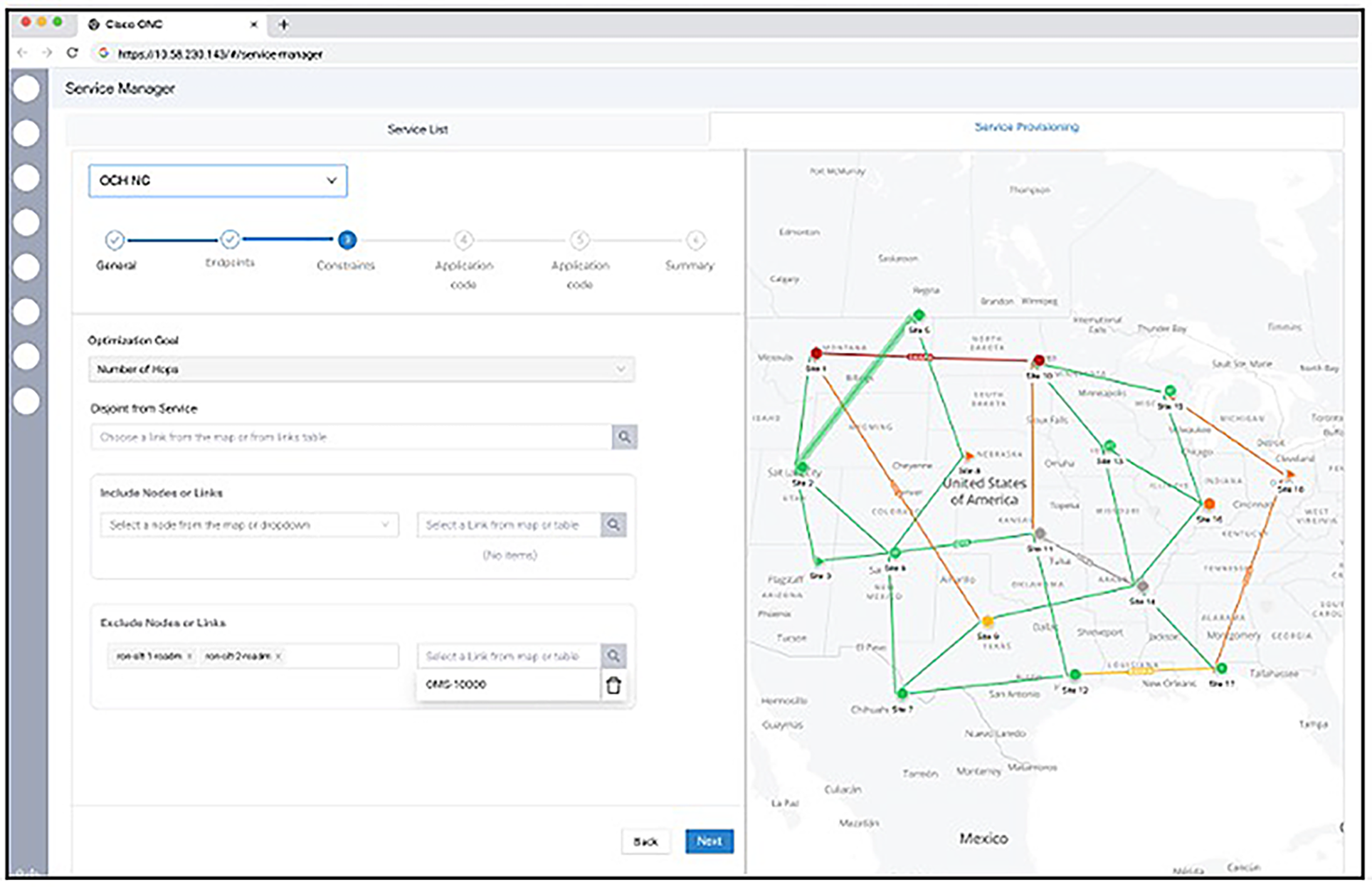
● Provisioning OCH-NC with OSNR sigma threshold, admin state, wavelength central-freq/blank, app. code, single/multicarrier, endpoint selection from map and inventory (plus drop-down list); PCE criteria—hop, cost, OSNR, distance/latency; path disjoint; node/link ERO/XRO, allow regen.
● Discovering OCH-NC/Trail/CC.
● Provisioning OCH-trail—same as OCH-NC + discovered trunk(Transponder Coherent Line) app. code and wavelength configuration.
● Provisioning OCH-CC—same as OCH-Trail + transponder client port.
● Error messages in case of PCE failure (e.g., spectrum not available) and in case of execution (e.g., device disconnected).
● Service edit—edit service name.
● Service delete.
Service assurance application / Circuit Monitoring
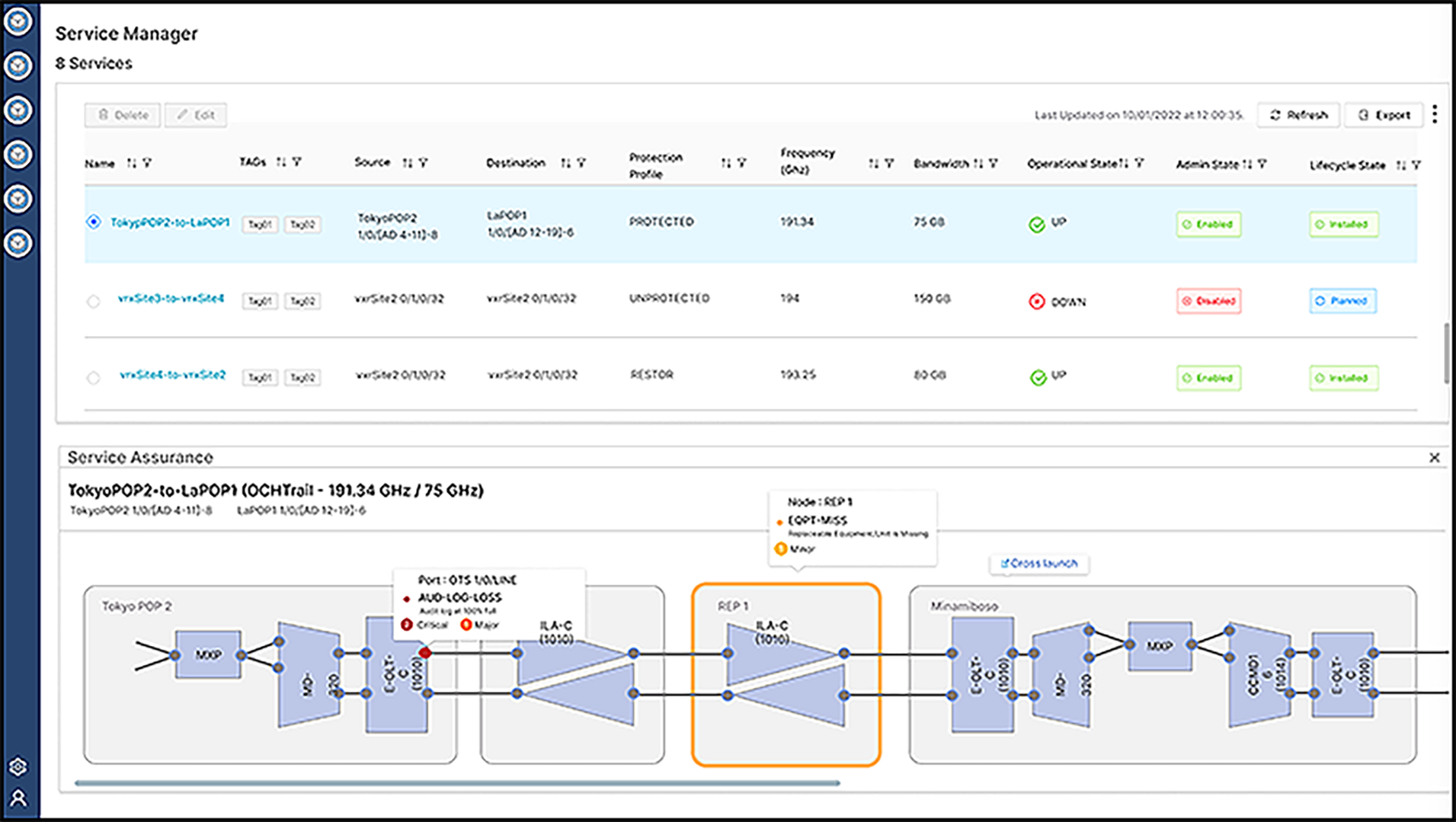
The service assurance application provides:
● Service data path visualization: TXP/MXP, PSM (future), MD/BRK/CCOFS, OLT, OLA, ports, links (client DSR, trunks, OCH, OTS).
● Service name; tag (customer) name; rate; cent freq + bandwidth; opp state, admin state, components ID (COSM/SVO-chassis-slot-port).
● Alarm severity visualization plus alarm app filter.
● User could cross-launch each component to the relevant COSM NFV.
● Exportable to XSLX file, saved in the local user storage.
● OCH-NC, OCH-trail, OCH-CC.
● Per Channel and Composite Power levels.
● Telemetry (PM) History for objects selected from the circuit.
Links Application
It provides a centralized location for managing and monitoring network links. It offers enhanced filtering and sorting capabilities compared to the topology view, allowing you to easily differentiate between discovered and undiscovered OMS links.
The Links app has two tabs, OMS and Undiscovered OMS:
● OMS tab: Lists the discovered optical links in a hierarchical, tree-structured table. The parent row shows OMS links, which, when expanded, reveal the underlying OTS links in forward and reverse directions.
● Undiscovered OMS tab: Lists undiscovered OMS links, which are considered partial links. In this tab, the parent row is an OTS link.
● OTN Links tab: Lists the OTN links for the tranponder networks.
Workspace application
The workspace application provides ways to accomplish different day-to-day workflows; a workspace consists of multiple applications that interact with each other within the same view.
A few of the common workflows have been predefined (e.g., circuit monitoring, network monitoring, Link Monitoring). We are looking to add a user-defined workspace in a later release.
For a given predefined workspace, the user can resize and position different applications to be in a favorite order and save it for the next launch. Clicking on one application will result in updates on the other applications.
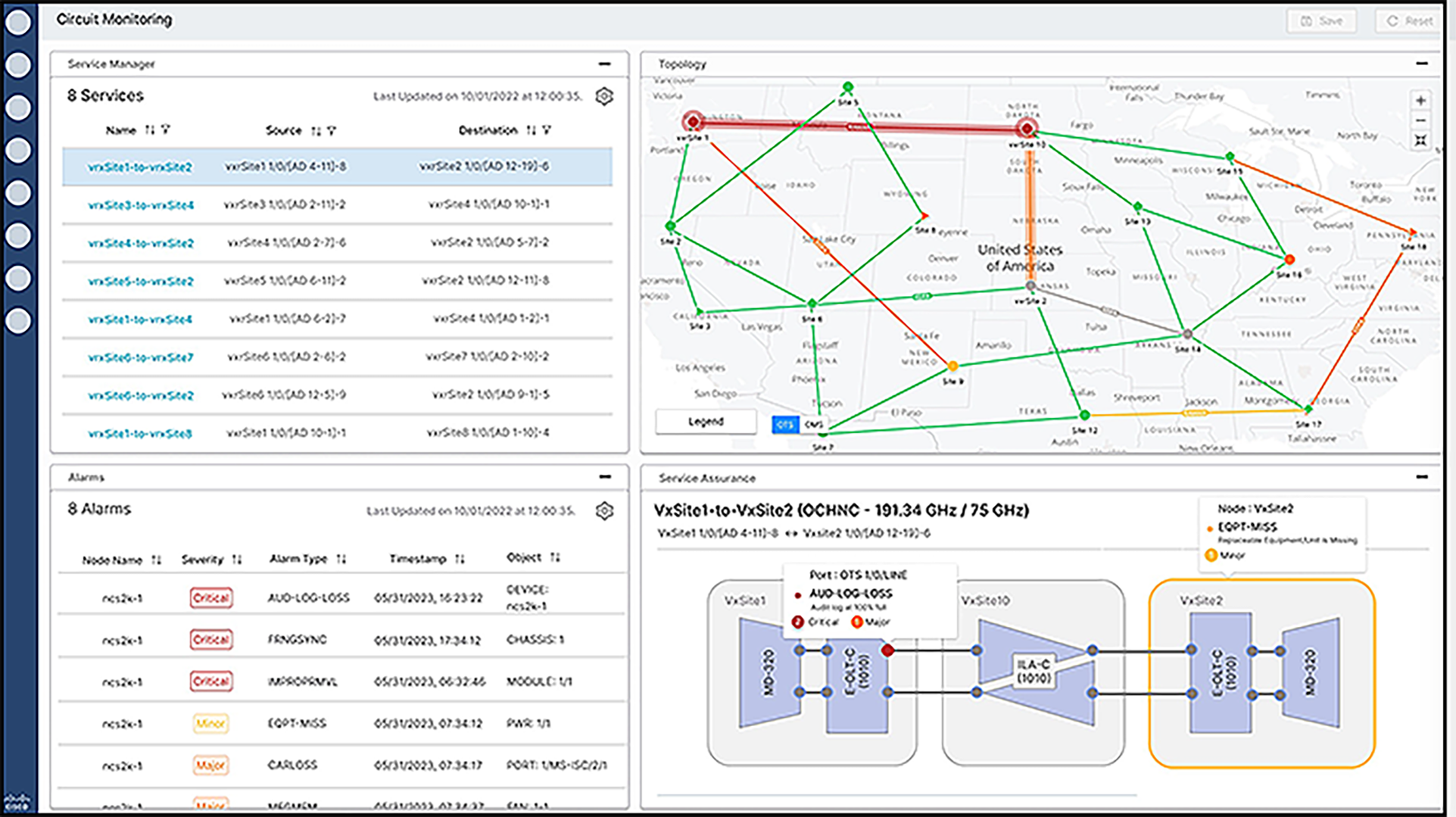
For example, in the following screenshot, a user clicks on service (circuit) from the service manager (top-left window). Then this circuit will be highlighted in the topology app (top-right window), will be fetched to the service assurance app (bottom-right window), and will filter the relevant alarms in the alarm app (bottom-left window).
Logs
Cisco Optical Network Controller supports two sets of logs:
● The Audit logs.
● The developer or Debug logs.
Both these logs can be viewed online, using the Logs application's Audit and Debug tabs. These logs are archived every week on Monday around midnight by default. The archived logs are in the.tgz format. You can also schedule different day and time values as the archive scheduler time. These archives can be downloaded and deleted using the Archive tab.
Audit Logs
The Audit logs option helps in:
● Auditing all the Cisco Optical Network Controller operations which include circuit operations, Cisco Optical Network Controller and COSM user login or logout procedures and traffic related operations that are done on COSM or node.
● The logs can be used to learn about all the changes that have occurred as a result of external notifications that come from connected nodes.
CONC North Bound Interface
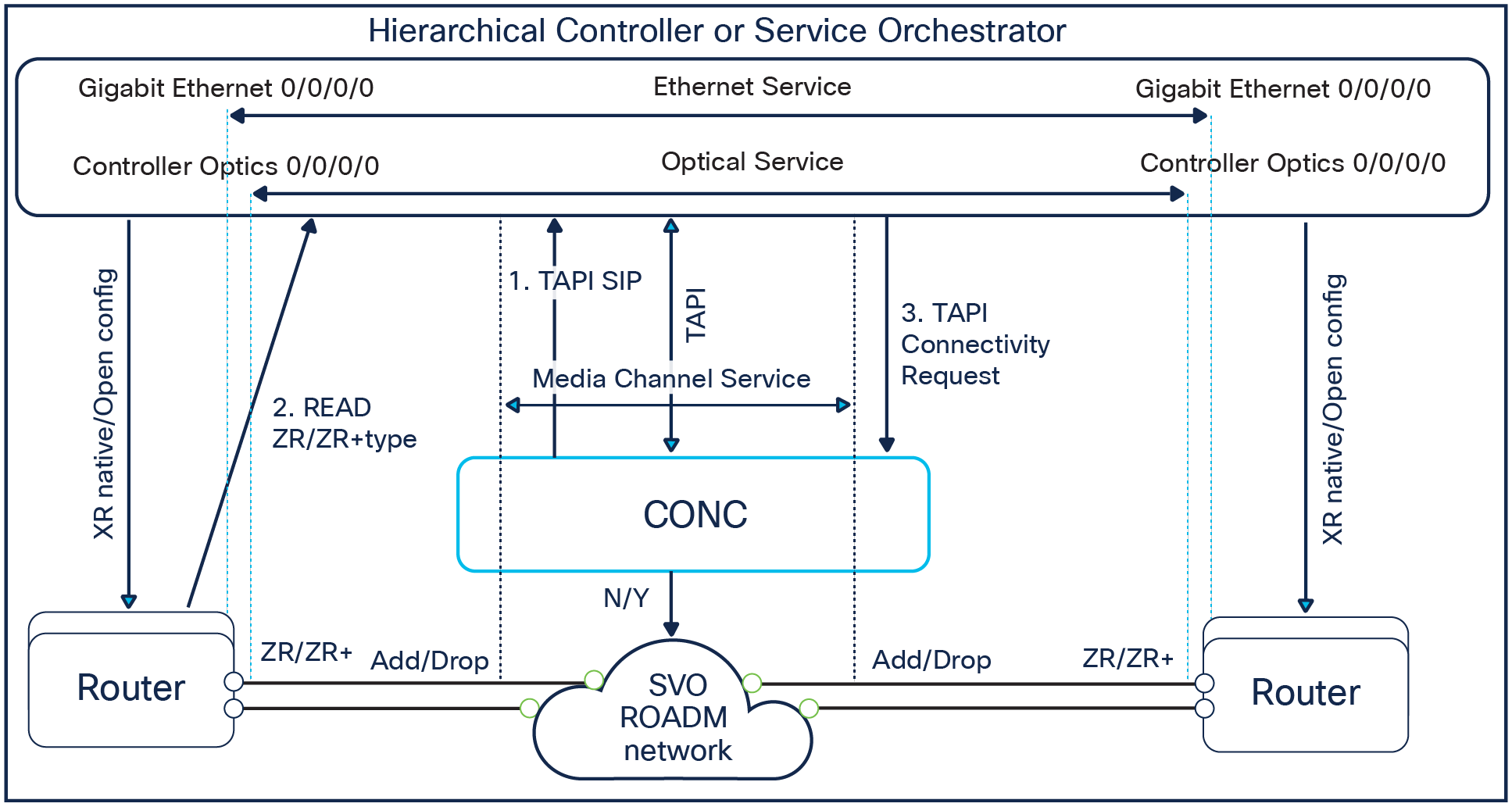
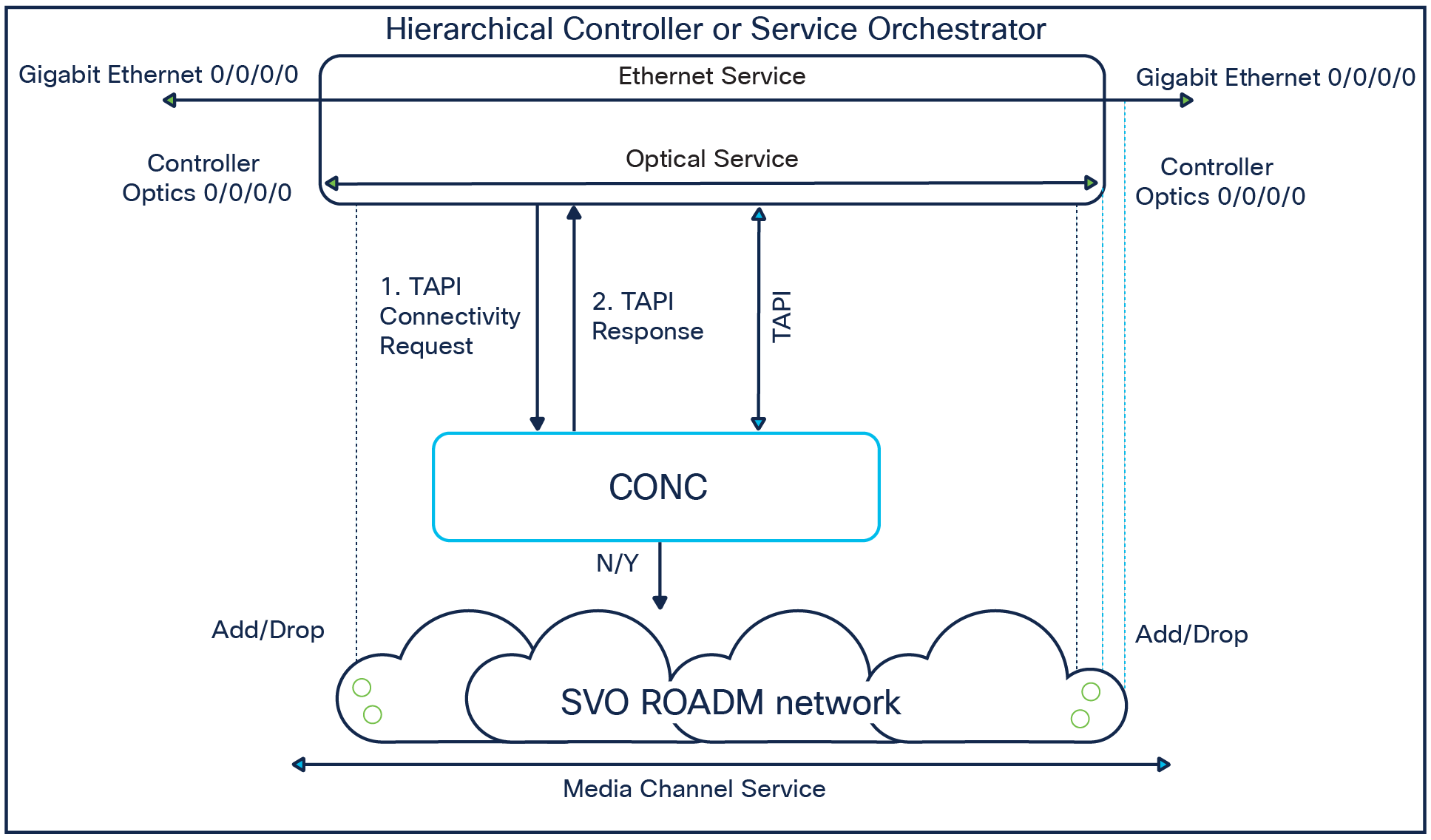
CONC’s NorthBound Interface (NBI) support multiple interfaces: ONF-standard TAPI model and is accessible via RESTCONF. REST APIs, SNMP Traps and Syslog. Detailed info is available in https://developer.cisco.com/docs/cisco-onc/
Appendix 1: Supported equipment
NCS1010-SA
NCS1K-BRK-SA
NCS1014
NCS1010-AC-PSU
NCS1010-DC-PSU
NCS1010-FAN
NCS1K14-FAN
NCS1010-FTF
NCS1K14-BLANK
NCS1K-CNTLR2
NCS1010-CNTLR-K9
NCS1010-CTLR-2-K9
NCS1K14-CNTLR-K9
NCS1K14-CCMD-16-C
NCS1K14-2.4T-L-K9
NCS1K14-2.4T-K9
NCS1K14-2.4T-X-K9
NCS1K14-2.4TXL-K9
NCS1K14-2.4TX-FB2C
NCS1K14-2.4TX-LC1C
NCS1K14-2.4TX-LC2C
NCS1K14-2.4TX-FB1C
NCS1K-ILA-2R-C
NCS1K-ILA-C
NCS1K-ILA-R-C
NCS1K-OLT-C
NCS1K-OLT-R-C
NCS1K-E-ILA-R-C
NCS1K-E-ILA-2R-C
NCS1K-E-ILA-R-C-2
NCS1K-E-OLT-C
NCS1K-E-OLT-R-C
NCS1K-BRK-8
NCS1K-BRK-24
NCS1K-MD-32E-C
NCS1K-MD-32O-C
NCS1K-MD-32E-L
NCS1K-MD-32O-L
NCS2K-SVO-K9
NCS2K-9-SMRxxFS
NCS2K-20-SMRxxFS
NCS2K-16-AD-CCOFS
NCS2K-EDRA1-xx
NCS2K-EDRA2-xx
RAMAN-CTP
RAMAN-COP
OPT-EDFA-xx
NCS2K-PPMESH8-5AD
NCS2K-MF-6AD-CFS
NCS2K-MF-DEG-5-CV
NCS2K-MF-UPG-4-CV
NCS2K-MF-MPO-8LC
NCS2K-MF-M16LC-CV
NCS2K-MF-10AD-CFS
NCS2K-MF-16AD-CFS
NCS2K-MF-4X4-COFS
PSM (w/o circuit/topology)
NCS2K-1.2T-MXP (T6) | 400GE>>400G
NCS2K-1.2T-MXP (T6) | 4x100GE>>400G
NCS2K-400G-XP (T5) | MXP
NCS2K-400G-XP (T5) | REGEN
NCS2K-400G-XP (T5) | OTN-XC R/O
NCS2K-200G-CK-C (T3B) | TXP100G
NCS2K-200G-CK-C (T3B) | RGN100G
NCS2K-200G-CK-C (T3B) peer 10x10G-LC | MXP-10x10G
10X10G-LC | TXP
100G-LC-C / 100G-ME-C (T1)
AR-MXP (ROCCIANERA)
Find warranty information on Cisco.com at the Product Warranties page.
To place an order, visit the Cisco Ordering Home Page and refer to Table 3. To download software, visit the Cisco Software Center.
Table 1. Ordering information for Cisco Optical Network Controller
| Part number |
Description |
| S-OAS-CONCX.Y-SW |
CONC software image |
| CONC-RTM-ESS-SM |
Essential CONC subscription for small device with support |
| CONC-RTM-SPC-SM |
Spectrum CONC subscription for small device with support |
| CONC-RTM-API-SM |
API CONC subscription for small device with support |
| CONC-RTM-ESS-LG |
Essential CONC subscription for large device with support |
| CONC-RTM-SPC-LG |
Spectrum CONC subscription for large device with support |
| CONC-RTM-API-LG |
API CONC subscription for large device with support |
● CONC would have Major X.Y SW releases, usually 2 major releases per year.
● CONC quote is done according to the consumed licenses, no charge for the SW Image.
● CONC would have per Device (small/large) and per package (Essential, Spectrum, API) Licenses. These Licenses are release agnostic and suitable a configurable term (3-7 years) and can be renwed after.
● CONC always require COSM Licenses (as CONC manage COSMs) - see at the other section below.
● CONC licenses are going to be tracked by Smart Licensing Instance in CONC.
● CONC Licenses have two device types
◦ Small: 1001, 1010, 2002
◦ Large: 1004, 1014, 2006, 2015, 1020
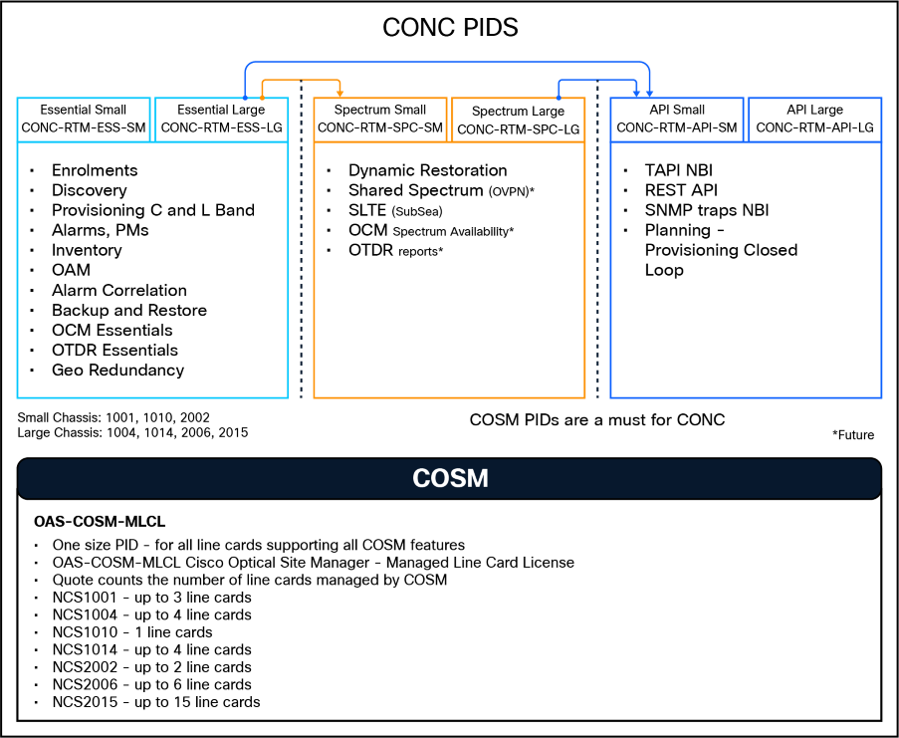
● CONC Licenses have three Packages: ESS = Essential (Mandatory), SPC = Spectrum (optional) and API (optional)
● Please refer to the diagram below describing the features/functions available per package.
● ESS (Essential) level is mandatory, and has to be ordered for all the devices managed by CONC
● SPC (Spectrum) is optional, a SPC package requires ESS first.
● API is optional, an API package requires ESS first.
● The following combinations are legit: ESS, ESS+SPC, ESS+API and A full blown of ESS+SPC+API.
● CONC Licenses are Subscription based, with configurable term (3-7 years) and can be renwed after; the Subscription includes the following
◦ SW usage - with full CRUD
◦ SW upgrades (excluding labor) - CONC SW Images for upgrading to the latest release.
◦ CONC CX support
● OAS-COSM-MLCL smart licenses are mandatory when managing a network through CONC (COSM is mandatory to manage 1K/2K devices in CONC).
● OAS-COSM-MLCL smart licenses includes the entire COSM features, and shall be quoted per line card for all NCS1000 / NCS2000 platforms, for example: OLT-C in 1010, TXP in 1014, SMR20 in NCS2000, PSM in 1001, etc.
● OAS-COSM-MLCL smart licenses are not required for chassis common cards, for example FAN, PSU, Controller, SVO-LC do not require OAS-COSM-MLCL License.
Cisco services for migrating converged IP + optical solutions
Services from Cisco and our partners help you get the most value from your investments in the Cisco converged IP + optical solution, quickly and cost-effectively. We can help you design, implement, and validate your solution to speed migration and cutover. Coordinate every step through to interworking, strengthen your team, and make the most of tomorrow’s opportunities. Learn more at www.cisco.com/go/spservices.
Cisco environmental sustainability
Information about Cisco’s environmental sustainability policies and initiatives for our products, solutions, operations, and extended operations or supply chain is provided in the “Environment Sustainability” section of Cisco’s Corporate Social Responsibility (CSR) report.
Reference links to information about key environmental sustainability topics (mentioned in the “Environment Sustainability” section of the CSR report) are provided in the following table:
| Sustainability topic |
Reference |
| Information on product material content laws and regulations |
|
| Information on electronic waste laws and regulations, including products, batteries, and packaging |
Cisco makes the packaging data available for informational purposes only. It may not reflect the most current legal developments, and Cisco does not represent, warrant, or guarantee that it is complete, accurate, or up to date. This information is subject to change without notice.
Flexible payment solutions to help you achieve your objectives
Cisco Capital® makes it easier to get the right technology to achieve your objectives, enable business transformation, and help you stay competitive. We can help you reduce the total cost of ownership, conserve capital, and accelerate growth. In more than 100 countries, our flexible payment solutions can help you acquire hardware, software, services, and complementary third-party equipment in easy, predictable payments. Learn more.
For more information about the Cisco Optical Network Controller, visit http://www.cisco.com/go/ncs4000 or contact your local Cisco account representative.
| New or revised topic |
Described in |
Date |
| CONC2.0 features |
CONC datasheet |
November 1, 2022 |
| CONC PIDs |
CONC datasheet |
December 9, 2023 |
| CONC3.1 applications and features |
CONC datasheet |