Cisco ハイアベイラビリティ
ルータ独自のハードウェアおよびソフトウェア アーキテクチャは、あらゆるネットワーク イベントの発生時にルータのアップタイムを最大化するように設計されているため、すべてのネットワーク シナリオで最大アップタイムと復元力が実現します。
ここでは、Cisco 8300 シリーズ セキュアルータで使用される Cisco ハイアベイラビリティのいくつかの側面について説明します。
この製品のドキュメントセットは、偏向のない言語を使用するように配慮されています。このドキュメントセットでの偏向のない言語とは、年齢、障害、性別、人種的アイデンティティ、民族的アイデンティティ、性的指向、社会経済的地位、およびインターセクショナリティに基づく差別を意味しない言語として定義されています。製品ソフトウェアのユーザインターフェイスにハードコードされている言語、RFP のドキュメントに基づいて使用されている言語、または参照されているサードパーティ製品で使用されている言語によりドキュメントに例外が存在する場合があります。シスコのインクルーシブ ランゲージの取り組みの詳細は、こちらをご覧ください。
このドキュメントは、米国シスコ発行ドキュメントの参考和訳です。リンク情報につきましては、日本語版掲載時点で、英語版にアップデートがあり、リンク先のページが移動/変更されている場合がありますことをご了承ください。あくまでも参考和訳となりますので、正式な内容については米国サイトのドキュメントを参照ください。
Cisco ハイ アベイラビリティ(HA)テクノロジーにより、ネットワークのどの部分でも発生し得る中断から迅速にリカバリでき、ネットワーク全体の保護が実現します。ネットワークのハードウェアとソフトウェアは、Cisco ハイ アベイラビリティ テクノロジーと連携して、中断から迅速にリカバリすることに加えて、ユーザとネットワーク アプリケーションに対して障害の透過性を提供します。
ここでは、デバイスで Cisco ハイアベイラビリティ機能を設定する方法について説明します。
ルータ独自のハードウェアおよびソフトウェア アーキテクチャは、あらゆるネットワーク イベントの発生時にルータのアップタイムを最大化するように設計されているため、すべてのネットワーク シナリオで最大アップタイムと復元力が実現します。
ここでは、Cisco 8300 シリーズ セキュアルータで使用される Cisco ハイアベイラビリティのいくつかの側面について説明します。
シャーシ間ハイ アベイラビリティ(HA)機能は、ボックスツーボックス冗長性機能とも呼ばれます。シャーシ間高可用性を使用すると、相互にバックアップとして動作するデバイスのペアを設定できます。いくつかのフェールオーバー条件に基づいてアクティブデバイスを決定するよう、この機能を設定できます。フェールオーバーが発生すると、中断なくスタンバイデバイスが引き継ぎ、コールシグナリングの処理と、メディア転送タスクの実行を開始します。
冗長インターフェイスのグループは、冗長グループと呼ばれます。次の図は、アクティブ/スタンバイ デバイスのシナリオを示しています。また、1 つの発信インターフェイスを持つデバイスのペアについて、冗長グループを設定する方法を示します。
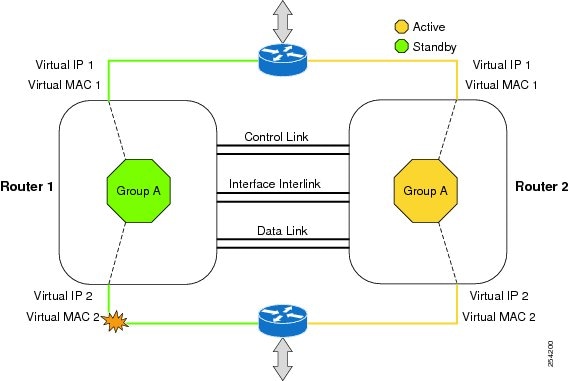
設定可能なコントロールリンクおよびデータ同期リンクによってデバイスが結合されます。コントロール リンクは、デバイスのステータスを通信するために使用されます。データ同期リンクを使ってステートフル情報を転送し、コールとメディア フローに関してステートフル データベースを同期します。冗長インターフェイスの各ペアは同じ一意の ID 番号(RII とも呼びます)で設定されます。デバイスでのシャーシ間 HA 設定の詳細については、シャーシ間ハイアベイラビリティの設定 を参照してください。
双方向フォワーディング検出(BFD)は、すべてのメディア タイプ、カプセル化、トポロジ、およびルーティング プロトコルのために短時間での転送パス障害検出を提供するよう設計された検出プロトコルです。BFD は、転送パス障害を高速で検出するだけでなく、ネットワーク管理者のために一貫した障害検出方式を提供します。ネットワーク管理者は BFD を使用することで、さまざまなルーティング プロトコルの HELLO メカニズムにより、変動速度ではなく一定速度で転送パス障害を検出できるため、ネットワーク プロファイリングおよびプランニングが容易になります。また、再収束時間の整合性が保たれ、予測可能になります。
BFD の詳細については、『IP Routing: BFD Configuration Guide』の「Bidirectional Forwarding Detection」を参照してください。
双方向フォワーディング検出オフロード機能は、障害検出にかかる時間を短縮するために、BDF セッション管理をフォワーディング エンジンにオフロードできるようにします。BFD オフロードにより、ルーティング テーブル再計算のために迅速な障害検出パケット(メッセージ)をルーティング プロトコルに送信することで、全体的なネットワーク コンバージェンス時間が短縮されます。BFD オフロードの設定を参照してください。
アクティブ デバイスとスタンバイ デバイスは、同じバージョンの Cisco IOS XE ソフトウェアを実行する必要があります。
アクティブ デバイスとスタンバイは、制御パス用の L2 接続を介して接続する必要があります。
タイムスタンプとコール タイマーが一致するように、両方のデバイスでネットワーク タイム プロトコル(NTP)を設定するか、クロックを同じに設定する必要があります。
データの正確な同期のために、アクティブデバイスとスタンバイデバイスの両方で Virtual Route Forwarding(VRF)を同じ順序で定義する必要があります。
遅延時間は、タイム アウトを防止するため、すべての制御リンクおよびデータ リンクで最小にする必要があります。
Gigabit EtherChannel などの物理的に冗長なリンクを、制御パスおよびデータ パスに使用する必要があります。
ボックスツーボックス アプリケーションのフェールオーバー時間は、非ボックスツーボックス アプリケーションではより高くなります。
LAN および MESH シナリオはサポートされません。
VRF はサポートされておらず、ZBFW 高可用性データおよび制御インターフェイスでは設定できません。
Front Panel Gigabit Ethernet(FPGE)インターフェイスでサポートされる仮想 MAC の最大数は、プラットフォームによって異なります。FPGE インターフェイスについては、『Hardware Installation Guide for Cisco 8300 Series Secure Router』を参照してください。
スタンバイデバイスに複製された設定は、スタートアップ コンフィギュレーションに適用されず、実行コンフィギュレーションに適用されます。アクティブデバイスから同期された変更を適用するには、スタンバイデバイスで write memory コマンドを実行する必要があります。
ルータでのシャーシ間高可用性の設定の詳細については、『IP Addressing: NAT Configuration Guide, Cisco IOS XE Release 3S』を参照してください。
使用中のデバイスでの BFD の設定については、『IP Routing BFD Configuration Guide』を参照してください。
BFD コマンドについては、『Cisco IOS IP Routing: Protocol-Independent Command Reference』を参照してください。
BFD バージョン 1 のみサポートされます。
これを設定すると、オフロードされる BFD セッションだけがサポートされ、RP の BFD セッションはサポートされません。
BFD の非同期モードまたはエコーなしモードだけがサポートされます。
511 非同期 BFD セッションがサポートされます。
BFD ハードウェア オフロードは、エコーなしモードの IPv4 セションでのみサポートされます。
BFD オフロードは、ポート チャネル インターフェイスでのみサポートされます。
BFD オフロードは、イーサネット インターフェース用にのみサポートされます。
BFD オフロードは、IPv6 BFD セッションではサポートされません。
BFD オフロードは、TE/FRR を使用する BFD セッションではサポートされません。
BFD オフロード機能はデフォルトでイネーブルに設定されています。ルート プロセッサで BFD ハードウェア オフロードを設定できます。詳細については、『Configuring BFD』と『IP Routing BFD Configuration Guide』を参照してください。
シャーシ間ハイアベイラビリティを検証するには、次の show コマンドを使用します。
 (注) |
シャーシ間ハイ アベイラビリティの設定に関する前提条件とマニュアルへのリンクが、シャーシ間ハイアベイラビリティの設定にリストされています。 |
show redundancy application group [group-id | all]
show redundancy application transport {client | group [group-id]}
show redundancy application control-interface group [group-id]
show redundancy application faults group [group-id]
show redundancy application protocol {protocol-id | group [group-id]}
show redundancy application if-mgr group [group-id]
show redundancy application data-interface group [group-id]
次の例は、デバイスで設定された冗長アプリケーショングループを示します。
Router# show redundancy application group
Group ID    Group Name                      State
--------    ----------                      -----
1           Generic-Redundancy-1            STANDBY
2           Generic-Redundancy2             ACTIVE
次の例は、冗長アプリケーショングループ 1 の詳細を示します。
Router# show redundancy application group 1
Group ID:1
Group Name:Generic-Redundancy-1

Administrative State: No Shutdown
Aggregate operational state : Up
My Role: STANDBY
Peer Role: ACTIVE
Peer Presence: Yes
Peer Comm: Yes
Peer Progression Started: Yes

RF Domain: btob-one
RF state: STANDBY HOT
Peer RF state: ACTIVE
次の例は、冗長アプリケーショングループ 2 の詳細を示します。
Router# show redundancy application group 2
Group ID:2
Group Name:Generic-Redundancy2

Administrative State: No Shutdown
Aggregate operational state : Up
My Role: ACTIVE
Peer Role: STANDBY
Peer Presence: Yes
Peer Comm: Yes
Peer Progression Started: Yes

RF Domain: btob-two
RF state: ACTIVE
Peer RF state: STANDBY HOT
次の例は、冗長アプリケーション トランスポート クライアントの詳細を示します。
Router# show redundancy application transport client
Client         Conn#  Priority   Interface   L3        L4
( 0)RF           0      1         CTRL       IPV4      SCTP

( 1)MCP_HA       1      1         DATA       IPV4      UDP_REL

( 4)AR           0      1         ASYM       IPV4      UDP

( 5)CF           0      1         DATA       IPV4      SCTP
次の例は、冗長アプリケーション トランスポート グループの設定の詳細を示します。
Router# show redundancy application transport group
Transport Information for RG (1)
Client = RF
TI   conn_id my_ip           my_port  peer_ip         peer_por intf    L3      L4
0    0       192.0.2.8       59000    192.0.2.4       59000    CTRL    IPV4    SCTP
Client = MCP_HA
TI   conn_id my_ip           my_port  peer_ip         peer_por intf    L3      L4
1    1       10.10.2.10      53000    10.10.6.9       53000    DATA    IPV4    UDP_REL
Client = AR
TI   conn_id my_ip           my_port  peer_ip         peer_por intf    L3      L4
2    0       192.0.2.3       0       192.0.2.3        0        NONE_IN NONE_L3 NONE_L4
Client = CF
TI   conn_id my_ip           my_port  peer_ip         peer_por intf    L3      L4
3    0       10.10.2.10      59001    10.10.6.9       59001    DATA    IPV4    SCTP
Transport Information for RG (2)
Client = RF
TI   conn_id my_ip           my_port  peer_ip         peer_por intf    L3      L4
8    0       192.0.2.8       59004    192.0.2.2       59004    CTRL    IPV4    SCTP
Client = MCP_HA
TI   conn_id my_ip           my_port  peer_ip         peer_por intf    L3      L4
9    1       10.10.2.10      53002    10.10.6.9       53002    DATA    IPV4    UDP_REL
Client = AR
TI   conn_id my_ip           my_port  peer_ip         peer_por intf    L3      L4
10   0       192.0.2.3       0        192.0.2.3       0        NONE_IN NONE_L3 NONE_L4
Client = CF
TI   conn_id my_ip           my_port  peer_ip         peer_por intf    L3      L4
11   0       10.10.2.10      59005    10.10.6.9       59005    DATA    IPV4    SCTP
次の例は、冗長アプリケーション トランスポート グループ 1 の設定の詳細を示します。
Router# show redundancy application transport group 1
Transport Information for RG (1)
Client = RF
TI   conn_id my_ip           my_port  peer_ip         peer_por intf    L3      L4
0    0       192.0.2.8       59000    192.0.2.4       59000    CTRL    IPV4    SCTP
Client = MCP_HA
TI   conn_id my_ip           my_port  peer_ip         peer_por intf    L3      L4
1    1       10.10.2.10      53000    10.10.2.10      53000    DATA    IPV4    UDP_REL
Client = AR
TI   conn_id my_ip           my_port  peer_ip         peer_por intf    L3      L4
2    0       192.0.2.3       0        192.0.2.3       0        NONE_IN NONE_L3 NONE_L4
Client = CF
TI   conn_id my_ip           my_port  peer_ip         peer_por intf    L3      L4
3    0       10.10.2.10      59001    10.10.2.10      59001    DATA    IPV4    SCTP
次の例は、冗長アプリケーション トランスポート グループ 2 の設定の詳細を示します。
Router# show redundancy application transport group 2
Transport Information for RG (2)
Client = RF
TI   conn_id my_ip           my_port  peer_ip         peer_por intf    L3      L4
8    0       192.0.2.8       59004    192.0.2.4       59004    CTRL    IPV4    SCTP
Client = MCP_HA
TI   conn_id my_ip           my_port  peer_ip         peer_por intf    L3      L4
9    1       10.10.2.10      53002    10.10.2.10      53002    DATA    IPV4    UDP_REL
Client = AR
TI   conn_id my_ip           my_port  peer_ip         peer_por intf    L3      L4
10   0       192.0.2.3       0        192.0.2.3       0        NONE_IN NONE_L3 NONE_L4
Client = CF
TI   conn_id my_ip           my_port  peer_ip         peer_por intf    L3      L4
11   0       10.10.2.10      59005    10.10.2.10      59005    DATA    IPV4    SCTP
次の例は、冗長アプリケーション制御インターフェイスグループの設定の詳細を示します。
Router# show redundancy application control-interface group
The control interface for rg[1] is TwoGigabitEthernet0/0/0
Interface is Control interface associated with the following protocols: 2 1
BFD Enabled
Interface Neighbors:
Peer: 192.0.2.4 Active RGs: 1 Standby RGs: 2 BFD handle: 0

The control interface for rg[2] is TwoGigabitEthernet0/0/0
Interface is Control interface associated with the following protocols: 2 1
BFD Enabled
Interface Neighbors:
Peer: 192.0.2.4 Active RGs: 1 Standby RGs: 2 BFD handle: 0
次の例は、冗長アプリケーション制御インターフェイスグループ 1 の設定の詳細を示します。
Router# show redundancy application control-interface group 1
The control interface for rg[1] is TwoGigabitEthernet0/0/0
Interface is Control interface associated with the following protocols: 2 1
BFD Enabled
Interface Neighbors:
Peer: 192.0.2.4 Active RGs: 1 Standby RGs: 2 BFD handle: 0
次の例は、冗長アプリケーション制御インターフェイスグループ 2 の設定の詳細を示します。
Router# show redundancy application control-interface group 2
The control interface for rg[2] is TwoGigabitEthernet0/0/0
Interface is Control interface associated with the following protocols: 2 1
BFD Enabled
Interface Neighbors:
Peer: 192.0.2.4 Active RGs: 1 Standby RGs: 2 BFD handle: 0
次の例は、冗長アプリケーション フォールト グループの設定の詳細を示します。
Router# show redundancy application faults group
Faults states Group 1 info:
Runtime priority: [50]
RG Faults RG State: Up.
Total # of switchovers due to faults: 0
Total # of down/up state changes due to faults: 2
Faults states Group 2 info:
Runtime priority: [135]
RG Faults RG State: Up.
Total # of switchovers due to faults: 0
Total # of down/up state changes due to faults: 2
次の例は、冗長アプリケーション フォールト グループ 1 に固有の設定の詳細を示します。
Router# show redundancy application faults group 1
Faults states Group 1 info:
Runtime priority: [50]
RG Faults RG State: Up.
Total # of switchovers due to faults: 0
Total # of down/up state changes due to faults: 2
次の例は、冗長アプリケーション フォールト グループ 2 に固有の設定の詳細を示します。
Router# show redundancy application faults group 2
Faults states Group 2 info:
Runtime priority: [135]
RG Faults RG State: Up.
Total # of switchovers due to faults: 0
Total # of down/up state changes due to faults: 2
次の例は、冗長アプリケーション プロトコル グループの設定の詳細を示します。
Router# show redundancy application protocol group
RG Protocol RG 1
------------------
Role: Standby
Negotiation: Enabled
Priority: 50
Protocol state: Standby-hot
Ctrl Intf(s) state: Up
Active Peer: address 192.0.4.2, priority 150, intf Gi0/0/0
Standby Peer: Local
Log counters:
role change to active: 0
role change to standby: 1
disable events: rg down state 1, rg shut 0
ctrl intf events: up 2, down 1, admin_down 1
reload events: local request 0, peer request 0

RG Media Context for RG 1
--------------------------
Ctx State: Standby
Protocol ID: 1
Media type: Default
Control Interface: TwoGigabitEthernet0/0/0
Current Hello timer: 3000
Configured Hello timer: 3000, Hold timer: 10000
Peer Hello timer: 3000, Peer Hold timer: 10000
Stats:
Pkts 117, Bytes 7254, HA Seq 0, Seq Number 117, Pkt Loss 0
Authentication not configured
Authentication Failure: 0
Reload Peer: TX 0, RX 0
Resign: TX 0, RX 0
Active Peer: Present. Hold Timer: 10000
Pkts 115, Bytes 3910, HA Seq 0, Seq Number 1453975, Pkt Loss 0


RG Protocol RG 2
------------------
Role: Active
Negotiation: Enabled
Priority: 135
Protocol state: Active
Ctrl Intf(s) state: Up
Active Peer: Local
Standby Peer: address 192.0.4.2, priority 130, intf Gi0/0/0
Log counters:
role change to active: 1
role change to standby: 1
disable events: rg down state 1, rg shut 0
ctrl intf events: up 2, down 1, admin_down 1
reload events: local request 0, peer request 0

RG Media Context for RG 2
--------------------------
Ctx State: Active
Protocol ID: 2
Media type: Default
Control Interface: TwoGigabitEthernet0/0/0
Current Hello timer: 3000
Configured Hello timer: 3000, Hold timer: 10000
Peer Hello timer: 3000, Peer Hold timer: 10000
Stats:
Pkts 118, Bytes 7316, HA Seq 0, Seq Number 118, Pkt Loss 0
Authentication not configured
Authentication Failure: 0
Reload Peer: TX 0, RX 0
Resign: TX 0, RX 1
Standby Peer: Present. Hold Timer: 10000
Pkts 102, Bytes 3468, HA Seq 0, Seq Number 1453977, Pkt Loss 0
次の例は、冗長アプリケーション プロトコル グループ 1 の設定の詳細を示します。
Router# show redundancy application protocol group 1
RG Protocol RG 1
------------------
Role: Standby
Negotiation: Enabled
Priority: 50
Protocol state: Standby-hot
Ctrl Intf(s) state: Up
Active Peer: address 192.0.4.2, priority 150, intf Gi0/0/0
Standby Peer: Local
Log counters:
role change to active: 0
role change to standby: 1
disable events: rg down state 1, rg shut 0
ctrl intf events: up 2, down 1, admin_down 1
reload events: local request 0, peer request 0

RG Media Context for RG 1
--------------------------
Ctx State: Standby
Protocol ID: 1
Media type: Default
Control Interface: TwoGigabitEthernet0/0/0
Current Hello timer: 3000
Configured Hello timer: 3000, Hold timer: 10000
Peer Hello timer: 3000, Peer Hold timer: 10000
Stats:
Pkts 120, Bytes 7440, HA Seq 0, Seq Number 120, Pkt Loss 0
Authentication not configured
Authentication Failure: 0
Reload Peer: TX 0, RX 0
Resign: TX 0, RX 0
Active Peer: Present. Hold Timer: 10000
Pkts 118, Bytes 4012, HA Seq 0, Seq Number 1453978, Pkt Loss 0
次の例は、冗長アプリケーション プロトコル グループ 2 の設定の詳細を示します。
Router# show redundancy application protocol group 2
RG Protocol RG 2
------------------
Role: Active
Negotiation: Enabled
Priority: 135
Protocol state: Active
Ctrl Intf(s) state: Up
Active Peer: Local
Standby Peer: address 192.0.4.2, priority 130, intf Gi0/0/0
Log counters:
role change to active: 1
role change to standby: 1
disable events: rg down state 1, rg shut 0
ctrl intf events: up 2, down 1, admin_down 1
reload events: local request 0, peer request 0

RG Media Context for RG 2
--------------------------
Ctx State: Active
Protocol ID: 2
Media type: Default
Control Interface: TwoGigabitEthernet0/0/0
Current Hello timer: 3000
Configured Hello timer: 3000, Hold timer: 10000
Peer Hello timer: 3000, Peer Hold timer: 10000
Stats:
Pkts 123, Bytes 7626, HA Seq 0, Seq Number 123, Pkt Loss 0
Authentication not configured
Authentication Failure: 0
Reload Peer: TX 0, RX 0
Resign: TX 0, RX 1
Standby Peer: Present. Hold Timer: 10000
Pkts 107, Bytes 3638, HA Seq 0, Seq Number 1453982, Pkt Loss 0
次の例は、冗長アプリケーションプロトコル 1 の設定の詳細を示します。
Router# show redundancy application protocol 1
Protocol id: 1, name: rg-protocol-1
BFD: ENABLE
Hello timer in msecs: 3000
Hold timer in msecs: 10000
OVLD-1#show redundancy application protocol 2
Protocol id: 2, name: rg-protocol-2
BFD: ENABLE
Hello timer in msecs: 3000
Hold timer in msecs: 10000
次の例は、冗長アプリケーション インターフェイス マネージャ グループの設定の詳細を示します。
Router# show redundancy application if-mgr group
 RG ID: 1
 ==========

 interface      TwoGigabitEthernet0/0/3.152
 ---------------------------------------
 VMAC           0007.b421.4e21
 VIP            203.0.113.1
 Shut           shut
 Decrement      10

 interface      TwoGigabitEthernet0/0/2.152
 ---------------------------------------
 VMAC           0007.b421.5209
 VIP            203.0.113.4
 Shut           shut
 Decrement      10


 RG ID: 2
 ==========

 interface      TwoGigabitEthernet0/0/3.166
 ---------------------------------------
 VMAC           0007.b422.14d6
 VIP            203.0.113.6
 Shut           no shut
 Decrement      10

 interface      TwoGigabitEthernet0/0/2.166
 ---------------------------------------
 VMAC           0007.b422.0d06
 VIP            203.0.113.9
 Shut           no shut
 Decrement      10
次の例は、冗長アプリケーション インターフェイス マネージャ グループ 1 およびグループ 2 の設定の詳細を示します。
Router# show redundancy application if-mgr group 1

 RG ID: 1
 ==========

 interface      TwoGigabitEthernet0/0/3.152
 ---------------------------------------
 VMAC           0007.b421.4e21
 VIP            203.0.113.3
 Shut           shut
 Decrement      10

 interface      TwoGigabitEthernet0/0/2.152
 ---------------------------------------
 VMAC           0007.b421.5209
 VIP            203.0.113.2
 Shut           shut
 Decrement      10

Router# show redundancy application if-mgr group 2
 RG ID: 2
 ==========

 interface     TwoGigabitEthernet0/0/3.166
 ---------------------------------------
 VMAC           0007.b422.14d6
 VIP            203.0.113.5
 Shut           no shut
 Decrement      10

 interface      TwoGigabitEthernet0/0/2.166
 ---------------------------------------
 VMAC           0007.b422.0d06
 VIP            203.0.113.7
 Shut           no shut
 Decrement      10
次の例は、冗長アプリケーション データ インターフェイス グループの設定の詳細を示します。
Router# show redundancy application data-interface group
The data interface for rg[1] is TwoGigabitEthernet0/0/1
The data interface for rg[2] is TwoGigabitEthernet0/0/1
次の例は、冗長アプリケーション データ インターフェイス グループ 1 およびグループ 2 に固有の設定の詳細を示します。
Router# show redundancy application data-interface group 1
The data interface for rg[1] is TwoGigabitEthernet0/0/1

Router # show redundancy application data-interface group 2
The data interface for rg[2] is TwoGigabitEthernet0/0/1デバイスの BFD オフロード機能を検証および監視するには、次のコマンドを使用します。
(注) |
BFD オフロードの設定については、双方向フォワーディングの設定に説明があります。 |
show bfd neighbors [details]
debug bfd [packet | event]
debug bfd event
show bfd neighbors コマンドは、BFD 隣接関係データベースを表示します。
Router# show bfd neighbor

IPv4 Sessions
NeighAddr                              LD/RD         RH/RS     State     Int
192.0.2.1                            362/1277       Up        Up        Gi0/0/1.2
192.0.2.5                            445/1278       Up        Up        Gi0/0/1.3
192.0.2.3                           1093/961        Up        Up        Gi0/0/1.4
192.0.2.2                           1244/946        Up        Up        Gi0/0/1.5
192.0.2.6                           1094/937        Up        Up        Gi0/0/1.6
192.0.2.7                           1097/1260       Up        Up        Gi0/0/1.7
192.0.2.4                           1098/929        Up        Up        Gi0/0/1.8
192.0.2.9                           1111/928        Up        Up        Gi0/0/1.9
192.0.2.8                           1100/1254       Up        Up        Gi0/0/1.10
debug bfd neighbor detail コマンドは、BFD パケットに関連するデバッグ情報を表示します。
Router# show bfd neighbor detail

IPv4 Sessions
NeighAddr                              LD/RD         RH/RS     State     Int
192.0.2.1                            362/1277       Up        Up        Gi0/0/1.2
Session state is UP and not using echo function.
Session Host: Hardware
OurAddr: 192.0.2.2
Handle: 33
Local Diag: 0, Demand mode: 0, Poll bit: 0
MinTxInt: 50000, MinRxInt: 50000, Multiplier: 3
Received MinRxInt: 50000, Received Multiplier: 3
Holddown (hits): 0(0), Hello (hits): 50(0)
Rx Count: 3465, Rx Interval (ms) min/max/avg: 42/51/46
Tx Count: 3466, Tx Interval (ms) min/max/avg: 39/52/46
Elapsed time watermarks: 0 0 (last: 0)
Registered protocols: CEF EIGRP
Uptime: 00:02:50
Last packet: Version: 1                  - Diagnostic: 0
             State bit: Up               - Demand bit: 0
             Poll bit: 0                 - Final bit: 0
             C bit: 1
             Multiplier: 3               - Length: 24
             My Discr.: 1277             - Your Discr.: 362
             Min tx interval: 50000      - Min rx interval: 50000
             Min Echo interval: 0
show bfd summary コマンドは、BFD の概要情報を表示します。
Router# show bfd summary

                    Session          Up          Down

Total                   400         400             0
show bfd drops コマンドは、BFD でドロップされたパケットの数を表示します。
Router# show bfd drops
BFD Drop Statistics
                      IPV4     IPV6    IPV4-M    IPV6-M    MPLS_PW   MPLS_TP_LSP
Invalid TTL             0         0       0         0           0       0
BFD Not Configured      0         0       0         0           0       0
No BFD Adjacency        33        0       0         0           0       0
Invalid Header Bits     0         0       0         0           0       0
Invalid Discriminator   1         0       0         0           0       0
Session AdminDown       94        0       0         0           0       0
Authen invalid BFD ver  0         0       0         0           0       0
Authen invalid len      0         0       0         0           0       0
Authen invalid seq      0         0       0         0           0       0
Authen failed           0         0       0         0           0       0
debug bfd packet コマンドは、BFD 制御パケットに関するデバッグ情報を表示します。
Router# debug bfd packet
*Nov 12 23:08:27.982: BFD-DEBUG Packet: Rx IP:192.0.2.1 ld/rd:1941/0 diag:0(No Diagnostic) Down C cnt:4 ttl:254 (0)
*Nov 12 23:08:27.982: BFD-DEBUG Packet: Tx IP:192.0.2.1 ld/rd:983/1941 diag:3(Neighbor Signaled Session Down) Init  C cnt:44 (0)
*Nov 12 23:08:28.007: BFD-DEBUG Packet: Rx IP:192.0.2.1 ld/rd:1941/983 diag:0(No Diagnostic) Up PC cnt:4 ttl:254 (0)
*Nov 12 23:08:28.007: BFD-DEBUG Packet: Tx IP:192.0.2.1 ld/rd:983/1941 diag:0(No Diagnostic) Up F C cnt:0 (0)
*Nov 12 23:08:28.311: BFD-DEBUG Packet: Rx IP:192.0.2.1 ld/rd:1941/983 diag:0(No Diagnostic) Up FC cnt:0 ttl:254 (0)
*Nov 12 23:08:28.311: BFD-DEBUG Packet: Tx IP:192.0.2.1 ld/rd:983/1941 diag:0(No Diagnostic) Up  C cnt:0 (0)
*Nov 12 23:08:28.311: BFD-DEBUG Packet: Rx IP:192.0.2.3 ld/rd:1907/0 diag:0(No Diagnostic) Down C cnt:3 ttl:254 (0)
*Nov 12 23:08:28.311: BFD-DEBUG Packet: Tx IP:192.0.2.3 ld/rd:993/1907 diag:3(Neighbor Signaled Session Down) Init  C cnt:43 (0)
*Nov 12 23:08:28.311: BFD-DEBUG Packet: Rx IP:192.0.2.1 ld/rd:1941/983 diag:0(No Diagnostic) Up C cnt:0 ttl:254 (0)
*Nov 12 23:08:28.626: BFD-DEBUG Packet: Rx IP:192.0.2.3 ld/rd:1907/993 diag:0(No Diagnostic) Up PC cnt:3 ttl:254 (0)
*Nov 12 23:08:28.626: BFD-DEBUG Packet: Tx IP:192.0.2.3 ld/rd:993/1907 diag:0(No Diagnostic) Up F C cnt:0 (0)
*Nov 12 23:08:28.645: BFD-DEBUG Packet: Rx IP:192.0.2.3 ld/rd:1907/993 diag:0(No Diagnostic) Up C cnt:0 ttl:254 (0)
*Nov 12 23:08:28.700: BFD-DEBUG Packet: Rx IP:192.0.2.3 ld/rd:1907/993 diag:0(No Diagnostic) Up FC cnt:0 ttl:254 (0)
*Nov 12 23:08:28.700: BFD-DEBUG Packet: Tx IP:192.0.2.3 ld/rd:993/1907 diag:0(No Diagnostic) Up  C cnt:0 (0)
*Nov 12 23:08:28.993: BFD-DEBUG Packet: Rx IP:192.0.2.3 ld/rd:1907/993 diag:0(No Diagnostic) Up C cnt:0 ttl:254 (0)
debug bfd event コマンドは、BFD 状態遷移に関するデバッグ情報を表示します。
Router# deb bfd event

*Nov 12 23:11:29.503: BFD-DEBUG Event: notify client(EIGRP) IP:192.0.2.6, ld:1401, handle:77, event:DOWN adminDown, (0)
*Nov 12 23:11:29.503: BFD-DEBUG Event: notify client(CEF) IP:192.0.2.6, ld:1401, handle:77, event:DOWN adminDown, (0)
*Nov 12 23:11:29.503: BFD-DEBUG Event: notify client(EIGRP) IP:192.0.2.10, ld:1400, handle:39, event:DOWN adminDown, (0)
*Nov 12 23:11:29.503: BFD-DEBUG Event: notify client(CEF) IP:192.0.2.10, ld:1400, handle:39, event:DOWN adminDown, (0)
*Nov 12 23:11:29.503: BFD-DEBUG Event: notify client(EIGRP) IP:192.0.2.8, ld:1399, handle:25, event:DOWN adminDown, (0)
*Nov 12 23:11:29.503: BFD-DEBUG Event: notify client(CEF) IP:192.0.2.8, ld:1399, handle:25, event:DOWN adminDown, (0)
*Nov 12 23:11:29.503: BFD-DEBUG Event: notify client(EIGRP) IP:192.0.2.5, ld:1403, handle:173, event:DOWN adminDown, (0)
*Nov 12 23:11:29.503: BFD-DEBUG Event: notify client(CEF) IP:192.0.2.6, ld:1403, handle:173, event:DOWN adminDown, (0)
*Nov 12 23:11:29.503: BFD-DEBUG Event: notify client(EIGRP) IP:192.0.2.4, ld:1402, handle:95, event:DOWN adminDown, (0)
*Nov 12 23:11:29.503: BFD-DEBUG Event: notify client(CEF) IP:192.0.2.4, ld:1402, handle:95, event:DOWN adminDown, (0)
*Nov 12 23:11:30.639: BFD-HW-API: Handle 1404: Timers: Tx timer 1000000 Detect timer 0
*Nov 12 23:11:30.639: BFD-HW-API: Handle 1404: Flags: Poll 0 Final 0
*Nov 12 23:11:30.639: BFD-HW-API: Handle 1404: Buffer: 0x23480318 0x0000057C 0x00000000 0x000F4240 0x000F4240 0x00000000 size 24
*Nov 12 23:11:30.641: BFD-HW-API: Handle 1405: Timers: Tx timer 1000000 Detect timer 0
*Nov 12 23:11:30.641: BFD-HW-API: Handle 1405: Flags: Poll 0 Final 0
*Nov 12 23:11:30.641: BFD-HW-API: Handle 1405: Buffer: 0x23480318 0x0000057D 0x00000000 0x000F4240 0x000F4240 0x00000000 size 24
*Nov 12 23:11:30.649: BFD-DEBUG Packet: Rx IP:192.0.2.6 ld/rd:1601/1404 diag:7(Administratively Down) AdminDown C cnt:0 ttl:254 (0)
*Nov 12 23:11:30.650: BFD-DEBUG Event: V1 FSM ld:1404 handle:207 event:RX ADMINDOWN state:UP (0)
*Nov 12 23:11:30.650: BFD-DEBUG Event: resetting timestamps ld:1404 handle:207 (0)
*Nov 12 23:11:30.650: BFD-DEBUG Event: notify client(CEF) IP:192.0.2.1, ld:1404, handle:207, event:DOWN adminDown, (0)
*Nov 12 23:11:30.650: BFD-DEBUG Packet: Tx IP:192.0.2.1 ld/rd:1404/0 diag:3(Neighbor Signaled Session Down) Down C cnt:0 (0)
*Nov 12 23:11:30.650: BFD-DEBUG Packet: Rx IP:192.0.2.1 ld/rd:1620/1405 diag:7(Administratively Down) AdminDown C cnt:0 ttl:254 (0)
*Nov 12 23:11:30.650: BFD-DEBUG Event: V1 FSM ld:1405 handle:209 event:RX ADMINDOWN state:UP (0)
*Nov 12 23:11:30.650: BFD-DEBUG Event: resetting timestamps ld:1405 handle:209 (0)
*Nov 12 23:11:30.650: BFD-DEBUG Event: notify client(CEF) IP:192.0.2.1, ld:1405, handle:209, event:DOWN adminDown, (0)
*Nov 12 23:11:30.650: BFD-DEBUG Packet: Tx IP:192.0.2.7 ld/rd:1405/0 diag:3(Neighbor Signaled Session Down) Down C cnt:0 (0)
*Nov 12 23:11:30.650: BFD-DEBUG Event: notify client(EIGRP) IP:192.0.2.7, ld:1404, handle:207, event:DOWN adminDown, (0)
*Nov 12 23:11:30.650: BFD-DEBUG Event: notify client(CEF) IP:192.0.2.7, ld:1404, handle:207, event:DOWN adminDown, (0)
*Nov 12 23:11:30.650: BFD-DEBUG Event: notify client(EIGRP) IP:192.0.2.7, ld:1405, handle:209, event:DOWN adminDown, (0)
*Nov 12 23:11:30.650: BFD-DEBUG Event: notify client(CEF) IP:192.0.2.7, ld:1405, handle:209, event:DOWN adminDown, (0)
*Nov 12 23:11:31.035: %DUAL-5-NBRCHANGE: EIGRP-IPv4 100: Neighbor 192.0.2.8
 フィードバック