- About this Guide
- Mobility Management Entity Overview
- Mobility Management Entity Configuration
- 128K eNodeB Connections
- A-MSISDN Functionality
- Access Restriction based on Regional Zone Code
- APN Override
- Backup and Recovery of Key KPI Statistics
- Cause Code #66
- Cell Broadcast Center - SBc Interface
- Cell Traffic Trace
- Closed Subscriber Groups
- CSFB and SMS over SGs Interface
- CSFB for 1xRTT
- DDN Throttling
- Default APN for DNS Failure
- eDRX Support on the MME
- Emergency Bearer Services
- Enhanced Congestion Control and Overload Control
- Enhanced Multimedia Priority Service (eMPS)
- Enhanced Event Logging
- Foreign PLMN GUTI Management
- GTP-C Load and Overload Control on MME
- GUTI Re-allocation
- Heuristic and Intelligent Paging
- HSS-based P-CSCF Restoration
- Idle-mode Signaling Reduction
- IMSI Manager Overload Control
- IMSI Manager Scaling on the MME
- Integrity and Confidentiality Algorithms for UE
- IPNE Service
- Limiting the Number of SGWs Tried
- Load Balancing and Rebalancing and VoLTE Offloading
- Local Emergency Numbers List
- Location Services
- MBMS for MME (eMBMS)
- Operator Policy
- Operator Specific QCI
- Operator Policy Selection Based on IMEI-TAC
- Overcharging Protection
- Paging Priority IE Support
- Power Saving Mode (PSM) in UEs
- QoS Profile Support
- S13 Additional IMEI Check
- Selective Authentication
- Session Tracing
- SGW Blacklisting on the MME
- SGSN-MME Combo Optimization
- Single Radio Voice Call Continuity
- SRVCC for 1xRTT
- State-Location Information Retrieval Flag
- TAI-based Routing for 20-bit and 28-bit eNB ID
- Timer-based GBR Bearer Deactivation
- UDPC2 Support for MME/SGSN
- UE Relocation
- VLR Management
- Troubleshooting the MME Service
- Monitor the MME Service
- Engineering Rules
Backup and Recovery
of Key KPI Statistics
The Backup and Recovery of Key KPI Statistics feature allows the MME to back up a small set of KPI counters for recovery of the counter values after a session manager (SessMgr) crash.
Feature Description
Before the Backup and Recovery of Key KPI Statistics feature was implemented, statistics were not backed up and could not be recovered after a SessMgr task restart. Due to this limitation, monitoring the KPI was a problem as the MME would loose statistical information whenever task restarts occurred.
KPI calculation involves taking a delta between counter values from two time intervals and then determines the percentage of successful processing of a particular procedure in that time interval. When a SessMgr crashes and then recovers, the MME loses the counter values - they are reset to zero. So, the KPI calculation in the next interval will result in negative values for that interval. This results in a dip in the graphs plotted using the KPI values, making it difficult for operations team to get a consistent view of the network performance to determine if there is a genuine issue or not.
This feature makes it possible to perform reliable KPI calculations even if a SessMgr crash occurs.
How It Works
A key set of counters, used in KPI computation will be backed up for recovery if a SessMgr task restarts. The counters that will be backed up are determined by the KPIs typically used in several operator networks.
The backup of counters is enabled or disabled via configuration. The configuration specifies the product for which counters will be backed up and also a time interval for the back up of the counters.
The backed up counters can be identified via CLI generated displays or via display of the MME-specific backup statistics schema: mme-bk. The operator can use this schema to compute the KPI as statistics will have the recovered counters. During the display and the backup processes, both the normal counters and backed-up counters are cumulatively displayed or backed up.
mme-bk schema - This schema comprises a superset of key MME counters maintained by the SessMgr and are backed up. The counters in this schema are pegged per MME service. Each line of output is per MME service. Additionally, there will be one set of consolidated counters for all MME services which is displayed with the MME service name.
Architecture
When this feature is enabled (see Configuring Backup Statistics Feature below), the MME only backs up the counters maintained at the SessMgr. The recovery function does not need to be configured or started as it occurs automatically as needed when the feature is enabled.
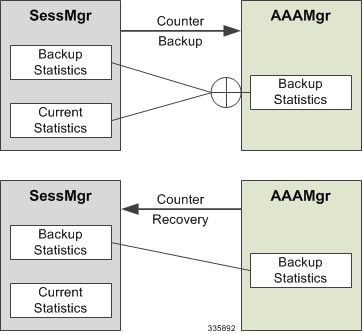
The counters are backed up to the AAAMgr that is paired with the SessMgr. They are recovered from the AAAMgr if a SessMgr task is killed and after the SessMgr task recovers. This feature makes use of the session recovery framework to backup and retrieve the counters.
The following diagram depicts how backed-up statistics are maintained separately at the SessMgr and how the cumulative values are backed up and recovered from the AAAMgr after SessMgr task recovery completes.
Limitations
- A backup interval is optionally specified default is every 5 minutes. We recommend care should be taken when defining an interval as too small an interval could mean too frequent checkpoints. For example, if the backup interval is specified as 5 minutes, then counters are backed up every 5 minutes. Suppose backup happened at Nth minute and the configured backup interval is for every 5 minutes, then if a task crash happens at N+4 minutes, the MME recovers only the values backed up at Nth minute and the data for the past 4 minutes is lost.
- Only service level statistics are backed up and recovered. Any KPI that is monitored per other granularity, such as per TAC or per eNodeB, is not supported.
- Only statistics maintained at the SessMgr are backed up. Statistics at other managers are not backed up.
Configuring Backup Statistics Feature
For the Backup and Recovery of Key KPI Statistics feature to work, it must be enabled by configuring the backup of statistics for the MME.
Configuration
The following CLI commands are used to manage the functionality for the backing up of the key KPI statistics feature
Enabling
The following configures the backup of statistics for the MME and enables the Backup and Recovery of Key KPI Statistics feature.
configure
   statistics-backup mme
   end
Setting the Backup Interval
The following command configures the number of minutes (0 to 60) between each backup of the statistics. When the backup interval is not specified a default value of 5 minutes is used as the backup interval
configure
   statistics-backup-interval minutes
   end
Disabling
The following configures the MME to disable the backing up of statistics for the MME.
configure
   no statistics-backup mme
   end
Verifying the Backup Statistics Feature Configuration
Use either the show configuration command or the show configuration verbose command to display the feature configuration.
If the feature was enabled in the configuration, two lines similar to the following will appear in the output of a show configuration [ verbose ] command:
statistics-backup  mme
statistics-backup-interval 5
- The interval displayed is 5 minutes. 5 is the default. If the statistics-backup-interval command is included in the configuration, then the 5 would be replaced by the configured interval number of minutes.
- If the command to disable the feature is entered, then no statistics-backup line is displayed in the output generated by a show configuration [ verbose ] command.
Managing Backed-up Statistics
A new keyword, recovered-values, is used with existing show and clear commands to either generate a display of the backed-up statistics or to clear the backed-up statistics.
Displaying Backed-up Statistics
- show mme-service statistics [ recovered-values ] [ verbose ]
- show mme-service statistics emm-only [ recovered-values ] [ verbose ]
- show mme-service statistics esm-only [ recovered-values ] [ verbose ]
Notes:
- When the recovered-values keyword is used, output includes both current + recovered backed-up statistical values.
- If no SessMmgr crash has occurred, then the recovered values in the output of the above commands will be 0 (zero).
Clearing Backed-up Statistics
- clear mme-service statistics [ recovered-values ]
- clear mme-service statistics emm-only [ recovered-values ]
- clear mme-service statistics esm-only [ recovered-values ]
Notes:
- When the recovered-values keyword is used, only the recovered values will be cleared.
 Feedback