- About this Guide
- Mobility Management Entity Overview
- Mobility Management Entity Configuration
- 128K eNodeB Connections
- A-MSISDN Functionality
- Access Restriction based on Regional Zone Code
- APN Override
- Backup and Recovery of Key KPI Statistics
- Cause Code #66
- Cell Broadcast Center - SBc Interface
- Cell Traffic Trace
- Closed Subscriber Groups
- CSFB and SMS over SGs Interface
- CSFB for 1xRTT
- DDN Throttling
- Default APN for DNS Failure
- eDRX Support on the MME
- Emergency Bearer Services
- Enhanced Congestion Control and Overload Control
- Enhanced Multimedia Priority Service (eMPS)
- Enhanced Event Logging
- Foreign PLMN GUTI Management
- GTP-C Load and Overload Control on MME
- GUTI Re-allocation
- Heuristic and Intelligent Paging
- HSS-based P-CSCF Restoration
- Idle-mode Signaling Reduction
- IMSI Manager Overload Control
- IMSI Manager Scaling on the MME
- Integrity and Confidentiality Algorithms for UE
- IPNE Service
- Limiting the Number of SGWs Tried
- Load Balancing and Rebalancing and VoLTE Offloading
- Local Emergency Numbers List
- Location Services
- MBMS for MME (eMBMS)
- Operator Policy
- Operator Specific QCI
- Operator Policy Selection Based on IMEI-TAC
- Overcharging Protection
- Paging Priority IE Support
- Power Saving Mode (PSM) in UEs
- QoS Profile Support
- S13 Additional IMEI Check
- Selective Authentication
- Session Tracing
- SGW Blacklisting on the MME
- SGSN-MME Combo Optimization
- Single Radio Voice Call Continuity
- SRVCC for 1xRTT
- State-Location Information Retrieval Flag
- TAI-based Routing for 20-bit and 28-bit eNB ID
- Timer-based GBR Bearer Deactivation
- UDPC2 Support for MME/SGSN
- UE Relocation
- VLR Management
- Troubleshooting the MME Service
- Monitor the MME Service
- Engineering Rules
- What Operator Policy Can Do
- The Operator Policy Feature in Detail
- How It Works
- Operator Policy Configuration
- Verifying the Feature Configuration
Operator
Policy
The proprietary concept of an operator policy, originally architected for the exclusive use of an SGSN, is non-standard and currently unique to the ASR 5x00. This optional feature empowers the carrier with flexible control to manage functions that are not typically used in all applications and to determine the granularity of the implementation of any operator policy: to groups of incoming calls or to simply one single incoming call.
The following products support the use of the operator policy feature:
This document includes the following information:
- What Operator Policy Can Do
- The Operator Policy Feature in Detail
- How It Works
- Operator Policy Configuration
- Verifying the Feature Configuration
What Operator Policy Can Do
Operator policy enables the operator to specify a policy with rules governing the services, facilities and privileges available to subscribers.
A Look at Operator Policy on an S-GW
The S-GW operator policy provides mechanisms to fine tune the behavior for subsets of subscribers. It also can be used to control the behavior of visiting subscribers in roaming scenarios by enforcing roaming agreements and providing a measure of local protection against foreign subscribers.
The S-GW uses operator policy in the SGW service configuration to control the accounting mode. The default accounting mode is GTPP, but RADIUS/Diameter and none are options. The accounting mode value from the call control profile overrides the value configured in SGW service. If the accounting context is not configured in the call control profile, it is taken from SGW service. If the SGW service does not have the relevant configuration, the current context or default GTPP group is assumed.
The Operator Policy Feature in Detail
This flexible feature provides the operator with a range of control to manage the services, facilities and privileges available to subscribers.
These policies can override standard behaviors and provide mechanisms for an operator to circumvent the limitations of other infrastructure elements such as DNS servers and HLRs in 2G/3G networks.
By configuring the various components of an operator policy, the operator fine-tunes any desired restrictions or limitations needed to control call handling and this can be done for a group of callers within a defined IMSI range or per subscriber.
- call control profiles
- IMEI profiles (SGSN only)
- APN profiles
- APN remap tables
- operator policies
- IMSI ranges
Each of these components is configured via a separate configuration mode accessed through the Global Configuration mode.
- Call Control Profile
- APN Profile
- IMEI-Profile (SGSN only)
- APN Remap Table
- Operator Policies
- IMSI Ranges
Call Control Profile
- setting access restriction cause codes for rejection messages
- enabling/disabling authentication for various functions such as attach and service requests
- enabling/disabling ciphering, encryption, and/or integrity algorithms
- enabling/disabling of packet temporary mobile subscriber identity (P-TMSI) signature allocation (SGSN only)
- enabling/disabling of zone code checking
- allocation/retention priority override behavior (SGSN only)
- enabling/disabling inter-RAT, 3G location area, and 4G tracking area handover restriction lists (MME and S-GW only)
- setting maximum bearers and PDNs per subscriber (MME and S-GW only)
Call control profiles are configured with commands in the Call Control Profile configuration mode. A single call control profile can be associated with multiple operator policies
- 1 (only one) - call control profile can be associated with an operator policy
- 1000 - maximum number of call control profiles per system (e.g., an SGSN).
- 15 - maximum
number of equivalent PLMNs for 2G and 3G per call control profile
- 15 - maximum number of equivalent PLMNs for 2G per ccprofile.
- 15 - maximum number of supported equivalent PLMNs for 3G per ccprofile.
- 256 - maximum number of static SGSN addresses supported per PLMN
- 5 - maximum number of location area code lists supported per call control profile.
- 100 - maximum number of LACs per location area code list supported per call control profile.
- unlimited number of zone code lists can be configured per call control profile.
- 100 - maximum number of LACs allowed per zone code list per call control profile.
- 2 - maximum number of integrity algorithms for 3G per call control profile.
- 3 - maximum number of encryption algorithms for 3G per call control profile.
APN Profile
An APN profile groups a set of access point name (APN)-specific parameters that may be applicable to one or more APNs. When a subscriber requests an APN that has been identified in a selected operator policy, the parameter values configured in the associated APN profile will be applied.
- enable/disable a direct tunnel (DT) per APN. (SGSN)
- define charging characters for calls associated with a specific APN.
- identify a specific GGSN to be used for calls associated with a specific APN (SGSN).
- define various quality of service (QoS) parameters to be applied to calls associated with a specific APN.
- restrict or allow PDP context activation on the basis of access type for calls associated with a specific APN.
APN profiles are configured with commands in the APN Profile configuration mode. A single APN profile can be associated with multiple operator policies.
IMEI-Profile (SGSN only)
The IMEI is a unique international mobile equipment identity number assigned by the manufacturer that is used by the network to identify valid devices. The IMEI has no relationship to the subscriber.
IMEI profiles are configured with commands in the IMEI Profile configuration mode. A single IMEI profile can be associated with multiple operator policies.
APN Remap Table
- An APN is provided in the Activation Request that does not match with any of the subscribed APNs either a different APN was entered or the APN could have been misspelled. In such situations, the SGSN would reject the Activation Request. It is possible to correct the APN, creating a valid name so that the Activation Request is not rejected.
- In some cases, an operator might want to force certain devices/users to use a specific APN. For example, all iPhone4 users may need to be directed to a specific APN. In such situations, the operator needs to be able to override the selected APN.
- APN aliasing - maps incoming APN to a different APN based on partial string match (MME and SGSN) or matching charging characteristic (MME and SGSN).
- Wildcard APN - allows APN to be provided by the SGSN when wildcard subscription is present and the user has not requested an APN.
- Default APN - allows a configured default APN to be used when the requested APN cannot be used for example, the APN is not part of the HLR subscription.
APN remap tables are configured with commands in the APN Remap Table configuration mode. A single APN remap table can be associated with multiple operator policies, but an operator policy can only be associated with a single APN remap table.
Operator Policies
The profiles and tables are created and defined within their own configuration modes to generate sets of rules and instructions that can be reused and assigned to multiple policies. An operator policy binds the various configuration components together. It associates APNs, with APN profiles, with an APN remap table, with a call control profile, and/or an IMEI profile (SGSN only) and associates all the components with filtering ranges of IMSIs.
In this manner, an operator policy manages the application of rules governing the services, facilities, and privileges available to subscribers.
Operator policies are configured and the associations are defined via the commands in the Operator Policy configuration mode.
The IMSI ranges are configured with the command in the SGSN-Global configuration mode.
- 1 maximum number of call control profiles associated with a single operator policy.
- 1 maximum number of APN remap tables associated with a single operator policy.
- 10 maximum number of IMEI profiles associated with a single operator policy (SGSN only)
- 50 maximum number of APN profiles associated with a single operator policy.
- 1000 maximum number of operator policies per system (e.g., an SGSN) this number includes the single default operator policy.
- 1000 maximum number of IMSI ranges defined per system (e.g., an SGSN).
SGSN operator policy configurations created with software releases prior to Release 11.0 are not forward compatible. Such configurations can be converted to enable them to work with an SGSN running Release 11.0 or higher. Your Cisco Account Representative can accomplish this conversion for you.
IMSI Ranges
Ranges of international mobile subscriber identity (IMSI) numbers, the unique number identifying a subscriber, are associated with the operator policies and used as the initial filter to determine whether or not any operator policy would be applied to a call. The range configurations are defined by the MNC, MCC, a range of MSINs, and optionally the PLMN ID. The IMSI ranges must be associated with a specific operator policy.
IMSI ranges are defined differently for each product supporting the operator policy feature.
How It Works
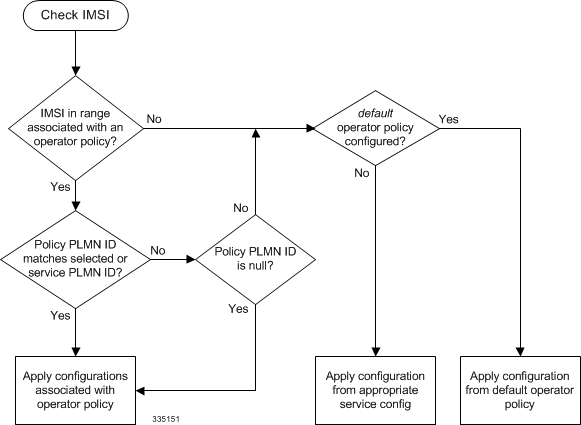
The specific operator policy is selected on the basis of the subscriber's IMSI at attach time, and optionally the PLMN ID selected by the subscriber or the RAN node's PLMN ID. Unique, non-overlapping, IMSI + PLMN-ID ranges create call filters that distinguish among the configured operator policies.
The following flowchart maps out the logic applied for the selection of an operator policy:
Operator Policy Configuration
This section provides a high-level series of steps and the associated configuration examples to configure an operator policy. By configuring an operator policy, the operator fine-tunes any desired restrictions or limitations needed to control call handling per subscriber or for a group of callers within a defined IMSI range.
Most of the operator policy configuration components are common across the range of products supporting operator policy. Differences will be noted as they are encountered below.
After creating or modifying the S4-SGSN's configuration, you must save the configuration and reboot the node for the change(s) to take effect.
This section provides a minimum instruction set to implement operator policy. For this feature to be operational, you must first have completed the system-level configuration as described in the System Administration Guide and the service configuration described in your product's administration guide.
The components can be configured in any order. This example begins with the call control profile:
Call Control Profile Configuration
This section provides the configuration example to create a call control profile and enter the configuration mode.
Use the call control profile commands to define call handling rules that will be applied via an operator policy. Only one call control profile can be associated with an operator policy, so it is necessary to use (and repeat as necessary) the range of commands in this mode to ensure call-handling is sufficiently managed.
- Configuring the Call Control Profile for an SGSN
- Configuring the Call Control Profile for an MME or S-GW
Configuring the Call Control Profile for an SGSN
The example below includes some of the more commonly configured call control profile parameters with sample variables that you will replace with your own values.
configure
   call-control-profile profile_name>
      attach allow access-type umts location-area-list instance list_id
      authenticate attach
      location-area-list instance instance area-code area_code
      sgsn-number E164_number
      end
Configuring the Call Control Profile for an MME or S-GW
The example below includes some of the more commonly configured call control profile parameters with sample variables that you will replace with your own values.
configure
    call-control-profile profile_name
      associate hss-peer-service service_name  s6a-interface
      attach imei-query-type imei verify-equipment-identity
      authenticate attach
      dns-pgw context mme_context_name
      dns-sgw context mme_context_name
      end
APN Profile Configuration
This section provides the configuration example to create an APN profile and enter the apn-profile configuration mode.
Use the apn-profile commands to define how calls are to be handled when the requests include an APN. More than one APN profile can be associated with an operator policy.
The example below includes some of the more commonly configured profile parameters with sample variables that you will replace with your own values.
configure
   apn-profile profile_name
      gateway-address 123.123.123.1 priority 1(SGSN only)
      direct-tunnel not-permitted-by-ggsn (SGSN only)
      idle-mode-acl ipv4 access-group station7 (S-GW only)
      end
IMEI Profile Configuration - SGSN only
This section provides the configuration example to create an IMEI profile and enter the imei-profile configuration mode.
Use the imei-profile commands to define how calls are to be handled when the requests include an IMEI in the defined IMEI range. More than one IMEI profile can be associated with an operator policy.
The example below includes some of the more commonly configured profile parameters with sample variables that you will replace with your own values.
configure
   imei-profile profile_name
      ggsn-address 211.211.123.3
      direct-tunnel not-permitted-by-ggsn (SGSN only)
      associate apn-remap-table remap1
      end
APN Remap Table Configuration
This section provides the configuration example to create an APN remap table and enter the apn-remap-table configuration mode.
Use the apn-remap-table commands to define how APNs are to be handled when the requests either do or do not include an APN.
The example below includes some of the more commonly configured profile parameters with sample variables that you will replace with your own values.
configure
   apn-remap-table table_name
      apn-selection-default first-in-subscription
      wildcard-apn pdp-type ipv4 network-identifier apn_net_id
      blank-apn network-identifier apn_net_id (SGSN only)
      end
- The apn-selection-default first-in-subscription command is used for APN redirection to provide "guaranteed connection" in instances where the UE-requested APN does not match the default APN or is missing completely. In this example, the first APN matching the PDP type in the subscription is used. The first-in-selection keyword is an MME feature only.
- Some of the commands represented in the example above are common and some are product-specific. Refer to the APN-Remap-Table Configuration Mode chapter in the Command Line Interface Reference for command details and variable options.
- This profile will only become valid when it is associated with an operator policy.
Operator Policy Configuration
This section provides the configuration example to create an operator policy and enter the operator policy configuration mode.
Use the commands in this mode to associate profiles with the policy, to define and associate APNs with the policy, and to define and associate IMEI ranges. Note: IMEI ranges are supported for SGSN only.
The example below includes sample variable that you will replace with your own values.
configure
   operator-policy policy_name
      associate call-control-profile profile_name
      apn network-identifier apn-net-id_1 apn-profile apn_profile_name_1
      apn network-identifier apn-net-id_2 apn-profile apn_profile_name_1
      imei range <imei_number to imei_number imei-profile name profile_name
      associate apn-remap-table table_name
      end
IMSI Range Configuration
This section provides IMSI range configuration examples for each of the products that support operator policy functionality.
Configuring IMSI Ranges on the MME or S-GW
IMSI ranges on an MME or S-GW are configured in the Subscriber Map Configuration Mode. Use the following example to configure IMSI ranges on an MME or S-GW:
configure
   subscriber-map name
      lte-policy
         precedence number match-criteria imsi mcc mcc_number mnc mnc_number msin first start_range last end_range operator-policy-name policy_name
         end
Associating Operator Policy Components on the MME
After configuring the various components of an operator policy, each component must be associated with the other components and, ultimately, with a network service.
The MME service associates itself with a subscriber map. From the subscriber map, which also contains the IMSI ranges, operator policies are accessed. From the operator policy, APN remap tables and call control profiles are accessed.
Use the following example to configure operator policy component associations:
configure
   operator-policy name
      associate apn-remap-table table_name
      associate call-control-profile profile_name
      exit
   lte-policy
      subscriber-map name
         precedence match-criteria all operator-policy-name policy_name
         exit
      exit
   context mme_context_name
      mme-service mme_svc_name
         associate subscriber-map name
         end
Configuring Accounting Mode for S-GW
The accounting mode command configures the mode to be used for the S-GW service for accounting, either GTPP (default), RADIUS/Diameter, or None.
Use the following example to change the S-GW accounting mode from GTPP (the default) to RADIUS/Diameter:
configure
   context sgw_context_name
      sgw-service sgw_srv_name
         accounting mode radius-diameter
         end
Verifying the Feature Configuration
This section explains how to display the configurations after saving them in a .cfg file as described in the System Administration Guide .
All commands listed here are under Exec mode. Not all commands are available on all platforms.
show operator-policy full name oppolicy1
The output of this command displays the entire configuration for the operator policy configuration. [local]asr5x00 show operator-policy full name oppolicy1 Operator Policy Name = oppolicy1 Call Control Profile Name : ccprofile1 Validity : Valid APN Remap Table Name : remap1 Validity : Valid IMEI Range 711919739 to 711919777 IMEI Profile Name : imeiprof1 Include/Exclude : Include Validity : Valid APN NI homers1 APN Profile Name : apn-profile1 Validity : Valid Notes:
|
 Feedback