Upgrade and Migration Strategy

Upgrade Methods

You can use one of these two main methods to upgrade components within Cisco HCS:

Direct Upgrades

A direct upgrade is when you install the new software on the same physical device or the same virtual server where the current version is installed. Direct upgrades allow you to upgrade from your current release to the latest release without the need to upgrade to an intermediate software version. It is a single-upgrade rather than a multi-hop upgrade.

There are two types of direct upgrade:

  • Standard upgrades

  • Refresh upgrades

Standard upgrades

Standard upgrades are upgrades that do not require upgrades to the embedded operating system. You can install upgrade software on your device while the system continues to operate.

For standard upgrades, you install the upgrade software as an inactive version. The system continues to function normally while you install the software. When the upgrade is complete, you can choose to automatically reboot the system to the upgraded software or you can manually switch to the new software later. When you reboot to the new software, the old software version remains on the system. This allows you to revert to the old version in the unlikely event of issues with the new software. During an upgrade your configuration information migrates automatically to the upgraded version.

Refresh upgrades

You can use the Refresh upgrades in situations where incompatibilities exist between the old and new software releases. For example, use a refresh upgrade when the major version of the embedded operating system changes between the version you are upgrading from and the version that you are upgrading to. Refresh upgrades require multiple reboots during installation to upgrade the underlying operating system, causing a temporary outage while installing the software. The duration of this outage depends on your configuration.


Note

You must perform all refresh upgrades during a maintenance window because the system is not available during the upgrade.


Migrations

A migration is an upgrade where the new software is installed on a different hardware system or virtual machine than the currently installed version. Some examples where you need to use the migration method on UC applications are as follows:

  • The currently installed version is running on Cisco 7800 Series Media Convergence Server (MCS 7800) hardware and you are upgrading to release that will run on a virtual machine.

  • The currently installed version is running on a virtual machine and you need to move to a new virtual machine.
Upgrade Methodology

Data Centers are in a constant state of change. Service Provider data centers are designed to meet the needs of the customer, so scalability is key. However, upgrading a data center without incurring downtime requires careful thought and planning. Consider these pointers while planning the upgrade:

  1. Assess infrastructure-The crucial first step is to update your systems that track assets. Without and accurate inventory, you cannot know what components are within your infrastructure contains or what your challenges may be.

  2. Catalogue and map applications-Planning a migration also requires mapping applications and workflows against infrastructure to determine where applications reside, which dependencies should not be broken, and understanding the implementation of the redundancy.

  3. Build and validate-Whether you are performing an in-place upgrade upon existing equipment or replacing old, end-of-support components, a proof of concept (POC) can help you become familiar with the future state and gain confidence.

  4. Migrate infrastructure-Whether you are following a disaster recovery (DR) failover strategy or using UC clustering over the WAN (COW), you are now “under construction.” Data center upgrades affects the normal day-to-day operations. Although careful planning can decrease the risk of downtime, a business continuity plan is paramount.

  5. Test and Validate-Performance testing and load testing are both necessary to prove the applications and systems are up and running without issues. Testing must include all high-availability (HA) portions and failover during maintenance windows. The test criteria depend upon applications, customer service level agreements (SLAs), recovery point objectives (RPOs) or time objectives (RTOs).

  6. Launch operation-Create operational runbooks throughout the process, to include ease of operations, cost-effectiveness, and reliability as the objectives. Start the oprations once these guides of day-to-day operations are finalised.

Data Center

The Data Center architecture is a logical grouping of security and network technology that supports data center business use cases. It implements a traditional access, distribution, and core network architecture with an application-centric server. The Data Center architecture has these characteristics:

  • Visibility with centralized management, analytics, and shared services.

  • A core connecting distribution and application-centric layers.

  • Redundant high-performance appliances for availability and maximum uptime.

  • Modular access and distribution layers which dynamically segment applications.

  • Software-defined network segmentation, orchestration.

  • Software-defined application segmentation.

  • Physical and virtual servers requiring secure network access connectivity.

  • It is recommended that Service Providers (SPs) and partners follow the individual Cisco product component recommendations regarding security and network infrastructure updates and upgrades in conjunction with the HCS Compatibility Matrix. See the HCS Compatibility Matrix for the latest updates, Recommended Version and Minimum Version for a specific HCS release.

The Cisco Product Security Incident Response Team (PSIRT) may also release advisories and notices that affect HCS components. Cisco defines a security vulnerability as an unintended weakness in a product that could allow an attacker to compromise the integrity, availability, or confidentiality of the product. Cisco advises you to consult the Cisco Event Responses and Cisco Security Advisories and Alerts page for additional information.

If the HCS Compatibility Matrix does not already address an advisory and advisory recommends a workaround, Cisco recommends that you follow it. If a workaround is not available or is not suitable, Cisco recommends that you deploy the version recommended in the PSIRT advisory that is closest to the HCS Compatibility Matrix.

HCS Management Applications

For Cisco HCS, management applications are deployed as single instances of the application that manages or monitors multiple instances of other applications and components. You may deploy multiple instances of a Domain Manager as the number of customers in your deployment increases beyond the scale of one instance.

The table provides a list of monitoring and management sources of system data that are available for a Cisco HCS deployment.

Assurance Management Product

Assurance Management Product

Monitored Cisco HCS Devices

Cisco Adaptive Security Device Manager

Provisioning, Performance, and Inventory

Cisco firewall appliances and firewall service modules

Cisco HCM-F

Provisioning, Performance, and Inventory

Cisco Unified Computing System (UCS), Cisco HCM-F, Unified Communications Domain Manager, UC Applications

Cisco Data Center Network Manager

Provisioning, Performance, and Inventory

NX-OS network deployments including LAN fabrics, SAN fabrics, and IP Fabric for Media (IPFM)

Cisco Intersight

Device Fault, Availability, Performance, and Inventory

Cisco UCS, HyperFlex, and third-party infrastructure

Cisco Prime Collaboration Assurance

Device Fault, Availability, Performance, and Diagnostics

UC Applications and Network Devices

Cisco Prime Collaboration Deployment

Provisioning

UC Applications

Cisco Prime Infrastructure

Provisioning, Performance, and Inventory

Cisco Network Router, Switches and Cisco Unified Computing System (UCS)

Cisco UCS Manager

Device Fault, Availability, and Performance

UCS Hardware

Cisco Unified Communications Domain Manager

Provisioning

Unified Communications Domain Manager, UC Applications

VMware vCenter / vCenter Server Appliance

Device Fault, Availability, and Performance

ESXi Hypervisor, VMs, Virtual Distributed Switch (VDS)

Telephony Aggregation

The Cisco HCS Telephony Aggregation components provide a centralized interconnect to the Service Provider cloud. The Telephony Aggregation is a demarcation for Cisco HCS. It is also a central point for all off-net calling capabilities to Unified Communications (UC) applications at the UC infrastructure layer.

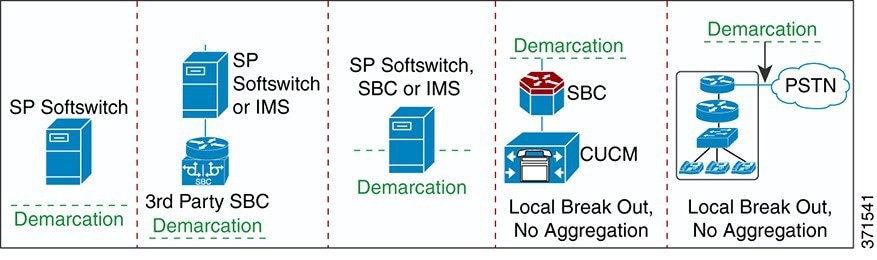
The Telephony Aggregation components can be deployed in various combinations depending on the type of services. The demarcation line denotes the logical and administrative separation between the service provider network and the Cisco HCS solution for the purposes of network interconnect. The following figure shows the different deployment models and the demarcation in each case.

Figure 1. Deployment Models and Cisco HCS Demarcation

This document recommends the order in which to upgrade Telephony Aggregation components relative to the other component groups. Upgrade details are provided only for Cisco HCS products that are deployed in the aggregation layer as listed in the Cisco Hosted Collaboration Solution Compatibility Matrix.


Note

  • Upgrading a session border controller (SBC) is discussed as part of the Aggregation Components Upgrade .

  • The upgrade strategy for the Aggregation components is discussed in the chapter: Phase 3 - Aggregation Components Upgrade.


Unified Communications Applications

Cisco HCS service providers deploy Unified Communications (UC) applications to offer voice, video, voice mail messaging, instant messaging and presence, and mobility. The Cisco Hosted Collaboration Solution Compatibility Matrix identifies the supported UC applications, which include the following:

  • Cisco Unified Communications Manager

  • Cisco Unified Communications Manager IM and Presence Service

  • Cisco Unity Connection

  • Cisco Emergency Responder

  • Jabber Guest Server

For information on the upgrade strategy for UC applications, see Phase 3 - Aggregation and Unified Communications Applications Upgrade.

Upgrades of Customer Deployments

You can complete Phases 1 to 4 in order first, and then deploy new customers as required. The standard release upgrade process includes upgrading all Unified Communications applications to the new release, then adding the new applications on the new release. There are also two optimized paths within the fully supported Cisco HCS upgrade process for upgrading UC applications:

  • Add new applications on the new release, then upgrade existing applications to the new release, when and as required.

  • Upgrade some existing applications to the new release, add new applications on the new release, and leave some applications on the old release.

Upgrade and Migration Phases

The strategy for upgrading and migrating Hosted Collaboration Solution (HCS) involves five phases.

  1. Phase 1 - Service Provider Cisco HCS Data Center Infrastructure Upgrades

  2. Phase 2 - Management Upgrades

  3. Phase 3 - Aggregation Component Upgrades

  4. Phase 4- Unified Communications Applications Upgrade

  5. Phase 5 - Upgrading Optional Components

  6. Phase 6 - Upgrading HCS Contact Center. See the Cisco Hosted Collaboration Solution for Contact Center link for details.

Each phase has the following characteristics:

  • Comprises one or more Cisco HCS application and component groups

  • Completed in a single or multiple maintenance windows

  • Completed in a specific order

  • Includes preupgrade and postupgrade phase conditions and activities

  • Includes upgrade maintenance window conditions and activities

  • Scheduled to be completed as soon as possible

You can operate your Cisco HCS deployment between upgrade phases because the application and component groups of any phase are compatible with the subsequent upgrade phases. However, before you upgrade to the next phase, the previous phases must be upgraded to the minimum version. You can upgrade the required Service Provider Cisco HCS Data Center components (based on the minimum versioning analysis) significantly before upgrading the subsequent phases. See the Solution Reference Network Design Guide for details on HCS Architecture, Dial plan, deployment and supported UC applications.

Understanding Subsystem Upgrades

This section provides an example of Cisco Hosted Collaboration Solution (HCS) consisting of subsystems, or groupings of similar functionality.

  • Management fulfillment and management assurance products, such as Cisco Hosted Collaboration Mediation Fulfillment and Cisco Prime Collaboration Assurance

  • Collaboration applications, such as Cisco Unified Communications Manager and Cisco Unity Connection.

  • Aggregation and Edge products, such as a session border controller and Cisco Expressway

For Cisco HCS Release 10.6(1) and later, you can upgrade one or more subsystems without upgrading the entire solution. The following rules apply:


Note

You may have to upgrade two or more components within a subsystem at the same time. Refer to the component release notes for dependency information.


Perform a Solution Upgrade Assessment

Assess the Cisco Hosted Collaboration Solution (HCS), to identify all components that require upgrade, and then develop an upgrade plan before starting the process. Confirm the Cisco HCS base and release sets and determine the solution components that require upgrade. For more information, see the Cisco Hosted Collaboration Solution Compatibility Matrix: http://www.cisco.com/c/en/us/support/unified-communications/hosted-collaboration-solution-hcs/products-device-support-tables-list.html.

Note

You may not need to upgrade a component to its target version number if the minimum version number is already deployed. For more information, see minimum supported version in the Cisco Hosted Collaboration Solution Compatibility Matrix guide.

CUCM Upgrade and Migration Tools

You can use one of the following tools to upgrade Cisco UC applications:

  • Prime Collaboration Deployment (PCD)

    Cisco Prime Collaboration Deployment is an application that is designed to help in the management of Unified Communications (UC) applications. It allows you to perform tasks such as migration of older software versions of clusters to new virtual machines, fresh installs, and upgrades on existing clusters.

    Cisco Prime Collaboration Deployment has four primary high-level functions:

    • Migrate an existing cluster of UC servers to a new cluster (such as MCS 7800 to virtual or virtual to virtual)

    • Perform operations on existing clusters (8.6(1) or later). Examples of these operations include:

      • Upgrade

      • Switch Version

      • Restart

    • Change IP addresses or hostnames in the cluster on existing Release 10.x clusters.

    • Fresh install a new Release 10.x, 11.x, or 12.x Unified Communications cluster

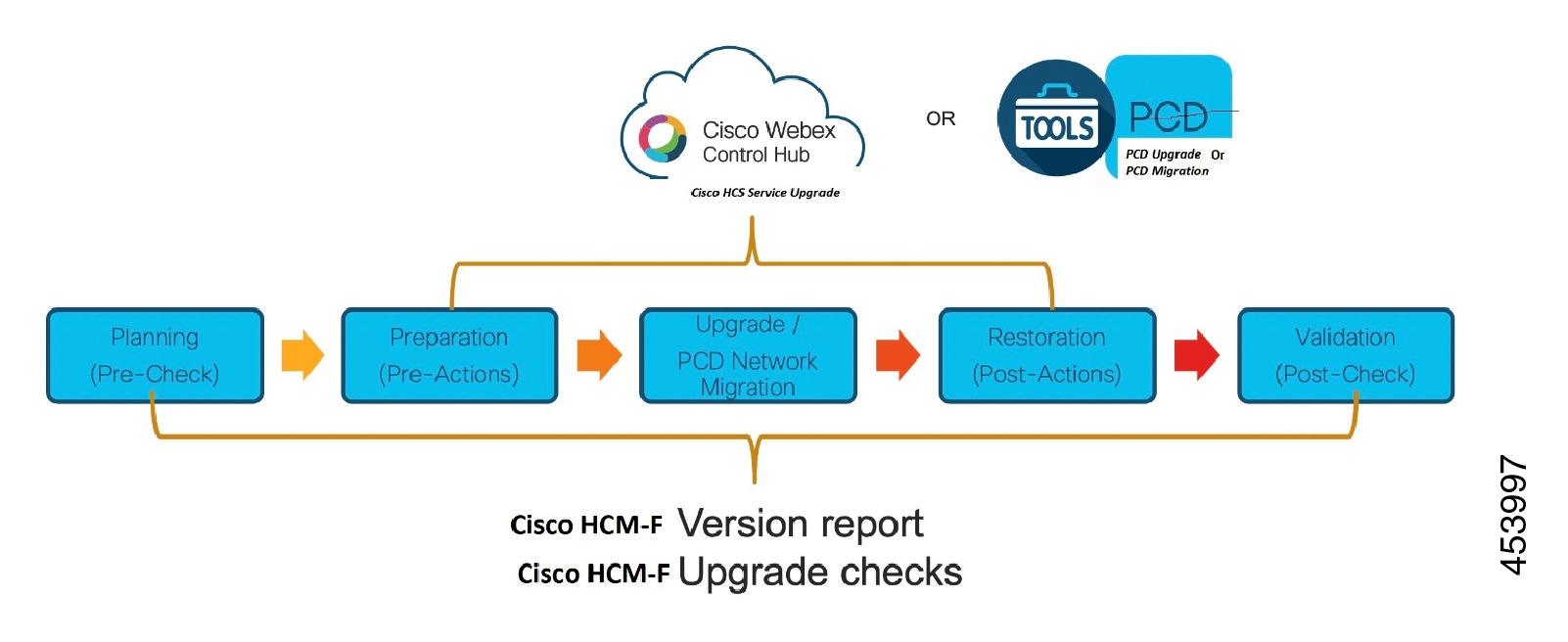
  • Cisco HCS Upgrade Service - Use the Upgrade Service to upgrade software versions, install COP files, and reboot and switch versions of the Unified Communications (UC) applications that HCS uses.

    You must sign into Cisco Webex Control Hub with HCS partner-level access. After you sign into Cisco Webex Control Hub, verify that you see the Services option. If not, a toggle allows you to continue to set up and use the HCS Upgrade service.

    The Cisco Hosted Collaboration Solution (HCS) Upgrade service provides a consolidated view of the clusters and component nodes to upgrade. You can upgrade all clusters and nodes from a single site, and you can upgrade one or more clusters at the same time.

We recommend you to use:

  • If you plan to upgrade from one version to other version, for example from 11.X to 12.X, Cisco recommends using PCD Migration method.

  • If you plan to do service updates, for example from SU1 to SU2, Cisco recommends using Cisco HCS Upgrade Service or PCD Upgrade method.

Supported Cisco UC Applications Based on Upgrade Methods

PCD Migration

PCD Upgrade

HCS Upgrade Service

Cisco Unified Communications Manager

Cisco Unified IM and Presence Service

Cisco Unity Connection

X

Cisco Emergency Responder

X

Upgrade Sequence

Perform the upgrade/migration of Cisco UC applications in the following sequence:

  1. Cisco Emergency Responder

  2. Cisco Unity Connection

  3. Cisco Unified CM and Unified CM IM and Presence

  4. Cisco Expressway

  5. Cisco Unified Attendant Consoles

Cisco UC Application Upgrade – End to End Process

Upgrade Cisco UC Applications using Cisco HCS Upgrade Service

See Cisco Hosted Collaboration Solution Upgrade Service for the upgrade procedure.

Checklist to Upgrade Cisco UC Applications using PCD Upgrade

HCM-F has information of the Cisco UC applications and various other devices in partner network. This information is used along with the information available from compatibility matrices to build a rich source of data useful for partners.


Note

For Cisco UC applications, you need a minimum of 25GB common partition space before you begin an upgrade. However, based on your environment you may require more space.

In addition to the Cisco HCM-F Pre and Post checks, we recommend you to run PreUpgradeCheck and PostUpgradeCheck COP files for Cisco Unified CM, Cisco Unified IM and Presence, Cisco Emergency Responder and Cisco Unity Connection.


Upgrade Steps

Task

Documentation

Status

(✓or X)

1

Download and check version report that consists of the summary and detailed information of Cisco UC applications and Cisco Expressway clusters

Version Summary Report

2

Check Compatibility and Documentation Reference

Compatibility and Documentation References

3

Perform Pre-upgrade checks using HCM-F Upgrade Toolkit

Note 
Skip this step if you do not have HCM-F installed.

Perform Upgrade Checks

4

Perform Pre-upgrade checks

Plan - Pre Upgrade Checks

5

Perform pre-upgrade checks on Cisco Emergency Responder

Plan - Cisco Emergency Responder

6

Perform pre-upgrade checks on Cisco Unity Connection

Plan - Cisco Unity Connection

7

Perform pre-upgrade checks on Unified CM and Unified CM IM and Presence

Plan - Unified CM and Unified CM IM and Presence

8

Prepare - Cisco Unity Connection

Prepare - Cisco Unity Connection

9

Prepare - Unified CM and Unified CM IM and Presence

Prepare - Unified CM and Unified CM IM and Presence

10

Perform one of the following:

  • Upgrade UC Applications using Refresh Upgrade

  • Upgrade UC Applications using Standard Upgrade

Upgrade UC Applications using Refresh Upgrade

Direct Refresh Upgrade - PCD

Upgrade UC Applications using Standard Upgrade

Direct Standard Upgrade - PCD

11

Restore Cisco Emergency Responder

Restore Cisco Emergency Responder

12

Restore Unified CM and IM and Presence

Restore Unified CM and IM and Presence

13

Perform post-upgrade checks using HCM-F Upgrade Toolkit

Note 
Skip this step if you do not have HCM-F installed.

Upgrade Comparison

Checklist to Upgrade Cisco UC Application using PCD Migration


Note

PCD Migration is not supported by Cisco Emergency Responder (CER) and Cisco Unity Connection (CUC). To upgrade CER and CUC, refer to Cisco HCS Upgrade Service or PCD Upgrade.

Note

For Cisco UC applications, you need a minimum of 25GB common partition space before you begin an upgrade. However, based on your environment you may require more space.

Upgrade Steps

Task

Documentation

Notes

Status

(✓or X)

1

Download and check version report that consists of the summary and detailed information of Cisco UC applications and Cisco Expressway clusters

Version Summary Report

-

2

Perform Pre-upgrade checks using HCM-F Upgrade Toolkit

Note 
Skip this step if you do not have HCM-F installed.

Perform Upgrade Checks

It is recommend you run PreUpgradeCheck COP files for Cisco Unified CM, Cisco Unified IM and Presence, Cisco Emergency Responder and Cisco Unity Connection

3

Pre-Migration Check

Pre Migration Check

This section details the following:

4

Create a Migration Task

Create Migration Task

-

5

Run/Start the migration on PCD

Run a Migration Task

Wait for the Task Status to equal Forced Pause before proceeding to next step.

6

Perform the CTL Client Update if the hostname is changed

CTL Update

Perform this step only if the cluster is secured.

7

Perform bulk certificate management

Bulk Certificate Management

-

8

Continue migration on PCD by resuming the paused task and wait for the task to complete

-

-

9

Perform the post-migration task

-

10

Change the TFTP IP address used by all endpoints

-

-

11

Perform post-upgrade checks using HCM-F Upgrade Toolkit

Note 
Skip this step if you do not have HCM-F installed.

Upgrade Comparison

It is recommend you run PostUpgradeCheck COP files for Cisco Unified CM, Cisco Unified IM and Presence, Cisco Emergency Responder and Cisco Unity Connection

Deprecated Phone Models in Cisco Unified Communications Manager, Release 12.0(x) and 14

Several phone models are deprecated and are not supported by Cisco Unified Communications Manager, Release 12.0(x) and beyond. If you are using any of these phone models and you upgrade to Release 12.5(x), you will be unable to use the phone after the upgrade. After you switch over to the new release, registration on the phone will be blocked. Field Notice: Cisco Unified Communications Manager Release 12.0(x) does not support some deprecated phone models

Additional phone models are expected to be not supported by Cisco Unified Communications Manager, Release 14. If you are using any of these phone models and you upgrade to Release 14, you will not be able to use these phones after you upgrade. After you switch over to the new release, registration of these phone models will also be blocked. Field Notice: Deprecated Phone Models in Cisco Unified Communications Manager, Release 14

If the phone remains powered on after the upgrade, the phone will make repeated registration attempts, which will create unnecessary network traffic as well as a load on the Cisco CallManager service.

Upgrades that Involve Deprecated Phones

To guarantee that you have full support, before you upgrade, do the following:

  1. Confirm whether the phones in your network will be supported in Release 12.5(x).

  2. Identify any non-supported phones.

  3. For any non-supported phones, power down the phone and disconnect the phone from the network.

  4. Provision a supported phone for the phone user. You can use the Migration FX tool to migrate from older model to newer model phones. For details, go to: http://refreshcollab.cisco.com/webportal/46/CUCM-Readiness-Assessment#endpoint_refresh_tool

  5. Once all the phones in your network are supported by Release 12.5(x), upgrade your system.

  6. Check the Deprecated Phone Models in Compatibility Matrix for Cisco Unified Communications Manager and the IM and Presence Service or do any one of the following:

    • Use HCM-F 11.5(4)SU1 to check the deprecated phones. HCM-F path: Infrastructure Manager > Service Provider Toolkit > Upgrade Toolkit > Phone Compatibility Check. For information about the phone compatibility, see Phone Compatibility Check.

    • See Cisco Hosted Collaboration Solution, Release Cisco Unified Communications Manager Feature Support.

    To understand the phone models with firmware version supported and unsupported on 12.5.

    Do the following if phone firmware version is not supported on 12.5:

    1. On HCMF, run SI Report to check the phone models.

      HCM-F path: Service Inventory > Reporting > On-Demand Reports

    2. Migrate the deprecated IP phone to the latest supported phone model before upgrade.

      To migrate the deprecated phone models, see Native Phone Migration using IVR and Phone Services procedure in Feature Configuration Guide for Cisco Unified Communications Manager.

    3. De-provision and re-provision newer phone models with same user, DN or services.

    To add IP phone to subscriber, see the procedure Associate a phone to a subscriber in Cisco Hosted Collaboration Solution End-User Provisioning Guide.

Upgrade of Virtualized Applications to New VM Characteristics (OVAs)

The Cisco UC Virtual Server Templates (OVA) define a virtual machine configuration that are supported in the Cisco HCS 12.5 release. These OVAs contain all supported virtual machine configurations of this release. Any fresh install of UC 12.5 applications must use a virtual machine created from these new OVAs.

For existing UC virtual machine (VM) deployments, it may be necessary to adjust the allocated number of virtual CPUs (vCPU) and amount of virtual RAM (vRAM) that each VM requires pre-upgrade. Some applications may also have changed the virtual hardware version to take advantage of new features or performance capabilities. You must refer to the specific application upgrade guide to determine specific changes and the procedure to upgrade existing deployments.

Solution Backups

It is important to backup all Cisco HCS components before starting each phase of the solution upgrade. Cisco UC applications do not support any third-party backup tools. The only supported backup tool is the Disaster Recovery System (DRS). However, for standalone management applications, support for VM backups is dependent upon application and version.

VMware Snapshots

Cisco cannot guarantee that a VMware snapshot can be used to successfully restore Cisco Unified CDM or any Cisco HCS Management application. If you cannot restore the application from a snapshot, your only recourse is to reinstall the application. See Quick Reference Guide by Component for supported methods for backup and frequency to take the backup(s). For Cisco Hosted Collaboration Mediation Fulfillment (HCM-F), use the CLI-based Disaster Recovery System.

Supported Upgrade Paths

Here is a list of supported upgrade and migration paths for UC deployments that are currently running on virtual machines. All of the supported upgrade and migration paths listed below are virtual-to-virtual (V2V).

From

To

Version Switching (From Source to Destination and vice versa)

Cisco HCS 11.5(1) +

Cisco HCS 12.5

Supported

PCD Upgrade (Direct Standard Upgrade)

Cisco Unified OS Admin (Direct Standard Upgrade)

Cisco HCS 10.6(1) +

Cisco HCS 12.5

Supported

PCD Upgrade (Direct Standard Upgrade)

Cisco Unified OS Admin (Direct Standard Upgrade)

Cisco HCS 10.1(x)

Cisco HCS 12.5

Not Supported

Cisco HCS 10.0(1)

Cisco HCS 12.5

Not Supported

Cisco HCS 9.2(1)

Cisco HCS 12.5

Not Supported

Cisco HCS 8.6(x)

Cisco HCS 12.5

Not Supported


Note

A ‘+’ sign identifies major release sets and subsequent minor releases. For example, Cisco HCS 10.6(1) + identifies any Cisco HCS release after 10.6(1).


Network Resource Limits

The verified scaling capabilities mentioned here may list multiple features enabled at the same time. The numbers listed in many cases exceed those used by most customers in their topologies. The scale numbers listed may not be the maximum verified values if each feature is viewed in isolation.

The values provided in this guide should also not be interpreted as theoretical system limits for Cisco Nexus hardware or Cisco NX-OS software. These limits refer to values that have been validated by Cisco. They can increase over time as more testing and validation is done. If the hardware is capable of a higher scale, future software releases may increase this verified maximum limit.

Cisco Nexus 7000 Series NX-OS Verified Scalability Guide

Cisco Nexus 9000 Series NX-OS Verified Scalability Guide, Release 7.0(3)I7(6)

Cisco Nexus 9000 Series NX-OS Verified Scalability Guide, Release 9.2(3)

As a part of the capacity planning process, you must be aware of the number of tenants that the components support and consider the future growth plans. The overall number of supported tenants for each deployment can differ based on the resource-usage profile variations.

Compatibility and Documentation References

Perform the following steps to check compatibility information and product Release Notes.

Before you begin

While the Cisco Hosted Collaboration Solution Compatibility Matrix provides guidance for the Cisco HCS system release minimum and recommended versioning, it may not account for new hardware, new features, security updates or legacy hardware you may have within your deployment. Therefore, it is important to cross-reference with the individual component compatibility and interoperability guides to ensure you will not be downgrading new hardware to a version below that models minimum version or attempt to upgrade a legacy device to a version that no longer provides support.

Procedure


Step 1

Understand the product versions supported by HCS

Document Reference

Description

HCS Compatibility Matrix

Cisco HCS System Release

Cisco Collaboration Systems Release Compatibility Matrix

Cisco Collaboration Systems Release

Cisco ASA Compatibility

Cisco ASA software and hardware compatibility and requirements

Cisco IOS and Cisco NX-OS Software Release Reference Guide

This guide also provides an overview of the software lifecycle and examples of migration paths for common migration scenarios.

Recommended Cisco NX-OS Releases for Cisco Nexus 7000 Series Switches This document lists the recommended Cisco NX-OS software releases for use with Cisco Nexus 7000 Series switches for both new and existing deployments.
Recommended Cisco NX-OS Releases for Cisco Nexus 9000 Series Switches This document lists the recommended Cisco NX-OS software releases for use with Cisco Nexus 9000 Series switches for both new and existing deployments.

Recommended Releases for Cisco MDS 9000 Series Switches

This document lists the minimum recommended Cisco MDS NX-OS software release and the recommended software releases for use with Cisco MDS 9000 Series switches for both new deployments and existing deployments.

Compatibility Matrix for Cisco Unified Communications Manager and the IM and Presence Service

This document provides the Compatibility Matrix for Cisco Unified Communications Manager and the IM and Presence Service, Release 12.5(X)

Unified CCX Software Compatibility Matrix

This document provides the Compatibility for Cisco Unified Contact Center Express 12.0(1)

UCS Hardware and Software Compatibility

The Cisco UCS Hardware and Software Compatibility Tool provides interoperability information for Cisco Unified Computing System components and configurations that have been tested and validated by Cisco, by Cisco partners, or both.

VMware Compatibility Guide

The VMware Compatibility Guide shows what various hardware, converged systems, operating systems, third-party applications and VMware products are compatible with a specific version of a VMware software product.

VMware Product Interoperability Matrices

The VMware Product Interoperability Matrix provides details about the compatibility of current and earlier versions of VMware vSphere components, including ESXi, VMware vCenter Server, and optional VMware products.

The following table provides references to the major infrastructure and UC applications within a typical Cisco HCS deployment.

Step 2

Refer the following Cisco HCS Component Install and Upgrade Guides:

Document Reference

Cisco Nexus 9000 Series Switches - Install and Upgrade Guides

Cisco Nexus 7000 Series Switches - Install and Upgrade Guides

Cisco ASR 1000 Series Aggregation Services Routers - Install and Upgrade Guides

Cisco MDS 9000 NX-OS and SAN-OS Software - Install and Upgrade Guides

Cisco ASA 5500-X Series Firewalls - Install and Upgrade Guides

Cisco Firepower 4100 Series - Install and Upgrade Guides

Cisco Firepower 2100 Series - Install and Upgrade Guides

Cisco UCS Manager - Install and Upgrade Guides

Cisco UCS B-Series Blade Servers - Install and Upgrade Guides

Cisco UCS C-Series Rack Servers - Install and Upgrade Guides

Cisco HyperFlex HX Data Platform - Install and Upgrade Guides

Cisco Unified Communications Manager (CallManager) - Install and Upgrade Guides

Cisco Unified Communications Manager IM & Presence Service - Install and Upgrade Guides

Cisco Unity Connection - Install and Upgrade Guides

Cisco Unified Attendant Consoles - Guides

Cisco Hosted Collaboration Solution for Contact Center - Install and Upgrade Guides

Cisco Emergency Responder - Maintain and Operate Guides

Cisco Paging Server - Maintain and Operate Guides

Cisco Expressway Series - Install and Upgrade Guides

Cisco Jabber Guest - Install and Upgrade Guides

Understand the new features and how the upgrade interacts with the other products that are associated with your system.

Step 3

Ensure that there are no expired certificates including the trust certificates. To verify if the certificates are valid, run the show cert list own command in the CLI.

The following are the system security certificates that you can regenerate.

Certificate Name

Description

tomcat

Self-signed certificate generated by system

tomcat-ECDSA

Self-signed certificate generated by system

ipsec

Self-signed certificate generated by system

ITLRecovery

Self-signed certificate generated by system

authz

Self-signed certificate generated by system

To regenerate the certificate, run the set cert region <certificate name> command.


VMware References

This section provides references to VMware documentation that is necessary to successfully upgrade within a Cisco HCS deployment.

VMware References

How to upgrade license keys in My VMware (2006974)

Upgrading a virtual machine to the latest hardware version (multiple versions) (1010675)

FAQ: Discontinuation of third party vSwitch program (2149722)

Migration tool - Nexus 1000v to VDS

Upgrade a vSphere Distributed Switch to a Later Version - VMware Docs

Known issues while upgrading to DVS version 6.6 (52621)

vSphere Upgrade - VMware vSphere 6.5 - VMware Docs

Important information before upgrading to vSphere 6.5 (2147548)

Update sequence for vSphere 6.5 and its compatible VMware products

Update sequence for vSphere 6.7 and its compatible VMware products

VMware ESXi Upgrade - VMware vSphere 6.7 - VMware Docs

vCenter Server Upgrade - VMware vSphere 6.7 - VMware Docs

Service Impacts and Functionality Freezes

This section describes the expected service impacts during an upgrade maintenance window.

Service Provider Cisco HCS Data Center upgrades

  • Some of the Nexus OS may be disruptive. It is recommended to review the Upgrade and Downgrade Guides for the target recommended version and understand the impact.

    For more information, see the NX-OS Software Upgrade and Downgrade Guide at http://www.cisco.com/c/en/us/support/.

Management Application upgrades

  • A complete provisioning freeze is in effect during the upgrade maintenance window, but interruptions to Cisco HCS end-user Unified Communications (UC) applications are not expected.

Model migration in the Cisco HCS deployment

  • A complete provisioning freeze is in effect during the upgrade maintenance window, but interruptions to Cisco HCS end-user UC applications are not expected.

  • As a best practice, complete Model migration in one maintenance window for all customers or locations within a cluster. If you cannot, do not configure NEW Model features for the customers or locations that are already migrated. Wait until all customers and locations within a cluster are migrated. Doing otherwise can cause inconsistencies in provisioning and operations between customers and locations. Call-routing errors can also occur and impact end-user service. Schedule the maintenance windows for subsequent Model migrations as soon as possible, to fully complete the Model migration for remaining customers and locations within a cluster. Complete the Model migrations for the remaining clusters as soon as possible.

Unified Communications applications upgrades

  • A complete provisioning freeze is in effect during the upgrade maintenance window for the UC application clusters being upgraded.

  • Interruptions to UC applications occur when idle endpoints reregister from the primary UC application node to the active backup node, while the primary node is upgraded. This endpoint reregistration takes only seconds. When the upgrade of the primary node is complete, the idle endpoints reregister to their primary UC application node, running the target version.