Cisco Contact Center SIP Proxy (CCCSP) License State Definitions
Introduction
This document defines the different Cisco Contact Center SIP Proxy (CCCSP) license states and describes how each license state affects call handling. CCCSP uses Cisco Smart Receiver to register and authorize licenses.
You must have a valid account in Cisco Smart Receiver to configure smart licensing for CCCSP.
Problem
The CCCSP license has different states, and each state causes CCCSP to handle calls differently.
Enforcement Modes
Enforcement modes determine the mode of license usage after the entitlement (license count) is requested. The enforcement modes are as described in the following:
-
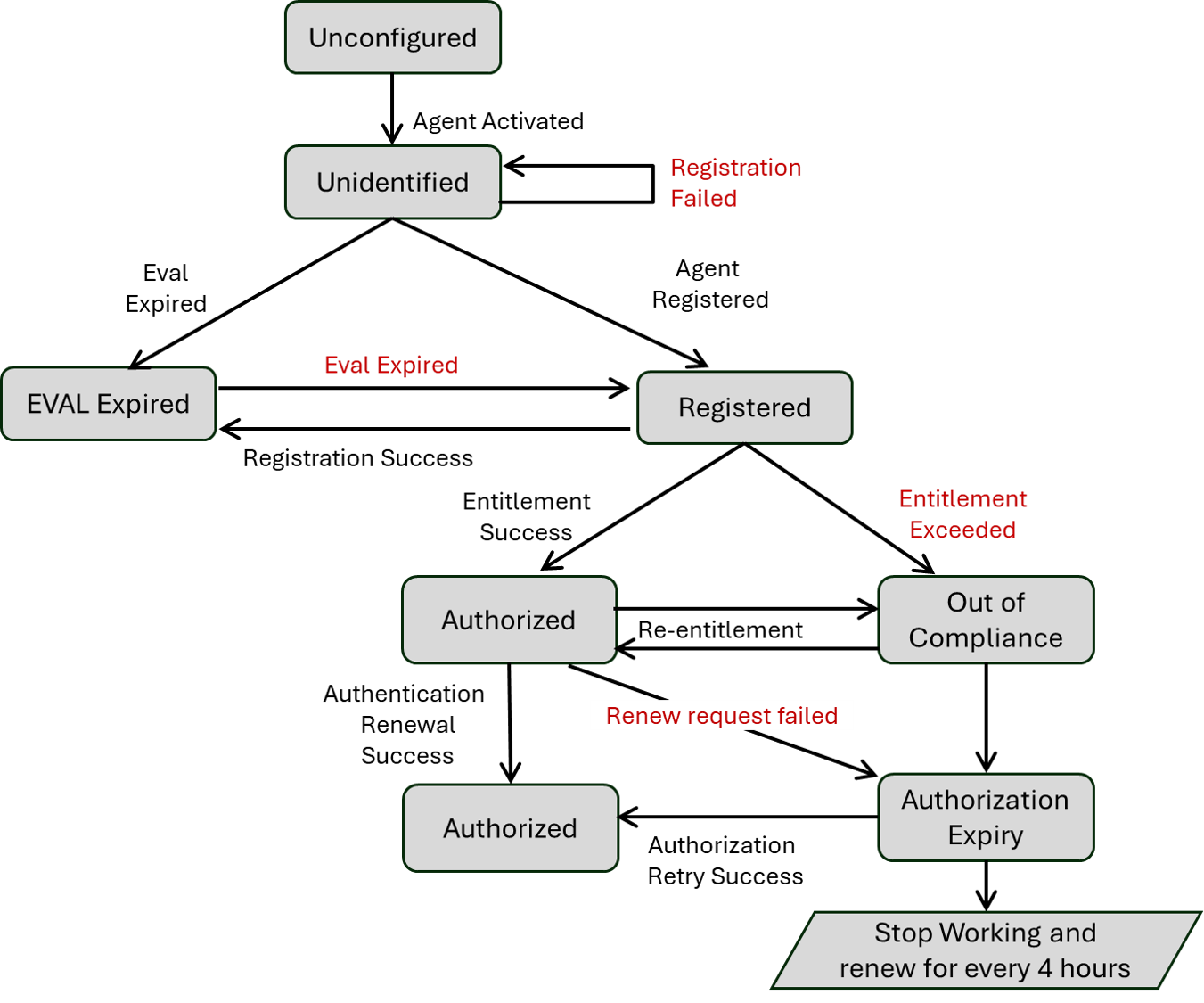
Unconfigured: Smart Licensing is not enabled. In this state, CCCSP operates in an Unconfigured mode and rejects all calls.
-
Unidentified: Smart Licensing is enabled and entitlement information has been sent to the Agent. In this state, CCCSP switches to Evaluation (EVAL) mode, starting the evaluation timer on the Agent. Calls are allowed during this period.
-
Registered: Entitlement information has been provided to the Smart Agent, and CCCSP is registered with the cloud server; however, license authorization is still pending. CCCSP continues to operate in the Evaluation (EVAL) state, with the evaluation timer active on the Agent. The system can function in this state even if authorization fails due to connectivity issues. Registration remains valid for one year, with the Smart Agent automatically managing the periodic refreshes.
-
Eval Expired: When the evaluation period concludes, CCCSP transitions to the Expired state, during which all calls are rejected. To restore normal operation, you must complete the registration and entitlement process to acquire valid permanent licenses.
-
Authorized Mode: After CCCSP registration and entitlement are successfully completed, the system continues to permit calls, and the Smart Agent starts the authorization renewal timer. When cloud authorization is successful, CCCSP enters Authorized Mode. The Smart Agent tries to renew the authorization with the Cisco Cloud every 30 days. If a renewal fails, CCCSP switches to notification listen mode—calls are allowed, but notifications about the failure are generated. This mode can also occur after the system recovers from an Out-of-Compliance (OOC) state via successful re-entitlement. If authorization renewals fail for 90 consecutive days, the Smart Agent marks the authorization as expired.
-
OutOfCompliance: CCCSP continues to allow calls in the Out-of-Compliance (OOC) state, which occurs when requested entitlement exceeds available licenses or re-entitlement attempts exceed the limit. In this state, CCCSP operates in notification listen mode. The Smart Agent attempts license renewal every 15 minutes for the first two hours in case of connection failures, and then reduce the retry interval to once every 4 hours.
-
AuthorizationExpired: This state is triggered when authorization renewal requests fail continuously for 90 days. The Smart Agent maintains a timer and continue to send authorization renewal requests. CCCSP remains in notification listen mode, and the Agent attempts to retry renewals every 4 hours in case of connection failures with renew request.
This image summarizes the CCCSP license states and the effect of each state.
Solution
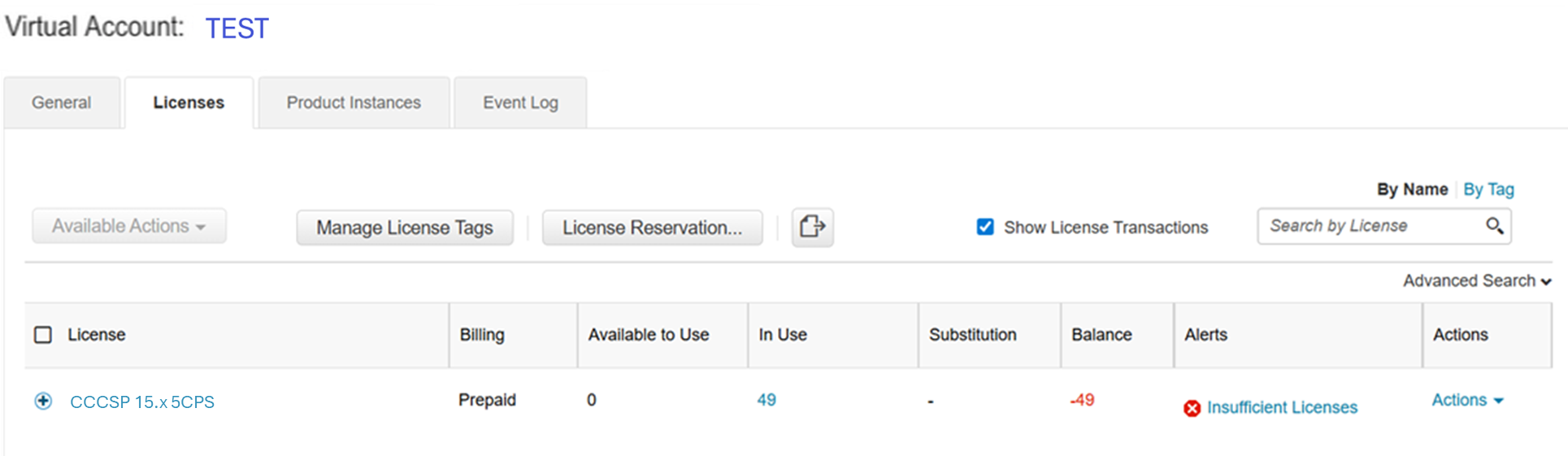
The Check License Usage state is based on the sum of the CCCSP server's configured counts compared to the purchased license count. The Check License Usage state is not the real-time Call Per Second (CPS) count.
You must check the number of licenses purchased and the usage from the Cisco Smart License website: https://software.cisco.com/#SmartLicensing-Inventory
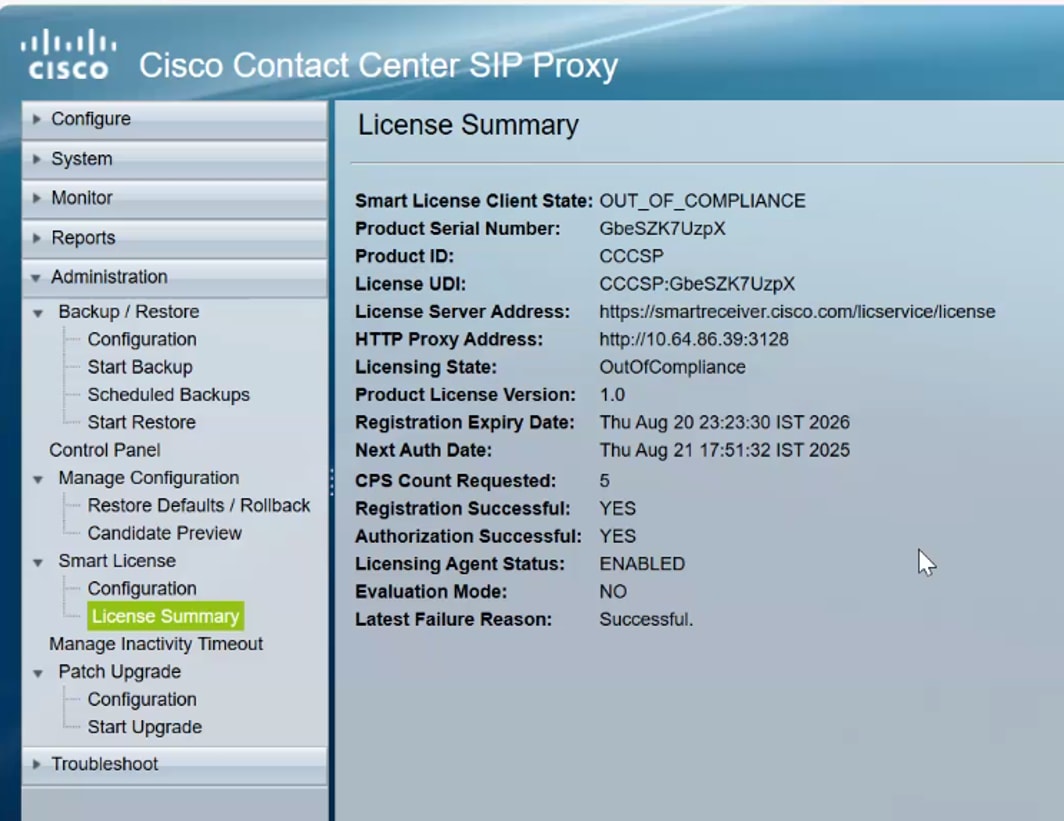
This image shows where to check the current CCCSP license state in the CCCSP Admin page.
Logs Analysis
FTP to Collect Logs from CCCSP
-
Create a username and assign privilege in CCCSP CLI.
username sftpuser create
username sftpuser password Test@123
username sftpuser group pfs-privusers
wr

/opt/CUSP/dsnrs/log/sml.log
 Feedback