Storage Controller Information

This appendix contains information and considerations for the supported storage controller.

Supported Storage Controllers and Cables

At this time, the node supports these storage control options (either one or the other):

  • SAS RAID control with a RAID card installed in PCIe riser 1 and a preinstalled SAS cable.

  • SATA pass-through JBOD control with a SATA cable attached to the Slimline connector on PCIe riser 1.

The controller in each node controls up to six front-panel SAS/SATA drives, in the group that corresponds to the node's position in the chassis (group 1, 2, 3, 4)

This server supports the controller options and cable requirements shown in the following table.

Controller

Server Version/Maximum Drives Controlled

RAID Levels

Optional Supercap Backup?

Required Cables

Broadcom 9400-8i 6G SATA / 12G SAS controller

UCSC-9400-8I

Six front-loading SAS/SATA drives in the C4200 chassis.

Non-RAID

No

Use the SAS cable UCSC-SAS3-C125= (preinstalled in the node) and connect it between the SAS connector on the card and the board connector.

Cisco 12G 9460-8i RAID Controller

Includes 2-GB flash-backed write cache (FBWC)

UCSC-SAS9460-8i

Six front-loading SAS/SATA drives in the C4200 chassis.

0, 1, 5, 6, 10, 50, 60

Yes

The RAID controller in each node is backed up by one supercap unit that installs to the C4200 chassis.

Use the SAS cable UCSC-SAS-C125 (preinstalled in the node) and connect it between the SAS connector on the card and the board connector.

If installing a RAID controller card to the node for the first time, you can order the card, supercap, SAS cable, and supercap cable as kit UCSC-RAID-C125-KIT.

SATA pass-through JBOD

Six front-loading SATA drives in the C4200 chassis.

Non-RAID

No

Use cable UCSC-SATA-C125 and connect it between the Slimline connector on PCIe riser 1 and the board connector.

Storage Controller Card Firmware Compatibility

Firmware on the storage controller must be verified for compatibility with the current Cisco IMC and BIOS versions that are installed on the node. If not compatible, upgrade or downgrade the storage controller firmware using the Host Upgrade Utility (HUU) for your firmware release to bring it to a compatible level.

See the HUU guide for your Cisco IMC release for instructions on downloading and using the utility to bring server components to compatible levels: HUU Guides.


Note


For nodes running in standalone mode only: After you replace controller card hardware, you must run the Cisco UCS Host Upgrade Utility (HUU) to update the controller firmware, even if the firmware Current Version is the same as the Update Version. This is necessary to program the controller's suboem-id to the correct value for the server SKU. If you do not do this, drive enumeration might not display correctly in the software. This issue does not affect servers controlled in UCSM mode.


Storage Controller Cabling

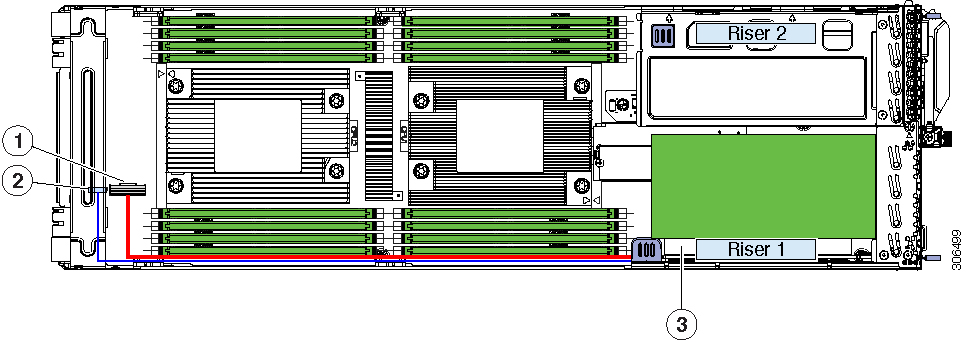
This topic shows the cable routing for storage control.Whether you are using the SAS cable with the RAID controller card or the SATA cable plugged into riser 1, the cable routing and the front cable connector location are the same.

In the following figure, the red and blue lines represent the path for routing cables from PCIe riser 1 to the connectors at the front of the node board.

Figure 1. Storage Controller Cable Routing

1

Connector location for SAS or SATA cable

At the other end of the cable:

  • A SAS cable plugs into the socket on the RAID card.

  • Alternatively, a SATA cable plugs into the Slimline connector on riser 1 to provide pass-through JBOD control.

3

PCIe Riser 1 with RAID card installed horizontally

2

Connector location for supercap cable

The other end of the supercap cable plugs into the connector on the SAS RAID card.

-

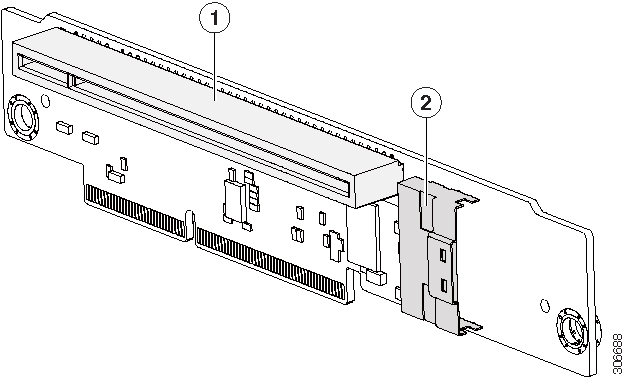
The following figure shows the two connectors on the board of PCIe riser 1.

Figure 2. PCIe Riser 1 Connectors

1

PCIe card socket for RAID controller card (Gen-3 x8 lane, x16 connector length)

2

Slimline connector for SATA JBOD cable UCSC-SATA-C125 (Gen-3 x8 lane)