Configuring RFC 2544

This document describes the RFC 2544 feature and configuration steps to implement RFC 2544.

Prerequisites for Configuring RFC 2544

  • You must disable:

    • Link Layer Discovery Protocol (LLDP) transmit and receive on source port.

    • Loop protection on destination port or Spanning Tree Protocol (STP) on destination and source port.

  • You must create:

    • Traffic test loop on destination port.

    • RFC 2544 profile with source port specified.

  • There should be no traffic coming in or out of the ports.

  • NID must have an IP address.

Restrictions for Configuring RFC 2544

  • Ethernet Virtual Circuit (EVC) Maintenance End Points (MEP) is not supported.

Information About RFC 2544

RFC 2544 defines a number of tests that can be used to describe the performance characteristics of a network interconnect devices. These tests certify that a Service Level Agreement (SLA) between a customer and a service provider is met.

You can perform RFC 2544 benchmark tests on Carrier Ethernet switch platforms running ME 1200 software without the need for any external test equipment.

The RFC 2544 benchmarking can be run on a Metro Ethernet and offers a variety of diagnosis, such as:
  • Throughput—Measures the maximum rate at which none of the offered frames are dropped on the device.

  • Back-to-back—Measures the buffering capacity of a device.

  • Frame loss—Measures the performance of a network device in an overloaded state.

  • Latency—Measures the round-trip time taken by a test frame to travel through a network device or across the network and back to the test port.

In addition, the ME 1200 software includes a test suite tool that allows creating, saving, and executing test profiles and capturing and reporting results. The Local Node acts as a frame generator and checker.

Note


For RFC 2544 to function properly, the Remote Node must support looping of particular frames.


The RFC 2544 benchmarking can be done either on the Port MEP or Virtual Local Area Network (VLAN) MEP. The following figure shows the topology used for provisioning RFC 2544 on two NIDs using the UCS Controller.
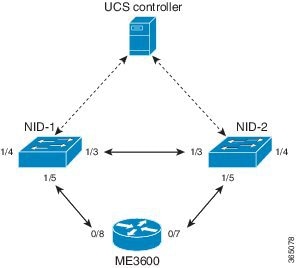
Figure 1. RFC 2544 Topology

Before executing RFC 2544 test, you must prepare a test profile. The RFC 2544 test profile contains all the parameters associated with one test, where one test may be a combination of one or more sub-tests (Throughput, Latency, and Frame Loss, Back-to-Back).

Common and sub-test specific parameters in a test profile are listed below:
  • Common Parameters

    • Profile Name— Name of each profile. Name can be up to 32 characters. Default name is New profile.

    • Profile Description—A text description up to 128 characters associated with the profile. Default description is blank.

    • MEG Level— Maintenance Entity Group (MEG) level on which the RFC 2544 test is run. Default MEG level is 7.

    • Egress Port—Egress port of the switch on which the RFC 2544 test frames are generated and checked.

    • Sequence Number Check—Checks generated frame sequence number. Default is Disabled.

    • Dwell Time—Number of seconds to wait after each trial for the system to settle before reading statistics from the hardware. Default is 2 seconds.

    • Type—Selects between two types of traffic: and VLAN-based . With VLAN-based , a configurable VLAN tag is inserted in the generated test frames.

    • VLAN ID—Specifies the VLAN ID if VLAN-based is configured.

    • PCP—Specifies the PCP value if VLAN-based is configured.

    • DEI—Specifies the DEI value if VLAN-based is configured.

    • DMAC—Specifies the DMAC of the generated frames for both Port-based and VLAN-based .

    • Frame Size—Specifies the frame size each test must be repeated with, such as 64,128,256,512, 1024,1280,1518,2000, and 9600 bytes. Default frame size is all but 9600.

    • Sub-Tests To Run—Specifies the sub-tests to be run in the profile (Throughput, Latency, Frame Loss, Back-to-Back). Default sub-tests to run is Throughput and Latency.

  • Throughput Test Parameters

    • Trial Duration—Duration of a trial run in seconds. Valid range is from 1 to 1800 seconds. Default trial duration is 60 seconds.

    • Minimum and Maximum Rate—Specifies the maximum and minimum search rates.

    • Rate Step—Specifies the granularity of search within the minimum and maximum rates define above. All three input parameters are specified in % of the egress port’s actual link speed and must be in the range from 1 to 1000% with a granularity of 1%. Default rate step is Minimum: 800% of link speed, Maximum: 1000% of link speed, and Step size: 20% of link speed.

    • Allowed Frame Loss—Specifies the allowable frame loss. Valid value is in range is from 0 to 100% with a granularity of 1%. Default allowable frame loss is 0.

  • Latency Test Parameters

    • Trial Duration—Duration of a trial run in seconds. Valid range is from 10 to 1800 seconds. Default trial duration is 120 seconds.

    • Delay Measurement Interval—Specifies the number of seconds between each delay measurement. Valid range is from 1 to 60 seconds in steps of 1 second. Default delay measurement interval is 10 seconds.

    • Allowed Frame Loss—Specifies the pass criterion of an allowable frame loss. Valid range is from 0 to 10% with a granularity of 0.1%. Default allowed frame loss is 0.

  • Frame Loss Test Parameters

    • Trial Duration—Duration of a trial run in seconds. Valid range is from 1 to 1800 seconds. Default trial duration is 60 seconds.

    • Minimum and Maximum Rate—Specifies the maximum and minimum search rates.

    • Rate Step—Specifies the granularity of search within the minimum and maximum rates define above. All three input parameters must be specified in % of the egress port’s actual link speed and must be in the range from 1 to 1000% with a granularity of 1%. Default rate step is Minimum: 800%.

  • Back-to-Back Test Parameters

    • Trial duration—Specifies the duration of a burst. Valid range is from 100 to 10000 milliseconds. Default trial duration is 2000 milliseconds.

    • Trial Count—Specifies the number of times the trial is executed. Valid range is from 1 to 100. Default trial count is 50. Up to 16 profiles can be created and saved in the switch flash memory.

RFC 2544 Test Report

On executing a RFC 2544 test profile, RFC 2544 test report is generated. The RFC 2544 test report is in clear text format and contains all the input parameters defined by the associated test profile and the measurement results. The RFC 2544 test report can be used to certify if an SLA is met.

The last 10 RFC 2544 test reports are stored in the Flash memory of the .

How to Provision RFC 2544

Disabling LLDP Port on NID-1

     Command or ActionPurpose
    Step 1ConfigureNID


    Example:
    UCS# Configure NID 1
     

    Opens a new session for NID 1.

     
    Step 2ProvisionLldpPortType


    Example:
    UCS# ProvisionLldpPortType
     
    Enters the ProvisionLldpPortType mode.  
    Step 3setLldpportconfig lldpPortConfiguration {lldp_receive_enable {disable | enable} | lldp_transmit_enable {disable | enable} | port_number port_number}


    Example:
    UCS(ProvisionLldpPortType)# setLldpPortConfig lldpPortConfiguration port_number 3
    UCS(ProvisionLldpPortType)# setLldpPortConfig lldpPortConfiguration lldp_receive_enable disable
    UCS(ProvisionLldpPortType)# setLldpPortConfig lldpPortConfiguration lldp_transmit_enable disable
     

    Sets the Link Layer Discovery Protocol (LLDP) port configuration.

    • lldp_receive_enable—Whether LLDP receive is enabled or disabled.

    • lldp_transmit_enable—Whether LLDP transmit is enabled or disabled.
    • port_number—The target interface number. The valid values are from 1 to 6.
     
    Step 4setLldpPortConfig review


    Example:
    UCS(ProvisionLldpPortType)# setLldpPortConfig review
     
    Displays the setLldpPortConfig configuration.  
    Step 5setLldpPortConfig commit


    Example:
    UCS(ProvisionLldpPortType)# setLldpPortConfig commit
     
    Sends the setLldpConfig configuration to the ME 1200 NID.  
    Step 6exit


    Example:
    UCS(ProvisionLldpPortType)# exit
     
    Exits the ProvisionLldpPortType mode.  

    Configuration Example

    The example shows how to disable LLDP port on NID-1:

    UCS# ProvisionLldpPortType
    UCS(ProvisionLldpPortType)# setLldpPortConfig lldpPortConfiguration port_number 3
    UCS(ProvisionLldpPortType)# setLldpPortConfig lldpPortConfiguration lldp_receive_enable disable
    UCS(ProvisionLldpPortType)# setLldpPortConfig lldpPortConfiguration lldp_transmit_enable disable
    UCS(ProvisionLldpPortType)# setLldpPortConfig review
    UCS(ProvisionLldpPortType)# setLldpPortConfig commit
    UCS(ProvisionLldpPortType)# exit

    Creating Layer 2 VLANs on NID-1

       Command or ActionPurpose
      Step 1ConfigureNID


      Example:
      UCS# Configure NID 1
       

      Opens a new session for NID 1.

       
      Step 2ProvisionLldpPortType


      Example:
      UCS# ProvisionLldpPortType
       
      Enters the ProvisionLldpPortType mode.  
      Step 3createVlanCommand createVlanReq vlan_list vlan_list


      Example:
      UCS(ProvisionPortVlanPortType)# createVlanCommand createVlanReq vlan_list 2-4095
       
      Creates the VLAN list. The valid values are from 1 to 4095.  
      Step 4createVlanCommand review


      Example:
      UCS(ProvisionPortVlanPortType)# createVlanCommand review
       

      Displays the createVlanCommand configuration.

       
      Step 5createVlanCommand commit


      Example:
      UCS(ProvisionPortVlanPortType)# createVlanCommand commit
       
      Sends the createVlanCommand configuration to the UCS controller.  
      Step 6exit


      Example:
      UCS(ProvisionPortVlanPortType)# exit
       
      Exits the ProvisionPortVlanPortType mode.  

      Configuration Example

      The example shows how to create Layer 2 VLANs on NID-1:

      UCS# ProvisionPortVlanPortType
      UCS(ProvisionPortVlanPortType)# createVlanCommand createVlanReq vlan_list 2-4095
      UCS(ProvisionPortVlanPortType)# createVlanCommand review
      UCS(ProvisionPortVlanPortType)# createVlanCommand commit
      UCS(ProvisionPortVlanPortType)# exit

      Assigning VLANs to Ports on NID-1

         Command or ActionPurpose
        Step 1ConfigureNID


        Example:
        UCS# Configure NID 1
         

        Opens a new session for NID 1.

         
        Step 2ProvisionLldpPortType


        Example:
        UCS# ProvisionLldpPortType
         
        Enters the ProvisionLldpPortType mode.  
        Step 3modifySwPort modifySWPortConfig mode access vlan vlan_id


        Example:
        UCS(ProvisionPortVlanPortType)# modifySwPort modifySWPortConfig mode trunk native vlan 3
         
        Sets the mode to ACCESS, and assigns a VLAN.  
        Step 4modifySwPort modifySWPortConfig mode trunk {allowed vlan {add {all | vlan_list vlan_list } | remove {all | vlan_list vlan_list }} | {native vlan vlan_list }


        Example:
        UCS(ProvisionPortVlanPortType)# modifySwPort modifySWPortConfig mode trunk allowed vlan add vlan_list 2-4095
         
        Sets the mode to TRUNK.
        • allowed—Sets the allowed VLAN characteristics when interface is in trunk mode.
        • add—Adds either all VLANs or specified VLANs to the current list.
        • remove—Removes either all VLANs or specified VLANs from the current list.
        • vlan_d—Specifies the VLAN ID. The valid values are from 0 to 4095.
         
        Step 5modifySwPort review


        Example:
        UCS(ProvisionPortVlanPortType)# modifySwPort review
         

        Displays the modifySwPort configuration.

         
        Step 6modifySwPort commit


        Example:
        UCS(ProvisionPortVlanPortType)# modifySwPort commit
         
        Sends the modifySwPort configuration to the UCS controller.  
        Step 7exit


        Example:
        UCS(ProvisionPortVlanPortType)# exit
         
        Exits the ProvisionPortVlanPortType mode.  

        Configuration Example

        The example shows how to assign VLANs to ports on NID-1:

        UCS# ProvisionPortVlanPortType
        UCS(ProvisionPortVlanPortType)# modifySwPort modifySWPortConfig interaface 3
        UCS(ProvisionPortVlanPortType)# modifySwPort modifySWPortConfig mode trunk native vlan 3
        UCS(ProvisionPortVlanPortType)# modifySwPort modifySWPortConfig mode trunk allowed vlan add vlan_list 2-4095
        UCS(ProvisionPortVlanPortType)# modifySwPort review
        UCS(ProvisionPortVlanPortType)# modifySwPort commit
        UCS(ProvisionPortVlanPortType)# exit

        Disabling Spanning-Tree Protocol on NID-1

           Command or ActionPurpose
          Step 1ConfigureNID


          Example:
          UCS# Configure NID 1
           

          Opens a new session for NID 1.

           
          Step 2ProvisionLldpPortType


          Example:
          UCS# ProvisionLldpPortType
           
          Enters the ProvisionLldpPortType mode.  
          Step 3setStpglobalConfig stpGlobalConfig {edge {bpdu-filter | bpdu-guard} {enable | disable} | mode {mstp | rstp | stp} {enable | disable} | mst {forward-time Fwdtime | instance instance {active {enable | disable} | priority Prio | vlan WORD} | max-age Maxage | max-hops Maxhops | name Name | revision Revision } | port-number Port number {enable | disable} | recovery Interval | transmit hold-count }


          Example:
          UCS(ProvisionStpPortType)# setStpGlobalConfig stpGlobalConfig port-number 3 disable

          Note    If the spanning-tree mode is STP or RSTP, and if the priority for the software needs to be changed, you can change using mst instance 0 and priority.
           
          Configures the spanning-tree global configuration.
          • stpGlobalConfig—Sets the spanning-tree global configuration.
          • edge—Configures the edge ports.
            • bpdu-filter—Enables or disables the BPDU filter (stop BPDU tx/rx).
            • bpdu-guard—Enables or disables the BPDU guard.
          • mode—Configures the STP protocol mode.
            • mstp—Enables or disables the Multiple Spanning Tree (802.1s).
            • rstp—Enables or disables the Rapid Spanning Tree (802.1w)
            • stp—Enables or disables the Spanning Tree (802.1D).
          • mst—Configures the STP bridge instance.
            • Fwdtime—Forward time. The range is from 4 to 30 seconds.
            • instance—Instance. The range is from 0 to 7 where CIST=0, MST2=1 and so on.
              • active—Enables or disables the instance.
              • Prio —Specifies the priority. The range is from 0 to 61440 seconds. The range should be given in the sets of (0, 4096, 8192...) and so on.
              • WORD—VLAN range.
            • Maxage—Maximum age. The range is from 6 to 40 seconds.
            • Maxhops—Maximum hops. The range is from 6 to 40 hop counts.
            • Name—Name of the bridge. You can use 32 characters to define.
            • Revision—Revision. The range is from 0-65535 revisions.
          • port-number—Configures the port number in the range from 1 to 6.
            • Port number—Port number. The range is from 1 to 6.
            • disable—Disables the port-number.
            • enable—Enables the port-number.
          • recovery—Configures the error recovery timeout.
            • Interval—Interval. The range is from 30-86400 seconds.
          • transmit—Configures the BPDUs to transmit.
            • hold-count—Maximum number of transmit BPDUs per second. The range is from 1 to 10 seconds.
           
          Step 4setStpGlobalConfig review


          Example:
          UCS(ProvisionStpPortType)# setStpGlobalConfig review
           
          Displays the setStpGlobalConfig.  
          Step 5setStpGlobalConfig commit


          Example:
          UCS(ProvisionStpPortType)# setStpGlobalConfig commit
           
          Sends the setStpGlobalConfig configuration to the UCS controller.  
          Step 6exit


          Example:
          UCS(ProvisionStpPortType)# exit
           
          Exits the ProvisionStpPortType mode.  

          Configuration Example

          The example shows how to disable Spanning-Tree Protocol on NID-1:

          UCS# ProvisionStpPortType
          UCS(ProvisionStpPortType)# setStpGlobalConfig stpGlobalConfig port-number 3 disable
          UCS(ProvisionStpPortType)# setStpGlobalConfig review
          UCS(ProvisionStpPortType)# setStpGlobalConfig commit
          UCS(ProvisionStpPortType)# exit

          Disabling LLDP Port on NID-2

             Command or ActionPurpose
            Step 1ConfigureNID


            Example:
            UCS# Configure NID 2
             

            Opens a new session for NID 2.

             
            Step 2ProvisionLldpPortType


            Example:
            UCS# ProvisionLldpPortType
             
            Enters the ProvisionLldpPortType mode.  
            Step 3setLldpportconfig lldpPortConfiguration {lldp_receive_enable {disable | enable} | lldp_transmit_enable {disable | enable} | port_number port_number}


            Example:
            UCS(ProvisionLldpPortType)# setLldpPortConfig lldpPortConfiguration port_number 3
            UCS(ProvisionLldpPortType)# setLldpPortConfig lldpPortConfiguration lldp_receive_enable disable
            UCS(ProvisionLldpPortType)# setLldpPortConfig lldpPortConfiguration lldp_transmit_enable disable
             

            Sets the Link Layer Discovery Protocol (LLDP) port configuration.

            • lldp_receive_enable—Whether LLDP receive is enabled or disabled.

            • lldp_transmit_enable—Whether LLDP transmit is enabled or disabled.
            • port_number—The target interface number. The valid values are from 1 to 6.
             
            Step 4setLldpPortConfig review


            Example:
            UCS(ProvisionLldpPortType)# setLldpPortConfig review
             
            Displays the setLldpPortConfig configuration.  
            Step 5setLldpPortConfig commit


            Example:
            UCS(ProvisionLldpPortType)# setLldpPortConfig commit
             
            Sends the setLldpConfig configuration to the UCS controlller.  
            Step 6exit


            Example:
            UCS(ProvisionLldpPortType)# exit
             
            Exits the ProvisionLldpPortType mode.  

            Configuration Example

            The example shows how to disable LLDP port on NID-2:

            UCS# ProvisionLldpPortType
            UCS(ProvisionLldpPortType)# setLldpPortConfig lldpPortConfiguration port_number 3
            UCS(ProvisionLldpPortType)# setLldpPortConfig lldpPortConfiguration lldp_receive_enable disable
            UCS(ProvisionLldpPortType)# setLldpPortConfig lldpPortConfiguration lldp_transmit_enable disable
            UCS(ProvisionLldpPortType)# setLldpPortConfig review
            UCS(ProvisionLldpPortType)# setLldpPortConfig commit
            UCS(ProvisionLldpPortType)# exit

            Creating Layer 2 VLANs on NID-2

               Command or ActionPurpose
              Step 1ConfigureNID


              Example:
              UCS# Configure NID 2
               

              Opens a new session for NID 2.

               
              Step 2ProvisionLldpPortType


              Example:
              UCS# ProvisionLldpPortType
               
              Enters the ProvisionLldpPortType mode.  
              Step 3createVlanCommand createVlanReq vlan_list vlan_list


              Example:
              UCS(ProvisionPortVlanPortType)# createVlanCommand createVlanReq vlan_list 2-4095
               
              Creates the VLAN list. The valid values are from 1 to 4095.  
              Step 4createVlanCommand review


              Example:
              UCS(ProvisionPortVlanPortType)# createVlanCommand review
               

              Displays the createVlanCommand configuration.

               
              Step 5createVlanCommand commit


              Example:
              UCS(ProvisionPortVlanPortType)# createVlanCommand commit
               
              Sends the createVlanCommand configuration to the UCS controller.  
              Step 6exit


              Example:
              UCS(ProvisionPortVlanPortType)# exit
               
              Exits the ProvisionPortVlanPortType mode.  

              Configuration Example

              The example shows how to create Layer 2 VLANs on NID-2:

              UCS# ProvisionPortVlanPortType
              UCS(ProvisionPortVlanPortType)# createVlanCommand createVlanReq vlan_list 2-4095
              UCS(ProvisionPortVlanPortType)# createVlanCommand review
              UCS(ProvisionPortVlanPortType)# createVlanCommand commit
              UCS(ProvisionPortVlanPortType)# exit

              Assigning VLANs to Ports on NID-2

                 Command or ActionPurpose
                Step 1ConfigureNID


                Example:
                UCS# Configure NID 2
                 

                Opens a new session for NID 2.

                 
                Step 2ProvisionPortVlanPortType


                Example:
                UCS# ProvisionPortVlanPortType
                 
                Enters the ProvisionLldpPortType mode.  
                Step 3modifySwPort modifySWPortConfig interface interface_id


                Example:
                UCS(ProvisionPortVlanPortType)# modifySwPort modifySWPortConfig interface 3
                 
                Modifies the switchport configuration on the defined interface.  
                Step 4modifySwPort modifySWPortConfig mode access vlan vlan_id


                Example:
                UCS(ProvisionPortVlanPortType)# modifySwPort modifySWPortConfig mode trunk native vlan 3
                 
                Sets the mode to ACCESS, and assigns a VLAN.  
                Step 5modifySwPort modifySWPortConfig mode trunk {allowed vlan {add {all | vlan_list vlan_list } | remove {all | vlan_list vlan_list }} | {native vlan vlan_list }


                Example:
                UCS(ProvisionPortVlanPortType)# modifySwPort modifySWPortConfig mode trunk allowed vlan add vlan_list 2-4095
                 
                Sets the mode to TRUNK.
                • allowed—Sets the allowed VLAN characteristics when interface is in trunk mode.
                • add—Adds either all VLANs or specified VLANs to the current list.
                • remove—Removes either all VLANs or specified VLANs from the current list.
                • vlan_d—Specifies the VLAN ID. The valid values are from 0 to 4095.
                 
                Step 6modifySwPort review


                Example:
                UCS(ProvisionPortVlanPortType)# modifySwPort review
                 

                Displays the modifySwPort configuration.

                 
                Step 7modifySwPort commit


                Example:
                UCS(ProvisionPortVlanPortType)# modifySwPort commit
                 
                Sends the modifySwPort configuration to the UCS controller.  
                Step 8exit


                Example:
                UCS(ProvisionPortVlanPortType)# exit
                 
                Exits the ProvisionPortVlanPortType mode.  

                Configuration Example

                The example shows how to assign VLANs to ports on NID-2:

                UCS# ProvisionPortVlanPortType
                UCS(ProvisionPortVlanPortType)# modifySwPort modifySWPortConfig interaface 3
                UCS(ProvisionPortVlanPortType)# modifySwPort modifySWPortConfig mode trunk native vlan 3
                UCS(ProvisionPortVlanPortType)# modifySwPort modifySWPortConfig mode trunk allowed vlan add vlan_list 2-4095
                UCS(ProvisionPortVlanPortType)# modifySwPort review
                UCS(ProvisionPortVlanPortType)# modifySwPort commit
                UCS(ProvisionPortVlanPortType)# exit

                Disabling Spanning-Tree Protocol on NID-2

                   Command or ActionPurpose
                  Step 1ConfigureNID


                  Example:
                  UCS# Configure NID 2
                   

                  Opens a new session for NID 2.

                   
                  Step 2ProvisionLldpPortType


                  Example:
                  UCS# ProvisionLldpPortType
                   
                  Enters the ProvisionLldpPortType mode.  
                  Step 3setStpglobalConfig stpGlobalConfig {edge {bpdu-filter | bpdu-guard} {enable | disable} | mode {mstp | rstp | stp} {enable | disable} | mst {forward-time Fwdtime | instance instance {active {enable | disable} | priority Prio | vlan WORD} | max-age Maxage | max-hops Maxhops | name Name | revision Revision } | port-number Port number {enable | disable} | recovery Interval | transmit hold-count }


                  Example:
                  UCS(ProvisionStpPortType)# setStpGlobalConfig stpGlobalConfig port-number 3 disable

                  Note    If the spanning-tree mode is STP or RSTP, and if the priority for the software needs to be changed, you can change using mst instance 0 and priority.
                   
                  Configures the spanning-tree global configuration.
                  • stpGlobalConfig—Sets the spanning-tree global configuration.
                  • edge—Configures the edge ports.
                    • bpdu-filter—Enables or disables the BPDU filter (stop BPDU tx/rx).
                    • bpdu-guard—Enables or disables the BPDU guard.
                  • mode—Configures the STP protocol mode.
                    • mstp—Enables or disables the Multiple Spanning Tree (802.1s).
                    • rstp—Enables or disables the Rapid Spanning Tree (802.1w)
                    • stp—Enables or disables the Spanning Tree (802.1D).
                  • mst—Configures the STP bridge instance.
                    • Fwdtime—Forward time. The range is from 4 to 30 seconds.
                    • instance—Instance. The range is from 0 to 7 where CIST=0, MST2=1 and so on.
                      • active—Enables or disables the instance.
                      • Prio —Specifies the priority. The range is from 0 to 61440 seconds. The range should be given in the sets of (0, 4096, 8192...) and so on.
                      • WORD—VLAN range.
                    • Maxage—Maximum age. The range is from 6 to 40 seconds.
                    • Maxhops—Maximum hops. The range is from 6 to 40 hop counts.
                    • Name—Name of the bridge. You can use 32 characters to define.
                    • Revision—Revision. The range is from 0-65535 revisions.
                  • port-number—Configures the port number in the range from 1 to 6.
                    • Port number—Port number. The range is from 1 to 6.
                    • disable—Disables the port-number.
                    • enable—Enables the port-number.
                  • recovery—Configures the error recovery timeout.
                    • Interval—Interval. The range is from 30-86400 seconds.
                  • transmit—Configures the BPDUs to transmit.
                    • hold-count—Maximum number of transmit BPDUs per second. The range is from 1 to 10 seconds.
                   
                  Step 4setStpGlobalConfig review


                  Example:
                  UCS(ProvisionStpPortType)# setStpGlobalConfig review
                   
                  Displays the setStpGlobalConfig.  
                  Step 5setStpGlobalConfig commit


                  Example:
                  UCS(ProvisionStpPortType)# setStpGlobalConfig commit
                   
                  Sends the setStpGlobalConfig configuration to the UCS controller.  
                  Step 6exit


                  Example:
                  UCS(ProvisionStpPortType)# exit
                   
                  Exits the ProvisionStpPortType mode.  

                  Configuration Example

                  The example shows how to disable Spanning-Tree Protocol on NID-2:

                  UCS# ProvisionStpPortType
                  UCS(ProvisionStpPortType)# setStpGlobalConfig stpGlobalConfig port-number 3 disable
                  UCS(ProvisionStpPortType)# setStpGlobalConfig review
                  UCS(ProvisionStpPortType)# setStpGlobalConfig commit
                  UCS(ProvisionStpPortType)# exit

                  Creating Port MEP Profile on NID-1

                     Command or ActionPurpose
                    Step 1ConfigureNID


                    Example:
                    UCS# Configure NID 1
                     

                    Opens a new session for NID 1.

                     
                    Step 2RFC2544PortType


                    Example:
                    UCS# RFC2544PortType
                     
                    Enters the RFC2544PortType mode.  
                    Step 3setRfc2544Profile Rfc2544Profile {profileName | description | megLevel | egressPort | seqNoCheck {enable | disable} | dwellTime | mepType {portDownMep | vlanDownMep} | vlanId | pcp | dei | dMac}


                    Example:
                    UCS(RFC2544PortType)# setRfc2544Profile Rfc2544Profile profileName profile1
                    UCS(RFC2544PortType)# setRfc2544Profile Rfc2544Profile description profile1
                    UCS(RFC2544PortType)# setRfc2544Profile Rfc2544Profile egressPort 3
                    UCS(RFC2544PortType)# setRfc2544Profile Rfc2544Profile megLevel 5
                    UCS(RFC2544PortType)# setRfc2544Profile Rfc2544Profile mepType portDownMep
                    UCS(RFC2544PortType)# setRfc2544Profile Rfc2544Profile seqNoCheck disable
                     

                    Creates Port MEP profile.

                    • profileName—Specifies RFC 2544 profile name.
                    • description—Adds a description to profile.
                      Note   

                      We recommend that you add a description for the profile.

                    • megLevel—Sets profile MEG level used in TST PDUs.
                    • egressPort—Sets the egress interface on which PDUs are transmitted.
                    • seqNoCheck—Enables sequence number checking of looped TST PDUs.
                      • enable—Enables sequence number.

                      • disable—Disables sequence number.

                    • dwellTime—Controls the number of seconds that the execution pauses after each trial, before reading counters and status from hardware.
                    • mepType—Specifies MEP type port. MEP or VLAN MEP.
                      • portDownMep—Creates a port down MEP.

                      • vlanDownMep—Creates a VLAN down MEP. All PDUs are then transmitted with a VLAN tag.

                    • vlanId—Specifies VLAN ID incase of VLAN down MEP.
                    • pcp—Specifies PCP value used in the VLAN tag incase of VLAN MEP.
                    • dei—Specifies DEI value used in the VLAN tag incase vlan mep.
                    • dMac—Specifies destination MAC address used in generation of the Y.1731 TST and 1DM frames.
                     
                    Step 4setRfc2544Profile review


                    Example:
                    UCS(RFC2544PortType)# setRfc2544Profile review
                     
                    Displays the setRfc2544Profile.  
                    Step 5setRfc2544Profile commit


                    Example:
                    UCS(RFC2544PortType)# setRfc2544Profile commit
                     
                    Sends the setRfc2544Profile configuration to the UCS controller.  
                    Step 6exit


                    Example:
                    UCS(RFC2544PortType)# exit
                     
                    Exits the RFC2544PortType mode.  

                    Configuration Example

                    The example shows how to create Port MEP profile on NID-1:

                    UCS# RFC2544PortType
                    UCS(RFC2544PortType)# setRfc2544Profile Rfc2544Profile profileName profile1
                    UCS(RFC2544PortType)# setRfc2544Profile Rfc2544Profile description profile1
                    UCS(RFC2544PortType)# setRfc2544Profile Rfc2544Profile egressPort 3
                    UCS(RFC2544PortType)# setRfc2544Profile Rfc2544Profile megLevel 5
                    UCS(RFC2544PortType)# setRfc2544Profile Rfc2544Profile mepType portDownMep
                    UCS(RFC2544PortType)# setRfc2544Profile Rfc2544Profile seqNoCheck disable
                    UCS(RFC2544PortType)# setRfc2544Profile review
                    UCS(RFC2544PortType)# setrfc2544profile commit
                    UCS(RFC2544PortType)# exit

                    Creating Traffic Test Loop on Destination Port on NID-2

                       Command or ActionPurpose
                      Step 1ConfigureNID


                      Example:
                      UCS# Configure NID 2
                       

                      Opens a new session for NID 2.

                       
                      Step 2RFC2544PortType


                      Example:
                      UCS# RFC2544PortType
                       

                      Enters the RFC2544PortType configuration mode.

                       
                      Step 3 setTrafficTestLoop trafficTestLoopConfig {instNum | adminState {enable | disable} | custVID | name | type {macLoop | oamLoop} | interface | direction {facility | terminal} | domain {evc | port | vlan} | flowld | level}


                      Example:
                      UCS(RFC2544PortType)# setTrafficTestLoop trafficTestLoopConfig interface 3 
                      UCS(RFC2544PortType)# setTrafficTestLoop trafficTestLoopConfig type macLoop 
                      UCS(RFC2544PortType)# setTrafficTestLoop trafficTestLoopConfig direction facility 
                      UCS(RFC2544PortType)# setTrafficTestLoop trafficTestLoopConfig domain port 
                      UCS(RFC2544PortType)# setTrafficTestLoop trafficTestLoopConfig adminState enable 
                      UCS(RFC2544PortType)# setTrafficTestLoop trafficTestLoopConfig instNum 1
                       
                      Creates traffic test loop on destination port on NID-2.
                      • instNum—Specifies the traffic-test-loop instance number.
                      • adminState—Specifies the administrative state.
                        • enable—Creates a loop if all required resources are available and operational state is up.
                        • disable—Deletes the loop and operational state is down.
                      • custVID—Only relevant for OAM-loop in EVC domain. Loops C-tagged customer frames with this specified VID in the EVC.
                      • name—Specifies the traffic-test-loop name.
                      • type—Specifies the type of the traffic-test-loop. Currently only MAC loop is supported.
                        • macLoop—All frames in the flow are looped with MAC swap.
                        • oamLoop—Y.1731 OAM aware and is looping the following:
                          • Loopback Messages (LBM) and Loopback Replies (LBR)

                          • Delay Measurement Message (DMM) and Delay Measurement Reply (DMR)

                      • interface—Specifies the residence port of the traffic-test-loop.
                      • direction—Specifies the direction of the traffic-test-loop.
                        • facility—Specifies that this traffic-test-loop is pointing to the port. Looping is done from ingress to egress.
                        • terminal—Specifies that this traffic-test-loop is pointing to the forwarding plane. Looping is done from egress to ingress.
                          Note   

                          The terminal option is not supported.

                      • domain—The domain of the traffic-test-loop.
                        • evc—This traffic-test-loop is in the EVC domain.
                        • port—This traffic-test-loop is in the Port domain.
                        • vlan—This traffic-test-loop is in the VLAN domain.
                        Note   

                        Only port domain is supported.

                      • flowld—Specifies the EVC domain instance ID or VID in VLAN domain.
                      • level—Specifies the Y.1731 OAM level of the traffic-test-loop. This is relevant only for OAM looping type traffic-test-loop.
                       
                      Step 4setTrafficTestLoop review


                      Example:
                      UCS(RFC2544PortType)# setTrafficTestLoop review
                       

                      Displays the setTrafficTestLoop configuration.

                       
                      Step 5setTrafficTestLoop commit


                      Example:
                      UCS(RFC2544PortType)# setTrafficTestLoop commit
                       
                      Sends the setTrafficTestLoop configuration to the UCS controller.  
                      Step 6exit


                      Example:
                      UCS(RFC2544PortType)# exit
                       
                      Exits the RFC2544PortType mode.  

                      Configuration Example

                      The example shows how to create traffic test loop on destination port on NID-2:

                      UCS# RFC2544PortType
                      UCS(RFC2544PortType)# setTrafficTestLoop trafficTestLoopConfig interface 3 
                      UCS(RFC2544PortType)# setTrafficTestLoop trafficTestLoopConfig type macLoop 
                      UCS(RFC2544PortType)# setTrafficTestLoop trafficTestLoopConfig direction facility 
                      UCS(RFC2544PortType)# setTrafficTestLoop trafficTestLoopConfig domain port 
                      UCS(RFC2544PortType)# setTrafficTestLoop trafficTestLoopConfig adminState enable 
                      UCS(RFC2544PortType)# setTrafficTestLoop trafficTestLoopConfig instNum 1
                      UCS(RFC2544PortType)# setTrafficTestLoop review
                      UCS(RFC2544PortType)# setTrafficTestLoop commit
                      UCS(RFC2544PortType)# exit

                      Disabling Loop Protection on Destination Port on NID-2

                         Command or ActionPurpose
                        Step 1ConfigureNID


                        Example:
                        UCS# Configure NID 2
                         

                        Opens a new session for NID 2.

                         
                        Step 2RFC2544PortType


                        Example:
                        UCS# RFC2544PortType
                         

                        Enters the RFC2544PortType configuration mode.

                         
                        Step 3 deleteTrafficTestLoop deleteLoopConfig {trafficLoop instNum |loopPotect interface}


                        Example:
                        UCS(RFC2544PortType)# deleteTrafficTestLoop deleteLoopConfig loopPotect interface 3 
                         
                        Disables loop protection on destination port on NID-2.
                        • deleteLoopConfig—Deletes traffic test loop configuration.
                        • trafficLoop—Deletes traffic test loop configuration.
                          • instNum—Specifies the traffic-test-loop instance number.
                        • loopPotect—Deletes loop protection at port level.
                          • interface—Specifies the residence port of the traffic-test-loop.
                         
                        Step 4deleteTrafficTestLoop review


                        Example:
                        UCS(RFC2544PortType)# deleteTrafficTestLoop review
                         

                        Displays the deleteTrafficTestLoop configuration.

                         
                        Step 5deleteTrafficTestLoop commit


                        Example:
                        UCS(RFC2544PortType)# deleteTrafficTestLoop commit
                         
                        Sends the deleteTrafficTestLoop configuration to the UCS controller.  
                        Step 6exit


                        Example:
                        UCS(RFC2544PortType)# exit
                         
                        Exits the RFC2544PortType mode.  

                        Configuration Example

                        The example shows how to disable loop protection on destination port on NID-2:

                        UCS# RFC2544PortType
                        UCS(RFC2544PortType)# deleteTrafficTestLoop deleteLoopConfig loopPotect interface 3
                        UCS(RFC2544PortType)# deleteTrafficTestLoop review
                        UCS(RFC2544PortType)# deleteTrafficTestLoop commit
                        UCS(RFC2544PortType)# exit

                        Setting RFC 2544 Reporting Parameters on NID-1

                           Command or ActionPurpose
                          Step 1ConfigureNID


                          Example:
                          UCS# Configure NID 1
                           

                          Opens a new session for NID 1.

                           
                          Step 2RFC2544PortType


                          Example:
                          UCS# RFC2544PortType
                           
                          Enters the RFC2544PortType mode.  
                          Step 3setReportParams rfc2544Reports reportAction {delete reportName | save {reportName | tftpPath} | start {reportName | profileName | description} | stop reportName | rename {oldName | newName}}


                          Example:
                          UCS(RFC2544PortType)# setReportParams rfc2544Reports reportAction start profileName profile1
                          UCS(RFC2544PortType)# setReportParams rfc2544Reports reportAction start reportName profile1
                          UCS(RFC2544PortType)# setReportParams rfc2544Reports reportAction start description profile1
                           

                          Sets RFC 2544 reporting parameters.

                          • reportAction—Specifies action to be performed on the report.
                            • delete—Deletes the existing report.

                              • reportName—Specifies name of the report.

                            • save—Saves the existing report.

                              • reportName—Specifies the name of existing report.

                              • tftpPath—Specifies TFTP server URL tftp://server[:port]/path-to-file.

                            • start—Starts profile execution

                              • reportName—Specifies unique name of the resulting report.

                              • profileName—Specifies name of the profile to execute.

                              • description—(Optional) Provides a description of the report.
                                Note   

                                We recommend that you add a description for the report.

                            • stop—Stops the report.

                              • reportName—Specifies name of the report to be stopped.

                            • rename—Renames the existing report.

                              • oldName—Specifies name of the old profile.

                              • newName—Specifies name of the new profile.

                           
                          Step 4setReportParams review


                          Example:
                          UCS(RFC2544PortType)# setReportParams review
                           
                          Displays the setReportParams configuration.  
                          Step 5setReportParams commit


                          Example:
                          UCS(RFC2544PortType)# setReportParams commit
                           
                          Sends the setReportParams configuration to the ME 1200 NID.  
                          Step 6exit


                          Example:
                          UCS(RFC2544PortType)# exit
                           
                          Exits the RFC2544PortType mode.  

                          Configuration Example

                          The example shows how to set the RFC 2544 reporting parameters on NID-1:

                          UCS# RFC2544PortType
                          UCS(RFC2544PortType)# setReportParams rfc2544Reports reportAction start profileName profile1
                          UCS(RFC2544PortType)# setReportParams rfc2544Reports reportAction start reportName profile1
                          UCS(RFC2544PortType)# setReportParams rfc2544Reports reportAction start description profile1
                          UCS(RFC2544PortType)# setReportParams review
                          UCS(RFC2544PortType)# setReportParams commit
                          UCS(RFC2544PortType)# exit

                          Displaying RFC 2544 Profile and Report on NID-1

                             Command or ActionPurpose
                            Step 1ConfigureNID


                            Example:
                            UCS# Configure NID 1
                             

                            Opens a new session for NID 1.

                             
                            Step 2RFC2544PortType


                            Example:
                            UCS# RFC2544PortType
                             
                            Enters the RFC2544PortType mode.  
                            Step 3showRfc2544 showRequest show {profiles | report}


                            Example:
                            UCS(RFC2544PortType)# showRfc2544 showRequest show profiles
                             
                            Displays RFC 2544 profile.
                            • show—Displays profile or report.

                              • profiles—Displays profile information.

                              • report—Displays report information.

                             
                            Step 4showRfc2544 review


                            Example:
                            UCS(RFC2544PortType)# showRfc2544 review
                             

                            Displays the showRfc2544 configuration.

                             
                            Step 5showRfc2544 commit


                            Example:
                            UCS(RFC2544PortType)# showRfc2544 commit
                             
                            Sends the setRfc2544Profile configuration to the UCS controller.  
                            Step 6showRfc2544 showRequest show {profiles | report}


                            Example:
                            UCS(RFC2544PortType)# showRfc2544 showRequest show report
                             
                            Displays RFC 2544 profile.
                            • show—Displays profile or report.

                              • profiles—Displays profile information.

                              • report—Displays report information.

                             
                            Step 7showRfc2544 review


                            Example:
                            UCS(RFC2544PortType)# showRfc2544 review
                             

                            Displays the showRfc2544 configuration.

                             
                            Step 8showRfc2544 commit


                            Example:
                            UCS(RFC2544PortType)# showRfc2544 commit
                             
                            Sends the setRfc2544Profile configuration to the UCS controller.  
                            Step 9exit


                            Example:
                            UCS(RFC2544PortType)# exit
                             
                            Exits the RFC2544PortType mode.  

                            Configuration Example

                            The example shows how to display RFC 2544 profile and report on NID-1:

                            UCS# RFC2544PortType
                            UCS(RFC2544PortType)# showRfc2544 showRequest show profiles
                            UCS(RFC2544PortType)# showRfc2544 review
                            UCS(RFC2544PortType)# showRfc2544 commit
                            ShowRfc2544_Output.showResponse.t = 1
                            ShowRfc2544_Output.showResponse.u.profile[0].profileName = 'profile1'
                            ShowRfc2544_Output.showResponse.u.profile[0].description = 'profile1'
                            
                             ShowRfc2544 Commit Success!!!
                            UCS# RFC2544PortType
                            UCS(RFC2544PortType)# showRfc2544 showRequest show report
                            UCS(RFC2544PortType)# showRfc2544 review
                            UCS(RFC2544PortType)# showRfc2544 commit
                            ShowRfc2544_Output.showResponse.t = 2
                            ShowRfc2544_Output.showResponse.u.report[0].reportName = 'Report1'
                            ShowRfc2544_Output.showResponse.u.report[0].created = '1970-01-04T07:29:25+00:00'
                            ShowRfc2544_Output.showResponse.u.report[0].status = 'Succeeded'
                            ShowRfc2544_Output.showResponse.u.report[1].reportName = 'Rep15'
                            ShowRfc2544_Output.showResponse.u.report[1].created = '1970-01-02T01:57:34+00:00'
                            ShowRfc2544_Output.showResponse.u.report[1].status = 'Failed'
                            ShowRfc2544_Output.showResponse.u.report[2].reportName = 'Rep16'
                            ShowRfc2544_Output.showResponse.u.report[2].created = '1970-01-02T02:08:12+00:00'
                            ShowRfc2544_Output.showResponse.u.report[2].status = 'Succeeded'
                            ShowRfc2544_Output.showResponse.u.report[3].reportName = 'profile1'
                            ShowRfc2544_Output.showResponse.u.report[3].created = '1970-01-02T03:48:16+00:00'
                            ShowRfc2544_Output.showResponse.u.report[3].status = 'Failed'
                            
                             ShowRfc2544 Commit Success!!!
                            UCS(RFC2544PortType)# exit

                            Creating VLAN Profile on NID-1

                               Command or ActionPurpose
                              Step 1ConfigureNID


                              Example:
                              UCS# Configure NID 1
                               

                              Opens a new session for NID 1.

                               
                              Step 2RFC2544PortType


                              Example:
                              UCS# RFC2544PortType
                               
                              Enters the RFC2544PortType mode.  
                              Step 3setRfc2544Profile Rfc2544Profile {profileName | description | megLevel | egressPort | seqNoCheck {enable | disable} | dwellTime | mepType {portDownMep | vlanDownMep} | vlanId | pcp | dei | dMac}


                              Example:
                              UCS(RFC2544PortType)# setRfc2544Profile Rfc2544Profile profileName vlan-profile 
                              UCS(RFC2544PortType)# setRfc2544Profile Rfc2544Profile egressPort 3 
                              UCS(RFC2544PortType)# setRfc2544Profile Rfc2544Profile mepType vlanDownMep 
                              UCS(RFC2544PortType)# setRfc2544Profile Rfc2544Profile vlanId 999 
                              UCS(RFC2544PortType)# setRfc2544Profile Rfc2544Profile megLevel 4 
                              UCS(RFC2544PortType)# setRfc2544Profile Rfc2544Profile description vlanprofile
                               

                              Creates RFC profile.

                              • profileName—Specifies RFC 2544 profile name.
                              • description—Adds a description to profile.
                                Note   

                                We recommend that you add a description for the profile.

                              • megLevel—Sets profile MEG level used in TST PDUs.
                              • egressPort—Sets the egress interface on which PDUs are transmitted.
                              • seqNoCheck—Enables sequence number checking of looped TST PDUs.
                                • enable—Enables sequence number.

                                • disable—Disables sequence number.

                              • dwellTime—Controls the number of seconds that the execution pauses after each trial, before reading counters and status from hardware.
                              • mepType—Specifies MEP type port. MEP or VLAN MEP.
                                • portDownMep—Creates a port down MEP.

                                • vlanDownMep—Creates a VLAN down MEP. All PDUs are then transmitted with a VLAN tag.

                              • vlanId—Specifies VLAN ID incase of VLAN down MEP.
                              • pcp—Specifies PCP value used in the VLAN tag incase of VLAN MEP.
                              • dei—Specifies DEI value used in the VLAN tag incase vlan mep.
                              • dMac—Specifies destination MAC address used in generation of the Y.1731 TST and 1DM frames.
                               
                              Step 4setRfc2544Profile review


                              Example:
                              UCS(RFC2544PortType)# setRfc2544Profile review
                               
                              Displays the setRfc2544Profile.  
                              Step 5setRfc2544Profile commit


                              Example:
                              UCS(RFC2544PortType)# setRfc2544Profile commit
                               
                              Sends the setRfc2544Profile configuration to the UCS controller.  
                              Step 6exit


                              Example:
                              UCS(RFC2544PortType)# exit
                               
                              Exits the RFC2544PortType mode.  

                              Configuration Example

                              The example shows how to create VLAN profile on NID-1:

                              UCS# RFC2544PortType
                              UCS(RFC2544PortType)# setRfc2544Profile Rfc2544Profile profileName vlan-profile 
                              UCS(RFC2544PortType)# setRfc2544Profile Rfc2544Profile egressPort 3 
                              UCS(RFC2544PortType)# setRfc2544Profile Rfc2544Profile mepType vlanDownMep 
                              UCS(RFC2544PortType)# setRfc2544Profile Rfc2544Profile vlanId 999 
                              UCS(RFC2544PortType)# setRfc2544Profile Rfc2544Profile megLevel 4 
                              UCS(RFC2544PortType)# setRfc2544Profile Rfc2544Profile description vlanprofile
                              UCS(RFC2544PortType)# setRfc2544Profile review
                              UCS(RFC2544PortType)# setrfc2544profile commit
                              UCS(RFC2544PortType)# exit

                              Getting RFC 2544 Profile for VLAN on NID-1

                                 Command or ActionPurpose
                                Step 1ConfigureNID


                                Example:
                                UCS# Configure NID 1
                                 
                                Opens a new session for NID 1.  
                                Step 2RFC2544PortType


                                Example:
                                UCS# RFC2544PortType
                                 
                                Enters the RFC2544PortType mode.  
                                Step 3getRfc2544Profile rfc2544Request profileName profileName


                                Example:
                                UCS(RFC2544PortType)# getRfc2544Profile rfc2544Request profileName vlan-profile
                                 
                                Gets the RFC 2544 profile.
                                • rfc2544Request—Specifies RFC2544 request parameter.

                                • profileName—Specifies name of the profile.

                                 
                                Step 4getRfc2544Profile review


                                Example:
                                UCS(RFC2544PortType)# getRfc2544Profile review
                                 

                                Displays the getRfc2544Profile configuration.

                                 
                                Step 5getRfc2544Profile commit


                                Example:
                                UCS(RFC2544PortType)# getRfc2544Profile commit
                                 
                                Sends the getRfc2544Profile configuration to the ME 1200 NID.  
                                Step 6exit


                                Example:
                                UCS(RFC2544PortType)# exit
                                 
                                Exits the RFC2544PortType mode.  

                                Configuration Example

                                The example shows how to get RFC 2544 profile for VLAN on NID-1:

                                UCS# RFC2544PortType
                                UCS(RFC2544PortType)# getRfc2544Profile rfc2544Request profileName vlan-profile
                                UCS(RFC2544PortType)# getRfc2544Profile review
                                UCS(RFC2544PortType)# getRfc2544Profile commit
                                GetRfc2544Profile_Output.Rfc2544Profile.profileName = 'vlan_profile'
                                GetRfc2544Profile_Output.Rfc2544Profile.description = 'vlanprofile'
                                GetRfc2544Profile_Output.Rfc2544Profile.megLevel = 4
                                GetRfc2544Profile_Output.Rfc2544Profile.egressPort = 3
                                GetRfc2544Profile_Output.Rfc2544Profile.seqNoCheck.t = 2
                                GetRfc2544Profile_Output.Rfc2544Profile.seqNoCheck.u.disable = ''
                                GetRfc2544Profile_Output.Rfc2544Profile.dwellTime = 2
                                GetRfc2544Profile_Output.Rfc2544Profile.mepType.t = 2
                                GetRfc2544Profile_Output.Rfc2544Profile.mepType.u.vlanDownMep = ''
                                GetRfc2544Profile_Output.Rfc2544Profile.vlanId = 999
                                GetRfc2544Profile_Output.Rfc2544Profile.pcp = 0
                                GetRfc2544Profile_Output.Rfc2544Profile.dei = 0
                                GetRfc2544Profile_Output.Rfc2544Profile.dMac = '00-00-00-00-00-01'
                                
                                 GetRfc2544Profile Commit Success!!!
                                UCS(RFC2544PortType)# exit

                                Setting RFC 2544 Reporting Parameters for VLAN on NID-1

                                   Command or ActionPurpose
                                  Step 1ConfigureNID


                                  Example:
                                  UCS# Configure NID 1
                                   

                                  Opens a new session for NID 1.

                                   
                                  Step 2RFC2544PortType


                                  Example:
                                  UCS# RFC2544PortType
                                   
                                  Enters the RFC2544PortType mode.  
                                  Step 3setReportParams rfc2544Reports reportAction {delete reportName | save {reportName | tftpPath} | start {reportName | profileName | description} | stop reportName | rename {oldName | newName}}


                                  Example:
                                  UCS(RFC2544PortType)# setReportParams rfc2544Reports reportAction start profileName vlan-profile  
                                  UCS(RFC2544PortType)# setReportParams rfc2544Reports reportAction start reportName vlan-profile  
                                  UCS(RFC2544PortType)# setReportParams rfc2544Reports reportAction start description vlan-profile 
                                   

                                  Sets RFC 2544 reporting parameters.

                                  • reportAction—Specifies action to be performed on the report.
                                    • delete—Deletes the existing report.

                                      • reportName—Specifies name of the report.

                                    • save—Saves the existing report.

                                      • reportName—Specifies the name of existing report.

                                      • tftpPath—Specifies TFTP server URL tftp://server[:port]/path-to-file.

                                    • start—Starts profile execution

                                      • reportName—Specifies unique name of the resulting report.

                                      • profileName—Specifies name of the profile to execute.

                                      • description—(Optional) Provides a description of the report.
                                        Note   

                                        We recommend that you add a description for the report.

                                    • stop—Stops the report.

                                      • reportName—Specifies name of the report to be stopped.

                                    • rename—Renames the existing report.

                                      • oldName—Specifies name of the old profile.

                                      • newName—Specifies name of the new profile.

                                   
                                  Step 4setReportParams review


                                  Example:
                                  UCS(RFC2544PortType)# setReportParams review
                                   
                                  Displays the setReportParams configuration.  
                                  Step 5setReportParams commit


                                  Example:
                                  UCS(RFC2544PortType)# setReportParams commit
                                   
                                  Sends the setReportParams configuration to the UCS controller.  
                                  Step 6exit


                                  Example:
                                  UCS(RFC2544PortType)# exit
                                   
                                  Exits the RFC2544PortType mode.  

                                  Configuration Example

                                  The example shows how to set the RFC 2544 reporting parameters for VLAN on NID-1:

                                  UCS# RFC2544PortType
                                  UCS(RFC2544PortType)# setReportParams rfc2544Reports reportAction start profileName vlan-profile  
                                  UCS(RFC2544PortType)# setReportParams rfc2544Reports reportAction start reportName vlan-profile  
                                  UCS(RFC2544PortType)# setReportParams rfc2544Reports reportAction start description vlan-profile 
                                  UCS(RFC2544PortType)# setReportParams review
                                  UCS(RFC2544PortType)# setReportParams commit
                                  UCS(RFC2544PortType)# exit

                                  Displaying RFC 2544 Report for VLAN on NID-1

                                     Command or ActionPurpose
                                    Step 1ConfigureNID


                                    Example:
                                    UCS# Configure NID 1
                                     

                                    Opens a new session for NID 1.

                                     
                                    Step 2RFC2544PortType


                                    Example:
                                    UCS# RFC2544PortType
                                     
                                    Enters the RFC2544PortType mode.  
                                    Step 3showRfc2544 showRequest show {profiles | report}


                                    Example:
                                    UCS(RFC2544PortType)# showRfc2544 showRequest show profiles
                                     
                                    Displays RFC 2544 profile.
                                    • show—Displays profile or report.

                                      • profiles—Displays profile information.

                                      • report—Displays report information.

                                     
                                    Step 4showRfc2544 review


                                    Example:
                                    UCS(RFC2544PortType)# showRfc2544 review
                                     

                                    Displays the showRfc2544 configuration.

                                     
                                    Step 5showRfc2544 commit


                                    Example:
                                    UCS(RFC2544PortType)# showRfc2544 commit
                                     
                                    Sends the setRfc2544Profile configuration to the UCS controller.  
                                    Step 6showRfc2544 showRequest show {profiles | report}


                                    Example:
                                    UCS(RFC2544PortType)# showRfc2544 showRequest show report
                                     
                                    Displays RFC 2544 profile.
                                    • show—Displays profile or report.

                                      • profiles—Displays profile information.

                                      • report—Displays report information.

                                     
                                    Step 7showRfc2544 review


                                    Example:
                                    UCS(RFC2544PortType)# showRfc2544 review
                                     

                                    Displays the showRfc2544 configuration.

                                     
                                    Step 8showRfc2544 commit


                                    Example:
                                    UCS(RFC2544PortType)# showRfc2544 commit
                                     
                                    Sends the setRfc2544Profile configuration to the UCS controller.  
                                    Step 9exit


                                    Example:
                                    UCS(RFC2544PortType)# exit
                                     
                                    Exits the RFC2544PortType mode.  

                                    Configuration Example

                                    The example shows how to display RFC 2544 report for VLAN on NID-1:

                                    UCS# RFC2544PortType
                                    UCS(RFC2544PortType)# showRfc2544 showRequest show report
                                    UCS(RFC2544PortType)# showRfc2544 review
                                    UCS(RFC2544PortType)# showRfc2544 commit
                                    ShowRfc2544_Output.showResponse.t = 2
                                    ShowRfc2544_Output.showResponse.u.report[0].reportName = 'Report1'
                                    ShowRfc2544_Output.showResponse.u.report[0].created = '1970-01-04T07:29:25+00:00'
                                    ShowRfc2544_Output.showResponse.u.report[0].status = 'Succeeded'
                                    ShowRfc2544_Output.showResponse.u.report[1].reportName = 'Rep15'
                                    ShowRfc2544_Output.showResponse.u.report[1].created = '1970-01-02T01:57:34+00:00'
                                    ShowRfc2544_Output.showResponse.u.report[1].status = 'Failed'
                                    ShowRfc2544_Output.showResponse.u.report[2].reportName = 'Rep16'
                                    ShowRfc2544_Output.showResponse.u.report[2].created = '1970-01-02T02:08:12+00:00'
                                    ShowRfc2544_Output.showResponse.u.report[2].status = 'Succeeded'
                                    ShowRfc2544_Output.showResponse.u.report[3].reportName = 'profile1'
                                    ShowRfc2544_Output.showResponse.u.report[3].created = '1970-01-02T03:48:16+00:00'
                                    ShowRfc2544_Output.showResponse.u.report[3].status = 'Failed'
                                    
                                     ShowRfc2544 Commit Success!!!
                                    UCS(RFC2544PortType)# exit

                                    Deleting RFC 2544 Profile on NID-1

                                       Command or ActionPurpose
                                      Step 1ConfigureNID


                                      Example:
                                      UCS# Configure NID 1
                                       

                                      Opens a new session for NID 1.

                                       
                                      Step 2RFC2544PortType


                                      Example:
                                      UCS# RFC2544PortType
                                       
                                      Enters the RFC2544PortType mode.  
                                      Step 3deleterfc2544 rfc2544DeleteConfig {profileName profileName | delete {btob | dMAC | description | dwellTime | frameLoss | frameSizes | ifc | latency | megLevel | rfc2544 | throughput | vid}}


                                      Example:
                                      UCS(RFC2544PortType)# deleteRfc2544 rfc2544DeleteConfig profileName profile1
                                       

                                      Deletes RFC profile.

                                      • profileName—Specifies RFC 2544 profile name.
                                      • profileName—Name of the RFC 2544 profile .
                                      • delete—Deletes the specific attributes of the profile.
                                      • btob—Removes back-to-back test.
                                      • dMAC—Removes destination MAC.
                                      • description—Removes description.
                                      • dwellTime—Removes dwell time.
                                      • frameLoss—Removes frame loss test.
                                      • frameSizes—Removes frame sizes.
                                      • ifc—Removes IFC.
                                      • latency—Removes latency test.
                                      • megLevel—Removes MEG level.
                                      • rfc2544—Removes RFC 2544 profile.
                                      • throughput—Removes throughput test.
                                      • vid—Removes version ID (VID).
                                       
                                      Step 4deleteRfc2544 review


                                      Example:
                                      UCS(RFC2544PortType)# deleteRfc2544 review
                                       
                                      Displays the deleteRfc2544 configuration.  
                                      Step 5deleteRfc2544 commit


                                      Example:
                                      UCS(RFC2544PortType)# deleteRfc2544 commit
                                       
                                      Sends the deleteRfc2544 configuration to the UCS controller.  
                                      Step 6exit


                                      Example:
                                      UCS(RFC2544PortType)# exit
                                       
                                      Exits the RFC2544PortType mode.  

                                      Configuration Example

                                      The example shows how to delete RFC 2544 profile on NID-1:

                                      UCS# RFC2544PortType
                                      UCS(RFC2544PortType)# deleteRfc2544 rfc2544DeleteConfig profileName profile1
                                      UCS(RFC2544PortType)# deleteRfc2544 review
                                      UCS(RFC2544PortType)# deleteRfc2544 commit
                                      UCS(RFC2544PortType)# exit

                                      Modifying RFC 2544 with Frameloss and Backtoback

                                         Command or ActionPurpose
                                        Step 1ConfigureNID


                                        Example:
                                        UCS# Configure NID 1
                                         

                                        Opens a new session for NID 1.

                                         
                                        Step 2RFC2544PortType


                                        Example:
                                        UCS# RFC2544PortType
                                         
                                        Enters the RFC2544PortType mode.  
                                        Step 3SetRfc2544TestToRun testParameters {profileName profileName | frameSizes | testToRun {throughput | latency | frameLoss | backToBack} | thoughputTParams {trialDuration | minRate | maxRate | accuracy | allowedFrameLoss} | latencyTParams {trialDuration | delayMessInterval | allowedFrameLoss} | frameLossTParams {trialDuration | minRate | maxRate | rateStep} | backToBackTParams {trialDuration | trialCount}}


                                        Example:
                                        UCS(RFC2544PortType)# setRfc2544TestToRun testParameters profileName vlan-profile
                                        UCS(RFC2544PortType)# setRfc2544TestToRun testParameters backToBackTParams trialCount 2 
                                        UCS(RFC2544PortType)# setRfc2544TestToRun testParameters frameLossTParams minRate 100 
                                        UCS(RFC2544PortType)# setRfc2544TestToRun testParameters frameLossTParams maxRate 200 
                                        UCS(RFC2544PortType)# setRfc2544TestToRun testParameters frameLossTParams rateStep 10 
                                         

                                        Modifies RFC 2544 with Frameloss and Backtoback.

                                        • testParameters—Specifies RFC 2544 test parameters.
                                        • profileName—Specifies RFC 2544 profile name.
                                        • profileName—Name of the RFC 2544 profile.
                                        • frameSizes—Specifies frame sizes separated by a comma, for example, 1024,128,1280,1518, 2000, 256, 512, 64, 9600.
                                        • testToRun—Test to be run.
                                          • throughput—Enables throughput test and optionally set its parameters.
                                          • latency—Enables latency test and optionally set its parameters.
                                          • frameLoss—Enables frame-loss test and optionally set its parameters.
                                          • backToBack—Enables back-to-back test and optionally set its parameters.
                                        • thoughputTParams—Specifies throughput test parameters.
                                          • trialDuration—Sets the duration of one trial.
                                          • minRate—Sets the minimum rate.
                                          • maxRate—Sets the maximum rate.
                                          • accuracy—Sets the accuracy (stop criterion).
                                          • allowedFrameLoss—Sets the maximum allowed test protocol data unit (PDU) loss at which the test is considered successful.
                                        • latencyTParams—Specifies latency test parameters.
                                          • trialDuration—Sets the duration of one trial.
                                          • delayMessInterval—Specifies interval between sending delay measurement frames.
                                          • allowedFrameLoss—Sets the maximum allowed test PDU loss at which the test is considered successful.
                                        • frameLossTParams—Specifies frame loss test parameters.
                                          • trialDuration—Sets the duration of one trial.
                                          • minRate— Sets the minimum rate.
                                          • maxRate— Sets the maximum rate.
                                          • rateStep—Sets the step rate.
                                        • backToBackTParams—Specifies back to back test parameters.
                                          • trialDuration—Specifies the time (in milliseconds) to transmit a burst of Y.1731 test frames at line rate and frame size.
                                          • trialCount—Specifies the number of times to repeat the burst.
                                         
                                        Step 4SetRfc2544TestToRun review


                                        Example:
                                        UCS(RFC2544PortType)# SetRfc2544TestToRun review
                                         
                                        Displays the SetRfc2544TestToRun configuration.  
                                        Step 5SetRfc2544TestToRun commit


                                        Example:
                                        UCS(RFC2544PortType)# SetRfc2544TestToRun commit
                                         
                                        Sends the SetRfc2544TestToRun configuration to the UCS controller.  
                                        Step 6SetRfc2544TestToRun testParameters {profileName profileName | frameSizes | testToRun {throughput | latency | frameLoss | backToBack} | thoughputTParams {trialDuration | minRate | maxRate | accuracy | allowedFrameLoss} | latencyTParams {trialDuration | delayMessInterval | allowedFrameLoss} | frameLossTParams {trialDuration | minRate | maxRate | rateStep} | backToBackTParams {trialDuration | trialCount}}


                                        Example:
                                        UCS(RFC2544PortType)# setRfc2544TestToRun testParameters testToRun backToBack enable 
                                        UCS(RFC2544PortType)# setRfc2544TestToRun testParameters testToRun frameLoss enable 
                                        UCS(RFC2544PortType)# setRfc2544TestToRun testParameters testToRun latency disable 
                                        UCS(RFC2544PortType)# setRfc2544TestToRun testParameters testToRun throughput disable 
                                        UCS(RFC2544PortType)# setRfc2544TestToRun testParameters profileName vlan-profile
                                         

                                        Modifies RFC 2544 with Frameloss and Backtoback.

                                        • testParameters—Specifies RFC 2544 test parameters.
                                        • profileName—Specifies RFC 2544 profile name.
                                        • profileName—Name of the RFC 2544 profile.
                                        • frameSizes—Specifies frame sizes separated by a comma, for example, 1024,128,1280,1518, 2000, 256, 512, 64, 9600.
                                        • testToRun—Test to be run.
                                          • throughput—Enables throughput test and optionally set its parameters.
                                          • latency—Enables latency test and optionally set its parameters.
                                          • frameLoss—Enables frame-loss test and optionally set its parameters.
                                          • backToBack—Enables back-to-back test and optionally set its parameters.
                                        • thoughputTParams—Specifies throughput test parameters.
                                          • trialDuration—Sets the duration of one trial.
                                          • minRate—Sets the minimum rate.
                                          • maxRate—Sets the maximum rate.
                                          • accuracy—Sets the accuracy (stop criterion).
                                          • allowedFrameLoss—Sets the maximum allowed test protocol data unit (PDU) loss at which the test is considered successful.
                                        • latencyTParams—Specifies latency test parameters.
                                          • trialDuration—Sets the duration of one trial.
                                          • delayMessInterval—Specifies interval between sending delay measurement frames.
                                          • allowedFrameLoss—Sets the maximum allowed test PDU loss at which the test is considered successful.
                                        • frameLossTParams—Specifies frame loss test parameters.
                                          • trialDuration—Sets the duration of one trial.
                                          • minRate— Sets the minimum rate.
                                          • maxRate— Sets the maximum rate.
                                          • rateStep—Sets the step rate.
                                        • backToBackTParams—Specifies back to back test parameters.
                                          • trialDuration—Specifies the time (in milliseconds) to transmit a burst of Y.1731 test frames at line rate and frame size.
                                          • trialCount—Specifies the number of times to repeat the burst.
                                         
                                        Step 7SetRfc2544TestToRun review


                                        Example:
                                        UCS(RFC2544PortType)# SetRfc2544TestToRun review
                                         
                                        Displays the SetRfc2544TestToRun configuration.  
                                        Step 8SetRfc2544TestToRun commit


                                        Example:
                                        UCS(RFC2544PortType)# SetRfc2544TestToRun commit
                                         
                                        Sends the SetRfc2544TestToRun configuration to the UCS controller.  
                                        Step 9exit


                                        Example:
                                        UCS(RFC2544PortType)# exit
                                         
                                        Exits the RFC2544PortType mode.  

                                        Configuration Example

                                        The example shows how to modify and enable RFC 2544 with Frameloss and Backtoback:

                                        UCS# RFC2544PortType
                                        UCS(RFC2544PortType)# setRfc2544TestToRun testParameters profileName vlan-profile
                                        UCS(RFC2544PortType)# setRfc2544TestToRun testParameters backToBackTParams trialCount 2 
                                        UCS(RFC2544PortType)# setRfc2544TestToRun testParameters frameLossTParams minRate 100 
                                        UCS(RFC2544PortType)# setRfc2544TestToRun testParameters frameLossTParams maxRate 200 
                                        UCS(RFC2544PortType)# setRfc2544TestToRun testParameters frameLossTParams rateStep 10 
                                        UCS(RFC2544PortType)# setRfc2544TestToRun review
                                        UCS(RFC2544PortType)# setRfc2544TestToRun commit
                                        
                                        UCS(RFC2544PortType)# setRfc2544TestToRun testParameters testToRun backToBack enable 
                                        UCS(RFC2544PortType)# setRfc2544TestToRun testParameters testToRun frameLoss enable 
                                        UCS(RFC2544PortType)# setRfc2544TestToRun testParameters testToRun latency disable 
                                        UCS(RFC2544PortType)# setRfc2544TestToRun testParameters testToRun throughput disable 
                                        UCS(RFC2544PortType)# setRfc2544TestToRun testParameters profileName vlan-profile
                                        UCS(RFC2544PortType)# setRfc2544TestToRun review
                                        UCS(RFC2544PortType)# setRfc2544TestToRun commit
                                        
                                        UCS(RFC2544PortType)# exit

                                        Getting RFC 2544 Profile after Modifying Frameloss and Backtoback

                                           Command or ActionPurpose
                                          Step 1ConfigureNID


                                          Example:
                                          UCS# Configure NID 1
                                           

                                          Opens a new session for NID 1.

                                           
                                          Step 2RFC2544PortType


                                          Example:
                                          UCS# RFC2544PortType
                                           
                                          Enters the RFC2544PortType mode.  
                                          Step 3getRfc2544TestToRun rfc2544Request profileName profileName


                                          Example:
                                          UCS(RFC2544PortType)# getRfc2544TestToRun rfc2544Request profileName vlan-profile
                                           
                                          Gets the RFC 2544 profile.
                                          • rfc2544Request—Specifies RFC2544 request parameter.

                                          • profileName—Specifies name of the profile.

                                           
                                          Step 4getRfc2544TestToRun review


                                          Example:
                                          UCS(RFC2544PortType)# getRfc2544TestToRun review
                                           

                                          Displays the getRfc2544Profile configuration.

                                           
                                          Step 5getRfc2544TestToRun commit


                                          Example:
                                          UCS(RFC2544PortType)# getRfc2544TestToRun commit
                                           
                                          Sends the getRfc2544Profile configuration to the UCS controller.  
                                          Step 6exit


                                          Example:
                                          UCS(RFC2544PortType)# exit
                                           
                                          Exits the RFC2544PortTypemode.  

                                          Configuration Example

                                          The example shows how to get RFC 2544 Profile after modifying frameloss and backtoback:

                                          UCS# RFC2544PortType
                                          UCS(RFC2544PortType)# getRfc2544TestToRun rfc2544Request profileName vlan-profile 
                                          UCS(RFC2544PortType)# getRfc2544TestToRun review
                                          UCS(RFC2544PortType)# getRfc2544TestToRun commit
                                          GetRfc2544TestToRun_Output.testParameters.profileName = 'vlan-profile'
                                          GetRfc2544TestToRun_Output.testParameters.frameSizes = '64-128-256-512-1024-1280-1518-2000'
                                          GetRfc2544TestToRun_Output.testParameters.testToRun.throughput = false
                                          GetRfc2544TestToRun_Output.testParameters.testToRun.latency = false
                                          GetRfc2544TestToRun_Output.testParameters.testToRun.frameLoss = true
                                          GetRfc2544TestToRun_Output.testParameters.testToRun.backToBack = true
                                          GetRfc2544TestToRun_Output.testParameters.thoughputTParams.trialDuration = 60
                                          GetRfc2544TestToRun_Output.testParameters.thoughputTParams.minRate = 800
                                          GetRfc2544TestToRun_Output.testParameters.thoughputTParams.maxRate = 1000
                                          GetRfc2544TestToRun_Output.testParameters.thoughputTParams.accuracy = 2
                                          GetRfc2544TestToRun_Output.testParameters.thoughputTParams.allowedFrameLoss = 0
                                          GetRfc2544TestToRun_Output.testParameters.latencyTParams.trialDuration = 120
                                          GetRfc2544TestToRun_Output.testParameters.latencyTParams.delayMessInterval = 10
                                          GetRfc2544TestToRun_Output.testParameters.latencyTParams.allowedFrameLoss = 0
                                          GetRfc2544TestToRun_Output.testParameters.frameLossTParams.trialDuration = 60
                                          GetRfc2544TestToRun_Output.testParameters.frameLossTParams.minRate = 800
                                          GetRfc2544TestToRun_Output.testParameters.frameLossTParams.maxRate = 1000
                                          GetRfc2544TestToRun_Output.testParameters.frameLossTParams.rateStep = 5
                                          GetRfc2544TestToRun_Output.testParameters.backToBackTParams.trialDuration = 2000
                                          GetRfc2544TestToRun_Output.testParameters.backToBackTParams.trialCount = 50
                                          
                                           GetRfc2544TestToRun Commit Success!!!
                                          UCS(RFC2544PortType)# exit

                                          Verifying RFC 2544

                                          Use the following commands to verify the RFC 2544 status on the UCS controller.

                                          • showRfc2544 com

                                            This command displays the RFC 2544 report. The following is a sample output from the command:

                                            UCS(SPAN)# showRfc2544 com
                                            UCS(SPAN)# showRfc2544 com review
                                            Commands in queue:
                                            	    showRfc2544 com
                                            UCS(SPAN)# showSpanConfig commit
                                            ShowRfc2544_Output.showResponse.t = 2
                                            ShowRfc2544_Output.showResponse.u.report[0].reportName = 'Jul3'
                                            ShowRfc2544_Output.showResponse.u.report[0].created = '1970-01-04T01:02:24+00:00'
                                            ShowRfc2544_Output.showResponse.u.report[0].status = 'Failed'
                                            ShowRfc2544_Output.showResponse.u.report[1].reportName = 'July3'
                                            ShowRfc2544_Output.showResponse.u.report[1].created = '1970-01-04T01:15:37+00:00'
                                            ShowRfc2544_Output.showResponse.u.report[1].status = 'Failed'
                                            ShowRfc2544_Output.showResponse.u.report[2].reportName = 'repjuly3'
                                            ShowRfc2544_Output.showResponse.u.report[2].created = '1970-01-04T01:52:07+00:00'
                                            ShowRfc2544_Output.showResponse.u.report[2].status = 'Succeeded'
                                            ShowRfc2544_Output.showResponse.u.report[3].reportName = 'Report1'
                                            ShowRfc2544_Output.showResponse.u.report[3].created = '1970-01-04T07:29:25+00:00'
                                            ShowRfc2544_Output.showResponse.u.report[3].status = 'Succeeded'
                                            ShowRfc2544_Output.showResponse.u.report[4].reportName = 'rep-vlan'
                                            ShowRfc2544_Output.showResponse.u.report[4].created = '1970-01-04T21:01:59+00:00'
                                            ShowRfc2544_Output.showResponse.u.report[4].status = 'Failed'
                                            ShowRfc2544_Output.showResponse.u.report[5].reportName = 'Report20'
                                            ShowRfc2544_Output.showResponse.u.report[5].created = '1970-01-01T08:15:17+00:00'
                                            ShowRfc2544_Output.showResponse.u.report[5].status = 'Failed'
                                            ShowRfc2544_Output.showResponse.u.report[6].reportName = 'Rep22'
                                            ShowRfc2544_Output.showResponse.u.report[6].created = '1970-01-01T09:36:14+00:00'
                                            ShowRfc2544_Output.showResponse.u.report[6].status = 'Failed'
                                            ShowRfc2544_Output.showResponse.u.report[7].reportName = 'profile2'
                                            ShowRfc2544_Output.showResponse.u.report[7].created = '1970-01-02T00:55:43+00:00'
                                            ShowRfc2544_Output.showResponse.u.report[7].status = 'Failed'
                                            
                                            ShowRfc2544 Commit Success!!!
                                            

                                          Additional References

                                          Related Documents

                                          Related Topic Document Title

                                          Cisco ME 3800x and ME 3600x Switches Software Configuration Guide, Cisco IOS Release 15.4(1)S

                                          http:/​/​www.cisco.com/​c/​en/​us/​td/​docs/​switches/​metro/​me3600x_3800x/​software/​release/​15-4_1_S/​configuration/​guide/​3800x3600xscg.html

                                          MIBs

                                          MIB MIBs Link

                                          MIBs Supporting Cisco IOS

                                          To locate and download MIBs for selected platforms, Cisco IOS releases, and feature sets, use Cisco MIB Locator found at the following URL:

                                          http:/​/​www.cisco.com/​go/​mibs

                                          Technical Assistance

                                          Description Link

                                          The Cisco Support website provides extensive online resources, including documentation and tools for troubleshooting and resolving technical issues with Cisco products and technologies.

                                          To receive security and technical information about your products, you can subscribe to various services, such as the Product Alert Tool (accessed from Field Notices), the Cisco Technical Services Newsletter, and Really Simple Syndication (RSS) Feeds.

                                          Access to most tools on the Cisco Support website requires a Cisco.com user ID and password.

                                          http:/​/​www.cisco.com/​support