Configuring RSPAN

This document describes the Remote Switched Port Analyzer (RSPAN) feature and configuration steps to implement RSPAN.

Prerequisites for Configuring RSPAN

  • You must enable SPAN globally to support the desired SPAN configuration.

  • NID must have an IP address.

  • You must select a SPAN source from the following options:
    • Interface—one or more source interfaces.

    • VLAN— one or more source VLANs.

    • CPU— to monitor CPU traffic.

Restrictions for Configuring RSPAN

  • You cannot configure a port as both a source and destination port.

  • VLAN SPAN monitors only the traffic that leaves or enters Layer 2 ports in the VLAN.

  • SPAN sources interface and VLAN cannot exit together.

Information About RSPAN

Remote Switched Port Analyzer (RSPAN) is an advanced feature that requires a special VLAN to carry the traffic that is monitored by SPAN between switches. RSPAN is useful when source ports are not located on the same switch as the destination port. The following figure shows the topology used for provisioning RSPAN on two NIDs using the UCS Controller.
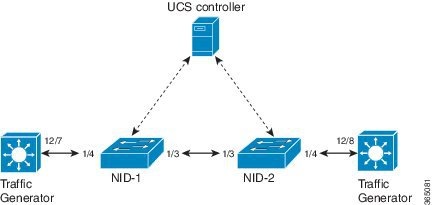
Figure 1. RSPAN Topology

How to Provision RSPAN

Enabling SPAN Globally to Start a Monitoring Session

     Command or ActionPurpose
    Step 1ConfigureNID


    Example:
    UCS# Configure NID 1
     

    Opens a new session for NID 1.

     
    Step 2span


    Example:
    UCS# span
     
    Enters the SPAN mode.  
    Step 3setSpanGlobalConfReq {enable | disbale}


    Example:
    UCS(SPAN)# setSpanGlobalConf setSpanGlobalConfReq enable
     

    Enters SPAN global configuration mode.

    Sub-command options.
    • enable—Enables SPAN globally.
    • disbale—Disables SPAN globally.
     
    Step 4setSpanGlobalConf review


    Example:
    UCS(SPAN)# setSpanGlobalConf review
     
    (Optional) Displays the configuration.  
    Step 5setSpanGlobalConf commit


    Example:
    UCS(SPAN)# setSpanGlobalConf commit
     
    Sends the configuration to NID.  
    Step 6exit


    Example:
    UCS(SPAN)# exit
     
    Exits the Opens a new session for NID 1. mode.  

    Configuration Example

    • The example shows how to enable SPAN globally:

      UCS# span
      UCS(SPAN)# setSpanGlobalConf setSpanGlobalConfReq enable
      UCS(SPAN)# setSpanGlobalConf review
      UCS(SPAN)# setSpanGlobalConf commit
      UCS(SPAN)# exit

    Configuring SPAN Source Interface on NID-1

    Before You Begin

    Perform the steps to enable SPAN globally. See Enabling SPAN Globally to Start a Monitoring Session.

       Command or ActionPurpose
      Step 1setSpanSrcConfRequest {source {cpu {rx | tx | both} | {vlan vlan_list} | interface {intf_range | traffic-type {rx | tx | both}


      Example:
      UCS(SPAN)# setSpanSrcConf commitsetSpanSrcConf setSpanSrcConfRequest source interface intf_range 1/4
       
      Configures SPAN source interface.
      • source—Mirrors source interface or VLAN.
      • cpu—Mirrors source CPU.
      • rx—Mirrors received traffic.
      • tx—Mirrors transmitted traffic.
      • both—Mirrors received and transmitted traffic.
      • vlan—Mirrors source VLAN.
      • vlan_list—Mirrors source VLAN.
      • interface— Mirrors source interface and traffic type.
      • intf_range—Mirrors an interface number or a range from 1 to 6.
      • traffic-type—Mirrors traffic type.
      • rx—Mirrors received traffic.
      • tx—Mirrors transmitted traffic.
      • both—Mirrors received and transmitted traffic.
       
      Step 2setSpanSrcConf review


      Example:
      UCS(SPAN)# setSpanSrcConf review
       
      (Optional) Displays the configuration.  
      Step 3setSpanGlobalConf commit


      Example:
      UCS(SPAN)# setSpanSrcConf commit
       
      Sends the configuration to NID.  
      Step 4exit


      Example:
      UCS(SPAN)# exit
       
      Exits the SPAN mode.  

      Configuration Example

      • The example shows how to configure SPAN source on NID-1:

        UCS(SPAN)# setSpanSrcConf commitsetSpanSrcConf setSpanSrcConfRequest source interface intf_range 1/4
        UCS(SPAN)# setSpanSrcConf review
        UCS(SPAN)# setSpanSrcConf commit
        UCS(SPAN)# exit

      Configuring Destination VLAN on NID-1

      Before You Begin

      Perform the steps to configure SPAN source on NID-1. See Configuring SPAN Source Interface on NID-1.

         Command or ActionPurpose
        Step 1 setrSpandestConf setRSpanDestConfRequest remote vlan_id


        Example:
        UCS(SPAN)# setrSpandestConf setRSpanDestConfRequest remote vlan_id 500
         
        Configures destination VLAN.
        • remote—Mirrors remote destination.
        • vlan_id— Remote mirror destination VLAN number.
         
        Step 2setrSpandestConf review


        Example:
        UCS(SPAN)# setrSpandestConf review
         
        (Optional) Displays the configuration.  
        Step 3setrSpandestConf commit


        Example:
        UCS(SPAN)# setrSpandestConf commit
         
        Sends the configuration to NID.  
        Step 4exit


        Example:
        UCS(SPAN)# exit
         
        Exits the SPAN mode.  

        Configuration Example

        • The example shows how to configure destination VLAN on NID-1:

          UCS(SPAN)# setrSpandestConf setRSpanDestConfRequest remote vlan_id 500
          UCS(SPAN)# setrSpandestConf review
          UCS(SPAN)# setrSpandestConf commit
          UCS(SPAN)# exit

        Configuring Source VLAN on NID-2

           Command or ActionPurpose
          Step 1ConfigureNID


          Example:
          UCS# Configure NID 2
           

          Opens a new session for NID 2.

           
          Step 2span


          Example:
          UCS# span
           
          Enters the SPAN mode.  
          Step 3setrSpansrcConf setRSpanSrcConfRequest remote vlan_id


          Example:
          UCS(SPAN)# setrSpansrcConf setRSpanSrcConfRequest remote vlan_id 500
           
          Configures RSPAN source.
          • remote—Mirrors remote source.
          • vlan_id— Remote mirror source VLAN number.
           
          Step 4setrSpansrcConf review


          Example:
          UCS(SPAN)# setrSpansrcConf review
           
          (Optional) Displays the configuration.  
          Step 5setrSpansrcConf commit


          Example:
          UCS(SPAN)# setrSpansrcConf commit
           
          Sends the configuration to NID.  
          Step 6exit


          Example:
          UCS(SPAN)# exit
           
          Exits the SPAN mode.  

          Configuration Example

          • The example shows how to configure source VLAN on NID-2:

            UCS# span
            UCS(SPAN)# setSpanGlobalConf setSpanGlobalConfReq enable
            UCS(SPAN)# setSpanGlobalConf review
            UCS(SPAN)# setSpanGlobalConf commit
            UCS(SPAN)# exit
            UCS(SPAN)# setrSpansrcConf setRSpanSrcConfRequest remote vlan_id 500
            UCS(SPAN)# setrSpansrcConf review
            UCS(SPAN)# setrSpansrcConf commit
            UCS(SPAN)# exit

          Configuring Destination Interface on NID-2

          Before You Begin

          Perform the steps to configure source VLAN on NID-2. See Configuring Source VLAN on NID-2.

             Command or ActionPurpose
            Step 1setSpanDestConf setSpanDestConfRequest destination intf_id


            Example:
            UCS(SPAN)# setSpanDestConf setSpanDestConfRequest destination intf_id 5
             
            Configures destination interface.
            • destination—Mirrors destination interface.
            • intf_id— Single port ID from 1 to 6.
             
            Step 2setSpanDestConf review


            Example:
            UCS(SPAN)# setSpanDestConf review
             
            (Optional) Displays the configuration.  
            Step 3setSpanDestConf commit


            Example:
            UCS(SPAN)# setSpanDestConf commit
             
            Sends the configuration to NID.  
            Step 4exit


            Example:
            UCS(SPAN)# exit
             
            Exits the SPAN mode.  

            Configuration Example

            • The example shows how to configure destination VLAN on NID-1:

              UCS(SPAN)# setSpanDestConf setSpanDestConfRequest destination intf_id 5
              UCS(SPAN)# setSpanDestConf review
              UCS(SPAN)# setSpanDestConf commit
              UCS(SPAN)# exit

            Deleting RSPAN Source Configuration on NID-2

               Command or ActionPurpose
              Step 1 delRSpanSrcConfRequest remote vlan_id


              Example:
              UCS(SPAN)# delRSpanSrcConf delRSpanSrcConfRequest remote vlan_id 500
               
              Deletes RSPAN source configuration.
              • remote—Removes remote mirror source.
              • vlan_id— Removes remote mirror source VLAN number.
               
              Step 2delRSpanSrcConf review


              Example:
              UCS(SPAN)# delRSpanSrcConf review
               
              (Optional) Displays the configuration.  
              Step 3delRSpanSrcConf commit


              Example:
              UCS(SPAN)# delRSpanSrcConf commit
               
              Sends the configuration to NID.  
              Step 4exit


              Example:
              UCS(SPAN)# exit
               
              Exits the SPAN mode.  

              Configuration Example

              • The example shows how to delete RSPAN source configuration on NID-2:

                UCS(SPAN)# delRSpanSrcConf delRSpanSrcConfRequest remote vlan_id 500
                UCS(SPAN)# delRSpanSrcConf review
                UCS(SPAN)# delRSpanSrcConf commit
                UCS(SPAN)# exit

              Deleting RSPAN Destination Configuration on NID-1

                 Command or ActionPurpose
                Step 1delRSpanDstConfRequest remote vlan_id


                Example:
                UCS(SPAN)# delRSpanDstConf delRSpanDstConfRequest remote vlan_id 500
                 
                Deletes RSPAN destination configuration.
                • remote—Removes remote mirror destination.
                • vlan_id—Removes remote mirror destination VLAN number.
                 
                Step 2 delSpanDstConf review


                Example:
                UCS(SPAN)# delRSpanDstConf review
                 
                (Optional) Displays the configuration.  
                Step 3delSpanDstConf commit


                Example:
                UCS(SPAN)# delRSpanDstConf commit
                 
                Sends the configuration to NID.  
                Step 4exit


                Example:
                UCS(SPAN)# exit
                 
                Exits the SPAN mode.  

                Configuration Example

                • The example shows how to delete RSPAN destination configuration on NID-1:

                  UCS(SPAN)# delRSpanDstConf delRSpanDstConfRequest remote vlan_id 500
                  UCS(SPAN)# delRSpanDstConf review
                  UCS(SPAN)# delRSpanDstConf commit
                  UCS(SPAN)# exit

                Verifying RSPAN

                Use the following commands to verify the RSPAN status on the UCS controller.

                • showSpanConfig showSpanConfigReq

                  This command displays the SPAN configuration status on the NID, when source interface is 1/4 and traffic type is both. The following is a sample output from the command:

                  UCS(SPAN)# showSpanConfig showSpanConfigReq
                  UCS(SPAN)# showSpanConfig review
                  Commands in queue:
                  	   showSpanConfig showSpanConfigReq
                  UCS(SPAN)# showSpanConfig commit
                  ShowSpanConfig_Output.showSpanConfigResp.span_config[0] = 'Session: 1, Mode: Disabled'
                  ShowSpanConfig_Output.showSpanConfigResp.span_config[1] = 'Type: Remote Source Session'
                  ShowSpanConfig_Output.showSpanConfigResp.span_config[2] = 'Dest RMIRROR VLAN: 500'
                  ShowSpanConfig_Output.showSpanConfigResp.span_config[3] = 'Source VLAN(s): '
                  ShowSpanConfig_Output.showSpanConfigResp.span_config[4] = 'Source port(s): 1/5'
                  ShowSpanConfig_Output.showSpanConfigResp.span_config[5] = 'Traffic Type: '
                  ShowSpanConfig_Output.showSpanConfigResp.span_config[6] = 'rx : 1/5'
                  ShowSpanConfig_Output.showSpanConfigResp.span_config[7] = 'Destination Ports: 1/4'
                  ShowSpanConfig Commit Success!!!
                  

                Additional References

                Related Documents

                Related Topic Document Title

                Cisco ME 3800x and ME 3600x Switches Software Configuration Guide, Cisco IOS Release 15.4(1)S

                http:/​/​www.cisco.com/​c/​en/​us/​td/​docs/​switches/​metro/​me3600x_3800x/​software/​release/​15-4_1_S/​configuration/​guide/​3800x3600xscg.html

                MIBs

                MIB MIBs Link

                MIBs Supporting Cisco IOS

                To locate and download MIBs for selected platforms, Cisco IOS releases, and feature sets, use Cisco MIB Locator found at the following URL:

                http:/​/​www.cisco.com/​go/​mibs

                Technical Assistance

                Description Link

                The Cisco Support website provides extensive online resources, including documentation and tools for troubleshooting and resolving technical issues with Cisco products and technologies.

                To receive security and technical information about your products, you can subscribe to various services, such as the Product Alert Tool (accessed from Field Notices), the Cisco Technical Services Newsletter, and Really Simple Syndication (RSS) Feeds.

                Access to most tools on the Cisco Support website requires a Cisco.com user ID and password.

                http:/​/​www.cisco.com/​support