- Preface
- Using the Command-Line Interface
- Using the Web Graphical User Interface
-
- Configuring the Switch for Access Point Discovery
- Configuring Data Encryption
- Configuring Retransmission Interval and Retry Count
- Configuring Adaptive Wireless Intrusion Prevention System
- Configuring Authentication for Access Points
- Converting Autonomous Access Points to Lightweight Mode
- Using Cisco Workgroup Bridges
- Configuring Probe Request Forwarding
- Optimizing RFID Tracking
- Configuring Country Codes
- Configuring Link Latency
- Configuring Power over Ethernet
-
- Preventing Unauthorized Access
- Controlling Switch Access with Passwords and Privilege Levels
- Configuring TACACS+
- Configuring RADIUS
- Configuring Kerberos
- Configuring Local Authentication and Authorization
- Configuring Secure Shell (SSH)
- Configuring Secure Socket Layer HTTP
- Configuring IPv4 ACLs
- Configuring IPv6 ACLs
- Configuring DHCP
- Configuring IP Source Guard
- Configuring Dynamic ARP Inspection
- Configuring IEEE 802.1x Port-Based Authentication
- Configuring Web-Based Authentication
- Configuring Port-Based Traffic Control
- Configuring IPv6 First Hop Security
- Configuring Cisco TrustSec
- Configuring Wireless Guest Access
- Managing Rogue Devices
- Classifying Rogue Access Points
- Configuring wIPS
- Configuring Intrusion Detection System
-
- Administering the System
- Performing Switch Setup Configuration
- Configuring Right-To-Use Licenses
- Configuring Administrator Usernames and Passwords
- Configuring 802.11 parameters and Band Selection
- Configuring Aggressive Load Balancing
- Configuring Client Roaming
- Configuring Application Visibility and Control
- Configuring Voice and Video Parameters
- Configuring RFID Tag Tracking
- Configuring Location Settings
- Monitoring Flow Control
- Configuring SDM Templates
- Configuring System Message Logs
- Configuring Online Diagnostics
- Managing Configuration Files
- Configuration Replace and Configuration Rollback
- Working with the Flash File System
- Working with Cisco IOS XE Software Bundles
- Troubleshooting the Software Configuration
- Index
- Finding Feature Information
- Prerequisites for Configuring PIM
- Restrictions for Configuring PIM
- Restrictions for Configuring Auto-RP
- Restrictions for Configuring Auto-RP and BSR
- Information About PIM
- PIM Stub Routing
- IGMP Helper
- Auto-RP
- PIM v2 BSR
- Multicast Forwarding and Reverse Path Check
- PIM Shared Tree and Source Tree
- Default PIM Routing Configuration
- Example: Enabling PIM Stub Routing
- Example: Verifying PIM Stub Routing
- Example: Manually Assigning an RP to Multicast Groups
- Example: Configuring Auto-RP
- Example: Defining the IP Multicast Boundary to Deny Auto-RP Information
- Example: Filtering Incoming RP Announcement Messages
- Example: Preventing Join Messages to False RPs
- Example: Configuring Candidate BSRs
- Example: Configuring Candidate RPs
Configuring PIM
- Finding Feature Information
- Prerequisites for Configuring PIM
- Restrictions for Configuring PIM
- Restrictions for Configuring Auto-RP
- Restrictions for Configuring Auto-RP and BSR
- Information About PIM
- How to Configure PIM
- Monitoring PIM
- Troubleshooting PIMv1 and PIMv2 Interoperability Problems
- Configuration Examples for PIM
- Where to Go Next for PIM
- Additional References
- Feature History and Information for PIM
Finding Feature Information
Your software release may not support all the features documented in this module. For the latest feature information and caveats, see the release notes for your platform and software release.
Use Cisco Feature Navigator to find information about platform support and Cisco software image support. To access Cisco Feature Navigator, go to http://www.cisco.com/go/cfn. An account on Cisco.com is not required.
Prerequisites for Configuring PIM
The following are the prerequisites for configuring PIM and PIM stub routing:
-
Before configuring PIM stub routing, you must have IP multicast routing configured on both the stub router and the central router. You must also have PIM mode (dense-mode, sparse-mode, or sparse-dense-mode) configured on the uplink interface of the stub router.
-
Before configuring PIM stub routing, you must also configure either Enhanced Interior Gateway Routing Protocol (EIGRP) stub routing or Open Shortest Path First (OSPF) stub routing on the switch. The PIM stub router does not route the transit traffic between the distribution routers. Unicast (EIGRP) stub routing enforces this behavior. You must configure unicast stub routing to assist the PIM stub router behavior.

Note
For information about EIGRP or OSPF configurations, see the Catalyst 3650 Routing Configuration Guide, Release 3SE.
Restrictions for Configuring PIM
The following are the restrictions for configuring PIM:
PIM stub routing
The IP Services image contains complete multicast routing.
In a network using PIM stub routing, the only allowable route for IP traffic to the user is through a switch that is configured with PIM stub routing.
The redundant PIM stub router topology is not supported. Only the nonredundant access router topology is supported by the PIM stub feature.
Only directly connected multicast (IGMP) receivers and sources are allowed in the Layer 2 access domains. The PIM protocol is not supported in access domains.
Restrictions for Configuring Auto-RP
The following are restrictions for configuring Auto-RP (if used in your network configuration):
Auto-RP is not supported when running the LAN Base feature set.
If you configure PIM in sparse mode or sparse-dense mode and do not configure Auto-RP, you must manually configure an RP.
If routed interfaces are configured in sparse mode, Auto-RP can still be used if all devices are configured with a manual RP address for the Auto-RP groups.
If routed interfaces are configured in sparse mode and you enter the ip pim autorp listener global configuration command, Auto-RP can still be used even if all devices are not configured with a manual RP address for the Auto-RP groups.
Restrictions for Configuring Auto-RP and BSR
The following are restrictions for configuring Auto-RP and BSR (if used in your network configuration):
If your network is all Cisco routers and multilayer switches, you can use either Auto-RP or BSR.
If you have non-Cisco routers in your network, you must use BSR.
If you have Cisco PIMv1 and PIMv2 routers and multilayer switches and non-Cisco routers, you must use both Auto-RP and BSR. If your network includes routers from other vendors, configure the Auto-RP mapping agent and the BSR on a Cisco PIMv2 device. Ensure that no PIMv1 device is located in the path a between the BSR and a non-Cisco PIMv2 device.
NoteThere are two approaches to using PIMv2. You can use Version 2 exclusively in your network or migrate to Version 2 by employing a mixed PIM version environment.
Because bootstrap messages are sent hop-by-hop, a PIMv1 device prevents these messages from reaching all routers and multilayer switches in your network. Therefore, if your network has a PIMv1 device in it and only Cisco routers and multilayer switches, it is best to use Auto-RP.
If you have a network that includes non-Cisco routers, configure the Auto-RP mapping agent and the BSR on a Cisco PIMv2 router or multilayer switch. Ensure that no PIMv1 device is on the path between the BSR and a non-Cisco PIMv2 router.
If you have non-Cisco PIMv2 routers that need to interoperate with Cisco PIMv1 routers and multilayer switches, both Auto-RP and a BSR are required. We recommend that a Cisco PIMv2 device be both the Auto-RP mapping agent and the BSR.
Information About PIM
Protocol-Independent Multicast (PIM) is called protocol-independent because regardless of the unicast routing protocols used to populate the unicast routing table, PIM uses this information to perform multicast forwarding instead of maintaining a separate multicast routing table.
PIM can leverage whichever unicast routing protocols are used to populate the unicast routing table, including EIGRP, OSPF, BGP, or static routes. PIM uses this unicast routing information to perform the multicast forwarding function, so it is IP protocol independent. Although PIM is called a multicast routing protocol, it actually uses the unicast routing table to perform the reverse path forwarding (RPF) check function instead of building up a completely independent multicast routing table. PIM does not send and receive multicast routing updates between routers as the other routing protocols do.
PIM is defined in RFC 4601, Protocol-Independent Multicast-Sparse Mode (PIM-SM): Protocol Specification. PIM is defined in these Internet Engineering Task Force (IETF) Internet drafts:
- PIM Versions
- PIM Modes
- PIM Stub Routing
- IGMP Helper
- Auto-RP
- PIM v2 BSR
- Multicast Forwarding and Reverse Path Check
- PIM Shared Tree and Source Tree
- Default PIM Routing Configuration
PIM Versions
PIMv2 includes these improvements over PIMv1:
A single, active rendezvous point (RP) exists per multicast group, with multiple backup RPs. This single RP compares to multiple active RPs for the same group in PIMv1.
A bootstrap router (BSR) provides a fault-tolerant, automated RP discovery and distribution function that enables routers and multilayer switches to dynamically learn the group-to-RP mappings.
Sparse mode and dense mode are properties of a group, as opposed to an interface.
NoteWe strongly recommend using sparse-dense mode as opposed to either sparse mode or dense mode only.
PIM join and prune messages have more flexible encoding for multiple address families.
A more flexible hello packet format replaces the query packet to encode current and future capability options.
Register messages sent to an RP specify whether they are sent by a border router or a designated router.
PIM packets are no longer inside IGMP packets; they are standalone packets.
PIMv1 and PIMv2 Interoperability
To avoid misconfiguring multicast routing on your switch, review the information in this section.
The Cisco PIMv2 implementation provides interoperability and transition between Version 1 and Version 2, although there might be some minor problems.
You can upgrade to PIMv2 incrementally. PIM Versions 1 and 2 can be configured on different routers and multilayer switches within one network. Internally, all routers and multilayer switches on a shared media network must run the same PIM version. Therefore, if a PIMv2 device detects a PIMv1 device, the Version 2 device downgrades itself to Version 1 until all Version 1 devices have been shut down or upgraded.
PIMv2 uses the BSR to discover and announce RP-set information for each group prefix to all the routers and multilayer switches in a PIM domain. PIMv1, together with the Auto-RP feature, can perform the same tasks as the PIMv2 BSR. However, Auto-RP is a standalone protocol, separate from PIMv1, and is a proprietary Cisco protocol. PIMv2 is a standards track protocol in the IETF.
Note | We recommend that you use PIMv2. The BSR function interoperates with Auto-RP on Cisco routers and multilayer switches. |
When PIMv2 devices interoperate with PIMv1 devices, Auto-RP should have already been deployed. A PIMv2 BSR that is also an Auto-RP mapping agent automatically advertises the RP elected by Auto-RP. That is, Auto-RP sets its single RP on every router or multilayer switch in the group. Not all routers and switches in the domain use the PIMv2 hash function to select multiple RPs.
Dense-mode groups in a mixed PIMv1 and PIMv2 region need no special configuration; they automatically interoperate.
Sparse-mode groups in a mixed PIMv1 and PIMv2 region are possible because the Auto-RP feature in PIMv1 interoperates with the PIMv2 RP feature. Although all PIMv2 devices can also use PIMv1, we recommend that the RPs be upgraded to PIMv2. To ease the transition to PIMv2, we recommend:
If Auto-RP is not already configured in the PIMv1 regions, configure Auto-RP.
PIM Modes
PIM can operate in dense mode (DM), sparse mode (SM), or in sparse-dense mode (PIM DM-SM), which handles both sparse groups and dense groups at the same time.
PIM DM
PIM DM builds source-based multicast distribution trees. In dense mode, a PIM DM router or multilayer switch assumes that all other routers or multilayer switches forward multicast packets for a group. If a PIM DM device receives a multicast packet and has no directly connected members or PIM neighbors present, a prune message is sent back to the source to stop unwanted multicast traffic. Subsequent multicast packets are not flooded to this router or switch on this pruned branch because branches without receivers are pruned from the distribution tree, leaving only branches that contain receivers.
When a new receiver on a previously pruned branch of the tree joins a multicast group, the PIM DM device detects the new receiver and immediately sends a graft message up the distribution tree toward the source. When the upstream PIM DM device receives the graft message, it immediately puts the interface on which the graft was received into the forwarding state so that the multicast traffic begins flowing to the receiver.
PIM-SM
PIM-SM uses shared trees and shortest-path-trees (SPTs) to distribute multicast traffic to multicast receivers in the network. In PIM-SM, a router or multilayer switch assumes that other routers or switches do not forward multicast packets for a group, unless there is an explicit request for the traffic (join message). When a host joins a multicast group using IGMP, its directly connected PIM-SM device sends PIM join messages toward the root, also known as the rendezvous point (RP). This join message travels router-by-router toward the root, constructing a branch of the shared tree as it goes.
The RP keeps track of multicast receivers. It also registers sources through register messages received from the source’s first-hop router (designated router [DR]) to complete the shared tree path from the source to the receiver. When using a shared tree, sources must send their traffic to the RP so that the traffic reaches all receivers.
Prune messages are sent up the distribution tree to prune multicast group traffic. This action permits branches of the shared tree or SPT that were created with explicit join messages to be torn down when they are no longer needed.
When the number of PIM-enabled interfaces exceeds the hardware capacity and PIM-SM is enabled with the SPT threshold is set to infinity, the switch does not create (source, group (S, G) ) entries in the multicast routing table for the some directly connected interfaces if they are not already in the table. The switch might not correctly forward traffic from these interfaces.
Multicast Source Discovery Protocol (MSDP)
Multicast Source Discovery Protocol (MSDP) is used for inter-domain source discovery when PIM SM is used. Each PIM administrative domain has its own RP. In order for the RP in one domain to signal new sources to the RP in the other domain, MSDP is used.
When RP in a domain receives a PIM register message for a new source, with MSDP configured it sends a new source-active (SA) message to all its MSDP peers in other domains. Each intermediate MSDP peer floods this SA message away from the originating RP. The MSDP peers install this SA message in their MSDP sa-cache. If the RPs in other domains have any join requests for the group in the SA message (indicated by the presence of a (*,G) entry with non empty outgoing interface list), the domain is interested in the group, and the RP triggers an (S,G) join toward the source.
PIM Stub Routing
The PIM stub routing feature, available in all of the switch software images, reduces resource usage by moving routed traffic closer to the end user.
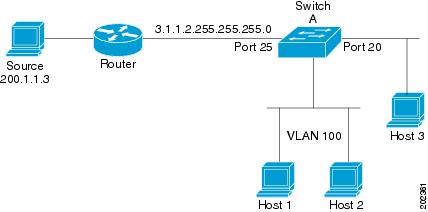
The PIM stub routing feature supports multicast routing between the distribution layer and the access layer. It supports two types of PIM interfaces: uplink PIM interfaces and PIM passive interfaces. A routed interface configured with the PIM passive mode does not pass or forward PIM control traffic, it only passes and forwards IGMP traffic.
In a network using PIM stub routing, the only allowable route for IP traffic to the user is through a switch that is configured with PIM stub routing. PIM passive interfaces are connected to Layer 2 access domains, such as VLANs, or to interfaces that are connected to other Layer 2 devices. Only directly connected multicast (IGMP) receivers and sources are allowed in the Layer 2 access domains. The PIM passive interfaces do not send or process any received PIM control packets.
When using PIM stub routing, you should configure the distribution and remote routers to use IP multicast routing and configure only the switch as a PIM stub router. The switch does not route transit traffic between distribution routers. You also need to configure a routed uplink port on the switch. The switch uplink port cannot be used with SVIs. If you need PIM for an SVI uplink port, you should upgrade to the IP Services feature set.
You must also configure EIGRP stub routing when configuring PIM stub routing on the switch. For information about this procedure, refer to the Catalyst 3850 IP Routing Configuration Guide.
The redundant PIM stub router topology is not supported. The redundant topology exists when there is more than one PIM router forwarding multicast traffic to a single access domain. PIM messages are blocked, and the PIM asset and designated router election mechanisms are not supported on the PIM passive interfaces. Only the nonredundant access router topology is supported by the PIM stub feature. By using a nonredundant topology, the PIM passive interface assumes that it is the only interface and designated router on that access domain.
IGMP Helper
PIM stub routing moves routed traffic closer to the end user and reduces network traffic. You can also reduce traffic by configuring a stub router (switch) with the IGMP helper feature.
You can configure a stub router (switch) with the ip igmp helper help-address interface configuration command to enable the switch to send reports to the next-hop interface. Hosts that are not directly connected to a downstream router can then join a multicast group sourced from an upstream network. The IGMP packets from a host wanting to join a multicast stream are forwarded upstream to the next-hop device when this feature is configured. When the upstream central router receives the helper IGMP reports or leaves, it adds or removes the interfaces from its outgoing interface list for that group.
For complete syntax and usage information for the ip igmp helper-address command, see the IP Multicast Command Reference, Cisco IOS XE Release 3SE (Catalyst 3850 Switches).
Auto-RP
The PIM-SM protocols require the presence of a rendezvous point (RP) in the network. An RP acts as the meeting place for sources and receivers of multicast data. If a static RP configuration is used, then the configuration needs to be applied on all the routers in the multicast network. To automate this process, the Auto-RP protocol was devised.
This Cisco proprietary feature eliminates the need to manually configure the RP information in every router and multilayer switch in the network. For Auto-RP to work, you configure a Cisco router or multilayer switch as the mapping agent. It uses IP multicast to learn which routers or switches in the network are possible candidate RPs to receive candidate RP announcements. Candidate RPs periodically send multicast RP-announce messages to a particular group or group range to announce their availability.
Mapping agents listen to these candidate RP announcements and use the information to create entries in their group-to-RP mapping caches. Only one mapping cache entry is created for any group-to-RP range received, even if multiple candidate RPs are sending RP announcements for the same range. As the RP-announce messages arrive, the mapping agent selects the router or switch with the highest IP address as the active RP and stores this RP address in the group-to-RP mapping cache.
Mapping agents periodically multicast the contents of their group-to-RP mapping caches. Thus, all routers and switches automatically discover which RP to use for the groups that they support. If a router or switch fails to receive RP-discovery messages and the group-to-RP mapping information expires, it changes to a statically configured RP that was defined with the ip pim rp-address global configuration command. If no statically configured RP exists, the router or switch changes the group to dense-mode operation.
Multiple RPs serve different group ranges or serve as hot backups of each other.
Auto-RP Benefits
Auto-RP uses IP multicast to automate the distribution of group-to-RP mappings to all Cisco routers and multilayer switches in a PIM network. Auto-RP has these benefits:
Easy to use multiple RPs within a network to serve different group ranges.
Provides load splitting among different RPs and arrangement of RPs according to the location of group participants.
Avoids inconsistent, manual RP configurations on every router and multilayer switch in a PIM network, which can cause connectivity problems.
PIM v2 BSR
PIMv2 BSR (Bootstrap Router) is another method to distribute group-to-RP mapping information to all PIM routers and multilayer switches in the network. It eliminates the need to manually configure RP information in every router and switch in the network. However, instead of using IP multicast to distribute group-to-RP mapping information, BSR uses hop-by-hop flooding of special BSR messages to distribute the mapping information.
The BSR is elected from a set of candidate routers and switches in the domain that have been configured to function as BSRs. The election mechanism is similar to the root-bridge election mechanism used in bridged LANs. The BSR election is based on the BSR priority of the device contained in the BSR messages that are sent hop-by-hop through the network. Each BSR device examines the message and forwards out all interfaces only the message that has either a higher BSR priority than its BSR priority or the same BSR priority, but with a higher BSR IP address. Using this method, the BSR is elected.
The elected BSR sends BSR messages with a TTL of 1. Neighboring PIMv2 routers or multilayer switches receive the BSR message and multicast it out all other interfaces (except the one on which it was received) with a TTL of 1. In this way, BSR messages travel hop-by-hop throughout the PIM domain. Because BSR messages contain the IP address of the current BSR, the flooding mechanism enables candidate RPs to automatically learn which device is the elected BSR.
Candidate RPs send candidate RP advertisements showing the group range for which they are responsible to the BSR, which stores this information in its local candidate-RP cache. The BSR periodically advertises the contents of this cache in BSR messages to all other PIM devices in the domain. These messages travel hop-by-hop through the network to all routers and switches, which store the RP information in the BSR message in their local RP cache. The routers and switches select the same RP for a given group because they all use a common RP hashing algorithm.
Multicast Forwarding and Reverse Path Check
With unicast routing, routers and multilayer switches forward traffic through the network along a single path from the source to the destination host whose IP address appears in the destination address field of the IP packet. Each router and switch along the way makes a unicast forwarding decision, using the destination IP address in the packet, by looking up the destination address in the unicast routing table and forwarding the packet through the specified interface to the next hop toward the destination.
With multicasting, the source is sending traffic to an arbitrary group of hosts represented by a multicast group address in the destination address field of the IP packet. To decide whether to forward or drop an incoming multicast packet, the router or multilayer switch uses a reverse path forwarding (RPF) check on the packet as follows:
-
The router or multilayer switch examines the source address of the arriving multicast packet to decide whether the packet arrived on an interface that is on the reverse path back to the source.
-
If the packet arrives on the interface leading back to the source, the RPF check is successful and the packet is forwarded to all interfaces in the outgoing interface list (which might not be all interfaces on the router).
Some multicast routing protocols, such as DVMRP, maintain a separate multicast routing table and use it for the RPF check. However, PIM uses the unicast routing table to perform the RPF check.
Note | DVMRP is not supported on the switch. |
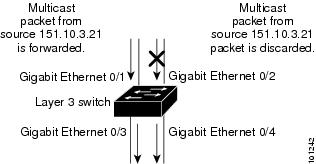
PIM uses both source trees and RP-rooted shared trees to forward datagrams. The RPF check is performed differently for each:
-
If a PIM router or multilayer switch has a source-tree state (that is, an (S, G) entry is present in the multicast routing table), it performs the RPF check against the IP address of the source of the multicast packet.
-
If a PIM router or multilayer switch has a shared-tree state (and no explicit source-tree state), it performs the RPF check on the RP address (which is known when members join the group).
Sparse-mode PIM uses the RPF lookup function to decide where it needs to send joins and prunes:
-
(S, G) joins (which are source-tree states) are sent toward the source.
-
(*,G) joins (which are shared-tree states) are sent toward the RP.
Note | DVMRP is not supported on the switch. |
PIM Shared Tree and Source Tree
By default, members of a group receive data from senders to the group across a single data-distribution tree rooted at the RP.
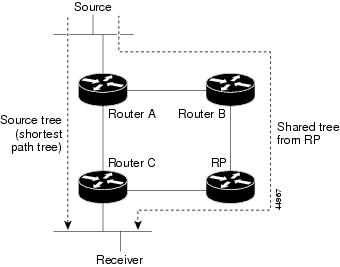
If the data rate warrants, leaf routers (routers without any downstream connections) on the shared tree can use the data distribution tree rooted at the source. This type of distribution tree is called a shortest-path tree or source tree. By default, the software switches to a source tree upon receiving the first data packet from a source.
This process describes the move from a shared tree to a source tree:
A receiver joins a group; leaf Router C sends a join message toward the RP.
The RP puts a link to Router C in its outgoing interface list.
A source sends data; Router A encapsulates the data in a register message and sends it to the RP.
The RP forwards the data down the shared tree to Router C and sends a join message toward the source. At this point, data might arrive twice at Router C, once encapsulated and once natively.
When data arrives natively (unencapsulated) at the RP, it sends a register-stop message to Router A.
By default, reception of the first data packet prompts Router C to send a join message toward the source.
When Router C receives data on (S, G), it sends a prune message for the source up the shared tree.
The RP deletes the link to Router C from the outgoing interface of (S, G). The RP triggers a prune message toward the source.
Join and prune messages are sent for sources and RPs. They are sent hop-by-hop and are processed by each PIM device along the path to the source or RP. Register and register-stop messages are not sent hop-by-hop. They are sent by the designated router that is directly connected to a source and are received by the RP for the group.
Multiple sources sending to groups use the shared tree.
You can configure the PIM device to stay on the shared tree. You can configure the PIM device to stay on the shared tree. For more information, see Delaying the Use of PIM Shortest-Path Tree (CLI).
Default PIM Routing Configuration
How to Configure PIM
- Enabling PIM Stub Routing (CLI)
- Configuring a Rendezvous Point
- Configuring PIMv2 BSR
- Configuring Auto-RP and BSR for the Network (CLI)
- Delaying the Use of PIM Shortest-Path Tree (CLI)
- Modifying the PIM Router-Query Message Interval (CLI)
Enabling PIM Stub Routing (CLI)
1.
enable
DETAILED STEPS
| Command or Action | Purpose | |
|---|---|---|
| Step 1 |
enable
Example:
Switch> enable
|
Enables privileged EXEC mode. |
| Step 2 | configure terminal Example: Switch# configure terminal | |
| Step 3 | interface
interface-id
Example: Switch(config)# interface gigabitethernet 1/0/1 |
Specifies the interface on which you want to enable PIM stub routing, and enters interface configuration mode. The specified interface must be one of the following:
|
| Step 4 | ip pim
passive
Example: Switch(config-if)# ip pim passive | |
| Step 5 | end
Example: Switch(config-if)# end | |
| Step 6 | show ip pim
interface
Example: Switch# show ip pim interface |
(Optional) Displays the PIM stub that is enabled on each interface. |
| Step 7 | show ip igmp
groups detail
Example: Switch# show ip igmp groups detail |
(Optional) Displays the interested clients that have joined the specific multicast source group. |
| Step 8 | show ip
mroute
Example: Switch# show ip mroute | |
| Step 9 | show
running-config
Example: Switch# show running-config | |
| Step 10 | copy
running-config startup-config
Example: Switch# copy running-config startup-config |
Configuring a Rendezvous Point
You must have a rendezvous point (RP), if the interface is in sparse-dense mode and if you want to handle the group as a sparse group. You can use several methods, as described in these sections:
Manual assignment
For information about this procedure, see Manually Assigning an RP to Multicast Groups (CLI).
As a standalone, Cisco-proprietary protocol separate from PIMv1
For information about these procedures, see the following sections:
Using a standards track protocol in the Internet Engineering Task Force (IETF)
For information about this procedure, see Configuring PIMv2 BSR.
Note | You can use Auto-RP, BSR, or a combination of both, depending on the PIM version that you are running and the types of routers in your network. For information about working with different PIM versions in your network, see PIMv1 and PIMv2 Interoperability. |
- Manually Assigning an RP to Multicast Groups (CLI)
- Setting Up Auto-RP in a New Internetwork (CLI)
- Adding Auto-RP to an Existing Sparse-Mode Cloud (CLI)
- Preventing Join Messages to False RPs (CLI)
- Filtering Incoming RP Announcement Messages (CLI)
Manually Assigning an RP to Multicast Groups (CLI)
If the rendezvous point (RP) for a group is learned through a dynamic mechanism (such as Auto-RP or BSR), you need not perform this task for that RP.
Senders of multicast traffic announce their existence through register messages received from the source first-hop router (designated router) and forwarded to the RP. Receivers of multicast packets use RPs to join a multicast group by using explicit join messages.
Note | RPs are not members of the multicast group; they serve as a meeting place for multicast sources and group members. |
You can configure a single RP for multiple groups defined by an access list. If there is no RP configured for a group, the multilayer switch responds to the group as dense and uses the dense-mode PIM techniques.
1.
enable
3.
ip pim rp-address
ip-address [access-list-number] [override]
4.
access-list
access-list-number
{deny |
permit}
source [source-wildcard]
DETAILED STEPS
Setting Up Auto-RP in a New Internetwork (CLI)
If you are setting up Auto-RP in a new internetwork, you do not need a default RP because you configure all the interfaces for sparse-dense mode.
Note | Omit Step 3 in the following procedure, if you want to configure a PIM router as the RP for the local group. |
1.
enable
4.
ip pim
send-rp-announce
interface-id
scope
ttl
group-list
access-list-number
interval
seconds
5.
access-list
access-list-number
{deny |
permit}
source [source-wildcard]
DETAILED STEPS
| Command or Action | Purpose | |||
|---|---|---|---|---|
| Step 1 |
enable
Example:
Switch> enable
|
Enables privileged EXEC mode. | ||
| Step 2 | show
running-config
Example: Switch# show running-config |
Verifies that a default RP is already configured on all PIM devices and the RP in the sparse-mode network. It was previously configured with the ip pim rp-address global configuration command.
The selected RP should have good connectivity and be available across the network. Use this RP for the global groups (for example, 224.x.x.x and other global groups). Do not reconfigure the group address range that this RP serves. RPs dynamically discovered through Auto-RP take precedence over statically configured RPs. Assume that it is desirable to use a second RP for the local groups. | ||
| Step 3 | configure terminal Example: Switch# configure terminal | |||
| Step 4 | ip pim
send-rp-announce
interface-id
scope
ttl
group-list
access-list-number
interval
seconds
Example:
Switch(config)# ip pim send-rp-announce gigabitethernet
1/0/5 scope 20 group-list 10 interval 120
|
Configures another PIM device to be the candidate RP for local groups.
| ||
| Step 5 | access-list
access-list-number
{deny |
permit}
source [source-wildcard]
Example:
Switch(config)# access-list 10 permit 10.10.0.0
|
Creates a standard access list, repeating the command as many times as necessary.
| ||
| Step 6 | ip pim
send-rp-discovery scope
ttl
Example:
Switch(config)# ip pim send-rp-discovery scope 50
|
Finds a switch whose connectivity is not likely to be interrupted, and assign it the role of RP-mapping agent. For scope ttl, specify the time-to-live value in hops to limit the RP discovery packets. All devices within the hop count from the source device receive the Auto-RP discovery messages. These messages tell other devices which group-to-RP mapping to use to avoid conflicts (such as overlapping group-to-RP ranges). There is no default setting. The range is 1 to 255. | ||
| Step 7 | end Example: Switch(config)# end | |||
| Step 8 | show
running-config
Example:
Switch# show running-config
|
Verifies your entries. | ||
| Step 9 | show ip pim rp
mapping
Example: Switch# show ip pim rp mapping
|
Displays active RPs that are cached with associated multicast routing entries. | ||
| Step 10 | show ip pim
rp
Example:
Switch# show ip pim rp
|
Displays the information cached in the routing table. | ||
| Step 11 | copy
running-config startup-config
Example:
Switch# copy running-config startup-config
|
(Optional) Saves your entries in the configuration file. |
Adding Auto-RP to an Existing Sparse-Mode Cloud (CLI)
This section contains suggestions for the initial deployment of Auto-RP into an existing sparse-mode cloud to minimize disruption of the existing multicast infrastructure.
1.
enable
4.
ip pim
send-rp-announce
interface-id
scope
ttl
group-list
access-list-number
interval
seconds
5.
access-list
access-list-number
{deny |
permit}
source [source-wildcard]
DETAILED STEPS
| Command or Action | Purpose | |||
|---|---|---|---|---|
| Step 1 |
enable
Example:
Switch> enable
|
Enables privileged EXEC mode. | ||
| Step 2 | show
running-config
Example: Switch# show running-config |
Verifies that a default RP is already configured on all PIM devices and the RP in the sparse-mode network. It was previously configured with the ip pim rp-address global configuration command.
The selected RP should have good connectivity and be available across the network. Use this RP for the global groups (for example, 224.x.x.x and other global groups). Do not reconfigure the group address range that this RP serves. RPs dynamically discovered through Auto-RP take precedence over statically configured RPs. Assume that it is desirable to use a second RP for the local groups. | ||
| Step 3 | configure terminal Example: Switch# configure terminal | |||
| Step 4 | ip pim
send-rp-announce
interface-id
scope
ttl
group-list
access-list-number
interval
seconds
Example:
Switch(config)# ip pim send-rp-announce gigabitethernet
1/0/5 scope 20 group-list 10 interval 120
|
Configures another PIM device to be the candidate RP for local groups.
| ||
| Step 5 | access-list
access-list-number
{deny |
permit}
source [source-wildcard]
Example:
Switch(config)# access-list 10
permit 224.0.0.0 15.255.255.255
|
Creates a standard access list, repeating the command as many times as necessary.
Recall that the access list is always terminated by an implicit deny statement for everything. | ||
| Step 6 | ip pim
send-rp-discovery scope
ttl
Example:
Switch(config)# ip pim send-rp-discovery scope 50
|
Finds a switch whose connectivity is not likely to be interrupted, and assigns it the role of RP-mapping agent. For scope ttl, specify the time-to-live value in hops to limit the RP discovery packets. All devices within the hop count from the source device receive the Auto-RP discovery messages. These messages tell other devices which group-to-RP mapping to use to avoid conflicts (such as overlapping group-to-RP ranges). There is no default setting. The range is 1 to 255.
| ||
| Step 7 | end Example: Switch(config)# end | |||
| Step 8 | show
running-config
Example:
Switch# show running-config
|
Verifies your entries. | ||
| Step 9 | show ip pim rp
mapping
Example: Switch#
show ip pim rp mapping
|
Displays active RPs that are cached with associated multicast routing entries. | ||
| Step 10 | show ip pim
rp
Example:
Switch# show ip pim rp
|
Displays the information cached in the routing table. | ||
| Step 11 | copy
running-config startup-config
Example:
Switch# copy running-config startup-config
|
(Optional) Saves your entries in the configuration file. |
Preventing Join Messages to False RPs (CLI)
Determine whether the ip pim accept-rp command was previously configured throughout the network by using the show running-config privileged EXEC command. If the ip pim accept-rp command is not configured on any device, this problem can be addressed later. In those routers or multilayer switches already configured with the ip pim accept-rp command, you must enter the command again to accept the newly advertised RP.
To accept all RPs advertised with Auto-RP and reject all other RPs by default, use the ip pim accept-rp auto-rp global configuration command.
This procedure is optional.
Filtering Incoming RP Announcement Messages (CLI)
You can add configuration commands to the mapping agents to prevent a maliciously configured router from masquerading as a candidate RP and causing problems.
1.
enable
3.
ip pim
rp-announce-filter rp-list
access-list-number
group-list
access-list-number
4.
access-list
access-list-number
{deny |
permit}
source [source-wildcard]
DETAILED STEPS
| Command or Action | Purpose | |
|---|---|---|
| Step 1 |
enable
Example:
Switch> enable
|
Enables privileged EXEC mode. |
| Step 2 | configure terminal Example: Switch# configure terminal | |
| Step 3 | ip pim
rp-announce-filter rp-list
access-list-number
group-list
access-list-number
Example:
Switch(config)# ip pim rp-announce-filter rp-list 10 group-list 14
|
Filters incoming RP announcement messages. Enter this command on each mapping agent in the network. Without this command, all incoming RP-announce messages are accepted by default. For rp-list access-list-number, configure an access list of candidate RP addresses that, if permitted, is accepted for the group ranges supplied in the group-list access-list-number variable. If this variable is omitted, the filter applies to all multicast groups. If more than one mapping agent is used, the filters must be consistent across all mapping agents to ensure that no conflicts occur in the group-to-RP mapping information. |
| Step 4 | access-list
access-list-number
{deny |
permit}
source [source-wildcard]
Example:
Switch(config)# access-list 10 permit 10.8.1.0 255.255.224.0
|
Creates a standard access list, repeating the command as many times as necessary.
The access list is always terminated by an implicit deny statement for everything. |
| Step 5 | end Example: Switch(config)# end | |
| Step 6 | show
running-config
Example:
Switch# show running-config
|
Verifies your entries. |
| Step 7 | copy
running-config startup-config
Example:
Switch# copy running-config startup-config
|
(Optional) Saves your entries in the configuration file. |
Configuring PIMv2 BSR
The process for configuring PIMv2 BSR may involve the following optional tasks:
- Defining the PIM Domain Border (CLI)
- Defining the IP Multicast Boundary (CLI)
- Configuring Candidate BSRs (CLI)
- Configuring the Candidate RPs (CLI)
Defining the PIM Domain Border (CLI)
As IP multicast becomes more widespread, the chance of one PIMv2 domain bordering another PIMv2 domain increases. Because two domains probably do not share the same set of RPs, BSR, candidate RPs, and candidate BSRs, you need to constrain PIMv2 BSR messages from flowing into or out of the domain. Allowing messages to leak across the domain borders could adversely affect the normal BSR election mechanism and elect a single BSR across all bordering domains and comingle candidate RP advertisements, resulting in the election of RPs in the wrong domain.
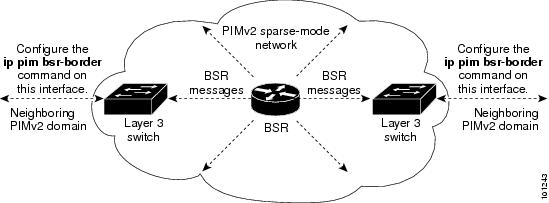
This procedure is optional.
1.
enable
DETAILED STEPS
| Command or Action | Purpose | |||
|---|---|---|---|---|
| Step 1 |
enable
Example:
Switch> enable
|
Enables privileged EXEC mode. | ||
| Step 2 | configure terminal Example: Switch# configure terminal | |||
| Step 3 | interface
interface-id
Example:
Switch(config)# interface
gigabitethernet 1/0/1
|
Specifies the interface to be configured, and enters interface configuration mode. The specified interface must be one of the following:
| ||
| Step 4 | ip pim
bsr-border
Example:
Switch(config-if)# ip pim bsr-border
|
Defines a PIM bootstrap message boundary for the PIM domain. Enter this command on each interface that connects to other bordering PIM domains. This command instructs the switch to neither send nor receive PIMv2 BSR messages on this interface.
| ||
| Step 5 | end Example: Switch(config)# end | |||
| Step 6 | show
running-config
Example:
Switch# show running-config
|
Verifies your entries. | ||
| Step 7 | copy
running-config startup-config
Example:
Switch# copy running-config
startup-config
|
(Optional) Saves your entries in the configuration file. |
Defining the IP Multicast Boundary (CLI)
You define a multicast boundary to prevent Auto-RP messages from entering the PIM domain. You create an access list to deny packets destined for 224.0.1.39 and 224.0.1.40, which carry Auto-RP information.
1.
enable
3.
access-list
access-list-number
deny
source [source-wildcard]
DETAILED STEPS
| Command or Action | Purpose | |
|---|---|---|
| Step 1 |
enable
Example:
Switch> enable
|
Enables privileged EXEC mode. |
| Step 2 | configure terminal Example: Switch# configure terminal | |
| Step 3 | access-list
access-list-number
deny
source [source-wildcard]
Example: Switch(config)#
access-list 12 deny 224.0.1.39
access-list 12 deny 224.0.1.40
|
Creates a standard access list, repeating the command as many times as necessary.
The access list is always terminated by an implicit deny statement for everything. |
| Step 4 | interface
interface-id
Example:
Switch(config)# interface gigabitethernet 1/0/1
|
Specifies the interface to be configured, and enters interface configuration mode. The specified interface must be one of the following:
|
| Step 5 | ip multicast
boundary
access-list-number
Example:
Switch(config-if)# ip multicast boundary 12
|
Configures the boundary, specifying the access list you created in Step 2. |
| Step 6 | end
Example:
Switch(config-if)# end
|
Returns to privileged EXEC mode. |
| Step 7 | show
running-config
Example:
Switch# show running-config
|
Verifies your entries. |
| Step 8 | copy
running-config startup-config
Example:
Switch# copy running-config
startup-config
|
(Optional) Saves your entries in the configuration file. |
Configuring Candidate BSRs (CLI)
You can configure one or more candidate BSRs. The devices serving as candidate BSRs should have good connectivity to other devices and be in the backbone portion of the network.
DETAILED STEPS
| Command or Action | Purpose | |
|---|---|---|
| Step 1 |
enable
Example:
Switch> enable
|
Enables privileged EXEC mode. |
| Step 2 | configure terminal Example: Switch# configure terminal | |
| Step 3 | ip pim bsr-candidate
interface-id
hash-mask-length [priority]
Example:
Switch(config)# ip pim bsr-candidate gigabitethernet 1/0/3 28 100
|
Configures your switch to be a candidate BSR.
|
| Step 4 | end
Example:
Switch(config-if)# end
|
Returns to privileged EXEC mode. |
| Step 5 | show
running-config
Example:
Switch# show running-config
|
Verifies your entries. |
| Step 6 | copy
running-config startup-config
Example:
Switch# copy running-config startup-config
|
(Optional) Saves your entries in the configuration file. |
Configuring the Candidate RPs (CLI)
You can configure one or more candidate RPs. Similar to BSRs, the RPs should also have good connectivity to other devices and be in the backbone portion of the network. An RP can serve the entire IP multicast address space or a portion of it. Candidate RPs send candidate RP advertisements to the BSR. When deciding which devices should be RPs, consider these options:
-
In a network of Cisco routers and multilayer switches where only Auto-RP is used, any device can be configured as an RP.
-
In a network that includes only Cisco PIMv2 routers and multilayer switches and with routers from other vendors, any device can be used as an RP.
-
In a network of Cisco PIMv1 routers, Cisco PIMv2 routers, and routers from other vendors, configure only Cisco PIMv2 routers and multilayer switches as RPs.
This procedure is optional.
1.
enable
3.
ip pim rp-candidate
interface-id [group-list
access-list-number]
4.
access-list
access-list-number
{deny |
permit}
source [source-wildcard]
DETAILED STEPS
| Command or Action | Purpose | |
|---|---|---|
| Step 1 |
enable
Example:
Switch> enable
|
Enables privileged EXEC mode. |
| Step 2 | configure terminal Example: Switch# configure terminal | |
| Step 3 | ip pim rp-candidate
interface-id [group-list
access-list-number]
Example:
Switch(config)# ip pim rp-candidate gigabitethernet 1/0/5 group-list 10
|
Configures your switch to be a candidate RP.
|
| Step 4 | access-list
access-list-number
{deny |
permit}
source [source-wildcard]
Example:
Switch(config)# access-list 10 permit 239.0.0.0 0.255.255.255
|
Creates a standard access list, repeating the command as many times as necessary.
The access list is always terminated by an implicit deny statement for everything. |
| Step 5 | end
Example:
Switch(config-if)# end
|
Returns to privileged EXEC mode. |
| Step 6 | show
running-config
Example:
Switch# show running-config
|
Verifies your entries |
| Step 7 | copy
running-config startup-config
Example:
Switch# copy running-config startup-config
|
(Optional) Saves your entries in the configuration file |
Configuring Auto-RP and BSR for the Network (CLI)
If there are only Cisco devices in your network (no routers from other vendors), there is no need to configure a BSR. Configure Auto-RP in a network that is running both PIMv1 and PIMv2.
If you have non-Cisco PIMv2 routers that need to interoperate with Cisco PIMv1 routers and multilayer switches, both Auto-RP and a BSR are required. We recommend that a Cisco PIMv2 router or multilayer switch be both the Auto-RP mapping agent and the BSR.
If you must have one or more BSRs, we have these recommendations:
-
Configure the candidate BSRs as the RP-mapping agents for Auto-RP. For information about these procedures, see:
-
For group prefixes advertised through Auto-RP, the PIMv2 BSR mechanism should not advertise a subrange of these group prefixes served by a different set of RPs. In a mixed PIMv1 and PIMv2 domain, backup RPs should serve the same group prefixes. This prevents the PIMv2 DRs from selecting a different RP from those PIMv1 DRs, due to the longest match lookup in the RP-mapping database.
Beginning in privileged EXEC mode, follow these steps to verify the consistency of group-to-RP mappings. This procedure is optional.
1.
show ip pim rp [
hostname or
IP
address |
mapping [
hostname or
IP
address |
elected |
in-use
] |
metric
[ hostname or
IP
address ] ]
DETAILED STEPS
| Command or Action | Purpose | |
|---|---|---|
| Step 1 | show ip pim rp [
hostname or
IP
address |
mapping [
hostname or
IP
address |
elected |
in-use
] |
metric
[ hostname or
IP
address ] ]
Example:
Switch#
show ip pim rp mapping
|
On any Cisco device, displays available RP mappings and metrics:
|
| Step 2 | show ip pim
rp-hash
group
Example: Switch# show ip pim rp-hash 239.1.1.1 |
On a PIMv2 router or multilayer switch, confirms that the same RP is the one that a PIMv1 system chooses. For group, enter the group address for which to display RP information. |
Delaying the Use of PIM Shortest-Path Tree (CLI)
The change from shared to source tree happens when the first data packet arrives at the last-hop router. This change occurs because the ip pim spt-threshold global configuration command controls that timing.
The shortest-path tree requires more memory than the shared tree but reduces delay. You might want to postpone its use. Instead of allowing the leaf router to immediately move to the shortest-path tree, you can specify that the traffic must first reach a threshold.
You can configure when a PIM leaf router should join the shortest-path tree for a specified group. If a source sends at a rate greater than or equal to the specified kbps rate, the multilayer switch triggers a PIM join message toward the source to construct a source tree (shortest-path tree). If the traffic rate from the source drops below the threshold value, the leaf router switches back to the shared tree and sends a prune message toward the source.
You can specify to which groups the shortest-path tree threshold applies by using a group list (a standard access list). If a value of 0 is specified or if the group list is not used, the threshold applies to all groups.
1.
enable
3.
access-list
access-list-number
{deny |
permit}
source [source-wildcard]
4.
ip pim spt-threshold {kbps |
infinity} [group-list
access-list-number]
DETAILED STEPS
| Command or Action | Purpose | |||
|---|---|---|---|---|
| Step 1 |
enable
Example:
Switch> enable
|
Enables privileged EXEC mode. | ||
| Step 2 | configure
terminal
Example: Switch# configure terminal | |||
| Step 3 | access-list
access-list-number
{deny |
permit}
source [source-wildcard]
Example: Switch(config)# access-list 16 permit 225.0.0.0 0.255.255.255 |
Creates a standard access list.
The access list is always terminated by an implicit deny statement for everything. | ||
| Step 4 | ip pim spt-threshold {kbps |
infinity} [group-list
access-list-number]
Example: Switch(config)# ip pim spt-threshold infinity group-list 16 |
Specifies the threshold that must be reached before moving to shortest-path tree (spt).
| ||
| Step 5 | end
Example: Switch(config)# end | |||
| Step 6 | show
running-config
Example: Switch# show running-config | |||
| Step 7 | copy
running-config startup-config
Example: Switch# copy running-config startup-config |
Modifying the PIM Router-Query Message Interval (CLI)
PIM routers and multilayer switches send PIM router-query messages to find which device will be the designated router (DR) for each LAN segment (subnet). The DR is responsible for sending IGMP host-query messages to all hosts on the directly connected LAN.
With PIM DM operation, the DR has meaning only if IGMPv1 is in use. IGMPv1 does not have an IGMP querier election process, so the elected DR functions as the IGMP querier. With PIM-SM operation, the DR is the device that is directly connected to the multicast source. It sends PIM register messages to notify the RP that multicast traffic from a source needs to be forwarded down the shared tree. In this case, the DR is the device with the highest IP address.
DETAILED STEPS
| Command or Action | Purpose | |
|---|---|---|
| Step 1 |
enable
Example:
Switch> enable
|
Enables privileged EXEC mode. |
| Step 2 | configure terminal Example: Switch# configure terminal | |
| Step 3 | interface
interface-id
Example: Switch(config)# interface gigabitethernet 1/0/1 |
Specifies the interface to be configured, and enters interface configuration mode. The specified interface must be one of the following:
|
| Step 4 | ip pim
query-interval
seconds
Example: Switch(config-if)# ip pim query-interval 45 |
Configures the frequency at which the switch sends PIM router-query messages. |
| Step 5 | end
Example: Switch(config-if)# end | |
| Step 6 | show ip igmp interface [interface-id]
Example: Switch# show ip igmp interface | |
| Step 7 | copy
running-config startup-config
Example: Switch# copy running-config startup-config |
Monitoring PIM
Command |
Purpose |
|---|---|
show ip pim all-vrfs tunnel [tunnel tunnel_number | verbose] |
Displays all VRFs. |
show ip pim autorp |
Displays global auto-RP information. |
show ip pim boundary |
Displays information about mroutes filtered by administratively scoped IPv4 multicast boundaries configured on an interface. |
show ip pim interface |
Displays information about interfaces configured for Protocol Independent Multicast (PIM). |
show ip pim neighbor |
Displays the PIM neighbor information. |
show ip pim tunnel [tunnel | verbose] |
Displays information about Protocol Independent Multicast (PIM) tunnel interfaces |
show ip pim vrf { word { all-vrfs | autorp | boundary | bsr-router | interface | mdt | neighbor | rp | rp-hash | tunnel } } |
Displays the VPN routing/forwarding instance. |
Monitoring RP Mapping
Command |
Purpose |
|---|---|
show ip pim bsr |
Displays information about the elected BSR. |
show ip pim bsr-router |
Displays information about the BSRv2. |
show ip pim rp [ hostname or IP address | mapping [ hostname or IP address | elected [hostname or IP address] | in-use [hostname or IP address] ] | metric [ hostname or IP address ] ] |
Displays how the switch learns of the RP (through the BSR or the Auto-RP mechanism). |
show ip pim rp-hash hostname or IP group address |
Displays the RP that was selected for the specified group. |
Troubleshooting PIMv1 and PIMv2 Interoperability Problems
When debugging interoperability problems between PIMv1 and PIMv2, check these in the order shown:
Verify RP mapping with the show ip pim rp-hash privileged EXEC command, making sure that all systems agree on the same RP for the same group.
Verify interoperability between different versions of DRs and RPs. Make sure that the RPs are interacting with the DRs properly (by responding with register-stops and forwarding decapsulated data packets from registers).
Configuration Examples for PIM
- Example: Enabling PIM Stub Routing
- Example: Verifying PIM Stub Routing
- Example: Manually Assigning an RP to Multicast Groups
- Example: Configuring Auto-RP
- Example: Defining the IP Multicast Boundary to Deny Auto-RP Information
- Example: Filtering Incoming RP Announcement Messages
- Example: Preventing Join Messages to False RPs
- Example: Configuring Candidate BSRs
- Example: Configuring Candidate RPs
Example: Enabling PIM Stub Routing
In this example, IP multicast routing is enabled, Switch A PIM uplink port 25 is configured as a routed uplink port with spare-dense-mode enabled. PIM stub routing is enabled on the VLAN 100 interfaces and on Gigabit Ethernet port 20.
Switch(config)# ip multicast-routing distributed
Switch(config)# interface GigabitEthernet3/0/25
Switch(config-if)# no switchport
Switch(config-if)# ip address 3.1.1.2 255.255.255.0
Switch(config-if)# ip pim sparse-dense-mode
Switch(config-if)# exit
Switch(config)# interface vlan100
Switch(config-if)# ip pim passive
Switch(config-if)# exit
Switch(config)# interface GigabitEthernet3/0/20
Switch(config-if)# ip pim passive
Switch(config-if)# exit
Switch(config)# interface vlan100
Switch(config-if)# ip address 100.1.1.1 255.255.255.0
Switch(config-if)# ip pim passive
Switch(config-if)# exit
Switch(config)# interface GigabitEthernet3/0/20
Switch(config-if)# no switchport
Switch(config-if)# ip address 10.1.1.1 255.255.255.0
Switch(config-if)# ip pim passive
Switch(config-if)# end
Example: Verifying PIM Stub Routing
To verify that PIM stub is enabled for each interface, use the show ip pim interface privileged EXEC command:
Switch# show ip pim interface
Address Interface Ver/ Nbr Query DR DR
Mode Count Intvl Prior
3.1.1.2 GigabitEthernet3/0/25 v2/SD 1 30 1 3.1.1.2
100.1.1.1 Vlan100 v2/P 0 30 1 100.1.1.1
10.1.1.1 GigabitEthernet3/0/20 v2/P 0 30 1 10.1.1.1
Example: Manually Assigning an RP to Multicast Groups
This example shows how to configure the address of the RP to 147.106.6.22 for multicast group 225.2.2.2 only:
Switch(config)# access-list 1 permit 225.2.2.2 0.0.0.0
Switch(config)# ip pim rp-address 147.106.6.22 1
Example: Configuring Auto-RP
This example shows how to send RP announcements out all PIM-enabled interfaces for a maximum of 31 hops. The IP address of port 1 is the RP. Access list 5 describes the group for which this switch serves as RP:
Switch(config)# ip pim send-rp-announce gigabitethernet1/0/1 scope 31 group-list 5
Switch(config)# access-list 5 permit 224.0.0.0 15.255.255.255
Example: Defining the IP Multicast Boundary to Deny Auto-RP Information
This example shows a portion of an IP multicast boundary configuration that denies Auto-RP information:
Switch(config)# access-list 1 deny 224.0.1.39
Switch(config)# access-list 1 deny 224.0.1.40
Switch(config)# access-list 1 permit all
Switch(config)# interface gigabitethernet1/0/1
Switch(config-if)# ip multicast boundary 1
Example: Filtering Incoming RP Announcement Messages
This example shows a sample configuration on an Auto-RP mapping agent that is used to prevent candidate RP announcements from being accepted from unauthorized candidate RPs:
Switch(config)# ip pim rp-announce-filter rp-list 10 group-list 20
Switch(config)# access-list 10 permit host 172.16.5.1
Switch(config)# access-list 10 permit host 172.16.2.1
Switch(config)# access-list 20 deny 239.0.0.0 0.0.255.255
Switch(config)# access-list 20 permit 224.0.0.0 15.255.255.255
The mapping agent accepts candidate RP announcements from only two devices, 172.16.5.1 and 172.16.2.1. The mapping agent accepts candidate RP announcements from these two devices only for multicast groups that fall in the group range of 224.0.0.0 to 239.255.255.255. The mapping agent does not accept candidate RP announcements from any other devices in the network. Furthermore, the mapping agent does not accept candidate RP announcements from 172.16.5.1 or 172.16.2.1 if the announcements are for any groups in the 239.0.0.0 through 239.255.255.255 range. This range is the administratively scoped address range.
Example: Preventing Join Messages to False RPs
If all interfaces are in sparse mode, use a default-configured RP to support the two well-known groups 224.0.1.39 and 224.0.1.40. Auto-RP uses these two well-known groups to collect and distribute RP-mapping information. When this is the case and the ip pim accept-rp auto-rp command is configured, another ip pim accept-rp command accepting the RP must be configured as follows:
Switch(config)# ip pim accept-rp 172.10.20.1 1
Switch(config)# access-list 1 permit 224.0.1.39
Switch(config)# access-list 1 permit 224.0.1.40
Example: Configuring Candidate BSRs
This example shows how to configure a candidate BSR, which uses the IP address 172.21.24.18 on a port as the advertised BSR address, uses 30 bits as the hash-mask-length, and has a priority of 10.
Switch(config)# interface gigabitethernet1/0/2
Switch(config-if)# ip address 172.21.24.18 255.255.255.0
Switch(config-if)# ip pim sparse-dense-mode
Switch(config-if)# ip pim bsr-candidate gigabitethernet1/0/2 30 10
Example: Configuring Candidate RPs
This example shows how to configure the switch to advertise itself as a candidate RP to the BSR in its PIM domain. Standard access list number 4 specifies the group prefix associated with the RP that has the address identified by a port. That RP is responsible for the groups with the prefix 239.
Switch(config)# ip pim rp-candidate gigabitethernet1/0/2 group-list 4
Switch(config)# access-list 4 permit 239.0.0.0 0.255.255.255
Where to Go Next for PIM
You can configure the following:
Additional References
Related Documents
| Related Topic | Document Title |
|---|---|
|
PIM is defined in RFC 4601 and in these Internet Engineering Task Force (IETF) Internet drafts. |
|
|
For complete syntax and usage information for the commands used in this chapter. |
IP Multicast Routing Command Reference (Catalyst 3650 Switches) |
|
IGMP Helper command syntax and usage information. |
IP Multicast Routing Command Reference (Catalyst 3650 Switches) |
|
Multicast Source Discovery Protocol (MSDP) |
IP Routing: Protocol-Independent Configuration Guide, Cisco IOS XE Release 3SE (Catalyst 3650 Switches) |
|
Enhanced Interior Gateway Routing Protocol (EIGRP) stub routing |
IP Routing: EIGRP Configuration Guide, Cisco IOS XE Release 3SE (Catalyst 3650 Switches) |
|
Open Shortest Path First (OSPF) stub routing |
IP Routing: OSPF Configuration Guide, Cisco IOS XE 3SE (Catalyst 3650 Switches) |
|
Platform-independent configuration information |
Error Message Decoder
| Description | Link |
|---|---|
|
To help you research and resolve system error messages in this release, use the Error Message Decoder tool. |
https://www.cisco.com/cgi-bin/Support/Errordecoder/index.cgi |
Standards and RFCs
| Standard/RFC | Title |
|---|---|
|
RFC 4601 |
Protocol-Independent Multicast-Sparse Mode (PIM-SM): Protocol Specification |
MIBs
| MIB | MIBs Link |
|---|---|
|
All supported MIBs for this release. |
To locate and download MIBs for selected platforms, Cisco IOS releases, and feature sets, use Cisco MIB Locator found at the following URL: |
Technical Assistance
| Description | Link |
|---|---|
|
The Cisco Support website provides extensive online resources, including documentation and tools for troubleshooting and resolving technical issues with Cisco products and technologies. To receive security and technical information about your products, you can subscribe to various services, such as the Product Alert Tool (accessed from Field Notices), the Cisco Technical Services Newsletter, and Really Simple Syndication (RSS) Feeds. Access to most tools on the Cisco Support website requires a Cisco.com user ID and password. |
Feature History and Information for PIM
Release |
Modification |
|---|---|
Cisco IOS XE 3.3SE |
This feature was introduced. |
 Feedback