- Preface
- Using the Command-Line Interface
- Using the Web Graphical User Interface
-
- Configuring the Switch for Access Point Discovery
- Configuring Data Encryption
- Configuring Retransmission Interval and Retry Count
- Configuring Adaptive Wireless Intrusion Prevention System
- Configuring Authentication for Access Points
- Converting Autonomous Access Points to Lightweight Mode
- Using Cisco Workgroup Bridges
- Configuring Probe Request Forwarding
- Optimizing RFID Tracking
- Configuring Country Codes
- Configuring Link Latency
- Configuring Power over Ethernet
-
- Preventing Unauthorized Access
- Controlling Switch Access with Passwords and Privilege Levels
- Configuring TACACS+
- Configuring RADIUS
- Configuring Kerberos
- Configuring Local Authentication and Authorization
- Configuring Secure Shell (SSH)
- Configuring Secure Socket Layer HTTP
- Configuring IPv4 ACLs
- Configuring IPv6 ACLs
- Configuring DHCP
- Configuring IP Source Guard
- Configuring Dynamic ARP Inspection
- Configuring IEEE 802.1x Port-Based Authentication
- Configuring Web-Based Authentication
- Configuring Port-Based Traffic Control
- Configuring IPv6 First Hop Security
- Configuring Cisco TrustSec
- Configuring Wireless Guest Access
- Managing Rogue Devices
- Classifying Rogue Access Points
- Configuring wIPS
- Configuring Intrusion Detection System
-
- Administering the System
- Performing Switch Setup Configuration
- Configuring Right-To-Use Licenses
- Configuring Administrator Usernames and Passwords
- Configuring 802.11 parameters and Band Selection
- Configuring Aggressive Load Balancing
- Configuring Client Roaming
- Configuring Application Visibility and Control
- Configuring Voice and Video Parameters
- Configuring RFID Tag Tracking
- Configuring Location Settings
- Monitoring Flow Control
- Configuring SDM Templates
- Configuring System Message Logs
- Configuring Online Diagnostics
- Managing Configuration Files
- Configuration Replace and Configuration Rollback
- Working with the Flash File System
- Working with Cisco IOS XE Software Bundles
- Troubleshooting the Software Configuration
- Index
Configuring SSM
- Finding Feature Information
- Prerequisites for Configuring SSM
- Restrictions for Configuring SSM
- Information About SSM
- How to Configure SSM
- Monitoring SSM
- Where to Go Next for SSM
- Additional References
- Feature History and Information for SSM
Finding Feature Information
Your software release may not support all the features documented in this module. For the latest feature information and caveats, see the release notes for your platform and software release.
Use Cisco Feature Navigator to find information about platform support and Cisco software image support. To access Cisco Feature Navigator, go to http://www.cisco.com/go/cfn. An account on Cisco.com is not required.
Prerequisites for Configuring SSM
The following are the prerequisites for configuring source-specific multicast (SSM) and SSM mapping:
-
Before you configure SSM mapping, you must perform the following tasks:
-
Enable IP multicast routing. For information about this procedure, see Configuring Basic IP Multicast Routing (CLI).
-
Enable PIM sparse mode. For information about this procedure, see How to Configure PIM.
-
Configure SSM. For information about this procedure, see Configuring SSM (CLI).
-
-
Before you configure static SSM mapping, you must configure access control lists (ACLs) that define the group ranges to be mapped to source addresses.
-
Before you can configure and use SSM mapping with DNS look ups, you must be able to add records to a running DNS server. If you do not already have a DNS server running, you need to install one.

Note
You can use a product such as Cisco Network Registrar to add records to a running DNS server.
Restrictions for Configuring SSM
The following are the restrictions for configuring SSM:
To run SSM with IGMPv3, SSM must be supported in the Cisco IOS router, the host where the application is running, and the application itself.
The SSM mapping feature does not have all the benefits of full SSM. Because SSM mapping takes a group join from a host and identifies this group with an application associated with one or more sources, it can only support one such application per group. Full SSM applications can still share the same group as in SSM mapping.
Enable IGMPv3 carefully on the last hop router when you rely solely on SSM mapping as a transition solution for full SSM. When you enable both SSM mapping and IGMPv3 and the hosts already support IGMPv3 (but not SSM), the hosts send IGMPv3 group reports. SSM mapping does not support these IGMPv3 group reports, and the router does not correctly associate sources with these reports.
Existing applications in a network predating SSM do not work within the SSM range unless they are modified to support (S, G) channel subscriptions. Therefore, enabling SSM in a network can cause problems for existing applications if they use addresses within the designated SSM range.
IGMPv3 uses new membership report messages that might not be correctly recognized by older IGMP snooping switches.
Address management is still necessary to some degree when SSM is used with Layer 2 switching mechanisms. Cisco Group Management Protocol (CGMP), IGMP snooping, or Router-Port Group Management Protocol (RGMP) support only group-specific filtering, not (S, G) channel-specific filtering. If different receivers in a switched network request different (S, G) channels sharing the same group, they do not benefit from these existing mechanisms. Instead, both receivers receive all (S, G) channel traffic and filter out the unwanted traffic on input.
Because SSM can re-use the group addresses in the SSM range for many independent applications, this situation can lead to decreased traffic filtering in a switched network. For this reason, it is important to use random IP addresses from the SSM range for an application to minimize the chance for re-use of a single address within the SSM range between different applications. For example, an application service providing a set of television channels should, even with SSM, use a different group for each television (S, G) channel. This setup guarantees that multiple receivers to different channels within the same application service never experience traffic aliasing in networks that include Layer 2 switches.
In PIM-SSM, the last hop router continues to periodically send (S, G) join messages if appropriate (S, G) subscriptions are on the interfaces. Therefore, as long as receivers send (S, G) subscriptions, the shortest path tree (SPT) state from the receivers to the source is maintained, even if the source does not send traffic for longer periods of time (or even never).
The opposite situation occurs with PIM-SM, where (S, G) state is maintained only if the source is sending traffic and receivers are joining the group. If a source stops sending traffic for more than 3 minutes in PIM-SM, the (S, G) state is deleted and only reestablished after packets from the source arrive again through the RPT (rendezvous point tree). Because no mechanism in PIM-SSM notifies a receiver that a source is active, the network must maintain the (S, G) state in PIM-SSM as long as receivers are requesting receipt of that channel.
Information About SSM
The source-specific multicast (SSM) feature is an extension of IP multicast in which datagram traffic is forwarded to receivers from only those multicast sources that the receivers have explicitly joined. For multicast groups configured for SSM, only SSM distribution trees (no shared trees) are created.
This section describes how to configure source-specific multicast (SSM). For a complete description of the SSM commands in this section, refer to the IP Multicast Command Reference. To locate documentation for other commands that appear in this chapter, use the command reference master index, or search online.
- SSM Components Overview
- SSM and Internet Standard Multicast (ISM)
- SSM IP Address Range
- SSM Operations
- SSM Mapping
SSM Components Overview
SSM is a datagram delivery model that best supports one-to-many applications, also known as broadcast applications. SSM is a core networking technology for the Cisco implementation of IP multicast solutions targeted for audio and video broadcast application environments. The switch supports the following components that support SSM implementation:
SSM and Internet Standard Multicast (ISM)
The current IP multicast infrastructure in the Internet and many enterprise intranets is based on the PIM-SM protocol and Multicast Source Discovery Protocol (MSDP). These protocols have the limitations of the Internet Standard Multicast (ISM) service model. For example, with ISM, the network must maintain knowledge about which hosts in the network are actively sending multicast traffic.
The ISM service consists of the delivery of IP datagrams from any source to a group of receivers called the multicast host group. The datagram traffic for the multicast host group consists of datagrams with an arbitrary IP unicast source address (S) and the multicast group address (G) as the IP destination address. Systems receive this traffic by becoming members of the host group. Membership in a host group simply requires signaling the host group through IGMP version 1, 2, or 3.
In SSM, delivery of datagrams is based on (S, G) channels. In both SSM and ISM, no signaling is required to become a source. However, in SSM, receivers must subscribe or unsubscribe to (S, G) channels to receive or not receive traffic from specific sources. In other words, receivers can receive traffic only from (S, G) channels to which they are subscribed, whereas in ISM, receivers need not know the IP addresses of sources from which they receive their traffic. The proposed standard approach for channel subscription signaling uses IGMP and includes modes membership reports, which are supported only in IGMP version 3.
SSM IP Address Range
SSM can coexist with the ISM service by applying the SSM delivery model to a configured subset of the IP multicast group address range. Cisco IOS software allows SSM configuration for the IP multicast address range of 224.0.0.0 through 239.255.255.255. When an SSM range is defined, existing IP multicast receiver applications do not receive any traffic when they try to use an address in the SSM range (unless the application is modified to use an explicit (S, G) channel subscription).
SSM Operations
An established network, in which IP multicast service is based on PIM-SM, can support SSM services. SSM can also be deployed alone in a network without the full range of protocols required for interdomain PIM-SM (for example, MSDP, Auto-RP, or bootstrap router [BSR]) if only SSM service is needed.
If SSM is deployed in a network already configured for PIM-SM, only the last-hop routers support SSM. Routers that are not directly connected to receivers do not require support for SSM. In general, these not-last-hop routers must only run PIM-SM in the SSM range and might need additional access control configuration to suppress MSDP signalling, registering, or PIM-SM shared tree operations from occurring within the SSM range.
Use the ip pim ssm global configuration command to configure the SSM range and to enable SSM. This configuration has the following effects:
For groups within the SSM range, (S, G) channel subscriptions are accepted through IGMPv3 include-mode membership reports.
PIM operations within the SSM range of addresses change to PIM-SSM, a mode derived from PIM-SM. In this mode, only PIM (S, G) join and prune messages are generated by the router, and no (S, G) rendezvous point tree (RPT) or (*, G) RPT messages are generated. Incoming messages related to RPT operations are ignored or rejected, and incoming PIM register messages are immediately answered with register-stop messages. PIM-SSM is backward-compatible with PIM-SM unless a router is a last-hop router. Therefore, routers that are not last-hop routers can run PIM-SM for SSM groups (for example, if they do not yet support SSM).
No MSDP source-active (SA) messages within the SSM range are accepted, generated, or forwarded.
SSM Mapping
In a typical set-top box (STB) deployment, each TV channel uses one separate IP multicast group and has one active server host sending the TV channel. A single server can send multiple TV channels, but each to a different group. In this network environment, if a router receives an IGMPv1 or IGMPv2 membership report for a particular group, the report addresses the well-known TV server for the TV channel associated with the multicast group.
When SSM mapping is configured, if a router receives an IGMPv1 or IGMPv2 membership report for a particular group, the router translates this report into one or more channel memberships for the well-known sources associated with this group.
When the router receives an IGMPv1 or IGMPv2 membership report for a group, the router uses SSM mapping to determine one or more source IP addresses for the group. SSM mapping then translates the membership report as an IGMPv3 report and continues as if it had received an IGMPv3 report. The router then sends PIM joins and continues to be joined to these groups as long as it continues to receive the IGMPv1 or IGMPv2 membership reports, and the SSM mapping for the group remains the same.
SSM mapping enables the last hop router to determine the source addresses either by a statically configured table on the router or through a DNS server. When the statically configured table or the DNS mapping changes, the router leaves the current sources associated with the joined groups.
Static SSM Mapping
With static SSM mapping, you can configure the last hop router to use a static map to determine the sources that are sending to groups. Static SSM mapping requires that you configure ACLs to define group ranges. After configuring the ACLs to define group ranges, you can then map the groups permitted by those ACLs to sources by using the ip igmp ssm-map static global configuration command.
You can configure static SSM mapping in smaller networks when a DNS is not needed or to locally override DNS mappings. When configured, static SSM mappings take precedence over DNS mappings.
DNS-Based SSM Mapping
You can use DNS-based SSM mapping to configure the last hop router to perform a reverse DNS lookup to determine sources sending to groups. When DNS-based SSM mapping is configured, the router constructs a domain name that includes the group address and performs a reverse lookup into the DNS. The router looks up IP address resource records and uses them as the source addresses associated with this group. SSM mapping supports up to 20 sources for each group. The router joins all sources configured for a group.
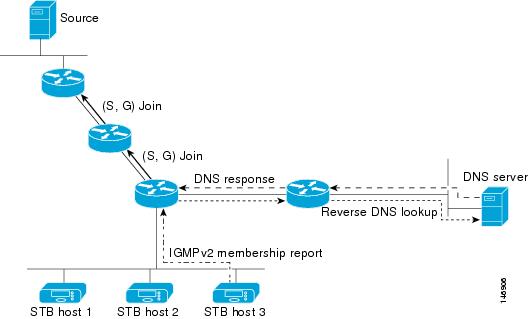
The SSM mapping mechanism that enables the last hop router to join multiple sources for a group can provide source redundancy for a TV broadcast. In this context, the last hop router provides redundancy using SSM mapping to simultaneously join two video sources for the same TV channel. However, to prevent the last hop router from duplicating the video traffic, the video sources must use a server-side switchover mechanism. One video source is active, and the other backup video source is passive. The passive source waits until an active source failure is detected before sending the video traffic for the TV channel. Thus, the server-side switchover mechanism ensures that only one of the servers is actively sending video traffic for the TV channel.
To look up one or more source addresses for a group that includes G1, G2, G3, and G4, you must configure these DNS records on the DNS server:
G4.G3.G2.G1 [multicast-domain] [timeout] IN A source-address-1 IN A source-address-2 IN A source-address-n
See your DNS server documentation for more information about configuring DNS resource records.
How to Configure SSM
For a complete description of the source-specific multicast (SSM) commands in this section, see the IP Multicast Command Reference, Cisco IOS XE Release 3SE (Catalyst 3850 Switches). To locate documentation for other commands that appear in this chapter, use the command reference master index, or search online.
Configuring SSM (CLI)
DETAILED STEPS
| Command or Action | Purpose | |
|---|---|---|
| Step 1 |
enable
Example:
Switch> enable
|
Enables privileged EXEC mode. |
| Step 2 | configure terminal Example: Switch# configure terminal | |
| Step 3 | ip pim ssm [default |
range
access-list]
Example: Switch(config)# ip pim ssm range 20 | |
| Step 4 | interface
type number
Example: Switch(config)# interface gigabitethernet 1/0/1 |
Selects an interface that is connected to hosts on which IGMPv3 can be enabled, and enters the interface configuration mode. The specified interface must be one of the following:
|
| Step 5 | ip pim {sparse-mode |
sparse-dense-mode}
Example: Switch(config-if)# ip pim sparse-dense-mode |
Enables PIM on an interface. You must use either sparse mode or sparse-dense mode. |
| Step 6 | ip igmp version
3
Example: Switch(config-if)# ip igmp version 3 |
Enables IGMPv3 on this interface. The default version of IGMP is set to Version 2. |
Configuring Source Specific Multicast Mapping
The Source Specific Multicast (SSM) mapping feature supports SSM transition when supporting SSM on the end system is impossible or unwanted due to administrative or technical reasons. You can use SSM mapping to leverage SSM for video delivery to legacy STBs that do not support IGMPv3 or for applications that do not use the IGMPv3 host stack.
- Configuring Static SSM Mapping (CLI)
- Configuring DNS-Based SSM Mapping (CLI)
- Configuring Static Traffic Forwarding with SSM Mapping (CLI)
Configuring Static SSM Mapping (CLI)
The following procedure describes how to configure static SSM mapping.
1.
enable
4.
no ip igmp ssm-map
query dns
5.
ip igmp ssm-map
static
access-list
source-address
6. Repeat Step 4 to configure additional static SSM mappings, if required.
DETAILED STEPS
Configuring DNS-Based SSM Mapping (CLI)
To configure DNS-based SSM mapping, you need to create a DNS server zone or add records to an existing zone. If the routers that are using DNS-based SSM mapping are also using DNS for other purposes, you should use a normally configured DNS server. If DNS-based SSM mapping is the only DNS implementation being used on the router, you can configure a false DNS setup with an empty root zone or a root zone that points back to itself.
1.
enable
5.
ip domain
multicast
domain-prefix
6. ip name-server server-address1 [server-address2... server-address6]
7. Repeat Step 5 to configure additional DNS servers for redundancy, if required.
DETAILED STEPS
| Command or Action | Purpose | |||
|---|---|---|---|---|
| Step 1 |
enable
Example:
Switch> enable
|
Enables privileged EXEC mode. | ||
| Step 2 | configure terminal Example: Switch# configure terminal | |||
| Step 3 | ip igmp ssm-map
enable
Example: Switch(config)# ip igmp ssm-map enable | |||
| Step 4 | ip igmp ssm-map
query dns
Example: Switch(config)# ip igmp ssm-map query dns |
(Optional) Enables DNS-based SSM mapping. By default, the ip igmp ssm-map command enables DNS-based SSM mapping. Only the no form of this command is saved to the running configuration.
| ||
| Step 5 | ip domain
multicast
domain-prefix
Example: Switch(config)# ip domain multicast ssm-map.cisco.com |
(Optional) Changes the domain prefix used by the switch for DNS-based SSM mapping. | ||
| Step 6 | ip name-server
server-address1 [server-address2...
server-address6]
Example: Switch(config)# ip name-server 172.16.1.111 172.16.1.2 |
Specifies the address of one or more name servers to use for name and address resolution. | ||
| Step 7 | Repeat Step 5 to configure additional DNS servers for redundancy, if required. | |||
| Step 8 | end Example: Switch(config)# end | |||
| Step 9 | show
running-config
Example: Switch# show running-config | |||
| Step 10 | copy
running-config startup-config
Example: Switch# copy running-config startup-config |
Configuring Static Traffic Forwarding with SSM Mapping (CLI)
Use static traffic forwarding with SSM mapping to statically forward SSM traffic for certain groups.
DETAILED STEPS
| Command or Action | Purpose | |||
|---|---|---|---|---|
| Step 1 |
enable
Example:
Switch> enable
|
Enables privileged EXEC mode. | ||
| Step 2 | configure terminal Example: Switch# configure terminal | |||
| Step 3 | interface
type number
Example: Switch(config)# interface gigabitethernet 1/0/1 |
Selects an interface on which to statically forward traffic for a multicast group using SSM mapping, and enters interface configuration mode. The specified interface must be one of the following:
These interfaces must have IP addresses assigned to them.
| ||
| Step 4 | ip igmp
static-group
group-address
source ssm-map
Example: Switch(config-if)# ip igmp static-group 239.1.2.1 source ssm-map |
Configures SSM mapping to statically forward a (S, G) channel from the interface. Use this command if you want to statically forward SSM traffic for certain groups. Use DNS-based SSM mapping to determine the source addresses of the channels. | ||
| Step 5 | end
Example: Switch(config-if)# end | |||
| Step 6 | show
running-config
Example: Switch# show running-config | |||
| Step 7 | copy
running-config startup-config
Example: Switch# copy running-config startup-config |
Monitoring SSM
Command |
Purpose |
|---|---|
Displays the (S, G) channel subscription through IGMPv3. |
|
Displays whether a multicast group supports SSM service or whether a source-specific host report was received. |
Monitoring SSM Mapping
Command |
Purpose |
|---|---|
Displays the sources that SSM mapping uses for a particular group. |
|
show ip igmp groups [group-name | group-address | interface-type interface-number] [detail] |
Displays the multicast groups with receivers that are directly connected to the router and that were learned through IGMP. |
Displays the default domain name, the style of name lookup service, a list of name server hosts, and the cached list of hostnames and addresses. |
|
Displays the IGMP packets received and sent and IGMP host-related events. |
Where to Go Next for SSM
You can configure the following:
Additional References
Related Documents
| Related Topic | Document Title |
|---|---|
|
For complete syntax and usage information for the commands used in this chapter. |
IP Multicast Routing Command Reference (Catalyst 3650 Switches) |
|
Platform-independent configuration information |
Error Message Decoder
| Description | Link |
|---|---|
|
To help you research and resolve system error messages in this release, use the Error Message Decoder tool. |
https://www.cisco.com/cgi-bin/Support/Errordecoder/index.cgi |
Standards and RFCs
| Standard/RFC | Title |
|---|---|
|
RFC 4601 |
Protocol-Independent Multicast-Sparse Mode (PIM-SM): Protocol Specification |
MIBs
| MIB | MIBs Link |
|---|---|
|
All supported MIBs for this release. |
To locate and download MIBs for selected platforms, Cisco IOS releases, and feature sets, use Cisco MIB Locator found at the following URL: |
Technical Assistance
| Description | Link |
|---|---|
|
The Cisco Support website provides extensive online resources, including documentation and tools for troubleshooting and resolving technical issues with Cisco products and technologies. To receive security and technical information about your products, you can subscribe to various services, such as the Product Alert Tool (accessed from Field Notices), the Cisco Technical Services Newsletter, and Really Simple Syndication (RSS) Feeds. Access to most tools on the Cisco Support website requires a Cisco.com user ID and password. |
Feature History and Information for SSM
Release |
Modification |
|---|---|
Cisco IOS XE 3.3SE |
This feature was introduced. |
 Feedback