- Preface
- Using the Command-Line Interface
- Using the Web Graphical User Interface
-
- Configuring the Switch for Access Point Discovery
- Configuring Data Encryption
- Configuring Retransmission Interval and Retry Count
- Configuring Adaptive Wireless Intrusion Prevention System
- Configuring Authentication for Access Points
- Converting Autonomous Access Points to Lightweight Mode
- Using Cisco Workgroup Bridges
- Configuring Probe Request Forwarding
- Optimizing RFID Tracking
- Configuring Country Codes
- Configuring Link Latency
- Configuring Power over Ethernet
-
- Preventing Unauthorized Access
- Controlling Switch Access with Passwords and Privilege Levels
- Configuring TACACS+
- Configuring RADIUS
- Configuring Kerberos
- Configuring Local Authentication and Authorization
- Configuring Secure Shell (SSH)
- Configuring Secure Socket Layer HTTP
- Configuring IPv4 ACLs
- Configuring IPv6 ACLs
- Configuring DHCP
- Configuring IP Source Guard
- Configuring Dynamic ARP Inspection
- Configuring IEEE 802.1x Port-Based Authentication
- Configuring Web-Based Authentication
- Configuring Port-Based Traffic Control
- Configuring IPv6 First Hop Security
- Configuring Cisco TrustSec
- Configuring Wireless Guest Access
- Managing Rogue Devices
- Classifying Rogue Access Points
- Configuring wIPS
- Configuring Intrusion Detection System
-
- Administering the System
- Performing Switch Setup Configuration
- Configuring Right-To-Use Licenses
- Configuring Administrator Usernames and Passwords
- Configuring 802.11 parameters and Band Selection
- Configuring Aggressive Load Balancing
- Configuring Client Roaming
- Configuring Application Visibility and Control
- Configuring Voice and Video Parameters
- Configuring RFID Tag Tracking
- Configuring Location Settings
- Monitoring Flow Control
- Configuring SDM Templates
- Configuring System Message Logs
- Configuring Online Diagnostics
- Managing Configuration Files
- Configuration Replace and Configuration Rollback
- Working with the Flash File System
- Working with Cisco IOS XE Software Bundles
- Troubleshooting the Software Configuration
- Index
Configuring IPv6 Client Mobility
Prerequisites for IPv6 Client Mobility
To enable wireless IPv6 client connectivity, the underlying wired network must support IPv6 routing and an address assignment mechanism such as SLAAC or DHCPv6. The switch must have L2 adjacency to the IPv6 router, and the VLAN needs to be tagged when the packets enter the switch. APs do not require connectivity on an IPv6 network, as all traffic is encapsulated inside the IPv4 CAPWAP tunnel between the AP and switch.
Restrictions For IPv6 Client Mobility
- When using the IPv6 Client Mobility, clients must support IPv6 with either static stateless auto configuration (such as Windows XP clients) or stateful DHCPv6 IP addressing (such as Windows 7 clients).
- To allow smooth operation of stateful DHCPv6 IP addressing, you must have a switch or router that supports the DHCP for IPv6 feature (such as the switch) that is configured to act like a DHCPv6 server, or you need a dedicated server such as a Windows 2008 server with a built-in DHCPv6 server. Cisco Catalyst 3850 switch and Cisco Catalyst 5700 switch can act as (internal) a DHCPv6 server.
 Note | To load the SDM IPv6 template in the Cisco Catalyst 3850 switch, enter the sdm prefer dual-ipv4 and v6 default command and then reset the switch. |
Information About IPv6 Client Mobility
The Switch supports IPv6 mobility for IPv6-only or dual-stack nodes. The IPv6 Client Mobility is divided into:
The link layer is handled by the 802.11 protocol which enables the client to roam to any AP in the same BSS (basic service set) identified by the same SSID without losing the link layer connectivity.
However, link layer mobility is not enough to make wireless client Layer 3 applications continue to work seamlessly while roaming. Cisco IOSd’s wireless mobility module uses mobility tunneling to retain seamless connectivity for the client’s Layer 3 PoP (point of presence) when the client roams across different subnets on different switches.
IPv6 is the next-generation network layer Internet protocol intended to replace IPv4 in the TCP/IP suite of protocols. This new version increases the internet global address space to accommodate users and applications that require unique global IP addresses. IPv6 incorporates 128-bit source and destination addresses, which provide significantly more addresses than the 32-bit IPv4 addresses.
To support IPv6 clients across controllers, ICMPv6 messages must be dealt with specially to ensure the IPv6 client remains on the same Layer 3 network. The switch keep track of IPv6 clients by intercepting the ICMPv6 messages to provide seamless mobility and protect the network from network attacks. The NDP (neighbor discovery packets) packets are converted from multicast to unicast and delivered individually per client. This unique solution ensures that Neighbor Discovery and Router Advertisement packets are not leaked across Vlans. Clients can receive specific Neighbor Discovery and Router Advertisement packets ensuring correct IPv6 addressing and avoids unnecessary multicast traffic.
The configuration for IPv6 mobility is the same as IPv4 mobility and requires no separate software on the client side to achieve seamless roaming. The switch must be part of the same mobility group. Both IPv4 and IPv6 client mobility are enabled by default.
IPv6 client mobility is used for the following:
- Using Router Advertisment
- RA Throttling and NS suppression
- IPv6 Address Learning
- Handling Multiple IP Addresses
- IPv6 Configuration
- High Availability
Using Router Advertisment
The Neighbor Discovery Protocol(NDP) operates in the link-layer and is responsible for the discovery of other nodes on the link. It determines the link-layer addresses of other nodes, finds the available routers, and maintains reachability information about the paths to other active neighbor nodes.
Router Advertisement (RA) is one of the IPv6 Neighbor Discovery Protocol (NDP) packets that is used by the hosts to discover available routers, acquire the network prefix to generate the IPv6 addresses, link MTU, and so on. The routers send RA on a regular basis, or in response to hosts Router Solicitation messages.
IPv6 wireless client mobility manages the IPv6 RA packet . The converged access switch forwards the link-local all-nodes multicast RA packets to the local and roaming wireless nodes mapped on same VLAN the RA was received on.
Figure 1 illustrates the link-local all-nodes mcast RA forwarding issue in the wireless node mobility.
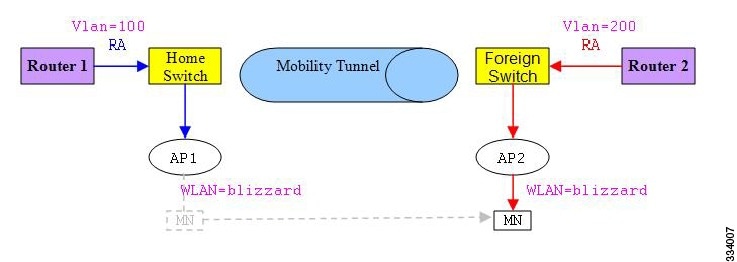
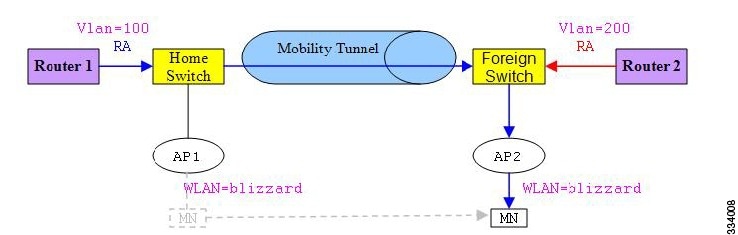
Figure 2 illustrates how a roaming client “MN” receives RA from VLAN 200 in a foreign switch and how it acquires an new IP address and breaks into L3 mobility's point of presence.
RA Throttling and NS suppression
To safeguard the power-saving wireless clients form being disturbed by frequent unsolicited periodic RAs, the controller can throttle the unsolicited multicast RA.
IPv6 Address Learning
There are three ways for IPv6 client to acquire IPv6 addresses:
For these methods, the IPv6 client always sends NS DAD (duplicate address detection) to ensure that there is no duplicated IP address on the network. The switch snoops the clients NDP and DHCPv6 packets to learn about its client IP addresses and then updates the controllers database. The database then informs the controller for the clients new IP address.
Handling Multiple IP Addresses
In the case when the new IP address is received after RUN state, whether an addition or removal, the controller updates the new IP addresses on its local database for display purposes. Essentially, the IPv6 uses the existing or same PEM state machine code flow as in IPv4. When the IP addresses are requested by external entities, for example, from Prime Infrastructure, the controller will include all the available IP addresses, IPv4 and IPv6, in the API/SPI interface to the external entities.
An IPv6 client can acquire multiple IP addresses from stack for different purposes. For example, a link-local address for link local traffic, and a routable unique local or global address.
When the client is in the DHCP request state and the controller receives the first IP address notification from the database for either an IPv4 or IPv6 address, the PEM moves the client into the RUN state.
When a new IP address is received after the RUN state, either for addition or removal, the controller updates the new IP addresses on its local database for display purposes.
When the IP addresses are requested by external entities, for example, from Prime Infrastructure, the controller provides the available IP addresses, both IPv4 and IPv6, to the external entities.
IPv6 Configuration
The switch supports IPv6 client as seamlessly as the IPv4 clients. The administrator must manually configure the Vlans to enable the IPV6, IPv6's snooping and throttling functionality. This will enable the NDP packets to throttle between the switch and its various clients
High Availability
The switch will sync with the wireless clients when the clients IP address is hard to learn. When a switchover happens, the IPv6 neighbor binding table is synced to standby state. However, the wireless client will itself disassociate and reassociate to a new active state once the switchover is complete and the neighbor binding table is updated with latest information for that client.
If, during the reassociation, the client moves to another AP then the original entry in the binding table is marked as down for sometime and will be aged-out.
For the new entries joining the switch from another AP, the new IP address is learned and notified to the controller's database.
Note | This feature is available only for the Cisco Catalyst 3850 Switch. |
Verifying IPv6 Client Mobility
Command |
Description |
| debug mobility ipv6 | Enables all the wireless client IPv6 mobility debugs. |
| debug client mac-address (mac-addr) |
Displays wireless client debugging. Enter a MAC address for debugging information. |
Monitoring IPv6 Client Mobility
Commands |
Description |
| show wireless client summary |
Displays the wireless specific configuration of active clients. |
| show wireless client mac-address (mac-addr) |
Displays the wireless specific configuration of active clients based on their MAC address. |
Additional References
Related Documents
| Related Topic | Document Title |
|---|---|
| IPv6 command reference | IPv6 Command Reference (Catalyst 3650 Switches) |
| Mobility configuration | Mobility Configuration Guide, Cisco IOS XE Release 3SE (Catalyst 3650 Switches) |
Error Message Decoder
| Description | Link |
|---|---|
|
To help you research and resolve system error messages in this release, use the Error Message Decoder tool. |
https://www.cisco.com/cgi-bin/Support/Errordecoder/index.cgi |
MIBs
| MIB | MIBs Link |
|---|---|
| All supported MIBs for this release. |
To locate and download MIBs for selected platforms, Cisco IOS releases, and feature sets, use Cisco MIB Locator found at the following URL: |
Technical Assistance
| Description | Link |
|---|---|
|
The Cisco Support website provides extensive online resources, including documentation and tools for troubleshooting and resolving technical issues with Cisco products and technologies. To receive security and technical information about your products, you can subscribe to various services, such as the Product Alert Tool (accessed from Field Notices), the Cisco Technical Services Newsletter, and Really Simple Syndication (RSS) Feeds. Access to most tools on the Cisco Support website requires a Cisco.com user ID and password. |
Feature Information For IPv6 Client Mobility
|
Feature |
Release |
Modification |
|---|---|---|
|
IPv6 Client Mobility Functionality |
Cisco IOS XE 3.3SE |
This feature was introduced. |
 Feedback