Configuring Cisco IOS Configuration Engine

Prerequisites for Configuring the Configuration Engine

  • Obtain the name of the configuration engine instance to which you are connecting.

  • Because the CNS uses both the event bus and the configuration server to provide configurations to devices, you must define both ConfigID and Device ID for each configured switch.

  • All switches configured with the cns config partial global configuration command must access the event bus. The DeviceID, as originated on the switch, must match the DeviceID of the corresponding switch definition in the Cisco Configuration Engine. You must know the hostname of the event bus to which you are connecting.
Restrictions for Configuring the Configuration Engine

  • Within the scope of a single instance of the configuration server, no two configured switches can share the same value for ConfigID.

  • Within the scope of a single instance of the event bus, no two configured switches can share the same value for DeviceID.

Information About Configuring the Configuration Engine

Cisco Configuration Engine Software

The Cisco Configuration Engine is network management utility software that acts as a configuration service for automating the deployment and management of network devices and services. Each Cisco Configuration Engine manages a group of Cisco devices (switches and routers) and the services that they deliver, storing their configurations and delivering them as needed. The Cisco Configuration Engine automates initial configurations and configuration updates by generating device-specific configuration changes, sending them to the device, executing the configuration change, and logging the results.

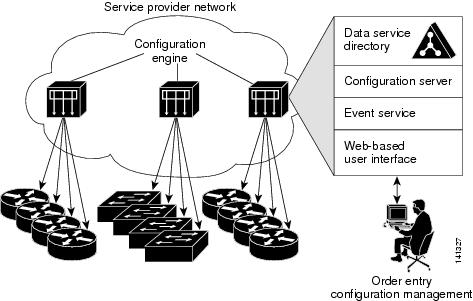
The Cisco Configuration Engine supports standalone and server modes and has these Cisco Networking Services (CNS) components:

  • Configuration service:

    • Web server

    • File manager

    • Namespace mapping server

  • Event service (event gateway)

  • Data service directory (data models and schema)

In standalone mode, the Cisco Configuration Engine supports an embedded directory service. In this mode, no external directory or other data store is required. In server mode, the Cisco Configuration Engine supports the use of a user-defined external directory.

Figure 1. Cisco Configuration Engine Architectural Overview

Configuration Service

The Configuration Service is the core component of the Cisco Configuration Engine. It consists of a Configuration Server that works with Cisco IOS CNS agents on the switch. The Configuration Service delivers device and service configurations to the switch for initial configuration and mass reconfiguration by logical groups. Switches receive their initial configuration from the Configuration Service when they start up on the network for the first time.

The Configuration Service uses the CNS Event Service to send and receive configuration change events and to send success and failure notifications.

The Configuration Server is a web server that uses configuration templates and the device-specific configuration information stored in the embedded (standalone mode) or remote (server mode) directory.

Configuration templates are text files containing static configuration information in the form of CLI commands. In the templates, variables are specified by using Lightweight Directory Access Protocol (LDAP) URLs that reference the device-specific configuration information stored in a directory.

The Cisco IOS agent can perform a syntax check on received configuration files and publish events to show the success or failure of the syntax check. The configuration agent can either apply configurations immediately or delay the application until receipt of a synchronization event from the configuration server.

Event Service

The Cisco Configuration Engine uses the Event Service for receipt and generation of configuration events. The Event Service consists of an event agent and an event gateway. The event agent is on the switch and facilitates the communication between the switch and the event gateway on the Cisco Configuration Engine.

The Event Service is a highly capable publish-and-subscribe communication method. The Event Service uses subject-based addressing to send messages to their destinations. Subject-based addressing conventions define a simple, uniform namespace for messages and their destinations.

NameSpace Mapper

The Cisco Configuration Engine includes the NameSpace Mapper (NSM) that provides a lookup service for managing logical groups of devices based on application, device or group ID, and event.

Cisco IOS devices recognize only event subject-names that match those configured in Cisco IOS software; for example, cisco.cns.config.load. You can use the namespace mapping service to designate events by using any desired naming convention. When you have populated your data store with your subject names, NSM changes your event subject-name strings to those known by Cisco IOS.

For a subscriber, when given a unique device ID and event, the namespace mapping service returns a set of events to which to subscribe. Similarly, for a publisher, when given a unique group ID, device ID, and event, the mapping service returns a set of events on which to publish.

Cisco Networking Services IDs and Device Hostnames

The Cisco Configuration Engine assumes that a unique identifier is associated with each configured switch. This unique identifier can take on multiple synonyms, where each synonym is unique within a particular namespace. The event service uses namespace content for subject-based addressing of messages.

The Cisco Configuration Engine intersects two namespaces, one for the event bus and the other for the configuration server. Within the scope of the configuration server namespace, the term ConfigID is the unique identifier for a device. Within the scope of the event bus namespace, the term DeviceID is the CNS unique identifier for a device.

ConfigID

Each configured switch has a unique ConfigID, which serves as the key into the Cisco Configuration Engine directory for the corresponding set of switch CLI attributes. The ConfigID defined on the switch must match the ConfigID for the corresponding switch definition on the Cisco Configuration Engine.

The ConfigID is fixed at startup time and cannot be changed until the device restarts, even if the switch hostname is reconfigured.

DeviceID

Each configured switch participating on the event bus has a unique DeviceID, which is analogous to the switch source address so that the switch can be targeted as a specific destination on the bus.

The origin of the DeviceID is defined by the Cisco IOS hostname of the switch. However, the DeviceID variable and its usage reside within the event gateway adjacent to the switch.

The logical Cisco IOS termination point on the event bus is embedded in the event gateway, which in turn functions as a proxy on behalf of the switch. The event gateway represents the switch and its corresponding DeviceID to the event bus.

The switch declares its hostname to the event gateway immediately after the successful connection to the event gateway. The event gateway couples the DeviceID value to the Cisco IOS hostname each time this connection is established. The event gateway retains this DeviceID value for the duration of its connection to the switch.

Hostname and DeviceID

The DeviceID is fixed at the time of the connection to the event gateway and does not change even when the switch hostname is reconfigured.

When changing the switch hostname on the switch, the only way to refresh the DeviceID is to break the connection between the switch and the event gateway. For instructions on refreshing DeviceIDs, see "Related Topics."

When the connection is reestablished, the switch sends its modified hostname to the event gateway. The event gateway redefines the DeviceID to the new value.


Caution

When using the Cisco Configuration Engine user interface, you must first set the DeviceID field to the hostname value that the switch acquires after, not before, and you must reinitialize the configuration for your Cisco IOS CNS agent. Otherwise, subsequent partial configuration command operations may malfunction.


Hostname, DeviceID, and ConfigID

In standalone mode, when a hostname value is set for a switch, the configuration server uses the hostname as the DeviceID when an event is sent on hostname. If the hostname has not been set, the event is sent on the cn=<value> of the device.

In server mode, the hostname is not used. In this mode, the unique DeviceID attribute is always used for sending an event on the bus. If this attribute is not set, you cannot update the switch.

These and other associated attributes (tag value pairs) are set when you run Setup on the Cisco Configuration Engine.

Automated CNS Configuration

To enable automated CNS configuration of the switch, you must first complete the prerequisites listed in this topic. When you complete them, power on the switch. At the setup prompt, do nothing; the switch begins the initial configuration. When the full configuration file is loaded on your switch, you do not need to do anything else.

For more information on what happens during initial configuration, see "Related Topics."

Table 1. Prerequisites for Enabling Automatic Configuration

Device

Required Configuration

Access switch

Factory default (no configuration file)

Distribution switch

  • IP helper address

  • Enable DHCP relay agent1

  • IP routing (if used as default gateway)

DHCP server

  • IP address assignment

  • TFTP server IP address

  • Path to bootstrap configuration file on the TFTP server

  • Default gateway IP address

TFTP server

  • A bootstrap configuration file that includes the CNS configuration commands that enable the switch to communicate with the Configuration Engine

  • The switch configured to use either the switch MAC address or the serial number (instead of the default hostname) to generate the ConfigID and EventID

  • The CNS event agent configured to push the configuration file to the switch

CNS Configuration Engine

One or more templates for each type of device, with the ConfigID of the device mapped to the template.

1 A DHCP Relay is needed only when the DHCP Server is on a different subnet from the client.

How to Configure the Configuration Engine

Enabling the CNS Event Agent


Note

You must enable the CNS event agent on the switch before you enable the CNS configuration agent.


Follow these steps to enable the CNS event agent on the switch.

Procedure

  Command or Action Purpose
Step 1

enable

Example:


Switch> enable

Enables privileged EXEC mode.

  • Enter your password if prompted.

Step 2

configure terminal

Example:


Switch# configure terminal

Enters global configuration mode.

Step 3

cns event {hostname | ip-address} [port-number] [ [keepalive seconds retry-count] [failover-time seconds ] [reconnect-time time] | backup]

Example:


Switch(config)# cns event 10.180.1.27 keepalive 120 10

Enables the event agent, and enters the gateway parameters.

  • For {hostname | ip-address} , enter either the hostname or the IP address of the event gateway.

  • (Optional) For port number , enter the port number for the event gateway. The default port number is 11011.

  • (Optional) For keepalive seconds , enter how often the switch sends keepalive messages. For retry-count , enter the number of unanswered keepalive messages that the switch sends before the connection is terminated. The default for each is 0.

  • (Optional) For failover-time seconds , enter how long the switch waits for the primary gateway route after the route to the backup gateway is established.

  • (Optional) For reconnect-time time , enter the maximum time interval that the switch waits before trying to reconnect to the event gateway.

  • (Optional) Enter backup to show that this is the backup gateway. (If omitted, this is the primary gateway.)

Note 

Though visible in the command-line help string, the encrypt and the clock-timeout time keywords are not supported.

Step 4

end

Example:


Switch(config)# end

Returns to privileged EXEC mode.

Step 5

show running-config

Example:


Switch# show running-config 

Verifies your entries.

Step 6

copy running-config startup-config

Example:


Switch# copy running-config startup-config 

(Optional) Saves your entries in the configuration file.

What to do next

To verify information about the event agent, use the show cns event connections command in privileged EXEC mode.

To disable the CNS event agent, use the no cns event { ip-address | hostname } global configuration command.

Refreshing DeviceIDs

Follow these steps to refresh a DeviceID when changing the hostname on the switch.

Procedure

  Command or Action Purpose
Step 1

enable

Example:


Switch> enable

Enables privileged EXEC mode.

  • Enter your password if prompted.

Step 2

show cns config connections

Example:


Switch# show cns config connections

Displays whether the CNS event agent is connecting to the gateway, connected, or active, and the gateway used by the event agent, its IP address and port number.

Step 3

Make sure that the CNS event agent is properly connected to the event gateway.

Examine the output of show cns config connections for the following:

  • Connection is active.

  • Connection is using the currently configured switch hostname. The DeviceID will be refreshed to correspond to the new hostname configuration using these instructions.

Step 4

show cns event connections

Example:


Switch# show cns event connections

Displays the event connection information for your switch.

Step 5

Record from the output of Step 4 the information for the currently connected connection listed below. You will be using the IP address and port number in subsequent steps of these instructions.

Step 6

configure terminal

Example:


Switch# configure terminal

Enters global configuration mode.

Step 7

no cns event ip-address port-number

Example:

Switch(config)# no cns event 172.28.129.22 2012

Specifies the IP address and port number that you recorded in Step 5 in this command.

This command breaks the connection between the switch and the event gateway. It is necessary to first break, then reestablish, this connection to refresh the DeviceID.

Step 8

cns event ip-address port-number

Example:

Switch(config)# cns event 172.28.129.22 2012

Specifies the IP address and port number that you recorded in Step 5 in this command.

This command reestablishes the connection between the switch and the event gateway.

Step 9

end

Example:


Switch(config)# end

Returns to privileged EXEC mode.

Step 10

Make sure that you have reestablished the connection between the switch and the event connection by examining the output from show cns event connections .

Step 11

show running-config

Example:


Switch# show running-config 

Verifies your entries.

Step 12

copy running-config startup-config

Example:


Switch# copy running-config startup-config 

(Optional) Saves your entries in the configuration file.

Monitoring CNS Configurations

Table 2. CNS show Commands

Command

Purpose

show cns config connections


Switch# show cns config connections

Displays the status of the CNS Cisco IOS CNS agent connections.

show cns config outstanding


Switch# show cns config outstanding

Displays information about incremental (partial) CNS configurations that have started but are not yet completed.

show cns config stats


Switch# show cns config stats

Displays statistics about the Cisco IOS CNS agent.

show cns event connections


Switch# show cns event connections

Displays the status of the CNS event agent connections.

show cns event gateway


Switch# show cns event gateway

Displays the event gateway information for your switch.

show cns event stats


Switch# show cns event stats

Displays statistics about the CNS event agent.

show cns event subject


Switch# show cns event subject

Displays a list of event agent subjects that are subscribed to by applications.

Additional References

Related Documents

Related Topic Document Title
Configuration Engine Setup

Cisco Configuration Engine Installation and Setup Guide, 1.5 for Linux http://www.cisco.com/en/us/docs/net_mgmt/configuration_engine/1.5/installation_linux/guide/setup_1.html

Error Message Decoder

Description Link

To help you research and resolve system error messages in this release, use the Error Message Decoder tool.

https://www.cisco.com/cgi-bin/Support/Errordecoder/index.cgi

Standards and RFCs

Standard/RFC Title

None

-

MIBs

MIB MIBs Link

All the supported MIBs for this release.

To locate and download MIBs for selected platforms, Cisco IOS releases, and feature sets, use Cisco MIB Locator found at the following URL:

http://www.cisco.com/go/mibs

Technical Assistance

Description Link

The Cisco Support website provides extensive online resources, including documentation and tools for troubleshooting and resolving technical issues with Cisco products and technologies.

To receive security and technical information about your products, you can subscribe to various services, such as the Product Alert Tool (accessed from Field Notices), the Cisco Technical Services Newsletter, and Really Simple Syndication (RSS) Feeds.

Access to most tools on the Cisco Support website requires a Cisco.com user ID and password.

http://www.cisco.com/support

Feature History and Information for the Configuration Engine

Release

Modification

Cisco IOS Release 15.2(5)E

This feature was introduced.