- Index
- New and Changed Information
- Preface
- Overview
- Configuring CFS
- Configuring NTP
- Configuring CDP
- Configuring System Message Logging
- Configuring Smart Call Home
- Configuring Rollback
- Configuring Session Manager
- Configuring the Scheduler
- Configuring SNMP
- Configuring RMON
- Configuring Online Diagnostics
- Configuring the Embedded Event Manager
- Configuring Onboard Failure Logging
- Configuring SPAN
- Configuring NetFlow
- Supported RFCs
- EEM Events and Examples
Configuring SPAN
This chapter describes how to configure an Ethernet switched port analyzer (SPAN) to analyze traffic between ports on Cisco NX-OS devices.
This chapter includes the following sections:
• Licensing Requirements for SPAN
•Verifying the SPAN Configuration
Information About SPAN
SPAN analyzes all traffic between source ports by directing the SPAN session traffic to a destination port with an external analyzer attached to it.
You can define the sources and destinations to monitor in a SPAN sessions on the local device.
This section includes the following topics:
SPAN Sources
The interfaces from which traffic can be monitored are called SPAN sources. Sources designate the traffic to monitor and whether to copy ingress, egress, or both directions of traffic. SPAN sources include the following:
•Ethernet ports
•VLANs—When a VLAN is specified as a SPAN source, all supported interfaces in the VLAN are SPAN sources.
•Remote SPAN (RSPAN) VLANs
•The inband interface to the control plane CPU—You can monitor the inband interface only from the default VDC. Inband traffic from all VDCs is monitored.

Note A single SPAN session can include mixed sources in any combination of the above.
Characteristics of Source Ports
SPAN source ports have the following characteristics:
•A port configured as a source port cannot also be configured as a destination port.
•An RSPAN VLAN can only be used as a SPAN source.
•If you use the supervisor inband interface as a SPAN source, the following packets are monitored:
–All packets that arrive on the supervisor hardware (ingress)
–All packets generated by the supervisor hardware (egress)
SPAN Destinations
SPAN destinations refer to the interfaces that monitor source ports. Destination ports receive the copied traffic from SPAN sources.
Characteristics of Destination Ports
SPAN destination ports have the following characteristics:
•Destinations for a SPAN session include Ethernet ports or port-channel interfaces in either access or trunk mode.
•A port configured as a destination port cannot also be configured as a source port.
•A destination port can be configured in only one SPAN session at a time.
•Destination ports do not participate in any spanning tree instance. SPAN output includes Bridge Protocol Data Unit (BPDU) Spanning-Tree Protocol hello packets.
•An RSPAN VLAN cannot be used as a SPAN destination.
•You can configure SPAN destinations to inject packets to disrupt a certain TCP packet stream in support of the Intrusion Detection System (IDS).
•You can configure SPAN destinations to enable a forwarding engine to learn the MAC address of the IDS.
SPAN Sessions
You can create up to 18 SPAN sessions designating sources and destinations to monitor.
Note Only two SPAN sessions can be running simultaneously.
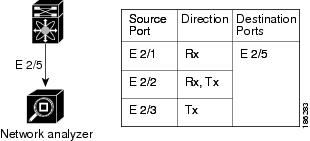
Figure 14-1 shows a SPAN configuration. Packets on three Ethernet ports are copied to destination port Ethernet 2/5. Only traffic in the direction specified is copied.
Figure 14-1 SPAN Configuration
.
Virtual SPAN Sessions
You can create a virtual SPAN session to monitor multiple VLAN sources and choose only VLANs of interest to transmit on multiple destination ports. For example, you can configure SPAN on a trunk port and monitor traffic from different VLANs on different destination ports.
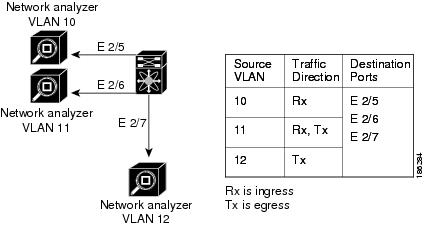
Figure 14-2 shows a virtual SPAN configuration. The virtual SPAN session copies traffic from the three VLANs to the three specified destination ports. You can choose which VLANs to allow on each destination port to limit the traffic that the device transmits on it. In Figure 14-2, the device transmits packets from one VLAN at each destination port.
Note Virtual SPAN sessions cause all source packets to be copied to all destinations, whether the packets are required at the destination or not. VLAN traffic filtering occurs at the egress destination port level.
Figure 14-2 Virtual SPAN Configuration
.
For information about configuring a virtual SPAN session, see the "Configuring a Virtual SPAN Session" section.
Multiple SPAN Sessions
Although you can define up to 18 SPAN sessions, only two SPAN sessions can be running simultaneously. You can shut down an unused SPAN session.
For information about shutting down SPAN sessions, see the "Shutting Down or Resuming a SPAN Session" section.
High Availability
The SPAN feature supports stateless and stateful restarts. After a reboot or supervisor switchover, Cisco NX-OS applies the running configuration.
Virtualization Support
A virtual device context (VDC) is a logical representation of a set of system resources. SPAN applies only to the VDC where the commands are entered.
Note You can monitor the inband interface only from the default VDC. Inband traffic from all VDCs is monitored.
For information about configuring VDCs, see the Cisco Nexus 7000 Series NX-OS Virtual Device Context Configuration Guide, Release 4.x.
Licensing Requirements for SPAN
The following table shows the licensing requirements for this feature:
Prerequisites for SPAN
SPAN has the following prerequisites:
•You must first configure the ports on each device to support the desired SPAN configuration. For more information, see the Cisco Nexus 7000 Series NX-OS Interfaces Configuration Guide, Release 4.x.
Guidelines and Limitations
SPAN has the following configuration guidelines and limitations:
•Table 1 lists the SPAN session limits.
|
|
|
|---|---|
Configured SPAN sessions |
18 |
Simultaneously running SPAN sessions |
2 |
Source interfaces per session |
128 |
Source VLANs per session1 |
32 |
Destination interfaces per session |
32 |
1 If you specify a VLAN range greater than 32, the first 32 VLANs are added as source VLANs to the SPAN session even if the VLANs have not been created. For example, if you specify a VLAN range of 1-40 for the SPAN session, only VLANs 1-32 are added to the SPAN session. To add only specific VLANs within a range, you must add the VLANs explicitly. |
•SPAN is not supported for management ports.
•A destination port can only be configured in one SPAN session at a time.
•You cannot configure a port as both a source and destination port.
•A single SPAN session can include mixed sources in any combination of the following:
–Ethernet ports, but not subinterfaces.
–VLANs, which can be assigned to port channel subinterfaces
–The inband interface to the control plane CPU
•Destination ports do not participate in any spanning tree instance. SPAN output includes Bridge Protocol Data Unit (BPDU) Spanning-Tree Protocol hello packets.
•When a SPAN session contains source ports that are monitored in the transmit or transmit and receive direction, packets that these ports receive may be replicated to the SPAN destination port even though the packets are not actually transmitted on the source ports. Some examples of this behavior on source ports include:
–Traffic that results from flooding
–Broadcast and multicast traffic
•For VLAN SPAN sessions with both ingress and egress configured, two packets (one from ingress and one from egress) are forwarded from the destination port if the packets get switched on the same VLAN.
•VLAN SPAN monitors only the traffic that leaves or enters Layer 2 ports in the VLAN.
•You can monitor the inband interface only from the default VDC. Inband traffic from all VDCs is monitored.
•You can configure an RSPAN VLAN for use only as a SPAN session source.
•You can configure a SPAN session on the local device only.
•SPAN sessions cannot capture packets with broadcast or multicast MAC addresses that reach the supervisor, such as ARP requests and Open Shortest Path First (OSPF) protocol hello packets, if the source of the session is the supervisor ethernet in-band interface. To capture these packets, you must use the physical interface as the source in the SPAN sessions.
•All SPAN replication is performed in the hardware. The supervisor CPU is not involved.
Configuring SPAN
This section includes the following topics:
•Configuring a Virtual SPAN Session
•Shutting Down or Resuming a SPAN Session
Note Cisco NX-OS commands for this feature may differ from those in Cisco IOS.
Configuring a SPAN Session
You can configure a SPAN session on the local device only. By default, SPAN sessions are created in the shut state.
For sources, you can specify Ethernet ports, port channels, the supervisor inband interface, VLANs, and RSPAN VLANs. You can specify private VLANs (primary, isolated, and community) in SPAN sources.
A single SPAN session can include mixed sources in any combination of Ethernet ports, VLANs, or the inband interface to the control plane CPU. You cannot specify Ethernet port subinterfaces as sources for a SPAN session.
Note To use a Layer 3 port-channel subinterface as a SPAN source in the monitor session, you must specify the vlan ID that you entered when configuring IEEE 802.1Q VLAN encapsulation for the subinterface as the filter VLAN. When you use the main interface and the SPAN VLAN filter to filter the 802.1Q VLANs on the subinterfaces, SPAN shows the traffic for all subinterfaces on the SPAN destination port.
When you specify the supervisor inband interface for a SPAN source, the device monitors all packets that arrive on the supervisor hardware (ingress) and all packets generated by the supervisor hardware (egress).
For destination ports, you can specify Ethernet ports or port-channels in either access or trunk mode. You must enable monitor mode on all destination ports.
BEFORE YOU BEGIN
Make sure that you are in the correct VDC. To switch VDCs, use the switchto vdc command.
•You must have already configured the destination ports in access or trunk mode. For more information, see the Cisco Nexus 7000 Series NX-OS Interfaces Configuration Guide, Release 4.x at the following.l
SUMMARY STEPS
1. config t
2. interface ethernet slot/port[-port]
3. switchport
4. switchport mode [access | trunk | private-vlan]
5. switchport monitor [ingress [learning]]
6. Repeat Steps 2 and 3 to configure monitoring on additional SPAN destinations.
7. no monitor session session-number
8. monitor session session-number
9. description description
10. source {interface type | vlan {number | range} [rx | tx | both]
11. Repeat Step 8 to configure all SPAN sources.
12. filter vlan {number | range}
13. Repeat Step 10 to configure all source VLANs to filter.
14. destination interface type {number | range}
15. Repeat Step 12 to configure all SPAN destination ports.
16. no shut
17. show monitor session {all | session-number | range session-range} [brief]
18. copy running-config startup-config
DETAILED STEPS
Configuring a Virtual SPAN Session
You can configure a virtual SPAN session to copy packets from source ports, VLANs, and RSPAN VLANs to destination ports on the local device. By default, SPAN sessions are created in the shut state.
For sources, you can specify ports, VLANs, or RSPAN VLANs.
For destination ports, you can specify Ethernet ports. You can choose which VLANs to allow on each destination port to limit the traffic that the device transmits on it.
BEFORE YOU BEGIN
•Ensure that you are in the correct VDC (or use the switchto vdc command).
•You have already configured the destination ports in trunk mode. For more information, see the Cisco Nexus 7000 Series NX-OS Interfaces Configuration Guide, Release 4.x.
•You have already configured the destination ports to monitor a SPAN session with the switchport monitor command.
SUMMARY STEPS
1. config t
2. no monitor session session-number
3. monitor session session-number
4. source {interface type | vlan} {number | range} [rx | tx | both]
5. Repeat Step 4 to configure all virtual SPAN VLAN sources.
6. destination interface type {number | range}
7. Repeat Step 6 to configure all virtual SPAN destination ports.
8. no shut
9. show monitor session {all | session-number | range session-range} [brief]
10. interface ethernet slot/port[-port]
11. switchport
12. switchport mode trunk
13. switchport trunk allowed vlan {{number | range} | add {number | range} | except {number | range} | remove {number | range} | all | none}
14. Repeat Steps 10 and 11 to configure the allowed VLANs on each destination port.
15. show interface ethernet slot/port[-port] trunk
16. copy running-config startup-config
DETAILED STEPS
Configuring an RSPAN VLAN
You can specify a remote SPAN (RSPAN) VLAN as a SPAN session source.
BEFORE YOU BEGIN
Ensure that you are in the correct VDC (or use the switchto vdc command).
SUMMARY STEPS
1. config t
2. vlan vlan
3. remote-span
4. exit
5. show vlan
6. copy running-config startup-config
DETAILED STEPS
Shutting Down or Resuming a SPAN Session
You can shut down SPAN sessions to discontinue the copying of packets from sources to destinations. Because only two SPAN sessions can be running simultaneously, you can shut down one session in order to free hardware resources to enable another session. By default, SPAN sessions are created in the shut state.
You can resume (enable) SPAN sessions to resume the copying of packets from sources to destinations. In order to enable a SPAN session that is already enabled but operationally down, you must first shut it down and then enable it.
You can configure the shut and enabled SPAN session states with either a global or monitor configuration mode command.
BEFORE YOU BEGIN
Ensure that you are in the correct VDC (or use the switchto vdc command).
SUMMARY STEPS
1. config t
2. monitor session {session-range | all} shut
3. no monitor session {session-range | all} shut
4. monitor session session-number
5. shut
6. no shut
7. show monitor
8. copy running-config startup-config
DETAILED STEPS
Verifying the SPAN Configuration
To display SPAN configuration information, perform one of the following tasks:
|
|
|
|---|---|
show monitor session {all | session-number | range session-range} [brief] |
Displays the SPAN session configuration. |
For detailed information about the fields in the output from these commands, see the Cisco NX-OS System Management Command Reference.
SPAN Example Configurations
This section includes the following topics:
•SPAN Session Example Configuration
•Virtual SPAN Session Example Configuration
•Private VLAN Source in SPAN Session Example Configuration
SPAN Session Example Configuration
To configure a SPAN session, follow these steps:
Step 1 Configure destination ports in access or trunk mode, and enable SPAN monitoring.
switch# config t
switch(config)# interface ethernet 2/5
switch(config-if)# switchport
switch(config-if)# switchport mode trunk
switch(config-if)# switchport monitor
switch(config-if)# no shut
switch(config-if)# exit
switch(config)#
Step 2 Configure a SPAN session.
switch(config)# no monitor session 3
switch(config)# monitor session 3
switch(config-monitor)# source interface ethernet 2/1-3, ethernet 3/1 rx
switch(config-monitor)# source interface port-channel 2
switch(config-monitor)# source interface sup-eth 0 both
switch(config-monitor)# source vlan 3, 6-8 tx
switch(config-monitor)# filter vlan 3-5, 7
switch(config-monitor)# destination interface ethernet 2/5
switch(config-monitor)# no shut
switch(config-monitor)# exit
switch(config)# show monitor session 3
switch(config)# copy running-config startup-config
Virtual SPAN Session Example Configuration
To configure a virtual SPAN session, follow these steps:
Step 1 Configure destination ports in access or trunk mode, and enable SPAN monitoring.
switch# config t
switch(config)# interface ethernet 3/1
switch(config-if)# switchport
switch(config-if)# switchport mode trunk
switch(config-if)# switchport trunk allowed vlan add 100-200
switch(config-if)# switchport monitor
switch(config-if)# no shut
switch(config-if)# exit
switch(config)# interface ethernet 3/2
switch(config-if)# switchport
switch(config-if)# switchport mode trunk
switch(config-if)# switchport trunk allowed vlan add 201-300
switch(config-if)# switchport monitor
switch(config-if)# no shut
switch(config-if)# exit
switch(config)#
Step 2 Configure a SPAN session.
switch(config)# no monitor session 3
switch(config)# monitor session 3
switch(config-monitor)# source vlan 100-300
switch(config-monitor)# destination interface ethernet 3/1-2
switch(config-monitor)# no shut
switch(config-monitor)# exit
switch(config)# show monitor session 3
switch(config)# copy running-config startup-config
Private VLAN Source in SPAN Session Example Configuration
To configure a SPAN session that includes a private VLAN source, follow these steps:
Step 1 Configure source VLANs.
switch# config t
switch(config)# vlan 100
switch(config-vlan)# private-vlan primary
switch(config-vlan)# exit
switch(config)# interface ethernet 3/1
switch(config-if)# switchport
switch(config-if)# switchport access vlan 100
switch(config-if)# no shut
switch(config-if)# exit
switch(config)# interface ethernet 3/2
switch(config-if)# switchport
switch(config-if)# switchport mode trunk
switch(config-if)# switchport trunk native vlan 100
switch(config-if)# no shut
switch(config-if)# exit
switch(config)#
Step 2 Configure destination ports in access or trunk mode, and enable SPAN monitoring.
switch# config t
switch(config)# interface ethernet 3/3
switch(config-if)# switchport
switch(config-if)# switchport mode trunk
switch(config-if)# switchport trunk allowed vlan add 100-200
switch(config-if)# switchport monitor
switch(config-if)# no shut
switch(config-if)# exit
switch(config)#
Step 3 Configure a SPAN session.
switch(config)# no monitor session 3
switch(config)# monitor session 3
switch(config-monitor)# source vlan 100
switch(config-monitor)# destination interface ethernet 3/3
switch(config-monitor)# no shut
switch(config-monitor)# exit
switch(config)# show monitor session 3
switch(config)# copy running-config startup-config
Additional References
For additional information related to implementing SPAN, see the following sections:
Related Documents
Standards
|
|
|
|---|---|
No new or modified standards are supported by this feature, and support for existing standards has not been modified by this feature. |
— |
Feature History for SPAN
Table 14-2 lists the release history for this feature.
|
|
|
|
|---|---|---|
Guidelines and Limitations |
4.1(3) |
Added a table of SPAN session limits. See the "SPAN Session Limits" section. |
 Feedback