- Index
- New and Changed Information
- Preface
- Overview
- Configuring CFS
- Configuring NTP
- Configuring CDP
- Configuring System Message Logging
- Configuring Smart Call Home
- Configuring Rollback
- Configuring Session Manager
- Configuring the Scheduler
- Configuring SNMP
- Configuring RMON
- Configuring Online Diagnostics
- Configuring the Embedded Event Manager
- Configuring Onboard Failure Logging
- Configuring SPAN
- Configuring NetFlow
- Supported RFCs
- EEM Events and Examples
Configuring the Embedded Event Manager
This chapter describes how to configure the Embedded Event Manager (EEM) to detect and handle critical events on Cisco NX-OS devices.
This chapter includes the following sections:
• Licensing Requirements for EEM
Information About EEM
EEM monitors events that occur on your device and takes action to recover or troubleshoot these events, based on your configuration.
This section includes the following topics:
EEM Overview
EEM consists of three major components:
•Event statements—Events to monitor from another Cisco NX-OS component that may require some action, workaround, or notification.
•Action statements —An action that EEM can take, such as sending an e-mail, or disabling an interface, to recover from an event.
•Policies—An event paired with one or more actions to troubleshoot or recover from the event.
Policies
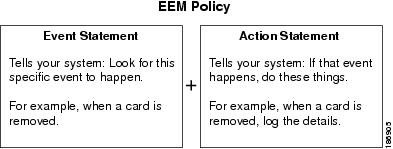
An EEM policy consists of an event statement and one or more action statements. The event statement defines the event to look for as well as the filtering characteristics for the event. The action statement defines the action EEM takes when the event occurs.
Figure 13-1 shows the two basic statements in an EEM policy.
Figure 13-1 EEM Policy Statements
You can configure EEM policies using the CLI or using a VSH script.
EEM gives you a device-wide view of policy management. You configure EEM policies on the supervisor, and EEM pushes the policy to the correct module based on the event type. EEM takes any actions for a triggered event either locally on the module or on the supervisor (the default option).
EEM maintains event logs on the supervisor.
Cisco NX-OS has a number of preconfigured system policies. These system policies define many common events and actions for the device. System policy names begin with two underscore characters (__).
You can create user policies to suit your network. If you create a user policy, any actions in your policy occur after EEM triggers any system policy actions related to the same event as your policy. To configure a user policy, see the "Defining a User Policy Using the CLI" section.
You can also override some system policies. The overrides that you configure take the place of the system policy. You can override the event or the actions.
Use the show event manager system-policy command to view the preconfigured system policies and determine which policies that you can override.
To configure an overriding policy, see the "Overriding a Policy" section.

Note You should use the show running-config eem command to check the configuration of each policy. An override policy that consists of an event statement and no action statement triggers no action and no notification of failures.
Note Your override policy should always include an event statement. An override policy without an event statement overrides all possible events in the system policy.
Event Statements
An event is any device activity for which some action, such as a workaround or a notification, should be taken. In many cases, these events are related to faults in the device such as when an interface or a fan malfunctions.
EEM defines event filters so only critical events or multiple occurrences of an event within a specified time period trigger an associated action.
Figure 13-2 shows events that are handled by EEM.
Figure 13-2 EEM Overview
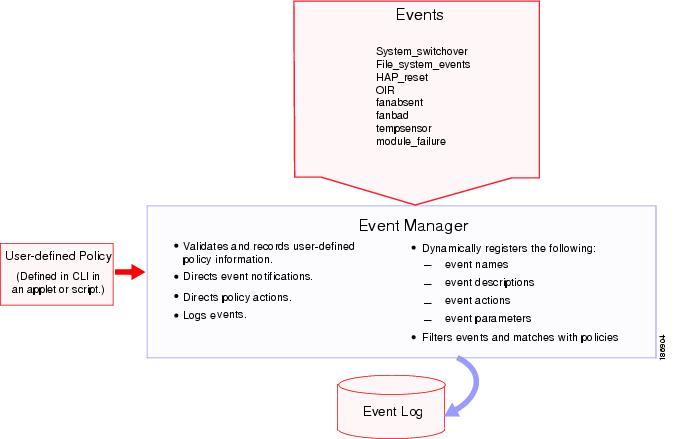
Event statements specify the event that triggers a policy to run. You can configure only one event statement per policy.
EEM schedules and runs policies on the basis of event statements. EEM examines the event and action commands and runs them as defined.
Note If you want to allow the triggered event to process any default actions, you must configure the EEM policy to allow the event default action statement.
Action Statements
Action statements describe the action triggered by a policy. Each policy can have multiple action statements. If no action is associated with a policy, EEM still observes events but takes no actions.
EEM supports the following actions in action statements:
•Execute any CLI commands.
•Update a counter.
•Log an exception.
•Force the shutdown of any module.
•Reload the device.
•Shut down specified modules because the power is over budget.
•Generate a syslog message.
•Generate a Call Home event.
•Generate an SNMP notification.
•Use the default action for the system policy.
Note If you want to allow the triggered event to process any default actions, you must configure the EEM policy to allow the default action. For example, if you match a CLI command in a match statement, you must add the event-default action statement to the EEM policy or EEM will not allow the CLI command to execute.
Note Verify that your action statements within your user policy or overriding policy do not negate each other or adversely affect the associated system policy.
VSH Script Policies
You can also write policies in a VHS script, using a text editor. These policies have an event statement and action statement(s) just as other policies, and these policies can either augment or override system policies. After you write your script policy, copy it to the device and activate it. To configure a policy in a script, see the "Defining a Policy using a VSH Script" section.
Environment Variables
You can define environment variables for EEM that are available for all policies. Environment variables are useful for configuring common values that you can use in multiple policies. For example, you can create an environment variable for the IP address of an external e-mail server.
You can use an environment variable in action statements by using the parameter substitution format.
Example 13-1 shows a sample action statement to force a module 1 shutdown, with a reset reason of "EEM action."
Example 13-1 Action Statement
switch (config-eem-policy)# action 1.0 forceshut module 1 reset-reson "EEM action."
If you define an environment variable for the shutdown reason, called default-reason, you can replace that reset reason with the environment variable, as shown in Example 13-2.
Example 13-2 Action Statement with Environment Variable
switch (config-eem-policy)# action 1.0 foreshut module 1 reset-reason $default-reason
You can reuse this environment variable in any policy. For more information on environment variables, see the "Defining an Environment Variable" section.
High Availability
Cisco NX-OS supports stateless restarts for EEM. After a reboot or supervisor switchover, Cisco NX-OS applies the running configuration.
Virtualization Support
You configure EEM in the virtual device context (VDC) that you are logged into. By default, Cisco NX-OS places you in the default VDC. You must be in this VDC to configure policies for module-based events.
Not all actions or events are visible in all VDCs. You must have network-admin or vdc-admin privileges to configure policies.
See the Cisco Nexus 7000 Series NX-OS Virtual Device Context Configuration Guide, Release 4.x, for more information on VDCs.
Licensing Requirements for EEM
Prerequisites for EEM
EEM has the following prerequisites:
•You must have network-admin or vdc-admin user privileges to configure EEM.
Guidelines and Limitations
EEM has the following configuration guidelines and limitations:
•The maximum number of configurable EEM policies is 500.
•Action statements within your user policy or overriding policy should not negate each other or adversely affect the associated system policy.
•If you want to allow a triggered event to process any default actions, you must configure the EEM policy to allow the default action. For example, if you match a CLI command in a match statement, you must add the event-default action statement to the EEM policy or EEM will not allow the CLI command to execute.
•An override policy that consists of an event statement and no action statement triggers no action and no notification of failures.
•An override policy without an event statement overrides all possible events in the system policy.
Configuring EEM
You can create policies that contain actions to take based on system policies. To display information about the system policies, use the show event manager system-policy command. For more information about system policies, see the "Embedded Event Manager System Events and Configuration Examples" appendix.
This section includes the following topics:
•Defining an Environment Variable
•Defining a User Policy Using the CLI
•Defining a Policy using a VSH Script
•Registering and Activating a VSH Script Policy
•Configuring Memory Thresholds
Defining an Environment Variable
You can define a variable to serve as a parameter in an EEM policy.
BEFORE YOU BEGIN
Make sure that you are in the correct VDC. To change the VDC, use the switchto vdc command.
SUMMARY STEPS
1. config t
2. event manager environment variable-name variable-value
3. show event manager environment
4. copy running-config startup-config
DETAILED STEPS
Defining a User Policy Using the CLI
You can define a user policy using the CLI to the device.
This section includes the following topics:
•Configuring Action Statements
BEFORE YOU BEGIN
Make sure that you are in the correct VDC. To change the VDC, use the switchto vdc command.
SUMMARY STEPS
1. config t
2. event manager applet applet-name
3. description policy-description
4. event event-statement
5. action number[.number2] action-statement
(Repeat Step 5 for multiple action statements.)
6. show event manager policy-state name [module module-id]
7. copy running-config startup-config
DETAILED STEPS
|
|
|
|
|---|---|---|
Step 1 |
config t Example: switch# config t Enter configuration commands, one per line. End with CNTL/Z. switch(config)# |
Places you in global configuration mode. |
Step 2 |
event manager applet applet-name Example: switch(config)# event manager applet monitorShutdown switch(config-applet)# |
Registers the applet with EEM and enters applet configuration mode. The applet-name can be any case-sensitive alphanumeric string up to 29 characters. |
Step 3 |
description policy-description Example: switch(config-applet)# description "Monitors interface shutdown." |
(Optional) Configures a descriptive string for the policy. The string can be any alphanumeric string up to 80 characters. Enclose the string in quotation marks. |
Step 4 |
event event-statement Example: switch(config-applet)# event cli match "shutdown" |
Configures the event statement for the policy. See the "Configuring Event Statements" section. |
Step 5 |
action number[.number2] action-statement Example: switch(config-applet)# action 1.0 cli show interface e 3/1 |
Configures an action statement for the policy. See the "Configuring Action Statements" section. Repeat Step 5 for multiple action statements. |
Step 6 |
show event manager policy-state name [module module-id] Example: switch(config-applet)# show event manager policy-state monitorShutdown |
(Optional) Displays information about the status of the configured policy. |
Step 7 |
copy running-config startup-config Example: switch(config)# copy running-config startup-config |
(Optional) Saves this configuration change. |
Configuring Event Statements
Use one the following commands in EEM configuration mode to configure an event statement:
|
|
|
|---|---|
event cli match expression [count repeats | time seconds] Example: switch(config-applet)# event cli match "shutdown" |
Triggers an event if you enter a command that matches the regular expression. The repeats range is from 0 to 65000. The time range, in seconds, is from 0 to 4294967295, where 0 indicates no time limit. |
event counter name counter entry-val entry entry-op {eq | ge | gt | le | lt |ne} [exit-val exit exit-op {eq | ge | gt | le | lt |ne}] Example: switch(config-applet)# event counter name mycounter entry-val 20 gt |
Triggers an event if the counter crosses the entry threshold based on the entry operation. The event resets immediately. Optionally, you can configure the event to reset after the counter passes the exit threshold. The counter name can be any case-sensitive, alphanumeric string up to 28 characters. The entry and exit value ranges are from 0 to 2147483647. |
event fanabsent [fan number] time seconds Example: switch(config-applet)# event fanabsent time 300 |
Triggers an event if a fan is removed from the device for more than the configured time, in seconds. The number range is module dependent. The seconds range is from 10 to 64000. |
event fanbad [fan number] time seconds Example: switch(config-applet)# event fanbad time 3000 |
Triggers an event if a fan fails for more than the configured time, in seconds. The number range is module dependent. The seconds range is from 10 to 64000. |
event gold module {slot | all} test test-name [severity {major | minor | moderate}] testing-type {bootup | monitoring | ondemand | scheduled} consecutive-failure count Example: switch(config-applet)# event gold module 2 test ASICRegisterCheck testing-type ondemand consecutive-failure 2 |
Triggers an event if the named online diagnostic test experiences the configured failure severity for the configured number of consecutive failures. The slot range is from 1 to 10. The test-name is the name of a configured online diagnostic test. The count range is from 1 to 1000. |
event memory {critical | minor | severe} Example: switch(config-applet)# event memory critical |
Triggers an event if a memory threshold is crossed. See also the "Configuring Memory Thresholds" section. |
event module-failure type failure-type module {slot | all} count repeats [time seconds] Example: switch(config-applet)# event module-failure type lc-failed module 3 count 1 |
Triggers an event if a module experiences the failure type configured. See the Cisco Nexus 7000 Series NX-OS System Management Command Reference, for information on the failure types. The repeats range is from 0 to 4294967295. The seconds range is from 0 to 4294967295, where 0 indicates no time limit. |
event module status {online | offline | any} module {all | module-num} Example: switch(config-applet)# event module status offline module all |
Triggers an event if the specified module enters the selected status. |
event oir {fan | module | powersupply} {anyoir | insert | remove} [number] Example: switch(config-applet)# event oir fan remove 4 |
Triggers an event if the configured device element (fan, module, or power supply) is inserted or removed from the device. You can optionally configure a specific fan, module, or power supply number. The number range is as follows: • • • |
event policy-default count repeats [time seconds] Example: switch(config-applet)# event policy-default count 3 |
Uses the event configured in the system policy. Use this option for overriding policies. The repeats range is from 1 to 65000. The seconds range is from 0 to 4294967295, where 0 indicates no time limit. |
event poweroverbudget Example: switch(config-applet)# event poweroverbudget |
Triggers an event if the power budget exceeds the capacity of the configured power supplies. |
event snmp oid oid get-type {exact | next} entry-op {eq | ge | gt | le | lt |ne} entry-val entry [exit-comb {and | or}] exit-op {eq | ge | gt | le | lt |ne} exit-val exit exit-time time polling-interval interval Example: switch(config-applet)# event snmp oid 1.3.6.1.2.1.31.1.1.1.6 get-type next entry-op lt 300 entry-val 0 exit-op eq 400 exit-time 30 polling-interval 300 |
Triggers an event if the SNMP OID crosses the entry threshold based on the entry operation. The event resets immediately or optionally, you can configure the event to reset after the counter passes the exit threshold. The OID is in dotted decimal notation. The entry and exit value ranges are from 0 to 18446744073709551615. The time, in seconds, is from 0 to 2147483647. The interval, in seconds, is from 1 to 2147483647. |
event storm-control Example: switch(config-applet)# event storm-control |
Triggers an event if traffic on a port exceeds the configured storm control threshold. |
event sysmgr memory [module module-num] major major-percent minor minor-percent clear clear-percent Example: switch(config-applet)# event sysmgr memory minor 80 |
Triggers an event if the specified system manager memory threshold is exceeded. The range for the percentage is from 1 to 99. |
event sysmgr switchover count count time interval Example: switch(config-applet)# event sysmgr switchover counet 10 time 1000 |
Triggers an event if the specified switchover count is exceeded within the time interval specified. The switchover count is from 1 to 65000. The time interval is from 0 to 2147483647. |
event temperature [module slot] [sensor number] threshold {any | major | minor} Example: switch(config-applet)# event temperature module 2 threshold any |
Triggers an event if the temperature sensor exceeds the configured threshold. The sensor range is from 1 to 18. |
event track object-number state {any | down | up} Example: switch(config-applet)# event track 1 state down |
Triggers an event if the tracked object is in the configured state. The object-number range is from 1 to 500. |
Configuring Action Statements
Use the following commands in EEM configuration mode to configure action statements:
Note If you want to allow the triggered event to process any default actions, you must configure the EEM policy to allow the default action. For example, if you match a CLI command in a match statement, you must add the event-default action statement to the EEM policy or EEM will not allow the CLI command to execute. You can use the terminal event-manager bypass command to allow all EEM policies with CLI matches to execute the CLI command.
Defining a Policy using a VSH Script
You can define a policy using a VSH script.
BEFORE YOU BEGIN
Make sure that you are in the correct VDC. To change the VDC, use the switchto vdc command.
Ensure that you are logged in with administrator privileges.
Ensure that your script name is the same name as the script filename.
DETAILED STEPS
Step 1 In a text editor, list the commands that define the policy.
Step 2 Name the text file and save it.
Step 3 Copy the file to the following system directory:
bootflash://eem/user_script_policies
Registering and Activating a VSH Script Policy
You can register and activate a policy defined in a VSH script.
BEFORE YOU BEGIN
Make sure that you are in the correct VDC. To change the VDC, use the switchto vdc command.
SUMMARY STEPS
1. config t
2. event manager policy policy-script
3. show event manager policy name
4. copy running-config startup-config
DETAILED STEPS
Overriding a Policy
You can override a system policy.
BEFORE YOU BEGIN
Make sure that you are in the correct VDC. To change the VDC, use the switchto vdc command.
SUMMARY STEPS
1. config t
2. show event manager policy-state system-policy
3. event manager applet applet-name override system-policy
4. description policy-description
5. event event-statement
6. action number action-statement
(Repeat Step 6 for multiple action statements.)
7. show event manager policy-state name
8. copy running-config startup-config
DETAILED STEPS
|
|
|
|
|---|---|---|
Step 1 |
config t Example: switch# config t Enter configuration commands, one per line. End with CNTL/Z. switch(config)# |
Places you in global configuration mode. |
Step 2 |
show event manager policy-state system-policy Example: switch(config-applet)# show event manager policy-state __ethpm_link_flap Policy __ethpm_link_flap Cfg count : 5 Cfg time interval : 10.000000 (seconds) Hash default, Count 0 |
(Optional) Displays information about the system policy that you want to override, including thresholds. Use the show event manager system-policy command to find the system policy names. For information about system policies, see the "Embedded Event Manager System Events and Configuration Examples" appendix. |
Step 3 |
event manager applet applet-name override system-policy Example: switch(config)# event manager applet ethport override __ethpm_link_flap switch(config-applet)# |
Overrides a system policy and enters applet configuration mode. The applet-name can be any case-sensitive alphanumeric string up to 29 characters. The system-policy must be one of the existing system policies. |
Step 4 |
description policy-description Example: switch(config-applet)# description "Overrides link flap policy." |
(Optional) Configures a descriptive string for the policy. The string can be any alphanumeric string up to 80 characters. Enclose the string in quotation marks. |
Step 5 |
event event-statement Example: switch(config-applet)# event policy-default count 2 time 1000 |
Configures the event statement for the policy. See the "Configuring Event Statements" section. |
Step 6 |
action number action-statement Example: switch(config-applet)# action 1.0 syslog priority warnings msg "Link is flapping." |
Configures an action statement for the policy. See the "Configuring Action Statements" section. Repeat Step 6 for multiple action statements. |
Step 7 |
show event manager policy-state name Example: switch(config-applet)# show event manager policy-state ethport |
(Optional) Displays information about the configured policy. |
Step 8 |
copy running-config startup-config Example: switch(config)# copy running-config startup-config |
(Optional) Saves this configuration change. |
Configuring Memory Thresholds
You can set the memory thresholds used to trigger events and set whether the operating system should kill processes if it cannot allocate memory.
BEFORE YOU BEGIN
Make sure that you are in the correct VDC. To change the VDC, use the switchto vdc command.
Ensure that you are logged in with administrator privileges.
SUMMARY STEPS
1. config t
2. system memory-thresholds minor minor severe severe critical critical
3. system memory-thresholds threshold critical no-process-kill
4. show running-config | include "system memory"
5. copy running-config startup-config
DETAILED STEPS
Verifying EEM Configuration
To display EEM configuration information, perform one of the following tasks:
EEM Example Configuration
This example shows how to override the __lcm_module_failure system policy by changing the threshold for just module 3 hitless upgrade failures. This example also sends a syslog message. The settings in the system policy, __lcm_module_failure, apply in all other cases.
event manager applet example2 override __lcm_module_failure
event module-failure type hitless-upgrade-failure module 3 count 2
action 1 syslog priority errors msg module 3 "upgrade is not a hitless upgrade!"
action 2 policy-default
This example shows how to override the __ethpm_link_flap system policy and shuts down the interface.
event manager applet ethport override __ethpm_link_flap
event policy-default count 2 time 1000
action 1 cli conf t
action 2 cli int et1/1
action 3 cli no shut
This example creates an EEM policy that allows the CLI command to execute but triggers an SNMP notification when a user enters configuration mode on the device:
event manager applet TEST
event cli match "conf t"
action 1.0 snmp-trap strdata "Confiiguration change"
action 2.0 event-default
Note You must add the default-event action statement to the EEM policy or EEM will not allow the CLI command to execute.
Default Settings
Table 13-1 lists the default settings for EEM parameters.
|
|
|
|---|---|
system policies |
Active. |
Additional References
For additional information related to implementing EEM, see the following sections:
Related Documents
|
|
|
|---|---|
EEM commands |
Cisco Nexus 7000 Series NX-OS System Management Command Reference |
VDCs |
Cisco Nexus 7000 Series NX-OS Virtual Device Context Configuration Guide, Release 4.x |
Standards
|
|
|
|---|---|
No new or modified standards are supported by this feature, and support for existing standards has not been modified by this feature. |
— |
Feature History for EEM
Table 13-2 lists the release history for this feature.
 Feedback