- Read Me First
- Introduction to Segment Routing
- Segment Routing With IS-IS v4 Node SID
- IS-IS Link-protection Topology Independent Loop Free Alternate Fast Reroute
- Segment Routing Traffic Engineering With IS-IS
- Segment Routing With OSPFv2 Node SID
- OSPFv2 Link-protection Topology Independent Loop Free Alternate Fast Reroute
- Segment Routing Traffic Engineering With OSPF
- BGP Dynamic Segment Routing Traffic Engineering
- Segment Routing On Demand Next Hop for L3/L3VPN
- Routing Information Base Support
- SR-TE On Demand LSP
- Segment Routing MPLS OAM Support
- Using Seamless BFD and SSPF with Segment Routing
- Dynamic PCC
- ISIS - SR: uLoop Avoidance
- BGP - SR: BGP Prefix SID Redistribution
SR-TE On Demand
LSP
The SR TE On demand LSP feature provides the ability to connect Metro access rings via a static route to the destination. The static route is mapped to an explicit path and that will trigger an on demand LSP to the destination. The SR TE On demand LSP feature will be used to transport the VPN services between the Metro access rings.
- Restrictions for SR-TE On Demand LSP
- Information About SR-TE On Demand LSP
- How to Configure SR-TE On Demand LSP
- Additional References for SR-TE On Demand LSP
- Feature Information for SR-TE On Demand LSP
Restrictions for SR-TE On Demand LSP
Segment-Routing auto tunnel static route does not support ECMP.
-
Metrics for IP explicit path and administrtive distance change for auto tunnel SRTE static route is not supported.
-
MPLS Traffic Engineering (TE) Nonstop Routing (NSR) must be configured on the active route processor (RP) for Stateful Switchover (SSO). This is because, SR static auto tunnel will fail to come up after SSO, unless the static route auto tunnel configuration is removed and reconfigured.
-
IP unnumbered interfaces do not support dynamic path.
-
When using IP unnumbered interfaces, you cannot specify next hop address as an explicit path index. It should be a node address or a label.
Information About SR-TE On Demand LSP
The SR TE On demand LSP feature provides the ability to connect Metro access rings via a static route to the destination.
SR-TE: Setup LSP as Static Route
Agile Carrier Ethernet (ACE) solution leverages Segment Routing-based transport for consolidated VPN services. In metro rings architecture, the access rings do not share their routing topologies with each other.
The SR TE On demand LSP feature provides the ability to connect Metro access rings via a static route to the destination. The static route is mapped to an explicit path and that will trigger an on demand LSP to the destination. The SR TE On demand LSP feature will be used to transport the VPN services between the Metro access rings.
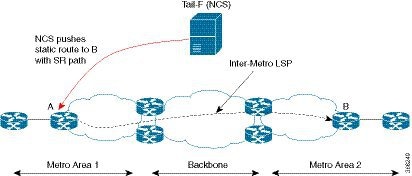
Inter-Metro LSPs have the following aspects:
-
The source packet may not know the IP address of the destination device.
-
Existing segment routing features are applicable for LSPs.
The binding SID helps in steering the traffic in the SR-TE tunnel. In other words, ingress MPLS packet with the binding SID will be forwarded through the specific SR-TE tunnel.
Static SRTE over Unnumbered Interfaces
As explained in the previous section, you can set up LSP as static route to create an auto tunnel by specifying an IP explicit path.
The explicit path is a combination of IP addresses (or) IP address and labels. You can also configure the static SRTE tunnel over unnumbered interfaces. There are few restrictions for unnumbered interfaces against numbered interfaces.
-
You must specify the node IP address, not the next hop interface address in the ip-explicit path option.
-
You must not specify adjacency SID in the explicit path option. In short, the explicit path option should contain only the node IP address (/32 mask) and prefix SID labels.
How to Configure SR-TE On Demand LSP
Perform the following steps to configure SR-TE On Demand LSP.
- Configuring LSP as Static Route
- Enabling Segment Routing Auto Tunnel Static Route
- Verifying Segment Routing Auto-Tunnel Static Route
Configuring LSP as Static Route
To avoid packet drop after RP switchover with SR TE, it is recommended to use the following command:
mpls traffic-eng nsr
If ISIS is configured, use the following command:
router isis
 nsf cisco
 nsf interval 0
Enabling Segment Routing Auto Tunnel Static Route
Perform this task to configure auto tunnel static route as follows:
Configure IP explicit path
-
Associate the auto tunnel with an IP explicit path with a static route
-
Enable peer-to-peer (P2P) auto tunnel service
ip explicit-path name path1
 index 1 next-label 16002
 index 2 next-label 16006
 exit
ip route 172.16.0.1 255.240.0.0 segment-routing mpls path name path1
mpls traffic-eng auto-tunnel p2p
mpls traffic-eng auto-tunnel p2p config unnumbered-interface loopback0
mpls traffic-eng auto-tunnel p2p tunnel-num min 10 max 100
Verifying Segment Routing Auto-Tunnel Static Route
The command show mpls traffic-eng service summary displays all registered TE service clients and statistics that use TE auto tunnel.
Device# show mpls traffic-eng service summary

Service Clients Summary:
  Client: BGP TE
    Client ID                 :0
    Total P2P tunnels         :1
    P2P add requests          :6
    P2P delete requests       :5
    P2P add falis             :0
    P2P delete falis          :0
    P2P notify falis          :0
    P2P notify succs          :12
    P2P replays               :0
  Client: ipv4static
    Client ID                 :1
    Total P2P tunnels         :1
    P2P add requests          :6
    P2P delete requests       :5
    P2P add falis             :0
    P2P delete falis          :0
    P2P notify falis          :0
    P2P notify succs          :85
    P2P replays               :0
The command show mpls traffic-eng auto-tunnel p2p displays the peer-to-peer (P2P) auto tunnel configuration and operation status.
Device# show mpls traffic-eng auto-tunnel p2p

State: Enabled
  p2p auto-tunnels: 2 (up: 2, down: 0)
  Default Tunnel ID Range: 62336 - 64335
  Config:
   unnumbered-interface: Loopback0
   Tunnel ID range: 1000 – 2000
The command show mpls traffic-eng tunnel summary displays the status of P2P auto tunnel.
Device# show mpls traffic-eng tunnel summmary

Signalling Summary:
    LSP Tunnels Process:            running
    Passive LSP Listener:           running
    RSVP Process:                   running
    Forwarding:                     enabled
    auto-tunnel:
        p2p    Enabled  (1), id-range:1000-2000
    Periodic reoptimization:        every 3600 seconds, next in 1265 seconds
    Periodic FRR Promotion:         Not Running
    Periodic auto-bw collection:    every 300 seconds, next in 66 seconds
    SR tunnel max label push:       13 labels
    P2P:
      Head: 11 interfaces,   5234 active signalling attempts, 1 established
            5440 activations,  206 deactivations
            1821 failed activations
            0 SSO recovery attempts, 0 SSO recovered
      Midpoints: 0, Tails: 0
    P2MP:
      Head: 0 interfaces,   0 active signalling attempts, 0 established
            0 sub-LSP activations,  0 sub-LSP deactivations
            0 LSP successful activations,  0 LSP deactivations
            0 SSO recovery attempts, LSP recovered: 0 full, 0 partial, 0 fail
      Midpoints: 0, Tails: 0
Bidirectional Tunnel Summary:
    Tunnel Head: 0 total, 0 connected, 0 associated, 0 co-routed
    LSPs Head:   0 established, 0 proceeding, 0 associated, 0 standby
    LSPs Mid:    0 established, 0 proceeding, 0 associated, 0 standby
    LSPs Tail:   0 established, 0 proceeding, 0 associated, 0 standby

AutoTunnel P2P Summary:
    ipv4static:
        Tunnels: 1 created, 1 up, 0 down
    Total:
        Tunnels: 1 created, 1 up, 0 down
The command show mpls traffic-eng tunnel auto-tunnel only displays TE service auto tunnel.
Device# show mpls traffic-eng tunnel auto-tunnel detail

 P2P TUNNELS/LSPs:

Name: R1_t1000                            (Tunnel1000) Destination: 0.0.0.0 Ifhandle: 0x17 (auto-tunnel for ipv4static)
  Status:
    Admin: up         Oper: up     Path: valid       Signalling: connected
    path option 1, (SEGMENT-ROUTING) type explicit (verbatim) path202 (Basis for Setup)

  Config Parameters:
    Bandwidth: 0        kbps (Global)  Priority: 7  7   Affinity: 0x0/0xFFFF
    Metric Type: TE (default)
    Path Selection:
     Protection: any (default)
    Path-selection Tiebreaker:
      Global: not set   Tunnel Specific: not set   Effective: min-fill (default)
    Hop Limit: disabled [ignore: Verbatim Path Option]
    Cost Limit: disabled
    Path-invalidation timeout: 10000 msec (default), Action: Tear
    AutoRoute: disabled LockDown: disabled Loadshare: 0 [0] bw-based
    auto-bw: disabled
    Fault-OAM: disabled, Wrap-Protection: disabled, Wrap-Capable: No
  Active Path Option Parameters:
    State: explicit path option 1 is active
    BandwidthOverride: disabled  LockDown: disabled  Verbatim: enabled

  History:
    Tunnel:
      Time since created: 33 days, 20 hours, 29 minutes
      Time since path change: 10 days, 19 hours, 45 minutes
      Number of LSP IDs (Tun_Instances) used: 1646
    Current LSP: [ID: 1646]
      Uptime: 10 days, 19 hours, 45 minutes
    Prior LSP: [ID: 1645]
      ID: path option unknown
      Removal Trigger: signalling shutdown
  Tun_Instance: 1646
  Segment-Routing Path Info (IGP information is not used)
    Segment0[First Hop]: 0.0.0.0, Label: 16002
    Segment1[ - ]: Label: 16006
The command show mpls traffic-eng tunnel brief displays auto tunnel information.
Device# show mpls traffic-eng tunnel brief

Signalling Summary:
    LSP Tunnels Process:            running
    Passive LSP Listener:           running
    RSVP Process:                   running
    Forwarding:                     enabled
    auto-tunnel:
        p2p    Enabled  (2), id-range:1000-2000

    Periodic reoptimization:        every 3600 seconds, next in 406 seconds
    Periodic FRR Promotion:         Not Running
    Periodic auto-bw collection:    every 300 seconds, next in 107 seconds
    SR tunnel max label push:       13 labels

P2P TUNNELS/LSPs:
TUNNEL NAME                      DESTINATION      UP IF     DOWN IF   STATE/PROT
R1_t1                            66.66.66.66      -         -         up/down
R1_t2                            66.66.66.66      -         -         up/up
R1_t3                            66.66.66.66      -         -         up/up
R1_t10                           66.66.66.66      -         -         up/up
SBFD tunnel                      33.33.33.33      -         -         up/up
SBFD Session configured: 1       SBFD sessions UP: 1
Additional References for SR-TE On Demand LSP
Related Documents
|
Related Topic |
Document Title |
|---|---|
|
Cisco IOS Commands |
Feature Information for SR-TE On Demand LSP
The following table provides release information about the feature or features described in this module. This table lists only the software release that introduced support for a given feature in a given software release train. Unless noted otherwise, subsequent releases of that software release train also support that feature.
Use Cisco Feature Navigator to find information about platform support and Cisco software image support. To access Cisco Feature Navigator, go to www.cisco.com/go/cfn. An account on Cisco.com is not required.|
Feature Name |
Releases |
Feature Information |
|---|---|---|
|
SR-TE On Demand LSP |
Cisco IOS XE Everest 16.5.1b |
The SR TE On demand LSP feature provides the ability to connect Metro access rings via a static route to the destination. The static route is mapped to an explicit path and that will trigger an on demand LSP to the destination. The SR TE On demand LSP feature will be used to transport the VPN services between the Metro access rings. The following command was modified: mpls traffic-eng auto-tunnel. |
 Feedback