Use Bandwidth Optimization (BWOpt) to Optimize the Network


Note


  • Functionality described within this section is only available as part of the Advanced RTM license package.

  • Throughout this section, the navigation is documented as Traffic Engineering > Traffic Engineering. However, when using Crosswork Optimization Engine within the Crosswork Network Controller solution, the navigation is Traffic Engineering & Services > Traffic Engineering.


Bandwidth Optimization Overview

Bandwidth Optimization (BWOpt) provides closed-loop tactical traffic engineering (TTE) for segment routed policies by automatically detecting and mitigating congestion in your network. It achieves this through a real-time view of the network topology overlaid with a demand matrix built through telemetry-based Segment Routing Traffic Matrix (SRTM). The intent is to optimize bandwidth resource utilization by setting utilization thresholds on links. BWOpt uses the threshold interface utilization requested by the user and compares it to the actual utilization in the network. When interface congestion is detected by BWOpt, it attempts to reroute intent-based traffic from hot spots through the use of TTE SR policies which are deployed to the network via SR-PCE. As network conditions (topology and/or traffic) change over time, BWOpt continues to monitor interface utilization and manage any TTE SR policies deployed, including changing their paths and/or removing them from the network when deemed no longer necessary.
BWOpt Important Notes

Consider the following information when using BWOpt:

  • You must have the Advanced RTM license package to use BWOpt.

  • You cannot enable Bandwidth Optimization if LCM is enabled.

  • BWOpt will not shift traffic in existing SR-TE policies that it did not create. This may prevent it from being able to mitigate congestion if most of the traffic on the congested link is in non-BWOpt SR-TE policies.

  • BWOpt relies on the PCC's autoroute feature to steer traffic into the tactical SR-TE policies it creates. Autoroute is applied to these policies through the proper Profile ID option set in BWOpt (to align with configuration on the PCC associating that Profile ID with autoroute feature). This is critical to tactical SR policies shifting traffic away from congested links.

  • Enable BWOpt on single-level IGP domains only.

  • If the Policy Violation advanced field is set to either Strict Policy or Strict Network, then the SR Policy Traffic option should be set to Max Measured Requested.

  • BWOpt leverages on the use of Segment Routing Traffic Matrix (SR-TM). SR-TM has the following limitations:

    • IPv6 is not supported.

    • Management, bundle, subinterfaces and tunnel interfaces are not supported as external interfaces.

    • Non-default Virtual, Routing, and Forwarding (VRF) is not supported as external interfaces.

    • SR-TM only takes SR labeled traffic into consideration. It will not account for Label Distribution Protocol (LDP) traffic.


    Note


    For more information on SR-TM, see Segment Routing Traffic Matrix.


  • BWOpt uses simulated traffic based on measured SR-TM data to determine link utilizations and when to mitigate congestion. The simulated interface utilization that BWOpt monitors should closely align with the SNMP-based interface utilization that is displayed in the UI. However, due to various factors, including SNMP polling cadence and rate averaging techniques, they may differ at times. This can result in scenarios like a link appearing to be congested in the UI and BWOpt not reacting.

  • BWOpt only creates tactical SR-TE policies on PCCs that are sources of SRTM telemetry data. Only these nodes (typically provider edge routers) provide the telemetry-based data needed to create simulated traffic demands in the internal model representing the traffic from that node to other PE nodes in the network.

  • Only solutions that produce interface utilization below the threshold (set across all interfaces) will be deployed. If BWOpt is unable to mitigate congestion across the entire network, it will not deploy any tactical SR-TE policies and a “Network Congested. BWOpt unable to mitigate.” alarm is raised. This alarm goes away when congestion either subsides on its own or can be addressed successfully through BWOpt tactical SR-TE policy deployments.

  • BWOpt temporarily pauses operation whenever the system is unavailable due to a restart or a rebuild of the topology from Topology Services. When this occurs, an alarm indicating this condition is set by BWOpt. During this time, BWOpt will not evaluate congestion in the network. All currently deployed tactical SR policies are maintained, but will not be modified or deleted. As soon as the model becomes available, the alarm is cleared and BWOpt will resume normal operation.

Automated Network Congestion Mitigation Example

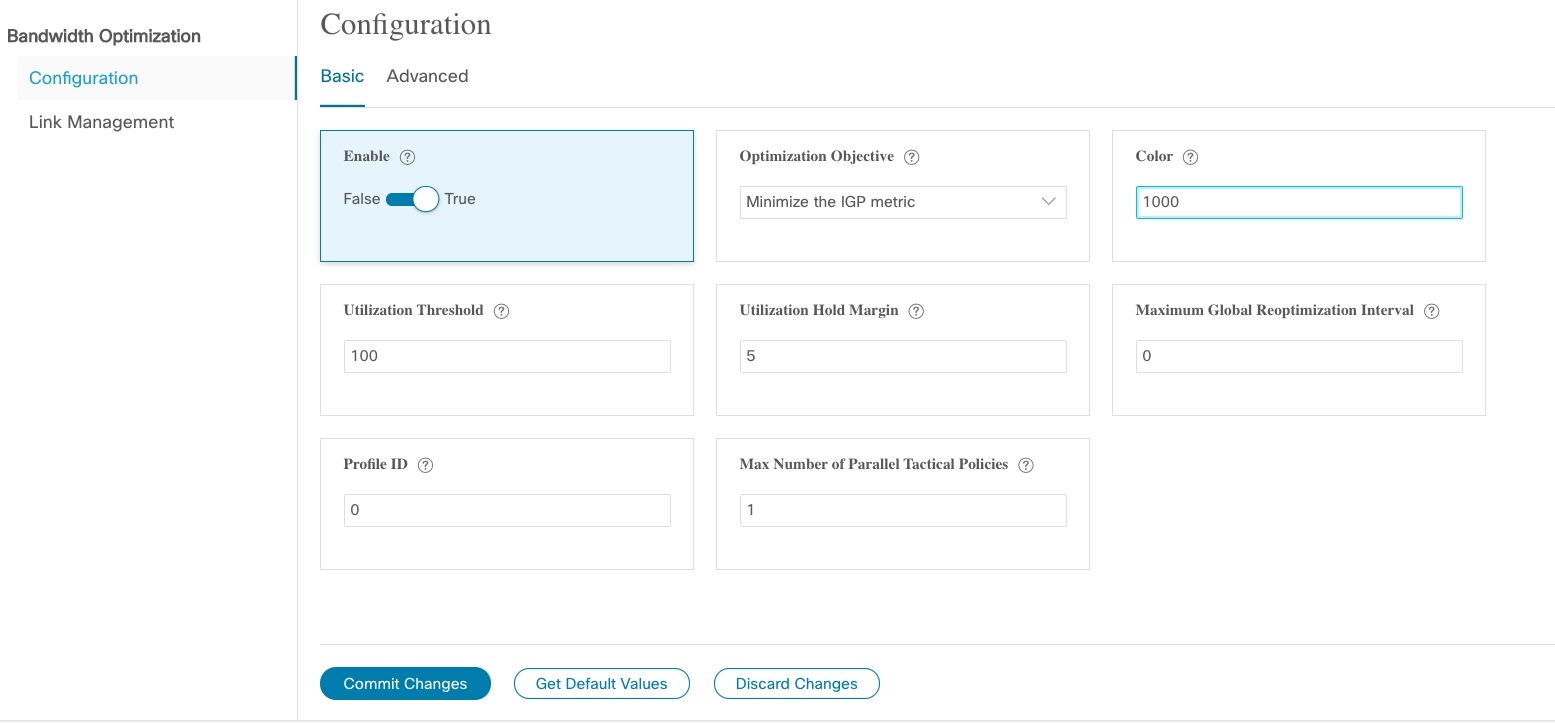
This example demonstrates how Bandwidth Optimization (BWOpt) automatically mitigates network congestion by rerouting intent-based traffic without user intervention. In this example, the optimization intent is set to minimize the IGP metric.

The following BWOpt options are set (Traffic Engineering > Bandwidth Optimization > Configuration):
Figure 1. Bandwidth Optimization Configuration
Bandwidth Optimization Configuration
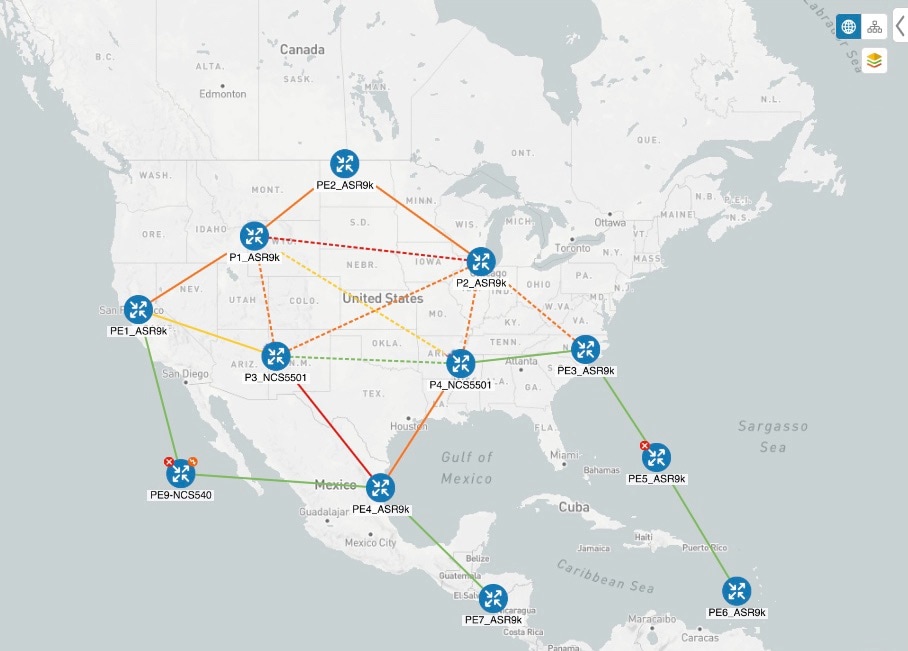
Below is a network with various devices and links that span the United States. Note that there are no SR-TE policies listed in the SR Policies table.
Figure 2. Example: Current Network
No SR policies displayed
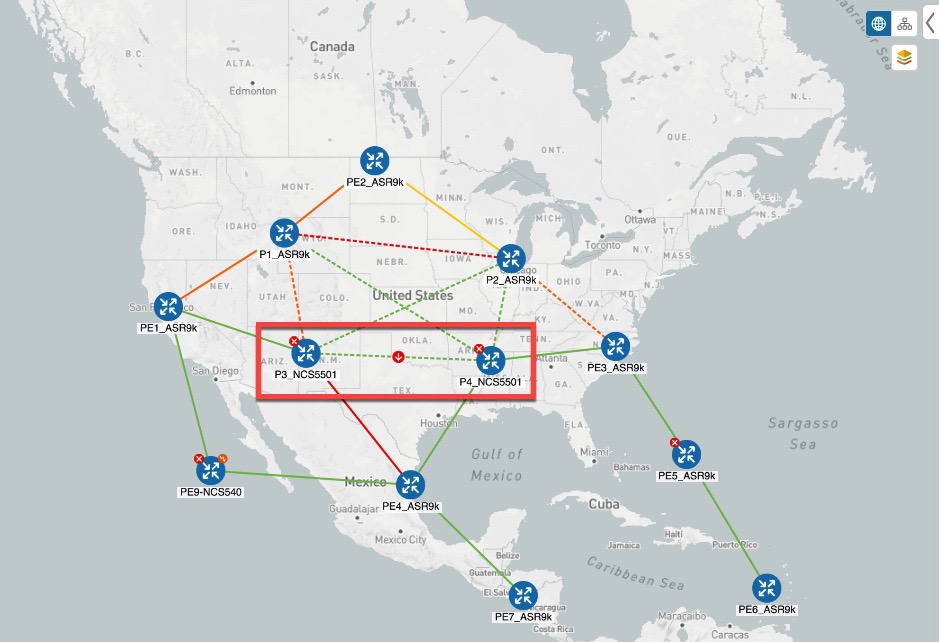
Suppose the link between P3_NCS5501 and P4_NCS5501 goes down. Traffic moves towards other links causing congestion and exceeds the configured utilization threshold.
Figure 3. Example: Link Down Between P3 and P4 Nodes
Link Down
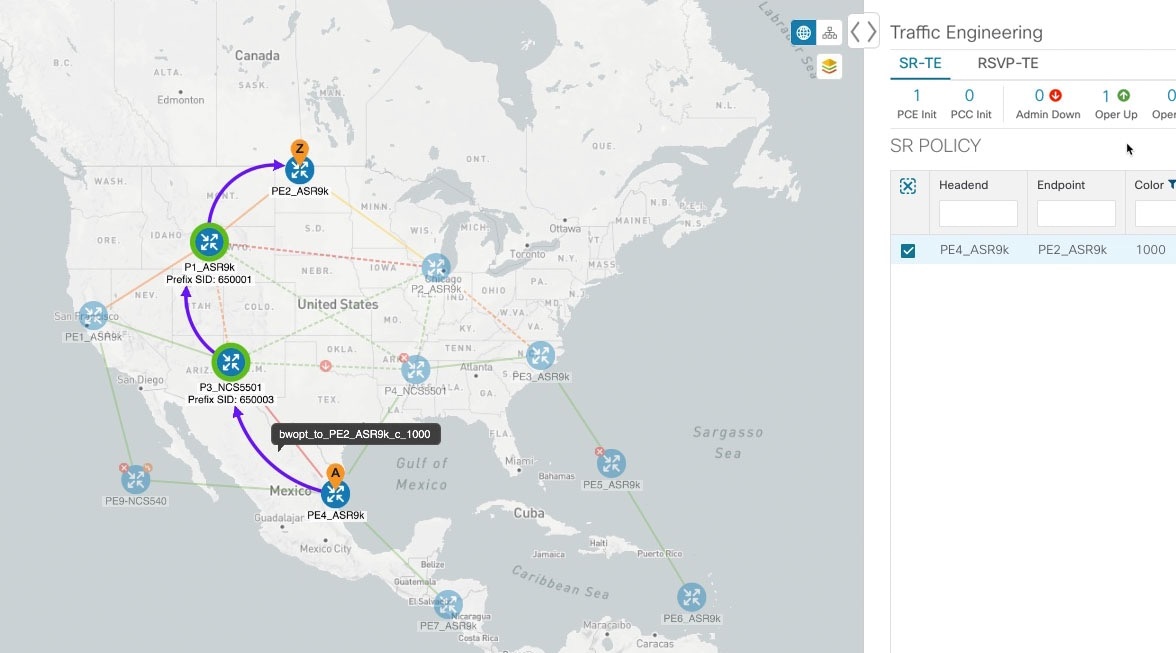
BWOpt recognizes the congestion and immediately calculates and deploys a tactical SR-TE policy. This new tactical SR-TE policy is listed in the SR Policies window.
Figure 4. Example: Tactical SR Policy Deployed
Tactical SR Policy Deployed

BWOpt continually monitors the network. When the links between P3_NCS5501 and P4_NCS5501 are back up, BWOpt will detect that the congestion (based on the defined criteria) has been mitigated. When the congestion falls under the set utilization threshold minus the utilization hold margin, the tactical SR-TE policy is automatically removed from the network.

You can also click Show Events icon to view events relating to instantiation and removal of tactical SR-TE policies created by BWOpt.

Configure Bandwidth Optimization


Note


Bandwidth Optimization (BWOpt) is only available as part of the Advance License package.

After BWOpt is enabled, it monitors all interfaces in the network for congestion based on the configured utilization threshold. When the utilization threshold is exceeded, it automatically deploys tactical polices and moves traffic away from the congested links. When congestion is alleviated, BWOpt automatically removes the tactical SR policy.

Procedure


Step 1

From the main menu, choose Traffic Engineering > Bandwidth Optimization.

Step 2

Toggle the Enable switch to True.

Note


LCM and Bandwidth Optimization cannot be enabled at the same time.

Step 3

Enter the required information. Hover the mouse pointer over Info icon to view a description of each field.

Step 4

Click Commit Changes. BWOpt begins to monitor network congestion based on the threshold and optimization intent that was configured.


Add Individual Interface Thresholds

Networks have many different links (10G, 40G, 100G) that require different thresholds to be set. To assign specific threshold values for individual interfaces when using Bandwidth Optimization, do the following:

Procedure


Step 1

From the main menu, choose Traffic Engineering > Bandwidth Optimization > Interface Thresholds

Step 2

Click Import .CSV File.

Step 3

Click the Download sample configuration file link.

Step 4

Click Cancel.

Step 5

Open and edit the configuration file (BWOptLinkManagementTemplate.csv) you just downloaded. Replace the sample text with your specific node, interface, and threshold information.

Step 6

Rename and save the file.

Step 7

Navigate back to the Customized Interface Thresholds window.

Step 8

Click Import .CSV File and navigate to the CSV file you just edited.

Step 9

Click Import.

Step 10

Confirm that the information appears correctly in the Customized Interface Thresholds window.


Troubleshoot Bandwidth Optimization

BWOpt disables itself and issues an alarm when specific error conditions occur that hinder its ability to manage congestion properly and may lead to instability. The following table defines some of these conditions and possible causes to investigate. Additional details can be obtained for each error condition by referring to the BWOpt logs.


Note


You can navigate to Administration> Collection Jobs and then filter the list of active collection jobs for Optim in the App ID column.


Table 1. Errors

Error Event Message

Possible Causes and Recommended Corrective Action

Optima Engine model error

The network model used by BWOpt from the Optimization Engine is corrupt or is missing key data that is needed to properly support BWOpt. Possible causes include network discovery issues or synchronization problems between the Optimization Engine and Topology Services. Try restarting the Optimization Engine pod to rebuild the model.

This error can also occur if the time required to deploy a tactical policy through SR-PCE, discover it, and add it to the model exceeds the Deployment Timeout option set for BWOpt. The default is 30 seconds which should suffice for small to medium sized networks. However, larger networks may require additional time.

PCE Dispatch unreachable

The deployment of a tactical policy to the network is not confirmed successful before the Deployment Timeout is exceeded. Increase the Deployment Timeout option to allow for additional time for deployments in larger networks.

Unable to deploy a tactical SR policy

A tactical SR policy deployment to SR-PCE was unsuccessful. There could be a variety of reasons for this. BWOpt and/or PCE Dispatch logs can provide some guidance as to the details of the failure. Confirm basic SR policy provisioning capability to the PCC via one of the SR-PCE providers is working.